Default and Secured Wireless LAN Configurations

Introduction Design of Simulation

                       This chapter deals with the explanation of the design that is actually followed in this simulation project. Improving the level of security in wireless LAN networks is taken as the significant aim of the simulation project and to achieve this aim two scenarios are considered. The design that is implemented in simulating these two scenarios is explained in this chapter. The default wireless LAN configuration is used for the creation of the first scenario and secured wireless LAN configurations are used for the creating the second scenario. The further sections of this chapter explain the design of creating the networks:

Design of default wireless LAN configuration scenario:

The simulation procedure of this application is done by creating two scenarios as indicated earlier and the creation of first scenario and the design principles that are implemented in creating and simulation of the scenario are explained in the present section. The main aim of the project is to improve the security levels in wireless LAN, For achieving this aim a Mobile adhoc network is selected as the as the wireless sensor network. The default networking conditions of the first scenario is with the common configuration of the wireless LAN.

The sensor nodes required for the simulation of this particular scenario are considered using 10 mobile nodes and one fixed wireless LAN server is selected to behave as the sink node to handle all the mobile nodes. Then the network required is created in this approach as there is no other specific approach for the creation of wireless sensor network using OPNET modeler. The design implemented for configuring the required network setup is explained in the following sections.The entire design of the scenario is classified in to various factors and they are clearly explained in following sections:

Basic Network Setup

Node Level Configuration

Application definitions

Profile definitions

Mobile definitions

Setting the Performance Metrics

Design of secured wireless LAN configuration scenario:

As discussed initially the second scenario is created to propose the secure wireless LAN configuration and this scenario is the copy of the first scenario and there are few changes done to the wireless LAN configuration and they are as given below 

  • Transmit power is set to 0.020
  • Packet reception power threshold is set to -76
  • RTS threshold is set to 256
  • Fragmentation threshold is set to 256
  • CTS to self option is set to enabled
  • Short retry limit is set to 11
  • Long retry limit is set to 9
  • AP Becon interval is set to 0.02 seconds
  • Max receive life time is set to 1.2
  • Buffer size is set to 64000
  • Roaming capability is set to enabled
  • Large packet processing is set to fragment

Once all these steps are followed the simulation design is completed and the simulation steps followed are explained in the next chapter. 
Simulation tool: OPNET modeler and its importance

Simulation tool:

As discussed in the introduction section of this chapter the simulation procedure of this application considers two scenarios and the simulation tool used for simulating the scenarios is OPNET modeler. In comparison with different simulations tools like OMINET and NS2, OPNET modeler is considered as the best simulation tool as it provides several advantages that they cannot provide.

The significant advantages of OPNET modeler are it supports level of models and provides a user interface to establish several networks. Not only OPNET modeler, NS2 is also considered as a best simulation tool but the single disadvantage in using NS2 is its behavior which is very complex as it includes loads of coding part and this problem is completely avoided using the OPNET modeler.

The significant factor that encourages the usage of OPNET modeler is its drag drop approach, using this approach the simulation procedure is done very simply by selecting the required objects from the object palette that is available by using the OPNET and the configuration of the objects is also provided, the other important feature of OPNET is it supports several model families over the wireless network to enable the communication.

The network setup required for the simulation can be completed by dragging the required objects from the object palette and then by configuring them according to user’s requirement. The model of the simulation includes the operations like establishing the network needed, checking the consistency of the model, simulation running and at last estimating the results.

Irrespective to the type of network to be created these steps are followed in creating the wireless and wired networks. Because of this reason OPNET is regarded as the simple way out to create any network. In addition to the above models of networks, latest network technologies are also provided by OPNET such as the Mobile Adhoc networks, Zigbee networks and wireless mesh networks. Using these available models the estimation of network’s performance can be done easily. 

Node and Server Level Settings for Packet Analysis CSE Reference Material

In order to define the traffic as well as the packet analysis the node as well as the service level settings are needed which are against the nodes and then the overall configuration is been followed further in order to explain the server and node level settings. As discussed earlier, there are 20 different types of mobile nodes along with the single wireless LAN server and then the nodes which are been configured towards the traffic analysis as well as the packet analysis is situated in the initial step. The steps required to perform this activity are explained below:

  • Select the appropriate mobile nodes as well as the WLAN server
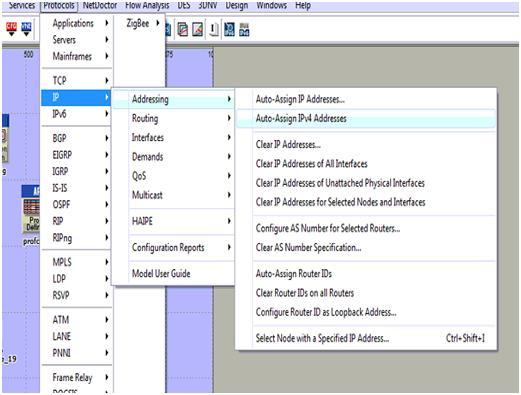
  • Then after go towards the menu called protocol -à ApplicationsàIP
  • Then after starting from the IP section select the option called Auto assign and then the IPV4 address through which the actual nodes as well as the WLAN server which are allotted are been sent to the alternate !PV4 address and the screen shot which explains this process is shown below:
server 1

The auto assign IPV4 address which are been selected for the entire process are been allotted to the different mobile node along with the wireless LAN server as explained in the below screenshot. The next step is to configure the mobile nodes as well as the server which is added towards the routing protocols. It is explained in the earlier section that AODV is been used for the purpose of desired routing protocol the applicable mobile nodes along with the WLAN server is used and the steps are explained below:

  • The routing option is available to node levels or else to the server levels which are used to select the entire mobile nodes as well as wireless LAN server.
  • Within the entire available nodes, a single node is selected as well as opened within the edit mode which can be performed by clicking on right button
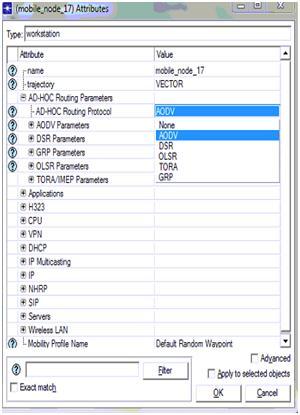
  • Within this edit mode the quality such as Adhoc routing protocols are used which allows the server to display the entire list of the routing protocols towards the users starting from AODV scenario and the process will be explained in the below screen

AODV is been chosen from the available list in which the total number of routing protocols which are seen in the screen can select al the nodes along with the server that are against the AODV protocol and it can be verified in the form of selected objects shown in the screen displayed above. In the entire process if the routing protocol is all set to serve the traffic against the patters of routing parameters the nodes as well as the server will be totally against the applications and profile definitions process is explained below. The total application level settings are situated towards the nodes that are explained below:

  • The total number of mobile nodes are been selected starting from the simulation networks and every node will be selected as well as edited in order to explain and define the total applications
  • Within the node level qualities there are different types of options available such as application destination preferences and then the tab which is expanded can be used to explain the application requirements
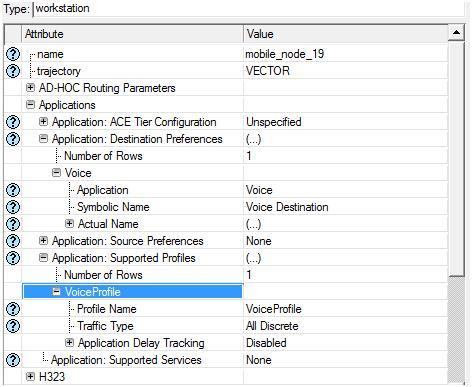
  • The total number of tows that are explained as single nodes requires support to the voice applications that are created with in the below screen

Application destination preferences is set to one rows and then the voice application is selected for this row and the symbolic server name is given as voice such that this server will generate the required voice traffic and the corresponding packets across the network.  Apart from the destination preferences now the application supported profiles are also set and in this context a single row is added to the section application supported profiles and voice profile is selected for this row as shown in the above screen. With this the node level application and profile definitions are applied to all the mobile nodes and the procedure followed to apply the same for wireless LAN server is given below

  • Select the wireless LAN server from the network and open it in the edit mode
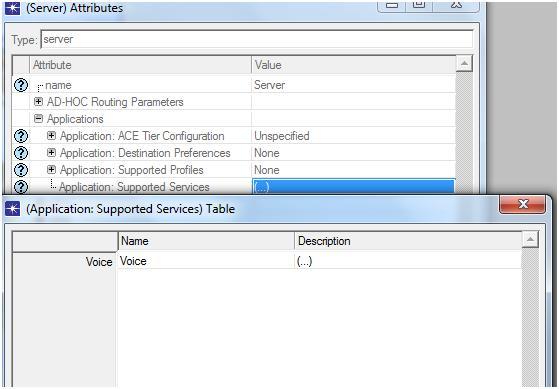
  • There is an option like application supported profiles and expand this option to edit the profile settings for the wireless LAN server and the corresponding screen is as shown below

The above screen it can be identified that the voice profile which is been chosen as the main application facilitated and managed by the corresponding profiles the WLAN server will provide its support to the traffic that is distinct and then the voice profile will be generated and then the server will be capable of managing different types of the packets that are adjacent to the traffic. There is an alternate method which can be used to apply for the applications as well as the profile settings for the purpose of mobile nodes and wireless LAN server this particular process is known as deployment and these steps are explained in detail below:

  • The user should go to the protocol menuàApplicationsàDeploy in order to define the applications
  • The new window is been displayed towards the user side and then the deployment process will be performed
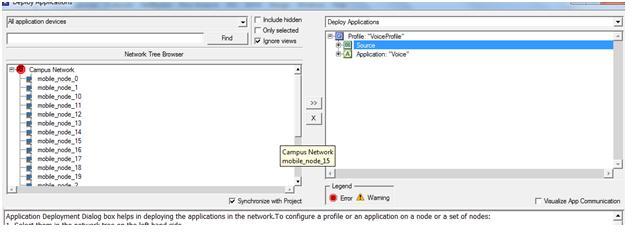
  • The entire mobile nodes are been submitted towards the source and then the WLAN server is been submitted towards the destination side and the example is given below

From the above screen it can be identified that the entire mobile nodes are submitted towards the actual source. A success message like consistency check pass is displayed to the users if the deployment is done in a right manner. With this the corresponding email application and email profile are applied to the 20 mobile nodes and the single wireless LAN server. 

Basic Network Setup to create MANET Using the OPNET Modeler

Basic network setup:

The explanation of the process that is involved in creating the basic network setup required for this particular scenario is done in this section.Using the OPNET modeler a MANET model is created and this is considered as the model family that is needed for the simulation. A campus that is simple is selected for creating the MANET and 1000X1000 square meters area is selected as the size of the network scale and the 10 mobile nodes considered are operated across the campus taken where the model family considered is the MANET for the model of simulation.

A blank scenario is established to create the campus network needed and this done by using 10 mobile nodes initially.These 10 mobile nodes are dragged from the object palette and placed on the work space these mobile nodes are considered as the wireless sensor nodes and in the time of the routing process these will nodes will move in random routes. These mobile nodes taken can be controlled using the sink node and a wireless LAN server node which is fixed is dragged from the object palette and dropped in the work space and this is considered as the sink node that can control all the 10 mobile nodes.

Then the network setup is said to be ready for supporting the traffic generation through the network but for this purpose an application is needed always, for this from the object palette an “application configuration node” is taken on to the work space for establishing the application needed. In this particular scenario three applications are created as they are required and the next section of this chapter explains the configuration setting required.

The applications created are supported by the profile definition and this necessary for the OPNET simulation and to create the profile a profile configuration node is dragged from the object palette and placed in the work space. In addition to these a mobile configuration node is also selected from the object palette in order to support the mobile configuration. The list of nodes selected from the object palette are listed below, all these nodes are very significant for the simulation procedure.

  • The sensor nodes needed are regarded as the mobile nodes and they are taken 10 in number.
  • One fixed wireless LAN server is taken as the sink node to control the mobile nodes.
  • An application configuration node is selected to create the application necessary.
  • A profile configuration node is selected for creating the profile definition needed.
  • A mobile configuration network is selected to apply mobility to all the mobile nodes.

             The further sections of this chapter explain the process of real configuration implemented for all the nodes selected.

Setting the Performance Metrics of the Secured Wireless LAN Configuration

Setting the performance metrics

As there are three applications in this project, following are the performance metrics used to evaluate the performance of the proposed secured wireless LAN configuration 

FTP 

Following are the performance metrics used for FTP application

  • Traffic received in bytes per sec
  • Traffic received in packets per sec
  • Traffic sent in bytes per sec
  • Traffic sent in packets per sec 

Voice

Following are the performance metrics for Voice application 

  • Jitter
  • MOS
  • Packet end to end delay
  • Traffic sent in byte per sec

Video

Following are the performance metrics used for video application

  • Traffic sent in bytes per sec

WLAN

Following are the WLAN metrics used

  • Delay
  • Network load
  • Medium Access delay
  • Load

Profile Configuration Settings in Ad hoc Mobile Nodes

The further step in the simulation process is to define the profile configuration setting and there is a necessity of the profile definitions in order to perform the application requests that are obtained from the mobile nodes and then alternately the traffic is been produced which totally depends on the created profile definitions. The steps required to define the profile configuration settings are explained below.

  • In order to define and explain the profiles the profile configuration is used and then the profile configuration should be selected by using right click option
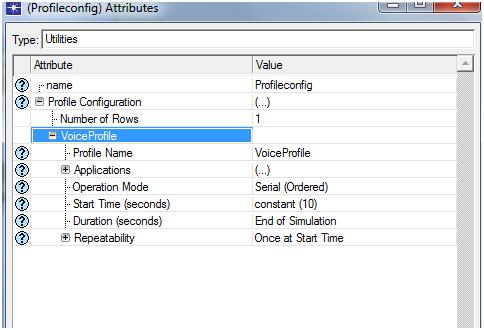
  • The different types of the rows are added to the profile definition and then the single row is been added to the context in order to support different types of voice applications that are already designed in the previous section
  • Only less number of definitions such as start time as well as end time are been set to the alternate network which is explained in the below screen.

profile configuration

From the above screen it can be noticed that the voice applications which are utilized in order to set the different voice profiles that are alternate towards the row are created for the purpose of explaining the profile definitions. 

The Performance of TCP across Dynamic Source Routing (DSR)

The performance of TCP

Generally the mobile nodes towards the MANETs are been communicated by making use of the radio frequency as well as in this specific situation the fixed infrastructure is not been preserved or maintained. In the recent times many research works are been carried out on the efficient routing of the MNAET but even though it is the topic of the research because of the high mobility of the nodes as well as the route volatility.

The performance of the TCP towards the MANETS is considered as one of the other important problem and it is been specified that the performance of the TCP is always los towards the infrastructure less networks such as the MANETS while comparing them with the other different types of the networks.

In general there are some solutions in order to manage this type of situations the first one is to pass the warning and offer the training to the TCP in order to overlook the different types of the packet loses but not to appeal the blocking control routines within the situation of the minor packet loses. As a result the performance of the TCP could be secured and saved the disadvantages within these packet losses could be easily decreased.

The other significant method to develop or improve the performance of the TCP is to assign the role or job to control or manage the packet losses towards the routing algorithm rather than appealing for the controlling routines that belongs to the TCP and by performing this process the performance of the TCP can be easily developed.

Application Configuration Settings

In order to set the desired levels for the purpose of obtaining the traffic upon the networks the applications are needed. Depending on the type of application selected and used the traffic sending process as well as traffic receiving process are performed. Within the OPNT modeler process different types of applications are been used and then the voice application is been designed and the below steps are required to perform this action.

  • The user should give a right click on the application definitions towards the object in order to edit the different attributes that are required
  • There is a separate tab called application definition within this section and then the user can add the number of rows required in which each and every node will represent a single application
  • But within this simulation only single and unique application is utilize and for this reason only single row is created within this process
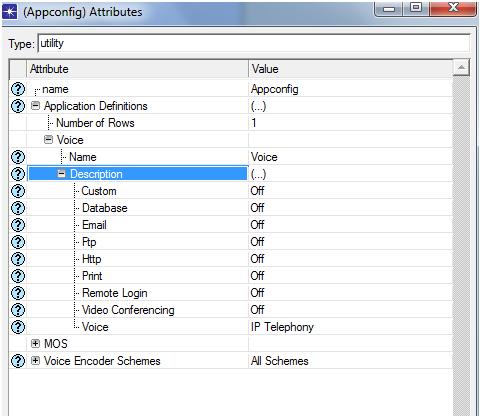
  • The application voice is created in which each and every voice based application is selected
  • The IP telephony is been selected for the purpose of application and then the next screenshot obtained is given below

application configuration settings

The IP telephony application is been used within this particular scenario in which the voice traffic is been produced upon the networks and then once if the application is selected then click on the OK button in order to apply these settings. The application definitions which are needed are been produced in this step and then in order to create the profile definition the further process is explained below.

The Route Maintenance Process Literature Review

The Route maintenance process

In order to verify the current status of the topology changes towards the network the route maintenance process could be utilized. It is been noticed that the mobility of the nodes is very high towards the MANETS then there is more possibility for the changes within the topology as well as the changes towards the route is been preserved towards the cache by making use of the nodes.

The breaks to the links starting from one node to the other types of the hops must be detected through the individual nodes and basically there are several types of the existing standards in order to achieve or complete this particular function. In order to detect the link failures towards the routes the DSR will utilize the process of the passive response. Within the entire process if the source forwards the packets to the target destination then the intermediate nodes will detect the problems related to the link of the adjacent nodes then in the next minute it will send the RERR- route error packet towards the source node.

Simulation Steps Involved in Using ADOV Protocol

Within this first scenario the ADOV protocol is been utilized along with the 20 mobile nodes in order to produce the traffic. The different types of voice applications are used within this scenario in order to identify the service requirements of the quality by using this protocol. The different steps are followed in order to perform this scenario such as follows:

Steps to form basic network

The MANET- mobile Adhoc networks is widely used within this project in order to estimate the entire performance of the AODV protocol which is totally against the different packet losses which needs some important steps to be followed to create the network which is general. A single LAN along with 20 different types of mobile nodes are utilized within the simulation process in order to set the traffic upon the networks. The steps that are to be followed to create the network are explained below:

  • Initially the user should open the OPNET modeller simulation tolls and then the user should select the option to open new file in order to start the simulation process
  • The project name as well as scenario names should be created in order to obtain the new scenario
  • By selecting a specific option users can create the scenario which is employ in which the OPNET modeler can be utilized to load the different types of default scenarios that are totally inherent into the networks.
  • In order to select specific type of topology various options have taken place and then alternately in the simulation process the simple campus network is been selected to perform the topology functions
  • In the next step the campus size should be situated and then the simulation size of the campus should be set with size of 1000X1000 square meters
  • There is a necessity of new network model family for the purpose of simulation of MANET and within the entire available models the appropriate model is selected in order to perform the simulation process. By following the above mentioned steps the basic network which is required to perform the simulation process is explained and then the different objects which are considered from object palette will be utilized in the simulation process in order to get the expected results.
  • Depending on the requirement of mobile nodes 20 different types of wireless LAN mobile workstations are utilized which performs an activity as the main source in order to get the final traffic in which the actual real packet analysis process is performed
  • The single WLAN server is utilized which acts as an individual application destination along with a server as well as the 20 mobile nodes.
  • As discussed earlier the actual aim of this project is to evaluate and estimate the different packet losses towards the Mobile Adhoc networks which requires a traffic and source applications to perform the actions. The configuration is required to the applications in order to produce the traffic that is needed to analyze the entire data packet losses
  • The profile definition is been created for the purpose of application which is performed by making use of the profile configuration nodes which are gathered from the object palette.
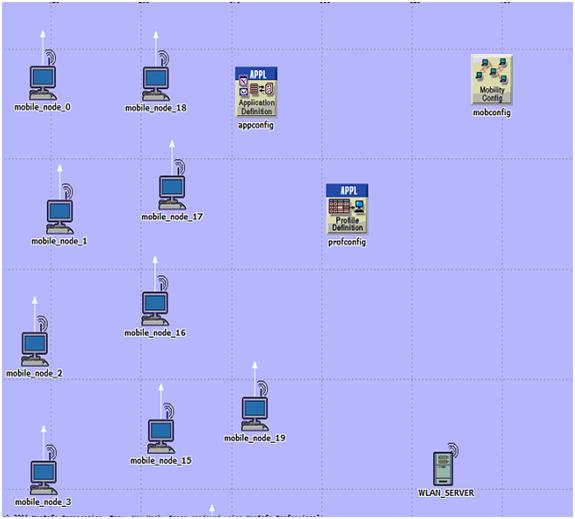
  • The major and important step within the entire simulation process is to set the mobility towards the nodes by making use of the mobile configuration object which is there to perform the process with the object palette and then the finally by following all these steps the first scenario is obtained which is explained in the form of screen shot.

simulation steps

From the above proposed screen it can be identified that the total number of 20mobile nodes starting from mobile_node_0 to mobile_node_19 is been created with the individual WLAN server with different traffic definitions.

In order to set the definitions different types of configurations such as application configuration, mobile configurations as well as the profile configuration are used. The application configuration settings are explained in the further steps.