MBA Dissertation Project on Car Market and Buying Behavior of the Customers in Indian Automobile Market

In this competitive world automobiles have become an important part of daily transportation, and the computation between different automobile industry’s lead to the high level innovations in automobiles in order to reach the needs of the people. Indian car market growth is considered to be the second fastest growth globally according to an article published in Times Of India.

The automobile industry is the type of business, which includes the process of production of self-powered vehicles like cars, trucks and the agricultural vehicles as well as business vehicles. The automobile industry is considered as one of the top industries in India, which is having higher purchase percentage when compared with the other industries. Conventionally according to business standards most of the customers prefer to use their own vehicles and this interest has led to the rapid increase in the sales of cars, (Global Auto Commercial Vehicles, 2011).

There are other specific reasons for the rapid increase in car sales i.e. pollution; most of the individuals are suffering with pollution-based diseases, because of this they are showing interest in buying cars instead of two wheeler vehicles. Every individual is giving importance to their health and for this specific reason they prefer to use cars which reduce their suffering from pollution based diseases. 

MBA Business Seminar Topic on Automobile Industry

Automobile industry is a type of industry, which will include different types of designs, manufacturing methods, marketing strategies and the sales of vehicles. Because of the huge customer interest in the cars and motor vehicles the automobile industry has gained more importance in the market and it is facing heavy competition. Customers are very important to any type of business and especially in the automobile industry (Adam, Dunn & Hall, 2005).

Companies are facing many problems in understanding the changing behavior of the customers. This research will provide the detailed information on the consumer behavior while buying a car in India, like in which aspects the customers are concentrating more.

For example whether they are concentrating on fuel efficiency of the car or whether they are looking at the cost of the car or they are looking for the luxury and good-looking cars etc. To explain these aspects in this research, researcher is using the Tata Nano car that is the world’s cheapest car as an example along with its success stories, threats and problems. 

ADOV Routing Protocol Implementation Design

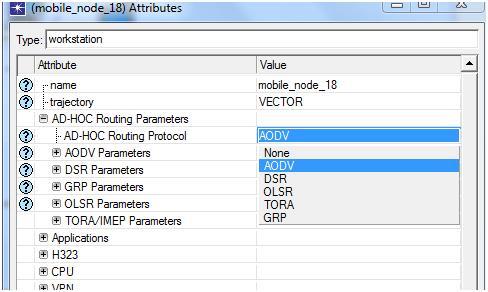
Similar simulation setup can be created for voice the applications and the routing protocol chosen in this context is AODV. Low resolution video is selected across the application configuration and the routing protocol used is AODV and the corresponding screenshot is as given below

adov routing 1

Routing protocol for video applications is selected as AODV and the corresponding screenshot is as shown below

adov routing 2

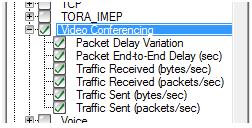
Now the performance metrics are chosen for video application and the corresponding screenshot is as given below

The following performance metrics can be used for evaluating the QoS of video application

  • Packet delay variation
  • Packet end to end delay
  • Traffic received bytes per sec
  • Traffic received packets per sec
  • Traffic sent bytes per sec
  • Traffic sent packets per sec

As with mobile nodes, similar performance metrics can be used for the rest of the scenarios in video applications as well. We only have to change the routing protocols to DSR and TORA.

Similarly run the results for evaluation against the simulation time after you create all required protocols.

Application Definitions in Default Wireless LAN Configurations

Application definitions:

To develop the necessary traffic around the entire network it is recommended that the mobile nodes and its concerned server should take hold of application the application should be developed through application configuration node. Application config node is modified in this scenario to describe  the necessary applications and in this context three applications are created for the traffic purpose and the three applications here considered are FTP,VOICE, VIDEO applications and these in common creates TCP traffic and this traffic is used to develop the communication modules around the network.

The elaborated descriptions of the all the three FTP,video,Voice applications are fixed at this point mostly in terms of the load scheduled the network and the no of packets created once all the applications created is should be backed by all the profiles around the network  and the entire design process is discussed in the next section.

Profile Definitions in Default Wireless LAN Configurations

Profile definitions

On the whole OPNET every application developed to produce the traffic around the entire network should be backed by a profile description and this is developed by utilizing the profile configuration node as seen before. Every application has an independent profile and we create three applications in this situation three profiles need to be maintaining.FTP, Voice, video profiles are created and in all the scenarios the beginning time and end time are fixed in this level.

In this scenario the beginning time is fixed as ideal value as 10 seconds which is default and the process is again started once it comes to the end time of that particular profile. Once the desired profiles are created now the necessary mobility to the nodes should be appended it is clearly explained in the next section below:

Mobile Definitions in Default Wireless LAN Configurations

Mobile definitions:

In this particular simulation, mobile nodes are selected from the object palette and therefore all these nodes must be added with mobility as a necessary requirement. The mobility model selected in the scenario must be supported by all the 10 mobile nodes selected for simulation and a mobile configuration node is selected for defining the mobility model.

By opening the object palette the mobile configuration node is dragged from it and placed on the work station to establish the mobility model and a random waypoint model which is default is implemented as the mobility model and the selection of this model is done at the “mobile configuration node level”. In addition to the selection of mobility model there few other factors that are required for the simulation and they are mobility speed which is set 100 meters per second and the pause time which is set to 0 seconds.

That means that the movement of the mobile nodes across the network is maintained at a speed of 100 meters per second and the time the nodes get paused will be 0. All the 10 mobile nodes should be added with this mobility which is defined and this can be achieved by using the topology menu. The next chapter explains the detailed process of this mobility configuration.

DSR Protocol Simulation

Simulation for DSR is similar to DES protocol but the routing protocol set for the mobile nodes and the server is alone changed. The steps to be followed in this protocol are as follows:

  • Choose all the mobile nodes and the server from the simulation environment
  • Select any one of the mobile node and edit it to the attributes level.

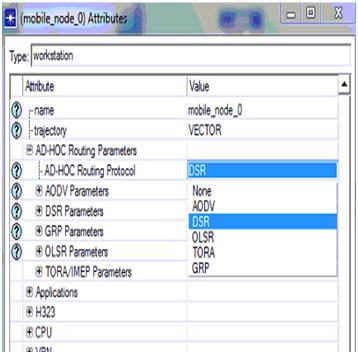
Go to the ad hoc routing protocols menu and change the routing protocol to DSR. Remember it was AODV with DES protocol. Refer the corresponding screenshot given 

From above screen it can be observed the AODV routing protocol is changed to DSR routing protocol.

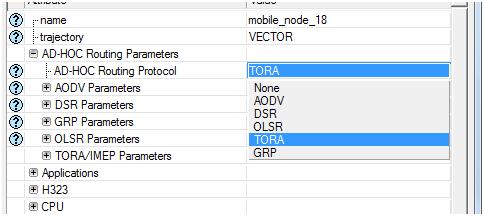
Simulation of third scenario: TORA

It is same as the second scenario only the routing protocol is changed to TORA throughout the process. Watch the screenshot below carefully.

This completes the simulation of all three protocols and the next step is to run the simulations against its simulation time. All the three scenarios are run for 15 minutes to achieve the results. 

Ad Hoc Network Project Reference for Setting Up The DES Metrics For Performance Evaluation

The main aim of this process is to analyse the packet losses in the network. The following steps are to be followed in setting up the DES metrics.

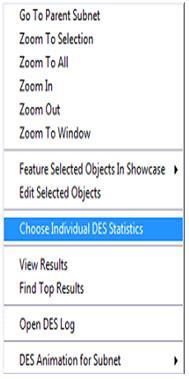
  • Right click on the simulation environment and chose the option  and Choose ‘Individual DES statistics’
  • A new window is opened where three options like global, link and node level are available. You got to choose the right option to evaluate the performance of the network
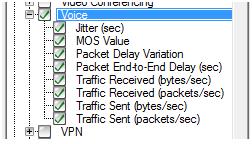
  • Refer  the following screenshot for Global level attributes, if chosen .

The following are the actual performance metrics used across the network against the traffic and packet sequences.

  • Jitter time in seconds
  • MOS Value
  • Packet Delay variation
  • Packet end to end delay in seconds
  • Traffic received in bytes per sec
  • Traffic received in packets per sec
  • Traffic sent in bytes per sec
  • Traffic sent in packets per sec

The same process stands good and can be applied for the second and the third scenario as well. The following are the actual simulation methodology implemented for the other scenarios. 

Node Level Configuration at Default Wireless LAN Configurations

Node level configuration:

Using the simple drag and drop approach provided by the OPNET modeler all the nodes required for the simulation are selected from the object palette and placed in the work station. All the types of nodes dragged are needed to make some changes and this process is generally called as configuration of nodes and this section concentrates on the explanation of the configuration process. Firstly the 10 mobile nodes taken from the object palate are also need to make some changes and in order to make the changes right click should be given on the node and can then select the edit option.

All the nodes must be allocated with a routing protocol in order to establish the routing process needed for the network, several routing protocols are supported by MANETs and some among them are OLSR, AODV, DSR and TORA, these are also supported by the simulation selected in this simulation. OLSR routing protocol is selected for the simulation this particular scenario and therefore all the 10 nodes taken here must be allocated with the OLSR routing protocol.

This routing protocol is also allocated to the wireless LAN server to support the simulation. The other nodes such as the application, profile and mobile nodes also require some changes and are configured by editing the attributes and parameters. The next chapter that is the simulation procedure chapter gives a clear idea of how these configurations are made.

Improving the security level in wireless LAN network is the significant aim of this project and so the configuration of the scenario is done based on this requirement. The settings needed for the configuration of next scenario is done in next level.All the settings done to the nodes will support the simulation process as the default attributes of wireless LAN are made automatically using the OLSR routing protocol. The sections below explain the other configuration like application, profile and mobile nodes.

Setting the Mobile Definitions to the Nodes Ad hoc Project Reference

The main constraint of a mobile launch program is the packet losses across the network. This could be kept at a minimum by keeping the nodes used in the simulation pre set against few mobility patterns and these nodes can be added using the mobile configuration program. This mobility pattern is very important as if defines the destination, source and speed of the mobile nodes and the functioning of the mobile network on the whole.

The following points should be considered to set the mobility of the mobile nodes.

  • Right click on the object to edit mobile configuration object
  • Choose random mobility profile from the various options that prop out.
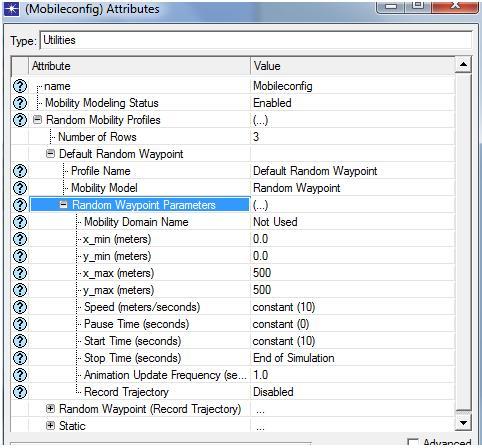
  • Expand the option, default random waypoint tab and set this as the required mobility model to the nodes. Check the corresponding screenshot given below for your reference.

From the above said process, random waypoint parameters are set and from the above screen it is clear that the speed of the mobile nodes is set to a constant value of 10, pause time is set to a constant value of 0 seconds and start time of the mobile nodes is repeated for every 10 seconds. Stop time of the simulation is set to bring about an end to the simulation as shown in the above screen.

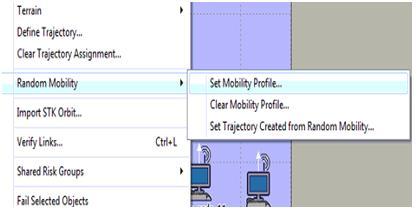
The edited mobility profile should be applied to all the mobile nodes and this can be achieved by choosing the option, ‘set mobility’ from the topology menu. Refer to the pictorial representation below to clear any of your doubts.

Once the mobility profile is set as shown above, all the mobile nodes should be assigned with this random waypoint mobility which helps the nodes to move randomly to process the traffic and to deliver the corresponding packets to the destination side. With this step the process of setting up the mobility patterns to the network nodes is done and the next step is to define the performance DES metrics. Its process is as follows.