Online Movie Ticketing System Python web Project

Movie theatres have become one of the most preferred getaways in today’s world. And yet going to the theatre, selecting a movie, and making sure the tickets aren’t sold out, could prove tedious. Any knowledge about the list of movies, show timings, or even seats can be attained by the customer only by being present physically.

An Online Movie Ticketing System brings the theatres closer to the customers. It eases and improves the booking experience. The system holds the database of all the movies being played along with their show timings and available seats. This system can be accessed using a website by the customers a few days before the show to book their seats of choice, and at the same time, keeps the theatre admins updated about the seats being booked.

The purpose of this Online Movie Ticketing System SRS document is to analyze and elaborate on the high-level needs and features of the Online Movie Ticketing System. It focuses on the capabilities and facilities provided by a theatre. The details of all the needs of the Online Movie Ticketing System and if it fulfills these needs are detailed in the use case and supplementary specifications.

Purpose

The expected audience for this document includes the theatre administrators, the Box Office Staff at the partnered theatres, and the developer.

Scope

The Movie Ticketing System that is to be developed provides the theatre staff and the customers with the movies being screened, show timings, seat availability, and many other facilities. The Online Movie Ticketing System is supposed to have the following features:

  • The Online Movie Ticketing System is up and running all day.
  • The product provides customers with online booking capabilities.
  • The system provides a login facility to the users.
  • The system lets the Box Office staff check seat bookings and seat availability for any screen during operating hours.
  • The system allows the theatre staff to monitor screen details and update movie screening information.
  • The transactions of the theatre are updated with every reservation or refund submitted.

Document Overview

The SRS will provide a detailed description of the Movie E-ticketing System. The remainder of this document is in two sections, the first providing a full description of the project for the Theatre Administrators.

Overall description

The Online Movie Ticketing System is a package to be used by Administrators to improve the efficiency of the website for Box Office staff and Users. The Online Movie Ticket System to be developed benefits greatly the general public. The system provides movies and dates, from which the user can choose, as desired. The Administrator can keep the movie database and seating arrangements updated all the time so that the user gets the updated information all the time.

The Movie ticketing system encompasses various GUI menus, to provide a seamless facility for the online booking of movie tickets. The system is connected to the theatre database.

Product Functions

The Online Movie Ticketing System provides online real-time information about the movies available in the Theatre to the user. The functions of the system include the system providing different types of services based on the type of users [User/ Administrator].

  • The member should be provided with updated information about the movie’s showtimes and seats available.
  • Provisions for the user to book the movie they want, if all the other required rules hold good.
  • The members are provided with the movie available roster and allowed to choose the movies, they want to use in the coming up days.
  • The Administrator is aware of all the tickets booked and also about the seats available.
  • The Administrator is provided with interfaces to add/delete the movies and also update the seating arrangements accordingly.
  • The user is also provided an option to claim a refund of 25% of the ticket rate, provided he/she cancels the ticket 24 hours before showtime.

User characteristics

The users of this system are the customers, box office staff, and the administrators of the partnered theatres. The customers are assumed to have basic knowledge of the computers and Billing systems.

Performance

Response Time

The home page, which displays the movie streaming should be loaded in less than 2 seconds. The theatre’s seating arrangement is refreshed after every successful transaction. The system shall respond to the member in not less than two seconds from the time of completing the payment. The system shall be allowed to take more time when doing bulk bookings.

Throughput

The number of bookings is directly dependent on the tickets being sold. The users may be the administrator or also the customer who uses the ticketing system for booking tickets.

Ticket Cancellation Flexibility

The system allows the user to cancel tickets within a day before the date of booking. It also includes the provision to claim refunds, following the protocols listed by the system to the user.

Design Constraints

Software Language Used

The languages that shall be used for developing the front end of the Online Movie Ticketing System are HTML, CSS, and JavaScript. The backend will be supported using Python, with the additional support of MySQL for managing the database.

System Evolution

In the future, this system could be partnered with other theatre administrators. Database access speed can be increased further.

Visit here to download the Online Movie Ticketing System Python, HTML, CSS, and JavaScript project code & Report.
A DBMS Project on Fingerprint-based Attendance System

In this Fingerprint-based Attendance System Database management System project, we have tried to use the knowledge that we gained in this course to make a Fingerprint-based Attendance System. Although we had aimed to implement it using hardware due to hardware constraints, we have tried to implement it online. In this DBMS system, the Faculty for a particular course switches ON the system, and the system marks attendance for the students based on their fingerprints.

Features:

This system apart from marking attendance also maintains the student’s records and the faculty members. We have tried to incorporate the following features:

Administrator: For the modification of crucial information we have created an administrator account. The Administrator only has the privilege to add/remove courses and edit profiles of students and faculty members.

Login Page: On this page, the students and faculty members can log in to their accounts and view their information.

Register Page: For students and faculty members who don’t have their accounts can create their accounts by clicking on REGISTER on the login page. The register page asks for data and creates a profile.

Timetable: This page displays the schedule of all the courses.

Attendance: On this page, a list of the currently running courses and their respective faculty is displayed. There is a slot for the faculty fingerprint. Once the faculty fingerprint matches with any one of the faculty members whose name is being displayed on the page the system automatically turns ON the database to be modified. Now the students are required to input their fingerprints and their attendance is marked.

Tools used:

  • Database Management System: MySql
  • Server for hosting the project: Apache Tomcat with port number 8080.
  • Programming scripts: Java Server Pages, Javascript, HTML, CSS.

Relation to the course:

This whole project like many other projects has two ends. The Front end consists of the GUI which has been made using our prior knowledge and the Back end consists of database interaction which we have learned in this course. We have tried to incorporate the following things that we have learned in this course.

ER Model: The basic thing that we did before starting with the project was to make an ER Model and check the feasibility of the project. This helped us in enlisting the various aspects and classify them into entities and relations.

MySql Queries: In this project we have tried to incorporate the different queries such as Insert, Create, Update, and Alter that we learned in this course.

Triggers: To let the student know about his short attendance we have tried to incorporate the concept of triggers.

System Time: We have tried to fetch the system’s current time and have used it to compare it with the time of the lectures stored in the database.

Conclusion:

While working on this project we brushed upon the knowledge we gained in this course and the hardships and problems faced in implementing such a real-time project helped us learn a lot.

Design & Development of Student Database Management System PHP Project

The purpose of implementing the ‘Student Database Management System’ is for the ease of maintaining student-related data on an institution, our system does serve this purpose and also is a means of communication between the students/parents and teachers during times when physical contact is not possible or when it is necessary to convey an important message quickly, due to this system a lot of paperwork, maintenance, space, time are all reduced for the purpose of handling large student data.

The goals achieved by this project are:

  • Centralized Database.
  • Reduced paper works and Stacking of files.
  • Easier Searching, Updating, and Storing the Details
  • User-Friendly Environment.

Along with the existing features, additional features can be added in the future, Like:

  • Handling admission details in a more detailed manner by Adding a payment feature through our site.
  • Extension of the current system for the entire institution.
  • Better interaction between the parents and the teachers.
  • Storing the records of co-curricular activities.
  • Assigning and reporting the assignments and many more.

Output Results:

  • Welcome Page with Register and Login Page

Teacher View

  • Teacher Home Page
  • Admit, Update Student’s details for a Specific Class
  • Fetch or Search the Student Details Using the Student ID
  • Admit or Add new Student Details to the Specific Class
  • Add or Update the Subject with its Instructor’s Details
  • Announce Upcoming Events and Circulate the Same
  • Update Attendance for each student in the Class
  • Update Internal Assessment Marks for each student
  • Update Exam Marks for each student

Student View

  • Student Home Page
  • View any Recent Announcements made by the specific Subject teacher
  • View Subject Details and Contact information of the subject teachers
  • View Internal Assessment Marks for each Subject
  • View Final Exam Marks for each subject
  • View the Attendance details

SOFTWARE REQUIREMENTS

  • Database Support: MySQL 5.7
  • Web Browser: Google Chrome
  • Coding language: PHP, HTML, CSS, JS.
  • Server Deployment: Apache Server, MySQL Server.

Download & Deploy the complete Student Database Management System Project PHP & MySQL Code, Project Report, and Execution Steps readme file.


Development of Blood Bank Management System Java Project

Our Project “Blood Bank Management System” is a computerized system used to store and retrieve information related to Blood donations/inventory the project aims to expose the relevance and importance of Blood Bank Management Systems. The system allows the admin/receptionist to store and retrieve information like blood donor details, blood receiver details, amount of blood present in the inventory of the blood bank store, etc.

The Blood Bank Management System checks for the availability of a certain blood type like A+, A-, B+, B- etc. If the blood type is available, then the system allows the admin to further proceed with the procedure. Otherwise, it asks the admin to choose another blood type. The system asks the admin to enter customer details for further blood transactions. The main purpose of this Blood Bank Management System is to reduce the manual/paperwork involved in blood bank management and make it convenient for the admin/receptionist to store and retrieve data as and when required. The software supports the concept of modifications by admin and allows inserting, modifying, or deleting customer data.

Introduction

Considering the volumes of data that need to be tracked and accessed, it would be very difficult to manage the accuracy and quality of data manually and deliver them accordingly. It would be almost impossible to get the details required in case of manual maintenance of data. The BBM (Blood Bank Management system) is an innovative solution that helps in managing huge loads of blood bank data. The Blood Bank management system simplifies the manual work and allows smooth administration of the operations of blood transactions.

Purpose

This project is aimed to reduce the manual work involved in data maintenance in the Blood bank management system. This project is developed mainly to simplify the manual work and allows smooth administration of the operations of blood transactions. The purpose of the project is to computerize the administrative operations of a blood transaction and to develop software that is user-friendly, simple, fast, and cost-effective. It deals with the collection of Donors, Receivers’ Inventory information, etc. Traditionally, it was done manually. The main function of the system is to enter and retrieve these details as and when required, and also to manipulate these details meaningfully.

  • To ease the process of blood donation and reception.
  • To improve the existing system.
  • To develop a scalable system.
  • To be highly available

Scope

  • Ensure that all the functionalities of a manual blood bank are covered
  • To ensure proper contactable information.
  • Make sure the program is simple and easy to use.

Conclusion

The Blood Bank Management System is a great improvement over the manual system which uses lots of manual work and paper. The computerization of the system speeds up the process. This system was thoroughly checked and tested with dummy data and found to be very reliable. Thus, we have implemented a fully comprehensive and minimalistic efficient system for use by Admins/Receptionists without any additional training.

Limitations of the Project

The donor cannot modify/add/delete his details like address, and phone number. The whole project is done for an offline blood bank since there is no way to access the details online. Moreover, there is no feature to modify donor details.

Future Enhancements

The Blood bank Management System can be enhanced by including more functionality like allowing online access to the donor to modify the details if he has gone wrong while registering. Online implementation to the nearest blood banks may be implemented.

Visit Here or download the complete Development of Blood Bank Management System Java Project Source Code, Report, and how to run files.

Implementing a Blood Bank backend system.

An Individual Donor donates blood at the branch. The donated blood is tested for safe use. The Tested blood can either be kept as whole blood for ‘whole blood’ transfusion or can be processed into different components. The different components can be Red cells, Fresh Frozen Plasma, and Platelet Concentrate.

By using blood components, several patients can be treated with the blood from one donor, leading to optimal use of every unit of donated blood.

The system will be designed as a set of rest endpoints.

● Register a Blood Bank Branch with Address and Contact details.
● Register members who can donate blood or request blood or its components.
● Record blood donation details.
● Record Test results for a blood donation.
● Store request for donated blood unit either as Whole or as Component. Calculate Shelf life and update the inventory.
● Record blood or component requests and update the inventory.
● Search for blood or blood component active inventory across branches.
● Leader board – for top donors. By Period – by month, year, and By Branch or Across Branches.

Donation and Receipt Records can have the following information,

● Unique Transaction ID
● MemberID
● BranchID
● TransactionDate
● Quantity
● Tested
● BloodGroup

Inventory Records can hold the following information,

● Donor transaction reference
● Quantity In milli-liter
● Blood Group type
● Sub Type (Whole, RBC, Plasma, Platelet)
● Expiry Date
● Active

Note:

● Record blood test results, and mark the unit as unusable in case of a failed test.
● A Single donation by a donor can be fixed at 450ml for the assignment
● Interval of 90 days should be maintained between two donations by the same donor.
● Expired inventory should not be searchable.

Design & Development of Tender Management System Project

Abstract:

The Tender Management System was developed to enable the vendors to get all the tender details online and provide a facility to submit the tender. This Tender Management System project was developed & designed with Java & MySQL Database.

Existing System:

  • Contractors need to submit their documents by visiting the office or centers on time.
  • Contractors have to bid for a particular tender on time by applying forms and need to wait for an approval reply.
  • The Admin Needs to post the Projects or contracts as a poster or advertisements regularly.
  • It takes a long time to access tenders or vendors’ data access.

Proposed System:

  • User Needs to Have a Network Connection.
  • New User needs to register a new vendor on the website.
  • Contractors can log in and bid for some existing tenders.
  • They need to log in using their login-id and password which they used while registration
  • To reduce paperwork, and data that are available online, using this final decision can be taken by the administration and can contact directly to such suppliers.
  • Easy to access the tenders and vendors’ data.

Software Requirements:

Language: Java
Web technologies : J2EE (JDBC/Servlets/JSP)
Front-end Design : Html, CSS, JSP, Bootstrap
Database: MYSQL
Scripting: JavaScript , CSS

Application Work Flow

Modules:

Administrator

Uploading advertisement documents
Verifying projects and contractors by using their information
Accepting and Rejecting Bids
Maintaining data and confirmation of the final report.
Update Notice Board
Make some announcement
Block or unblock some vendors or company

Company

The Company needs to get registered to proceed.
The company can log in with a valid username and password.
Apply or releases new tenders and view the status of the tender.
Make Some announcements.
Change the tender details
Documentations

Vendor

Vendors are the key persons or contractors who look for new upcoming tenders on the website
Vendors’ Functionality includes:
New Vendors can register
Login using vendor-id and password
View and update their profile
See the new open tenders and their details
Bid for a tender with an amount greater than its base price
See the bid approval or denial status

After the tender status approval, they can view and submit the documentation
Vendors can look for the important notice in the notice section

Conclusion

Our Project Tender management System Successfully Created a user-friendly environment for the tender management process.
This Project is flexible and changes can be incorporated easily.
Easy for further Modification
Saves a lot of time by doing most of the processes online
It may lead to increase profit and improve the quality of a company.
Assigns the tenders and project in a good manner and optimal way to the contractors in less time with low-cost charges.

Download the complete Design & Development of Tender Management System Project using Java, MySQL, HTML, CSS, JavaScript, Bootstrap, and J2EE.

Development of Visitor Management System Java & MySQL Project

VMS also known as Visitor Management System is an interactive project which after considers the real-life examples of an institute dealing with daily visitors. It is designed from scratch using JAVA and Python and using a server-side language MySQL which is connected to the developer language JAVA using a JDBC connector.

The entire work of the Visitor Management System Java & MySQL Project is done on a local host which consists of the application using JAVA and Python involving the use of APACHE TOMCAT server and MySQL. The server side contains all the implementation related to setting up of database using MySQL, creating session models for joining different pages, and other transactions to be performed. It is responsible for picking up information from the database and displaying it on the client side which comprises a basic user interface built-in JavaFX as the software GUI.

Introduction

In this fast-paced world, where everyone is squeezed for time, it is very difficult for an institute with a large number of students and instructors to manage and have a smooth-going and organized way of entertaining visitors. Logistically, the visitor management system allows the security system of the institute to conventionally check and enroll each visitor efficiently inside the premises without the hassle of identity clashes and any other inconvenience.
It is therefore the task of institute administrators to optimally design a visitor management system where the security department could save time. 

Motivation

The motivation for designing this visitor management system is the keen observation of day-to-day problems faced by the security department, as the lack of info and medium among the teachers, students, and the administration of the institute such that there is difficulty in the efficient process of teaching and studying by the teachers and students respectively. Moreover, we value the recent learning about the programming languages as well as seeing how powerful and dynamic they are when it comes to designing system and database-based projects. The languages used to develop the project are extremely useful while working with the technologies at a workplace.

Aim Of The Project

This Visitor Management System Java & MySQL Project is designed to help students understand software design using programming languages from their basic capabilities to have a real industry-based client and service provider environment. This application helps the student to understand the basics of appearance and how a complete working application can be built from scratch. It also allows students to understand the concept of GUI-based applications and use it to embed MySQL and other programming languages. Further, it gives insight into how the client-side language interacts with the server-side language and finally with the database. This application is a server-based app so it involves the use of a particular institute server (in this case our localhost machines). The visitor management application is very versatile and can be enhanced by adding more functions and modified graphics for the use of the institute’s security department.

Project Perspective

The visitor management application is a web-based system.

User Interface & Characteristics

The two types of interface found in the visitor management system are as follows :

• User Interface: Officials of the security department can view the home page of the visitor management system. The officials can carry out a transaction based on deciding whether the visitor is a –
• New User
• Old User
The official also has options for “Checkout” and “Detail updating” of visitors adding to it he/she can also check the “Users not checked out”.

• Admin Interface: Along with other features the admin has superuser rights to –
• Report viewing
• Log viewing
• Entering the details of new cards

Hospital Database Management System Project using PHP & MySQL

Description of Project:

Hospital Database Management System Project using PHP & MySQL developed under the Database Management System Course study, It is DBMS based application that can handle different workflows related to a hospital using MySQL and PHP. The main aim of developing this project is to develop an online web-based system that registers, stores, and alters the data related to the day-to-day hospital operations to have some meaningful conclusions.

System Requirement Specification:

We have used Netbeans IDE 8.2 software to configure PHP/HTML/CSS scripts on our localhost webserver. The operating system was Windows 10 / macOS Catalina. The web browser is Chrome with PhpMyAdmin as Front-end and Back-end Integration. We deployed our web server on localhost using Apache(built-in server) using MAMP/WAMP (MacOS/Windows Apache MySQL PHP. At Least 8MB of disk space is required. We can implement Hospital Database Management in modern browsers like IE7+, Firefox, Safari, Google Chrome, and Opera that support CSS and HTML frameworks.

Functionalities:

1) Managing Patients Information:

  • For deriving the age of a patient, given the DOB, we have created a function followed by a procedure 
  • To get an overview related to the blood groups of all the patients present in the database
  • To get the details of the patient who has the maximum number of appointments in this hospital
  • To display the patients who took appointments on the weekends
  • To get information about the patients who took an appointment during the current month
  • In our database, we have a table for all the patients in the hospital, and then a separate table for indoor patients. However, we do not have a table that shows the details of outdoor patients.
  • At last, we have generated a bill for a visit of a patient, which includes a patient’s visit charge, doctor charge, medicine charge, etc. And generates the total amount to be paid.

2) Managing Doctors’ Information:

  • To get information about the most famous doctor/s among the patients

3) Managing Appointment Related Information:

  • To get the trend of appointments for each weekday
  • To display patient-wise appointment details
  • To display year-wise appointment details

4) Managing Department wise HODs:

  • For identifying a HOD of a department

5) Managing Staff, Rooms, and Medicines related to Information:

6) Managing Admin/Login Details:

  • We have created a simple login and user registration system using authentication from Admin User Table.
  • There are some functionalities like creating a new administrator, logging out, and password change.
  • As a matter of Privacy Policy we don’t save ‘password’ directly but instead, store the HashCode corresponding to it

7) Managing other information:

  • If Contact no. is not a 10-digit number then a trigger will display an error message
  • For managing patient log details

Visit Here and Download the Complete PHP & MySQL Database Management System Project Code, Report on Hospital Database Management System

Car Rental System Database Design Project

Data Requirements

The Car Rental System Database involves around three main entities Car, User, and Reservation

The car can be reserved from a rental location with a specific address. It has a unique Rental_Location_ID, a phone number, and a contact email. A rental location keeps track of the address where the car belongs using the street name, state, and zip code.

A rental location has several cars for rental. Each car is described by VIN, Registration Number, Color, Model, Manufactured year, Seating capacity of the car, whether it has Disabled friendly feature and its Status marked ‘Available’ or ‘Unavailable’

The car has a parameter Car Type. It can be ‘Economy’, ‘Standard’, ’SUV’, ‘Premium’ and ‘Minivan’. Car Type defines the rental price per day. A user can take Insurance per day for the rental car. There are different types of Insurance each having different medical coverage, collision coverage, and bodily coverage. Insurance Types are ‘Liability’ and ‘Comprehensive’. Car type and Insurance Type drives the Insurance price per day.

A user can reserve a car for several days. He can use any valid promotional code which is maintained by status. When a user books a car he mentions the start date and end date for which he needs the car. The end date will be hypothetical at the time of reservation and updated with the actual end date when the car is returned. The total amount and net amount are calculated based on start date, end date, rental price per day, insurance price per day, and promotional code if any

A user is categorized as a guest or customer. The user can continue reserving the car as a guest as long as he has not registered as a a customer. A user is uniquely identified by his/her license number. User information consists of his name as first name, middle name and last name, email, address, date of birth, and contact number

A registered customer will be provided with a login id and password. A customer can save his credit/debit card details for future payment

Partial payment can also be made at the time of reservation and the balance must be paid by the user during car return when the actual end date is known. If the user is a customer, he/she can pay through saved debit/credit card details

A user can add any accessories as part of his/her reservation. Accessories can be ‘Car Seat’ and ‘GPS’. A user can add as many accessories he/she needs as part of the reservation

The additional driver can be added as part of his/her reservation. For each additional driver, there will be an additional charge

A user can cancel a reserved car before the car has been rented. A reservation can have status as ‘Reserved’, ‘Completed’, and ‘Cancelled’. When the car is reserved, the status will be in ‘Reserved’ Status. Once the car is returned and the total amount is paid, the status will be ‘Completed’

Functional Dependencies

In Rental car location, Rental_Location_ID is the primary key
Rental_Location_ID —> {Phone, Email, Street_Name, State, Zip_Code}

Type of the car defines the rental price of the car per day
Car_Type —> Price_Per_Day

Type of the insurance defines the insurance coverage
Insurance_Type —> {Bodily_Coverage, Medical_Coverage, Collision_Coverage}

Insurance Type and Car Type defines the Insurance price per day
{Car_Type, Insurance_Type} —> {Insurance_Price}

A user is defined by his/her License_No
{License_No} —> {FName, Mname, Lname, Email,Address, Phone,DOB, User_Type}

In a user credential, Login_ID defines the rest of the attributes in the entity
{Login_ID} —> {Password, Year_Of_Membership, License_No}

Login_ID and Card_No in Card_Details defines complete card information
{Login_ID, Card_No} —> {Name_On_Card, Expiry_Date, CVV, Billing_Address}

Reservation_ID drives all the other attributes in Reservation relation
Reservation_ID —> {Start_Date, End_Date, Meter_Start, Meter_End, Rental_Amount, Insurance_Amount, Status, License_No, VIN, Promo_Code, Additional_Amount, Tot_Amount, Insurance_Type}

Payment_ID is the primary key of Payment relation
Payment_ID —> {Amount_Paid, Card_No, Expiry_Date, Name_On_Card, CVV, Billing_Address, Reservation_ID, Login_ID, Saved_Card_No, Paid_By_Cash}

Promo_Code defines other attributes in Offer_Details relation
Promo_Code —> {Description, Promo_Type, Is_One_Time, Percentage, Discounted_Amount}

Additional_Drivers relation
{Reservation_ID,Name} —> DOB

In Accessories relation, Accessory_ID drives the type and amount of the accessory
Accessory_ID —> {Type, Amount}

Download the Car Rental System Database Design Project Code, Report, and Presentation.

Online Student Project Report Submission and Evaluation System PHP Project

Project Overview

The online project report submission and evaluation system enables the student to submit their project report online without submitting any physical file. Before the submission, the student needs to update their progress to the system and the lecturer can view their progress and give comments online.

The online project report submission and evaluation system is providing an online discussion and document sharing for students and lecturers. The pre-existing systems didn’t have the functionalities such as notifying the student when he/she is being added to the project group, online automatic generation of the certificate after the completion of the entire project, and many more which are being implemented in this version of the system.

The proposed system will take away the biggest risk out of the picture i.e. the manual transmission of all the tasks related to the project report and also the design is formulated in such a way that the impersonation will be reduced to a greater level. With the increase in technology, the need for systems is constantly increasing.

What is new today will be old tomorrow. Our system at present will help to overcome the drawbacks of the previous versions of the system as per mentioned in the literature survey. Smooth access and a more user-friendly UI will help the users to get a home-like environment.

A special feature has been inculcated into the system as a result of which the notifications will be received by the faculty as well as the students on their respective registered mobile numbers. The faculty who will be added to the portal as well as the students who will be allotted to them will all get an individual notification that they have been allotted under which group and to which project they have been entitled. No submission is permitted by the system after the deadline has been crossed. The upload report button will be automatically disabled by the system itself so that no reports can be uploaded once the deadline has been crossed.

Objectives

  • The system provides online processing of the reports.
  • Accurate results can be obtained.
  • The proposed system is used to reduce chaos and manual errors.
  • By viewing the reports the management can improve the institutional facilities.

Motivation

  • As society is developing and new trends are emerging in the education sector every coming day.
  • The ‘Online project report submission and evaluation system’ approach is all about managing project reports online for institutional and educational practices
  • Intelligence is used for the automatic generation of the certificates once the project report has been finalized or the deadline is crossed.
  • The motivation is to propose an intelligent system that can be implemented in any organization.

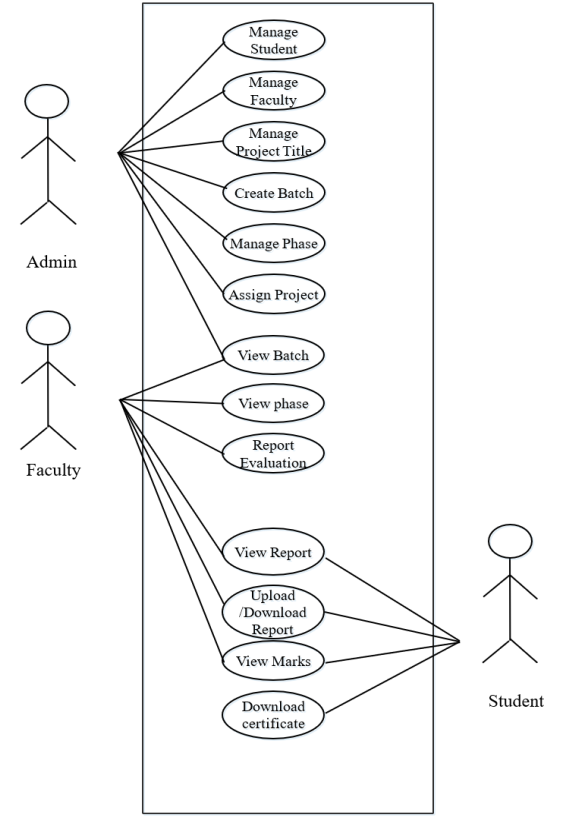
Use Case Diagram for the Proposed System:

Conclusion:

With the increase in technology, the need for systems is constantly increasing. What is new today will be old tomorrow. The proposed system at present will help to overcome the drawbacks of the previous versions of the system as per mentioned in the literature survey. Smooth access and a more user-friendly UI will help the users to get a home-like environment. The electronic marking of student project reports will save a lot of time, effort, and energy as well as expenses. It will also be more accurate and reliable for both the students and their instructions. In all, it will be a great help at the institutional level.

This application can be implemented in various situations. New features can be added as and when required. Reusability is possible as and when required in the proposed system. All modules are flexible. A very useful functionality from which the students could benefit would be if the system had a forum where any discussion could be opened that is related to the project. In the future, a useful feature that can be added is a platform to upload the student’s projects (like applications) to their instructors by the students.

Software Requirements

  • Front-end Design: JS, CSS, HTML
  • Back-end Coding: PHP, MySQL
  • Web Browser: Mozilla Firefox, Google Chrome, or later.
  • Operating System: Linux, Ubuntu, Windows 10.
  • Application Server: XAMPP Server

Download the complete Online Project Report Submission and Evaluation System for College students with HTML, CSS, JavaScript, PHP & MySQL Source code, and Full report documentation.

Car Showroom Management System JAVA & SQL Project

The Car Showroom Management System consists of four major fields of management i.e. store cars, store Sales Persons, store admins, store customers and store total sales progress. Here the store admin manages all the activities such as viewing and adding car details, salesperson details, and admin details of different stores. Each store has a Manager and the Manager’s task here is to fill in the details of the car, customer, sales, and workers of a particular store.

The main goal of this application is to maintain the records of different stores which are visible only to the admin and can only be updated by him. It helps to achieve ease of access in searching car details of the selected store, salesperson’s details of the selected store, and sales details of the selected store.

CAR Showroom Management System is a software application to maintain day-to-day activities in the store, This JAVA & SQL project helps to maintain the record of the bike, customers, workers, and sales information Admin manages adds, updates, and deletes the cars, salespersons, and admin records. Admin also can add new admins. The software is designed to handle, the daily activities of all the stores. Search the details when required.

PROJECT PURPOSE

Provides a simple way of accessing the database. Allows the admin to make a search and find certain bikes, customers, and sales records that are linked through a TIN of different stores located at different locations. Provides centralized control of store database. Holds complete information about the customer.

PROJECT SCOPE

The Car Showroom Management System application is designed and developed so that there will be the elimination of storing the records and other details in a hardcopy thereby supporting its eco-friendly nature. The Bike Showroom Management System application is quite simple and easy to use. This application has not had many Complications. It has a very simple way of maintaining the store records such as storing the bike Details of a certain store, customers visiting a certain store, and the sales details of the store that the admin chooses to gain access to.

PROJECT GOAL

This CAR Showroom Management System project aims to show the shadow implementation of JAVA & SQL which includes a better storage facility, update, and view of data. The application provides a user-friendly interface so that the admin can access it with ease.

Download Car Showroom Management System JAVA & SQL Project Source Code, Project Report.