Implementation of E-voting Machine Project using Python and Arduino

INTRODUCTION

Our E-voting Machine project is very useful, This Project was implemented using Python and Arduino. The user is no longer required to check his register in search of records, after the voting procedure gets over, the admin will be able to calculate the total number of votes in just one click since the entire work is done using computers. The user just needs to enter his/her unique voter ID.

In today’s world, no one likes to manually analyze the result after the voting procedure gets over because the process is time-consuming and of which results get usually delayed. Everyone wants his/her work to be done by computer automatically and displaying the result for further manipulations. So this E-voting Machine project is about providing convenience regarding voting.

OBJECTIVE

  • Our objective for the E-voting Machine project is to make a user-friendly Electronic Voting Machine that makes the current voting process faster, easier, and error-free.
  • We have used Arduino in our project for the implementation of push buttons and Python as a programming language.

PROBLEM STATEMENT 

The problem statement was to design a module:

  • Which is a user-friendly E-voting Machine
  • Which will restrict the user from accessing other users’ data.
  • Which will ease the calculations and storage of data.
  • Which will help the jury to declare the result without any biasing.

FUNCTIONS TO BE PROVIDED:

The E-voting Machine system will be user-friendly and completely secured so that the users shall have no problem using all options.

  • The system will be efficient and fast in response.
  • The system will be customized according to needs.

FOR e-VOTING SYSTEM

  • (Check
  • Store
  • )

SYSTEM REQUIREMENTS

  • Programming Language Used: Python, C
  • Hardware Used: Arduino UNO
  • Components Used: Push buttons, Connecting Wires, Resistances(100k ohm), Breadboard
  • Software Used: Anaconda 2.7.x, Python 2.7.x, Arduino IDE
  • Modules Used: Serial, SQLite, Tkinter, tkMessageBox

WORKING

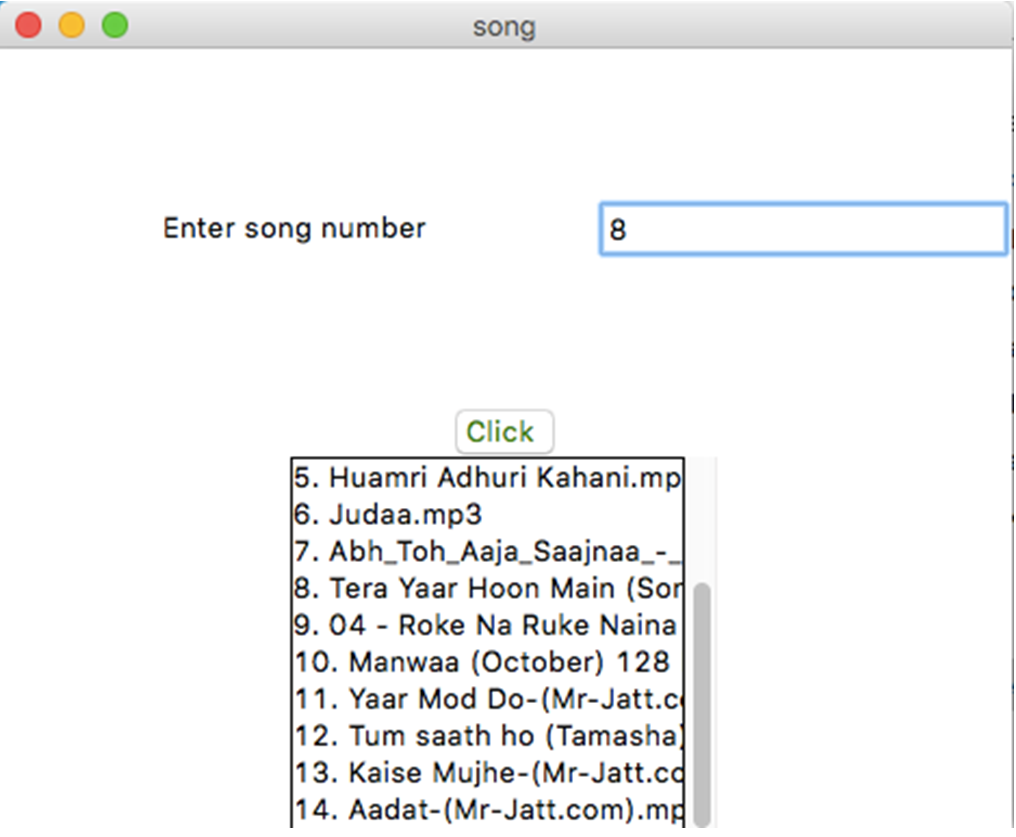
  • The user has to enter his/her ID in the system.
  • After verifying the user ID, the system will show a message that whether a user is eligible to vote or not after checking his/her details stored in the system.
  • A message will be displayed accordingly. The user will then have to press the button against which the name of the candidate is written and whom he/she wants to vote.
  • The votes hence are stored in the database and the results will be announced accordingly.

FUTURE SCOPE OF THE PROJECT

My project “e-VOTING SYSTEM” will be a great help in conducting voting at various organizations. So the modifications that can be done in our project is to add one major change which can be done in this project is to add the data of the voters. This will result in the total identification of the voter.

CONCLUSION

From this E-voting Machine project, we can conclude that this program is very useful in conducting the voting procedures smoothly. It provides easy methods to analyze the voting result. It helps in conducting faster, more secure, and more efficient voting. The program can be used per the norms of the voting requirements.

Download the complete project code, report, and PPT on E-voting Machine using Python and Arduino.

Mini Project on Student Profile Management System using Java

Develop a java based application using GUI to maintain student records. This Student Profile Management application should have a login page. The Student Profile Management should take student details like name, address, branch, previous year scores, and curricular and extra-curricular activities, and all the entered data should be displayed at the end for confirmation.

Project Programming Details –

1) LoginFrame :

Login Frame is GUI based window that is displayed when the user first executes the program. It is the welcome page through which the user will move on to the next frame.
It contains a button with an ActionListener() which on pressing opens Frame2.

2) Frame2 :

Frame2 is the login page. This page takes the user id and password as input and only after successful verification of user the user is allowed to move to the next page.
The default user id password is
User id:- admin
Password:- admin1234

3) Frame3 :

Frame3 is where the user is given the option to enter their details such as name, age, branch, and address and select their gender from the drop-down menu. Each detail to be entered is stored using JTextField() and JRadioButton is used to display the drop-down menu for the gender selection. Finally, there is the submit details button which on pressing triggers ActionListener() and checks whether the user-given input is legitimate or not, if it is not then it pops an alert message that reminds the user to enter the correct details. Once the correct input is given, we pass this information on to Frame4.

4) Frame4 :

Frame4 is where the user is given the option to enter their details such as their previous academic achievements, their 10th, and 12th scores, their average pointer, and their extra-curricular and co-curricular activities. Each detail to be entered is stored using JTextField() and JRadioButton is used to display the drop-down menu for the gender selection. Finally, there is the submit details button which on pressing triggers ActionListener() and checks whether the user-given input is legitimate or not, if it is not then it pops an alert message that reminds the user to enter the correct details. Once the correct input is given, we pass this information on to Frame5.

5) Frame5 :

Frame5 class is where we receive the user input taken in Frame3 and Frame4 and using JLabel()’s we display it on our Java application windows. There are two buttons to either make a new entry or exit. On clicking on the first button, ActionListener() is triggered which calls Frame3(), and thus we can enter details of another entry.

6) Student Details :

This is the final class that contains the main method, which calls the LoginFrame().

The output Results of the project will be:

  • Welcome page
  • Login Frame
  • Credential verification
  • User input
  • User input verification
  • Additional inputs
  • User input verification
  • Displaying user details
  • Making new entry

Thus, using a GUI-based java application we have successfully created Student Profile Management application with a welcome page, and login verification page, which takes various student details as input, verifies them and displays it in the end.
A major advantage of GUI is that it makes computer operations more intuitive and thus easier to learn and use.
Icons are more user-friendly than long command lines. GUIs provide the user with immediate, visual feedback about the effect of each action.

Download the complete project source code on Student Profile Management System.

Online System Shopping Management Project Synopsis

This document brief up the project titled “Online System Shopping Management”. The main objective of our project is to provide users with an online experience for buying computers. This project helps the user to check the rates on the net and compare them, and also view and purchase more products that are related to computers like accessories and everything.

This project gives a clear user Interface as to what detail the user requires about every computer present in stock and also every detail of the accessories etc.        

INTRODUCTION:-

This site will be developed to make shopping for computers online. The site will be developed to help the user and also the seller. Any user can just use the net and shop for computers and also this reduces the load of sellers interacting with the customers.

In the present system, the computers are purchased manually by visiting the shop. So there is a need of automating the existing system by providing software solutions for it. So that there is the ease of shopping for the user in their busy life. By visualizing and experiencing all these problems, we felt it would be better to provide a solution for this problem. This was the basic reason for taking up this problem.

Problem Statement: 

The main aim of developing this project is to automate the process of shopping for computers. It also provides the seller with every record automated and avoids the interaction with the customers to convince the rate and all. It also provides users to choose every product on the site and also can purchase many products simultaneously.

A user can view his/her details about the product or buy a product by logging in with user name and password

Objectives:

  • The main purpose of using this new system is to provide, ease of shopping and selling for both customer and seller.
  • The objective of this new system is to provide easy access to the world of shopping.
  • This system provides security and backup of the data for the seller.

Technology Used:

WEB PROGRAMMING MODEL:

The idea of using the Web as an application environment developed over time, with each stage of technology serving as a springboard for new ideas.

ER-DIAGRAM

SCHEMA DIAGRAM

Employee Data Base Management Project using Data Structures with Java

We are doing a project which is about storing the data (details) of employees of a company or any other industry.

In this project, we are providing many functions to store and manipulate the data of employees such as

  • Storing the details like name of the employee,  ID, salary, date of joining, etc.
  • Adding new employee details to the existing list.
  • Providing the report of required employees.
  • To provide details of a specific employee.
  • To give the sorted list of employees based on name, ID, salary, and date of joining.
  • This project also gives the report of employees with certain specifications.

For this project, we are using a data structure-linked list to store the details of employees, and also we can add details of a new employee to the existing list. We are implementing the method to search for an employee and give details provided his name or ID. In this project, we also have a method to sort the list of employees based on name, ID, salary, and date of joining using different data structures. This project allows users to get the details of a certain number of employees from the list. We can also use this project to get the list of employees with certain specifications like the number of employees whose salary is in the given range.

INTRODUCTION

Our project “Employee Data Base Management”  is an application that we have created that helps to manage the details of employees associated with the company.  Since in a company, there are many employees who have worked or are working, to manage all their details such as their name, ID, date of joining and salary, etc., so to manage these data by conventional methods is cumbersome so we have developed this small application which is very helpful nowadays. This application will reduce the workload in generating the report, maintaining the data, and updating it as per the user’s requirement.

In our project, we have provided two user modes. First is the administrator and guest mode.

In our project, the administrator mode gives the user the ability to

  • Add a new employee’s details.
  • Update the details of an existing employee.
  • Delete (fired from the company) the details of a specific employee from the database.
  • Search for the details of an employee based on name or his/her ID in both working and nonworking categories.
  • Display the list of all employees either in the working or nonworking category.

In our project, the guest mode gives the user the  to 

  • Search for the details of an employee based on name or his/her ID in both working and nonworking categories.
  • Generate a report as the guest user desires for example generating the report in a sorted manner based on name, and ID.

OBJECTIVE

The main objective behind the development of this project is to create software with the following features:

  1. Highly user-friendly
  2. Enterprise independent
  3. Cross-platform
  4. Easy-to-use
  5. Tested system to track unnoticed error
  6. Data entry is restricted to valid domains to avoid errors

We are using the node ENode to form a doubly linked list and in each node, we are storing the details of one employee.

In each node, we are having different fields as follows

  • Left- Address of the previous node
  • Name-Name of the employee
  • ID-Employee’s ID
  • Position-Employee’s position in the company/firm
  • Gender-Gender of the employee
  • Salary-Employee’s annual income
  • Date of join-Date on which employee joined the company
  • Right-Address of the next node

Flow Chart:

IMPLEMENTATION

Class ENode

In this class, we have fields to store the details of employees. In each node, we are having different fields as follows

  • Left- Address of the previous node
  • Name-Name of the employee
  • ID-Employee’s ID
  • Position-Employee’s position in the company/firm
  • Gender-Gender of the employee
  • Salary-Employee’s annual income
  • Date of join-Date on which employee joined the company
  • Right-Address of the next node

Class EList

In this class, we have implemented the following methods

  • addEmp : this method does the job of adding the ENode node of employee details to the list-elist. And also this method is used to add ENode read from the file(“employee.dat”) again to the elist.
  • delEmp : this method does the job of deleting the node ENode from the working employees list elist and calls the method naddEmp and passes the deleted node as a parameter.
  • naddEmp : this method does the job of adding the ENode node of employee details which is deleted from elist to the list-nlist. And also this method is used to add ENode read from a file (“nemployee.dat”) again the nlist.
  • update : this method allows to edit and resave the details of an employee asked by the user.
  • fread : this method reads the data from both files “employee.dat” and “nemployee.dat” which creates a node and calls addEmp method to form the doubly linked list.
  • display : this method displays the list of employees in a display window

Class ESearch

      In this class we have implemented the following method

  • nsearch : this method searches for the entered name and displays the details of that employee. If the name is not found in the list then an error message “The name you entered not found” is printed.
  • idsearch: this method searches for the entered ID and displays the details of that employee. If the ID is not found in the list then an error message “The ID you entered not found” is printed.
  • Salsearch : this method gives the list of employees who all have salaries in the given range. If no employees in the database are having salary within the entered range then an error message “The salary range you entered not found” is printed
  • dojsearch : this method gives the list of employees who joined the company in the specified range of date. If no employees in the database have joined within the entered range then an error message ”No employees joined during this time” is printed.

Class ESort :

      In this class, we have implemented the following methods

  • nsort : this method gives a sorted list of employees based on their names. If there the list is empty then the message “NO DATA EXISTS” is printed.
  • idsort : this method gives the sorted list of employees based on ID. If there the list is empty then the message “NO DATA EXISTS” is printed.

Class EFile :

     In this class, we have implemented the following methods

  • fwrite1 : this method writes the data of list-elist the list into the file “employee.dat” whenever the list is edited. We are using @ as delimiter.
  • Fwrite2 : this method writes the data of list-nlist the list into the file “nmployee.dat” whenever the list is edited. We are using @ as a delimiter.

CONCLUSION

This was our project based on an Employee database management System. We think this system will give a better way for a shopkeeper to maintain his shop. Though every task is never said to be perfect in this development field even more improvements are possible in this system which we have mentioned below and some more improvements can also be done to give a more user-friendly system that can help the shopkeeper more efficiently. This project has contributed a lot to my knowledge that has proved to be a valuable addition for me.

SCOPE FOR IMPROVEMENT

  • All frame objects are created as static hence when we move to the next frame and return back to the previous frame the content of the frame will be stored. Therefore we are using the reset button everywhere.
  • In our project in some of the frames, we have a button PRINT to get the printout of the report generated but we have not given any action to that button.

Download the complete project on Employee Data Base Management.

Library Management System Using PHP, JavaScript, HTML, CSS and MySQL

Introduction

The Library Management System is an application to manage various tasks such as check out and check in of books, adding the borrowers, and fine management of the books.

Functions:

1. Search Books based on keywords.
2. Select the book and checkout if available.
3. Check in the book.
4. Pay fines for books checked in after the due date.
5. Add borrowers.

Architecture

To implement the system, various schemas were built which are described below:

1. Book
The book table contains the ISBN, title, and availability of the book. Here, ISBN acts as the primary key of the table.
2. Book Authors
The Book_Authors table contains the Author_id and ISBN number of the book written by the author. Here, Author_id and ISBN act as the primary key.
3. Authors
The Authors table contains the Author_id and name of the author. Here, Author_id is the primary key.
4. Borrower
The Borrower table contains the card_id, SSN, Name, Address, and phone number of the Borrower. Here, card_id is the primary key.
5. Book Loans
The Book_Loans table contains the Loan_id, ISBN, Card_Id, Date_out, Due_date, and Date_in of the book loans. Here, Loan_id is the primary key.
6. Fines
The Fines table contains the Loan_id and Fine_Amount of the book loans. Here, Loan_id is the primary key.

The application is built on MVC (Model View Control) Architecture.

Libraries and Software Used

Software Used: Wamp(Apache, MySQL, PHP)
Database: MySQL
Language: PHP, JavaScript, HTML, CSS, SQL
Libraries: Bootstrap

User Manual

There are 4 navigation links on the index/home page. The following are the functionalities of each tab:

1. Search Books

The user can search books from the database by typing the keywords into the search box provided and clicking the search button. If the keyword matches the records in the database, the result is displayed in tabular format. On clicking the row of the table, the user can proceed to checkout if the book is available by providing the card id.

2. Check in Books

First, the user needs to search for the record by providing the keyword in the search box and clicking the search button. After the results are fetched, on selecting the required row, the user can check in the book.

3. Pay Fines

On clicking the refresh button, the user can see the total summed fines of the borrower based on their card id. On clicking the required row, the user can pay the fines.

4. Add Borrower

By filling out the form and clicking on submit button, the user can add a borrower to the database.

Download Library Management System Project Using PHP, JavaScript, HTML, CSS, and MySQL.

Two Wheeled Self Balancing Robot Minor Project Synopsis

Introduction

The basic working principle behind a self-balancing robot is an inverted pendulum concept model in control theory, according to which the robot drives the wheels in the direction in which it tilts. Examples of the inverted pendulum in certain real applications include rockets like MAXUS, Segway the personnel transporter, and a self-balancing vehicle.

It has great advantages like small size, flexibility, and low cost because of these advantages, it can be used in various applications in the field of control engineering. The inherent complexity associated with the control of this platform finds its application in the design and development of control systems for automobiles, spacecraft, and transportation facilities including military transport.

The developed hardware is used to develop an object-carrying vehicle that can be used to reduce human efforts in working places, offices, and household applications.

This is a cost-effective solution using the PID algorithm for these two-wheeled vehicles.

Rationale

Because of the previously stated advantages that come with a two-wheeled self-balancing design, a number of consumer products have recently gone mainstream that utilize a similar idea for purpose of convenient human transportation, i.e. – Hover-boards, Segway, and self-balancing two-wheelers. Our goal with this project was to demonstrate the balancing mechanism used in these products in a compact, cost-effective prototype of a self-balancing robot.

Objectives

1. To balance the whole body on two wheels automatically by designing the best possible structure for the body and obtaining the filtered values from the gyro and accelerometer sensor i.e. – mpu6050.
2. To use inbuilt Wi-Fi or Bluetooth capabilities of ESP32 microcontroller to communicate with the robot in order to de- liver the commands to follow.
3. To fine-tune custom PID values for the robot to ensure its smooth maneuverability.
4. To generate the ability to balance and maneuver with objects placed on its head

Feasibility Study

1) Feasibility of the project

The project is intended to explain the design along with the construction and control mechanism of a two-wheel self-balancing robot. To deal with the problem of sudden horizontal movements and gyro drifts in sensors, a complementary filter is implemented[1]. PID (proportional integral derivative), is the feedback mechanism used for this project.

2) Need of the project –

1. Its ability to turn on the spot and sustainable architecture increases its applications in industries.
2. It is essential for the robot to not only balance but also maintain its position, withstanding external forces or unexpected disturbances if any

3. Active research on two-wheeled robots has been widely increased since the early versions of the studies on self-balancing robots by JOE and n-BOT.

3) Significance of the project –

These robots can be used for

1. Smart gardening purposes.
2. Autonomous trolleys in malls, hospitals, and airports.
3. An intelligent robot for various industrial-military purposes.

4. Currently popularized as “Segways,” these machines are mostly used for travel and tourism purposes and by private security services. It has been put to use by a range of private and military organizations since its invention.

Methodology/ Planning of work

The main objectives of a system for Online voting system are:

1. The objective of the Online voting system is to help the organization in automating the whole manual processing of the existing system.
2. Test the working and compatibility of all electronic components (mpu6050 and motors and its driver) with ESP32 separately and ensure the proper working of each component. a rudimentary prototype using all components with temporary wiring on the breadboard in order to test the integrated working of the components with each other (without tuning PID values).
3. Fabricate the basic frame of the robot using acrylic sheets, spacers, screws, and angle brackets.
4. Mount all electronic components onto the frame.
5. Make wired connections according to the planned circuit.
6. Upload code to ESP32 from Arduino IDE.
7. Update PID values.
8. Test the performance, balance, and maneuverability of the machine, if not satisfied with its performance, go to the 7th step in order to fine-tune PID values else the required development of the robot is completed.

Facilities required for proposed work

Software Requirements:-

1. Arduino IDE

Hardware Requirements:-

1. Arduino IDE
2. ESP32 microcontroller – 1
3. MPU6050 sensor – 1
4. Bo geared motors – 2
5. L298N Motor driver -1
6. 3.7v 18650 Li-ion battery – 2
7. Assorted Jumper Wires
8. 3mm Acrylic Sheet
9. 65mm Nylon Tyres – 2
10. Angle Brackets – 2, Spacers and Screws

Competitive Programming Platform for Students Project Synopsis

Introduction

Most of the major IT corporations are leveraging online coding competitions to judge the pressure handling and fundamentals of upcoming software engineers. This has led to a significant increase in the number of online judges and coding competitions. Most of the students are now confused, about which platform they should opt for and how to approach these coding contests on time, every time. This is where the Competitive Programming Platform comes into the picture.
A competitive Programming Platform is a collection of extensions, APIs, bots, and web apps aimed to simplify competitive programming. With this project, students can observe, compare, shortlist and outperform these online judges and compare the improvements and achievements with their peers in a healthy environment. Technologies that we’ll be using in this Competitive Programming Platform project will be Python, Javascript, Node, Flask, Selenium, VueJS, and Tailwind.

Objectives

The main objective is to create a platform on which students can easily select and prepare for online coding competitions in the best possible way.
The key objectives of the Competitive Programming Platform are:
1. Looking at all the competitive profiles at a glance.
2. Get updates about the latest programming contests.
3. Getting all the updates through an email newsletter and push notification.
4. Fetching global and local leadership.
5. VS code extension to speed up local development.
6. Chrome extension to view upcoming contests on the go.
7. Standalone REST API.

Methodology

In the first step, we will scrape the data from various resources using a crawler built in Python with Selenium. We will store this data in our database and create a pipeline with a cronjob every six hours.
Now we will deliver all the extracted data through our SPA using VueJS. We will use Workbox 6.0 to convert our SPA into a Progressive Web Application and natively support push notifications.

Web Scrapping: Web scraping is an automatic method to obtain large amounts of data from websites.
Cronjobs in recurrent pipelines: A cron job is normally used to schedule a job that is executed periodically. In our case, we use a cronjob to run our python script that will fetch, and extract unstructured HTML data, validate it and save it in our required database.
User interfaces: Building user-friendly interfaces that bring meaning to our extracted data and visualize it through various tables, charts, and graphs.

Work Flow

Facilities required

• Vue, Tailwind, ChartJS, Babel, GSAP, Node
• Flask, Postgre, Selenium, Python
• Git, GitHub, CodeQL, VS Code
• NGINX, PM2, Travis, Certbot

Expected Outcome

• Responsive, minimalistic user interface with a clutter-free user experience.
• Powerful REST API that can power other third-party applications.
• Healthy competitive environment with ’ friendly competition’ among peers and making competitive programming a constructive habit.

Social-Eyez an Social Media App Minor Project Synopsis

Introduction

A Social-Eyez is a social media app that facilitates the creation and sharing of information, ideas, interests, and other forms of expression through virtual communities and networks. In our project, we are working to build an app that caters to the above requirements. the app will contain many features like user authentication, content creation(uploading images), interactions in the form of the like button, comment button, etc. the app will be made using Flutter Framework. Among many apps build on this framework, Google pay is a prime example as it is built using this framework.

In the initial Phase, our target is to build the application for Android OS and then take it to another platform like IOS. this application is going to be a live project and our team will keep on integrating new features from time to time. We will start will basic structure and features and then scale it up according to available resources.

Rationale 

Social media is a part of our life now and there are only a few platforms that are dominating this space. Meta is the shark in the tank, it is the parent organization of Instagram, Facebook, and Whatsapp China has its own alternative apps like WeChat and Weibo. India is still heavily dependent on these apps. This Project is a humble effort to give Indians their own social media app and eventually realize the dream of Atmanirbhar Bharat apart from this our app will include many other features which are lagging in Instagram like:-

  1. SOS (Save Our Souls) feature. it can be triggered in the event of an emergency.
  2. Social and News combined.

Objectives 

Social-Eyez will try to give a platform for its user to interact and connect with each other. The main objectives of our app in the long run are:-

  1. Community Builder: One of the many reasons to use Social Media is that it acts as a Community Builder! 
  2. Exchange of Ideas: Social Media has been one of the most successful and popular ways of exchanging ideas! 80percent of people have their accounts on one of the many social media sites thus, making it more logical to validate my point! You can exchange innumerable ideas and can apply them too!
  3. Engagement of users: 
  4. Biggest Marketing Platform: Social Media is now one of the largest media where you can market all your product right from the needle to the largest machines! There’s nothing impossible now!
  5.  Monetization:. One of the major advantages to use social media is that they provide us with the facility to monetize.

Methodology

  •  User authentication. 
  •  Writing posts with image attachments. 
  •  Becoming followers of other users. 
  •  Reacting and commenting on posts. 
  •  Notification about the latest posts from followed users. 
  •  Searching for specific posts.

Facilities required for Social-Eyez

Technologies that we’ll be using in this project will be Flutter Framework, Dart Programming, Git, and Visual Studio.

the main development of the Application will be done using Flutter Framework. it is a slightly new framework backed by Google. Firebase will also be used. it is a Backend-as-a-Service (BaaS) app development platform that provides hosted backend services. Firebase supports Flutter.

Visual Studio will be used as a code editor and Git will be used for version control development.

Hardware requirement: 

1. Laptop

2. Smartphone

References 

  1. Shakleen Ishfar “Leaf: Flutter Social Media App” https://medium.com/@shakleenishfar/leaf-flutter-social-media-app-part-0-954ab180d476
  2. Stanislav Termosa, ”An Introduction to Flutter: The Basics ” https://www.freecodecamp.org/news/an- introduction-to-flutter-the-basics-9fe541fd39e2/
  3. Introduction to Dart Programming, 2 April 2018 https://dart.dev/tutorials

Food for Life PHP Minor Project Synopsis

Introduction

”FOOD FOR LIFE” is a food relief web project to serve food for the needy. Nowadays, One-third of the food produced is being wasted and about 9 percent of the people in this world go to bed on an empty stomach. In this Minor Project, various party palaces or hotels have to give information about their unused food on our website and we or other organisations have to collect the food and distribute the food to the needy.

Technologies to be used

 This Food for Life project will be a Web application to be developed in PHP having below technologies:

  • PHP
  • HTML
  • MYSQL
  • JavaScript

Technical feasibility

The technical needs of the Food for Life system may include:

Front-end and back-end selection

When we decided to develop the Food for Life project we went through an extensive study to determine the most suitable platform that suits the needs of the organization as well as helps in the development of the PHP & MySQL project.

Front-end selection:

    1. Scalability and extensibility
    2. Flexibility
    3. Robustness
    4. Platform independent
    5. Easy to debug and maintain

Back-end Selection:

1. Multiple user support.
2. Efficient data handling.
3. Provide inherent features for security.
4. Efficient data retrieval and maintenance.
5. Easy to install.
6. Various drivers must be available.
7. Easy to implant with the Front-end.

Objectives 

The main objectives of this Food for Life project are:

  • The main objective of our academic minor project is to reduce food wastage as many of us throw unused food in dustbins
  • The objective of this is to help the organization that serves food to the hungry people

Conclusion 

This ”Food For Life” project is to feed hungry people with the help of our system. Organizations such as hotels or restaurants have to publish the details of their food on our Food for Life website.

College Classroom Check and Fill Mini Project Synopsis

Introduction

The Classroom Check and Fill project is to prepare a website that tells the current status of a particular room. It tells whether a class is going on or empty or there is no class in that particular room. . It uses the technologies like PHP, python, java, MySQL, and many more. With the help of this website, a teacher or a student can know the status of the room and work accordingly.

Objectives

The aim of our project is to help teachers and students to check if in the room a class is going on if the room is empty or if there is no class in that particular room.

1. To help the HODs and teachers to check whether the venue is empty or not (in one click)
2. To help students to check their timetables with ease
3. Provides user-friendly application

Methodology/ Planning of work

Step 1: GATHERING RELEVANT INFORMATION
Our project is to help teachers and students to check if in the room a class is going on or the room is empty or there is no class in that particular room. We will take the relevant information from the CR of a particular class of IT and update the status of the room accordingly.

Step 2: PLANNING

Step 3: DESIGN LAYOUT

Basically in this step, we create the front-end part of our website with the help of languages like HTML, CSS, Bootstrap, and Javascript.

Step 4: DEVELOPMENT

Step 5: TESTING, REVIEW, AND LAUNCH

Step 6: MAINTENANCE AND UPDATION

Facilities required for proposed work

Hardware Requirements: Laptop – i3 processor or higher, 4 GB RAM or higher, 100 GB ROM or higher
Software Requirements: Laptop or PC, Windows 7 or higher, Visual Studio, HTML, CSS, Javascript, Mysql, Php

References

[1] Geekathon series(2013)[Online]. Available: http://www.GeeksforGeeks.com
[2] Jimmy Wales, Larry Sanger (2001)[Online]. Available: http://www.Wikipedia.com
[3] Refnes Data (1998)[Online]. Available: http://www.w3schools.com
[4] Steve Chen (2005) [Online]. Available: http://www.youtube.com