Campus Assessment System C# or PHP Project Synopsis

ABSTRACT

The main purpose of this System is to develop a process/ system through which the efficiency of an Institution can be increased by continuous monitoring and assessment of various practices right from academic offerings to infrastructural facilities adopted by the institution.

The main aim of the system is to identify whether the services of the institution under different segments such as Teaching/Learning mechanism, student support services (such as training, placement, career guidance), infrastructural support are in accordance with the expected level of performance. The system further points out the deviations/deficiencies, if any, and suggests possible control measures to bring back the services on the expected level of performance.

This is achieved by gathering opinions/feedback from the stakeholders of the system such as heads of departments, teacher, and student. The opinion/feedback of the stakeholders is taken through carefully designed questionnaires in the form of a survey. The opinion is taken in terms of performance indicators against each of the services offered by the institution. The results of the survey are analyzed and accordingly, summary reports and on-demand reports are generated to help management of the institution to improve and standardize the entire process and practices being adopted by the institution. The surveys can be based on any kind of questionnaires like

  • Surveys based on student performance
  • Surveys based on faculty Performance
  • Surveys based on career guidance & placement
  • Surveys based on campus Infrastructure and allied facilities

This application can be used as Intranet / Internet Application. Using intranet HODs can post the queries and their related options on the site. The authentication for both student and faculty is provided in this system. Any authenticated user can log in and post the views, feedbacks, and suggestions for consideration.

When it comes to the student, depending on the queries one can choose the options. Depending on the knowledge provided the HODs will be able to analyze and take a precise decision.

The system further maintains an address book containing the email ids and contact details of all the students, faculty members, and other staff members so that they can be contacted as and when needed.

MODULES

  • HOD
  • Teacher
  • Student
  • Admin
  • Reports

Software Requirements:

Technical Aspects:

  • Database: SQL Server 2008  and more
  • Language: C# and ASP
  • Framework: .Net
  • Front end: HTML, CSS, Javascript
  • It can also be done in Php, MySql as back end with other frameworks

Hardware Requirements:

  • Intel Core processor
  • RAM 4GB and Above
  • HDD 100 GB Hard Disk Space and Above
  • 64 or 32 bit OS Windows 8 and above 

LIST OF REQUIREMENTS

The given requirements are defined below.

  1. Internal campus assessment Application system should have the Login screen. By this feature the Faculty / Student enters into the system.
  2. A login box should appear to the Faculty / Student, when the system is invoked.
  3. The logins are assigned by the Administrator only, not by the other users of the system.
  4. The System should display proper error messages in case of an error.
  5. The System should enable the user to Logout. This feature ensures the security of the application such that no more transactions can be carried out, once user logs out.
  6. The application must adhere to usability and interoperability norms so that system can be more user friendly by virtue of providing necessary screens and navigations.

SCOPE (IN AND OUT) OF THE PROJECT

Description of what features are in the scope and out of the scope of the Project.

In Scope

  1. Internal campus assessment system should have the login screen, by this feature the HOD /Faculty Student / Administrator enters into the system.
  2. The logins are assigned by the administrator only, for various user types as Faculty, Student and Departmental-heads.
  3. Validation of users and based on user type giving different user interfaces.
  4. Allocation of users to system by Administrator.
  5. Survey Entry provision must be with the Administrator.
  6. Generation of different reports based on the survey.
  7. When the Survey Entries are made by the Admin and when the Faculty/ student logs into the system they must be able to see different surveys that can be attempted by them.
  8. Head of the Department must be able to view the reports in different formats.
  9. Administrator must be able to enter the master data related to sections, sub-sections, Academic years and so on.
  10. Also the process of mapping the Survey to Section must be in Administrator login.
Restaurant Management System Servlets, MVC and JDBC Project

Project Aim:

The aim is to create an online reservation system for a restaurant, in addition to providing other resources such as the employee’s portal and a working portal for the particular restaurant.

Scope and objective:

This project will focus on the online booking system, the employee portal, and the creation of a job portal where individuals can search for open positions and release an application to the position they are interested in. It also has a rating where customers are encouraged to post their opinions in the restaurant so that the restaurant can improve its performance according to the ratings.

The environment of the project:

We are developing a web-based app for a restaurant. Using J2EE jsps, mysql aligning in mvc pattern.

Expected site users:

This site can be used by any customer to make a reservation at the restaurant. This site helps the user (manager) make menu changes and update a client’s reservation and can also be used by job seekers in the food industry.

Site Content:

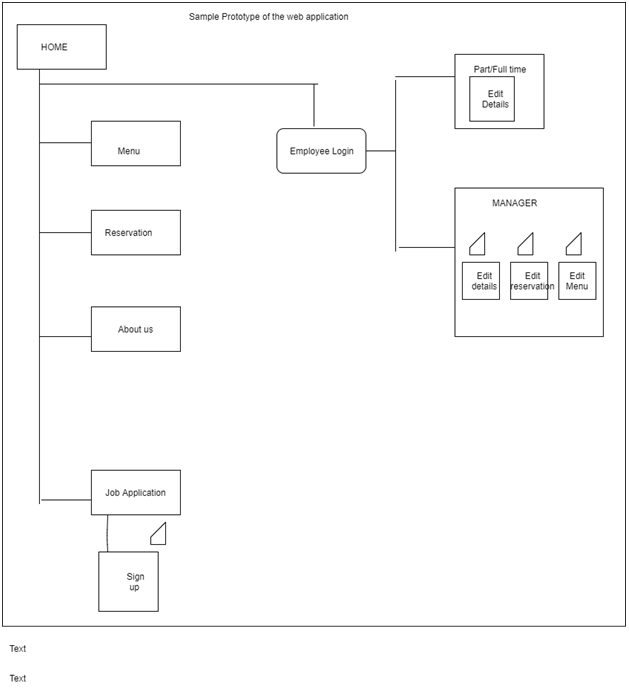
This site has 6 pages of HTML that offer different functionalities. The web pages are named as start, menu and reservations, about us, employee login and job application. The content of each page is explained in the Html section.

A prototype of the web application:

This  Restaurant Management System project has been developed by using  Servlets, MVC, and JDBC.

Download this project source code & Database for reference purpose.

Color Hunt Game Simple Java Project

Introduction:

Color hunt is an entertaining mind game that consists of letters with different colors arranged randomly on them.
In this game, we mention a statement of a precise color and letter, which we’re supposed to click in the block box fastly.
We need to click on the exact color which has been mentioned and the statement immediately keeps changing.

We may have one or many of the same colors with either the same letter or different letters.

If in case we don’t click on the mentioned block, we lose a point because we have Time Limit mentioned

The theme of the Game:

Basically, the color hunt is an application that is applicable only to Android Smartphones.
In this game, we get a statement that mentions the color and letter to be identified, and we’re supposed to click on them in the below blocks.
We may have letters with different colors or the same colors. Depending upon the statement, we must click.

We also have one or more than one block of the mentioned statement, we should make sure that we click on all of them within the time limit.
It consists of Different levels. Each with a time limit decreased.
The statement stays only for 15 seconds and we must click within the time.
If not, we will lose a Point.

Project Output:

System Requirements:

Language: Java
Technology: Java Technology
IDE: Eclipse / Netbeans
Operating System: Windows 7, XP, and any other windows version.

Hardware Requirements:

HARD DISK: 50 GB

RAM:  612 MB (Approximately)

Conclusion:

Basically, Color Hunt is just like a Brain Activity.
It is one of the Mindgames which works on speeding up your Thought Process.
It is also a fun game!

Here you can freely Download this Color Hunt Gaming Java Project Source Code, project documentation, PPT

Online Project Approval System .Net / PHP Project Synopsis

Domain: Workflow Management

Architecture: N-Tier Architecture

SDLC Methodology: SDLC Model

Objective:  In this Online Project Approval System project, we will focus mainly on automating the process of project submission. In the sense project topics will be submitted online along with doc and approval will be provided online by the head of the department along with suggestions if any. This will reduce the physical efforts of students meeting the head of the department and also reduce the time frame period of completing this part of project work. Students can also update their project status weekly and provide in for regarding the progress, which will be monitored by all relevant professors and head of departments. It will be useful for all students related to Engineering, MSc, M.Tech, final year students of any grad etc.

Description:

In general, the Project & Title will be selected from various sources and send it to the HOD like the Project Title along with a birds-eye view of the Project in a document called Project Abstract.  The HOD will accept the Project and allows the student to proceed and start working on the Project.

In the middle of the Project designing, the HOD also makes a request to the Student to send the Sample Code of any module as well.  And at the final, the Student has to prepare the necessary Documents like Project Final Document (contains Introduction, Modules, User roles, SDLC methodology, etc.), UML Diagrams, Powerpoint Presentation (PPT) of the Project flow for Demo and also takes the Database (as backup file to restore), Source Code and all the content in a Compact Disk (CD) and submits to the HOD along with printed hard copy.  The HOD will review all these documents and finishes the Project Review and enters the Marks into the College records.

Using this web application the above entire flow can be automated so that the Student need not submit any Soft copy (CD) of the project as well, the College need not maintain all the collected CDs of the students in the Library for records.

Using this web application, the Student can send a request to HOD for Project Title along with Abstract.  On acceptance of HOD, he/she can design the Project along with necessary documents and submit to the College over the Internet using College’s website.  In the HOD Project Review, the HOD can download the Project content from the College’s website (from the Internet) and can do the evaluation.  As well, the Student can also download the content from the College’s website and give Demo of the Project (by restoring the database, configuring the Project site, etc.) to the HOD.

User Types: Admin and Student

Modules:

Admin:

This module will allow HOD or any other admin login to log in and approve project abstracts submitted by students. Admin or HOD will add College Info which can be displayed on the dashboard. Will view project progress which has been submitted by the student and reviews it. Admin can add professors involved in the project. Add batch info for a year, course info for that year, course name, and these all info will be used by the student at registration process. Once the student registration is done, HOD will get a request for approving student registration. Hod or admin can also add project titles that have been approved for different students and they can be viewed by any registered student in the dashboard.

Registration:

The student will register and provide the necessary info. The application will be secure as registration will be approved by HOD and then the student can log in.

Project:

A student once logged in after registration will add abstract along with project name as tentative info in this module and that can be viewed by HOD.
This module will have the option to upload different files for the assigned project. It will have the option to add progress info date wise or weekly. A student can upload initial abstract from this module and then all other files for final submission.

Features and Benefits include:

  • Secured login and authentication with forgot password option.
  • Students Can upload and download documents and another sort of files as zipping.
  • The process of submitting projects abstract and getting approval has been made easy via the online application.

Future enhancements:

  • We can plan mailing module which will allow the student to send email to hod with attachments. View/ send/reply email options will be provided. It can be done in the form of the message center.
  • Registration process can be refined by adding email alerts whenever HOd approves registration.
  • Alerts or notification module can be added separately which will show notification icon and which when clicked will open the related info for which notification was received.

KEYWORDS:

Generic Technology Keywords: Database, User Interface, Programming

Specific Technology Keywords: Asp.Net 3.5, C#.Net, MS SqlServer-05

Project Keywords: Presentation, Business Object, Data Access Layer

SDLC Keywords: Analysis, Design, Implementation, Testing

Software Requirements:

Technical Aspects:
Database: SQL Server 2008  and more
Language: C# and Asp
Framework: .Net
Front-end: HTML, CSS, Javascript

It can also be done in Php, MySql as backend

Hardware Requirements:

Intel Core processor
RAM 4GB and Above
HDD 100 GB Hard Disk Space and Above
64 or 32 bit OS Windows 8 and above

Employee Pay Management System C# / PHP Project Synopsis

Project Understanding: This Employee Pay Management System application will basically handle salary management for employees that work on an hourly basis and contract basis. It will allow employees to register and login to access various modules including Timesheet module which actually allows the employee to save their days work on hourly basis. Employee can update his or her details after login. Information will be like educational qualification, technical experience, personal information etc. Employees can also enter their salary rate. The option will be provided to view salary slips on monthly basis. He or she can also apply leaves and also view their leave history.

User Types: Admin, Employee

Basic Modules involved in the project:

Login / Registration / Dashboard → Every employee working on contractual basis will register and once admin approves it will be able to log in. Once they log in they will be provided with different options to save their personal details, emergency details, permanent address, current address etc. They can add experience details related to all previous companies, add skill sets like proficiency in Java or .net etc.

Timesheet → This module will allow the employee to select the client, then select the project he or she is working, task and then provide comments like activity is done and add no of hours worked for any task. Multiple entries can be posted in a day with different no of hours. Depending upon no of hours saved, the monthly payment will be calculated. The option will be provided to mark a day as leave or weekly off. It will have a view wherein there will be a count, hours, work time and Off time. An employee can also enter his / her off hours like half n hour for lunch.

Leaves →  This module will allow employee to save or request leave type for a day or more. It will also have leave history grid to check the history of leaves.

Admin → Admin will actually manage the admin panel in the back end. Admin will create leave types. Will add projects. Will have option to approve employees registration. Will add different skill names, Add company profile with all details including logo, Employer ID, Address Currency, Owner etc,. Add clients and also add tasks. Admin will approve timesheets submitted by employees and then come up with pay calculations. Admin will approve hourly rate submitted by the employee.

Pay module → This module will have a grid wherein it will have the option to pull up employee working hours details and calculate their pay as per hourly rates approved by admin. This module will be accessible to admin only.

 Future Enhancements: 

  • We can come up with employee alerts wherein they will get alerts for approved leaves, approved timesheets.
  • We can provide reports module with a different type of reports.
  • We can also introduce invoice module too.

Software Requirements:

Technical Aspects:
Database: SQL Server 2008  and more
Language: C# and Asp
Framework: .Net
Front-end: HTML, CSS, Javascript

It can also be done in Php, MySql as backend

Hardware Requirements:

Intel Core processor
RAM 4GB and Above
HDD 100 GB Hard Disk Space and Above
64 or 32 bit OS Windows 8 and above

Advanced Vehicle Security System Project Synopsis

Abstract

This main & objective of this proposed project work is an attempt to design an advanced vehicle security application that can identify vehicle accident detection and fire detection alert can send the details over GSM to authorized persons.

In present existing security models, there is no such automation system which will send alert to the user when an accident is meet or if it gets caught with fire. It is very difficult to identify the vehicle in this situation.

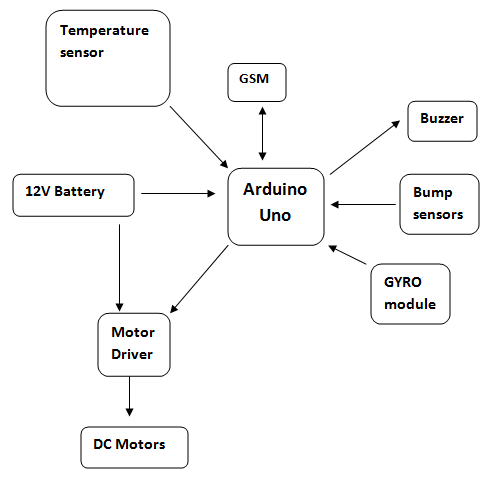
We are proposing the new security system for 4 wheelers, which will have given security to the vehicle. In this system, the vehicle will have Position sensor and bump sensors inside the car to detect the vehicle accident and we have a temperature sensor to detect engine overheating and alert the user in the car with buzzer sound and an alert is sent over GSM module.

The entire security system is controlled with Arduino UNO board. This complete system is designed taking into consideration the low range vehicles to provide them extreme security.

Required Components:

Temperature sensor
12V Battery
Motor Driver
DC Motors
GSM
Arduino Uno
Buzzer
Bump sensors
GYRO module

Block Diagram:

Image Encryption and Decryption using Blow Fish Algorithm

Abstract: 

Generally, we send many pictures to our friend’s relatives and others. The photos that may contain personal information so keeping them to at most secure is the important thing. So in this project, we implement the idea of encrypting and decrypting the image using BLOWFISH algorithm.

Encryption Process:

Data image as a plaintext and the encryption key are two inputs of the encryption process. In this case, original image data bit stream is divided into the length of the block of Blowfish algorithm.

Decryption Process:

The encrypted image is divided into the same block length of Blowfish algorithm from top to bottom. The first block is entered to the decryption function and the same encryption key is used to decrypt the image but the application of subkeys is reversed. The process of decryption is continued with other blocks of the image from top to bottom

The Single Module Present in the application is

User:

In this application user will register and log in with the username and password, after logging in the user will upload the image which is to be encrypted and then after encrypting the user will get a secret key to the user registered email id using the key and encrypted image

Existing System:

The existing system for this project the text information is encrypted by ASCII values or any special characters. In the existing system, didn’t use the safely sent the encrypted information into the mail. The hackers easily access that information. The encrypted text is didn’t restrict any secret key. So that information easily decrypted. Two common drawbacks of the visual cryptography scheme (VCS) are the large pixel expansion of each shared image and the small contrast of the recovered secret image

Proposed System:

Blowfish to be a publicly available cryptographic algorithm with the potential to replace DES. Blowfish is a 64-bit symmetric block cipher that uses a variable-length key from 32 to 448-bits (14 bytes). The algorithm was developed to encrypt 64-bits of plaintext into 64-bits of ciphertext efficiently and securely. The operations selected for the algorithm were table lookup, modulus, addition and bitwise exclusive-or to minimize the time required to encrypt and decrypt data on 32-bit processors

Screens:


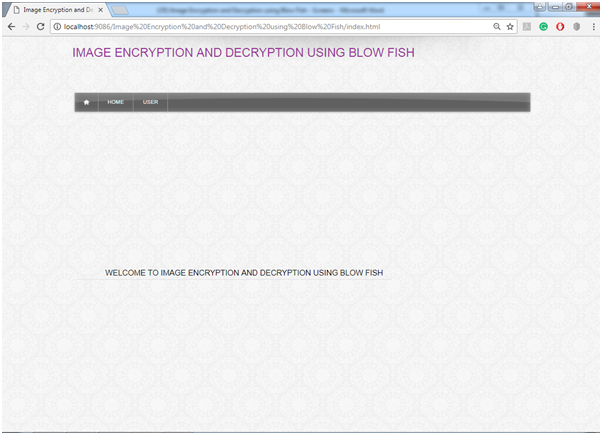
Fig: Home Page

This page shows the default view of the Image Encryption and Decryption application and showing the number of modules present in it.

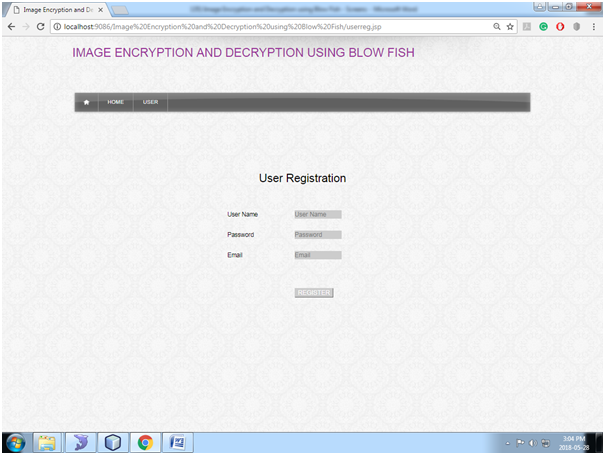
Fig: User Registration

In this page, new users will register the Image Encryption and Decryption application by entering all necessary details.

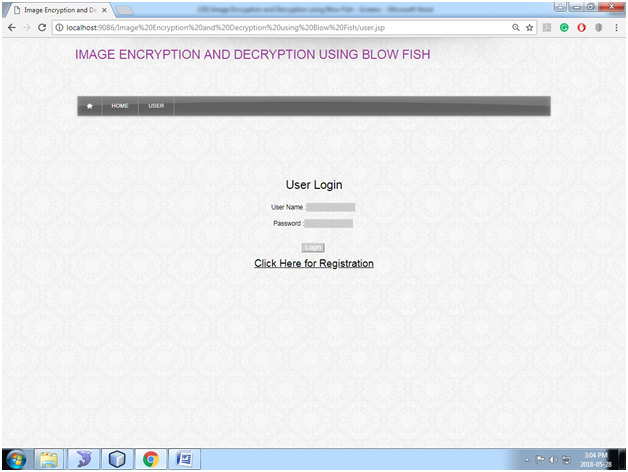
Fig: User Login

In this page, the user will log in by giving username and password.

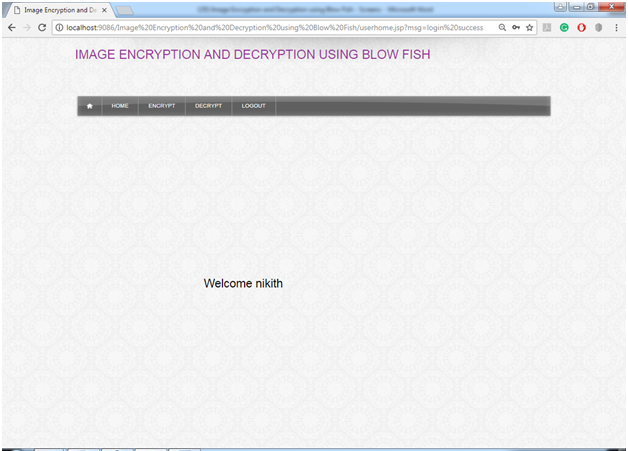
Fig: User Home

This page shows after the successful login and showing the basic functionalities that user can perform in this Image Encryption and Decryption application.

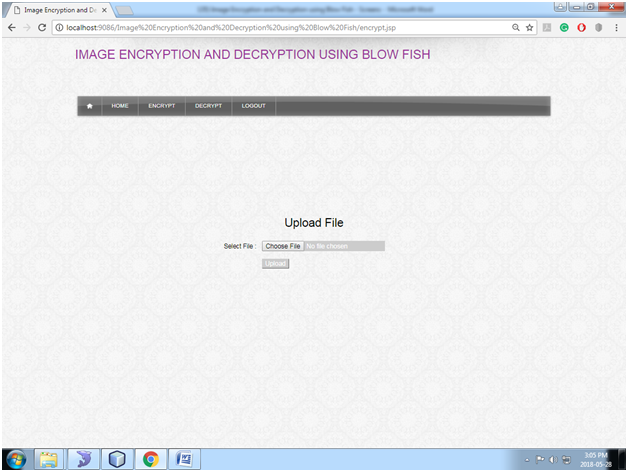
Fig: Encrypt Image

In this page, the user will upload the normal image to encrypt the image.

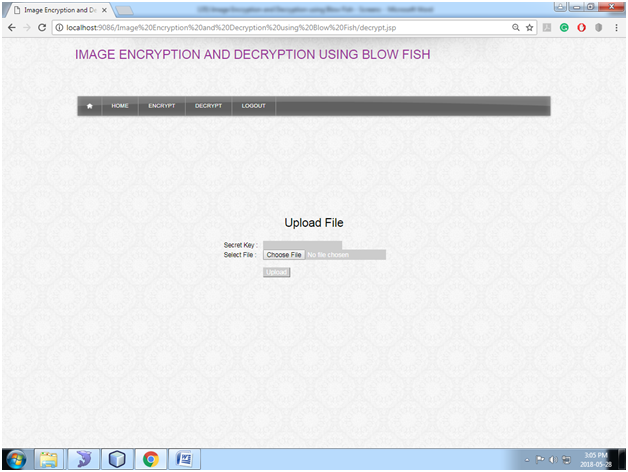
Fig: decrypt Image

In this page, the user needs to upload the encrypted image and secret key which is sent to user mail id.

Software Requirements:

 JDK 1.8, NetBeans 8.0.2, MySQL5.5, SQLYog

Online Test Management Application Project Synopsis

Online Test Management:

Online test application will provide an Online platform wherein students will attend online objective questions. Grades will be provided as per the number of questions that were answered correctly. This concept will use an admin panel as the backend for loading the questions and also identify whether the student has selected a correct answer or not. Questions will be segregated on the basis of different subjects.

The option will be there to add subjects also. Admin panel will be saving the data and communicating with DB via web service or API.  It will have a flow wherein a subject will be selected and that will load respective questions. Once all questions are answered result will be published there and then.

A student can see grades as per the number of questions that were answered correctly or will calculate the marks for all correct answers and show percentage of marks.

The whole process of conducting the test and checking them and then grading them was a tedious manual process and time consuming too. This whole process can be avoided by adapting to a new online text conducting application that will allow  a easy to approach UI wherein students can save their answers and also being graded much faster and their by publish results soon.

This software will also be secured as it will provide code match system which admin will provide to the student which each of them has to enter to start the exam. Student will also register themselves to appear to this exam. After successful registration admin will approve the registration and then the student will login to the online application system. We can also implement time constraint check for the completion of the exam after which student cannot attempt any question.

User Types: Admin and Student

Modules:

Admin:

  • Subject: Will have the option to add subjects for which questions will be uploaded.
  • Questions: This module will select a subject and then add questions to it along with correct answers for the same. This actually helps in checking whether student gave the correct answer or not. This part is basically admin panel which manages the question and answer that are save in DB and then provide instant results too.
  • Student: Admin will approve student registration for attending test online. Will also post results for different subjects for which student has appeared.
  • Grades: Admin will define grades as per percentage of correct answers given by the student. All those calculation are taken care in this module.

Student:

  • Exam: Once logged in a student will have set of questions which will be objective and he or she has to select the correct answer. It  will be a UI with questionset being loaded on the basis of the subject selected.
  • View Result: This module will be a UI where in result will be shown in a grid grouping them subject wise. Grade and percentage of marks will also be shown for the student who has appeared for the exam.

Contact Us: Will show info related to contact numbers and also search filters.

Future Enhancements:

  • We can provide email notifications and SMS integration. This will require web service or API integration with SMS providers and SMTP configuration to handle emails. It will notify students once results are posted by admin.
  • Add Blogs that can be posted by students.
  • We can plan a social platform in the same application where in students can chat with other registered students. Can also like comment and share posts from other students. Admin can also post info and students can access it. Post pics and share them too in groups created by students.

Software Requirements:

Technical Aspects:
Database: Sql Server 2008  and more
Language: C# and Asp
Framework: .Net
Front end: HTML, CSS, Javascript

It can also be done in Php, MySql as the back end with other frameworks

Hardware Requirements:

Intel Core processor
RAM 4GB and Above
HDD 100 GB Hard Disk Space and Above
64 or 32 bit OS Windows 8 and above

Online Notice Board Project Synopsis and PHP Source code

Online Notice Board

Online Notice Board is an application that will automate a lot of activities in a school or college or office etc depending upon the usage that is expected by different organizations. If it’s a school they can use it for displaying info related to different extracurricular events and winners info.

They can display info on all teachers in various departments, display timetables for students, and display the results of students. They can display info related to any holidays or info related to any fee collection scenarios or any common regulations that are announced by management. In the same way, it can be used by colleges also.

In this project, we will aim to provide a way to automate the way in which noticeboard messages can be updated, deleted, or removed. Provide access to students/ professors or administrative etc officers to different features which will provide various information.

We will also provide roles and based on them permissions will be granted to add or remove data to notice board features.

You can also visit & download the Notice Board PHP project on Online College Complaints Suggestions and Compliances.

User Types: Admin, student, professors, staff,

Modules:

Admin: Will have access to modules Departments, Result Board, Fees Board, and Timetable board. Admin can log in and add departments in the department module. Can add results in the results module which will then show the related info on the board. Will upload the timetable schedule daily. Admin will approve student registration logins / Professors logins etc.

Student Registration: It will allow students to register. Once registered request will be sent to admin and it will be approved. Approved student login will have the option to view results, fees-related info, and also access the timetable.

College Profile: It will allow the admin to add all important info related to the college. The option will be provided to add information like year of start, no of professors, batches completed, classes, courses offered, etc.  Information saved here will be seen on the dashboard of the notice board by default for all logins. Will provide an option to add photos or pics of the college. For a student or professor or staff, this module will show info that has been saved and managed by admin. Hence views will be different in the case of admin when compared to other login types.

Departments: This module is accessible to the admin, it will allow the admin to add departments to it. A student can also have access to this module but his or her view will be to view all departments in college or school and view info regarding different departments.

Courses: It will be accessible to admin and will allow adding all courses provided in college or school. For other login types, it will  a view that provides information related to courses that are being offered.

Subjects: It will be accessible to the admin and it will allow the admin to add subjects to the courses that are being covered. Add max marks for each subject that has been registered. Subjects will be added to different courses and hence a flow will be followed for managing courses, subjects, and professors teaching that course, and subject.

Roles: It will be accessible to admin and it will help create different roles applicable like as clerk, accountant, professor, assistant professor, principal, etc.

Professors: It will allow professors to register and link themselves to their respective departments while registering. Also, add different subjects that can be taught by a registered professor. Add info related to the experience which professor has.

Staff: This module will allow registration for staff members other than professors. And provide their information that can be saved in the system.

Results Board: It will allow the admin to save marks for each subject for a registered student. It Will calculate the percentage of marks and other calculations needed. This will be accessible to students and admin with different views. For admin, it will be a view that will allow admin to add marks for subjects for which students enrolled. For a student, it will have a view that will allow him or her to view the results.

Fees Board: This module will have the option to add fees for different courses offered and then also maintain the fee payment details for students. Whichever students are registered in the application, the admin will update fees-related info to keep a track of all the related info. For any logged-in student, this module will show a grid or UI where in it will clearly show the fees per year, and records related fees that have been paid by a student already with date, amount, etc. it will also show pending fees amount too. All info that has to be shown has to be maintained by the admin. This module is available for both admin and students.

Timetable Board: This module will have the option to upload timetable info daily as a part of the attachment. Admin can upload a printout that can be viewed by students and professors. This module will be accessed by both admin/professors and students. The timetable uploaded by the admin can be viewed by logged-in students and professors.

Also Read this Java Project on Students and Teachers based College Notice board System

Existing System with Limitations:

The existing consists of paper-based notice which has to be carried by the human to every organization. Due to this, it has some disadvantages:

  • The paper may be torn or damaged due to bad weather conditions.
  • The paper has to be stored in some sort of file and managing physical files is tough.
  • The searching is very difficult to view a particular paper.

Future enhancements:

  • We can provide SMS-based integration for registration confirmation. Email-based confirmation to provide approval confirmation.
  • Send results as an email to registered students and send SMS alerts whenever results are sent to the email or updated by an admin. Alerting module can be worked out in the future.
  • Online fee payment for registered students with payment gateway integration.
  • We can develop a comprehensive timetable module that will automate the complete process of generating a timetable online.  

Software Requirements:

Technical Aspects:

Database: SQL Server 2008  and more
Language: C# and Asp
Framework: .Net
Front end: HTML, CSS, Javascript

It can also be done in Php, and MySql as a back end with other frameworks.

Download the complete project on Online Notice Board System PHP, Bootstrap, CSS, HTML, and MySQL Project Source Code.

Online College Voting System Java Project

ABSTRACT

This system provides an online tool for the students to vote on different questions posted by admin. In this system, there will be two main pages to be able to access: Admin page and user Page.

From the Admin, page administrator will be able to design the voting application and upload new questions on different topics which are relevant to college students. From the Voting page, the user will be able to view all questions and vote for the interesting question.

According to the login credentials, the system will determine if the user is Administrator or the user and open the pages given access to the user credentials.

Modules Implementation:

Admin:

Admin can log in with username and password and upload information like questions and four options for each question.  Admin can view answers given by students in graphical view in percentage.

User:

The user will log in with student roll number and view all questions posted by admin and student can vote for all questions.

EXISTING SYSTEM:

In the existing system, there are no specific websites dedicated to colleges who can participate voting from any location. There are many applications on e-voting for political parties but there are very few web applications which are used for voting or general questions or college-related topics questions. 

PROPOSED SYSTEM:

In the proposed system, we are developing e-voting system for college purpose which will have features of admin and user. Here admin will post questions based on social topics or subject related topics related to college. Students can log in and vote to topics and view percentage of votes for each question.

SOFTWARE REQUIREMENTS:

  • Operating system: Windows XP/7.
  • Coding Language: Java
  • Tool: Netbeans
  • Database: MYSQL