Implementation of Floyd’s Algorithm Java Project

Existing System:

The existing system is provided with the algorithm that consists of only insertion and deletion of vertices, edges, and weights. It is not provided with the actual graph that is to be considered but has only provided with the matrix that is to be determined.

Disadvantages of Existing System:

  • It can perform insertion and deletion only.
  • It cannot perform replacement of weights.
  • It doesn’t generate a graph by which the problem complicated to the user.

Proposed System:

The proposed system is being provided with insertion, deletion and also the replacement of weights compared to the existing system. This is provided with an option to solve using an actual graph that is either directed or undirected. Here it asks for nodes and corresponding weights to form a graph. This is used to calculate and gives the shortest path from one node to other.

Advantages of Existing System:

  • It can perform insertion, deletion, and replacement.
  • It generates a graph to explain the problem easily.
  • It is also used to find the shortest path.

System Design:

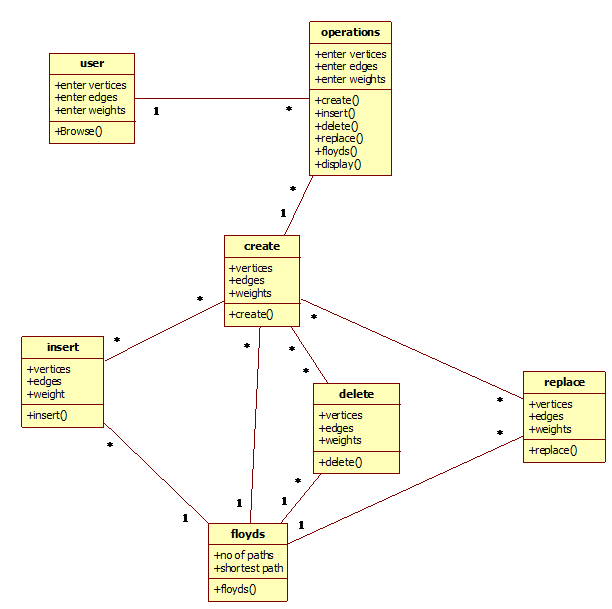
Class Diagram:

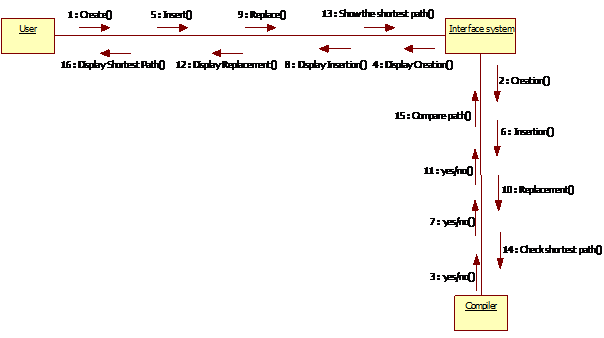
Collaboration Diagram:

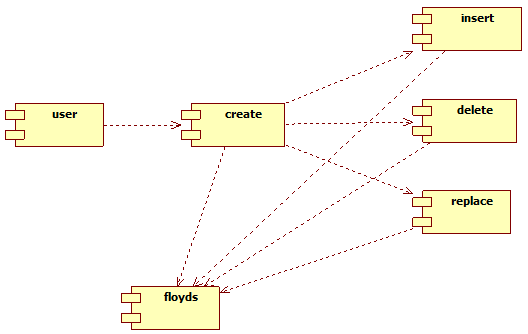
Component Diagram:

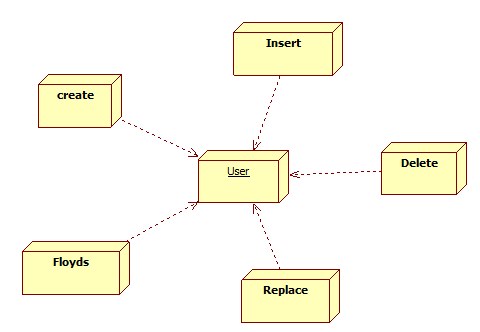
Deployment Diagram:

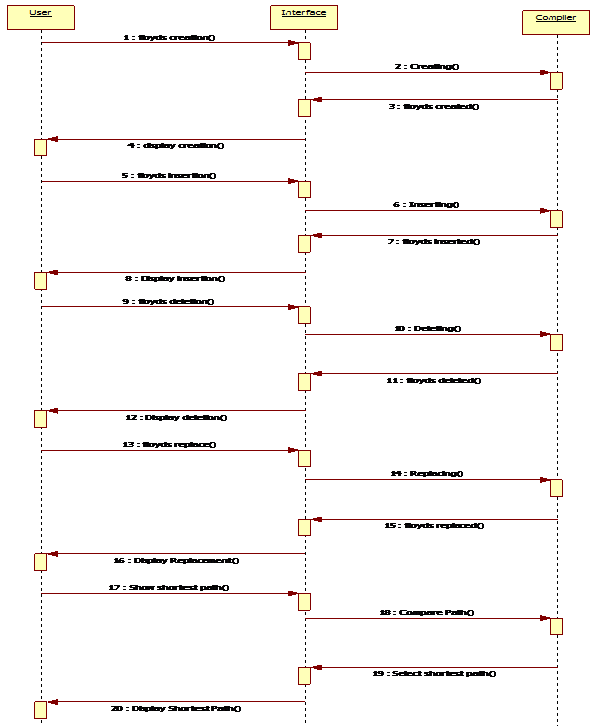
Sequence Diagram:

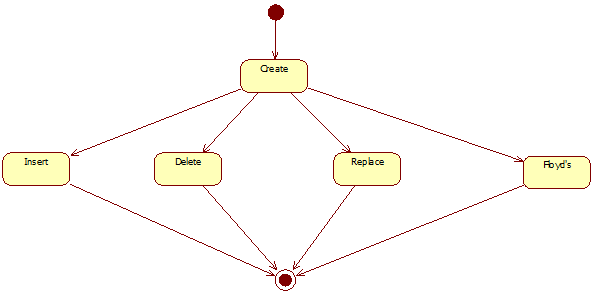
State Chart Diagram:

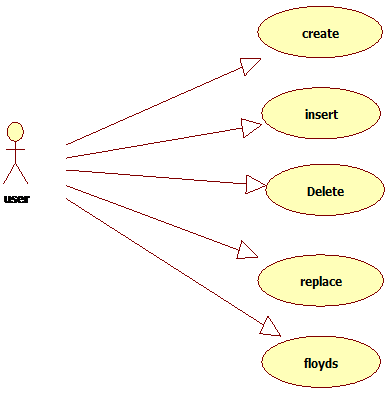
Usecase Diagram:

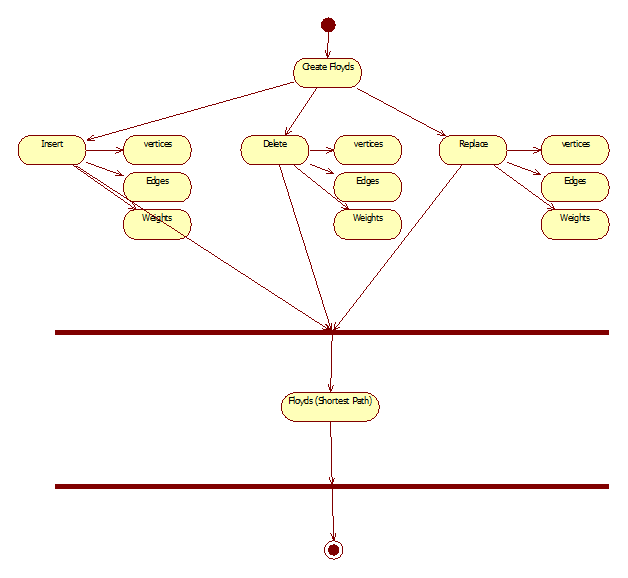
Activity Diagram:

Modules included in this project:

Creation Module:

This module helps the user to create a number of vertices and edges.

Insertion Module:

This module helps us to insert a number of vertices and edges present in the algorithm.

Deletion Module:

This module helps us to delete specified vertices or edges in the current graph.

Floyd Module:

This module specifies the algorithm’s logic used in the program to find the shortest root in the network.

Replace Module:

This module is used to replace the weights with the existing weights and also used to exchange the positions of the nodes.

Software Requirements:

Language: Java

Operating System: Windows

extract and run index.html on chrome.

Download Implementation of Floyd’s Algorithm Java Project

Chores Made Easy Home Repairs Java Project

Introduction

We have management systems for different applications such as schools, library, hospital etc. but our main objective is to develop a web-based application for homeowners with critical home repairs, accessibility modifications, and energy-efficient upgrades. This project helps to bring the communities together in efforts to assist those in need of general home repair and improvements. In this project, the Homeowners must submit an application form with a request. Then the admin review the received application and assign work to the respective employee based on skills and availability

Proposed Web Application Portal

  • Application portal being designed will help to integrate different functionalities of the organization by coordinating different users of the application through the single portal.

Modules of the System:

  • Applicant (Home Owner)
  • Admin
  • Employee (persons skilled at a wide range of repairs, typically around the home)

Current Work Flow:

  • Homeowners must submit an application form with a request.
  • The admin reviews the received application and match the information to the eligibility criteria and accept/decline applications accordingly.
  • The admin later makes a list of all the home repairs that need to be scheduled.
  • The scheduled work orders are then allocated to respective Employee based on skill set, availability etc.,
  • Admin also maintains employee information in their database.
  • An employee can register online and view projects assigned to them through the portal.

 Applications Module:

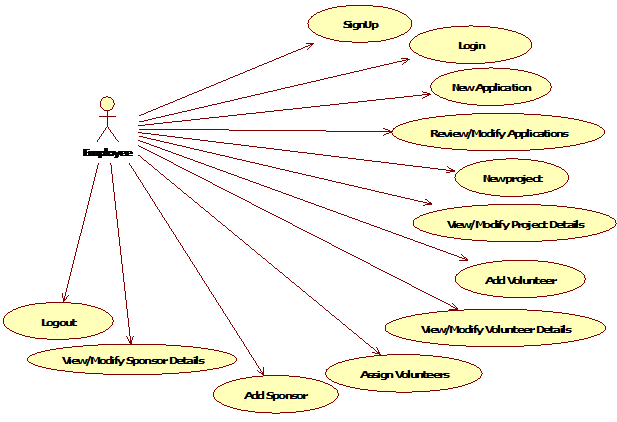
  • New Application: All applications sent through the mail are keyed into the system through this page. This is same as the online application form.
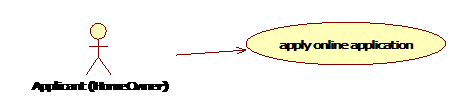
  • If there are any type of repairs related to home, then homeowners can simply visit our website and can send a request for serving all those home related repairs through this application module

Admin module:

  • Review/Modify Applications: Applications are modified and are approved or rejected by the admin through this page. Applications to be modified can be searched by three options. From date to date, by the last name and by status which can be pending, approved or rejected.

System Design:

Data Flow Diagrams:

UML Diagrams:

Employee Use Case Diagram:

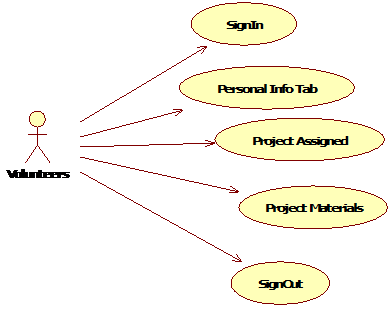
Volunteer Use Case Diagram:

Applicant (Home Owner) Use case Diagram:

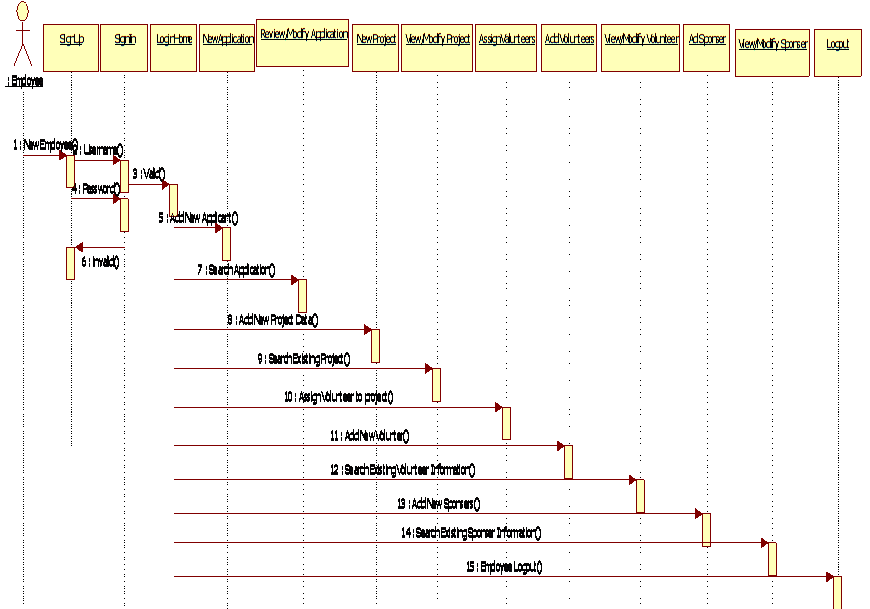
Employee Sequence Diagram:

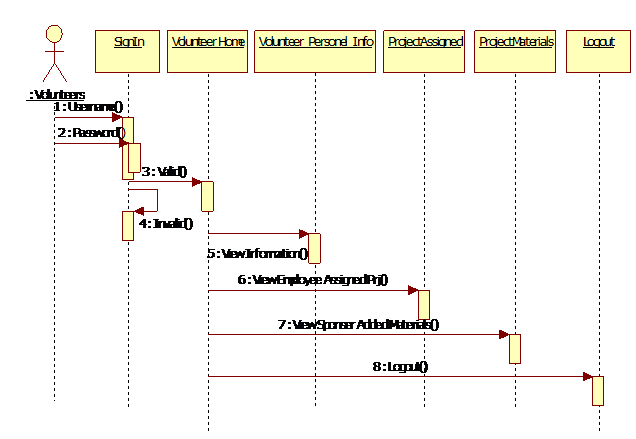
Volunteer Sequence Diagram:

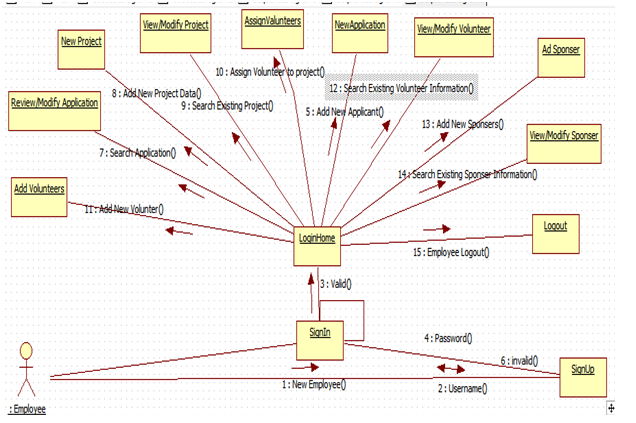
Employee Collaboration Diagram:

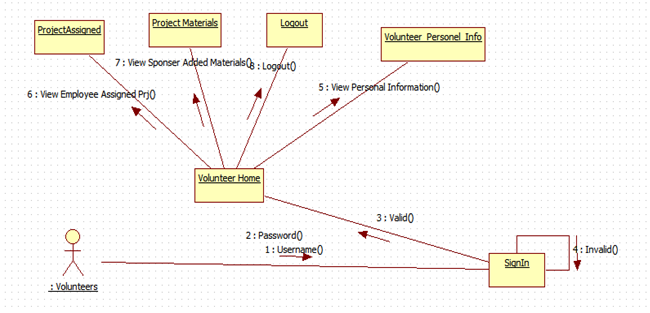
Volunteers Collaboration Diagram:

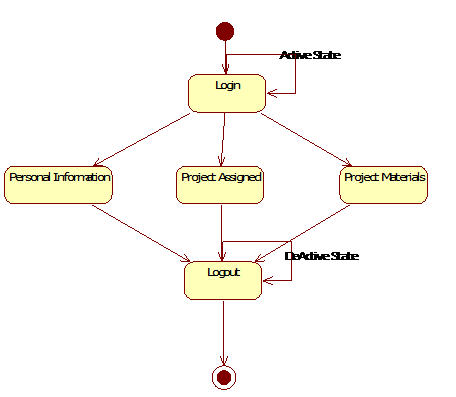
Employee State chart Diagram:

Volunteer Sate Chart Diagram:

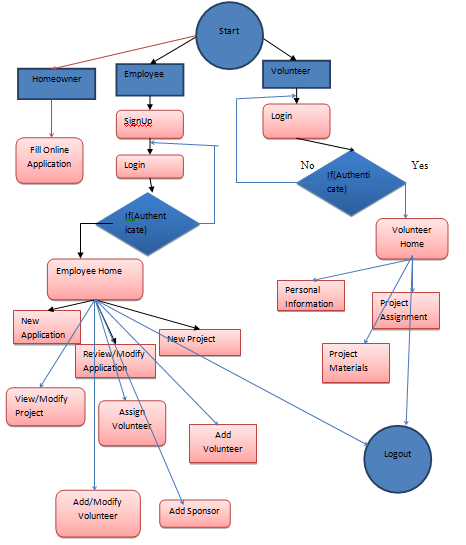
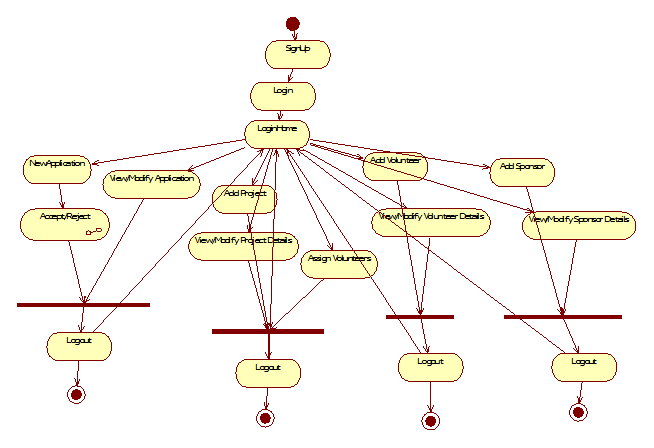
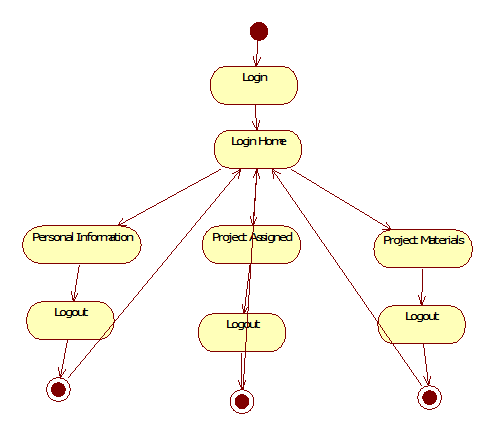
Employee Activity Diagram:

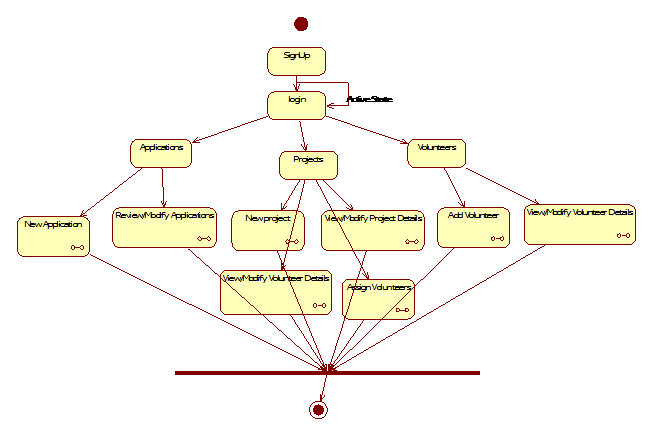
Volunteer Activity Diagram:

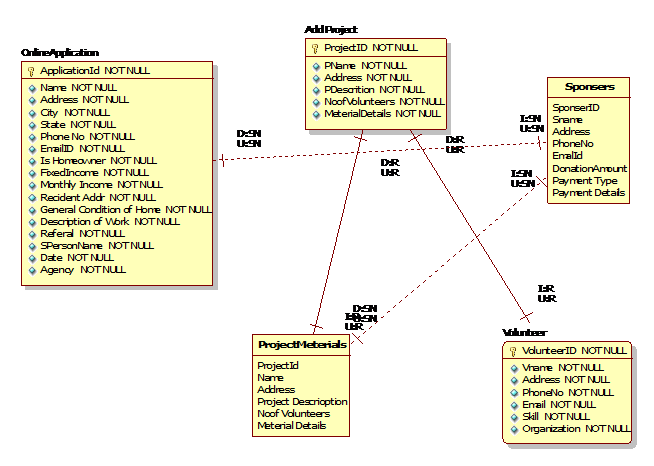
ER_Diagram:

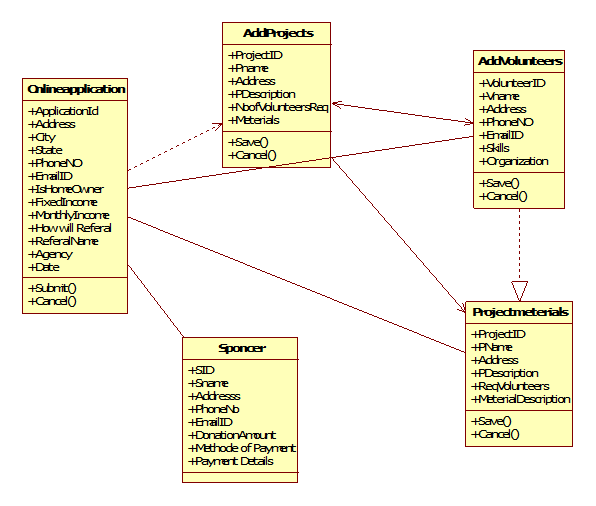
Class Diagram:

Projects Tab

  • New project: Projects are created for all approved applications. Application for which project is to be created is selected using the search button. Pop up should open on clicking search and should display all approved applications with no projects created on the dashboard by default.
  • View/Modify Project Details: Project is selected from dashboard which is displayed when searched with the last name. Click on Project ID should redirect to View/Modify Project page. This is same as new Project page but with all editable fields except Project ID.
  • View/Modify Employee Details: Project search page is same as view/modify project details. Click on Project ID should redirect to View/Modify Employee page. “NO Employees Assigned” message should be displayed if no employees are assigned. Employees assigned are displayed in a table. Task and House captain fields should be editable.
  • Assign Employee: Click on Search button for Project ID should open a pop-up. It should display project ids with no employee assigned. On selecting a project all details related to that project should be displayed on assign employees page.

Handyman Module:

Handyman Sign-in

  • A new user should register by providing all details given in Personal details page.

Handyman Home

  • First time sign into the portal for the current year (May 2108 – April 2018) should display a message
  • “Do you wish to be Handyman for the XXXX year (current 2018)”.

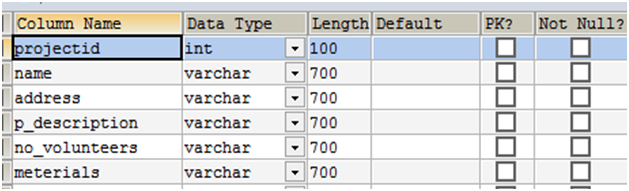
Project Table Structure:

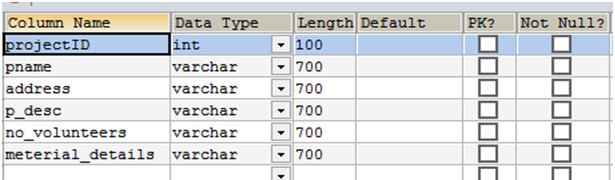
1. Add project table:


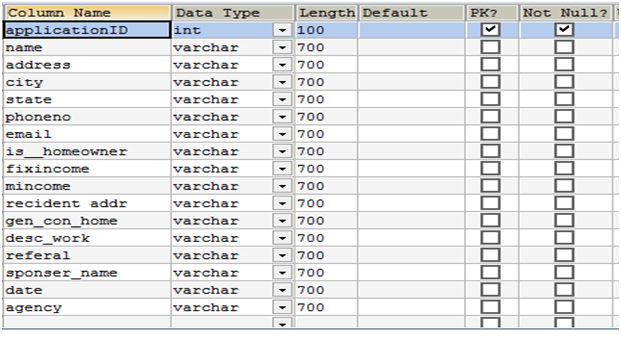
2. Online application table


3. Project materials table


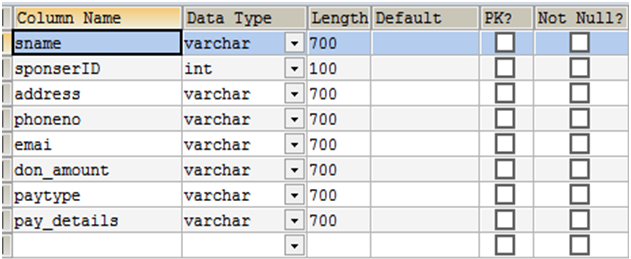
4. sponsors table

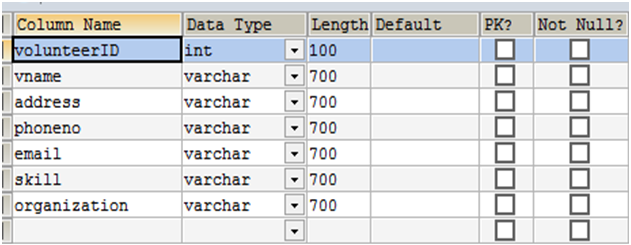
5. volunteer table

Download Chores Made Easy Home Repairs Java Project.

Online Course Management System Java Project

ABSTRACT 

The main aim of the developing this project is to provide live interactive virtual classroom site for online course importing affordable learning. This web application gives an opportunity to the students to get advantages of personalized learning. It offers course modules, assignment & performance tests to master the subject.

The main objective of delivering one of the most technologically advanced qualities online tutoring platforms.

EXISTING SYSTEM:

Offline education has been a part of our education system for as long we can remember.

In the existing system, we can store all the record manually that require large manpower & place to store all the records
this system was carried out through a manual process.

DISADVANTAGES:

It leads to following disadvantages.

  • Manual process.
  • Maintenance of records is difficult.
  • Chance of occurrence of errors.
  • Involves large amount of paperwork.
  • Slow updating & renewal of data 

PROPOSED SYSTEM

Automated To overcome the disadvantages of the existing system we proposed the online system.

The best technology learning tools such as video lectures, group chats, multimedia presentation & interactive software are used by us to provide online education.

This application introduce all types of question papers and solutions regarding the course

It also provides an audio lecture for each subject.

ADVANTAGES

  • The automated system is time-saving and better performance than the manual based system.
  • Students are encouraged to think critically & support their opinions.
    It supports the learning style of both audio and visual learners
    class time is not wasted.
  • Students who excel in online class develop a system for keeping track of upcoming online exams and assignments due dates.
  • There are no traffic jams, parking hassles are adverse weather conditions
    it enables the students to access course materials & contributed to discussion boards.
  • Home comfort.
  • Cost savings.
  • Schedule flexibility.

Automotive Pricing Aggregator Java Project

Generally, Automotive Pricing Aggregator is a Java Based web application which will handle the auctions or sales of cars/bikes. The auctions in the application are posted by dealers and users registered in the application can participate in the auction and bid the amount.

The Dealer will register into the application and activated by the admin. After Successful Dealer will have to maintain the auctions like delete the completed auctions and post new auction.

The auctions are managed by dealers. Users who registered and login need to search for the vehicles the search results will be displayed based on the user’s location and the results are displayed in such a way the distance traveled by the vehicle, year of manufacturer.

For this, we will have Pricing Aggregator. First, we will check in our database if any present it will show by calculating above details and then we will check online.

The Modules Present in the Project is:

  1. Admin:

Admin can View the dealers and customer’s registered and delete the products and search the products and view the feedback given by customers

  1. Dealer:

The dealer will register and login into the application he can edit/update his profile, search products, and manage auctions, view customers and their feedback

  1. User:

The user will register and log in and search products and view auctions and view the new cars and participate in the auction by bidding amount and give the feedback.

Existing System:

Existing System is completely manual so it is hard to maintain data and analyze the pricing of various vehicles. Retrieving the information is very difficult. To Overcome these problems, we Proposed this Project

Proposed System:

Proposed system all the records will be computerized and the users and dealers can be registered and participate in auction directly. All The records are computerized and retrieving information of any type will be just a matter of seconds.

Online Pharmacy Management System Java Project

Abstract

The main aim of developing this application is to supply the medicines all over the country by just a single click and to reduce the time consumption. Online pharmacy is a web-based application. The user can post requirement for medicine. TUser can purchase medicine online. Medicine is provided at your doorstep by the nearest associate store. The prescription is mandatory for ordering medicine. As per the prescription, the user can search medicine and useful information. This application provides information for daily consumption of medicine. This application provides user login to the customer. And admin can get the all expired medicines information and he can able to see all orders information of clients.

Existing System

The customer goes to the shop and purchases the medicine required. So a lot of time is wasted and the person gets tired. If he wants to exchange the product, once again he goes to the shop and replaces them. The complete process depends on the physical interactions.

Proposed System

The Online Pharmacy is easy to use and order. The customer selects the required medicines and orders them by a single click. Before it, the customer needs to create a login account and fill all the details like name, address, any id no…Etc.  The client can able to view the status of the medicines. The business goal for the application is to provide the medicines to all the people & admin will provide the supplier details.

System Design:

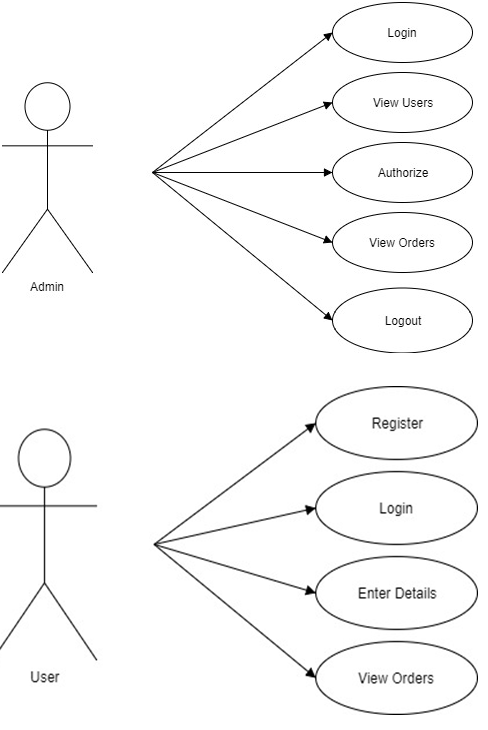
Use Case Diagram:

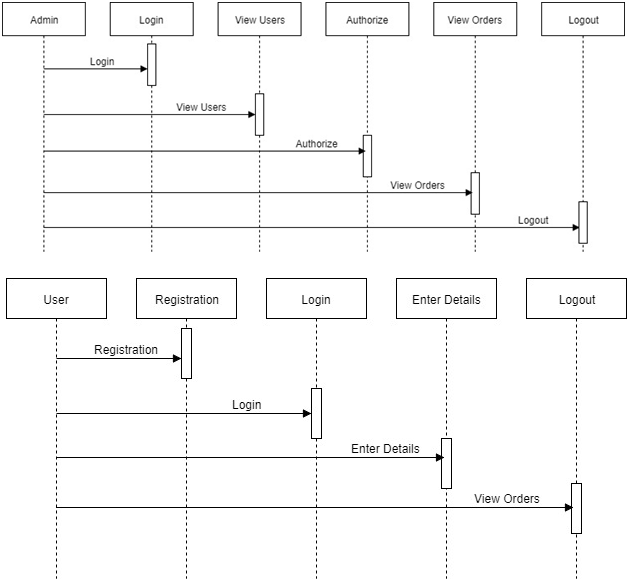
Sequence Diagram:

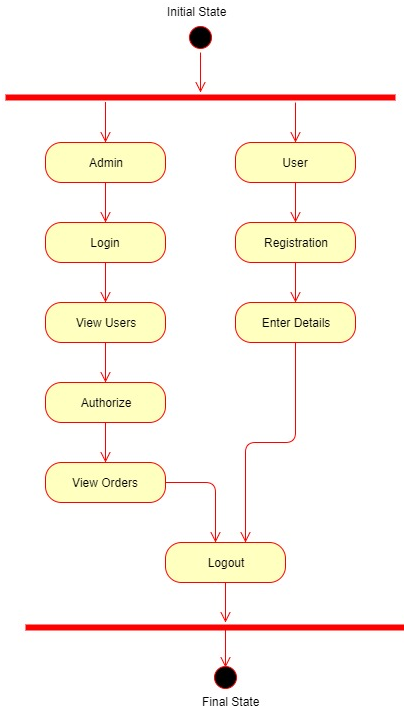
Activity Diagram:

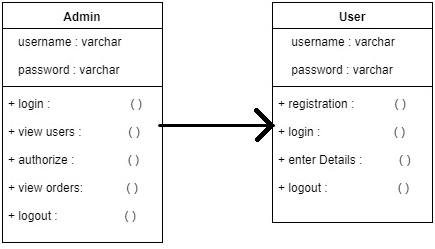
Class Diagram:

 Our Application provides the following things:

  • To provide login facility to the customers.
  • To provide a list of all available medicines to the customers.
  • To update all the list of expired medicines.
  • Medicines are delivered at your door-step. 

Modules: 

Admin:

He can able to add the new medicines information which are visible to the clients. And he can view the expired medicines information .and he can able to update the medicines status .he is behaves like the manufacturer of medicines and he will add the supplier details to the client. 

User:

User should follow the some authentication process. He can able to logging into our application by providing valid user name and password .after that user can able to search the medicines and he will order the required medicines information through online.

Online Pharmacy Output Screens Below:

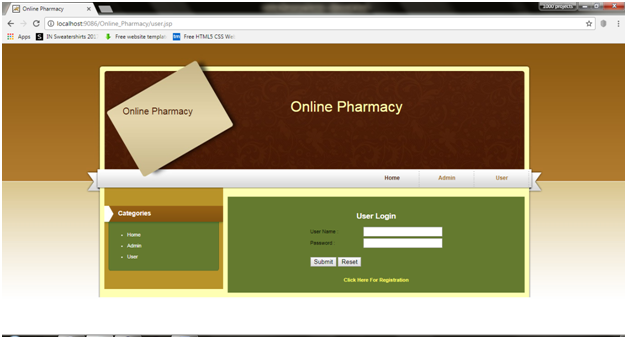
Home:

User Home:

User Main Page:

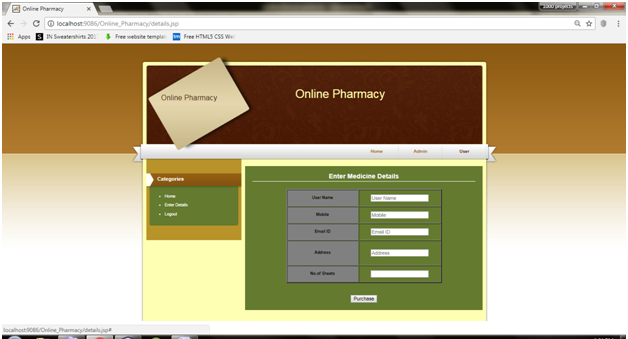
Enter Details Page:

Admin Home:
Admin Main Page:

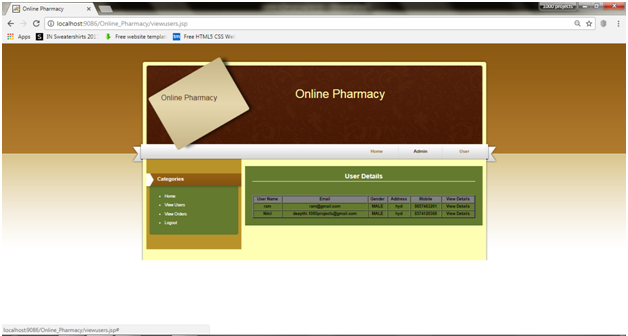
Users Details Page:

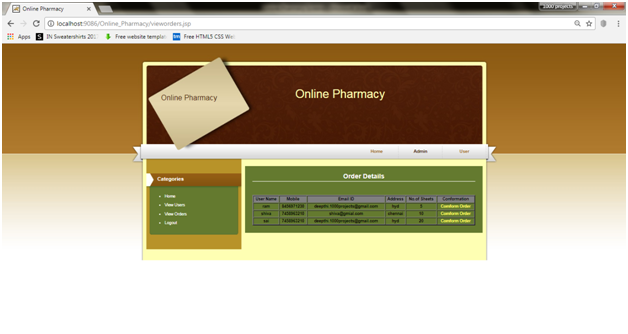
View Orders Page:

Farmers Buddy Java Project

Abstract:

Farmer’s buddy is a java based application for farmers to know which season is better for which crop and what soils are used for crops these are clearly known in this application. In this application, the admin will log in, add seasons, season time and what soil suitable for what crop also admin add the all the necessary details. Admin can view the user queries if any registered user sends the query to the admin and admin sends the solution to the user.

There are two modules in the application:

  • Admin
  • User

ADMIN:

Admin login into the application by giving username and password, admin can add the seasons, season time and view the queries sent by the user and admin sends the solution to the user.

USER:

The user will register and login into the application by giving username and password. The user sends the queries to the admin, the user gets the solution from the admin.

EXISTING SYSTEM:

In existing, the farmers don’t have enough knowledge on which soil is better for which crop and they don’t more income.

PROPOSED SYSTEM:

In proposed system the users get direct information from the admin, the user sends a query to the admin and getting solutions from the admin, the user should know which season is better for which crop.

Output Screens:

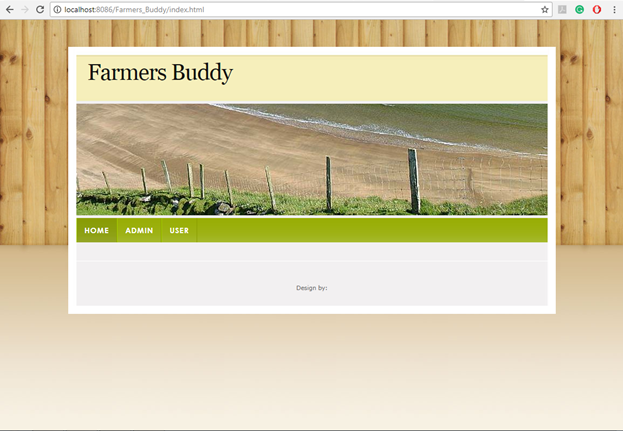
Fig: Homepage


This page shows the basic view of how the home page of the Farmer’s buddy application looks showing the modules present in the application.

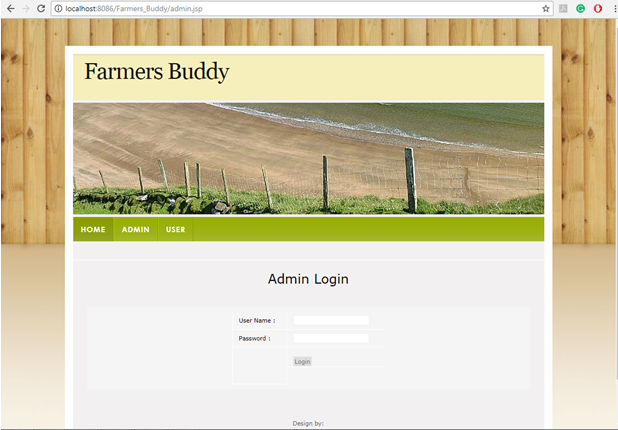
FIG: ADMIN PAGE


In this page, admin can login into the application by giving username and password

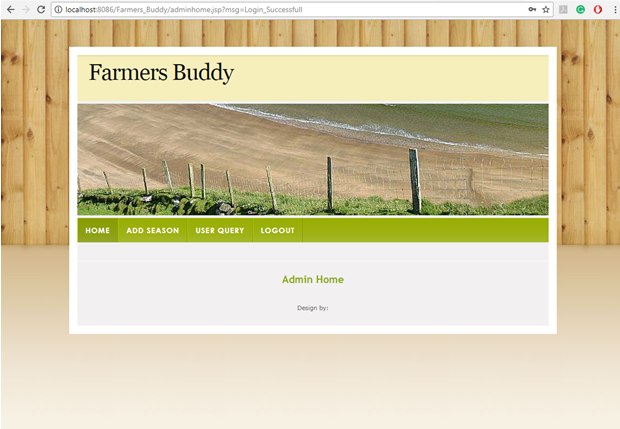
FIG: ADMIN HOME


Successful login the home page of admin shows the basic functionalities of admin.

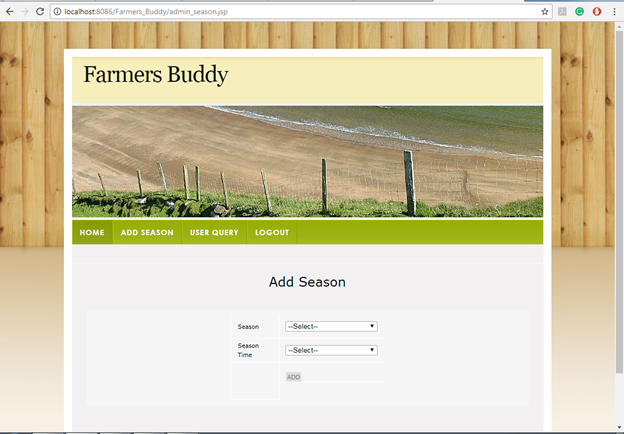
FIG: ADD SEASON


In this page, admin can add the seasons and season time.

FIG: USER QUERY
In this page, the user can send queries to the admin.

FIG: SEND QUERY


In this page, the user can send queries by selecting the season, season time, soil to the admin.

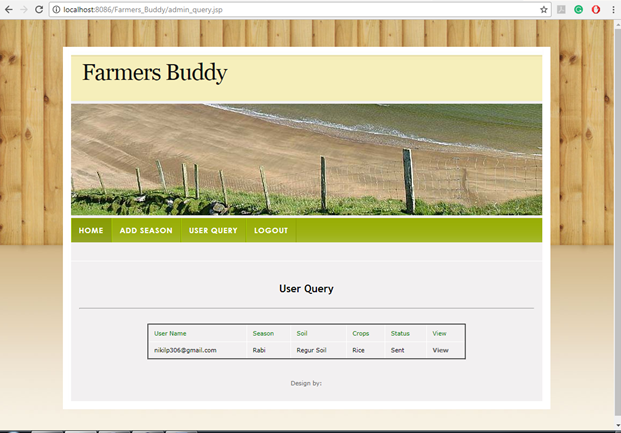
FIG: USER QUERY


In this page, admin gets the queries from the user and admin views it.

FIG: SOLUTION
In this page, users get a solution from the admin.

Software Requirements:

• JDK 1.8
• NetBeans 8.0.2
• MySQL5.5
• SQLYog

Digital Asset Management System .Net Project Synopsis

Project Title: Digital Asset Management System

Domain: Open Industry 

Sub Domain: Management 

Architecture: N-Tier Architecture

SDLC Methodology: SDLC Model 

Objective:

This System helps in creating and managing a data repository of the inventory pertaining to the hardware and software of IT resources in an organization. It will also be used to manage related documents of all employees which will be saved with security and authenticity. It will have options to register employees, save all related infrastructure items. Comprehensive role management will also be provided as per improved security. 

Description:

This System helps in creating and managing a data repository of the inventory pertaining to the hardware and software of IT resources in an organization.

The IT inventory list basically consists of computers, monitors, software, network devices, printers, plotters, scanners, cartridges, etc. Asset Management, which has two major components, an application to maintain the inventory data pertaining to the installed hardware and software of a computer and its associated peripherals, and second component named which helps in the management of these inventories. The Second module makes use of the data captured by the First and the financial and commercial data pertaining to the inventory. The financial details include data on the invoice, warranty, AMC and the commercial details include data on suppliers, contacts, contracts etc. The financial and commercial data have to be entered manually into the System. The data captured could be imported into System; also manual entry of inventory data is possible in the Software. 

Features:

Inventory of Asset types like Computer, Laptop, Projector, Chairs

Maintaining the Data about the AMC Details.

Raises warnings on Antivirus and AMC Expired date.

Maintains asset information as branch wise in the organization

Maintains the invoice details about Asset

Scope:

This System helps in creating and managing a data repository of the inventory pertaining to the hardware and software of IT resources in an organization.

Admin login into the system through credentials

Admin will add the Branch details

Admin will add information room, floor details

Admin will add the assets information into the system

Admin will add the assets invoice information

Manager login into the system through his credentials

Asset Manager will change assets from one location to another

The system will display expire dates about software like antivirus etc.

Admin will add AMC Details

The manager can view the AMC Details

The system maintains all asset information like computers, chairs laptops etc. 

Out of Scope:

Asset information that might have changed in long timeframes.

AMC contact details information may change.

MODULES

Administration This module is accessible to admin only. Admin can add all assets that are maintained in an organization. He will add company info first. Then will add branches and then related assets and all related information. Will have access to related modules to add the necessary info.

Asset Management this module is for adding different assets and its related info to the application. It will have grid view also to see the added info.  It will have add/ edit and delete option for any asset held in an organization. It will have the option to add AMC info to and upload attachments related to the same for related assets. It will have the option to update the status of an asset like a computer if it is in repair wherever applicable.

Registration Employees has to register themselves and their login will be approved to access the application. Employees can raise a complaint against hardware issues for the assets they are using.

Reports Will be used by admin and management officials to see the status of assets used in the organization as a snapshot.

Roles This module will be used to grant roles to different employees who have registered and access will be granted to them to different modules as per the assigned role. 

Users

Administrator / Asset Manager / Employees

KEYWORDS:

Generic Technology Keywords: Database, User Interface, Programming

Specific Technology Keywords: Asp.Net, C#.Net, MS SqlServer-05

Project Keywords: Presentation, Business Object, Data Access Layer

SDLC Keywords: Analysis, Design, Implementation, Testing 

Software Requirements:

Technical Aspects:
Database: SQL Server 2008  and more
Language: C# and Asp
Framework: .Net
Front-end: HTML, CSS, Javascript

It can also be done in Php, MySql as backend with other frameworks

Hardware Requirements:

Intel Core processor
RAM 4GB and Above
HDD 100 GB Hard Disk Space and Above
64 or 32 bit OS Windows 8 and above

Tutor Student Portal PHP Project

This is Tutor Student Portal PHP website based on HTML, CSS, and PHP and below is the project idea.

The main aim and objective of this  “Tutor Student Portal” web application is the place where a student can easily find a tutor and vise versa.
Student Features:

  • He should give all his details like Name, Email, Phone Number area and pin code at the time of sign up.
  • After the LogIn student must have an option to post his need of a tutor. In that he needs to give his class, subjects need to be taught. This should be controlled by the student. When he gets the tutor he can delete his need in the site.
  • Based on the details filled by the student, a tutor can find the student.
  • In the home page of the student, he should be able to find the tutor based on the pin code, location through a filter (just as online shopping filters) so that student can get the information and contact details of the tutors who are available nearby him.

Tutor Features:

  • He should give all his details like Name, profile pic, Email, Phone Number, age, subjects he can teach, qualification, area and pin code at the time of sign up.
  • Tutor profile should also have the filters as in students profile to find the student. So that the tutor can get student details how to require the tutor.

Needs HTML CSS coding for Student profile and Tutor profile, filters and displaying the search result and all the PHP coding stuff.

  1. Admin Module: In this module the admin can view the user’s details and allow them to perform view User, uploading, downloading files operations.
  2. User Module: User should log in with his registered account and view the status, download files.

UML Diagrams:

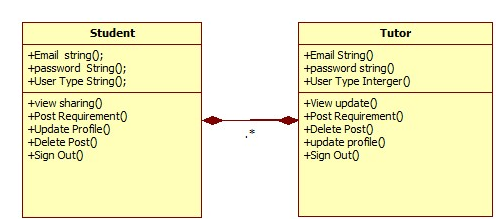
Class Diagram:

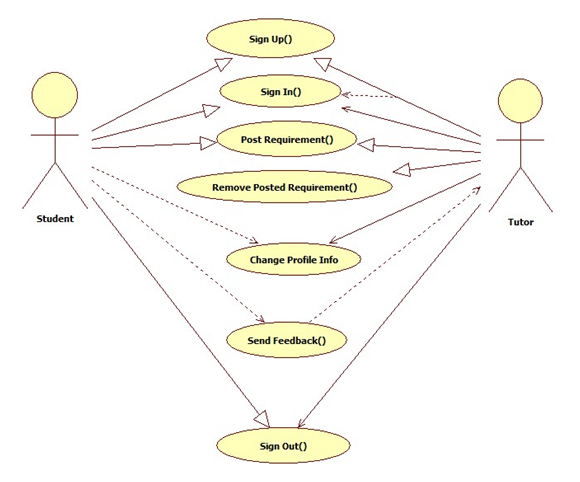
Use case Diagram:

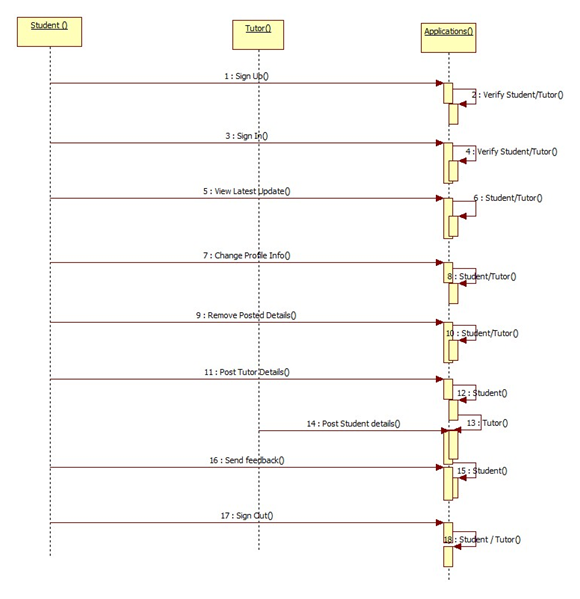
Sequence Diagram:

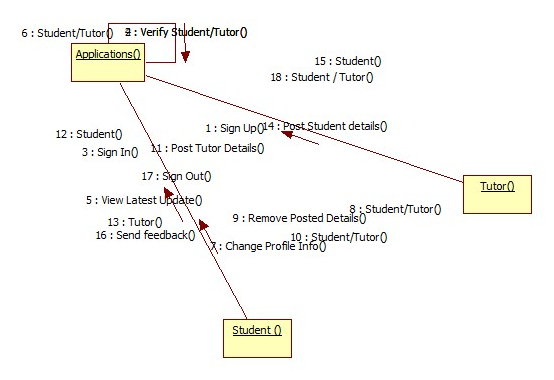
Collaboration Diagram:

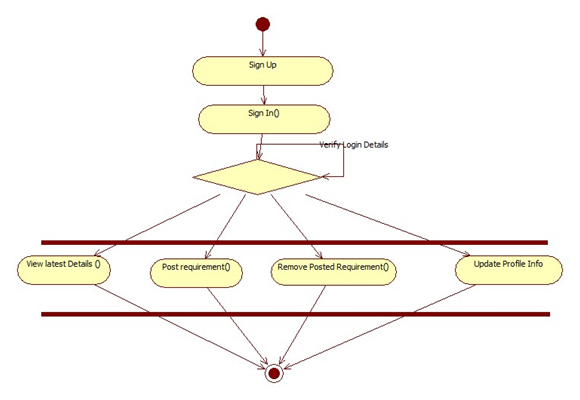
Activity Diagram:

Output Screens:

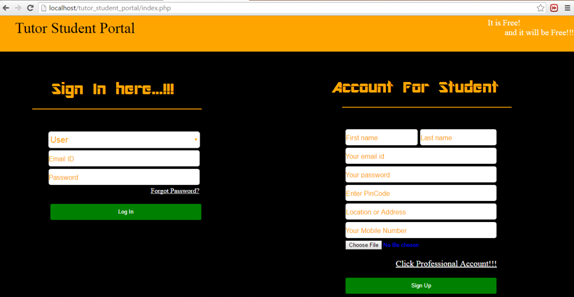
Home Page for Student Login:

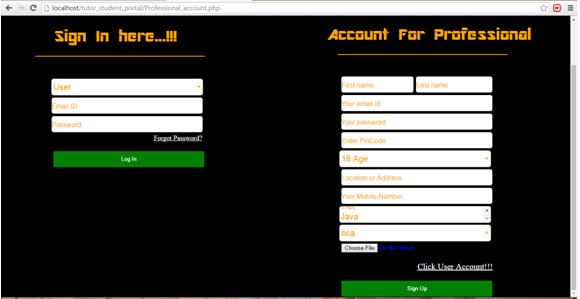
Account Registration for Tutor:

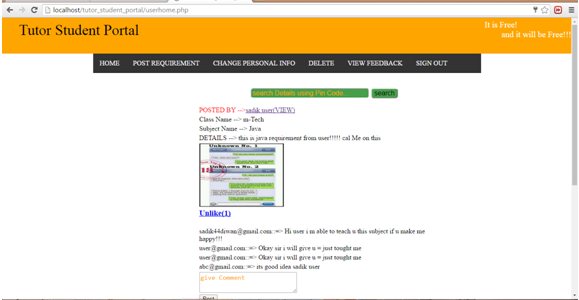
User Profile:

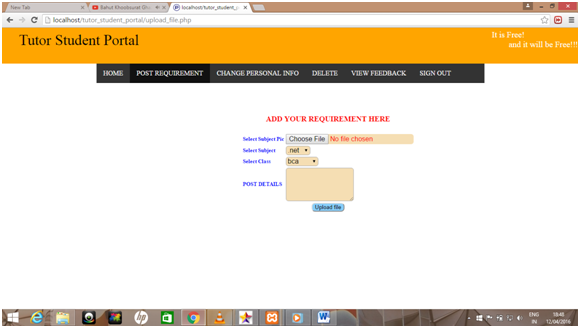
Add Requirements Page:

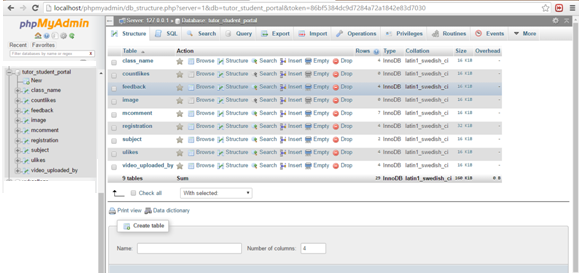
Php My Admin Details:

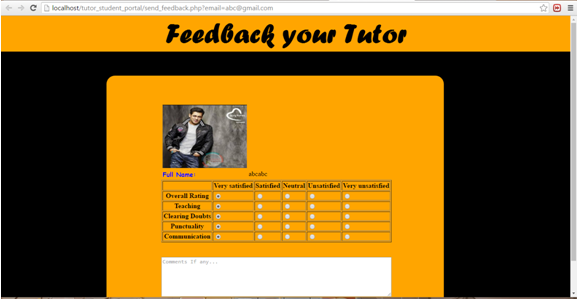
Tutor Feedback Page:

Download Tutor Student Portal PHP Project.

Cluster Disease Analysis with Mapping System Java Project

Abstract:

“Cluster Disease Analysis with Mapping” is a web application developed in java. This project enables users to analyze the details of the disease. Users can analyze the diseases based on the location, disease, and location and can view the cluster of the disease details. This application provides easy and various ways to analyze the diseases. In this project, users can analyze the details of the disease based on the cluster which gives results based on the disease, sub-disease, and location. This system allows users to make a comprehensible analysis on diseases and get a quick estimation.

Existing System:

In the existing system, the process of analysis is a time taking process. No proper information about disease and patients is provided to the uses. In the existing system, there is more chance of data misplacement and mislay of data. In this system, all the collected disease and patient data are maintained in records which take a lot of time and physical effort in searching and modifying the data.

Proposed System:

The proposed system provides the smart and easy procedure in analyzing the details of the disease and patient. In this system, all the collected data is maintained in the database where this is no possibility of losing the data or misplacement of data. In this system, data can be searched and modifies very easily without any time waste and physical effort. This system maintains accurate and provides differed ways to users in searching the details of the disease.

Modules:

Admin:

Admin needs to give valid username and password to get logged into the application. Admin can add the patient by entering all the details of the patient like personal details, disease details, and location details.

User:

The user needs to fill the registration process to get username and password. The user needs to give unique username and password to get logged into the application. The user can search disease based on the location. Users can search by location and disease details. Users can view details of the disease by using the cluster search.

Conclusion:

“Cluster Disease Analysis with Mapping” is a web application which satisfies the need of users by efficiently searching the details of the disease and patient which helps users to analyze the disease without any time waste and without any physical effort. Our project enables users to know the details of the disease and analyze it from anywhere and from anywhere.

Blood Connect Android App Project

Abstract:

“Blood Connect” is a mobile-based project developed in android platform. This android project provides an easy and fast way to search for blood. This app enables users to find blood in emergency situations. Here Users can easily find the details of donors and receivers through their mobiles. Users need to register with the application to view all the information which is available on the app. The user can search the details and find the details of the blood donors. Users can get brief details about the donor’s contact details including their location. The user can make a call or message directly by using this application.

Existing System:

The existing blood banking system includes a lot of manual work which takes a lot of time and physical effort. Users need to connect to the internet if they want to know the details of the blood donors. It takes a lot of time and effort to collect information about blood donors or receivers. Proper information is not available to the users.

Proposed System:

In the proposed blood banking system, the information about donors can be found in an easy and simple way which does not take any time or effort. This system provides an easy way to search donors within less time. Users can search details of the donors and can get their contact details including the location. This system enables users to communicate with donors directly which avoids miscommunication.

Modules:

Donor:

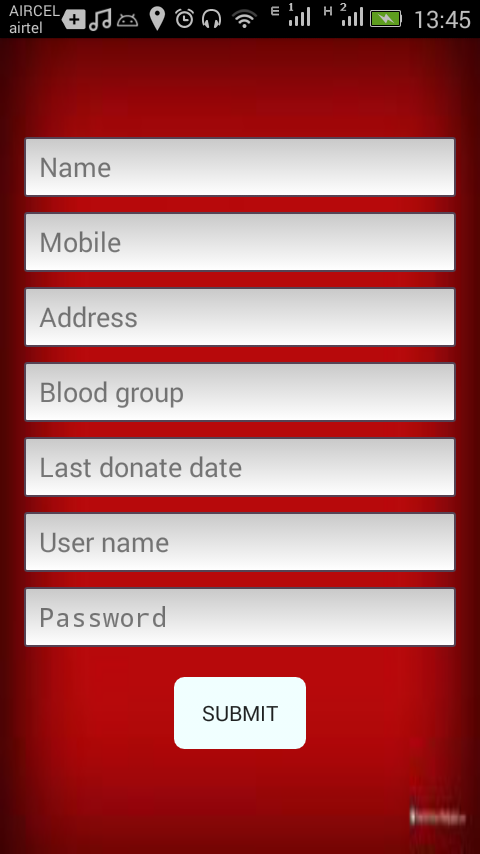
The donor needs to register with the application by entering all the details. The donor can get login by entering valid username and password. The donor can search details of the patient and can contact them directly.

Receiver:

The receiver needs to register first with the app by entering all the details. Receive can get login by entering valid username and password. Receive can search details of the donor and can contact them directly.

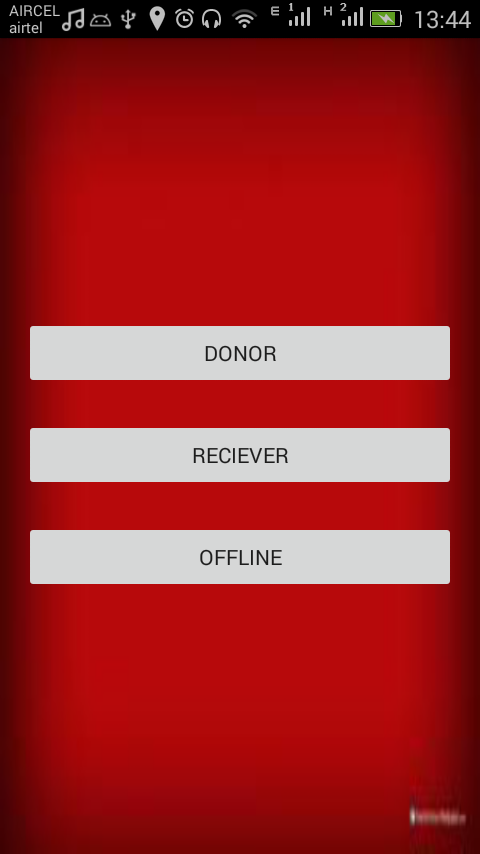
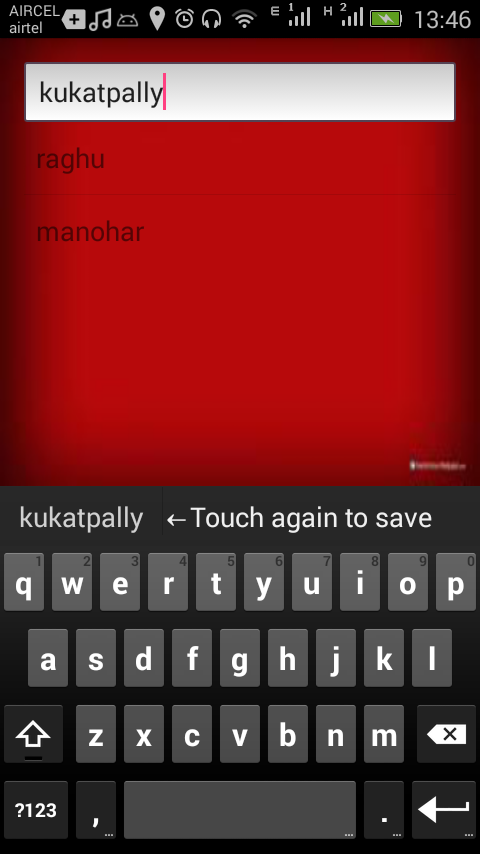
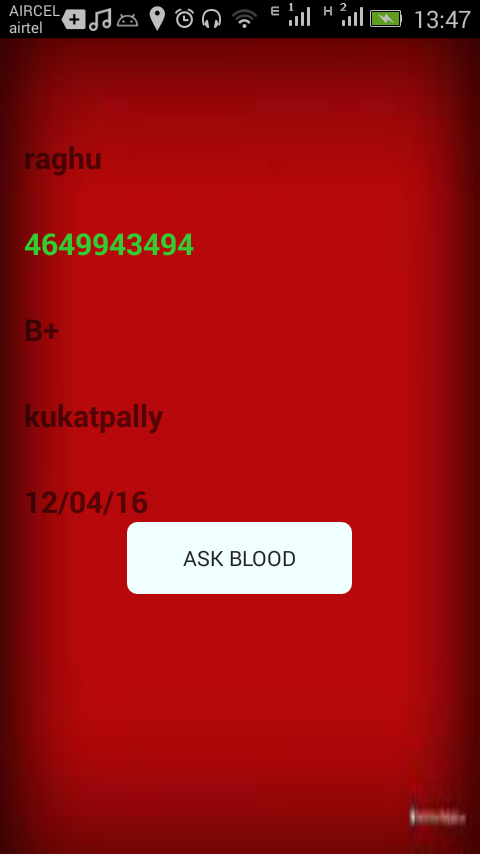
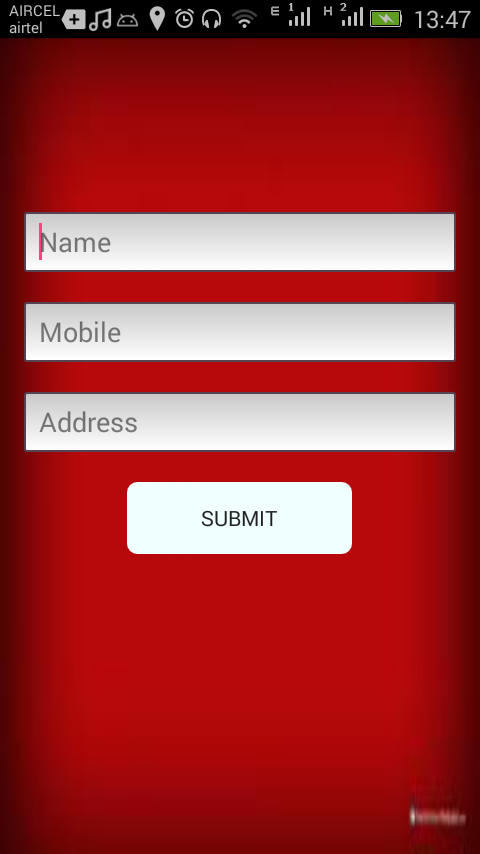
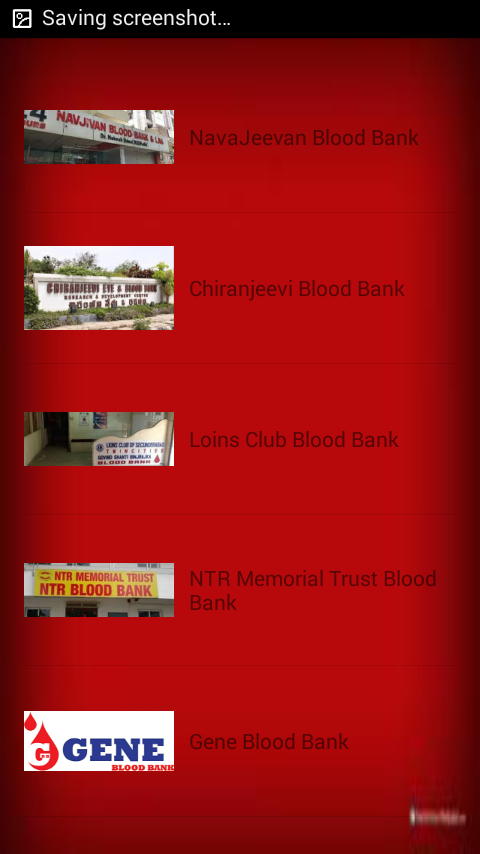
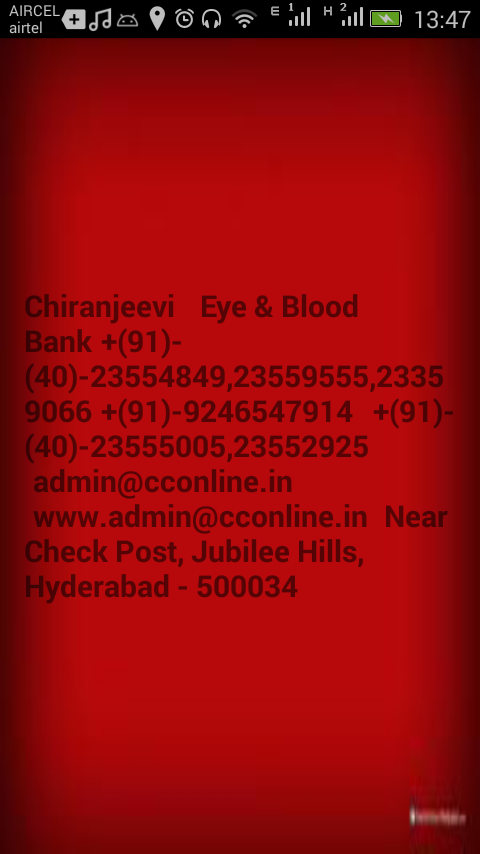
Output Screens:


Conclusion

Blood Connect is a mobile application which satisfies the need of the patients in emergency situations. This android based mobile app provides an easy and simple way of finding the details of the donors and receivers.