Grocery Ekart Management Real Time Project

Project Understanding:

The reference website link provided to the developer and also need few clarifications and inputs from the customer side specifically to understand the project flow. In this document, we present our understanding of what needs to be accomplished in the project along with the budget and time estimation.
Reference site link: https://www.bigbasket.com/  (checked only to have an idea regarding the features that will be there in the app)

Project Statement:

→ To design and develop an ekart marketplace and mobile app for Android platform which will provide an option to browse through various household groceries and related products.

Project Description in Brief:

The requirement is to develop and implement a fully functional ekart module which will allow customers register and browse through all products online. They can add products to kart and order them. It will also involve admin panel to manage the addition of products, editing details related to a product. It will manage payment gateway also. We will also provide an option to manage offers via offer management module in the admin panel.

1. Admin Module
2. Kart Module
3. User Module
4. Payment Gateway Integration (Let us know which all need to be integrated like Paytm, PayPal, VISA MasterCard etc)
5. Coupon / Offers Management
6. Employee and Executive Management
7. Order Management
8. Review and Rating Management
9. About Us
10. Careers
11. Privacy Policy (Client needs to provide us the info related to terms and conditions)
12. Terms and Conditions (Client needs to provide us the info related to terms and conditions)
13. Blogs (Let us know if this is needed)
14. Logo design
15. Notifications (Email and SMS , client need to purchase SMS package and it will be integrated)
16. Delivery management

Quality Control:

At the end of the development cycle, you will have a properly functioning and quality assured site. By ensuring implementation of the following points we maintain quality in the products we deliver.

➔    W3C validated semantic HTML code
➔    Well commented and indented PHP code
➔    Proper escaping of user entered data, the addition of captcha to web forms for preventing XSS, CSRF and other security issues
➔    Properly Optimized and indexed database tables for speed and consistency
➔    Minified CSS, JS and optimized images for faster loading of the site
➔    Implementation of meta tags, descriptions, open graph tags for help in SEO

User Types: Admin, Customer, Employee logins (no vendor login as discussed)

→ Admin will have access to all modules on web and can monitor everything the application.
→ Customer will have access to products view and can browse through and access offers and then finally add products to the kart and order the same.
→ Employee is basically the delivery executive login who will actually manage the deliveries and will have access to the related delivery management screens only

Module Details:

Web development: 

SL NO Type Time Estimation (in MD)
1. Users Module:
Login / Registration / Logout (Sign In with Google / Facebook social logins)
My Basket ( This actually deals with products being added to kart and manage it)
My Orders  ( This deals with history of  transactions  and orders for a logged in customer)
My Profile (Edit Profile , Delivery Address mgmt, Change Password , Email Address)
10 MD
       2. Common Admin panel:
Admin login features
Manages Employee executive delivery history
Manage Customers
Manage Products addition to applicationManage Reviews and Ratings in applicationManage Coupons and Offers in applicationsManage new offers (to be displayed in splash screen )
About Us submissions
Blogs management (if needed)
Categories / Sub-categories management
Brand management
Filter management
Location Settings
20 MD
       3. Designing:
Homepage design with splash screen, Banner with sliders and effects, offer views, products display designs, admin panel design, About Us (including smtp configurations), Careers, Privacy Policy, Terms & Conditions , Blogs design , Individual page designs , Menus and Submenus, Location selection design
15 MD
      4. Delivery management: status of products delivery  and related notifications, Pending / Confirmation option , a grid to view and manage all deliveries for executive login , option to update payment status for orders delivered 5 MD
      5. Testing, bug fixes, changes from client feedback 12 MD
      6. Total 62 MD (approximate)


Mobile: (2 Android Apps)

User App: Will follow all modules mentioned above except admin panel as it will be maintained only on the web.

Executive App: Will have screens designed for tracking deliveries, managing the delivery status, update the delivery and payment status 

SL NO Type Time Estimation (in MD)
1. Users Module:
Login / Registration / Logout (Sign In with Google / Facebook social logins)
My Basket ( This actually deals with products being added to kart and manage it)
My Orders  ( This deals with the history of  transactions  and orders for a logged in customer)
My Profile (Edit Profile , Delivery Address mgmt, Change Password , Email Address)
15 MD
        2. Designing:
Homepage design with a splash screen, Banner with sliders and effects, offer views, products display designs, admin panel design, About Us (including SMTP configurations), Careers, Privacy Policy, Terms & Conditions, Blogs design, Individual page designs, Menus and Submenus, Location selection design
15 MD
     3. Delivery management: status of products delivery  and related notifications, Pending / Confirmation option, a grid to view and manage all deliveries for executive login, option to update payment status for orders delivered 10 MD
     4. Total 40 MD (approximate) + 10 MD for testing and feedback changes


Technology to Use

Design and Markup

– HTML5, CSS3, JavaScript & jQuery for markup, design and interaction behavior

– Bootstrap / Angular JS will be used for making the site responsive and as a framework.

Server-side language (anyone can be used depending upon your preference)

– PHP (codeigniter, CakePHP, Phalcon or Laravel)

Database Software (anyone can be used depending upon your preference and server setup)

– MySQL

– SQL Server

Android: Java  (Android v 5.1 and higher)

Time frame for execution of the project ( Total 112 Days  approximate)

Designs & Web Services : 30 Days

Admin Panel :- 20 Days

Android App: 40 Days

Testing: 22 Days

Online Auditorium Booking Management Application

Project Understanding:

In this document, we present our understanding of what needs to be accomplished in the project along with the budget and time estimation. Reference site link: http://1000projects.org/online-seminar-hall-auditorium-booking-system.html  (checked only to have an idea regarding the features that will be there in the app)

Note: This link is basically for academic purpose only and cannot handle the live project activity.

Project Statement:

To design and develop an online Auditorium booking application which will allow sunshine hospital employee users and external users also to book auditorium as per their expected event schedules. Any user internal or external has to raise a request for auditorium booking and it will be approved by admin. A logged in user can check availability date wise and hourly wise too. Will have the option to provide the hourly availability info too while raising the request. Once approved an email notification can be  sent over confirming the booking, we can also send SMS notification (client needs to have an SMS package integrated for that)

Situation:

The proposal describes a solution that enables to solve specific auditorium availability issues so as to avoid confusion at the occupancy of a party at any specific time frame.

User Types: Admin, User, Customer

Admin will basically be able to access all the modules in the application and will have the option to approve a booking request raised by a user or customer.

User is an internal sunshine hospital employee who can log in and request for auditorium booking for a specific date and time interval.

Customer has to first register and once approved can log in and raise a request for auditorium booking as per the scheduled event for any meeting.

WorkFlow:

Admin will manage auditorium booking via a booking UI which will allow him or her to observe the availability and unavailability of the auditorium for any date and hourly time interval also

→ Admin will also manage user logins, will have the option to deactivate any user

→ An external user has to first register and his or her login will have to be approved by Admin and then can log in

→ Once approved external customer can login and raise a request for auditorium booking

→ Admin can deactivate any customer login also

→ Managing Booking activity will be done via a web service logically at the backend

→ An easy to use UI will be provided for checking the availability of auditorium

→ Application will have the option to register users on the basis of their departments as this part also needs to be managed (client needs to provide us departments related info so that we can manage them at backend)

Module details:

S. No Type Time Estimation (in MD)
1 Landing Activity (Splash screen / Login/ Registration Screen) 5 MD
2 Booking Module 10 MD
3 Admin Module :
Dashboard with notifications
User management
Customer Management
Booking management
Booking History
Department management
8 MD
4 Customer Module :
Registration
Dashboard
Notifications
3 MD
5 Web service 10 MD
6 Testing 5 MD
7 Total 41 MD approximate
Costing (Includes Designing, Web development, Web Service, Testing)


Technology to Use

 Design and Markup

– HTML5, CSS3, JavaScript & jQuery for markup, design and interaction behavior

– Bootstrap / Angular JS will be used for making the site responsive and as a framework.

– A server-side language (anyone can be used depending on your preference)

– PHP (CodeIgniter, CakePHP, Phalcon or Laravel)

Database Software (anyone can be used depending on your preference and server setup)

– MySQL

– SQL Server

Download Sample Seminar Hall booking System PHP project.

Sales Management Portal .Net Project

The Sales Management System should have, but not limited to, the features and functionalities as below

1)  Search: allows users to staff find clients by names, either on the complete or partial match.

2)  A filter for browsing: can shorten the list and separate prospects from current clients.

3)  A sign-in form

4)  Manager Console: Managers can create user accounts, view, and update entries, leave comments on entries, and send messages to staff, etc.

5)  Pipeline Reports: Managers should also be able to run various reports such as lists of prospects, reports of opportunities or proposals by dates, sales projections by month or by the salesperson, project tracking, etc.

Features described in this document may require, but not limited to, the following advanced technical knowledge and skills for:

  • HTML programming and CSS styling
  • Responsive design
  • The user authenticates and authorization
  • SQL database and programming
  • Site navigation
  • Application of state and cookies
  • Validation controls
  • API and Web service programming
  • Test and debug

Students should study and try to incorporate as many features and functionalities as possible in their projects

Portal Homepage

Main page after user logged-in

  • Announcements section displays manager’s messages in the order of dates.
  • Left-hand side panel displays a list of all clients in alphabetical order.
  • Users can search clients by names, also can filter the list by types, client or prospect.
  • The new prospect can be added by clicking Add Client.

Illustration of a pipeline for a client

After staff selects a client from the main client list, the page shows a sales pipeline for the selected client: General Info, Contacts, Notes, Opportunities, Proposals, and Projects.

The illustration shows the Contacts page

Database Design

Below are some essential information used in a real-world sales pipeline. It is recommended to incorporate them in your database design.

Pipeline: Opportunities

  • Opportunities Name
  • Added by
  • Date Added
  • Chance to close (percentage)
  • Estimated Budget
  • Opportunity Duration
  • Opportunity Type (a list of major products and services )
  • Contact Name
  • Contact Telephone
  • Opportunity Description
  • Opportunity Notes

Pipeline: Proposals

  • Proposal Name
  • Account Manager
  • Date Added
  • Chance to Close (percentage)
  • Estimated Budget
  • Proposal Duration
  • Proposal Amount
  • Total Revenue
  • Proposal Status (a project is automatically created when proposal status is set to accept )
  • Rejection Reason
  • Contact Name
  • Contact Telephone
  • Description
  • Proposal Notes

Pipeline: Projects

  • Project Name
  • Project Manager
  • Date Added
  • Project Amount
  • Total Revenue
  • Project Duration
  • Project Status
  • Launch Date
  • Contact Name
  • Contact Telephone
  • Project Description
  • Project Notes

Download The Sales Management System .Net Project Code, SQL Database & Output Screens.

Online Resume Management .Net Project Synopsis

Online resume management will basically provide an online platform that will provide an option to upload a resume and then search for jobs relevant to the skill set. It will have admin panel which will allow admin to manage different features. It will maintain information related to users who will register and apply for jobs as per skills. This application will provide an option to apply for different Functions or Verticals and allow users to apply for different skills as per choice.

User Types: Admin, Users

Modules:

Admin Module:

It will be accessible to Admin and he or she can add or manage Filters, Employers of Choice, and Job Openings.
→ Job Openings will have the option to add info related to Job title, Company name, Skills, Location, Experience, Posted On, Company Logo, HR Name, Contact no
→ Filters will have options to add different values to filters, like Bangalore / Hyderabad etc in Location. The grid will be provided with different Filter Names and will have the option to add/ Edit option to add Filter values. The option will also be there to add Filter heads.
→ Employers of choice will have the option to add a company logo. Description / About US, Jobs of that company. Admin can add as many Employers of choice and they will be added to the dashboard.

Home Dashboard:

This is basically the dashboard for all users (registered or unregistered). It will show different options like Search filters, Employers of Choice, Login / Register, Upload resume, Job Openings etc. Employers of choice will be added by admin. Job openings info will be added by admin.
Search: This module will provide filters that will allow searches for different conditions. Filters related to Skills, Function, Industry, Location, startups etc will be provided. This module will be accessible to both admin and user. Admin will manage filter updates, like adding and removing different filter values. Users will able to see these filters managed by admin in the home dashboard.

Registration Module:

It will have a complete and comprehensive form which will lot of options to be selected and save relevant information. It will have options to save First name, Last name, Middle name, Password, Re-Confirm password, Current Location, Total Exp, Industry, Function, Key Skills etc for submitting initial registration information.

Notifications:

This module will show notifications whenever admin adds new Job Openings or add Employers of choice.

Contact Us:

Will show info related to contact numbers and also search filters.

Future Enhancements:

→ We can provide email notifications and SMS integration. This will require web service or API integration with SMS providers and SMTP configuration to handle emails.

→ Provide package plans for users with related services.
→ Add Blogs that can be posted by users.

Software Requirements:

Technical Aspects:

Database: SQL Server 2008 and more

Language: C# and Asp

Framework: .Net

Front-end: HTML, CSS, JavaScript

It can also be done in Php, MySql as back end with other frameworks

Hardware Requirements:

Intel Core processor

RAM 4GB and Above

HDD 100 GB Hard Disk Space and Above

64 or 32 bit OS Windows 8 and above

Lab Test Management .Net / PHP Project Synopsis

Lab Test Management Synopsis:

Project Understanding: This Lab Test Management project basically will be used by the Diagnostic center and it has to provide the main functionality of adding lab test to the applications on ad hoc basis whenever needed. The main functionality should involve the addition of lab tests which will be used later at any point in time to generate bill receipts for patients who come over to center for various lab tests. It will also have reminders functionality which will send SMS notifications to customers in regard to various lab tests that need to be performed in specific time frames. The application will also provide registration for customers and also maintain their history, reports etc. It will also involve doctor registration who prescribes lab tests.

User Types:

Admin, Front Office, Manager, Lab Technician, Customer

Admin will have access to all modules. Can add lab tests from back-end via admin panel.

Front Office can access

Basic Modules involved in the project: 

Reporting

For this module, we will initially provide Option to gets reports like tests done on a daily, monthly and yearly filtering reports and costing related reports. Will discuss more with a client for specific reports which they will look out for.

User

This module will allow customers to register. It will have Personal details, Address, package selection option which diagnostics center provides, submit home collection request, view history related to reports and tests that were done previously, schedule a lab test.

Lab Test

It will be accessible to Admin and Manager only. These modules will allow the addition of categories to the system. Each category will then be linked to Subcategories and each subcategory will have different lab tests linked to it. A Lab test that needs to be added will have Lab Test name, Lab test Code, Methodology, and Disease info. Filter criteria will be provided to segregate and search lab tests. Each lab test will have the option to add price to it. (Need info related to CGST and SGST info which need to be shown at the time of report generation).

Doctor

Admin / Manager can add doctor details to the application. Doctors added to the application can be easily searched while generating receipts for lab tests. Basically, doctors added to the application are reference doctors who prescribe for lab tests.

Notifications

(SMS package integration → client needs to purchase SMS package / SMTP email configuration).

Reminders

This functionality will be implemented such that it sends out alerts to patients reminding them to schedule a lab test which has to be done after a specific interval of time frame. For example, a diabetes patient has to get his blood profile done to monitor sugar levels, we will send reminders to the patient that will go put after every 30 days suppose as SMS and email.

Lab Order management

This module will be used by the Front office to book lab tests for walk-in patients, generate receipts, register customers.

Admin panel details:

This will basically be the back end of the project. A separate link will be provided for this panel and is accessible only to admin. It will provide a secure back-end management of data and structural approach to the methodology followed while saving data.

Sl No Task / Module
1 Admin, Front Office, Manager, Lab Technician, Customer
Registration, profile management, change password, email verification of the user
2. Lab Test management
3. User / Customer management
4. Notifications and Reminder management
5. Doctor profile and registration
6. Reporting module
7. Lab Order management
8. Testing
9. Bug fixing and feedback changes

Details:
Lab test:
Main Category: All (slug for filtering)
Allergy / Diabetes etc

Add lab test details:

Lab Test Name: 5-HYDROXY INDOLE ACETIC ACID

Test Code: 9952

Diseases: biochemical diagnosis and monitoring of intestinal carcinoid syndrome

Methodology: ENZYME IMMUNOASSAY

Notifications:

→ Option to notify customers once results of lab test are ready

→ Option to notify customers via SMS or email for reminders related to periodic lab tests

→ Option to notify scheduled home sample collection info

→ Option to notify billing info for a lab test.

→ Will notify customers once they are registered successfully.

Reminders will work in the same concept as provided by the client.

Technology to Use:

Design and Markup

– HTML5, CSS3, JavaScript & jQuery for markup, design and interaction behaviour
– AngularJS will be used for making the site responsive and secured as per scripting is concerned.

The server-side language (anyone can be used depending upon your preference)

– PHP (Core PHP or any framework like CakePHP, Phalcon or Laravel)
OR
– C# and Asp (with a bootstrap framework or DNN skin)

Database Software (anyone can be used depending on your preference and server setup)
– MySQL
– SQL Server

→ We will suggest a server also.

→ This app will need maintenance for sure on a monthly basis. We will look forward to monthly maintenance charges.

Student & Faculty Interaction Outside the Classroom Java Project

Abstract:

“Student and Faculty Interaction outside the Classroom” is a web application developed in java. This application enables both professors and users to interact with each other at any time and anywhere. This application makes any time-accurate communication between professors and users. Admin will add all the details of professors and department. Professors can view all the details of the queries sent by users and can upload materials related to the queries. Users can ask queries and view answers and materials.

Existing System:

In the existing system there is no proper communication between professors and users. All the details of users and their queries are maintained in records which takes lot of time to verify and send them response. There are a lot of chances of misplacement of data and sometime missing. No proper information is maintained. Analyzing uses query and sending them response takes lot of time and lot of effort.

Proposed System:

The proposed system all the process is done automatically. All the information is stored in the database which can be easily modified and deleted. Users can ask queries and get the accurate response within not time and without any hard effort. Professors can view all the details of the user’s queries and can provide material related to the users query from anywhere and at anytime. This system maintains good and easy communication between professor and user.

Modules:

Admin:

Admin can get logged into the application by entering valid username and password. Admin can add the details of the professor. Admin can add details of the department and can view all the details of the department.

Professor:

Professor can get logged into the application by entering username and password. Professor can view all the details of the queries added by users. Professor can upload materials.

User:

Users need to fill all the registration details to get login details. Users can get logged into the application by entering unique username and password.

Conclusion:

“Student and Faculty Interaction outside the Classroom” web application satisfies all the requirements in maintain proper and easy communication between professors and users. By using this application professors and users can easily get the result in solving their queries.

Online E-Ticket System Java Project

Abstract:

“Online E-Tickets System” is a web application developed in java. This application enables users to book tickets easily from anywhere and at any time without any time waste and without any physical effort. Admin can view all the activities of agent and details of the buses and the offers of on the bus tickets. The agent can add all the details of the buses and can add the details of the offers available. Users can search buses and the offers and can book tickets from anywhere and at any time.

Existing System:

In the existing system, all the process of booking bus tickets includes a lot of time waste and physical effort. No proper information about buses and the offers on the tickets are available to users. No proper data is maintained. Users information and bus information is stored in records which is difficult to search modify or delete.

Proposed System:

The proposed system made the ticket booking process easy and simple. This system made Users to easily get information about buses and the information about offers available on the tickets. This system reduces a lot of time waste and physical effort to both users a and agents in adding the information and in booking tickets. All the information related to buses and the offers are maintained in the database in which we can easily search, modify or delete any information.

Modules:

Admin:

The Admin needs to enter valid username and password to get logged into the application. Admin can view all the details of the buses available. Admin can view all the details of the agent.

Agent:

An Agent needs to enter all the details in the registration form to get credentials. Agent need to enter unique username and password to get logged into the application. Agent can add all the details of the buses. Agent can add all the details of the offers available to the respective buses.

User:

The User needs to enter all the details in the registration form to get credentials. User need to enter unique username and password to get logged into the application. User can view all the details of the buses and the available offers and can book tickets.

Conclusion:

“Online E-Tickets System “is a application that satisfies all the requirements of admin, agent and the user. This application makes the process of booking tickets easy and simple.

Online College Bus Record Supervising System Java Project

Abstract:

“Online College Bus Record Supervising System” is a web application developed in java. This application enables students to apply for bus pass online. Admin will add the details of the buses. Students can view all the details of the buses and can select a route to apply for a bus pass. This application also allows students to renew their bus pass from anywhere and at any time which saves a lot of time and physical effort.

Existing System:

In the existing system, all the process of applying for a bus pass and renewing the pass is a very time taking process and takes much effort. No proper information is available. All the data is stored in the records where there is a chance of losing it or misplacement of data.

Proposed System:

The proposed system is an automatic system which allows students to view all the details of the buses and apply for a bus pass from anywhere and at any time. This system saves a lot of time and physical effort. All the information is stored in the database where there is no question of loosing or misplacement of data.

Modules:

Admin:

Admin should give valid username and password to get logged into the application. Admin can add all the bus details. Admin can view the details of the feedback sent by students. Admin can change his account password. Admin can view all the buses details. Admin can view all the student’s details with feedback.

Students:

Students need to give all the details in the registration form to get login credentials. Students need to enter valid username and password to get logged into the application. A student can apply for bus pass by selecting a route. A student can renew his bus pass by filling all the details in the renewal form. A student can send feedback to admin. A student can change the his\her account password. A student can get bus pass approval to his\her mail.

Conclusion:

“Online College Bus Record Supervising System” satisfies all the requirements of both admin and students in the process of applying for a bus pass. This application made the process of applying for a bus pass, renewing the bus pass and view details of the buses easy and simple. Admin can easily know the details of the buses and students.

Automation of Exam Invigilation System Java Project

Abstract:

“Automation of Exam Invigilation System” is a web application developed in java. This application presents a new automatic process for invigilation system. Admin can add all the details of the faculty and details of students and details of the rooms allocated to the faculty and details of the rooms allocated to students from anywhere and at any time Faculty and students can view the details of their allocated rooms at any time without any confusion. This application gives the accurate information about the allocated room numbers to the respective faculty or student which saves a lot of time an effort.

Existing System:

In the existing system, all the process of allocating rooms to faculty or students are done manually which creates a lot of confusion. These processes take the slot of time and effort. In this system, all the information is stored in records which is difficult to modify, search or delete.

Proposed System:

The proposed system is an automated system in which information is accurate and no worry of data misplacement. All the information will be automatically stored in the database which is easy to search, modify or delete. Information related rooms allocation can be added by admin and can be sent to the respective faculty or student from anywhere or at anytime which saves lot of time and effort.

Modules:

Admin:

Admin need to give valid username and password to get logged into the application. Admin can add details of faculty. Admin can add student details. Admin can add room’s details. Admin can allocate faculty by entering details.

Faculty:

Faculty can get logged into the application by entering valid username and password. Faculty can view student’s details.

Student:

Student need to give valid username and password to enter into the application. Students can view room details.

Conclusion:

“Automation of Exam Invigilation System” is an application which satisfies the requirement of admin, faculty, and students in the invigilation process. This application allows faculty and student find their allocated rooms without any confusion and time waste.

Output Results:

  • Application home page with admin, faculty, and student as modules:
  • Admin needs to give valid username and password to get logged into the application:
  • Admin home page with functionalities:
  • Admin can add details of faculty:
  • Admin can add student details:
  • Admin can add rooms details:
  • Admin can allocate faculty by entering details:
  • Faculty can get logged into the application by entering valid username and password:
  • Faculty home page with functionalities:
  • Faculty can view students details:
  • The student needs to give valid username and password to enter into the application:
  • Student homepage with functionalities:
  • Students can view room details:

Download this Automation of Exam Invigilation System Final Year web application Java Project

Review-Based Rating Prediction Java Project

Abstract:

“Review Based Rating Prediction” is a web application developed in java. This application relates to the features obtained by analyzing textual reviews. In this application the information retrieval retribution to analyze a utility function over a product. A product utility is a measure that shows how much it is preferred according to user’s current context. This context inference is distinguished from the user’s review history and the item review history. Based on the users purchased history and the rating history the present product rating will be automatically predicted. The predicted ratings can generate recommendations that are product-based and will appear at the recommended items list in the product page. This project predicts the rating score that a user will rate an item.

Existing System:

In the existing system, the rating is not generated automatically by the product user have selected. User’s previous history is not considered. Each and every product needed to be searched which takes a lot of time. No previous history is available and no recommendations are available.

Proposed System:

The proposed system is the automated system. This system considers users history and predicts the product rating. Users can get recommendations similar to the selected products which save a lot of time and effort to users. All the details of the users and purchased data will be available. This system compares the similarity with the item reviews and users performance.

Modules:

Admin:

Admin needs to give valid username and password to get logged into the application. Admin can add all the details of the category. Admin can add all the details of the product. Admin can view all the details of the products. Admin can view all the details of the purchased products. Admin can view all the details of rating and reviews.

User:

The user needs to fill all the details in the registration form to get login credentials. The user can get logged into the application by entering unique username and password. The user can view his profile. The user can view all the details of products. The user can view all the details of products and can add the products to cart. The user can view all the details of the products in the cart and can purchase the products. The user can view the details of the purchased products. The user can give ratings and can review the products.

Conclusion:

“Review Based Rating Prediction” is an application that satisfies the need of both the admin and the users. This application successfully helped to produce better prediction rating scores in comparison to the standard prediction methods for the user while purchasing the product.

Output Results:

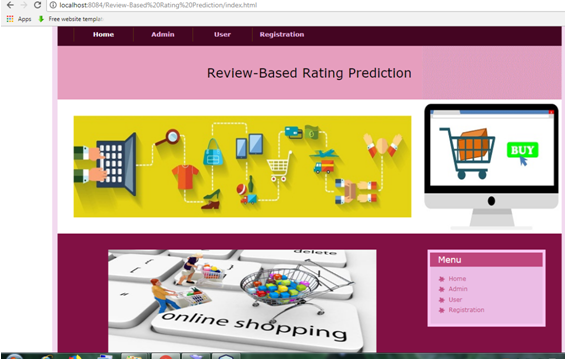
Application home page with admin and user modules:

  • Admin needs to give valid username and password to get logged into the application:
  • Admin home page:
  • Admin can add all the details of the category:
  • Admin can add all the details of the product:
  • Admin can view all the details of the products:
  • Admin can view all the details of the purchased products:
  • Admin can view all the details of rating and reviews:
  • The user needs to fill all the details in the registration form to get login credentials:
  • The user can get logged into the application by entering unique username and password:
  • User homepage with functionalities:
  • The user can view his profile:
  • The user can view all the details of products:
  • The user can view all the details of products and can add the products to cart:
  • The user can view all the details of the products in the cart and can purchase the products:
  • The user can view the details of the purchased products:
  • The user can give ratings and can review the products: