Touch Screen Based Wireless Home Automation Using Zigbee

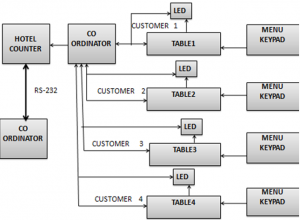
When an order is placed by the customer, table_id and order number is transmitted to the coordinator and an acknowledgement is sent automatically to that end device i.e. table and a LED is switched ON at the table device. Now once the order is ready, owner presses the respective button to the table whose order is ready, then the LED at end device starts blinking which will be as an acknowledge to the customer saying the order is ready.

All these information is being stored in data base and will be displayed by using a projector or any other displaying device. Now if another order has to be placed by the customer then he needs to first press any button to make the blinking LED off and then click the respective button for the order and this repeats. Thus the ordering an item at restaurant is being easier and simpler.

SOFTWARE REQUIREMENTS:

a) IAR Embedded Workbench (MCS-51 7.30B)
b) Z-Stack (CC2430 – 1.4.3 – 1.2.1)
c) Byte Wedge Standard for Database

HARDWARE REQUIREMENTS:

a) Intel Pentium based system with Windows XP.
b) Keypads for connecting to the Battery Board at the End Point.
c) Zigbee
d) Antenna

BLOCK DIAGRAM

WORKING PRINCIPLE

This is an Touch Screen Based Wireless Home Automation Using Zigbee Technology application that has tables as End Device and the owner as a Coordinator. The number of tables as per this application is 4 and can be changed according to the user’s requirement. Each table has its own unique table_id. This has to be assigned to the end device in order to differentiate each table.

The table can place an order having four items ranging from 1 to 4 using the four switches available. Here we are sending 11, 12, 13 and 14 from the four switches respectively where for example in “11”, the first digit is the table_id and second digit is the order. As the table_id must change for all the four end devices, the first digit shall be changed for every table.

Once the order is placed by the customer, order is being received by the Coordinator and for acknowledgement coordinator automatically sends back a message and an LED is switched ON at the end device. Now once the order is ready, owner presses the respective button to the table whose order is ready, then the LED at end device starts blinking and the food is being served by the waiter boy.

All these information will be displayed by using a projector or can also be displayed by any other displaying device. Now if another order has to be placed by the customer then he needs to first press any button to make the blinking LED off and then click the respective button for the order and this repeats.

ADVANTAGES

1) No need of man power.
2) We can save time.

APPLICATIONS

1) The counter and customers are connected in a wireless Zigbee network to make the service more efficient.

REFERENCE

1) http://www.palowireless.com/zigbee
2) http://www.circuitsforyou.com

Online Airways Java Project

One of the most common modes of travel is by airways. Customers who wish to travel by air nowadays have a wide variety of airlines are available.

Maintaining details about flights and fares manually so many errors may creep in. The Airlines or Agent’s office staff has to provide the data about the flights to the user manually by taking the requirements of the customer.

Even the transactions in booking and canceling the tickets must be done carefully and even a small mistake causes a great loss, and much time is required to rectify all those, which is again a tedious job.

The main intention of this Online Airways project is :

To serve the public by providing an easy and efficient way to reserve their flight ticket to make their journey comfort.

It is easy to the registered users of the site to reserve and cancel their tickets to minimize the time to effort through internet.

This system used to maintaining, monitoring, updating and deleting the details of flights, fares in economy and executive seats, arrival time, departing time along with reservation details of the users.

SOFTWARE USED:

  • O/S : Microsoft Windows
  • Interface Tools:-  FRONT END : HTML, JSP
  • LANGUAGES : Java , Servlets , JDBC
  • BACK END: Oracle
  • SERVER : Tomcat

Superimposition of lowlevel DFD’s:

Reservation Usecase Diagram:

Conclusion:

This Online Airways project is totally user friendly interface and it is very easy for the new users.

This Online Airways project has been developed using JSP, JSTL as front end and ORACLE as backend in windows environment.

Bus Tracking System using GSM Module Project

Bus Tracking System:

Using  GSM Module and Microcontroller we are designing and implementing a time saving system for daily BUS commuters, which will give the information about the present position of BUS whenever subscribed by the subscriber for a particular BUS, which will have its unique code.

Scope of the Project:

  • Bus Tracking System can be implemented in government, company, college & private buses.
  • Can also be implemented using GPS system.
  • Ring can be developed for blind people to get the status of bus.

Brief Description:

In the Bus Tracking System project, an IR transmitter is placed in bus & IR RECEIVER unit is placed at bus stop. Whenever bus reaches bus stop our unit comes to know which bus has been arrived. The transmitter present in the bus transmits a certain code using RC5 protocol. Carrier frequency for RC5 protocol is 36 kHz.

IR receiver which is present on bus-stop detects the IR signals and gives the coded data to the microcontroller for decoding purpose.  Microcontroller is controlling block of the system. After decoding this code, which bus has arrived is decided.   The acknowledgement is given to the system user through SMS. This SMS is send whenever bus is arrived.  The subscriber numbers to whom the message has to be send is stored in the EEPROM, which is the memory element used over here.

The 89s52 microcontroller communicates with EEPROM using I2C protocol. Whenever a message is to send to the subscriber for the subscribed bus controller  fetches those subscribed numbers & then send the message through GSM module. Microcontroller and GSM module are interfaced through MAX 232. . MAX232 is a device which converts TTL voltage logic levels to RS232 & vice versa.

The GSM module sends SMS to the subscriber which is mentioned in EEPROM through AT commands.  AT commands are used to send SMS from GSM module. LCD is used to display which bus has arrived.

The block diagram:

HARDWARE REQUIREMENTS:

Sr. No. Components Specifications Quantity
1 Microcontroller 89s52 1
2 MAX 232 IC DIP 16 PIN 1
3 GSM Module SIM 300 1
4 EEPROM CAT 24WC 08 8KKBit Serial CMOS 1
5 IR Transmitter Phillips RC-5 (Carrier Freq 36 KHz) 1
6 IR Receiver TSOP 1840(fo-40khz) 1

Assessment Analyst Java Project

Objective:

The main objective is to develop a Assessment Analyst system to conduct online tests in various domains and functional areas. It is a fast evolution of applicant’s skills and abilities. Online examination  for  employees  of  an organization, academic  institutions  and  training  centers. It is a excellent test management, which offers a complete solution for Computer Based Test.

Existing System:

  • The existing Assessment Analyst system is not computerized.
  • We need to conduct the tests manually, evaluate it manually and store the result information in records which is not safe and secure.
  • It is difficult to conduct and evaluate the tests manually.
  • It is also tedious to maintain all the records.

Proposed System:

  • The proposed Assessment Analyst system is fully computerized, which removes drawbacks of existing system and conducts online examination.
  • This type of application is accurate, financially feasible, user friendly and provides information in less time.
  • This system is developed with an eye towards the future and can easily be updated with new features, as needed.
  • By using this system we can conduct two types of tests one is “without negative marking”, and second “with negative marking”.

Modules Description:

  1. Administrator module
  2. User module
  3. Test module

Administrator Module:

  • This module provides administrator related functionalities.
  • Administrator can view, add, delete and edit questions in the question bank.
  • Administrator may allow or ban users.
  • Administrator may view the details of all tests and also the results.
  • Administrator can generate the appropriate reports.

User Module:

  • A user must be registered to allow the services. A user can enroll for an exam on ones chosen subject and domain.
  • The user has the option of opting for negative marks or otherwise.
  • The user can view the result of a test immediately after completion and also view the results, a test includes total marks,correct ans, incorrect ans and unanswered questions.
  • user can view his profile and edit his profile.

Test Module:

  • This module allows the candidate to take the test by choosing a subject of interest.
  • Questions will be generated randomly from the database.
  • To answer each question one minute of time .
  • If the question is not answered then present question is skips and goes to next question.
  • It evaluates the test finally by taking negative & non-negative marking into consideration and displays the result.

Required Software:

  • Server : Apache Tomcat
  • Database : MySql
  • Technology : JAVA/J2EE
  • Server Side Scripting : JSP
  • Client Side Scripting : Java Script
  • Java Version : JDK
  • Web Designing : HTML, DHTML, CSS
  • Editor : Edit plus
  • IDE : My Eclipse

Dataflow diagram for admin:

Class diagram

Usecase diagram:

E-R Diagram:

Output Screen details:

  • User login Page
  • Welcome to online testing
  • Exam without negative marking
  • Start testing
  • Exam with negative marking
  • Testing results
  • Student profile
  • User status
  • Invite a friend
  • User test history
  • Admin login
  • For adding, view, modify & delete select subject
  • Add the questions for testing
    Modify the questions
  • Create new admin login
  • To show user details

Android Based Bomb Diffusing Robotic Arm Project

Abstract:

The title of Project is Android Based Bomb Diffusing Robotic Arm and we can operate robot through android application. We are using metal detector circuit to demonstrate land mines ( heavy metallic objects beneath ground) .

The main reason why have you chosen this project is this project has easy to use android app and remote operation of robot and it can be useful in real time with sophisticated testing of the hardware for military operations.

Our Final year major Project comes under Embedded Systems domain as it combines both hardware and software.

Existing System:

Generally , bomb squad team goes on site and check for suspicious objects but it has risk of explosion if not handled situation with proper method. In our project since we are using robot, there is no life risk.

Design Explanation:

Design has four gear motors : two rear side with wheels and two front side with dummy motors. It has two more gear dc motors for horizontal and vertical track. Thus we can use gripper to hold objects and move it in vertical orientation i.e up or down. Colpit oscillator circuit is used to detect metal objects.

Tools:

We are using Arduino IDE and Embedded CPP code.

Design Results:

We are also using Proteus simulation software for showing design results .

Future Scope:

Android Based Bomb Diffusing Robotic Arm Project can be extended for unlimited range by using DTMF (Dual Tone Multiple Frequency) technology in which we can use mobile phone and control robot from anywhere in the world. High Detection range metal detector circuit can be used.

Report Generating System Web Application

Project Abstract 

Title Of Project: Report Generating System (Web Application)

Introduction: This Report Generating System project is an In-house web application for Private or Government Research Organisations, where the Scholars, Research people would login with their credentials and fill their required form, Which would be stored in a local Database and a report would be generated which would give the summary of the form filled with their respective Name and Signature.

Project Analysis: This Web Application consists of the following modules

1. Login with respective credentials ( Using Microsoft’s Active Directory Technology for authenticating)
2. Form Filling Using HTML, CSS
3. Server Side Programming using JAVA, MySQL
4. Report Generating using HTML

Login with Respective Credentials Module:

In this Module we create a general login page and use Active Directory to authenticate credentials.
To be made using HTML5 forms and styled using CSS3

Form Filling Using HTML, CSS Module:

After Logging in, we will generate a home page giving options to 4 forms. Which after selecting will be directed to the form filling page (Independent). Here, different fields will be filled and would be directed to the Database (Using MySQL).

Server Side Programming using JAVA, MySQL Module:

Server Side Programming in JAVA to direct and forms to Database (Using MySQL) and fetch the Login credentials to generate a digital signature of the Scientist.

Report Generating using HTML Module:

Report has to be generated of all the information filled in the forms. Into another independent web page using JAVA and html.

Software Requirements :

Operating System : Linux/Windows/ MacOS
Technology : HTML, CSS, AD, JAVA, MySQL
Web Server : Tomcat 7
Database : Oracle 10g Express Edition
Software’s : JAVA, Microsoft AD

Hardware Requirements :

Hardware : P4 and above.
RAM : 1 GB

Zigbee Based Wireless Sensor Network Project

Abstract

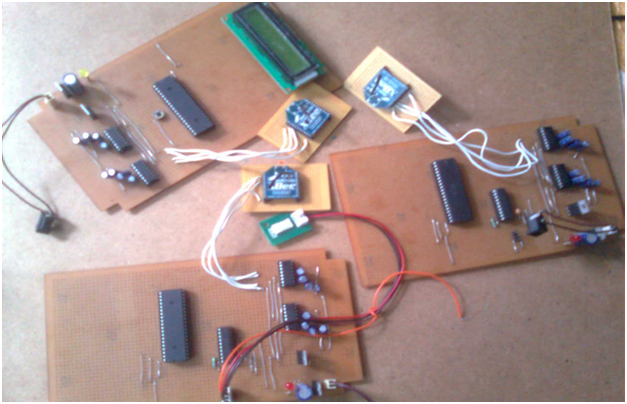
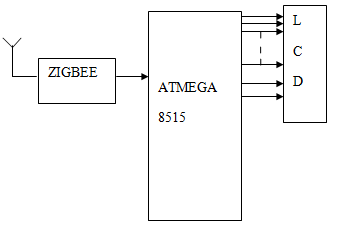
The Zigbee based Wireless Sensor Network system is developed to gather atmospheric data in hazardous/remote areas. This embedded system project is designed using embedded technology. This project is designed with Atmega 8515 micro-controller , LCD, ADC, Zigbee, temperature and humidity sensors. The Zigbee Based Wireless Sensor Network project involves designing and developing a transmitter and receiver section that can be used for data acquisition with the help of Zigbee modules.

The receiver and transmitter are equipped with the micro-controller. At transmitter side, there are sensors to sense atmospheric physical parameters like temperature, humidity etc. We can use multiple such nodes with many sensors but for demonstration purpose only two sensors are used in this project.

The data is then sent through zigbee module to transmit the signals. The receiver receives the signals and micro-controller decodes and analyzes it. The information is displayed with the help of a LCD.

Zigbee is a wireless network used for home, building and industrial control. It has IEEE 802.15.4 wireless standard for low data rate network. With a maximum speed of 250Kbps at 2.4GHz, zigbee is designed for low power consumption.

Hardware used to develop this Project:

Features

• Can be used in hazardous/remote areas.
• Independent of line-of-sight communication.
• Support for multiple network topologies.
• High data reliability.
• Transmission range available up to 1.6 Km
• Low power consumption.
• Highly reliable, cost effective and compact in size.

BLOCK DIAGRAM

Project Information System Java Project

ABSTRACT

Project information system is a project developed to provide an easy way to know the schedule of the project. This Project Information System application provides information of the project reviews. Super admin will provide all the details of project reviews which include date of submission and required documents. Student can view project schedule anytime and can upload from anywhere. In this application students can select him guide of his choice. Student uploaded documents will be checked by the respective guide. Guide can make changes or give suggestions online. Student can check and respond to the guide or super admin from anywhere.

Module Description:

Super Admin:

Super admin gets login by entering valid username and password. Super admin add the submission details of the project reviews in the add schedule field. Super admin can view the details of submitted project in the view documents field.

Admin:

Admin need to register with the application and fill all the details to get username and password. Admin can get login by entering a unique username and password. Admin can view the details of documents in the view documents filed.

Student:

Students should fill all the registration details to get username and password. Student can get login by entering valid username and password. Student can view schedule and view comments.

EXISTING SYSTEM:

In the existing system there is no proper communication between student and guide. Student should approach his guide every time to know the schedule of the project. This is a process which requires lot of time and effort. Information may be lost sometime or it may take lot of time to give feedback to the student.

PROPOSED SYSTEM:

The proposed system is an online system in which both the guide and student can communicate easily about the project. Student can upload project details from anywhere. Guide can view all the uploaded documents and can send feedback to the students. This system saves lot of time and effort. No data or information will be lost by using this system.

Microcontroller based Smart Parking Control System

This Smart Parking Control System project Designed With Microcontroller attempts to cut the time to park the vehicles in the lot and help the motorists to recall the exact parked space. Motorists often spend a significant amount of time to park their vehicles in the parking lots during peak hours. They also may not remember the parked space of their vehicle precisely, while picking up the vehicle.

To solve this problem, an automated vehicle parking system is designed which serves the motorist to find a space for his vehicle within less time. The system displays about the details of freed-up parking spaces. The waiting time to park the vehicle can be reduced by providing this vacant space information to the motorists before he/she enters the system.

The system recognizes the vacant space and displays automatically, this display system can be provided at the entrance of the main gate, so that while entering in to the parking space, the motorist can find his parking place without anybody’s direction.

To sense the vehicle at parking place, infrared sensors are used; the output of the sensors is fed to micro-controller and according to the received information from the sensors, the controller displays, that the particular parking place is vacant or full. For the demonstration purpose three sets of sensors are used to simulate three parking sites.

The system is designed such that, when all parking sites are filled and there is no space for another vehicle, automatically the gate will be closed. To simulate this, stepper motor is used and the controller drives the motor, a small arm of 10″ is coupled to the motor shaft, which simulates either the gate is opened or closed. For displaying the information LCD panel is connected at the output of micro -controller.

Virtual Learning Environment Java Project

Abstract:

Virtual learning environment is a project which is developed to provide support in the  academic administration, teaching and research using the internet, particularly in the world wide web. Visual  learning is a  form of e-learning that allows the interaction between teachers and students. This project provides various kinds of activities to students by introducing tutors and learners.

This project allows students to get information of the courses in a very easy and quick way. This project also maintains good interaction between parents and teachers. This project allows the potential for new ways of learning and teaching such as active and independent learning which make use of online communication, online assessment and collaborative learning such independent learning still needs to be guided and supported.

Modules:

Admin:

Admin gets login with valid username and password. Admin will upload all the details in the application like course details, syllabus details, fee details, parents and students queries ,professor details and payment details.

Student:

Students should register and can login by entering a valid username and password. Student can view all the college information details, fee details, course details and can post queries and feedback.

Professor:

Professor gets login with valid username and password. Professor can view all the details of the students and their queries. Professor can give reply to the students queries.

Software Requirements:

  • Language : Java
  • Web technologies : JEE (Servlets/JSP)
  • Front-end Design : Html, CSS, JSP, Bootstrap
  • Database : MYSQL
  • Scripting : JavaScript
  • Browser : IE 6.0/ Mozilla
  • Operating System : Windows/Linux

Conclusion:

Our project visual learning environment has been successful in making a good interaction between parents and teachers.