Online Handwriting Recognition using Motion Sensor based Pen Device

With the advances in current technology, we see a rapid increase in availability, but also a demand for intuitive interaction between man and computer. While recognizing has been developed graphically based on the vision, it has some limitations, such as running a camera in one place, with the advantage of using motion sensors to develop a portable device.

Combining the rapid development of man-computer technology and the growth of portable devices, a handheld device integrated with motion sensors has been proposed to recognize handwriting by capturing interaction writing paths.

The goal of this Handwriting Recognition project is to develop a portable pen movement base for the online reorganization of letters or handwritten sensor numbers. Users can use this pen to write letters or numbers in the air.

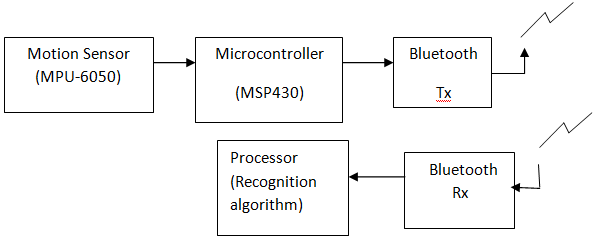
Signs generated by hand movements are generated by in-device and transmitted to the PC for processing and additional signal recognition via a wireless motion sensor module. A handwriting recognition algorithm will be developed for recognition signals using measured by the sensor.

A portable device will be developed base pen with motion sensors (triassic accelerometer, compass and gyroscope), a microcontroller and a wireless transceiver. This pen-based motion sensor can be used to enter numbers or letters in a free space at normal speed.

The sensors are used to detect hand movements. The microcontroller collects the hand motion sensors and wireless transmitters signals in the main PC processor for processing and recognizing the additional signal via a wireless transceiver.

A Handwrite Algorithm (DTW) recognition is implemented to perform handwriting recognition using the signals detected by the integrated sensors in the device.

Block- diagram:

E-Books Download PHP Project

PREFACE

The age of information has gone; The correct area is the Age of The Knowledge. This having knowledge would be higher resources from the society & at the same time would be earning the higher returns. But Knowledge is important to student, it is made mandatory for M.sc IT & CA  Students to work on a practical at some industrial organization & develop a comprehensive project.

Here is the detailed report on the project “E-Books Download” prepared. It is  developed on PHP & MYSQL with tables and forms. At last would only like to say that the practical education at COLLEGE has been very knowledgeable experience for us. we have tried my level best to produce the best output.

ACKNOWLEDGEMENT

The present of this PHP Project report gives us the feeling. As the final frontier achieving a Msc IT& CA, the actively of going through industrial orientation has bridged the gap between the academics and practical and real life work for us. It has prepared us to apply ourselves to become good IT professional. Naturally, it requires lot of people support to complete this project. We take this opportunity to acknowledge their supports to us.

We are specially Thanks to “Mr. ” Director of our college to give us opportunity to develop a project.

We sincerely thank our department for the academic advancement, it has finally provide us and opportunity for project work. We thank Mr. and head of department for their support through the E-Books Download project.

PROJECT PROFILE

Operating System: Windows XP & onwards

Technology Used:  HTML, JavaScript, CSS, PHP

Editor : Dreamweaver 8

Database: MySql

Diagrams

Activity Diagram For User


Activity Diagram For Admin


Data Flow Diagram (Dfd)
E-R Diagram
Usecase Diagram For Admin
Usecase Diagram For User

Output Screens:

DataBase Structure

  • Admin Table
  • Register table
  • BooksInfo
  • Categories
  • Feedback
  • BackGround
  • Photo

Home Page

In Home Page user can see the books photo, links related to site, last added Books, and Login Form.Home page Contains The Header And Footer That Contain The Different Link.

Registration Form

If User Want to Member then user need to fill up all the Details Which are Display in register Form.
After Fill up All The Information user Can Purchase the Books.

About Us

  • This Page Contain The Site Information like What’s Purpose,What’s Provides .
  • Contact Us
  • This Page Contain The Contact Us.

Help

Help Related To The Site like How to Login,How To Join,How To Purchase E-Books…
.
If User Login Then Page Will be (User Home)


Here User see the Different Categories From Which user Can select for EBooks Purchase.
Different links are Display in this page from which user can select , like feedback , logout etc.

If User Select Categorie Then Page

  • EBooks are Display related to the selected Categories
  • User Can Purchase The EBooks by Just Clicking on the Add To Card link.
  • Author name,Publisher,edition,size of EBooks are Display In This Page.

Feed Back Form

If User Want To send feedback then user need to fill up all the Details which are Display in Feed back Form like name, E-Mail, And Comments.

Change Profile

  • Here User Can See the his profile .
  • User Can also change the profile in this page.

Change Profile Photo Form

If User Want to change His Profile Photo then Must Need To Browse New Photo in this Page.

Change user Password

  • User Can Change The ID and Password in This Page.
  • User Need To Add old ID and old Password For Changing Password.

If Admin Login Then Page Will be( Admin Home)

Different links are Display from which admin can select any option.

Edit/Delete Books

  • Admin see all the EBooks With Edit And Delete Links.
  • Title, Categorie, author, publisher, price, size of EBooks Are Also Display in This Page.

Edit / Delete Categories

  • This Page Display all The Categories With Edit and Delete Links.
  • Admin Can Delete Multiple EBooks By Selecting More EBooks.

Add Books

  • Admin Need To Fill up All the Books Information for Uploading a New Books.
  • Admin can add the EBooks through this page.

Add Categories

Admin can add/edit the categories through this page.

View User Info.

  • Admin see all the user information in this page.
  • Admin can delete the User by clicking on delete link.

View Feedback

  • Admin see the Feedback in this page.
  • Admin can delete the feedback send by user.

Change Admin Password

Admin can change the ID and Password in this page.

Change About Us.

Admin can Change The About By Using This Page.

Change Background image

Admin Can Change The Site Background By Browsing Background Image in This Page.

Change Home Page Photo.

Admin can Change The Home Page Photo in this Page.

Bibliography

Following EBooks were referred to during the development of the project:

  • Introduction to website development
  • Website using PHP
  • MYSQL Database Management System
  • Professional guide to JavaScript

Following Websites were referred to during the development of the project:

  • http://www.php.net/
  • http://www.learnjavascript.net/
  • http://www.sourcecode.com/

Following EBooks were referred to during to the development of the project:

  • Beginning PHP, Apache
  • MYSQL® Web Development
  • PHP Manual

Power Fault Detector with Theft Intimation Project

Abstract:

This Power fault detector with theft intimation project is used to find out the fault in the power lines and to security from the tampering the device from the place and gives us indication.

Aim:

The main aim of this power fault detector project is to secure the power from someone who try’s to theft it. In this academic project we are using the Opto coupler to isolate from the high voltage to 5V output given to the micro controller .this microcontroller (AT89S52) is used to identify the fault in the supply and gives us alarm display will be shown on LCD.

If someone try’s to tamper the device this will be detected by the sensor (vibration sensor) and given to the microcontroller and alarm will be on.

Components:

  • Opto Copler
  • Micro Controller
  • LCD Display
  • Relay Driver
  • Relay
  • Vibration Sensor

Block Diagram:

Smarter Work Management System Java Project

Abstract:

Smarter work management system is a project that provides real time visibility and control over resources, projects, and applications across the organization.

This system helps in streamline workflow to improve efficiency and productivity and simplify day-to-day tedious monitoring. Smarter work management system is a project developed to achieve the complexity of interaction between running components.

Existing System:

In the existing work management system, all the data is maintained as records manually at a warehouse which can be a manual job, leading to discrepancy in customer’s work rules. Customers have no method to manage/access their booked space, or view their transaction details.

Proposed System:

The proposed system is a Smarter Work Management System which can make a warehouse management a simple process. Transaction records and reports generation can be done easily. This Smarter Work System maintains a centralized database.

Modules:

Admin:

Admin gets login with a valid username and password. Admin can view the application home page. Admin can view performance page. Admin can view user page and users registration page. Admin can assign times and view users timings page. Admin can view time submission page. Admin can update performance.

Employee:

Employee can login by getting registered with the application. Employee will get a unique username and password. Employee can vie time page and assigned time page. Employee can view and trace the performance page.

Software Requirements:

Programming Language : Java
Web technologies : JEE (Servlets/JSP)
Front-end Design : Html, CSS, JSP, Bootstrap
Database : MYSQL
Scripting : JavaScript
Browser : IE / Mozilla / Chrome
Operating System : Windows/Linux

Conclusion:

Our Smarter Work Management project work management system has successfully in managing the data. This is a web based application which allows distributed access developed using java and MySQL technologies. This allows users to store online entry transactions and this system sends automatic notifications.

Water Scheduling for Municipalities Using RTC

The main aim of this student project is to build a Water Scheduling for Municipalities using RTC.

Project Scope:

In main cities the water distribution system was done in regional manner. Normally the municipalities are responsible for this water distribution.

It can be done through manually, but it can’t possible to maintain scheduling for all times. Time lagging is reduced by this system arrangement. So, we go for this real time scheduling of water supply.

In this project we have a RTC (real time clock). We should provide water supply in particular area with in a periodic time interval. This time interval is set in a RTC programming.

These all operations are controlled by the micro controller. The Water scheduling time may be edited by modifying the RTC programming.

Software’s used to develop this project:

  • 1) Keil c
  • 2) Orcad/Express PCB.

Hardware components requirements:

  • 1) Micro controller.
  • 2) RTC
  • 3) Relay
  • 4) Motor
  • 5) Power supply

Block Diagram:

Intrapanel Campus Management System PHP Project

This project documentation serves the need of the visitors. Especially of those who want to buy tickets for the events & for those who want to submit resume for volunteering services. This documentation contains, Illustration of various screen queries & reports.

The first section of this web site covers information about different sports, venues, key stakeholders, games village, cultural events, competition schedule etc. The second section covers sales of tickets & how to submit the resume from any place & at any time.

Summary of the Project 

Campus Management Solutions are leading the way in this education technology revolution by allowing information to be shared throughout an institution in real time. Tasks that once required usage of lots of paperwork and files such as attendance records, examination marks, report cards, notices, time-tabling, and discipline tracking can now all be centralized under one integrated data management system and distributed to the appropriate users through secure, permission-based log-ins.

Intrapanel Campus Management Solution allows Management, students, teachers, and principal/administrators to easily communicate, share information, and manage their tasks from any computer with an Internet connection to unify entire institution communities around single, powerful databases, saving time, cutting down on duplication of efforts, and reducing rising costs for document storage.

Key benefits of Intra Panel:-

  • Intrapanel app  can be accessed from anytime anywhere. Anyone with permission (Secure Login) can access and work on all student information at any time of day/night from anywhere in the world
  • Need authentication for login.
  • Decrease lots of paper and pencil works 
  • Intrapanel can run on any system that can be used to check your email. Most of the systems are now available with Internet facility. 
  • Low total cost of ownership – There is no need to invest in expensive hardware – PC servers, new PCs, new software licenses, maintenance, or technical staff.  24x7x365 availability from anywhere, any time – Access from anywhere inside your University, College or School campus, from home, or any computer worldwide that has a web browser and Internet connection.

PC Hardware independent – Intrapanel CMS can be accessed from any Laptop/Desktop Windows PC.Also on slow data connection too.

About the Project

Having realized the importance of Information Technology in improving operational efficiency, the department started its computerized efforts early on. The primary purpose of the Software is to maintain information to monitor and enhance the performance of the departments.

The primary purpose of  IntraPanel is to develop and maintain a community information network, which provides open and free access to online information for the student. The hallmark of this community information network is the ability of the general student and college to obtain information that may not have been previously, or easily, accessible to them.

This pertains to maintenance of details of performance and college received, action taken and status of the performance and events. Users with access to the Web can enter their userid and find out the status of its data and academic status. Each user and student will be assigned a unique id for reference.

Table Name: User

It holds details about the user of the IntraPanel.

Table Name: Attendance

It holds the attendance record of  the student.

Table name: Feedback

It contains the information about the feedback add by users.

Table Name: Notice

It contains the information about the notices added.

Table Name: Results

It contains the information of  various semesters Results

Input/Output Screen Shots

Page Name:-  gallery.html

Description:-It is the gallery page of application and available to all user it contains the images of various event occur in college campus.

Validations:- No validation applied on this page

Page Name:- loginn.php

Description:-It is the login page of application and available to all user it contains the login box only the valid user get access from here to further.

Validations:- Validation applied on this page for user login.

Page Name:- isadmin.php

Description:-It is the user checkpoint page here application check that user who is loging in either the simple user or admin both the admin and student have different priviligies

Validations:- Validation applied on this page for users check.

Page Name:- isadmin.php

Description:-If the user is student then priviliges which are shown to student are shown in image
Validations:- Validation applied on this page for users check.


Fig: student welcome page

Page Name:- getnotice.php

Description:- The page will provide users with up to date info regarding the notices issued.
Validations:- Validation applied on this page for users check.

Page Name:- getattend.php

Description:- The page will provide users with up to date info regarding the attendance with year and month wise.
Validations:- Validation applied on this page for users check.

Page Name:- getattend.php

Description:- The page will provide users with up to date info regarding the attendance when year and month are inputed.

Validations:- Validation applied on this page for users check.

Page Name:- userResult.php

Description:- This page will provide users whole sem result information to the user.

Validations:- Validation applied on this page for users check.


Fig: Result Retrival

Page Name:- studentFeedback result.php

Description:- This page will provide users with whole teachers feedback.

Validations:- Validation applied on this page for users check.

Page Name:- Feedback.php

Description:- This page will provide users to add feedback to any lecturer.

Validations:- Validation applied on this page for users check.

Page Name:- isadmin.php

Description:- This page is admin page which working with full fledge privilligies grangted environment to admin.

Validations:- Validation applied on this page for users check.

Page Name:- isadmin.php

Description:- This page is admin page which consist two main section one is create and other one is manage.Both the section have their child component further.

Validations:- Validation applied on this page for users check

Page Name:- createuser.php

Description:- Create’s first child is student profile it generate form to make new profile of the student.
Validations:- Validation applied on this page for users check

Page Name:- createTeacher.php

Description:- Create’s second child is lecturer profile it generate form to make new profile of the teacher.

Validations:- Validation applied on this page for users check

Page Name:- notice.php

Description:- Create’s third child is notice it generate form to make newnotice along with date .

Validations:- Validation applied on this page for users check

Page Name:- loginn.php

Description:- login page which after validation ensure that the logger is admin or simple user.

Validations:- Validation applied on this page for users check

Page Name:- isadmin.php

Description:- It is the admin’s welcome page and shows the admin environment.

Validations:- Validation applied on this page for users check

Page Name:- isadmin.php

Description:- It contains two major operation one is of create and another is manage.

Validations:- Validation applied on this page for users check

Page Name:- createuser.php

Description:- The admin is create new user(student account) here.

Validations:- Validation applied on this page for users check

Fig: Create new user here

Page Name:- createuser.php

Description:- The admin is create new user(lecturer account) here.

Validations:- Validation applied on this page for users check

Page Name:- notice.php

Description:- The admin is create new notice for desired date here.

Validations:- Validation applied on this page for users check

Page Name:- aten.php

Description:- The admin is create new attendance here.

Validations:- Validation applied on this page for users check.

Page Name:- aten.php

Description:- The admin is update student profile here.

Validations:- Validation applied on this page for users check.

Page Name:- delete.php

Description:- The admin is delete student profile here.

Validations:- Validation applied on this page for users check.

Page Name:- editteacher.php

Description:- The admin can update teacher profile here.

Validations:- Validation applied on this page for users check

Page Name:- deleteteacher.php

Description:- The admin can delete teacher profile here.

Validations:- Validation applied on this page for users check

Page Name:- showresult.php

Description:- The admin can update and manage result of students here.

Validations:- Validation applied on this page for users check

Page Name:- viewresultadmin.php

Description:- The admin can update and manage result of students here.

Validations:- Validation applied on this page for users check
Wireless Controlled Digital Score Board Project

Abstract:

Implementation of a digital score board with wireless control is the aim of the project. A digital score board can be used for football, basket ball and volley ball courts.

It consists of Five various display’s. First one for the countdown timer which can be set according to the requirement with a pause and start function. Second and third for the display name of the Team A and Team B, Each display comprises of four alphabet display capability with letter varying from A-Z and 1-9.The fourth and Fifth display are for the respective 2 digit scores of Team A and Team B .

The whole functioning of the digital score board can be controlled with a wireless remote handed over to the referee; The time can be preset in 4 digit timer i.e. with two display’s for minutes and two display’s for seconds, the timer can be paused and started any moment using the remote. The score can be updated by the referee. Score display can be incremented and decremented as per requirements.

The Digital Score board will be powered with AC power supply. It can also be added with a battery backup depending on the requirement.

Model of digital Score Board

Project Report on Study Collage for CSE

Major Project is one of the most important components in the fulfillment of any professional course conducted at any level and at any college. Each one of us would always have an advantage if we have a chance to come face to face with the tools and processes we are being taught in our course. The main purpose of this Study Collage for CSE Major project is to expose the trainees to the practical experiences of the actual industrial conditions in which they are required in future.

This Process helps us to complete our knowledge about the process of developing software.

INTRODUCTION TO THE PROJECT

This ‘STUDY COLLAGE for CSE’ Project is online learning site. The motive behind developing this website is to help all computer science engineering students regarding their study material.
As we all know that collecting study material at the end of the semester is very tough and makes all students restless ,so this website will definitely going to help each and every student providing syllabus,books,previous years’ question papers and many more.

This Study Collage for CSE website provides facility to download books, syllabus, question papers etc. and a good interface for finding difficult words regarding computer science called technical dictionary.

PROJECT DESCRIPTION

• HOME PAGE


Home page contains basic information and basic links available in website. It provides options to access study related information. It contain various options in MENU bar

  1. Syllabus
  2. Books
  3. Dictionary
  4. Question papers
  5. Networking
  6. Hardware
  7. Operating system
  8. Animation

SYLLABUS

Through this option and with its sub menus we select download syllabus semester wise.

BOOKS

Through this menu option we can download the desired book of desired semester and subjectsof the respective semester.


DICTIONARY

It is the interface provided in the website for searching the difficult words that comes the path of study of the students.
Dictionary is the application that basically going to help a lot all the students whose going to use this website.


ANIMATION

This module of the website contains all information regarding animation.
It contains sub parts:
• Basics of animation
• Types of animation
• Principles of animation


COMPUTER HARDWARE

This module of the website contains all information regarding computer hardware and its sub parts available in the webpage are:
• SMPS
• Microprocessor
• Motherboard
• Hard disk
• Graphic card


ADMINISTRATOR

Administrator holds the right to update various fields provided in the website like
• To add words in the dictionary.
• To add contents in the sub modules.
• To upload books and syllabus.
• To keep a check on feedbacks.etc.

DATABASE DESIGN

• Login database table


• Database Table to store words of dictionary

• Database table to store feedbacks

FUTURE SCOPE

  • More and more modules of study material can be added to the project.
  • This project can be realized for all branches of engineering, so as to make it better and suitable for institute.
  • After all sky is the limit. 

CONCLUSION

The main aim of developing this Study Collage for CSE software is to learn about practical experience in IT industry. This software is devolved to buy books online and free downloading of books online. We can develop this website for those user how do not want to waste their time and Money for buying books.

BIBLIOGRAPHY

1. System Analysis & Design, Elias M. Awadh
2. www.google.com .
3. http://www.php.net/
4. http://www.w3schools.com
5. http://www.dynamicdrive.com

Elevator Control System with Voice Announcement

The Final Year ECE project deals with the design and development of microcontroller based elevator control system with stepper motor, display and voice announcement.

The elevator system can move up, down. It also indicates floor position on seven segment display. The user can control the elevator with the switches provided. The elevator control system is designed with stepper motor mechanism. The stpper motor is driven through L293d motor driver circuit.

The elevator system is designed with five floors with equal heights. The APR9600 Voice Chip Module is used to record and playback voice messages upto 60 sec duration.

BLOCK DIAGRAM:

Software Tools: 

  1. Keil compiler
  2. ucFlash
  3. Embedded C Code

Hardware Tools: 

  1. Microcontroller AT89S52.
  2. Switches
  3. L293D Motor Driver
  4. Bi-polar Stepper Motor
  5. Seven Segment Decoder 7447 IC
  6. Seven Segment Display
  7. APR9600 Voice Chip Module

Mileage Application Salesforce project

Introduction:

This is an attempt to create a project “Mileage application ” through which will show all the working of mileage calculation will be automated. This project can make the date of mileage report easier and faster.

Scope :

Without calculation of the mileage we do not know how much we have traveled and the date of traveling, everything can be stored in this application.

Goals:

The main aim of this project is to design the application using Cloud computing applications branch out well beyond CRM. Salesforce.com customers are building more apps, and building better apps.

Features of our Project:

1)Our Mileage application Salesforce project is more user friendly and can be used easily for maintains the stock details.
2)Our project keeps track of all the elements of a particular mileage details, date of traveling, contacts and so on.

Existing System:

In the existing systems we need to maintain the data base for that we need to buy the space offered by the companies.

Proposed Systems:

In the proposed system design the application using Cloud computing applications branch out well beyond CRM.

Overall Description:

• By using our tool you can develop the apps without any software installation in your pc’s. You can develop the applications with less price .
• By using this tool one person can do the work of 5 persons. Easy to use, automated update policy, pay per use, flexible scaling of resources.
• Any time any where access to IT resources.

Modules Description:

Admin:

Admin will take care of the data and back up of the data and maintains the data.

Vendor :

Vendor can use the application through Internet and he can maintain the merchandise item, such as its name, description, price, and so on.

Conclusion:

 By using this application you can reduce the paper work. You can maintain mileage record, contacts, daily mileage .

Bibliography:

The following websites were referred during the analysis and execution phase of the project.

Salesforce.com

Force.com