Simulation of Virtual Aerospace Vehicle Project

An Aerospace vehicle consists of many sub systems like computer, position-finding system etc. An Aerospace vehicle is a highly complex system consisting of various electronics, mechanical, aeronautics subsystems. Aerospace electronics plays a vital role in steering the Aerospace vehicle. All aerospace sub systems are interfaced on various standard communication interfaces like RS-422, 1553, ARINC etc.

All subsystems are checked as a single unit in a test bed consisting of all subsystems interconnected using respective communication interfaces.

The Aerospace vehicle project is mainly aimed at providing the features that do not exist currently. Various input parameters are used in aero space vehicle in Real Time, are given to virtual aero space vehicle in simulation. The entire simulation needs a GUI environment to display aero space events and to invoke routines of input parameters. Other important feature is to see that the entire job of data acquisition needs a real-time Graphical User Environment. The data received is being displayed in GUI to show the various flight events of aerospace vehicle. The entire Virtual Aerospace Vehicle simulation needs an GUI interface which can handle with subsystems (Hardware like sensors, seekers, radars, On Board computers etc) and applications (Software’s like control and guidance algorithms etc).

The programming language used to develop Interfacing Aerospace subsystems of the peripherals is C, Qt programming language on Red hat LINUX platform.

PROBLEM STATEMENT 

Any long-range aerospace vehicle has a flight time of few seconds to some minutes. These types of vehicles have many subsystems, which work in an integrated manner through various interfaces. The connectivity among subsystems depends on interfaces which can be monitored through GUI (Graphical User Interface).

For serial short distance communication RS-232 (Single Ended) is used. Reliable and long distance point to point communication is achieved using RS-422 interface at different baud rates. 1553 bus communication is used when sub systems have to communicate among themselves under control of master called Bus controller. Linux–QT is used for GUI implementation for Real Time Applications.

A study of 1553 communication with bus controller, remote terminal and bus monitor configurations is carried out.  QT GUI is implemented by plotting data received from 1553 protocol.

Intelligent Hospital Management System Java Project

Abstract:

Intelligent hospital is an application which is developed to retrieve patient’s details easily. In this application doctor directly collects all the information of the patient regarding the disease like patient name, age, gender, B.P, weight blood test, urine test place and the description of the disease. Doctor can analyze the disease of the patient easily with in no time with this information. Doctor can search the symptoms and find the cure to the disease easily. Depending on the result found related to patients symptoms doctor will prescribe medicines to the patient. When doctor finds new symptoms he can add the related information in the database which he can analyze the same disease in future without any waste of time. Doctor can view the graph which shows the level of various disease in various locations.

Existing System:

In the existing system hospital management maintains the critical information manually. Retrieval of patient information is very difficult. To find the details of particular patient information is very inconvenient and time talking process. Storing patient information with all the symptoms and prescribed medicines is difficult and occur duplication or data loss. Patient information is maintained in records which takes lot of time for doctor to analyze.

Proposed System:

The proposed Intelligent Hospital system maintains control over the information of the patient.All the details of the patient and the details of the disease and prescribed medicines are stored in the database which doesn’t lead to data damage or data duplication. Doctor can directly store the information of the patient and analyze the disease within no time. Doctor can view the level of disease in various locations in the graph where he can get quick view of the disease and give suggestions to the patients. By this both the doctor’s and patient’s time can be saved.

Objective:

The main objective of this Intelligent Hospital application is to save time of both patient and the doctor. To provide a quick exploration of the disease. This application provides a search option to the doctor where he can get the result very quickly by selecting the symptoms of the patient. This application provides a graph with the details of levels of the disease in various locations.

Modules:

Doctor:

Doctor can register by entering the information. He can get login by entering the unique username and password. Doctor can add patient details, search the disease by selecting the symptoms and he can view the graph of the disease levels in various locations.

Help Desk:

The help desk module all the details of the patient like name, age, place, gender, problem, date, time, B.P and weight will be added and stored in the database.

Scope:

The scope of the Intelligent Hospital project is to provide better service to patients with in less time.All the details of the patient and the details of the disease and prescribed medicines will be stored in the database which doesn’t lead to data damage or data duplication. This is to notify the doctor about the problem of the patient completely so that doctor can give accurate treatment in less time.To provide the doctor to take the information of the patient directly and analyze the disease. Doctor can view the level of disease in various locations in the graph where he can get quick view of the disease and give suggestions to the patients. By these both the doctor’s and patient’s time can be saved.

Conclusion:

Our application “Intelligent Hospital” maintains all the patient’s information and the disease details securely. Using this application patient details can be retrieved easily. This application guarantees the accurate maintenance of the patient details and gives the cure to the symptoms of the patient in very less time.Doctor can find the treatment to the symptoms of the patient by clicking on the search button which saves lot of time. This application also provides graph for various diseases in various locations.

Feedback Analysis of Interview Java Project

Abstract:

Feedback analysis of interview is an application which provides an easy way to analyze the interview process in college. In this application all the details of new companies will be added. So that, students can easily finds the details of the companies. Seniors will add questions with answers which can guide their juniors for their interviews. This Feedback Analysis of Interview application allows seniors and juniors an easy way to prepare for the interview. Faculty can view all the questions added by seniors and they can make modification if necessary. In this application faculty, seniors and juniors can share question regarding the interview.

Existing System:

In the existing system students have no proper details about various companies. It is very default to collect all the details of companies and store the details. Students have no information about the questions asked in the interview. They need a direct communication with their seniors and faculty which is not possible every time. Even the collected data may be mislaid or misplaced sometime.

Proposed System:

The proposed Feedback Analysis of Interview provides all the services online available to all the students and faculty. Student can view all the information about the companies and the related questions asked in the interview. This provides an updated system which provides information about questions and answers asked in the interview. Seniors, juniors and faculty can view the details of the questions and company details.

Modules:

Admin:

Admin can get login with a valid username and password. Admin will add new companies in the application.

Senior:

This module need to get register with the application and can get login with a unique username and password. Senior will add new questions in the application and view the questions.

Junior:

Junior can register and login by entering unique username and password. Junior can view all the companies added by admin.

Faculty:

Faculty need to register by entering all the details and get login by entering a valid username and password. Faculty can view all the questions added by senior and make modifications if needed.

Software Requirements:

Operating System : Windows
Application Server : Tomcat
Front End : HTML, Java, Jsp
Scripts : JavaScript.
Server side Script : Java Server Pages.
Database : Mysql
Database Connectivity : JDBC.

Conclusion:

Our project feedback analysis of interview provides an easy way to view the details of the companies and learn the frequently asked questions in the interviews. Students can save their time in searching the interview questions and prepare for the interview. They can view details of the companies by just one click which saves lot of time.

A Study on Online Examination System Internship Project Report

INTRODUCTION TO THE MODULE

The Online Examination System project mainly intends to provide insight into the functionality and behavior of the Online Examination System. This project integrates computer and Internet technologies for the purpose of student assessment. It provides the options of the examinations available on the system according to the user privilege.

Based on the choice of the user, the system provides the questions related to that area. Mostly the questions are in the form of multiple-choice questions, they can also be filling in the blanks, matching, and essay questions. At the end of the questions, the user will be given the option to report or cancel the scores.

When a person enters the online test, a system will ask for a login id and password. If the person is authorized, by simply giving his login id and password he will enter filling the registration field based on the privilege. If the user is new he has to register as a user by filling in the registration details. While filling in the details he has to take care of privilege. If the user is a candidate, he has to take the privilege as “0”, the operator as “1” and admin as “2”. Once these details are filled, the user will be provided with a login id. With this login id, he can enter based on his privilege.

If the user is a candidate, as soon as he submits the login id he enters the area section. There he can select the area depending on which he wants to take the test. As soon as he selects the area he will be ready to take the test.

Depending upon the area selected questions the be displayed with four options and the candidate has to select the correct answer and proceed to the next question till the end of the test. The time is set for the test. The test should be completed within that time period. If he does not complete the test within the given time the test will be lost automatically.

After the test is completed, the candidate has the option to report or cancel his scores. If he wants the hard copy of the score report he can take it.

If the user is an administrator, as soon as he submits the login id he enters into the administration section where he has to handle both operator and candidate functions.

If the user is an operator or administrator, as soon as he submits the login id he enters into the administration section. In this, he can change the information of the candidate, view the candidate result, and status by simply giving the respective login and he can also modify or update questions in any area.

Product goals:

  • The goals of this Online Examination System are:
  • To automate the testing activity. The system will function with centralized control over all the units that are involved in the online test system.
  • Provide data security from unauthorized users.

OUTPUT SCREENS

when the user is an operator or administrator opts for the operator section the process will direct to the above screen. This screen can get the user to user edit, candidate view, current examinees, exam report, and areas report screens on clicking the corresponding link.

The candidate on starting the test comes to this screen; here according to the selected area, the questions are generated automatically from the data basest candidate has to select the correct answer by clicking the radio button corresponding to the question. He can stop the test by clicking the stop button else going to the next question.

The above screen is the start of the test, in which the user should validate his/her login id and password by clicking submit button, after entering their identity. New users can register their information by clicking the register button.

This screen is used when the user is not registered. It is used for registering new users by entering their personal information and then by clicking on the save button.

When a user wants to view candidate details he can get this screen by clicking the link of candidate view in the operator section. This screen gets the information of the status, Name, and login id of the desired candidate.

The current examiner’s screen gets the information of the login id name, status, and date he/she appeared for the test for the specified candidate. On clicking the details the exam report is generated. We can get a copy of the details by clicking the copy.

Based on the privilege of the user, he is directed to the next screen. If he is a candidate the user comes to the above screen. In this, he got to confirm the login id and should select the area where he is intending to take the test. The user can start taking the test by clicking the start button.

This question editor screens enable the user (admin/operator) to create and update the new question in the desired area and specified difficulty level. The user can also create a new question by clicking on the new question button.

This screen is used to display the details of the code and the related areas selected. This screen links the user to questions related to that area. Here the user can also create a new area by clicking the new area button.
This screen is used to create a new area code and name of the area by mentioning them in the specified text boxes and then clicking on the save button.

The candidate on starting the test comes to this screen; here according to the selected area, the questions are generated automatically from the database. The candidate has to select the correct answer by checking the radio button corresponding to the question. On clicking the ok button. The answer he opted for is stored in the data store and the next question is generated. He can stop the test by clicking the stop button. This happens to generate the exam report.

This screen enables the user to answer the numeric ability questions posted to him by clicking on the radio buttons which are given to choose the right answers. The user can also create a new question by clicking on a new question button.

This screen is viewed when the user types either the wrong name or password in the given text box and the button back is used to move back to the login page to re-enter the right login id and password.

The current examinee’s screen gets the information of the login id, name, status, and date he appeared for the test for the specified candidate. . It also tells about the total number of questions and right answers given by the candidate.

CONCLUSION

The Online Examination System has been successfully completed. The goal of the system is achieved and problems are solved. Final reports are generated as per the specification of the client. The package is developed in a manner that is user-friendly and requires help is provided at different levels.

The Online Examination project can be easily used in the process of decision making.

FUTURE SCOPE

To modify the Online Examination System project to the .Net platform to take the advantage of geographical remote areas. By shifting the project to the Dot Net platform the project can be made into a Mobile Accessible Application by which the restrictions of the software & hardware requirements can be scaled down, which is not possible using ASP.

we can even apply the unique identity of the user by keeping certain formalities that must be answered by the user while entering the test (like the user need to answer again the questions which he did while registering himself for the test) the questions selected will be in random order from his personal data only (like the mole present on the user, etc …) so that it may confirm that the user itself is writing the test.

we can even use the thumb mark of the users to confirm their identities.

We can even add the photos of the users in this to confirm the user Identity.
Thus by applying these steps we can make sure that the user itself is writing the exam, not the others.

A Project Report on Hospital Management System

This Hospital Management System software is designed and developed to the specific requirements of any hospital to provide better services to patient and also to reduce the manual workload on staff and most important to maintain the case history of patients, their diagnosis process and also for consultation purposes.

This software provides with the following modules:

  • Administration
  • Reception
  • Finance Department / Accounts
  • Stores & Pharmacy
  • Diagnosis
  • Enquiries

The significant features of all the above modules are listed below:

Administration:

This is a very important module and has to be handled by only the authorized persons.

This module is basically used to maintain all that data which is mostly a one-time entry and based on this data only the total software modules will function.

The important Features of this module are :

It provides the client to

1. Specify the services available with them – like Floors, Wards, Rooms, Beds, ambulance, catering and all such other types of services, which the hospital provides.

2. Specify the different types of Departments / Sections with their respective hierarchy of staff.

3. Recruit staff and also visiting Doctors/ Surgeons, their specialization, and availability. activities relating to payroll.

Reception:

Handling the Front office / Reception activities like

Patient Registration
Renewal for O.P
Billing for O.P
Doctor/Surgeon Availability

Diagnosis:

This is a very important module that takes care of patient’s medication details i.e. case history.

The Doctor or the respective hierarchy will enter the diagnosis process and any important note or remark.

All the data that is maintained in the system can be retrieved, as required, from the case history of the patient.

Data pertaining to patient including Scan images, video clips, medication details can be maintained in the system.

Stores & Pharmacy:

This module takes care of the stock of medicines to be maintained in the hospital.

It checks the re-order level of the stock and informs the respective personnel about the status of the stock.

It ensures that there is always availability of medicine in the stores.

Keeps track of the information of distributors area wise and also provides with a report from whom the medicine is mostly purchased.

The pharmacy plays a very important role in the hospital. Through this the medicines to the patients are given. The bill is automatically updated in the patient’s account. The out- patient bill is given to the patient and the amount will be collected at the Pharmacy. In-patient bill will be collected by the Finance Dept, which in turn comes from the Pharmacy.

The indent placed from the pharmacy is given to the stores dept immediately and based on that they can take a decision for purchase of the medicines.

Accounts:

This module maintains the total information relating to the bill and receipts maintained within the hospital.

The salary for the staff is handled by the Accounts Dept.

The bills produced from the pharmacy and all other sections maintained here.

Some important registers maintained are as follows.

Registers Maintained:

Daily Collection Register
Purchase Register
Receipts & Payments Register
Cash Register
Bank Register
Patient Register
Services Register

Different reports based on the queries are being generated to assist the management in getting qualitative reports.

Enquiries:

This is very helpful at the reception to find out the details available in the hospital.

Through this module the information relating to patients, services available, doctors / surgeons availability, cost of different tests conducted in the hospital etc.

Pharmacy:

This module supports for 2 users to work. One is Administrator (for Pharmacy) and the other is a normal Pharmacy User. The menu options given for both user logins are listed below.

Pharmacy Administrator User:

• Pharmacy

• Distributor

• Stock Master

• Transactions
a) Purchases
– Order Form
– Delivery Challan

• Reports
a) Medicines
– Medicine wise Stock Details
– Required Medicines
– Expiry Medicines

b) Distributor
– Medicine wise Distributor Details
– Distributor wise DC Details
– Distributor wise Order Details

c) Stock
– Dead Stock
– Less Stock
– Re-Order

• Transaction Based
a) Purchases Report
– Monthly
– Weekly
– Daily

b) Sales Report
– Monthly
– Weekly
– Daily

Pharmacy User:

• Sales
– to Patients
– to Outsiders

• Medicine Details
–  Medicines Required
–  Less Stock (than ROL)

• Enquiries
a) Stock
– Available
– Required

b) Patients
– Prescribed Medicines

Collection Center:

This is the place where the patient pays any type of bill in the hospital and also it is this place where all the information of patients, their bills etc.. are maintained.
Menu for this login is listed below.

• Patient Details
a) Bill Details
– OP Registration
– OP Renewal
– Pharmacy
– Tests Conducted
b) Discharge Certificate

• Distributor Details
a) Bill Details
b) DC
c) Invoice

• View
a) Patient Details
b) Visit Details
c) Tests conducted
d) Bill Details
e) Discharge Details

f) Fee Details
g) OP Registration & Renewal
– OP General
– OP Renewal
– OP company
h) Test Fees

i) Company Details

j) Distributor Details
k) Bill Details
– Invoice Details
– DC Details
l) Address Details

Doctor User:

• Diagnosis
– Preliminary Tests
– Prescription
– Case History
– Direct to Specialist
– Direct to Collection Centre

• View
a) Patient Details
– Registration Details
– Case History
– Prescription Details

b) Test Details

c) Specialist Details

Font Applied For The Project :

Font Name: Times New Roman
For Titles:
Size: 12, Italic
Size: 10, Bold

System Requirements:

SERVER:
RAM : 2 GB (minimum)
Operating System : Windows
RDBMS : Oracle
Software : Microsoft ODBC for Oracle installed

CLIENTS:
RAM : 2 GB (minimum)
Operating System : Windows
RDBMS : Oracle – Client
Software : Microsoft ODBC for Oracle installed

Web Designed System for University Project

INTRODUCTION OF THE PROJECT

This project is a web-based application, which will be helpful to the students all over the world. This Web Designed System for University project was developed with the purpose of making students all over the world comfortable in getting different types of information of the University.

This Web-based application will allow user to surf various hierarchies, get its information and also fill in the admission forms.

This Web Designed System Web Site is made very user friendly and even the layman will find it very comfortable in using it. It has several important features like mark sheets, merit list, forms, site map, etc.

This Web Designed System application is easy to use at the same time efficient enough to serve purpose. This project is an attempt to gather the various scattered information about University. So, by doing this, we utilize IT in bringing comfort and cutting an edge for bringing the development of the University.

SYSTEM ANALYSIS

PROBLEM IDENTIFICATION

One of the most difficult tasks of the system is the problem identification of the existing system. Without the clear understanding of the problem in the system, any further work done will lead to wastage of time and energy at a later stage.

This stage involves identifying the root cause of the problem in the existing system and reach to it. This makes it possible to incorporate further modifications in the current system so as to make it more feasible.

ACTUAL PROBLEM:

The existing Web Designed System lacks details about the information about the admission process in any faculty. The mark sheet of any particular student cannot be obtained from the system, so the student has to personally contact his/hers college. The merit list of any particular admission process cannot be obtained online, so the students have to meet personally to the college for the same.

SOLUTION:

Developing a website is a much easier way to reach students all over the world as compared to other media such as advertisements, newspapers, etc.

The students feel quite comfortable by using the site, as much of their time and energy is saved by not meeting the institution personally.

FEASIBILITY STUDY AND COST-BENEFIT ANALYSIS

This report is the output of the Web Designed System analysis, which is carried out at the onset of this system. It tells us that the system requested is feasible. This study involves through analysis of the existing system. After the thorough study of the system, feasibility study is being made.

This report includes the following:

EXISTING SYSTEM

  • It includes brief information of University, courses offered, etc.
  • It includes the brief note from the Chairman about the University and their contact numbers.
  • There is a lack of interactive section for all those who wish to enroll in the University and also lacks in access of the mark sheets of any particular student.
  • There is also a lack of many features like online merit system, online search of the site, etc.
  • The existing system is not capable of letting users send their thoughts, opinions, suggestions, etc. regarding the university.

CURRENT DEFICIENCIES IN THE EXISTING SYSTEM

  • The existing system does not include the detailed information about the admission process in the University. It does not include the fees infrastructure for any course offered.
  • It does not contain the detailed information about the web site, so the layman would find difficult to access it, as there is no search mechanism or any site map.
  • It does not contain the mark sheet system for the current year, and also the merit list for any particular entrance test conducted.
  • The information is a bit scattered and too brief, so the student interested have to meet personally to the university.

NEED FOR THE NEW WEB BASED SYSTEM

The inconvenience of the people and the confusion in accessing the scattered information about the University paved the way for the development of the web-based system.

Main reasons for the development of the new web based system:

  • To help students in easily gathering the scattered information.
  • To facilitate students in getting and filling up the forms.
  • To help students in accessing detailed knowledge about the city and the university their in.
  • By creation of such user-friendly web based system the University would definitely prosper, as more and more people would be able to know about the university and the excellent courses offered with in.
  • To help students in gathering the detailed list of the courses offered and their durations.
  • To use IT for the general purpose.
  • By this application, it is assumed that the students will come closer to the University and much of their grievances will be removed.

GOALS AND OBJECTIVES OF THE NEW WEB BASED SYSTEM

There are certain goals and objectives set for this Web Designed System. They are as follows:

  • It should bring people closer to the University by providing necessary information.
  • Facilitate the students in getting desired admissions forms and merit lists.
  • Use IT for the benefit of the students all around the world.
  • Simplify the working of the whole organization.
  • Students should feel comfortable in getting forms as well as the information related to the University.
  • Provide a smooth touch in the working of the University.
  • Make the University courses and the admission process more transparent to the layman.
  • Speed up the task of accessing necessary information.
  • To help individuals in solving there problems regarding the University and the web site and provide relatively better solutions.

PROJECT PROFILE

PROJECT:  Website development for University.

BACKEND TOOL   :  Microsoft Access,

FRONTEND TOOL : Active Server Pages (ASP)

Output Screens :

User Screen Of Main Page

Welcome page for the User. This is the main university page that displays all the links content in the site. It contains 3 frames and the name of the developers.

User Screen of History Page

This page displays the history of Sardar Patel University by clicking on the links frame on the left hand side of the page.

User Screen of Vallabh Vidyanagar Page

This page displays the history of Vallabh Vidyanagar by clicking on the link present on the previous page. It shows the history of Vallabh Vidyanagar.

User Screen of Courses Page

This page displays the Courses offered by Sardar Patel University by clicking on the links frame on the left hand side of the page.

User Screen Of Department of Computer Science Page

This page displays the List of the Courses offered by the Department of Computer Science of Sardar Patel University by clicking on the links of the previous page.

User Screen Of Courses of MCA and PGDCA

This page displays the Course Details the MCA and PGDCA of Computer Science Department of Sardar Patel University by clicking on the link of the previous page.

User Screen for Online Admission Form

This page displays the Login Page of the Online Admission Form of Sardar Patel University. From here one can sign for new registration as well as edit the existing information by providing the Registration Number and Password.

User Screen Of New Registration Form

This page displays the fields to be filled during the new Registration Form. Use to store the information of the new Student. One can view this page after clicking the New User button on the previous page.

User Screen of Login Page

From here one can sign for new registration as well as edit the existing information by providing the Registration Number and Password.

User Screen of Registration Form Used for Editing

This page displays login page for the online mark sheet of a particular student by providing the appropriate seat number. This page can be viewed by clicking on the link present on the left hand side frame of the welcome page.

User Screen for Reports

This page displays the reports included in the site.

User Screen for Mark Sheet

This page displays the login page for Mark sheet of any semester of the current year.

User Screen for the Online Mark Sheet of MCA

This page displays the Online Mark Sheet of the Student according to the seat number and the semester.

User Screen for the Aggregate Marks of the Student of 6th Semester

This page displays the aggregate marks of the Student of all the semesters.

User Screen of Merit List Of MCA

This page displays the Online Merit list for entrance test of MCA conducted by Computer Science Department of Sardar Patel University.

User Screen for the Online Registered Forms

This page displays the choice for the reports of the registered students.

User Screen for Report of Registered BCA Students

This page displays the report of the students enrolled by the registration form having background as BCA.

User Screen for Reports of B.Sc.CS. Registered Students

This page displays the report of the students enrolled by the registration form having background as B.Sc.CS.

User Screen for Reports of Other Fields Registered Students

This page displays the report of the students enrolled by the registration form having background as Other Fields.

User Screen of Feedback Page

This page displays the feedback screen by clicking on the link present on the left hand side of the Welcome page. On this page one can provide the Feedback of the site.

HR Consultants Project Synopsis

Introduction:

1. A brief overview of the HR Consultants:

To develop a HR Consultants management system, to take care of job searching for applicants and applicants searching for company people.

The current manual system is slow laborious and error prone to computerize the same for quicker efficient results.

2. Advantages to the job seekers, Company People:

The proposed system is useful to both Applicants while searching a job and company people while selecting employees. This system is very fast as compared to manual system.

This HR Consultants Project contains six parts.

1.Putting Resume in the Applicants Database (XML) by a New applicant
2.Inserting the details of a New Job Requirement in the Jobs Database By a Company Authorized Persons
3.Searching A Suitable Applicant by Company Authorized Persons
4.Searching A Job By Applicant
5.Deleting the applicant
6.Deleting the job

In the first part of HR Consultants application, when we click the “Insert resume of an applicant” hyperlink, the Applicant detail page will be displayed. Now applicants can register their details. After registering, the details will store in an XML file and they will be given one Unique Id i.e Applicant-id. The Applicant-id can be used for further use like for deletion of the Applicant’s resume by clicking the “Delete” button in the home page. This Deletion option will be explained later.

In the second part, when the user clicks the “Insert a new job” hyperlink, the details of the job requirement page of the Company will be displayed. Only few personals of the company will be authorised to access this job requirement page only by entering specific username and password. If an incorrect username or password is given, the job requirement page cannot be accessed and the server will prompt again for correct username and password at the most for three times. After the three attempts, the server will reject the request.

Upon entering the correct username and password the company personals can enter the detailed requirements for their company in this page. These requirements are stored in the Database (i.e xml file, “jobs.xml”).For each unique job requirement a unique job identification is allocated i.e Job-id will be generated automatically. The job-id can further be used for the deletion of the job after job requirements are fulfilled by clicking the “Delete” button in the options page. This Deletion option will be explained later. Here we use xml as backend, instead of using RDBMS which increases application speed and decreases cost when compared to RDBMS.

In the third part, when the user clicks the “search an applicant” hyperlink, the details of the skilled area and experience page of the applicant will be displayed. After entering the details and submitting the details, it prompt for the username and password. Only few personals of the company will be authorised to access this job requirement page only by entering specific username and password. If an incorrect username or password is given, the applicant search page cannot be accessed and the server will prompt again for correct username and password at the most for three times. After the three attempts, the server will reject the request. After entering correct username and password, the list of the applicants who meet the requirement can be displayed.

In the fourth part, when the user clicks ” Search A Job “, the details of the skilled area of the Applicant, the list of companies who have requirement will be displayed by searching from the database. This will work as a search engine for jobs. Then the applicants can apply for the available job.

In the fifth part, The Applicant can delete their resume from the database by just entering the applicant-id (generated while registering resume in the option1) when the applicant doesn’t require the job. This delete option is in the home page.

In the sixth part, The Company persons can delete the job requirement of the company from the database by just entering the job-id (generated while registering the job in a company in the option2) when the company fullfills requirement of the job. This delete option is in the home page.

The HR Consultants Services project has been divided into two modules. They are:

1. Applicants
2. Company

1) Applicants

This module consists of the following sub modules viz.
1. Putting Resume in the Applicants Database
2. Searching a Job by Applicant
3. Deleting the applicant

2) Company

This module is divided into four sub modules. They are
1. Inserting the details of a New Job in the Jobs Database
2. Searching a Suitable Applicant
3. Deleting the job

Software Requirements:

Operating system : Windows XP
Language : JAVA
Database : Oracle
Server : Tomcat/Weblogic
Tool : Net Beans/Eclipse

Conclusion

The need for the HR Consultancy to computerize the application processing and servicing the customer request through automated modules is most necessary and now inevitable.

As we have already seen that the need cannot be emphasized further the develop of this system is only timely and helpful to any HR corporate company, the system defined in the above script is up to date and caters to all kinds of request faced by the telecom industries , being developed in java it is also flexible modularized highly parameterized and hence can be easily deployed by any other application because of its componentized approach.

Based on the various parameters and properties files everything from the look and feel to the functionalities can be customized.

Hospital Management System Project Synopsis

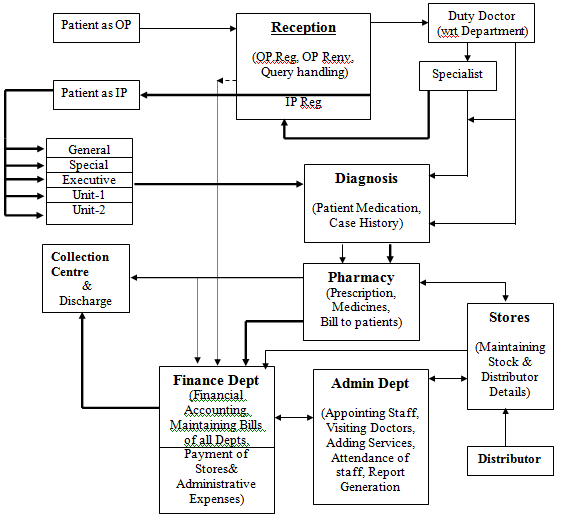
This Hospital Management System package is used to automate all the activities of the Hospital. It includes all features which are regularly used in the Hospitals and also it provides with more features like  query based reporting system, reports maintained for Administrative purposes.

The main modules in this system are:

  1. Administration
  2. Accounts
  3. Reception
  4. Diagnosis
  5. Stores
  6. Enquiries

The important tasks of each module are as follows.

Administration:

This is the main module of the entire Hospital Management System software. Any important classification of data has to be started from here. If any new Service has to be added then it has to be done from this module. Basically all main data which ever is required has to be entered from this module. Employee Appointment, Resignation, Visiting Doctor appointment, Attendance of all the staff, Lab and Ward service information,etc.

The user in the module can access any information requiring be changing or viewing. The reports that are generated will be for the support of the management.

Accounts:

All the financial accounting required in the hospital is managed and maintained using this module. Bill or any transaction information relating to financial terms will be updated to the database and will be accessed in this module for entry in the respective ledgers or records so as to produce a report on all the transactions that take place in the hospital.

Query based reports are available to retrieve based on the selection of the user requirements such as  Reports having the details of how much money is spent on procuring medicines to pharmacy for a period of any duration, etc.

Reception:

This module is used to enter the details of the patients who come in as Out Patient(OP) and based on the information of the doctor they will be admitted as In Patient(IP). Once the patient registers as OP a number will be given to the patient based on the  treatment required and availability of the respective doctor. Once the patient registers and the time allocated for visiting doctor then the process of diagnosis starts.

 Diagnosis:

This module will help the doctor to update the patient diagnosis information in the case sheet of the patient. It also helps to keep track  of the patient medication process to update the condition  of the patient by verifying past cases, if any.

A Project Report On Online Test System

ABSTRACT

ONLINE TEST SYSTEM

Online test is the examination taken by using a computer. Online test is the form of database of multiple choice questions posted on the Internet with secured access. It is specially designed for instant results as the Internet continues to develop, it becomes clear that the medium has different requirements. Questions and answers are generally short and unpretentious just what the net demands. It is more preferred rather than paper-based test. Some of them are its rapid speed evaluation and convenient fixation of examination date

The project is divided into four modules.

1. Registration modules

Registration of the user who is intending to write the test by getting the username and password is developed in the registration module. After the registration, the user based on his profile can take the test on the desired date and topic.

2. Selection module

This module based on the user privilege sets the question paper for the user. there are three privileges. They are candidate, administrator and operator.

3. Questionnaire module

In this module after getting the access for the required area, the system provides the questions related to that area to the user. The questions are in the form of multiple-choice questions.

4. Score report module

In this module, the system generates the score for the questions taken by the candidate. User can report those scores to store in that data base or otherwise cancel them.

In online test, testing could be scheduled when it is convenient for the students, which also encourages students to increase the time management skills. After the tests are scored, the data can be easily downloaded into the database.

Software specifications

ASP, ORACLE, HTML, VbScript and with appropriate WEB SERVERE.

INTRODUCTION TO THE PROJECT

With high demands in technologies for the purpose of student assessment and on curriculum coverage within the classroom, teachers are in need often efficient manner in which to conduct non teaching activities without lessening their impact .one such activity includes test administration. To overcome this online test is the best method.

Online test is a examination taken by using a computer. Online test is the form of database of multiple-choice question posted on the Internet with secured access. Online test is specifically designed for instant result. As the Internet continues to develop, it becomes clear that the medium has different requirement.

Using sound psychometric techniques online test is able to create a presided measurement tool that fulfill three needs to discover what the user knows, what a user does not know and what he needs to know. Questions and answers are generally short and unpretentious.

There are certain reasons why people prefer online test rather than paper-based test. Some of them are its rapid speed evaluation and convenient fixation of examination dates.

Introduction to Online Test System

This project is an attempt to design and develop online test system for the student assessment; the project is divided into four modules.

1. The registration of the user who is intending to take the test by getting the username and password is developed in the registration module. After the registration, the user based on his profile can take the test on the desired date.

2. The section module based on the user privilege sets the question paper for the user. There are three privileges. They are candidate, administrator, and operator.

3. In the Questionnaire module after getting access for the require area. The system provides the questions related to that area to the user. The questions are in the form of multiple-choice questions.

4. In the score report module, the system generates the score for the questions taken by the candidate. The user can report those scores to store in the database or otherwise cancel them.

In Online Test, testing could be scheduled when it is convenient for the student, which also encourages students to increase the time management skills. After the tests are scored, the data can be easily downloaded into the database.

Proposed System

Full on-line data entry with online validations on field and referential checking, context sensitive makes the registration of the user information easy and comfortable for the user. The goal of the system is to bring down the work load with the increased efficiency and to speed up the activities in testing activities.
User – friendly screens to the processes in the system with different access paths to the different users are to ensure the easier and secured access to different users.

  • Availability of the exam reports immediately after the examination is over
  • An integrated normalized relational database will be maintained for the entire system.
  • This system provides the facility for quick access of the data from the database and updating of the information to the database.

SOFTWARE REQUIREMENTS

S/W Requirements

Back End : ORACLE

Front End : HTML,DHTML

Server side Programming Technology : ASP

DataBase Technology : ADO
Web Server : IIS (Internet Information Server)

Android G -Search App

Abstract

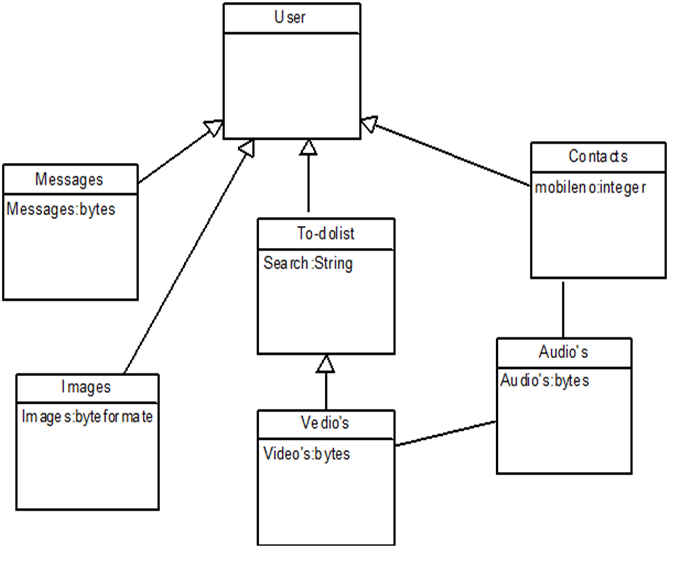
The project G-Search is a personal easy search option for mobile user. This Android based application provides Good User Interface to search options like contacts, messages etc. This Android G -Search application supports 2.3 version of android frame work.

Existing System

In the existing system there is no search bar in mobiles. If any user wants to search for any file in the mobile user need to go to the individual file system and search for the file which the user wants.

Proposed  System

We are going to create a mash up type of application which searches all the application (phone contacts, messages, video and audio files) which are in-built.

Software Requirements

  1. Java (JDK 1.6)
  2. Android SDK
  3. Eclipse Ganymede IDE
  4. Operating System Windows XP.

Modules:

1. Contacts
In this module application will search the SIM contacts and phone contacts based on the search string .

2. Messages
In this module application will search the SMS received from various phone numbers along with date and time stamp.

3. Audios
In this module all the mobile audio files will be displayed based on the search string .

4. Videos
In this module all the mobile videos files will be displayed based on the string and we can play the songs.

5. Images/Pictures
In this module all the mobile images matched with search string will be shown as in the grid format.

Conclusion:

As this is a Android G -Search mobile application one can easily search for required information. This makes this application efficient, convenient and easy to use along with providing maximum user satisfaction.

Future Work:

  • A dictionary can also be provided with this application for quick reference whenever needed while reading a book.
  • A Google map can also be provided in order to know the exact location of the book store.
  • E-book downloading can also be provided that can be an extension of this.