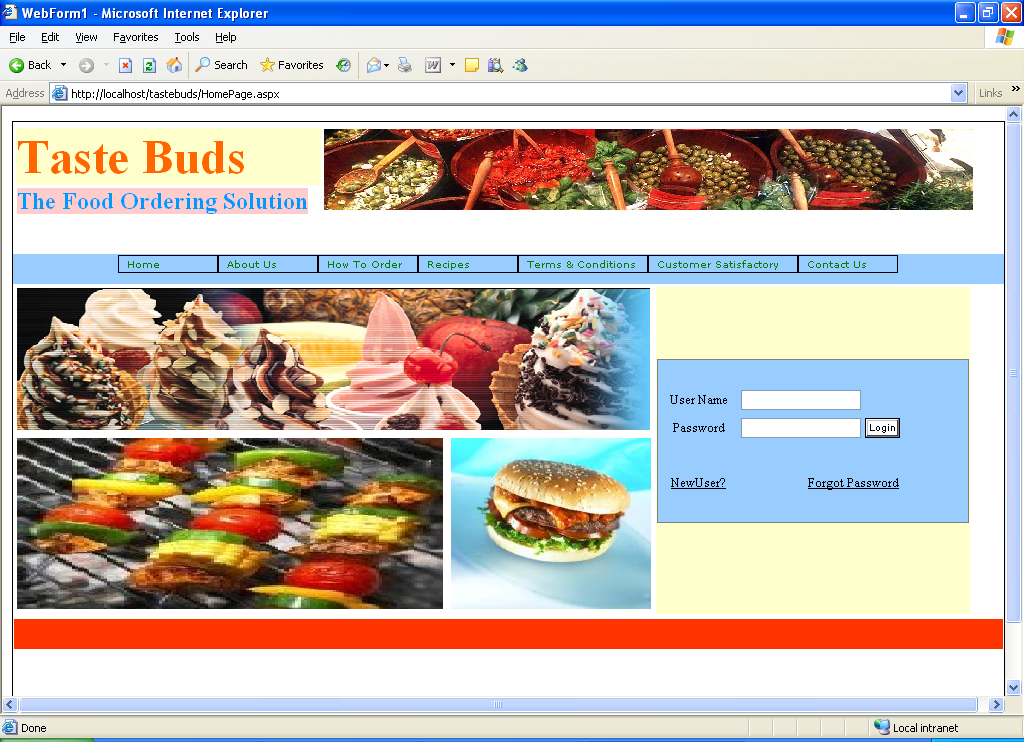
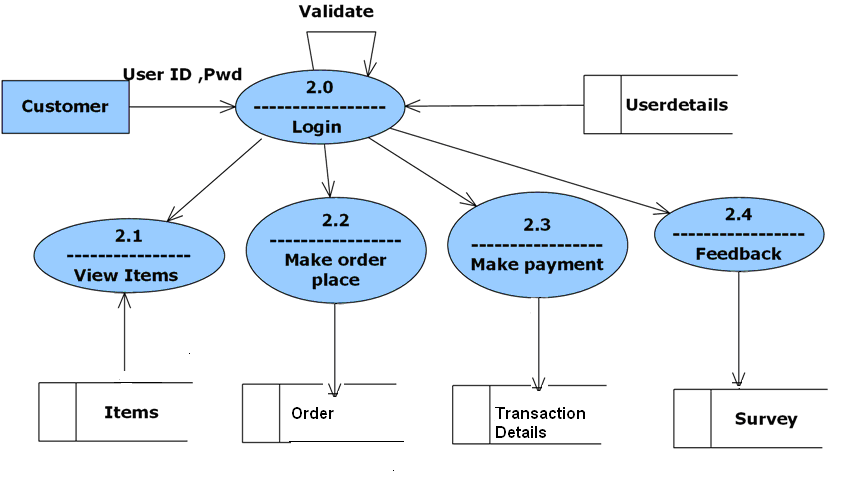
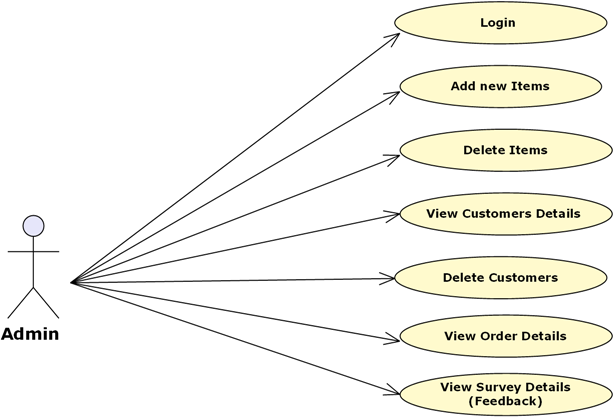
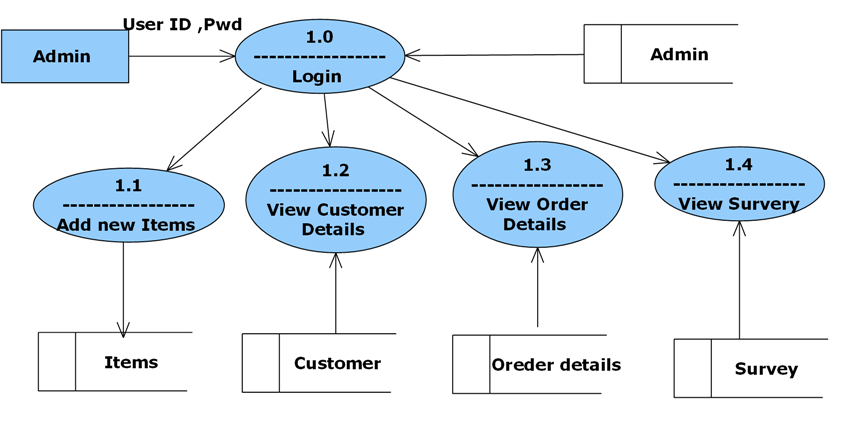
Taste Buds – The Food Ordering Application .Net Project

Objective:

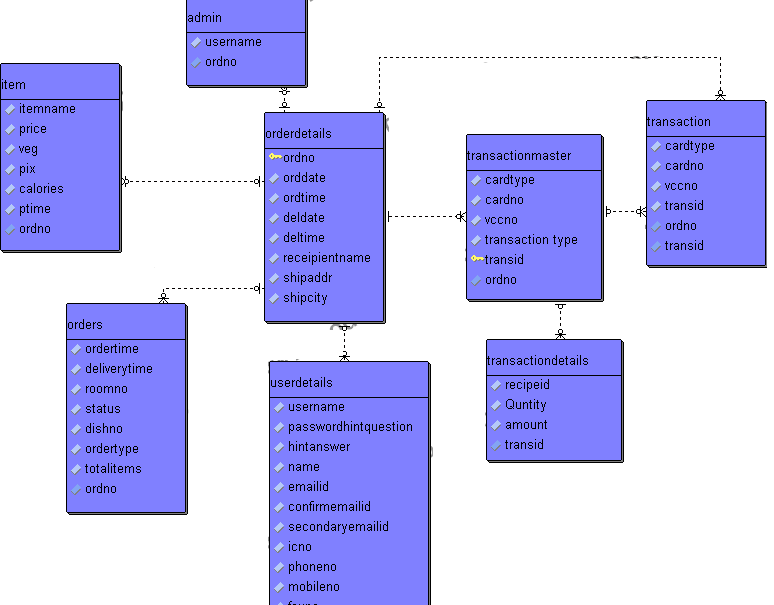
To develop a successful Intranet based food ordering application that can be associated with hotel administrative software in big hotels.

Abstract:

The main purpose of this The Food Ordering Software project is to develop a good application for a top rated hotel where their consumers can buy recipes online from anywhere. The system can help customers present the set of recipes available at this restaurant along with the various discounts available for the recipe items. The software will also present the images of the elements of the recipes along with the set of the menu items. Access to the device in the restaurant is likely to attract the administrator with the username and password.

Features of the project:

• Provides the option for consumers to purchase food online through the intranet
• Consumers can select items from the wide selection
• It is likely that the products are included in the basket, which can be analyzed and selected at the time of publication.
• Items purchased can also be deleted
• The possibility is that the client pays the claim individually for the things he requests, with this method this application can be quickly integrated with any active hotel software.

Modules:

The existing food system is classified into the following modules that are carefully integrated with each other.

• Customers
• Recipes
• Order
• Shopping Cart

Requirements:

Software requirements:

Content Description
OS: Win7
Database MS-SQL server
Technologies ASP.NET with C#.NET
IDE Ms-Visual Studio.Net

NUMBER OF MODULES

It Consists of 4 Modules

  1. Customers
  2. Recipes
  3. Order
  4. Shopping Cart

Customers:

• This module performs registration and maintenance of customer information.
• This information can be very much useful for delivering the ordered ones avoiding any confusion related to delivery address

Recipes:

• It contains
• Recipes
• Details about all recipes which are existing in the project
• Adding the new recipes and deleting the Recipes.

Order:

• It contains
• Orders List
• Payments information
Paying type
Card
Cash
• Using this, adding new order and deleting a order

Shopping Cart:

• It contains
• Recipes types
• list of items and cost
• Adding new items to recipes

Smart Voting System PHP Website & Android App Synopsis PPT

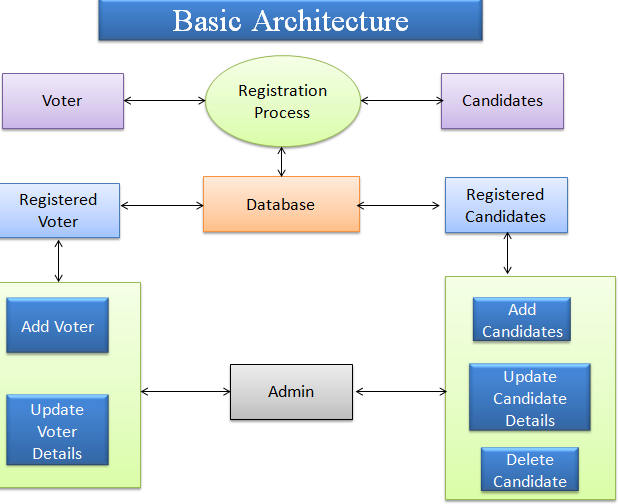
The main goal and objective of this Smart Voting System application are to help the organization in automating the entire manual process of the existing voting system.

The voting system must be compatible with the multiuser environment.

The Smart Voting System should be able to follow the entire detailed description of candidates and voters.

Development & Working Procedure: 

  1. Create a website
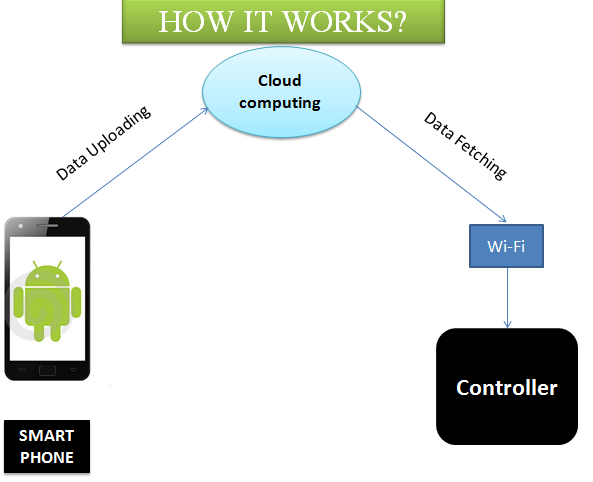
  2. Develop an Android application
  3. Create MySQL database
  4. Authentication and verification through OTP
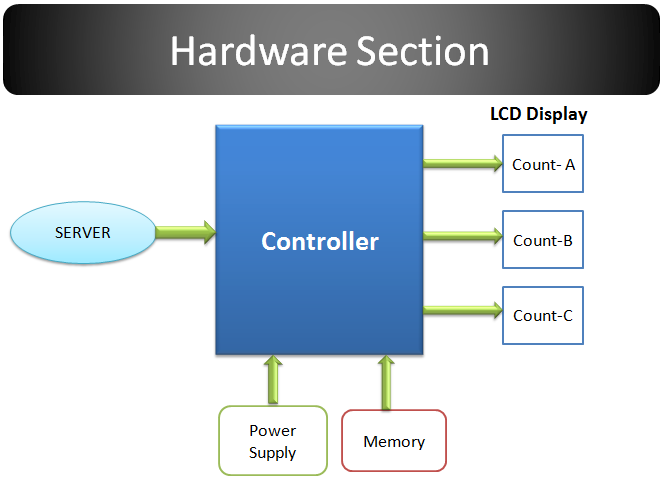
  5. Prepare hardware

Website:

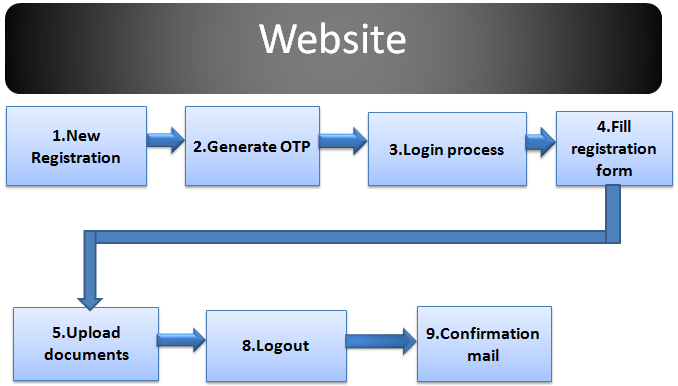
1) New User Registration via web portal
2) Generate OTP to confirm the valid user
3)Can login to the Website
4) Should fill the Voter Registration form to Vote
5) Upload necessary documents Like ID & Address Proofs
6) Get confirmation mail for participating in the voting process.

Android App:

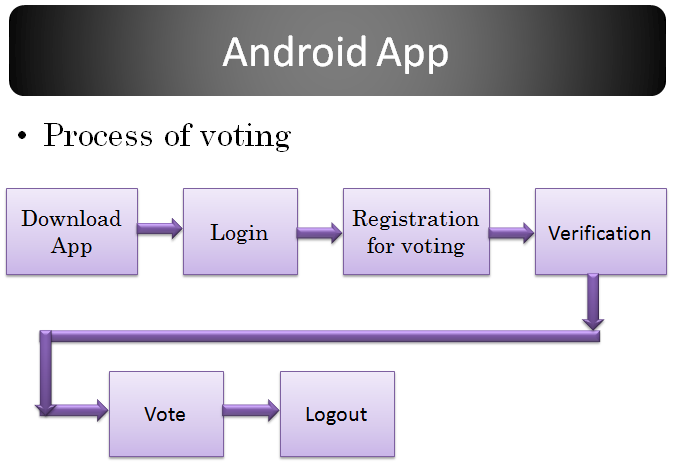
The Process of Voting is below:

First, the user has to download the android app then log in with their credentials then the user has to register for the voting, where the user getting verification mail / OTP to vote.

Creating database in MySQL:

1.Installation: two Apache webserver software programs with PHP and MySQL database server.

2. Save the voter information in the database. Now tell PHP to search the database for a list of voters and their information that you would like to appear on your site.

3. There are advantages to using this approach:

Instead of writing an HTML page for each voter, he would write a single PHP script designed to look up information in the database and display it.

Benefits

  • Voters can vote from anywhere at any time in India.
  • Save time.
  • Reduced workload.
  • Information available on time.
  • The number of votes will increase.

Library Management System .Net Project Code & Report

Library Management System:

The purpose of the LMS is to control the library’s daily operations effectively and efficiently. This technique basically has four types of modules that deal with the daily activity of the library.

In reality, it is a management subdiscipline that focuses on specific problems faced by libraries and library administration professionals. Library management encompasses normal managerial tasks, along with intellectual freedom and fundraising responsibilities.

Transactions are provided, such as logging in, registering, adding, searching, and deleting the problem. The library management system stores the important points, such as the name, address, identification number, and date of birth of library members, and users who arrive in the library.

Important bookmarks, such as book name, book number, price, author, edition, year of publication, etc., will also be stored. The application focuses primarily on the basic operations in a selection, such as adding new members, new books and updates of new information, searching for books and members, and ease of loan and return of books.

Modules:

  1. User management
  2. Book inventory module
  3. Book Loan Module
  4. Search Facility Management
  5. Assign book module
  6. Books inventory expired earrings

The web application can add members quickly, add books, browse members, search books, update information, edit information, borrow and return books in the shortest time possible. It focuses on paperless lending and stock management.

Book search processes become much easier with just a mouse click. Stores all books and member information, such as the name of the book, the name of the author of the book’s title, the publications, and the information on the shelf in the database.

In addition, it provides a search function to help students get the book by the access number/name of the author/title of the book. The librarian is willing to view and edit data from the machine’s database. The administrator may feel like creating users for the system.

The books are assigned to the students and, once the date of the assignment is made, the date of return will be shown along with the arrears charges.

Attached is the library project zip file with code and DB queries.

Run the query CREATE DATABASE LIBRARY before running the attached queries in the zip file.

SCREENSHOTS

Login Page:

Please enter the admin username and password to log in.
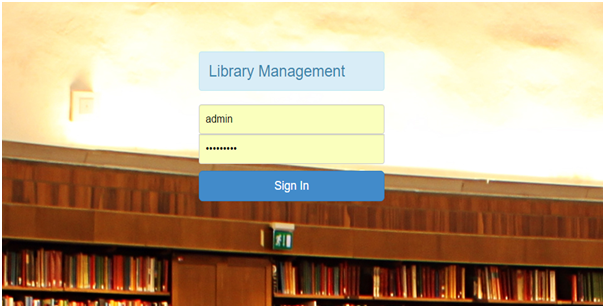

It will then move on to Home Screen.

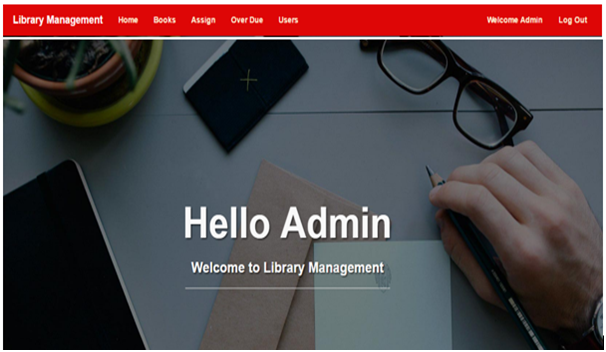
Home Screen:

The home screen will provide you access to Books, Assign, Over Due, Users, and Log Out modules.

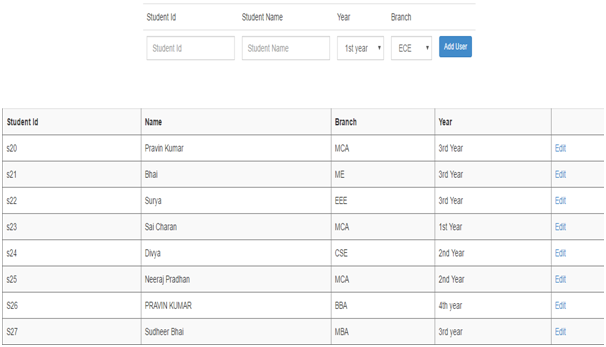
Users:

This module will allow the admin to add users in the sense of students who will actually be provided with books.

Type in Student ID, and Student Name, select Year and Branch from a respective year and Branch drop downs and click on Add User.

The saved Student details will be beaded in the grid. It provides an edit option which when clicked will provide an Update option. Edit will actually allow name, branch, and year details to be edited in edit mode. Click on the Update button to update the updated values.
Books:
This module will allow the admin to Add books to the application, Edit the Book Details, and then Delete a Book detail.

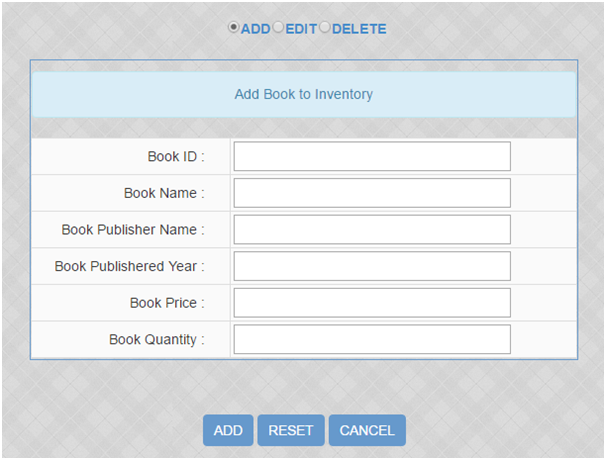
To Add book :

Provide a Book ID, BookName, Book PublisherName, Book Published year, Book Price, and BookQuantity. Click on Add to save the Book details.
Click on Reset to clear all fields in the view.
To Edit Book details:
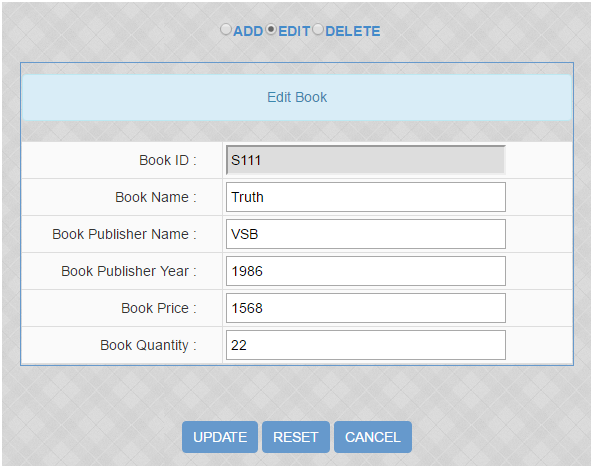
Select the Edit option.
Type in Book Id, click on Check and it will show details related to the searched Book ID. Edit the field values whichever needed to be and click on Update.
Click on Reset to clear all fields in the view.

To Delete Book Details:
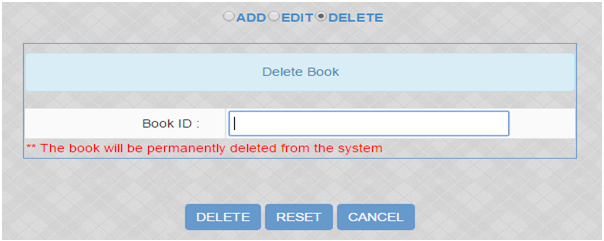
Type in Book Id and click on Delete.
Click on Reset to clear all fields in the view.
Click on Cancel to cancel any of the above operations.
Assign:

Assign will allow the admin to assign a book to a student and also show the due date after assigning to a student with a late fee.

Type in the Book ID and press Enter on the keyboard, it will populate the book details which has to be assigned.
Type in the Student ID, press Enter on the keyboard. It will populate the student details.
Click on Assign to assign a book to the student.
Click on Reset to clear all fields in the view.
Click on Cancel to cancel any of the above operations.

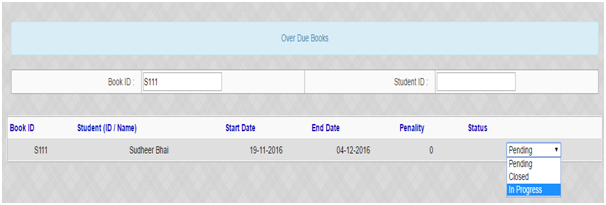
Over Due:

This module will allow the admin to see the books that are overdue on the basis of Student and Book search as seen in the screenshot below.
Download the attached Library Module Final Code, DB, and Report

Automatic Touch Screen Testing Machine Project Synopsis

Content:

  1. Abstract
  2. Electronics circuit and embedded systems
  3. Mechanical design.
  4. Microcontroller program
  5. Android app

Abstract

Designing and developing an automation process for testing capacitive touch screen of mobile, there will be android app installed in mobile which displays few color blocks on lcd screen when capacitive touch pen touches the particular color blocks on lcd screen with help of automation process with X,Y and Z-axis movement by holding capacitive touch pen on Z-axis, when capacitive touch pen touches color blocks on lcd screen in this process color block on lcd screen will change if its touch sensitivity is good else the block color will remain same and feedback from android mobile is taken for evaluating performance of touch screen and feedback is displayed on LCD screen.

Specifications

• XYZ axis router setup.
• Atmega 2586 Microcontroller board.
• DC motor driver L298.
• 12V/5A regulated supply.
• Hi-tech 645MG Servo motor z-axis movement.
• 2 DC motors for x-y plane axis movement.
• 2 DC motor encoders 16bit.
• Capacitive pen and its holder.
• 20X4 LCD Display.

Electronics circuit and embedded systems

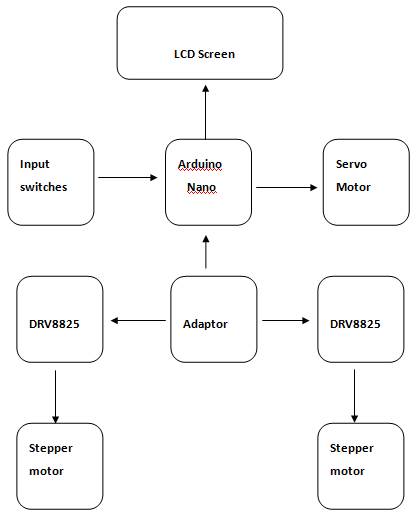
In this Automatic Touch Screen Testing Machine project we are Arduino nano board which consists of Atmega328 microcontroller with 2KB RAM and 64 KB flash memory this board will act as control unit which gives signals to DRV8266 stepper driver motors and 16 X 2 LCD screen, we have 4 input switches to select menu options all these are interfaced with Arduino nano motherboard.

List of components used in this project.

• Arduino nano 1no.
• DRV8266 stepper motor driver 2nos.
• Nima 13 stepper motos 2nos.
• Servo motor 90G 1no.
• 16 X 2 alphanumeric LCD.
• Input switches.
• Connectors and wires.
• 12V / 2A Adaptor.
• Dotted PCB.
In our Automatic Touch Screen Testing Machine project, we have used dotted PCB for interfacing.

Block diagram of electronics parts

Circuit working operation

We are using 12V / 2A adaptor for powering our circuit board Arduino nano and DRV8825, Arduino nano plays a major role in this Automatic Touch Screen Testing Machine project.

Online Book Store PHP Project Report

This Online Book Store PHP Project follows the concept of e-commerce in depth. This final year project is designed to sell products online from various categories of book collections mentioned in the project.

This project definitely helps the user to buy something from the internet because in the book store the user able to buy anything by selecting the book details and entering your online payment transaction details.

By using this output design, the user can save their time by buying the product that is wasting while roaming the market. From here they can probably get all the things they want as well as fast moving entertainment products. They have several options in the Single Collection.

First of all, I would like to say that the project is an essential part of our present educational system. If we are only by theory, it can not give us perfect knowledge.

This project report from the online book shopping website is against you for the project as a subject in

This site is developed with the purpose of studying the Computer Student. Provides computer e-book. It is also providing educational software for students. On this site, you only need to register the Buyers, which is also free. For this student, you must have a valid e-mail account, such as Yahoo, Rediff, Hotmail etc. This site Bookshopping.com is developed in JSP language.

This web application is quite easy to operate so that any student can use it easily.

Their collaboration in the form of suggestions and comments is welcome, to improve any knowledge and project.

We developed this site “Online Book Store System” which is developed in PHP as Front End and MySql as Back End.

I put a lot of effort into the design of this site. I did my best to meet all requirements efficiently.

This site provided services such as the email-based user account and will provide the student with the free download of the computer’s e-book. Besides providing software that is useful to students and a lot?

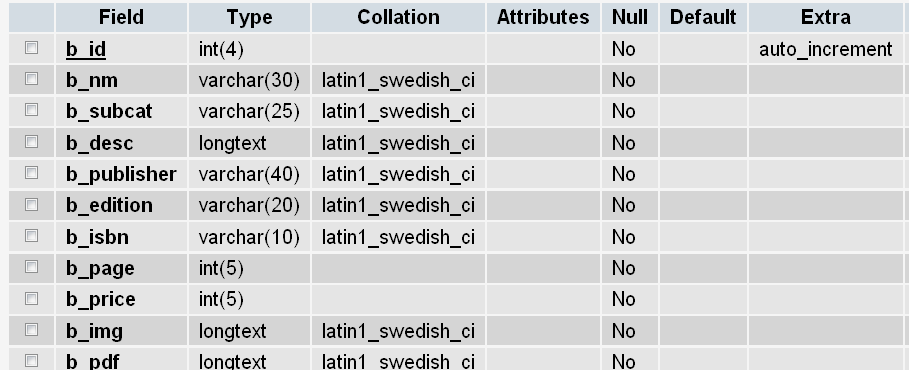
DATABASE NAME: Bookshop

1.Book Table
2. Category Table
3. Contact Table
4. Subcat Table
5. User Table

Screenshots Of Project

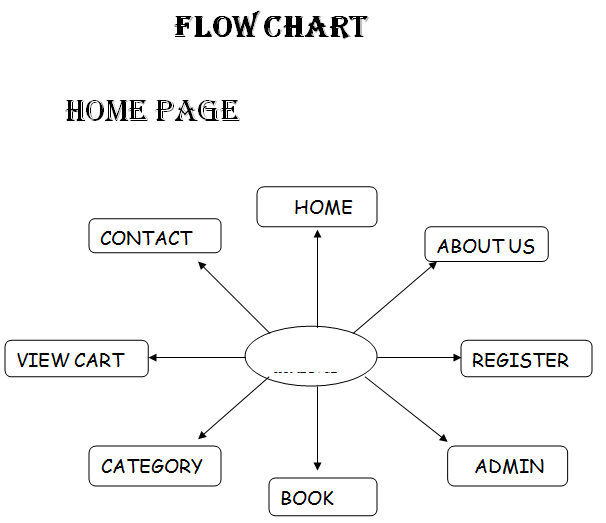
  • Homepage
  • Registration Form
  • Admin
  • Category
  • Item Details
  • View Cart
  • Book List
  • Contact

Software Requirement

1. Mysql

2. Web server

3. PHP (PHP Hypertext Preprocessor)

4. Notepad++

5. Macromedia Flash 8

Download the below attached Online Book Store PHP Project Documentation / Report

Genesis Auto Mobile Store and Service Java Project Abstract, Report & Source Code

Hi,

We showed the Auto Mobile Store and Service project to our professor today, he said that the project is outdated he wants us to add a new module in which we need to show the graph of cars brands that got problems in the past 10 years,
For example: If the user selects car brand Toyota the graph should show the total number of cars that got problems in past year and the other graph should show the graph of what kind of problems that particular car had to face like engine problems, tire flat problem and another kind of problems. If you can do this we can clarify further on this and give you the respective data for this module. It is actually data visualization functionality which should show graphs based on data we give.
Video Changes :

Make below changes and send a new video with all new changes in video

Auto Mobile Store and Service Project explanation (All the functionalities in the application)
Change “AMSM” to “Genesis” in all pages of application and make every page look appealing like real-time automobile sites
the pages in the video are outdated and header images sidebar images are not even half the length of the page.

Create different login For Admin and Customer and pls how can we do that in a database like creating user ids and giving permissions.

In the Available Brands scrolling section in the login page, we need images of American car logos like Audi, BMW, Dodge, etc.If u want we can provide you with the logos and brand names

Please use the following as usernames for logging in and any password

Admin Login Username1: Anurag
Admin Login Username2: Rajesh
 

Available products page and inventory page use only US related product names and price in dollars.Make navigation bars effective and attractive throughout the application

Please explain the difference between Products page and inventory page

Make the table display on every page more appealing and the headings font should be changed and font should be increased

Make sure that tabs images fit the screen without leaving the pages empty with spaces

Dropdowns have to be more effective the dropdowns as of looks very dull.

Main Project Changes:

Most Important thing we already informed this that the database should be Oracle or MySQL or SQL Server we don’t need to want it in MS Access

Need Job Scheduling page, Reports, and Invoices page with options to print them. This is mentioned in the abstract but not found in your video.
These pages are very important for our project. We showed that these 2 pages as major selling points in our project.

In Job Scheduling page the storekeeper should able to enter customer name, his contact details, his car name, repair description required for car, repair start date,
car delivery date after repair, cost estimation for repair and on the other side, the customer should be able to see the job status of his repair when he logins into the application.

SRS Documentation Changes:

 Please change the documentation as required In module section of SRS document please check the module sections it is all repetitive which doesn’t make any sense at all. Please include only
the functionalities used in our application.
Main Documentation Changes:
Is the E-R diagram in the documentation related to our Auto Mobile Store and Service application or is it generalized? If generalized we need it as per our application and use case diagrams should be project related and we need these changes by next Monday as we need to present them next week and pls explain them.The technologies used in the application should be explained clearly like how are they used in our app? what did we achieve using those technologies? In documentation, we got only generalized explanation of
each technology used which will not be accepted by our professor.

Please provide all these before October as we need to check all the things and submit it October last week and we need a complete demonstration of the project once all these changes are done.

Online Banking System .Net Project Abstract, Report and Source Code
ABSTRACT

Online Banking is one of the most important financial activities which will be carried out by any person who holds a bank account. There are various activities that can be carried out once you log in to your bank account. Once a user logs in he or she can check the bank balance, check bank account transaction history or account summary, add beneficiary accounts, transfer funds to another account, download account summary. Whenever we deal with a banking system main concern should be the security related to banking transactions and account login activity.

Existing System:

The Online Banking System as of now deals with a single sign-in log on and it will not be secure as expected. If a customer logs on from an unknown system outside the usual access device there are chances that it can be hacked easily and this might end up with a lot of issues. There are chances that if the user forgets the password and supposedly changes it and writes down the same somewhere and forgets to erase it or scramble it, there are chances that anyone can misuse the login.

Proposed System:

Once a customer logs in he or she has to generate a transaction password for online banking transactions. It will be an additional password apart from the login username and password credentials. The third security system can be provided by adding a graphical password generator which needs to be punched in before confirming an online transaction. This will involve password strength meter also.

Authentication is an activity of linking an independent or an individual process on the basis of username and password which basically consists of characters, numbers, alphanumeric values, special characters etc. Most of the authentications are complex, though they seem to be boring to the users and are very hard to remember. Every one of us, use the simple textual passwords which can be easily guessed by the attacker.

Let us try a New methodology to improve the authentication process using graphical password generation by making the user selects his/her own set of password as a series of clicks on the image which we will store it as a pattern and for each click the strength of the password is calculated and can be used to classify the password as Low/Medium/High .

Our Online Banking approach will be a click-based graphical passwords authentication system that works by having the user select from images, in a specific order, presented in a graphical user interface (GUI). For this reason, the graphical-password approach is sometimes called graphical user authentication (GUA).

A graphical password is easier than a text-based password for most people to remember. Suppose an 8-character password is necessary to gain entry into a particular computer network. Instead of w8KiJ72c, for example, a user might select images of the earth (from among a screen full of real and fictitious planets), the country of France (from a map of the world), the city of Nice (from a map of France), a white stucco house with arched doorways and red tiles on the roof, a green plastic cooler with a white lid, a package of Gouda cheese, a bottle of grape juice, and a pink paper cup with little green stars around its upper edge and three red bands around the middle.

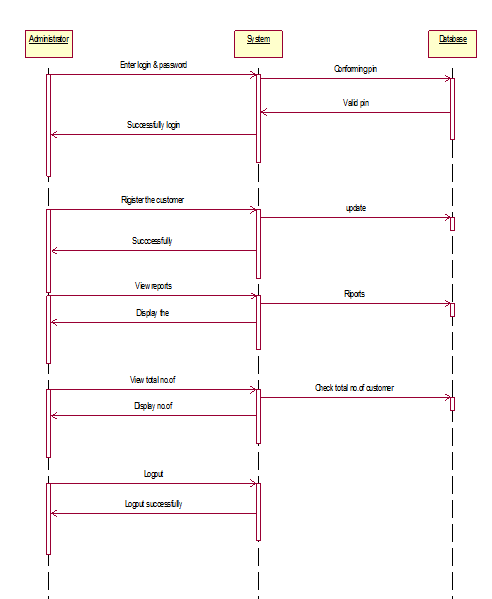
Administrator Sequence diagram
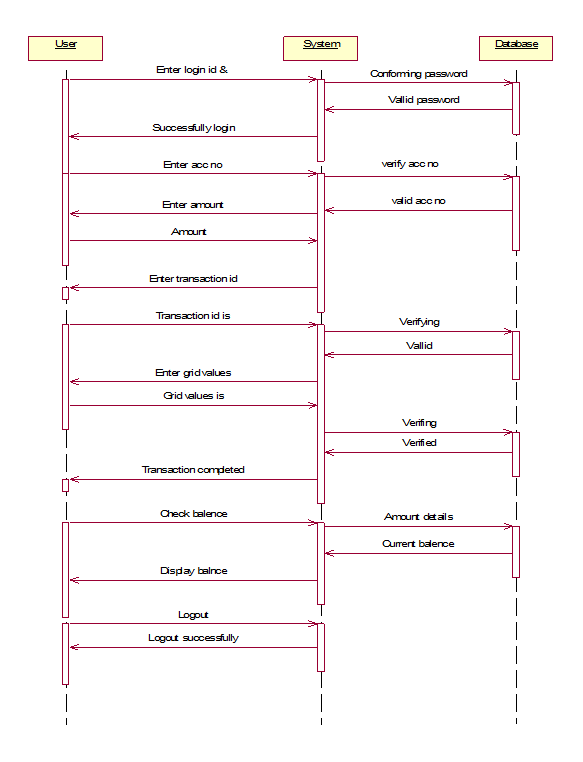
User Sequence diagram

Approach:

We will implement the strength indicator in a web environment using Html, CSS, Javascript, and Java to run my application. Like unlocking methodologies currently present in Smartphones, graphical passwords may act as a next-generation locking mechanism in which my design of the graphical password strength meter can be induced to suggest the strength of the graphical password which is being set.

In our assumption, we have noted the following two points:

1. The segment size of specific smaller objects (like the eyeballs of a selfie) is small which gives any attacker a clue on where the click might be.

2. The segment size of large spaces in the image (like the sky in the background) gives minimal clue on where the click mostly be.

3. Every pixel in the image belongs to a segment, so choosing a pixel anywhere in the image can give strength to the password.

Based on these two points we will give less weight to smaller/specific objects and more weight to larger objects.

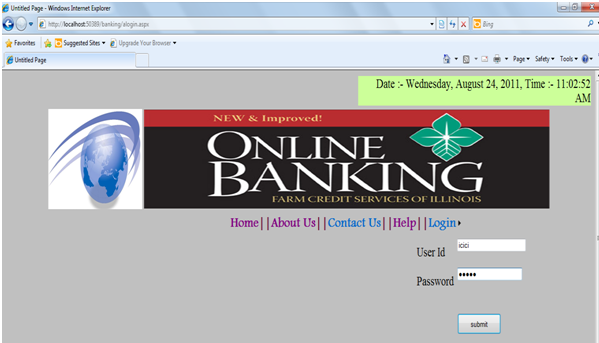
Output Screenshot

Number of Modules:

We will go with below modules:

1. Customer
2. Registration module
3. Security and Authentication
4. Accounts summary
5. Transfer Funds
6. Profile
7. Admin

Specification requirements:

Software requirements:

● Front End : HTML, Css, Javascript
● Data Base : SQL Server 2005 / MySQL
● Technology : Java and Framework

Hardware Requirements:

● Hard disk : 80GB Min.
● RAM : 2 GB Min. & Above
● Processor : Intel Pentium-IV and above

Online Furniture Shopping Mobile Application Design

This Online Furniture Shopping App developed for Android mobile phones.

  • Objective
  • Abstract
  • Modules
  • Software Requirement Specification
  • System Design
  • Conclusion

OBJECTIVE

This application showcases all the furniture products for shopping, making the customer a comfortable online shopping experience with a real look and feel of the furniture.

To buy products, the customer has to have an account. Those who do not have an account can only view the available product.

Once the customer authenticates his credentials, not only he can view the products, he can place an order to buy those products.

This application then generates a bill for that particular customer. After the confirmation, the customer has to enter his payment option to buy those products.

ABSTRACT

In this application Consumers can use three modes of payments:

Credit Card
Debit Card
Pay on Delivery

EXISTING SYSTEM

In the present system, the online shopping is very backward and all the modes of payment aren’t available.
The number of products available is also very less.

PROPOSED SYSTEM

The proposed system has a wide range of varieties of products available in the market.
Easy payment through all the credit and debit cards.
Cash on delivery and
Internet banking is also available.

MODULES

The following are the modules involved in this project
ADMIN
CUSTOMERS
STOCK DETAILS
PAYMENT MODE

ADMIN

This module has the information about all the details of the customer access.
He also has all the access permissions for the various sections related to online shopping.

CUSTOMERS

These are the users who use the application for the purpose of shopping.
They can search all the products in the cart.
They can also modify their personal details in the application database.
They have right to choose any payment option.

STOCK DETAILS

This contains the complete information about the stock present in the cart with respect to their available stock, sold stock, new stock when purchased, details of the exchanged stock(if a customer returns).

PAYMENT MODE

In this mode, various payment modes are available for a customer to pay for the item purchased.
Credit / debit card
Cash on delivery
Internet banking
Others.

Activity Diagram
Class Diagram
Collaboration Diagram
Component Diagram
Deployment Diagram
Sequence Diagram
State Chart Diagram

SOFTWARE REQUIREMENTS:-

  • Eclipse + ADT plugin
  • Android SDK Tools
  • Android Platform-tools
  • A version of the Android platform
  • A version of the Android system image for the emulator
  • My sql

HARDWARE REQUIREMENTS:-

  • 200 MHz processor
  • 32 MB of RAM
  • 32 MB of storage
  • ARMv7 processor

CONCLUSION:

In the current market for online shopping, we do not have many applications to be precisely for furniture shopping. This application facilitates more user-friendly interfaces, virtual shopping experience, on the go selections, dimensions of the furniture and easy payment options. With more interaction and collaboration with suppliers, this can be made the next generation shopping option by integrating with mobile operating systems like Android.

Banking Network Design MCA Project Report
OBJECTIVES & GOALS

  • It provides support to various applications of banking
  • This Network will let various users of the bank and their employees connect to the main Server.
  • The objective only authorized user to access Network including all servers and network devices.
  • Provide greater speed & reduce time consumption.
  • It provides 99.99% of uptime of Network.
  • Allocate bandwidth to servers accordingly by using QoS.
  • The proposed Network will be user-friendly so that even a beginner can troubleshoot any issue easily.

The H/W used for developing this Network entitled Banking Network Design is as follows:-

  • HUBs
  • L2 and L3 Switches
  • Routers
  • Modems
  • WIC Cards, S/T Cards and various modules for routers and switches.
  • Firewalls
  • Very small aperture terminal(VSAT)
  • Various types of cables for interconnecting Network Devices.
  • Servers according to Customers requirements.

Network Overview

The Network design starts from the point of topology. This will include defining the layers and defining the functionality of each layer. The main aspect of dividing the network into layers is to incorporate the functions based on the layered structure and design the connectivity methods and high availability techniques at each layer. It also helps in distribution and control of network functionality.

The aim of the network is to provide highly available and scalable environment for collocation of Internet, Intranet and Extranet services, and applications. It providing high-speed access to data, voice and internet-based applications. The network is planned such that it will provide the necessary backbone connectivity between the different offices to ensure that the network becomes an enabler for business plans.

The design should be in such a way that there will be no single points of failure and should be capable of achieving fast and predictable convergence times. The design should also address the ease of scalability by increasing the port density in the switches. This Low-Level Design has been made in accordance with Cisco’s existing best-practice recommendations. The foundation of the design stems from Cisco’s standard ‘Multilayer Network Design’ model.

Future Scope

There is a vast future scope of this Network. This Design can be improved and can be used by various banks. If the limitations present in this Design are removed then, this Network will become very reliable and provide 100% uptime.

We can easily implement any changes to the Network Design as we are using the latest protocol like Border Gateway Protocol (BGP) in our network which is having attributes to easily divert or control the flow of data and QOS which can be used to allocate bandwidth to servers accordingly.

LIMITATIONS

  • We will not be able to resolve issues from any of the following by using this Network:
    • Any unreported/ undetected Bugs in standard software’s, or tools
    • Any changes in Application Software features
    • Older versions are incompatible with current features
  • Lease line uptime depends on a particular Service Provider.
  • This Network is limited by the state of technology and functionality of software tools or products deployed.
  • Third-party IOS integration will be carried out on the best-effort basis.
  • All hardware devices upgrades, hardware re-deployments, and policy changes shall be done after the mutual consent of the customer, based on the impact it would have on the overall security situation and performance of the network.
  • Security can be implemented in a better way.

Online Job Portal Java Project Report & Source Code

Objectives of the project:

  • Registration
  • Login
  • Authenticating
  • Updating Profile
  • Posting a job and removing or modifying job
  • Searching for a job
  • Taking online exam
  • Feedback

LITERATURE SURVEY

There are many applications developed related to this Online Job Portal, but, however, these systems are very complex for their own purpose. Most of them do not have the centralized database and easy access to users. So in this project, we are implementing this application through a centralized database and easy-to-use access for job seekers and job providers. The administrator is the primary actor to maintain the database, and also accepts comments from job providers and job seekers to improve and develop the application’s graphical user interface. Registered job seekers can also take the company online exam. In addition, qualified applicants can be classified according to this system based on their qualifications and company requirements.

Limitations

• The current Online Job Portal system is not a fully computerized and manual system for entering job candidates and job provider data and managing it.
• There is no centralized database maintenance
• There is no easy access to records of people seeking work in particular
• Job seekers can not easily navigate through the database

Benefits

• It is a fully automated system for managing the Online Job Portal database
• This system provides centralized database maintenance
• This system provides easy access to certain job seekers or their complete details
This system gives job seekers easy to navigate through the application to get more information in the most secure way.

IMPLEMENTATION

5.1. MODULES

The system is divided into three major parts depending upon the requirement they are.

  • 1) Administrator
  • 2) Job Provider
  • 3) Job Seeker

Administrator

All the users are controlled by admin. Administrator services are

  1. view job providers
  2. view job seekers
  3. view feedback

Examination

The job providers prepared questions and update the providers and conduct examinations to the job seekers and also send the particular examination results.

And the job seeker searches the particular job then attends the exam and also views his results after completion of the exam.

Software Requirements: 

Operating System: Windows XP/2003 or Linux/Solaris

User Interface: HTML, CSS

Client-side Scripting: JavaScript

Programming Language: Java

Web Applications: JDBC, JSP

IDE/ Workbench: Eclipse with My Eclipse Plug-in

Database: Oracle

Server Deployment: Apache Tomcat 6.0

Screen Shots:

  • HOME PAGE
  • LOG-IN PAGE
  • ADMIN PAGE
  • JOB PROVIDERS IN DB
  • JOB SEEKERS IN DB
  • FEEDBACK PAGE
  • JOB PROVIDER PAGE
  • UPDATE PROFILE PAGE
  • ADD NEW VACANCY PAGE
  • SEARCH JOB SEEKER PAGE
  • RESULT PAGE FOR SEARCH JOB SEEKERS
  • EXAM MANAGEMENT PAGE
  • PREPARE EXAM PAPER PAGE
  • PREPARING QUESTIONS PAGE
  • ADDING QUESTIONS PAGE
  • RESULT PAGE FOR SEARCH JOBS
  • EXAM MANAGEMENT PAGE
  • TAKING EXAM PAGE

TEST CASE REPORTS 

Name of the page: Admin Login

Sno TEST CASE Expected Result Actual Output Remarks
 1 New Admin logged on without sign in. Should return a message sign in  before log in. Sign in First Success
2. Invalid password Enter correct password Wrong password Success
3. Invalid username Invalid User Enter valid name Success
4. Special character entered in password field. Verify your password You Entered Invalid password Success

Name of the page: Job provider Login 

Sno TEST CASE Expected Result Actual Output Remarks
 1 New provider tried to log on without sign up. Should return a message sign up  before log in.   Failure
2. Invalid password Enter correct password Wrong password Success
3. Invalid username Invalid User Enter valid name Success
4. Special character entered in password field. Verify your password You Entered Invalid password Failure

 Job Seeker Login 

Sno TEST CASE Expected Result Actual Output Remarks
 1 New seeker tried to log on without sign up. Should return a message sign up  before log in.   Failure
2. Invalid password Enter correct password Wrong password Success
3. Invalid username Invalid User Enter valid name Success
4. Special character entered in password field. Verify your password You Entered Invalid password Failure

Name of the page: Exam Management 

Sno TEST CASE Expected Result Actual Output Remarks
 1 Provider tried to add exam paper without scheduling Schedule first NULL Failure
2. Seeker tried to write same exam again exam already taken Can Write Failure
3. Displaying a message after time up in exam Time up Time up Success
4. Selecting exam before scheduling date Invalid test NULL Failure