Online Flight Reservation System .Net Project Report

Existing System

An extensive study of the existing Online Flight Reservation System was carried out. There is an existing flight booking system available in branch. The system is run manually by the database. It is difficult to run efficiently by manpower, and difficult to respond every user within a short period. Thus we came to know the essential need to make its web application.

Drawbacks of Existing System:

  • It is difficult to run efficiently by man power.
  • The system is run manually by the database.
  • It is difficult to respond every user within a short period.
  • The danger of losing the information in some cases.
  • The problem of maintaining the information of registered users.

Proposed System

The airline reservation system makes finding information about any ticket quick and easier, booking any ticket with a click of a mouse, also cancellation of ticket. It also maintains a record of regular passengers, their names, addresses, tickets issued, date of return, etc.

Advantages of Proposed System

  • No possibility of the missing database.
  • The request will help users to ask for new bookings.
  • All the information about the users and bookings can be maintained in an effective and efficient manner.
  • Saves a lot of time in searching, requesting and issuing.
  • The system contains all the up-to-date information and stores information.

Module List

The Online Flight Reservation System can be differentiated into the following modules which are closely integrated together.

Admin:

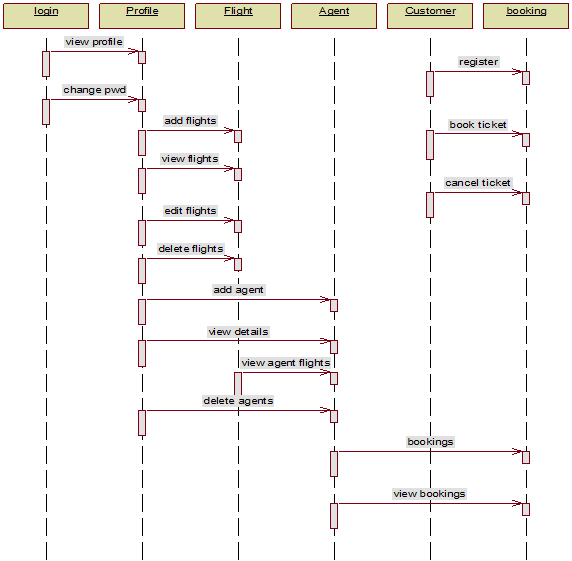
This module provides all the information of agent, passengers and flight details. He has the privileges add the agent, add the flight details, edit the flight details, delete the flight details, maintain the bookings, delete tickets according to the request of the customer.

Agent

This module provides all the information regarding flights.i.e Arrival and departure time of flights. Each agent has some group of airlines associated with him. He has to maintain all the details about the flights and bookings. He can add flight details, delete flight details, edit flight details, view the flight details and maintain the bookings.

User

In this module, User registers and can book the ticket for the desired flight and can even cancel his ticket.He can change his password. Send requests for booking and cancellation. View the flight details to book or cancel the tickets.
LIST OF Output Screens Pages:

  • Home Page
  • Login Page
  • Admin Login Page
  • Admin Home Page
  • Admin Profile
  • Admin View Profile
  • Output of Admin View Profile
  • Admin Change Password
  • Output of Admin Change Password
  • Admin Flight
  • Admin Add Flight
  • Output of Admin Add Flight
  • Admin Edit Flight
  • View of Admin Edit Flight
  • Output of Admin Edit Flight
  • Admin View Flight
  • Outputs of Admin View Flight
  • Delete Admin Flight
  • Output of Delete Admin Flight
  • Admin Agent Page
  • Admin Add Agent
  • Output of Admin Add Agent
  • Admin View Agent
  • Outputs of Admin View Agent
  • Admin View Agent Flight
  • Output of Admin View Agent Flight
  • Delete Admin Agent
  • Output of Delete Admin Agent
  • Admin Customer
  • Admin View Customer
  • Outputs of Admin View Customer
  • Admin Booking
  • Output of Admin View Booking
  • Output of View Cancellation
  • Admin Ticket Cancellation
  • the output of Admin Ticket Cancellation
  • Admin Logout Page
  • Agent Login Page
  • Agent Home Page
  • Agent Profile
  • Agent View profile
  • Outputs of Agent View Profile
  • Agent Change password
  • Output of Agent Change Password
  • Add Agent Flight
  • Output of Add Agent Flight
  • Agent View Flight
  • Outputs of Agent View Flight
  • Agent Edit Flight
  • View of Edit Agent Flight
  • Output of Edit Agent Flight
  • Delete Agent Flight
  • Output of Delete Agent Flight
  • Agent Booking
  • Output of Agent View Booking
  • Agent Logout Page
  • Customer Login Page
  • Customer Home Page
  • Customer Profile
  • Customer View Profile
  • Output of Customer View Profile
  • Customer Change Password
  • Output of Customer Change Password
  • Customer Booking
  • Customer Search for Flight
  • Output of Customer Search for Flight
  • Customer Ticket Details
  • Customer View Ticket
  • Output of Customer View Ticket
  • Customer Ticket Cancellation
  • Output of Customer Ticket Cancellation
  • Customer Logout Page
  • Customer Register Page
  • Output of Customer Register Page
  • About Us Page
  • Contact Us Page

Asset Management System .Net Project Report

OVERVIEW:

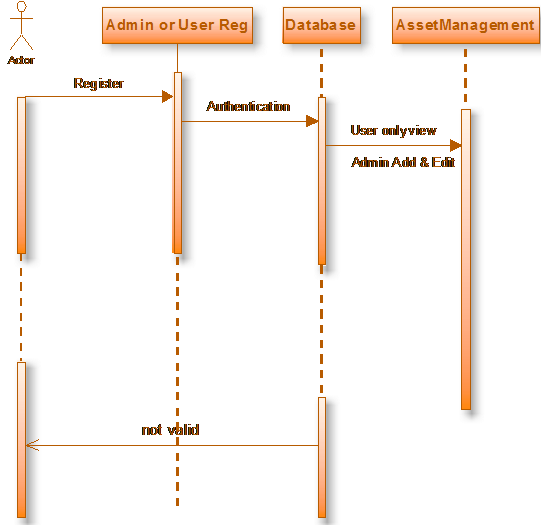
This project aims at creating an Asset Management System, which can be used to maintenance, the machineries, shares, project assets, insurances. The Administrator of the system can create an Item for sale providing the item name, description, an image of the item, minimum bid prize and insurance etc.

Sequence Diagram

PROJECT MODULES

  • Administrator
  • Users

MODULE DESCRIPTION

Name of the module-1: Administrator

Description: This module Administrator maintains the industry information.

Sub modules:

  • Project Asset.

Machinery Asset: Admin Add machine category and Add machines, machine name, machine description, cost, no of  items, machine insurances, Damaged Machinery information,  Display information of machineries.

Shares: This module contains Partner details, if partner involves in other business that business details partner business type, percentage and profit of in business displays, share percentage in Company, partner information.                      

Project assets:  This module consists Project details, required Configuration about projects, Profit details, Display   Project details.

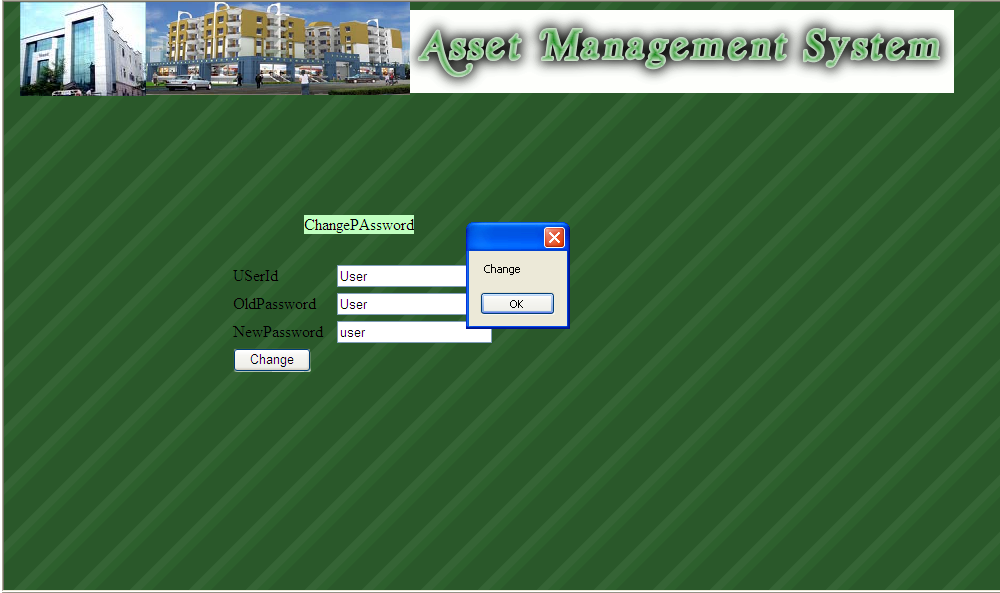
Output Screen

Insurance: This module describes about Company details and Issuing of insurances.

Name of the module-2: USERS

Description: This module user only view the industry information.

Partner Information: User can view the partner information.

Machinery Information: Available information on machineries.

Project Details: Includes details of project like investments and profits. 

Insurance: Includes company details and insurance for goods.

Ultra App Portal .Net project

RUN THE APPLICATION

This Ultra App Portal window is the main navigation area. Users can work and see the following:

1) Events module

Upcoming events
Get more details

2) Discussion module

View various Query
Connect and Reply

3) Links module

View various URL list
Connect to sites

4) Classifieds module

View various advertises list
Give new advertise
And also avail existing advertisements

5) News module

View various news

6) Administrator module

This is module from where we can do every task-related to this portal
The various options are shown at the bottom with images at the top

Login

The Portal is with 3 default users and 4 security levels, as shown to the right.

Security Level 0:

All visitors who are not logged in have security level 0 with limited permissions, allowing them to view portal areas.

Security Level 1:

All users who register and log in to the portal are automatically assigned security level 1, can submit new content, although some of such content may require approval by an editor or administrator.

Security Level 2:

This security level can be assigned to users only by the administrator and is usually assigned to editors who may submit, review, approve, change and delete content

Security Level 3:

This is the highest security level, available only to portal owners/administrators and allows them to modify and delete users, configure portal settings, and send email notifications to users.

Events Module

All of the events in events list are downloaded from the database and displayed.

Here we can search for the specific event by providing its name in the Search Events Option
Select any of events from the list and click More button to get the further data regarding the event.

We can add new events to the list if we are allowed by administrator depending on the various security levels.

We can even register for a particular event and get details regarding it from the portal’s administrator or provider of the event.

Displays Events Details

From this page, we can see and also, register for the given events

If we are register in this event than on that specified date we will get reminder and also message

We can get the specific details regarding the project like the date, description, fees, address information URL address.

Link Module

This module gives information regarding the specific links related to given or selected category.

It provides the category name, its links details and general description regarding the links and its connected organization.

It also provides the physical address of the links organization.

If this project is online than we can get connected to the site.

If the project is implemented in the intranet or extranet than to we can get connected to the specified URL.

We also search for the given category’s links by specifying it in the search option

Adding Links

This screen shows how we can add new links provided we have enough permission to our login name.

We have to provide the link name, description, address, URL address(link) and select the category from the dropdown list box.

This added link will go to the administrator for the approval and then if he approves it, then only it will be displayed in the list.

Classified Module

This module is designed for the advertisement and depending on the security level we can give our advertising on the portal.

In case of extranet, we can specify the new quotation on the portal and also give our URL address from where others can check the details in case of query

We can also date of posting the new advertisement and category along with its amount

Adding New Advertisement

Here we are submitting our new advertisement this is also dependent on the level of the security given to our login name

Again this form requires the approval of the administrator. If he approves this then it will be shown in the list of classified items.
We can specify the context and location along with the title of the advertisement.
We can even give the date of validity for the advertisement.

Discussion Module

This module consists of forums in which a user can submit his query and different people sent they reply or answer for the same.

Thus this is the bench where anyone can post this query and get the solution.

Here forums are created by the administrator and he may assign it to any of the users for management purpose.

This shows a number of threads in a particular forum and date and time for the last activity.

We can add a new thread to any forum. These threads are nothing but query regarding any topic.
Others can give there view on it.

Viewing New Threads

Here we can get the information on the specific thread and also post our reply to the query.

This page shows the thread title, the name of the author who submitted and also received feedback on the topic from various users.
We can search for any query in the list by providing the name in the search box.
Any anonymous user can give his query and this won’t require the approval of the administrator.

Adding New Thread

This is a page where we can write and send our thread for getting the solution on any topic.
This will get a solution from any user which can be viewed later.

Here we have to give the topic name and our name and also our query in the form of a message in the message box.

After submitting the query we can view it in the list of threads in the current forum.

Replying The Query

This is the where we can reply to any selected query posted by other users.

We can give our name and reply to the query and post it.

This will be available to all the users in the discussion forum’s thread list.

Join Us

Here any new users can register to become member of the portal and
Then can receive the announcement made on portal

User has written his name, password, email id and other information which are mentioned on the registration form
Apart from above mention fields most of the rest are optional

If all details are filled properly then the username is created and the user can access portal through his account by typing his or her name and password in the login form.

He will be prompted with the welcome message otherwise an error message will be shown asking for the required data.

Administration menu

He is the main person who has a duty of managing the portals all duty though he can give rights to any user for doing some specific job pertaining to the portal .

He can change the article, update news, approve or disapprove events & links.
He can create new categories and forums. He can give approval to the new submitted advertisement and create new ad-category.

He can check delete update status of members and also do other managing works related to the portal.

He is overall in charge of the portal.

Article Administration

From here admin can add, delete or modify the existing document.

He has been given the option of changing the contents of the existing document.

News Administration

New news can be added or existing can be edited from here by admin.

Event Administration

From this part, admin can approve or disapprove the newly submitted events by various users.

He can even modify the events on request of the authorized person of the event.

This shows fields showing approval with ‘yes’ keyword and disapproval with ‘no’ keyword.

Editing Events

He can change the date of validation too from here.

He can search for particular events in the submitted event list.
He can view and even give information of the events to all register users for this event from here.

Members Administration

From here admin can members list and other details like his email id, name security level, member status and other details.

He can change the status of member depending on his own level, and also allow the security-related rights for the member.

He searches for a particular member to get his specific data.

Links and Category

From here admin can add a new category for links and along with that he can even delete and update existing category.

He can even change the URL of links and even title and comments or description of the link.

Thus he is overall in charge of portal’s management. Accordingly, this work should be assigned to very good and efficient person of the company as he can do malpractice with the data.

Multi User Contact Management .Net Project Abstract, Full Report & Source Code

Abstract

On a daily basis, everyone depends on a lot of contacts which cannot be remembered so easily as it’s tough to do so. Hence dependability increases on phones. What will be the situation if our phone is lost and we do not easily remember our contacts and other important stuff? Idea is to come up with an app which will be a partial remedy to the phone. So let us try an app which will allow saving info like LastName, Firstname, Middlename, Phone number, email id, upload pic etc.

It will be multi user application secured as personal data and saved contact details will not be accessible to other users. The other option will be like save notes which will allow user type down anything which can be kept as an info related to passwords or info related to business deals, or info related to id’s or ticket numbers etc.

This Multi-User Contact Manager application will also provide an option to create groups and add contacts in it group wise. The app will also have a feature to create App groups and add friends, like as its a multi-user application known friends can be added to app groups, if a user has created an app he or she will be the admin of the group and send a request to know users in the app. Once added to the group, users will be members of the group and they can post messages in the group like message option will be provided. Contact details of members of a group will be visible to all. No of members added to the group can be seen. No of posts in the group will be seen. Members can post pictures in picture option of a group which will be visible only to the group and its members. Member can also leave the group.

The Multi User Contact Manager app will also have the option to save reminders like birthdays or any marriage function date etc. It will also have the option to save timetable like save different timeframes for different activities.

The Multi User Contact Manager app will also have options to see events/groups added by Admin and it is accessible to all registered users. If a group is created by a registered user, it will first be approved and the user who has created a group can send add request to other registered users. Options will be there to log in and log out of the application.

This project will have the below logins:

  1. Admin
  2. User

Admin:

Admin will monitor all groups and posts that are related to the app. Admin has to approve a group started by a registered user and then it can be allowed to send add requests. Admin will also post events or will start any group which will be visible to all registered users. Admin by default will also show all related social contacts and contacts of admins of related groups that are being worked out in the app.

Admin can also add pictures of an event and post related postings in the groups that have been created for all users. Admin can also set reminder dates for suppose events and shows notifications or messages in the dashboard so that all registered users can view the same. A common dashboard will be provided which will allow registered user to post any info. Admin will have access to all modules that are developed in this application.

Users:

Each user will have their profile wherein they can add their First name, Last name, Middle name, phone number, alternate phone number, landline, email id, educational details, professional details, upload pictures. A user can set reminders, save notes, create groups, create or publish events. Can share posts all registered users.

Functional Aspects:

Multi User Contact Manager project will have modules Contact Details, Professional details, Educational details, Notes, Reminders, Events, Groups, Dashboard

Dashboard:

It will show info related to social contacts posted by Admin, user group admin contacts related to different groups, events published by admin or any user, posts that have been posted by admin or registered users. Reminders will also be shown on dashboard(set by admin only)

Contact details:

It will allow users to save their details First name, Last name, Middle name, phone number, alternate phone number, landline, email id. Add pictures too.

Professional details:

This module will provide options to save info like which company the user is working, experience, if the registered user is a student they will enter college or school he or she is attending.

Notes:

This module will be used to enter notes related to the wany scenario. Like purchase a book tomorrow or prepare that chapter before the day of the exam or raised a complaint about phone not working and id is:- . This module will basically allow the user to save anything that needs to be followed up or mention some important points which one cannot remember easily.

Reminders:

This module will be used to add reminders which will save description related to the reminder that needs to be set, date and time frame info will be added. A reminder once created will be flashing on the dashboard which will be viewed by all registered users.

Events:

This module will be used to publish events like Sams’s Birthday party and initial approval request will be sent to admin. Upon confirmation add requests will be sent to all know registered users. The option will be provided to post views and add photos to a published event. NO option to reply on a published post in an event. The option will be provided to add a picture for the event. Small description info will be added. Event date info will be provided.

Groups:

This module will be used to create groups. Contact numbers and related details of friends will be added. Detail added can be linked to a registered user too. Once a group is created and numbers are contacted are added, members who have been added to the group can post postings. Can add photos to the group. Each group will have an info related to a number of members of the group. A picture can also be added to the group as a group icon.

Future prospects: This Multi User Contact Manager project has a lot of scopes to make a live application. A few features that can be tried are listed below:

→ We can add notifications whenever posting is done in a group or event that has been created.
→ We can add SMS notifications to event reminders and email setups.
→ We can add group chat feature for members in a group and chat feature for members who are added or linked to an event.

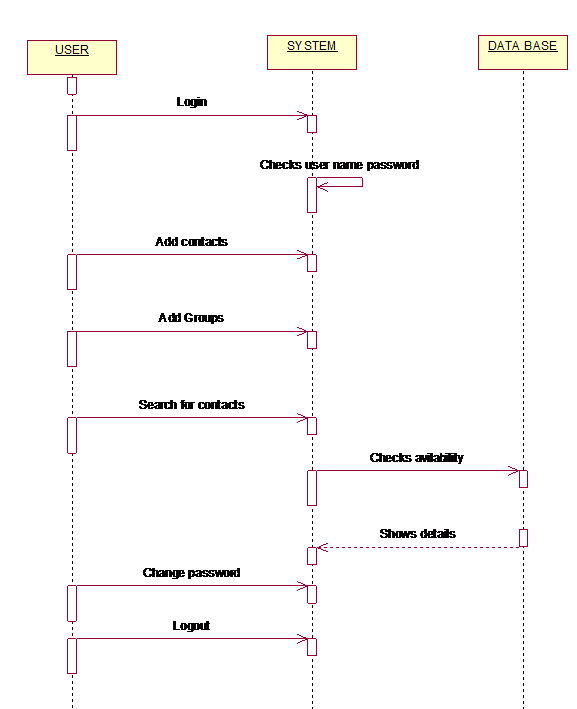
Multiple user contact management is used to store the details of the users. User details are stored in the database. Then any number of users can store their details in the database.If we can interest to search the details of the user we can search the details by using this multiple user contact management.

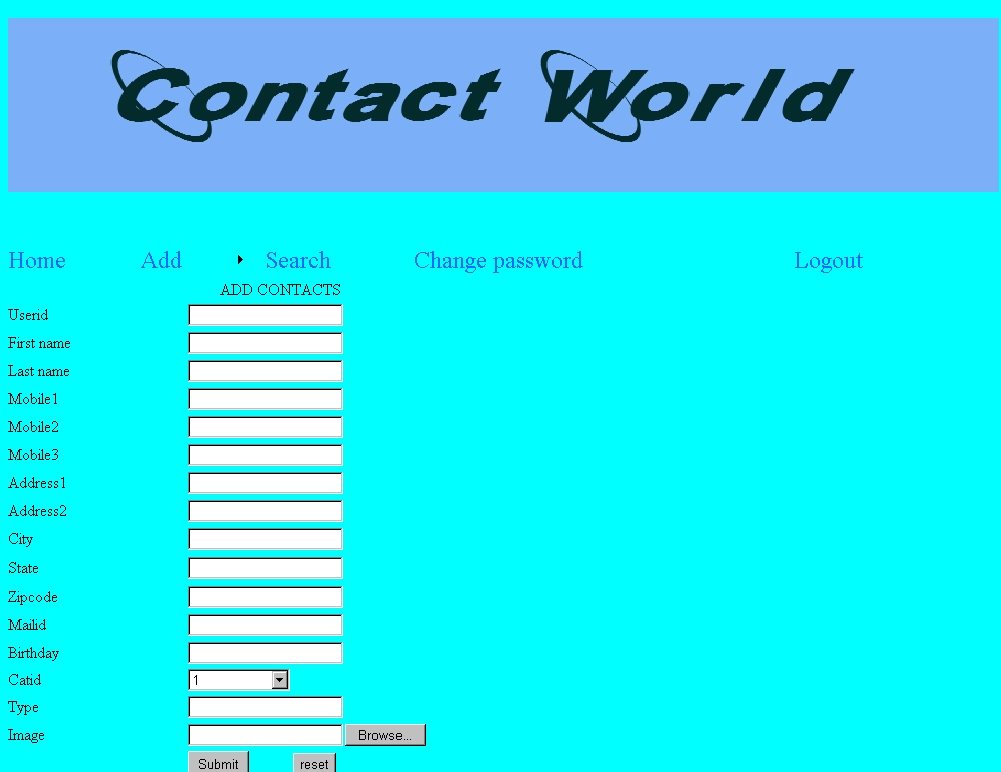
In this database, they can store the userid, first name, last name, password,mobile1,mobile2, Email etc..,
In multiple user contact management, we can add the details of the user, edit the details of the user and delete the details of the users. In this first process is give the password to the login page and after entry to the home page.

By using this process we can store the details of the user and admin also. This is very useful to search the details of the user and admin also.

Requirements Specification:

KEYWORDS:

● Generic Technology Keywords: Database, User Interface, Programming
● Specific Technology Keywords: Asp.Net 3.5, C#.Net, SqlServer-08 or above
● Project Keywords: Analysis, Design, Implementation, Testing
● SDLC Keywords: Presentation, Business Object, Data Access Layer

SOFTWARE REQUIREMENTS:

● Operating System Server: Windows 8 or later
● Database Server: Microsoft SQL Server-2008 or higher
● Client: Microsoft Internet Explorer
● Tools: Microsoft Visual Studio .Net-2008 or more
● User Interface: Asp.Net with Ajax
● Code Behind: C#.Net or any other language supported by .Net

HARDWARE REQUIREMENTS:

● Processor: Intel Pentium or More
● RAM: 1 GB Ram and above
● Hard Disk: PC with 20GB and above
● We can add any other Hardware according to our requirements.

My Party Link Service Portal .Net Project Abstract, Full Report & Source Code

Abstract:

INTRODUCTION TO PROJECT:

My Party Link service portal is a .Net based web project wherein Business holders can register their profile and add services as per their Business criteria and services provided. It will provide a platform to service/business providers to showcase or advertise their profiles, services offered or business profiles using the highly customizable features provided in the application. It will be accessible to users who look for a wide range of services for FREE.

The My Party Link project will basically cover registration, login, search functionality etc which are some of the important features for any online service portals or application. It will Admin, User and Vendor logins. Working on this My Party Link project will actually allow usage of important controls used in building or developing an application like Combo boxes, Dropdowns, Data grids, Text boxes, Html usage etc.

EXISTING PROJECT:

PROBLEMS IN THE EXISTING SYSTEM:

The manual process of writing information handmade bills and maintaining the same in books is tedious and time-consuming. It also raises concerns as per incorrect entries and irregularities as per record maintenance is concerned.

Disadvantages:

The following are the disadvantages of Existing system

➢ Highly impossible to maintain information in books and slips.
➢ Working hours for any employee will be more as he or she has to work out maintenance activities with manual work.
➢ Maintaining historical data of patients and employees will be complex and with no security as per data is concerned because they are maintained in papers and books.

SOLUTION OF THESE PROBLEMS

This My Party Link application will have a multi-user login environment and will be secure with authentication being monitored by Admin. The processing of data will be fast as we will use SQL Server 2008 and above version to save data. It will provide a faster processing of complex queries and thereby save time.

PURPOSE OF THE SYSTEM:

The purpose of this My Party Link document is to describe all external requirements for Web Info Model. It also describes the interfaces for the system. This project will teach the most important things that are required in any online application i.e. this project deals with REGISTRATION, LOGIN, SEARCHING and ADMIN modules. Importantly, this project uses the most used controls/techniques such as Data Grids, Emailing Mechanism, and Dropdown List etc

Module Description:

There are four modules for this project listed below:

1. Admin
2. Vendor
3. User
4. Home / Search

Admin:

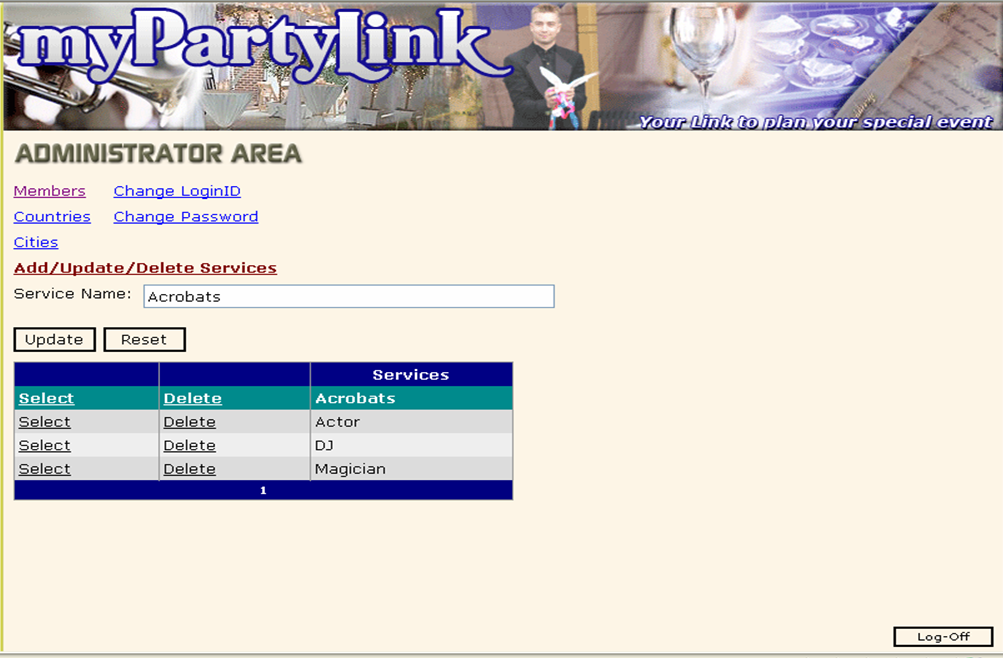
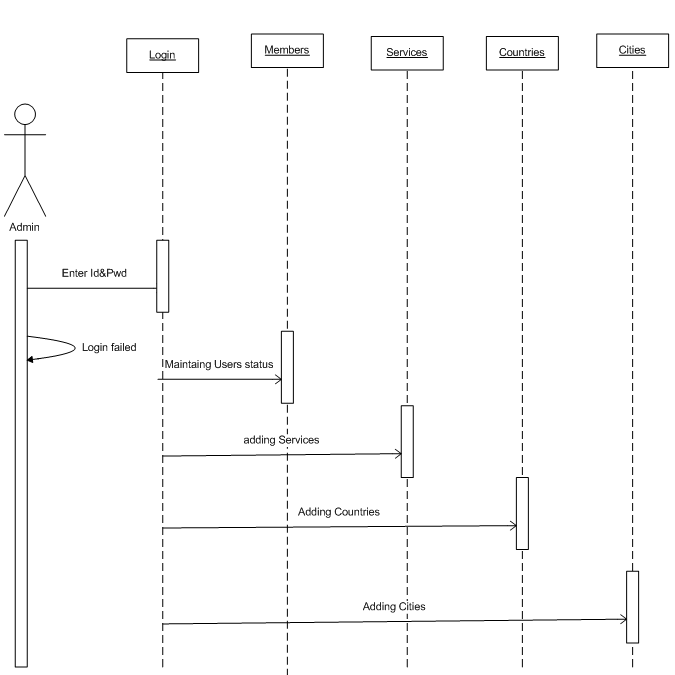
Admin approves the registration of Vendors and Users who access the application and register to it. Admin can add countries and cities to the application which will then be followed by addition of local areas in cities, will also add the service area for which vendors will belong to like Agriculture, Software, Hardware etc. Registered Vendors and users will be monitored by Admin as their registration can be revoked by admin. Admin can also change the passwords for Vendors whenever a request is submitted to admin. A vendor has to send approval request for the services that will be added to the application for advertising. Once approved services related to registered vendors will be validated and listed out for advertising.

Vendor:

A Vendor will be a Businessman or Service provider who will register and provide info related to the services provided. Will add his profile and initially register his company. Once registered a request will be sent to Admin and upon approval, Vendor will be able to showcase or advertise his service or business details. A Vendor can upload images related to products which he or she deals with. The vendor can upload company logo and all textual information, price info, office info, warehouse info wherein products are manufactured, properties of products that are to be marketed. Information placed by vendors is visible to all users for free.

User:

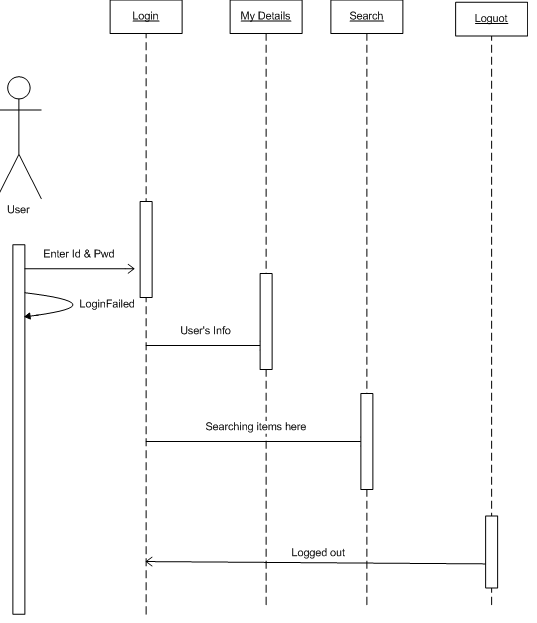
The user will register initially and the same will be approved by Admin. Once approved a user can search for services he is looking for from dashboard and select whichever service they are looking for.

Search:

Logged in user will be allowed to search services they are looking for depending on country, city, location and service area. This feature is basically a dashboard for logged in users.

Sequence Diagram for Admin
Sequence diagram for User

Features:

Configurable Portal Settings
▪ The option will be provided for approvals requested by Vendors and Users.
▪ All features are customizable and can be modified as per client requirement. UI will be user-friendly.
▪ Will be compatible with all sorts of browsers.

CONCLUSION:

The My Party Link application designed will be a frontrunner as per service-oriented applications are concerned. It will be provided with easy to use and understandable UI with flexible and customizable front-end design. Enhanced Security option will be provided as it will be monitored by Admin. It will be suitable for all service providers/business professionals. It will be a linkage between users/customers and vendors.

Hardware/Software:

Front End Asp.net/C#.net
Web Yes
Server IIS 5.0 or Above
Back End(Database) SQL Server 2008 and more
NET Framework V 5.0 and more
Operating System Windows 8/10
Service Pack Latest

Download the below attached My Party Link Service Portal .Net Project Abstract, Full Report & Source Code & Database Files.

Diagnostic Management System Project Design PPT

The proposed Diagnostic Management System system contains the below data tables in its database.

  • Patient Details table
  • Doctor  Details Table
  • Room Details Table
  • Bill Details table
Diagnostic Management System Architectural Design

MODULES DESIGN SPECIFICATION

User:

User Login:

User Login to the application using his ID and Password.

User Registration:

If the user is a new user, he will enter his personal details and he will user Id and password through which he can log in to the application.

My Details:

The user can view his personal details.

Selection the test:

The patient will select the required test and cost of the test will be paid to the lab while the samples are taken as cash on delivery (COD).

Diagnostic Management System ER Diagram

Admin:

Admin Login:

Admin can login to the application using his ID and Password.

 Add Lab:

Admin can add new labs details to the database.

Add new tests:

Admin can add test details along with cost and type.

View lab:

Admin can view various lab along with their details of test which will be conducted.

View test:

Admin can view various tests details stored in the database.

View user:

Admin can view various user details who had accessed the application.

Lab:

Lab Login:

The lab will access the application using his User ID and Password.

User Details:

Lab persons can view user’s personal details.

User’s Previous Details:

The lab will get all information about user’s previous case history. That will help him to serve him better.

Diagnostic Management System Database Design

E-Health Care Management .Net Project Abstract, Source Code & Full Report

Abstract

This Health Care Management abstract will basically outline the requirement and functional aspects covered in e-Health Care Management. It lists out all the essential requirements for the client [Global Life Clinic] so as to provide expected quality and output from the application. It also provides all info which will be used by the development team to develop and design the application as per workflow.

Project Description:

This Health Care Management application will be like in an online Healthcare Management service provider with easy to use customizable options. The application is accessible from anywhere for all employees or staff of the hospital in private or at desktops or tablets etc. it will basically lessen the manual work and improves the quality of maintaining records and other information related to doctors or patients or billing etc. It reduces time frame in adding any info related to hospital and thereby reduce the complexity too.  

Number of Modules

The Health Care system after careful analysis has been identified to be presented with the following modules:

The modules developed in this application are:

  • ADMIN MODULE
  • APPOINTMENTS MODULE
  • DOCTOR MODULE
  • PATIENT MODULE
  • BILLING MODULE

Module Description:

Health Care .Net application has mainly divided into five modules

  1.     ADMIN MODULE

Admin can add hospital employees, add patients, add doctors and physicians. Admin can modify the info and remove too. Will also take care of billing. Admin will also take care of scheduling appointments for doctors via appointments module. Also, assign roles to different employees like a front desk executive can book appointments or schedule appointments. Admin can also assign doctors to patients or front desk can assign the same while booking appointments. A patient can also be provided with an appointment as walk-in or be provided with prior appointment booking.

  1. DOCTOR MODULE

The doctor will check his schedule and meet the patients as well. He or she can save data related to patient illness, history of the patient and his or her family, vitals can be noted down too. Separate options will be provided for saving these data. The doctor can also view the patient related visit data in the form of a report. The doctor will also prescribe medications and option will be provided with same meds. The doctor can also order scans or X-Rays as lab tests ( a separate option will be provided to enter the same). The doctor will be provided with the option to save diet plan if any.

  1. PATIENT MODULE

The patient module will have the option to view the patient history report, family history etc. Details of illness, any diagnostics ordered. The report will also consist of medications prescribed. Visit wise report can also be viewed by a doctor just before checking any patient. This module will be accessible to doctor and admin only. The option will be provided to print reports like visit reports, medication history report etc.

  1. APPOINTMENTS MODULE

This module will be for viewing the appointments for a doctor login, can be accessed by admin, front desk and nurses. It will allow booking of appointments in advance and also like walk-in appointments. The option will be provided to select the doctor for whom appointment need to be booked or assigned for walk-in appointments. The option will be provided to cancel booked appointments or modify appointments like updating the assigned doctor or changing the appointment date.

  1. BILLING MODULE

This module will be accessible to admin and front desk only. It will allow bill generation for walk-in patients, admitted patients etc. The option will be provided to select service type like Doctor visit charges, Diagnostic charges, Emergency service charges etc.

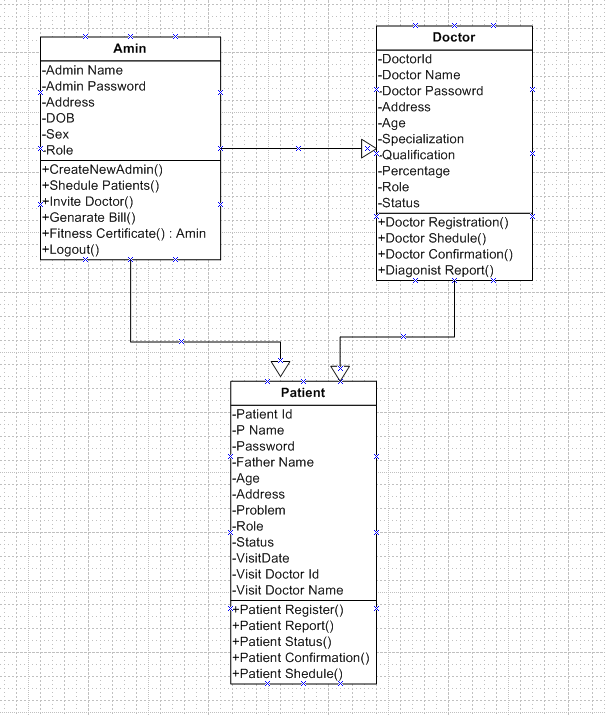
E-Health Care Management Overall Class Diagram
E-Health Care Management Sequence Diagram

Features:

An overall idea of what are the impacts, the system is going to have in the business activity and the expected results from the system towards managing the daily activity with the system

EXISTING SYSTEM

The existing manual process of maintaining a patient record, maintain doctor scheduling info, day to day activities and billing is tough and hence a system or application which can complete these tasks in a easy to use is what we can achieve by this application.

Advantages:

The following are the disadvantages of Existing system

  • Easy to maintain the info in the database wherein all data is saved easily via the application.
  • Report generation will be easy and less time-consuming.
  • Managing historical patient data is made easy and is less complex with less effort.

PURPOSE OF THE SYSTEM

The Main motive of this application to provide to provide seamless Hospital Management system wherein patient info can be maintained in a secure way and also handle scheduling, treatment details given by Doctor.

One of the solutions that we are going to discuss here to speed up the database response by using SQL Server database and to reduce the time complexity by using multi-user environment. Multi-user environment reduces burden with effortless maintenance.

HARDWARE REQUIREMENTS:

  • PIV 2.8 GHz Processor and Above
  • RAM 2GB and Above
  • HDD 50 GB Hard Disk Space and Above

SOFTWARE REQUIREMENTS:               

  • WINDOWS OS (WIN10/ WIN7/ VISTA/ XP / 2000 / 200 Server / 2003 Server)
  • Visual Studio. Net 2008 or Latest Enterprise Edition
  • Internet Information Server (IIS)
  • Visual Studio. Net Framework (Minimal for Deployment)                           
  • SQL Server 2008 or Latest Enterprise Edition

Training and Placement Cell Java Project Abstract

Training and Placement Cell is an online-based software application created in the Windows system so that the training team and the university site can provide the important points of their students in a database so that the companies obtain a suitable means of employment. begin the session.

The Training and Placement Cell contains all information regarding students. The device stores all of your students’ personal information, such as your personal details, your added scars, your experience and your specialized skills that may be required in the CV that will be provided to a company.

A device is an online software that can be achieved throughout the business and effectively with the appropriate start of the session. This technique can be used as a software for university TPO to manage scholarly information regarding placement.

This challenge contains all the important points of the students that can be considered by all consumers (read-only), but only the student can modify them if they have an approved service. By maintaining student information, the system facilitates the options for a company to test the employment process.

Students can search for the product needed for the selection method, such as talent, reasoning, and other different sites for site documents. The activities that take place in the university and the achievements of the students, that is, the details of the students chosen, can be seen by all users.

So our challenge offers the ability to keep the important points of the students and get the set of people needed for companies that wish to recruit individuals according to the confirmed query.

EXISTING SYSTEM

The earlier program is not computerized. All transactions in the system are performed personally sustaining records. To make that laborious job simple the customers have to computerize the system.
The management and most of the departments which have been holding out that job using personally makes the job harder and monotonous all of the times. Therefore, the easiest way is advanced computerization of the current environment.

For example, in the earlier program positioning official has to gather scholar details for placements. Signing these scholar details requires lots of time. Positioning official and pupils have to consult each other straight if any data is needed. If any new organization come for placements, positioning official and his team has to search the scholar details and they have to get the eligible prospects for that specific organization placement.

Here looking for eligible prospects requires lots of time. And sometimes some prospects’details might be missed.

PROPOSED SYSTEM

The planned program is fully advanced, which removes most of the disadvantages of the present system. The planned program is an on the web application which can be seen through the entire company and external as effectively with proper login provided. This technique may be used as a software for the TPO of the university to control the scholar data with regards to placement. Pupils recording should have the ability to add their data in the shape of a CV. Visitors/Company associates recording in may also access/search any data set up by Students.

All the customers have some common services like adjusting the password, upgrading details, looking for details, checking the important points, mailing to the supervisor, and studying the substance submitted by admin if the consumer is a student. The supervisor has to accomplish the services like putting activities, achievements and he can reply to the messages sent by users. They can add components, search for scholar details, and he has the best to approve the students.

Temperature Based DC Fan Control ECE Project Abstract

The point of the project is to outline a programmed temperature based fan control system that controls the speed of the fan. On the off chance that the temperature expands the speed of the fan additionally increments, and the temperature diminishes the speed of the fan likewise diminishes.

Mechanizing the on/off condition of a fan is valuable from numerous points of view it keeps the misuse of vitality when it’s not sufficiently hot for a fan to be required; it additionally makes it conceivable to screen situations that are not happy, or conceivable, for people to screen, particularly for broadened timeframes.

By interfacing a temperature sensor to a PolyBlock in Compare Mode, it’s very easy to turn on a fan when the incentive from the temperature sensor surpasses a given edge. Associating the fundamental segments for a Temperature Controlled Fan is clear. The thought is that the temperature sensor delivers a voltage that is corresponding to the temperature in degrees.

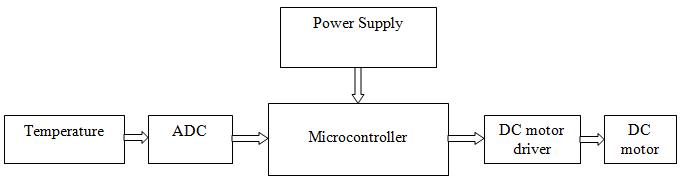
The project comprises of a microcontroller a temperature sensor ADC DC motored fan and a DC engine driver, the temperature sensor ADC and a DC engine driver are interfaced to the microcontroller. At the point when the framework is exchanged on the microcontroller empowers every one of its peripherals and begins perusing the information from the ADC and contrasts those qualities and the set predefined esteems if the temperature esteem surpasses the set predefined esteems then the microcontroller works the DC engine driver to expand the driving ebb and flow of the engine in order to build the speed and abatement the driving ebb and flow when temperature diminishes this shows the ADC esteems are straightforwardly corresponding driving ebb and flow of the DC engine, the DC engine driver is thusly associated with the DC engine.

In this way, we outline a temperature based microcontroller worked DC fan control.

Block Diagram of Temperature Based DC Fan Control System

Hotel Management System .Net Project Abstract

The hotel management project is an excellent software tool for the related industries that can be used in hostels, resorts, lodgings, motels, lodges, hostels, naval pensions, farms, and suites.

The hotel management tool is a complete set of software programs, along with integrated modules for various aspects of hotel control. The software program is often referred to as a property control system in the tourism industry. This software program consists of all the necessary capabilities in an Inn control software.

This software is designed for luxury full-service lodge, beds, breakfast and motels. It emphasizes the best stage of services for character visitors through our full capabilities that integrate rooms, restaurants and retail stores with records contained in book reserves for the fashion book at the bottom of the office.

The Hotel control application helps you increase revenue and delight users by creating a stronger and stronger link between your home business and your customers and partners.

The lodge control software program will cover the following modules:

1) Registration: This module incorporates data about the newly joined person’s details, such as the person’s call, the password, and many others.

2) User details: This module contains information such as customer service, business, tactile details, etc.
3) Billing and payment element: This module contains the payment element of the buyer.

4) Searching: This module is used to search customers.

5) Checkin, Checkout, Reservation: This module incorporates Checkin, Checkout, buyer reservation facts.

6) Comments:- This module incorporates customer’s facts daily assessments or monthly assessments