Food App – Restaurant Food Ordering Service in Trains

EXISTING SYSTEM DESCRIPTION

In the existing system, there is no such restaurant food ordering service for providing food services for passengers on the train. Railway catering is the only option for passengers to get food. Passengers face several problems in trains with unhygienic food. There are several cases where passengers faced health problems due to unhygienic food provided in trains.

Limitations of the existing system

  • Due to unhygienic food provided on trains, passengers’ health will be affected.
  • Without good food, small children in train journey also will have health problems like indigestion etc.

PROPOSED SYSTEM DESCRIPTION

This is an android application which is designed to order the food online while travelling by train. While travelling a long distance by train the main problem we face is food. To overcome such a problem we want to develop a mobile application through which we are ordering the food online. If the person wants to order food he/her can directly order the food so that the food is delivered directly to your seat and the cash-on-delivery process takes place between the customer and the person who delivers the food to us from the particular restaurant which we order.

Features of Proposed System:

  • Ordering the food online while travelling by train.
  • Provide more comfort for the users in ordering the food.
  • To avoid the unhygienic railway catering system.
  • The passengers can overcome the problems faced regarding their food need Complaints / Reviews can also be given about the food service


MODULE DESCRIPTION

Modules

User Module Description

In this user should install the application and then he should register into it. Registering into the application requires some fields such as email id, phone number. After registering into the application he/she user has to enter from and to address. Then the list of restaurants in various locations is displayed. Each restaurant displays the menu of a wide variety of food items. From that menu, the user can select the restaurant and food items and can order the food before reaching that particular station. The order consists of a list of food items along with passenger details like PNR number, train number, compartment number, berth and seat number. When the food is delivered to him, he pays the bill.

Restaurant Management Module:

The restaurant management receives the order. He can see the order in the same app and sends a person to deliver the food to the passenger. As the train waits for sometime in the railway station and with the help of passenger’s details, the restaurant person can get on the train and deliver the food to passenger and collects the bill amount. The mode of payment is cash-on-delivery. Also, there is a facility of complaint box, where complaints about the quality of food can be given to restaurant management. So that the restaurant management can improve their quality of service. The restaurant management can see the list of orders date-wise.

This Project is an android app for ordering food sitting in the train and giving the berth information.

The main requirement of this project is to provide an android app same as this which relates to food ordering and railways.

Advantages

  • Ordering the food online while travelling by train.
  • Provide more comfort for the users in ordering the food.
  • To avoid the unhygienic railway catering system.
  • The passengers can overcome the problems faced regarding their food needs.
  • Complaints / Reviews can also be given about the food services

Disadvantages

  • Due to unhygienic food provided in trains, passengers’ health will be affected.
  • Without good food, small children in train journey also will have health problems like indigestion etc.

SYSTEM REQUIREMENTS 

Software Requirements and Hardware Requirements: 

Software 

  • Operating system: Windows
  • Coding language: Android SDK
  • Toolkit: Android 5.0
  • IDE: Eclipse

Hardware

  • System: Pentium IV 2.4 GHz
  • Hard Disk: 80 GB
  • Monitor: 15 VGA Color
  • RAM: 2 GB

Runtime environment:

  • Device : Mobile / Tablet
  • OS: Android
  • Minimum Version : 0 Ice Cream Sandwich 

SYSTEM ARCHITECTURE:

The user can create and organize tasks or actions by interacting with a user interface (UI). UI internally interact with Restaurant where all the tasks are based on customer and order of the action to be performed or on the basis of priority. At ant time order placed, the dispatcher dispatches the order placed successfully message to the user console.

ER Diagram for Restaurant, User and Orders:

FUNCTIONAL AND NON-FUNCTIONAL REQUIREMENTS

Functional Requirements

  • The user can create/view the actions which are already performed and to be performed in the future.
  • The user can divide the actions based on the category.
  • The user can view and add the categories.
  • The user can also view and add the tasks in Restaurant Manager.
  • The user can prioritize the actions.
  • The user can view the actions, which are selected.
  • The user can order the items as per the requirement.
  • The user can make use of PNR number can directly communicate with the Restaurant Manager.

Use case Diagram:

Use Case Specification for User

Primary Actor:

User

Secondary Actor:

Database

Precondition:

Click On the Icon of Food Application

Post Condition:

Add an action into a database or Delete an action from the database.

Basic Flow:

  • Click on the Items in Item List.
  • Click on Item Name button to add an action.
  • Enter the information such as
    • Checking for available items
    • Items Name, Item cost, Active are Inactive
    • Conformation to User
    • Receive Order
    • Payment (COD)
  • Click on the Review button for Restaurant Rating
  • Click on go back and logout to end the task

Alternate Flow:

  • The user can enter his login id and password to order any other items.

Use Case Specification for Restaurant:

Primary Actor:

User

Secondary Actor:

Database

Precondition:

Actions/Tasks must be added in Inbox.

Post Condition:         

Retrieve information from database and display information on UI. 

Basic Flow:

  • Click on the Notification received from the user.
  • Give the confirmation to the user.
  • It displays order ID, delivery boy contact number, total amount.
  • It displays information about the duration of the delivery of the order.

Alternate Flow: 

  • If the mentioned PNR number is wrong then the order may not be considered in that case the restaurant module calls the user requesting to check his PNR number.

Class Description 

Description for Bootstrap Activity class:  

Attributes:

Purpose:

Launching Food Application 

Description for Login Activity class:

Attributes:

Guest Button, LoginButton1, Register Button Email edit- text, Password edit-text.  

Purpose: 

Ask the user to demonstrate with predefined categories. 

 Description for Restaurant Activity:

Attributes:

Orders Menu Items, Reviews.

Purpose: Display List of options

 Description List Orders Activity:

Attributes:

Button Pending, Button completed.

Purpose:

Action information is displayed to the Restaurant. 

Description for Review class:

Attributes:

List Reviews, Rating Bar.

Purpose:

Displays the list of action based on category. 

Description for Menu Items class:

Attributes:

List all Items, Button Back, Button check.

Purpose:

Displays the list of actions based on a task created 

Description for Pending Order Activity class:

Attributes:

List pending Order

Purpose:

Help the Restaurant to create a new action. 

Description for Selected Items class:

Attributes:

List Selected Items, Button Back.

Purpose:

Asks the user to enter the action information.

Description for Items Details class:

Attributes:

Edit text cost, Item number, Radio group status, Button Submit, Button Cancel.

Purpose:

Display the Details to the user. 

Description for Order Details class:

Attributes:

ID No, User Name, User Phone No, Items, PNR No, Cost

Purpose:

Used to display user details category.

Description for PNR status class:

Attributes:

Passenger Date, Coach, Train No, Berth No.

Purpose:

Used for user details for the order delivery for a new task.

Description for Train Details class:

Attributes:

Web view

Purpose:

Used for knowing the current running status of the train.

Description for the User Activity:

Attributes:

Station, spinner, get Button

Purpose:

Used to create a new task by the user.

Description for the List of Restaurant class:

Attributes:

Name, Rating, List of  Restaurants.

Purpose:

Displays the list of Restaurants. 

Description of the Restaurant Items class:

Attributes:

List items, cost, items name, checkbox, write a review, Button next.

Purpose:

Displays items available at the restaurants and to create a new category.

Description of the Write Review class:

Attributes:

Edit description, rating, submit.

Purpose:

Displays reviews of the user for the restaurants. 

Description of the List Items class:

Attributes:

List Items, cost, Button cancel , order now.

Purpose:

Displays the list of items.

Sequence Diagram:

Collaboration Diagram for FoodApp:

For creating Orders and User Actions from it:

Collaboration Diagram for Creating Orders:

For creating Receiving Order to User Action:

Collaboration Diagram for Receiving Orders:

Activity Diagram:

Displaying Smart Phone Data Android Project Report

Problem Statement:

Nowadays MNC companies are not allowing using smartphones in the workplace because the data is being transferred illegally. Due to this, the user is unable to know any important or urgent information.

Existing System:

In the existing system, some information such as missed calls and battery, messages information, referred to as device-oriented information. However, such information is related to a user. For example, if the user works in a company and cannot carry his mobile due to security issues then the user is unable to view the information.

Proposed System:

The application is based on sharing information such as battery status; miscall info and message from the Android device to web application, i.e., whenever the battery drains or any miscalls or when a message comes all this information will be updated on the server system and the user can view that information using the web application from anywhere.

Product Scope:

Users can access their device information from anywhere, anytime using server services.

Literature Survey:

The application is based on sharing information such as battery status; miscall info and message from Android device to web application, i.e., whenever the battery drains or any miscalls or when a message comes all this information will be updated on the server system and the user can view that information using the web application from anywhere.

Software Requirements Specifications

Introduction

The software product described in this document is Displaying Smart Phone Data. The main purpose of developing this system is to share device-oriented information i.e., location details to the server and retrieve that information from a server using Web Application

Product Scope

Users can access their device information from anywhere, anytime using server services.

Product Functions

The major functionalities of this website will be as follows:

  • User credentials.
  • Sending data from Android Device.
  • Displaying data.

Development Environment

Software and hardware required to develop this project are mentioned as follows.

Software requirements

Programming Platform: JDK 1.7, Android SDK

IDE: STS (Spring Tool Suite)

Web server: Google Server (Google App Search Engine)

Database: Google Database

SYSTEM FEATURES

The major functionalities of this project will be as follows:

  • User credentials.
  • Sending data from Android device.
  • Displaying data.

User credentials

The user provides registration details and registers, then logins by providing username and password.

Functional Requirements

Authentication:

It provides authentication to individuals who wish to get connected. The registration details are stored in the database and whenever the user logs in, the user credentials are retrieved to check whether the user is an authorized user or not.

If the details entered do not match with any of the existing data then the system displays a warning.

Sending data from android device

Users click in android mobile to get missed call, messages and battery information.

Functional Requirements

A user can choose information to push to external services. The application currently supports three types of information:

the battery information of the device, SMS and missed call history. It shows how to get mobile device related information and send it to the server.

Displaying Data

In this, the system creates a web Application to show the missed call, messages and battery information.

Functional Requirements

In this module system will develop a web application which can access, show the data pushed from the device to the server. It will show the missed call, messages and battery information using the data grid

DESIGN DIAGRAMS

UML DIAGRAMS

Use-Case Diagram

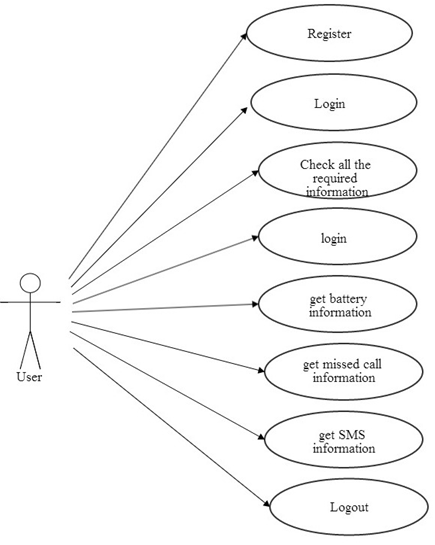
Figure: Use-Case diagram for the User

The user interfaces with the server. When the user login for the first time a user has to register the details. After registration, the user logins and receives the information about the battery missed call and SMS history of the phone. Finally, the users can log out.

Class Diagram

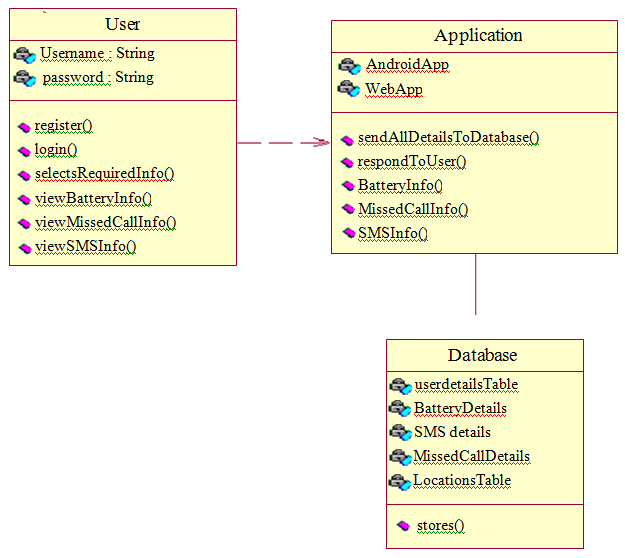
Figure: Class Diagram for the user, Web application and Database

The above figure depicts the three main classes User, Application and Database, where the user depends on the Application. The user interacts with the Application using Username and Password. And the Application is associated to the Database to retrieve and for storing information about the phone.

Sequence Diagram

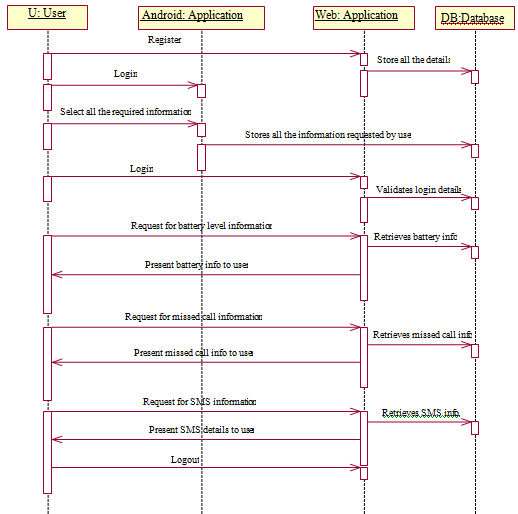
Figure: Sequence Diagram for the User

The sequence diagram shows the external flow of the system. The user logins with the server by giving username and password. Then the user receives the information about the battery, missed call and SMS history by requesting the server. After the user receives the information the user can log out.

Collaboration Diagram

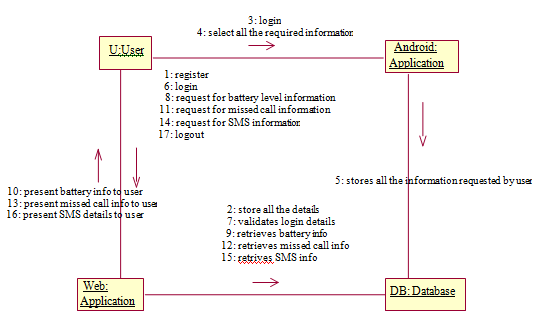
Figure: Collaboration Diagram

Test Cases:

Test Case #: 1 

Test Case ID Test Case Type Test Case Description Expected Value Actual Value Result
1 Entering URL of the Web application Checking status of Google Server and URL, through which the application begins The application should begin If the URL entered is corect then the application starts functioning Application starts successfully
1 Entering wrong URL of the Web application Checking status of Google Server and then entered URL is wrong The application fails to begin Entered URL is incorrect the application doesn’t begin Unable to start the Web Application

 Test Case #: 2 

Test Case ID Test Case Type Test Case Description Expected Value Actual Value Result
2 User Registration Registration details of the user will be present here If the user name has unique identity then user get register successfully User is getting Authenticated User is successfully registered.
2 User  Registration gets failure Without entering anyone of the fields if the user clicks on submit then alert message will be displayed. User will not able to registered An alert will be displayed An alert will be displayed like “Enter all the fields”.
2 User  Registration gets failure When a user tries to register with the same user name, then user will not get registered. User will not able to registered A alert is displayed An alert will be displayed like “Username already exists, try another”.

 Test Case #: 3 

Test Case ID Test Case Type Test Case Description Expected Value Actual Value Result
2 User Authentication User credentials of user are authenticated. User credentials are to be correct


User gets Authenticated The user login is successful and is authorized to use the system
2 User  Authentication gets failure User credentials of user are not authenticated. Login details are to be incorrect User Authentication

Fails

The user login is failed and is not able to use the system
2 Login into website Without giving User credentials Trying to login without providing User credentials. An alert is to be displayed An alert is displayed The user login is failed.

  Test Case #: 4

Test Case ID Test Case Type Test Case Description Expected Value Actual Value Result
4 Navigates to Home page The user tries to view the information. The required information(call,

Sms, battery) information should be displayed.

Information is retrieved from database The information is displayed successfully.
4 Home page cannot be redirected The user tries to view the information but home page can’t be displayed. The error page will be displayed. Due to some connection problem (Sms, call and battery) information of mobile will not be sent to the database.


This webpage is not available.

 Test Case #: 5 

Test Case ID Test Case Type Test Case Description Expected Value Actual Value Result
5 Mobile Status Changed Mobile Status is changed automatically web service will be called. The information can be viewed by the user. (Call, sms and battery) information will send it to the database.


The information can be retrieved.
5 Mobile Status not Changed Mobile Status cannot be changed. The information can’t be viewed by the user. (Call, Sms and battery) information will not be sent to the database.


The information can’t be retrieved.

 Screen Shots

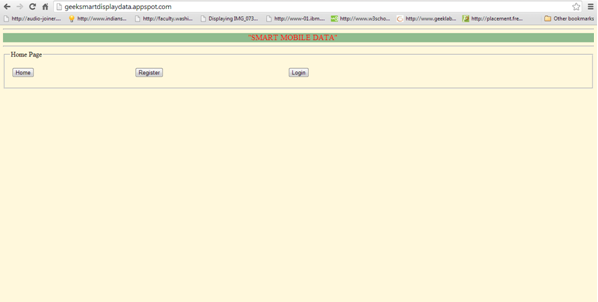
  • Home Page

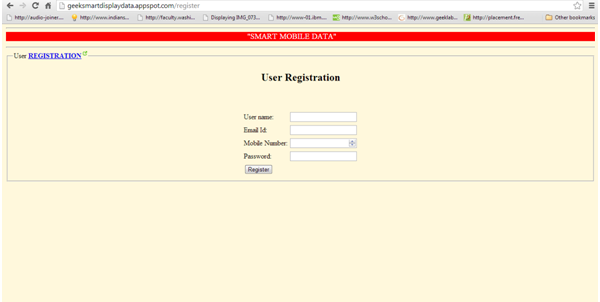
  • Registration Page for USER

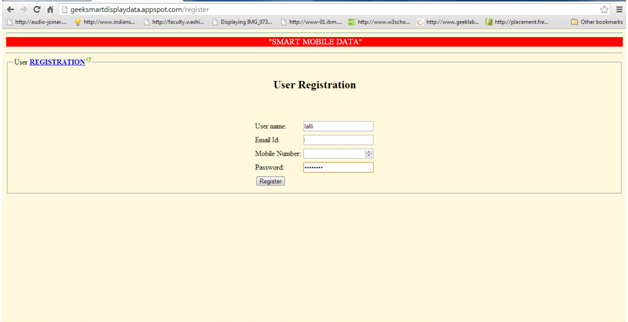
  • Entering details in Registration Page

  • Displaying Alert box to enter all details.
  • Entering all details
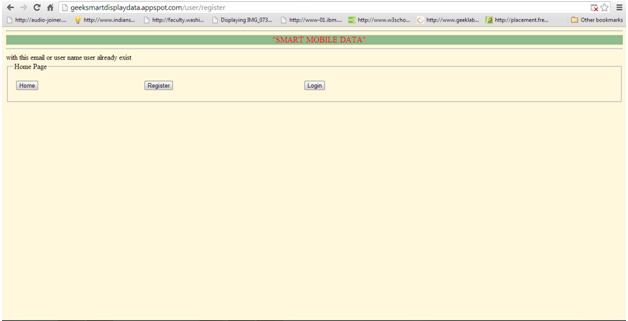
  • Redundancy of USER name

  • Successful Registration of User
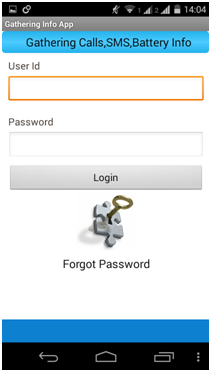
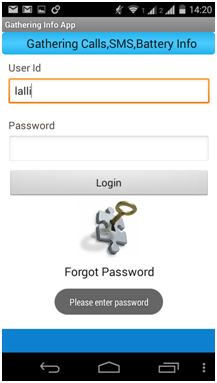
  • Login page in Android Phone

  • Displaying Alert message

  • Displaying an alert message
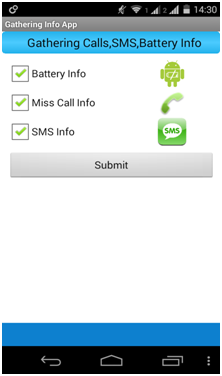
  • Selecting all mobile information

  • Sending information to the database
  • User Login Page
  • Displaying an error message
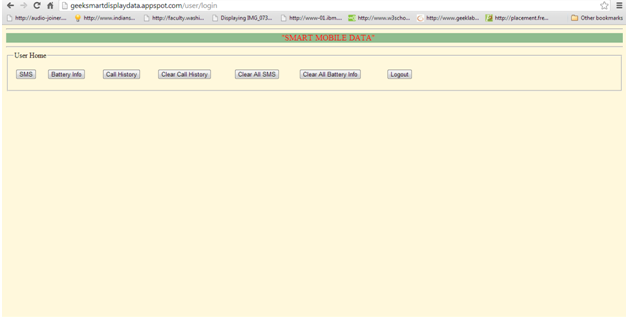
  • Successful Login

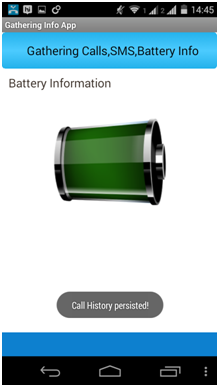
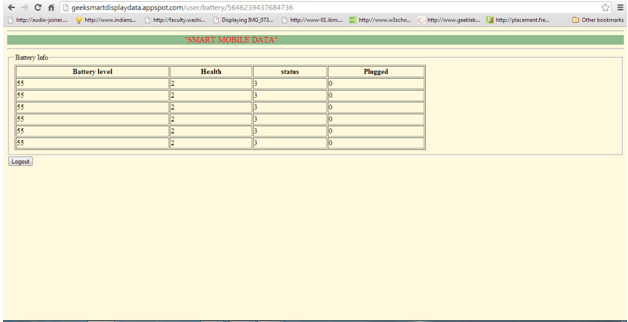
  • Displaying Battery Status

  • Displaying a message if there are no results to show
  • Displaying information on Call History.
  • Displaying information of SMS history
  • Clearing the information

Conclusion and Future Scope

This application, “Displaying Smart Phone Data” is based on sharing information such as battery status; miscall info and message from android device to web application, i.e., whenever the battery drains or any miscalls or when a message comes all this information will be updated on the server system and the user can view that information using the web application from anywhere.

In future, this project is useful to any Android mobile user where the user can get his mobile information data using Android Broadcasters. Before using the application, the user should register. This application detects the mobile information like SMS, call and battery information. So that the user can view the mobile data in Flex Application.

Job Suggestion Website Java Project

To help job seekers to find the job information online conveniently and quickly we are going to develop this project. The project title is job suggestion website. Here We are going to develop this website to ease the difficulty of searching for jobs according to the area of interest and according to locations where they want to work. To develop this website we have to collect information from different companies by crawling the data with their domains and location. These crawled data need to store by using some database (such as mongoDB or phpmyadmin or mysql). The stored data of companies should be searchable by location or domain. For searching, we will use elastic search or other search engines. To search companies user need to enter location or domain and our website will suggest companies according to the given information.

Output Results Explanation:

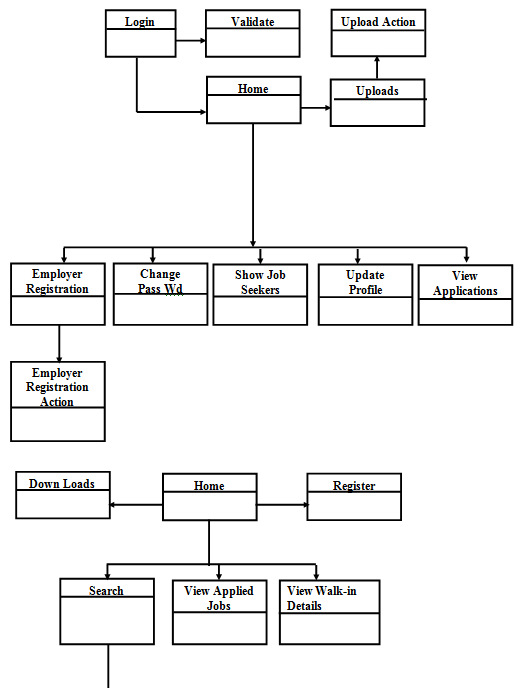
This User interface is for job portal home page where admin can log in with registered user id and password. The user can view a list of features available in this application.

After successful login admin can view different features and perform operations form this page.

Admin can view employee details with user id, employee name, company name, contact number, email id, date of registration and charges.

List user interface will display a list of applications which are applied for jobs.

Using View jobs user interface admin can view a list of jobs posted with job id, job description, company name, and date of posting with requirements.

The user can select posted jobs from this list and look after detail of job with address, time and company profile. The user can apply using directly from this interface.

This interface is confirmation message after user applying for the job.

This user interface is for the admin who can post new walk-in details. List of posted details is shown with walk-in id, job title, company name, location, walk-in date.

Using this User interface admin can add new walk-in details and post to the existing list.

This interface is for showing successful posting of a new walk in.

This interface is for user registration where the employee should register with an application for applying for a job. The user must enter login detail and contact information using this form.

Admin can view a list of job seekers details who had applied for a different job posting . Admin can view job seeker id, username, qualification, percentage.

Search interface can help admin or user to find respective job seeker or job postings without searching from the list. Admin can select criteria, location, experience, functional area and get results.

Using manager login form user must enter valid user id and password to log in with application only after login user can use any features.

Company manager can view employer details after login to the application.

The manager can view a list of job postings from different companies. He can post a new job for his company.

The manager can add new job post for the list based on his company requirement.

This interface is for post successfully posted confirmation.

This interface is for user login where user had already registered with the application. He can enter user id and password and apply for a job.

The user can view a list of placements papers and download for reference.

This interface will display downloaded placement paper with previous questions and answers.

Using this interface user can download sample resumes.

This interface shows details of downloads available for a user like networking question papers, database question papers..etc.

UML Diagrams:

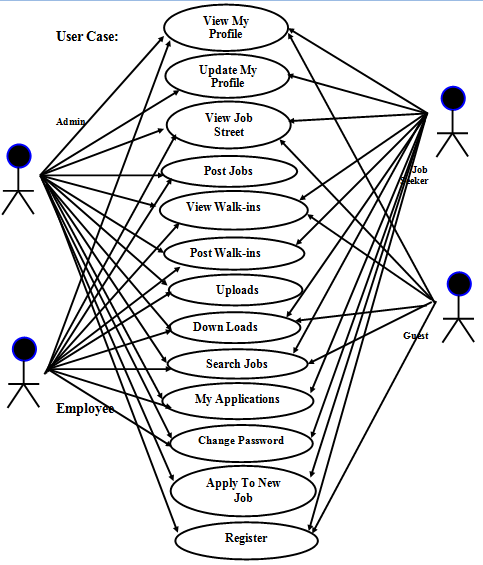
Use Case Diagram:

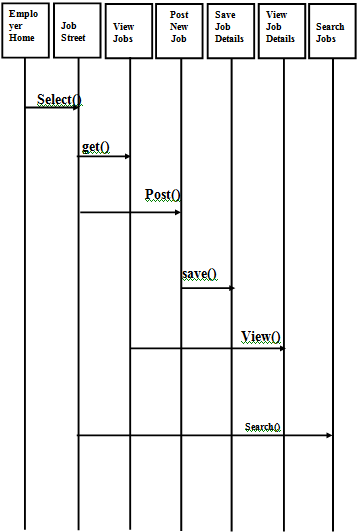
Sequence Diagram:

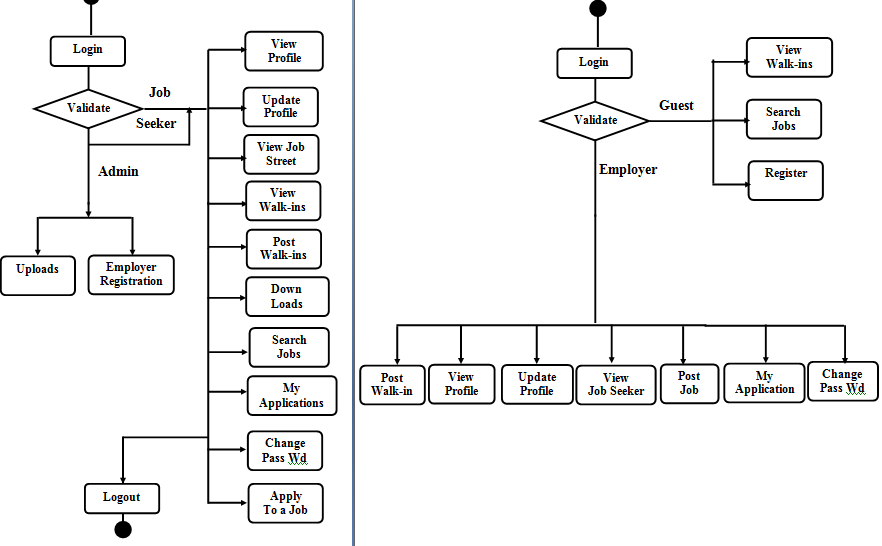
Activity Diagram:
Class Diagram:

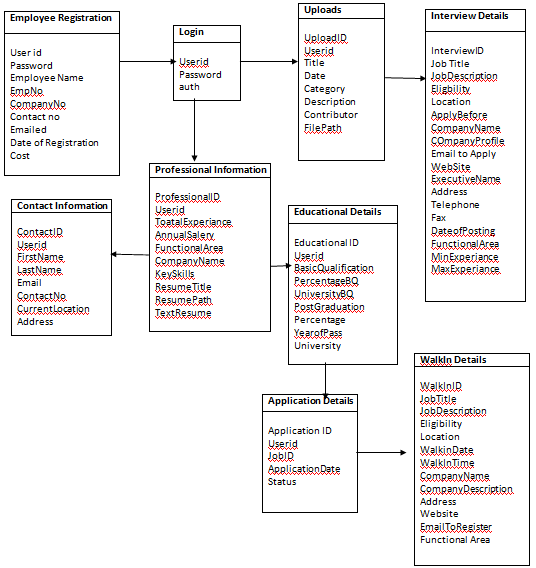
ER Diagram:

Metadata

Metadata has data about data. Metadata actually has the data that describes the data we store in our SQlite database files.

S.NO Table name attributes properties Data type  key
1 Admin Userid User1, user2, .. varchar Primary key
password varchar
2 Employer  Home


User name

password

Employer name Varchar

varchar

Primary key


Job Street


View Jobs


Post New Job


SaveJob Details


ViewJobDetails


SeniorSE,HR….

Software,Accountant

SeniorSE,HR….


SeniorSE,HR….


Varchar

Varchar

Varchar

Varchar


Varchar


Search Jobs


J2EE Software Engineer…. varchar Primary key
3 Job Seeker Home Search Jobs J2EE Software Engineer…. varchar Primary key
Apply Job JOB1, JOB1…. varchar
My Profile PerID1, PerID2.. varchar
My Applications A-1, A-2.. varchar
Update Profile

Downloads

PerID1, PerID2.. Varchar

varchar

Easy Market Android App Project Report

Presently handheld devices such as smartphones are using very huge. In short, we are using them to easy to solve our work. One application that falls into this category is Easy Market developed for Android phones. This application will help salespersons in managing the various types of Records such as client details, supplier details, product list and help to easily sell the product. The salesperson recording the details of the clients, suppliers, profit on paper is a time-consuming process. Also difficult to retrieve the previous records of clients, suppliers, product details.

This Easy Market Android App will solve the problem. The user can add a new product into the list by name, price or delete any product from the list which is not available in the market. It allowed changing the price of the product not affect the price registered in the catalogue of products. It shows how much the quantity of each product present in the inventory. It has an option to filter the products. It allows to record the customer details and show when he last came, what products he bought that day, the total price of the products. It records and shows the supplier details like the name of supplier, last visit, amount. It also displays how much profit he earn that day and how much is initial money at the opening of day and total money at the closing of the day.

The project “Easy Market” is developed with the objective of making the system reliable, easier, fast, and more informative.

Advantages:

  • Easy to maintain data.
  • Less time-consuming.

Easy Market is a mobile application used by the shopkeeper to record and manage the details of their shop like sales money. It is used to easily manage the details of the inventory and sell the product easily.

This application developed in android technology can install in any smartphones devices. This application contains various pages as clients, suppliers, sales, inventory etc. By logging in into the application shopkeeper can go to any page without recording in books.

Scope

To develop a product called “Easy Market” which is composed by an application for Mobile Devices and other Web management roles, users and information providers

The perspective of the product

Easy Market in a solution that will allow trade settlements through mobile devices like the Tablet, manage the operation of its business.

Product Functionality

The features that must have the applications are:

For mobile devices

  • Login
  • Client Details
  • Supplier Details
  • Inventory
  • Sales
  • Login Details

Assumptions and Dependencies

It should be developed for Android devices.

Predictable System Evolution

The system must be portable and scalable so that support users increased significantly and can be adapted to any type of establishment e.g. neighbourhood or shop etc.

Nowadays in general shopkeeper who used to record their shop details like client, product selling price, product purchase price, what is the discount on that product on paper and searching in the book. He/she used to search in books whether the client has to pay any amount in past and how much quantity of material still remaining in the shop. He uses a calculator to calculate the total amount of the bill.

Disadvantages of the existing system

  • Time-consuming.
  • Waste of paper.
  • Difficult to search and remember the details.

Proposed system

The proposed system aim is to reduce the difficulty of remembering the details and manage the shop details easily.

Advantages of the proposed system

  • Less time-consuming.
  • No paperwork.
  • No use of Calculator.
  • Reduce human effort.

Specific Requirements

Common Interfaces Requirements

Hardware Interfaces

• Input and output data are stored on the SQL Server 2014 database server.

• Development must support at least version 4.0 of Android.

Functional Requirements

Images of an example of what should be the requirements are attached in the next chapter.

Login

The application will ask for a username and password, previously created in the Database. The system must ensure that the username and password are valid, which otherwise will be left to the user in the login screen.

Client Module

• Enter this module list clients created with the value of the debt.

• You will have an option of creating customers where would deploy the user a screen where it will ask the following information:

Or required fields: name, Aadhar, phone, address, email address and gender.

Or non-obligatory data: the value of the initial debt. By default must be zero.

In the creation of the client should be validated by the number of identification card there is no customer.
• Created client list must have an option to edit customer data, in where it will display a window with the data of the client, allowing you to modify all data except for identification card and the value of the initial debt.
• Allow client search by the following filters: name and identification card.

• Whenever client doesn’t money to pay bill his debt will add to his details.

Supplier Module

• This module you enter providers that are created, data listed are as follows: Nit, the name of the manufacturer or distributor, a balance which is due.

• It will have a choice of provider creating, selecting this option would deploy a window to the user where requests the following information:

or – mandatory data: Nit., name, phone, address, visit (Monday, Tuesday, Wednesday, etc.) this field is multiple selections and frequency of visits (weekly, fortnightly and monthly.

or Optional data: name of contact and contact phone.

• When user unable to pay the total amount to supplier he can save the debt amount in this whenever required.

• The date when supplier last visit also record here.

Inventory Module

• Upon entering this module it lists the products created in the store. The following will show code of the product, the product description, quantity in the inventory, the price of sale and utility value.

• You will have a choice of creating the product. Selecting this option show the user a window where will ask for the following information:

or barcode: mandatory, to enter this field the system must validate if the product exists in the teacher’s products, if any product, you must bring the following information: name, group and line

or name: required field. It is the name of the product

or unit of measure: optional field. This field is for fruit and vegetable products. It allows selecting the type of measurement that will be used for the product (Kg and G) none for soap or others. It is not a mandatory field.

or purchase price: required field. It is the purchase price of the product.

or sale price: required field. It is the selling price of the product.

or quantity: required field. It is the amount that is the product.

or VAT: optional field. It is the value of VAT on the product. To create the product are:

• You will have an option to edit the product. Selecting this option will display the product data and allows to edit the following details: price sale, purchase price, taxes and supplier.

• You will have an option to search for products, search filters are as follows: barcode, name, internal code and provider.

• You will have an option to filter the list of products. The filters that you can arrange Products.

• Upon creating the product user need to arrange the product into his inventory. The first shop does not have any goods or products so the user needs to transfer his data from product module to the inventory module. Upon clicking the inventory module user will able to see his products which are present in his shop but not in the storeroom. He able to sell the items which are present in the inventory because the sales module navigate screen to inventory module only. So he needs to transfer shop products from storeroom to inventory.

• From product module user able to transfer products to inventory by entering the following data

Mandatory:-Quantity.

Not-Mandatory:-Unit of Measurement. Or any changes.

• Unit of measurement (UOM) is not mandatory because for bananas and sugar UOM is not the same.

Sales Module

• Allows to associate a client with the sale, the customer can be one registered (should be selected from a drop-down list) or one casual which is by default when this module is loaded.
• Be permitted creating users and payment of debt, as described in the customer module

• The user can register products on sale by either:

Or through a reader of the barcode in which case the screen the product price. Whenever You read the product is adding to the amount of reading product.

Or manually, where the user must have the following filters: name, barcode, code

Internal and the last 4 numbers of the barcode. When you select the product, will add the product on sale.

• Maybe delete some proceeds from the sale. Whenever you add a product on sale system calculate the Subtotal of sale, VAT and total sale.

• Should be allowed to change the quantities and price of a product manually. If the price is modified, this should not affect the price registered in the catalogue of products. However, if it should be recorded in the sales.

• At the end of the sale the user may choose different means of payment which are: Effective: would deploy a window with the total of the sale, a field to enter the value which is paying customer and a calculated field of change where it is calculated: the value paid by the customer, less the total of the sale.

This single payment method may be by customers of the store, for an occasional client does not appear this payment method. When you select this payment method displays a summary of the sale: the total sale, the name of the client and the client’s debt total. The system must add the total of the sale to the client’s debt.

• Discount value reduces the actual price cost.

• At the end of the sale system must subtract the quantities of each product in inventory.

• At the end of the sale system allows printing the invoice, where detailed invoice number, product, price, quantities and the total value of the sale.

• At the end of the sale system allow to modify and update the inventory module.

Login Details

• The time when the user last login details saved details as follows

Username, Date, Time.

Non-Functional Requirements

Performance Requirement

The Proposed system that we are going to develop will be used as a chief performance system in supermarkets. Therefore, it is expected that the database will perform functionally all the requirements specified by the user.

More Informative

The application is more informative because more information is stored in the database than paper stored information.

UML Diagrams:

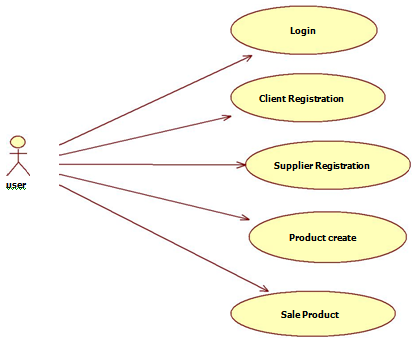
Use case Diagram for Easy Market:

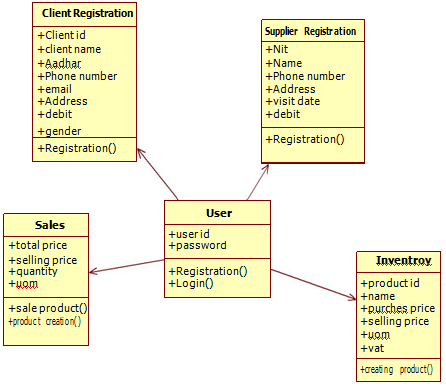
Class Diagram for Easy Market:

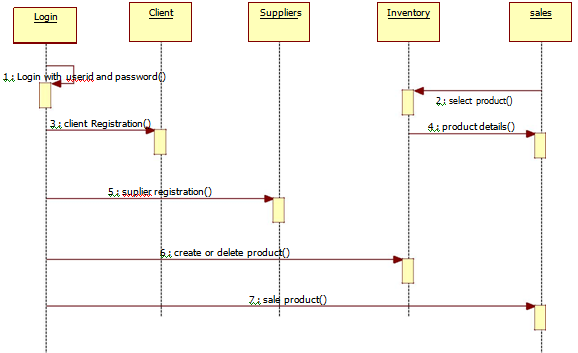
Sequence Diagram for Easy Market:

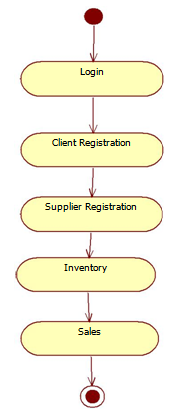
Activity Diagram for Easy Market:

Output Screens:

  • Login layout
  • Menu list layout
  • Client layout
  • Client Registration layout
  • Supplier layout
  • Supplier Registration
  • Inventory layout
  • Product Details layout
  • Product Registration layout
  • Product Details layout
  • Sales layout
  • Custom Sales layout
  • Saving Sales layout
  • Login Details layout

Conclusion

After the completion of the project, one can clearly say that our developed application will help shopkeepers in many ways to record the details. This is the easy way to record the details manage them. It can use by any persons who have a shop and who does not want to record the details of the shop not on paper to reduce his effort and time-consuming.

College Bus Tracking System Java Project

INTRODUCTION:

  • The college bus tracking system helps users to know the bus location so that the users don’t get delayed or don’t arrive at the stop too early.
  • In order to overcome increased waiting for time and uncertainty in arrival, we have come with this project.

Objective:

  • The main goal is to find the location of the bus so that the users do not get delayed.

EXISTING SYSTEM:

  • Location of the bus is not known, thus we need to ask the bus information for respective persons.
  • Long time waiting for the bus.
  • Chances of missing bus.

PROPOSED SYSTEM:

  • We are expecting to find the location of the bus and let the users know the location.
  • so that one can manage their time efficiently and reach their stop just before the bus arrives or take an alternate means of transport if they miss the bus or they are running late.

UML Diagrams:

Use Case Diagram:

Sequence Diagram:

Class Diagram:

Activity Diagram:
Output Screens:

Home Page:

Add Tracking Details:

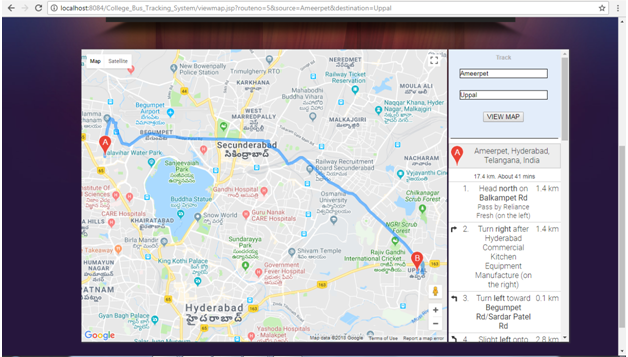
View Map:

Output Screen names:

  • Home Page
  • Admin Login Page
  • Admin Home Page
  • View Users & Activate Page
  • Add Bus Route Page
  • Track Bus Details Page
  • Driver Login Page
  • Driver Home Page
  • View My Route Details Page
  • Add Tracking Details Page
  • User Registration Page
  • User Login Page
  • User Home Page
  • View My Profile Page
  • View Bus Routes Page
  • View Map Page
  • Track Bus Details Page
  • Map Page

MyKids Parental Control Android App Synopsis

Project Aim:

MyKids is an android application which helps the parents to track the health and educational needs of their Childs.

Modules:

1) Admin

Admin is the person who adds the persons, hospitals and schools to the app. They can register to the application only by getting the approval from the admin. A notification will have sent to the clients if they get the approval/denial from the admin.

2) Registration and Login

In this module, parents can register their children by entering their details, their school’s details and the hospital details. Based on the data given in this time, they will be directed towards the specified page.

3) up to 3 years

Immunization chart-This module gives the option to track the immunization chart of children. It will show when the child has to take the vaccination, history of immunization, when is the next doctor appointment.

immunization we mean that nowadays it is getting very compulsory to give vaccines to kids. some schools need this information for giving admission to the children. So this app will give reminders to parents about the vaccine due and the parents able to get the chart of vaccines from the app

Development questionnaire-This will help the parent to make sure the developmental activities of the child by checking whether their children reached a particular milestone in growth.

4) 4-6 years

This module also has an immunization chart which helps to track the vaccination. Besides that, they also have they can get the updates from the school. They can track the tuition fee payment details, bus fee details, and important announcements from the schools.

5) 7-10 years

This category has focused more on schools. They get push notifications on the exams of the children and also the payment of tuition and bus fee.

6) Search

Search option gives the parents an opportunity to search the extracurricular activities for their children and also to search the nearest schools and children’s hospitals nearby.

The remainders to the parents will be given as push notification and also gets updates from the application.

Online Voting System ASP.Net Project Synopsis

SYNOPSIS

Project Title: Online Voting System

ABSTRACT:

This is a web page in which we create a voting system. We consider that all voters are preregistered by admin when the voter login for voting he/she can give only one vote. This project developed for threat free and user-oriented Online Voting System. Online Voting System is made for the voters who want to vote for their favourite candidate sitting at home or from any location.

INTRODUCTION:

The online voting system is implementing in Asp.net using MsAccess database.  The main aim of the online voting system is to develop communication with candidates. This web page used by the college for mini-election in which voters who have registered by admin can vote for their favourite candidate. The voter will log in and give its vote to its candidate to whom voter wants to vote.

PROJECT OVERVIEW:

Admin will register voters and candidates who are standing in an election or any other activity. Only admin can check the result.

PURPOSE:

To make the communication strong with the candidate and to provide the easy way for voting. To increment the voting percentage. As many people have their physical issue that they cannot go to voting boot so this system gives facility to voters that they can vote from any place or any location.

PROJECT SCOPE:

As this project is online so it is easy for voters to give the vote to their favourite candidate from any place or location

PROBLEM DEFINITION:

The voters must keep their login id and password secrete because the voter can vote from any place. As the project is online so anyone can vote using its login-id and password.

Project Objective:

The casting of the online voting system from virtually from college building and display voting results for the administrator to analyze and provide a most secure and user-friendly online voting system.

CONCLUSION:

By using the online voting system it will become possible to cast vote easily and without partiality. Thus seamless voting using the central database is possible and will cause no repetitions of votes.

Website Content Management System Development using WordPress

As a part of this website development work, the student needs to create a website in WordPress Blog. Here we will be responsible to select a theme for our website, for example, their portfolio or a hobby.

The WordPress website must look professional and contain the following features.

  1. Create a WordPress website by selecting an appropriate theme/template.
  2. Create a minimum of five pages on this WordPress website, make sure these all the pages are available in the main menu
  3. Create a secondary menu to display the facebook, twitter, google plus, social links on the website.
  4. Use WYSIWYG Text Editor and create a post with at least the following features
    1. Hyperlink
    2. Photos
    3. Text alignment
    4. Add a table on the page
    5. Display share to social media options
    6. Make use of HTML editor
  5. Create a photo gallery and display the link in the menu
  6. Post a video on the page
  7. Create a poll and display it on a page
  8. Display your blog on the menu
    1. Add a blog category either to top menu or any other side menu.
  9. Create at least five blog articles and categorize them in at least two categories
  10. Add widgets on your pages or blog entries

Structure:

This web application will be the mini project of the students’ final year. Students must keep their website until the end of the second semester to keep their project marks since there is no hard copy for the submission. As a part of the web project submission, students must provide a cover page which will have the following information and your website address. Students will upload this document to Moodle to submit the project. The application must be uploaded on Moodle prior to its due date, whereas the project will be assessed in class.

Include the following in your cover page

  1. Full name
  2. WordPress website address

Include the following in your website mandate:

  1. A brief summary of the WordPress website
  2. Theme or Template used in the web project
  3. All menu options in bullet form
  4. Screenshot of each page with a brief description on each menu item

Employer Branding through Recruitment & Selection

Objectives of the Study: 

  • To study the effectiveness of employer branding in creating employee value proposition.
  • The strategies of Employers to build Brand through Recruitment and Selection.
  • To analyze the perspective of the ex-employees, current employees and prospective employees towards a Software Company.
  • To identify the factors that increase job satisfaction of the employees.
  • To analyze the factors that make the organization a good brand.
  • To provide suggestions and recommendations to enhance the quality of the employer brand.

Scope of Study

  • The study was conducted with reference to the ex-employees, current employees and prospective employees of a Software Company.
  • The study will act as a catalyst for the organization to make itself a distinguished brand as an employer.
  • The study covers almost all the factors that an organization should consider to establish itself as the “Best Employer”.
  • The purpose of the study is to understand the preferences of the employees so that the organization will be able to raise its “external customer satisfaction” through “internal customer satisfaction”.

Limitations of the study

  • The findings are substantially based on the information given by the respondents and in most cases, subjective bias cannot be totally ruled out.
  • This report is purely applicable only to the company in which the project was carried out.
  • The opinions of the employees are likely to change in the future as there may be changes in the provision of welfare measures due to the economic conditions.
  • Only certain variables that the researcher found to be critical are considered for the study.

Questionnaire

    1. Name of the Respondent?
    2. Age of the Respondent?
    3. Qualification of the Respondent?
    4. Existing Employee: Yes No
    5. Came for Interview: Yes No
    6. How do you know about this company
    7. Are you happy with the company Recruitment process?
    8. How do you feel about the interview panel?
    9. Did the Internal meet your expectations?
    10. Are you happy with the salary what you offered from the company?
    11. Did this company Managing fulfill the commitments which are given to you at the time of interview?
    12. How do you come to know about openings in this company?
    13. Do you want to refer more friends to this company?
    14. Did you have the right Designations to this company?
    15. What should be the company’s main source of this company?
    16. Do you think this company spends too much in term of time and cost for the recruitment process?
    17. How do you think about Recruitment and selection procedure in your company?
    18. Does the selection process at this company bring in the right candidate for the right job?
    19. What should be the best recruitment sources according to your preference?
    20. Did you fully know about the company policies before joined this company?
    21. Current Challenges of HR in the Organization
    22. Future challenges of HR in the Organization
    23. Influence of Human Resources in the organization
    24. Methods of recruitment in the organization
    25. Different sources of Recruitment in the Organization
    26. The company preferred forms of attracting the candidates
    27. Different factors considered during the Recruitment
    28. Satisfaction levels of Organizational Infrastructure
    29. Satisfaction towards the information provided during recruitment
    30. Channels through which candidates were informed if selected
    31. Satisfaction towards the feedback given to the applicants

Project Report on Customer Management System

This Customer Management System project has the below forms:

1)  Form: CUSTOMER DETAILS

a) When Consumer Applies for New Connection, the administrator will get all the Details from the customer and save it to the DataBase Table “CustomerTemporaryDetails” except Phone numbers and Load details all the information is mandatory. Load details, at least a row should be filled. (Eg: lights).

b) In this Form, a unique application number, CustomerID, and RecieptNo will generate. Depending On the Supply Category, Registration amount will vary.

c) Application Number will generate according to Office Ids. When User loads this form User ID will automatically be displayed from Registry which is stored when The user enters his login details.

d) All the Primary Data will be Stored in the CustomerTemporaryDetails and Load details will be Stored in the CustomerPreliminaryLoadDetails.

e) Application  Status is updated as “ 1” in customerTemporarydetails indicating a New Connection.

Tables Used:

CustomerTemporaryDetails: Used to store All primary data

CustomerPreliminaryLoadDetails: Used to store all Load Details

Area Information: To display Area Details in Form

ConnectionLineSubType:  to display the line subtype based on Connection Line type.

CustomerType: display customer Type in form whether he is VIP, VVIP, Normal or Govt

Payment Mode: To display payment modes in the form

Delivery Channels: To Get office id for generating application number and to display office Name where the consumer is applying for.

Connection Type: display connection type details whether  temporary or permanent

Application Status: To get the status details for updation

Connection Line Type: display connection line type whether LT or HT

Registration Fee Details: Display Registration Details according to selected customer category

2) Form: PREMISES INSPECTION

a) This Form is for Generating Intimation Letter to the Employee  For premises Inspection. It contains Application Numbers Who are all applied for a new connection.

b) Select the Application No in the List box to display the application number in the text control when user press enter, it will display the customer information Then Select the Employee Id who will Go for Premises inspection and Inspection Date.then save it to the DataBase Table “CustomerTemporaryDetails” and Update The Application Status To “2”.

Tables Used:

Customer Temporary Details

1)To display the application numbers in the list control who are all applied for new connections

2)When application number is selected get all the customer information from this Table

3)Store the intimation LetterNo, LetterGenerationdate, Lettergenerationempid,  date of inspection and finally status updation

User Info

Display the Users in the Form whose Category is 4.

3) Form: INSPECTION DETAILS

This Form is for Generating Inspection Details after Customer Premises Inspection.

The user will Update the Status Whether to provide a new connection to the customer or not.

If Status is set to Accept then That consumer application will go for the Service order.

If Status is set to rejected then that consumer application should not proceed further.

a) IF user clicks on Application Number Then all the Details regarding that Customer will get displayed.

b) The user will select the Transformer and enters the Contracted load (Maxload-Present load)

c) Set the application status if set to accepted then status will be updated as 3

d) If set to rejected then application status will be updated as 4.

e) Store the information like InspectionDoneDate, ContractedLoad, and ApplStatusId in “CustomerTemporaryDetails”.

Tables Used

Transformer details: To display the Transformers in the Form

Customer Temporary Details:

a) To display the application numbers in the list control whose status is 2

b) When application number is selected get all the customer information from this Table

c) To Store Inspection Details and status updation

4) Form:  Security Deposit SERVICE ORDER

This Form is for Generating Service Order for Security deposit to the Employee.

a) Unique Service Order Number Generation

b) This Contains the Application Numbers whose status is 3(Accepted). if application Number is selected Corresponding Details will be displayed

c) Select the Service Ordertype whether for SO is for a security deposit or meterinstallation

d) Select The Employee that generate Security deposit Letter. And Security deposit pay date.

e) Store the Details in The Data Base Table  “Customer Temporary Details”.

Tables Used :

Service Order :

1) get the maximum service order number

2) To Store Service order  Details. Like ServiceOrderNo, ServiceOrderTypeID, ServiceOrderGenerationDate, ServiceOrderGenEmployeeID, ServiceOrderToEmployeeID, ApplicationNo, SecurityDeposit, DevelopmentCharges, PayDate.

Customer Temporary Details:

1) To display the application numbers in the list  whose status is 3

2) When application number is selected get all the customer information from this Table

3) Update the application Status to 8 

5) Form:  Security Deposit Intimation

This Form is for Generating Intimation Letter to the Employee For Security Deposit.

It contains Application Numbers which Service Orders have generated for them are displayed

In the list control.

  • Unique Letter number Generation from Database.
  • When the application number selects it displays the corresponding consumer details. User Selects the Pay location and paydate and stores the details in the Database

Tables Used :

CustomerTemporaryDetails

1) To display the application numbers from the database whose status is 8(service order generation)

2) To Generate Unique Security deposit letter no generation

3) Storing details like Securitydeposit LetterNo,lettergenertaion employee and lletetr generation date and updation of application status to 5(securitydeposit letter generated)

Delivery Channels:

  • to Display the Office id’s description in the form for selecting the pay location.

ServiceOrder

  • To display the Security deposit, development charges and paydate in the form controls

6) Form: Security Deposit PAYMENTS

 This Form is for Generating Security Deposit Details from Customers.  & GGenerateUnique SCNO.

Customers who had been intimated to deposit the security deposit. Those Customer Application numbers will be displayed here. Deposit Details will be stored in the Database.

Tables Used:

Payment Mode: To display payment Types in the form to accept the amount through cash, cheque, cards etc.

Customer Temporary Details:

  • To display the application numbers whose status is 5(Security deposit letter generated)
  • Storing the SCNO, and updation of Application status to 6(Security deposit paid)

Delivery Channels

TO get Office id to generate a Unique Receipt number

Security Deposit

To get the maximum receipt Number

7) Form: METER INSTALLATION

This Form is for Meter Installation Process. Here User will allot the Meter For the Customer

All the meter details entered here will be stored in DataBase.

Tables Used:

Customer Temporary Details: 

  • When user Enters the Application Number All the Customer Details will be displayed
  • Updating Metering Details like MeterNo, MeteringSourceID, MeteringPolicyID, Billing

PolicyID and SCNNO.

Meter Details :

  • Meter Make will be displayed according to the selected Meter Number.
  • Updating Meter Status “Not Avail” to that “Meter no” which is allotted to customer

Meter Reading Source :

To display all Meter reading types in the Form for selecting the appropriate Type

MeteringPolicies

To Display Metering Cycles in the Form for selecting the Appropriate Cycle.

BillingCycle

To Display Billing Cycles in the Form for selecting the Appropriate Cycle.

SCNDetails

This is a Master Table which all the Details of all the customers in transco have been stored here.