Mechanical Questionnaire System Java Project

Statement of the project

To maintain the questions in the database and develop an Auto Questionnaire to conduct promotional exams for the employees.

Existing System:

  • It is time-consuming and difficult to conduct for every section.
  • At present to conduct any exam question paper is being set manually.

Proposed System:

Questions are generated randomly with the proposed system if we mention the details.

Software Requirements:

Windows OS, JDK, Net Beans with Apache Tomcat web server,  Oracle, Internet Explorer with the latest available Adobe flash plug-in, Rational rose for modeling.

Project Modules:

  • Question Bank maintenance
  • Default Templates
  • Creating a new Template
  • Generating Reports

UML Diagrams:

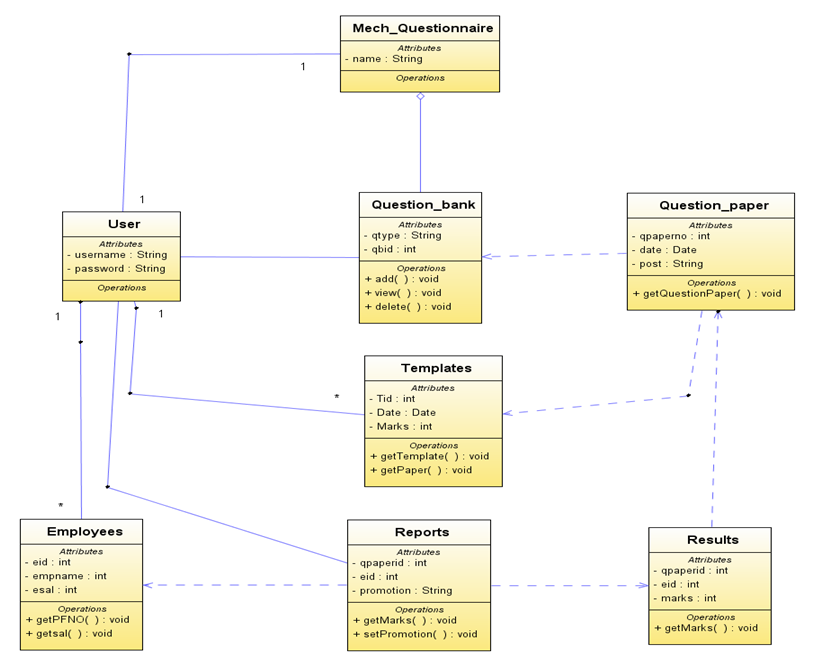
Class diagram for the System:

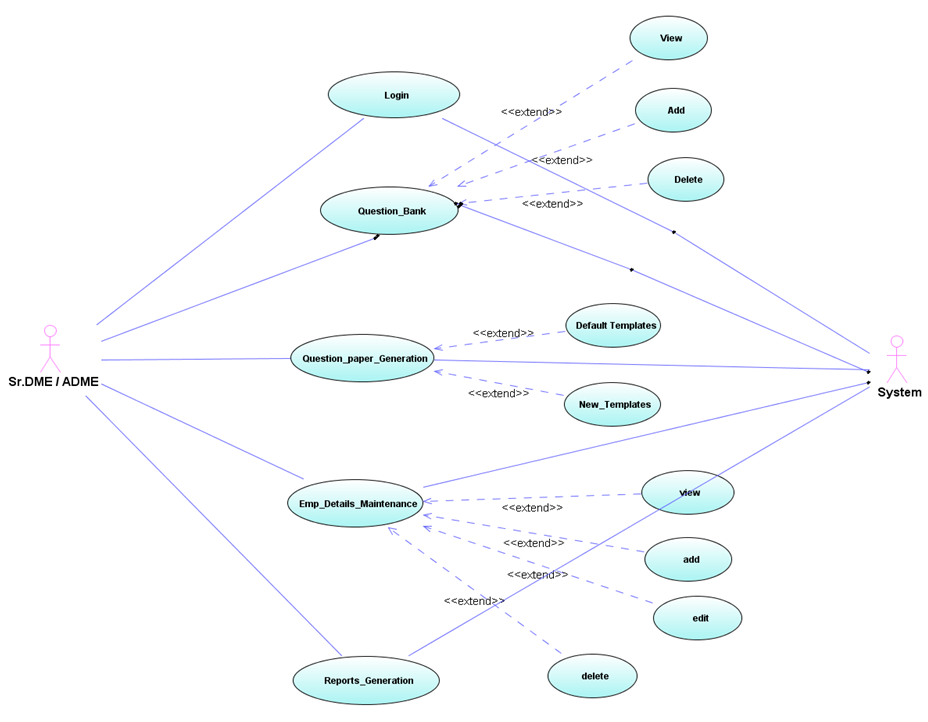
Use Case Diagram showing the actions of the administrator:

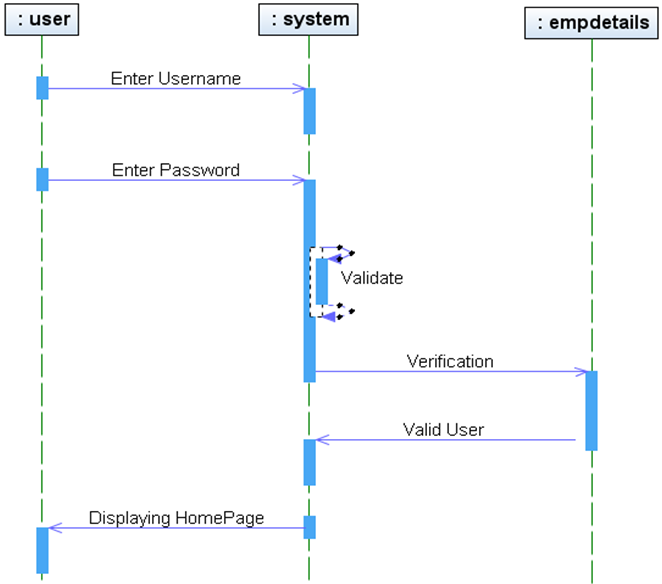
Sequence diagram for login to the system:

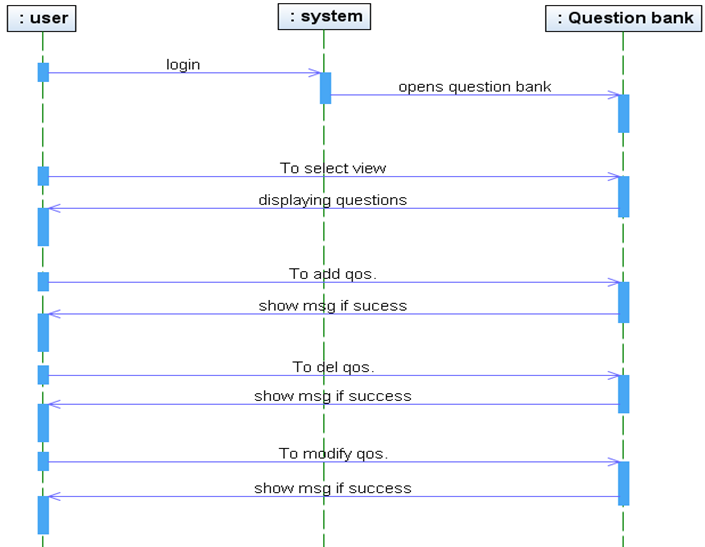
Sequence Diagram for Question bank:

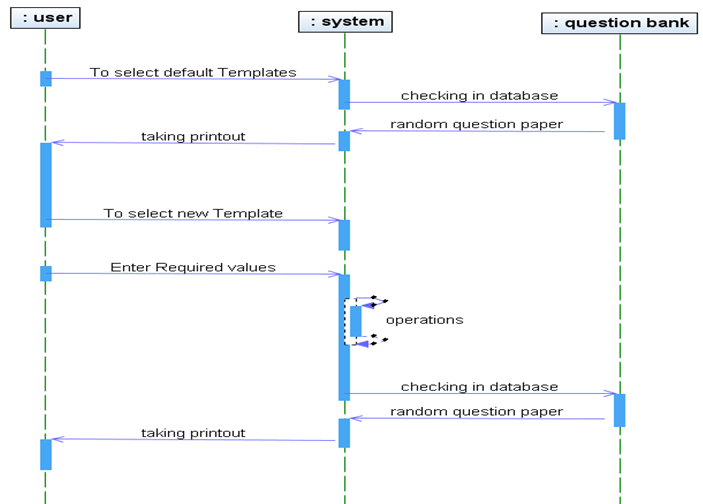
Sequence Diagram for Question Paper:

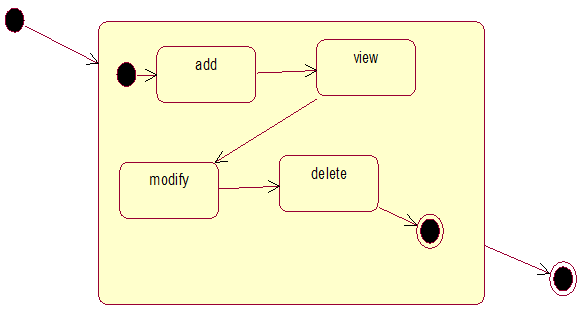
State Chart Diagram for admin object:

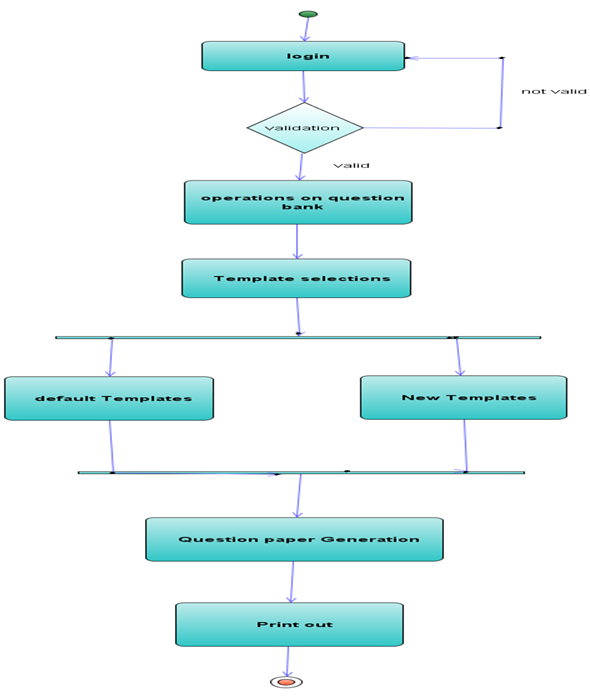
Activity diagram of the system:

Other Output Screenshots:

  • When user login to QB
  • Displaying QB
  • Viewing Questions from QB
  • Selecting to add Questions.
  • Adding Questions.
  • Deleting Questions.
  • Default Templates
  • Open/Save Q.paper in MS-Word
  • Question Paper Generator
  • Open/Save Question paper in MS-Word
  • Question Paper in MS-Word
  • Reports

Download Mechanical Questionnaire System Java Project Source Code

College Information Management System (CIMS) Project Synopsis

The project College Information Management System (CIMS) deals with the maintenance of information over a network within the college. The college system has gone through a vast transformation particularly in the last decade. While adopting, IT seems to be the best choice towards enhancing efficiency, it becomes necessary for college systems to face the challenges imposed by the e-vulnerabilities.

This product ensures instant and secure information maintenance in colleges.

This project is capable of maintaining the following details:

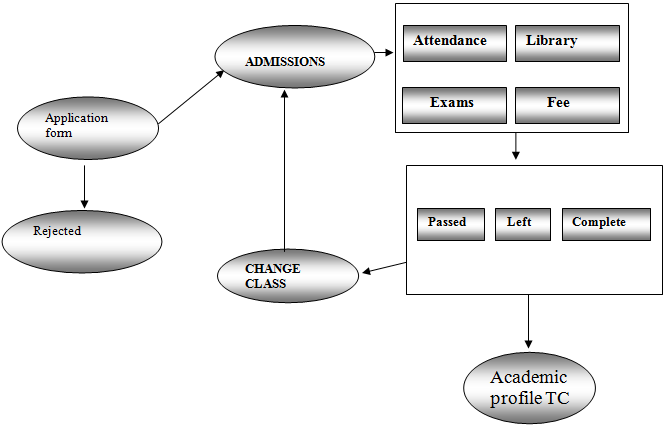
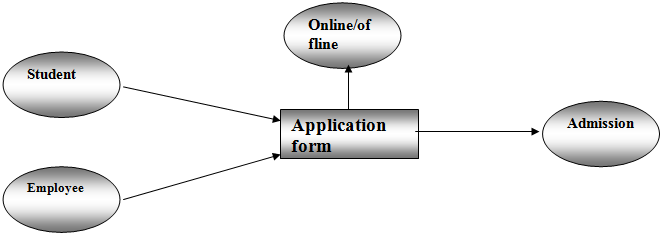
Student: The traditional process of admission requires a student to collect the admission forms, fill them and submit them at the college. CIMS enables the student’s to enroll them in the college. The student’s performance is also maintained and can be securely recovered by the college administration.

Staff: The admission process of staff requires them to fill out the application and submit to the college.CIMS maintains the complete details of the staff like department, attendance, and payroll.

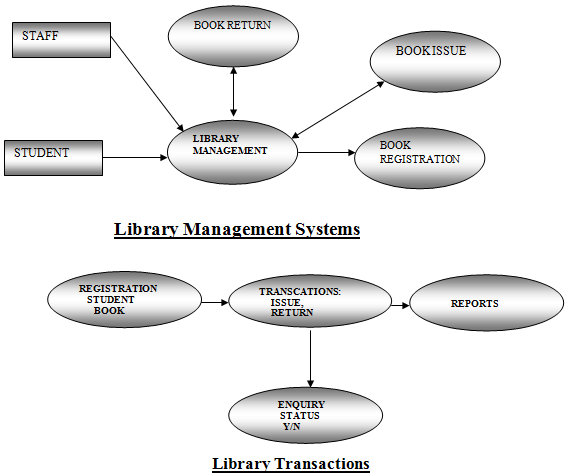
Library: The library management enables the book registration process, book transaction process, to know the book status.

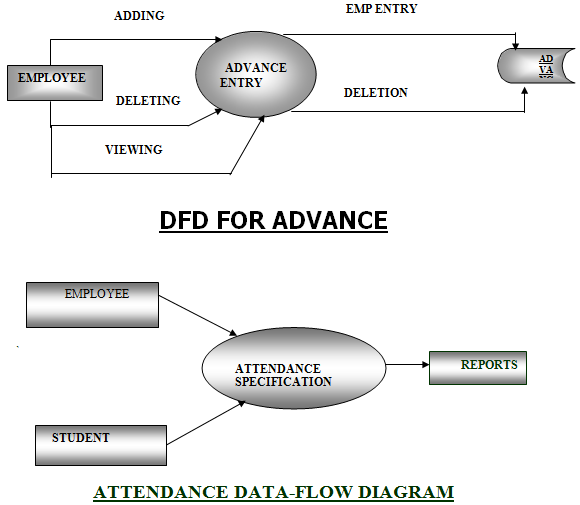
Attendance: CIMS maintains the complete attendance details of the student and the employee

Courses: The course details like presently offering, new courses etc are maintained by the system. Fee details like course wise, subject wise, are also maintained. Individual subject details like date of commencement, maximum marks, pass marks are also maintained.

College information: college information like history, calendar, holidays, timetable, news, and announcements are maintained.

Apart from this College Information Management System project allows the information available over the college internal network and provides information access to the entire spectrum of campus users that includes college staff such as administrators, faculty, librarians, etc. CIMS also avails the web interface to provide the college information on www. This allows the students and other users to search for information about the college online. The web also allows the students to register online for the college. Hence this project helps a college function in a very smart way. Due to the lack of time, CIMS does not enable to work on multi-branched educational institutions. It can be easily be implemented.

Project work description

This project of CIMS addresses all the vulnerable aspects and meets the requirements of various fields like college administration, staff and student enrollment, library management, latest happenings, course details, etc.

The system was developed in Java using swing, AWT packages, exception handling and event handling with interaction to a database in MS Access.

Modules:

This College Information Management System project is subdivided into the following modules or partitions.

• Employee
• Student
• Library
• Course
• Attendance
• Latest happenings
• Payroll management
• Web page

System Design Phase:

DFD
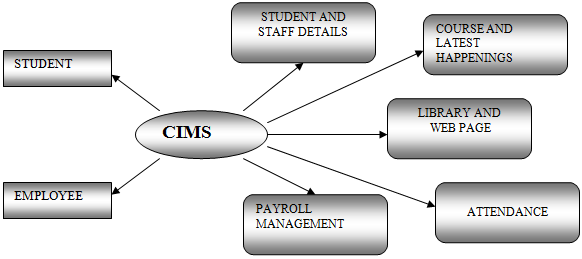
 

Student Admission:
Student application:
Staff Admission:
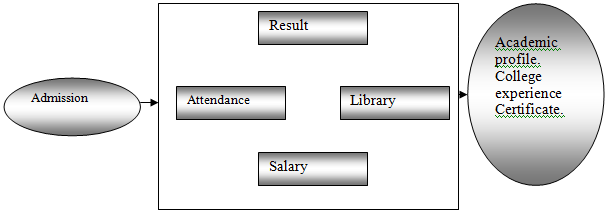
Payroll management:
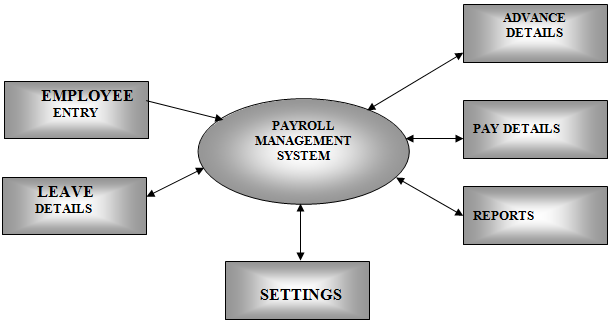
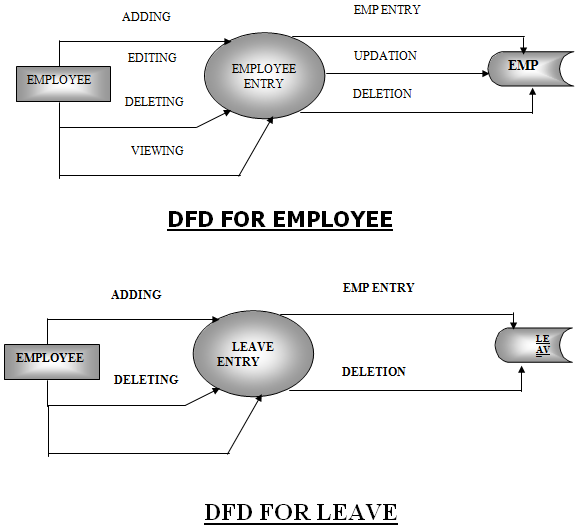
DFD for Employee & Leave:
DFD for Advance and Attendance:
Library Management Systems & Library Transactions
Latest happening:
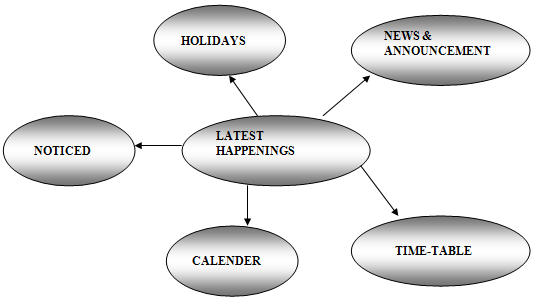
FUNCTIONAL DESCRIPTION OF PROJECT

When the package is started a dialog box is displayed by asking for a password on the correct entry of the password the user is allowed to enter into the main menu frame. A colorful welcome wish is displayed on the front window.

It has the following options:

  1. Employee details.
  2. Student details.
  3. Library management.
  4. Payroll management.
  5. Attendance.
  6. Web Page.
  7. Course information.
  8. Latest Happenings.
  9. About college

Employee

This window is used to maintain the Employee details.

On clicking the Employee menu item, it gives a window, which allows the user to add, view, modify and delete the employee details by clicking their corresponding buttons.

This module deals with the input of data from the user and storing the data in the database.

While adding an employee, the employee code is generated. The user has to enter the personal details, select the designation and select the department name etc.

Student

This window is used to maintain the Student details.

On clicking the Student menu item, it gives a window, which allows the user to add, view, modify and delete the student details by clicking their corresponding buttons.

This module deals with the input of data from the user and storing the data in the database.

While adding a student, the student ID is generated. The user has to enter the personal details, select the designation and select the department name etc.

Library

This window is used to maintain the Library details like the following:

  • Transaction [issue, return].
  • New Book registration.
  • Searching for a book.

On entering the Library details, to add the information of a book the user has to enter the book code, book name, author, publication, edition, date. The user also has the options to view, delete the book details whenever required. All the above-mentioned features have been extensively handled.

Payroll

This window is used to get the monthly Pay slip of an employee.

On entering the Pay slip window, the user has to supply the employee code. The system will calculate the net amount by calculating all corresponding calculations.

The calculations are displayed in their corresponding boxes and now pay slip is ready to take the printout by just clicking the print button.                                                                                        

Course details

This window is used to know the details about the courses, which the college is offering like the course ID, course duration, course fee, and any other information. It also gives the user the freedom of entering new courses, which the college will offer.

Latest information

This window will help the user know about the happenings in the college like the following:

  • Calendar
  • Time-table
  • News and announcements
  • Holidays
  • Notices

By choosing any of the above options the user can know about the related. He is also given the freedom of editing any changes to the data. 

Attendance

This window will have two options like

a) Student

b) Employee.

When we choose one it will show the details of the attendance of the selected candidate.

Web page

When we click this option the web page of the college will open and it has all the features, which the stand-alone application has.

About

This will show a window, which has a text field that shows the college history.

Conclusion:

This package has established a model for College Information Management.

This package is completely computerized and maintains the details of all students and employees like Student and Employee details, Leave, Advance, Admissions, Course details, Library Management, Attendance Specification, Latest Information, college web page, it also generates reports for all employees and students as needed, like Salary Summary, Department Wise Salary and Total Leaves took by an employee, marks obtained, attendance, library transactions, etc. by a student.

This package is so designed that all calculations are automatically generated for college management system.

Event Reminder Android App Project

It is designed and implemented to inform the person for a birthday and anniversary, here user can also create accustom event to inform to multiple persons. It is informed to a person with SMS and email.

Event reminders – which is useful for any special events like Birthdays, Anniversary etc. App sends automatically message and send e-mail.

This app adds a repeating Event reminder. You can customize the duration, multiple selections, update the events etc.

Requirement Determination

Input:

  • The first user has to add to the event.
  • Then select the event from birthday, anniversary and custom event.
  • In the selected event, he has to fill out all the data.
  • The user can create an event where he can inform multiple people.
  • The user has to select time and date when he wants to inform the user.

Output:

When the time has come which Is set by the user the application will automatically start and inform to the user of the event.

Screen Snapshots:

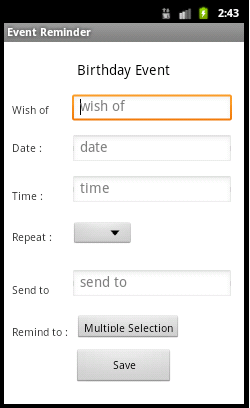
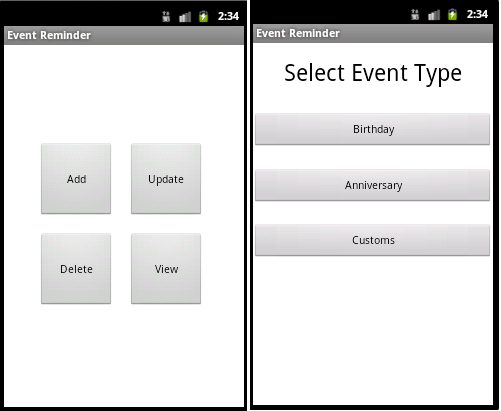
Home Page, Select Event Type and Birthday Event

  • Homepage Which is display two buttons EventAdd and EventView.
  • After selecting add event it displays all the events.
  • While we are filling the form of the event we get contact selection.
  • After selecting all the contacts we get the message that you have successfully inserted contacts.
  • Then we save that event and get the message that you have successfully inserted a birthday event.
  • When an event is fired, automatically application will start to ring the tone of the event.
  • After sending all the message this application request user to send an email.
  • This homepage contains two buttons add and view event.
  • After selecting the view event button it displays all the events.
  • When we long press on any event it displays option for update event and delete event.
  • When we selecting update event it displays whole data of the selected event.
  • Here in the update event, we can reselect contacts or if we want to keep old selection then press no.
  • In new contacts selection, it displays all the mobile contacts.
  • After selecting all the contacts it displays a message that you have successfully inserted contacts.
  • Then it displays a message that you have successfully updated event.
  • When we long press on any event it displays option for update event and delete event.
  • After deleting event it comes on the homepage.
  • On view events, which event we have deleted that event will not display.

Test Cases:

Event Id: 1
– While click on add event button it will show the SelectEventType page.
Event Id: 2
– While clicking on view it will show whole events.
Event Id:3
– While select AddBirthdayEvent button there opens a form where the user has to fill all the data after completion of that user will get a notification.
Event Id:4
– While select AddAnniversaryEvent button there opens a form where the user has to fill all the data after completion of that user will get a notification.
Event Id:5
– While select CustomEvent button there opens a form where the user has to fill all the data after completion of that user will get a notification.
Event Id:6
– Which events we have already created on that particular event long press it will show box which contains Update and delete.
Event Id:7
– While user selecting an update option it will make an editable whole form where the user can update the data.
Event Id:8
– While user selecting a delete option it will delete event and notified to the user.

Test Data and Results: 

Event Id Description Input Expected Output Actual Output Status
1 Add button Single click SelectEventType Page open SelectEventType page open pass
2 View button Single click ViewAllEvent page open ViewAllEvent page open Pass
3 AddBirthdayEvent Single click Open form. Open form. Pass
4 AddAnniversaryEvent Single click Open form. Open form. Pass
5 CustomEvent Single click Open form. Open form. pass
6 ViewAllEvents Long press Notify to user for update & delete Notify to user for update & delete Pass
7 Update Option Single click View editable form View editable form Pass
8 Delete Option Single click Notify to user after delete event Notify to user after delete event Pass

UML Diagrams:

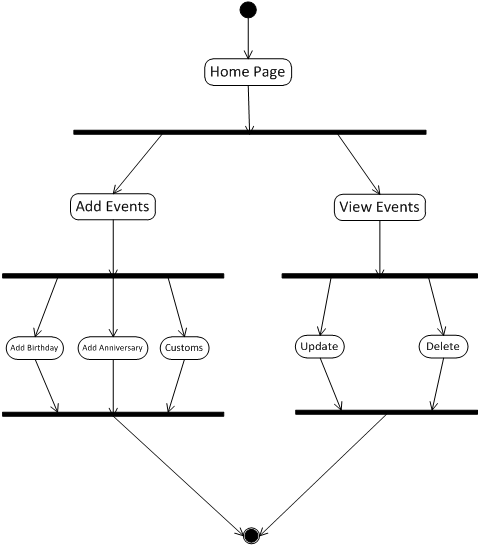
Activity Diagram:

Class Diagram:

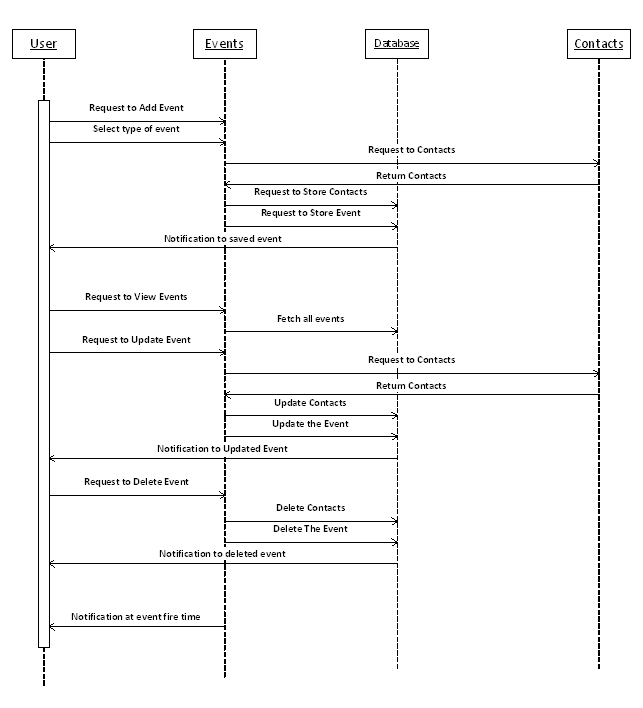
Sequence Diagram:

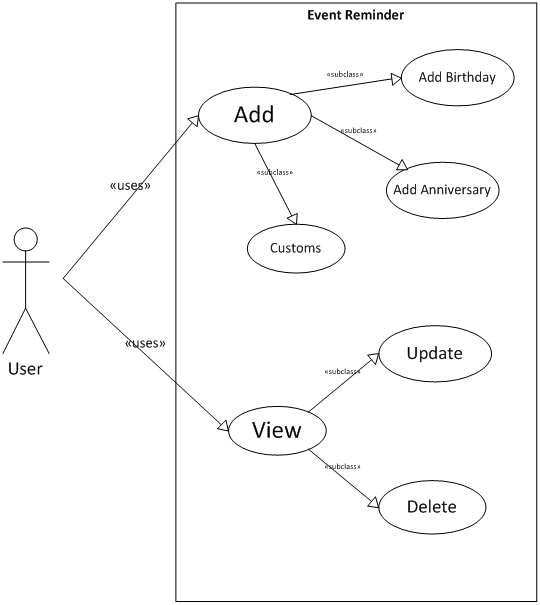
Usecase Diagram:

Structure of classes used: User Manual:

  • First, we have to select on the application logo.
  • It will open the application.

Add button

  • There are two buttons where “Add” is used for add event and another button “View” is used to view events.
  • While we selecting on “Add” button there is another page will open which contain three buttons set birthday, set anniversary and customs this are types of events which are included in this application.

Add birthday

  • first, we select in set birthday then where we get a set birthday form.
  • In this form we have to fill all the data like name, note etc. when we reach in date and time were we have to double click then it will open for set date and time.
  • there is remind to option which is useful for multiple contacts selection. After multiple selections we have to select menu button it will contain submit and delete event while we select in submit then it will submit all the contacts which we have select if we delete it then it will not select ant contacts.
  • After filling the whole form we have to submit it.
  • Then we get a message that successfully inserted event.

   Add anniversary

  • we select in the set anniversary, where we get a set anniversary form.
  • In this form we have to fill all the data like name, note etc. when we reach in date and time were we have to double click then it will open for set date and time.
  • there is remind to option which is useful for multiple contacts selection. After multiple selections we have to select menu button it will contain submit and delete event while we select in submit then it will submit all the contacts which we have select if we delete it then it will not select ant contacts.
  • After filling the whole form we have to submit it.
  • Then we get a message that successfully inserted event.

Custom event

  • we select in set Custom, where we get a set Custom form.
  • In this form we have to fill all the data like name, note etc. when we reach in date and time were we have to double click then it will open for set date and time.
  • there is remind to option which is useful for multiple contacts selection. After multiple selections we have to select menu button it will contain submit and delete event while we select in submit then it will submit all the contacts which we have select if we delete it then it will not select ant contacts.
  • After filling the whole form we have to submit it.
  • Then we get a message that successfully inserted event.

View events:

  • This button contains all the events which we have added in all the events.
  • Which events we can update and delete from the menu button.
  • In the update, the whole form will open where we can update all the data which we have to fill here.
  • In delete, the event will be deleted.

After complete the event when the time comes for any event then the application will automatically open and inform the user about the event. Then it will automatically send the message to that person whom user want to celebrate and inform to multiply selected person that this event is for this person so you can celebrate him.

Future Enhancement:

Facebook updation :

  • Here in this application user can send multiple messages and send mail to a particular person.
  • While in future user can write in the wall of person’s account.

Multiple Mail sending:

  • Here in this application is able to send a mail to only one person whose birthday or another event.
  • While the user can send mail to multiple people at a time.

Download Event Reminder Android App Project Code

Android based Weather Application for Students

Abstract: 

At present, we do not have any mobile applications for checking the weather at different places. The main goal of this project is to develop an android application for checking weather conditions like temperature, the pressure at other places through android mobile.

EXISTING SYSTEM:

1) If we want to go to a new place, then we cannot check the weather through our existing application in that place.

2) We have to check through search engines like google.

3) The existing system is not portable(hard to use).

PROPOSED SYSTEM:

1) We can check the weather reports (i.e., prediction reports) through our proposed system.

2) We can check the weather at other places through our proposed system.
3) This system is portable (easy to use).

HARDWARE REQUIREMENTS: 

1) Android mobile with a minimum version 2.2.

2) The processor is not less than 500MHZ.

3) RAM > 170mb.

4) SD card with a minimum of 512 MB.

5) Resolution is not less than 480*800pixs.

SOFTWARE REQUIREMENTS:

1) Android Studio.

2) JavaScript.

3) XML.

UML Diagrams:

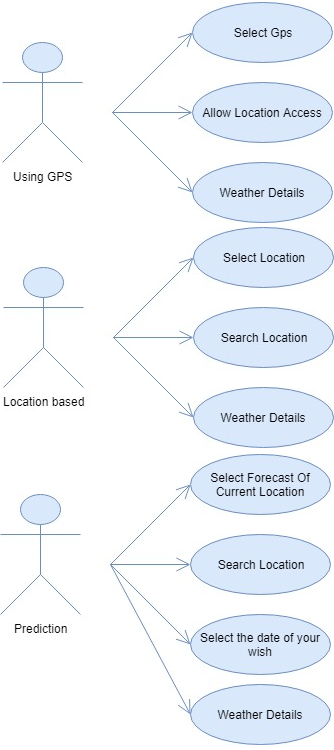
Use Case Diagrams:

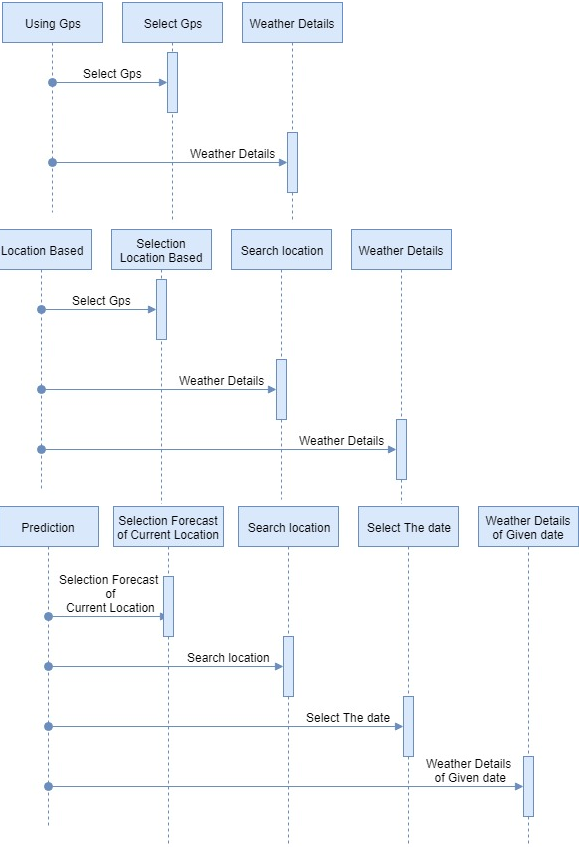
Sequence Diagram:

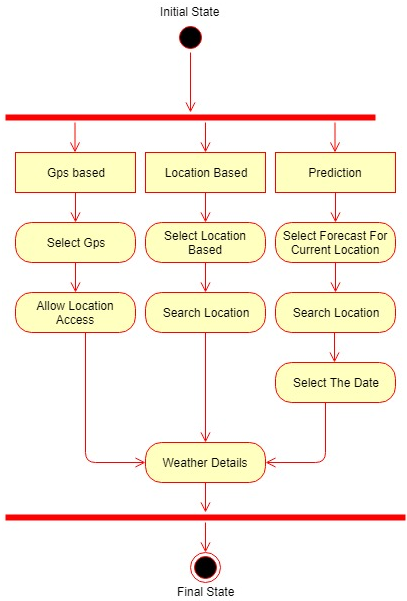
Activity Diagram:

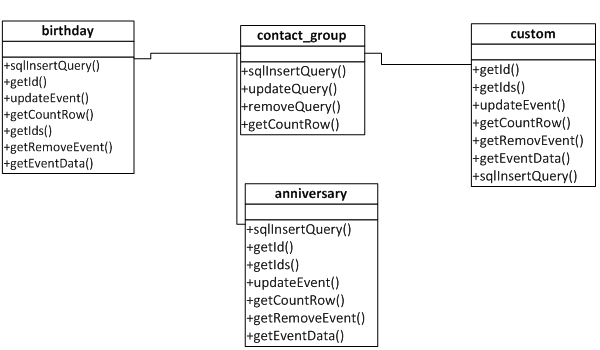
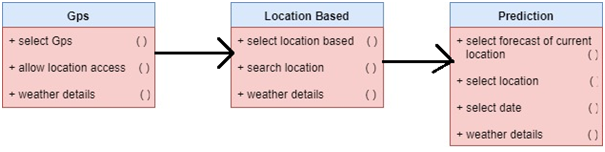
Class Diagram:

MODULES:

1) USING GPS: we can know the weather through GPS in our mobile.

2) LOCATION BASED: We can know the weather at other locations.

3) PREDICTION REPORTS: we can know weather forecast reports for coming 10 days in a given location.

Farmers Medium of Communication for Support Price of Crops

Abstract:

Farmers support price of crops is a web application which is useful for farmers to sell their crops at a good price. Nowadays the main issue for farmers is getting a good price for their crop so this creates a medium between farmers and buyers. In this Application, Farmers will register and login into the application and provide the crop details which they want to sell and also should mention the details like the type of crop and minimum amount etc. After submitting all those details the crop will be available for buyers o buy the buyers can register and login into the application and search for the desired crop and can bid the desired amount but cannot bid the amount less than the minimum amount. The Crop will be an auction for a particular set amount of time after the time expires the person with highest bid amount will be shown to the farmer and he accepts the crop will be sold to Buyer.

In this Farmers Price Project, we have 3 modules

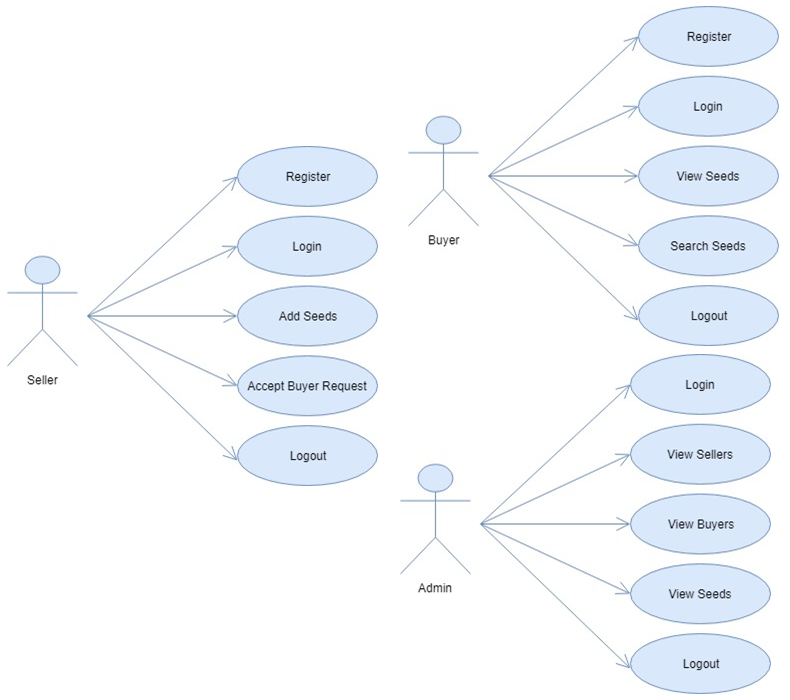
  1. Admin
  2. Farmer (Seller)
  3. Buyer

Modules Description: 

Admin:

Admin will login into the application with the default username and password and he can view the registered buyers and sellers and he can view the crops sold to buyers by farmers and the amount bid by the buyer.

Farmer (Seller):

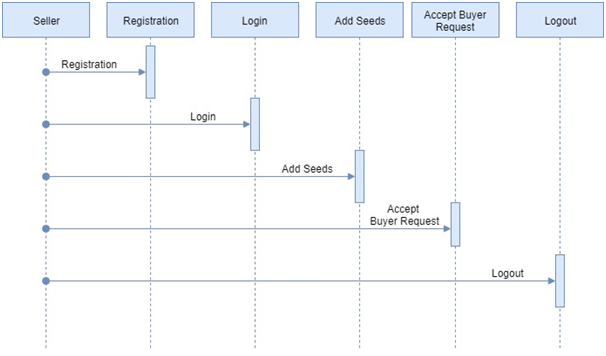
Farmer or Buyer will register and login into the application using username and password given at the time of registration and he will enter the crop details and the minimum bid amount and after the bid closes he can accept the highest bid. 

Buyer:

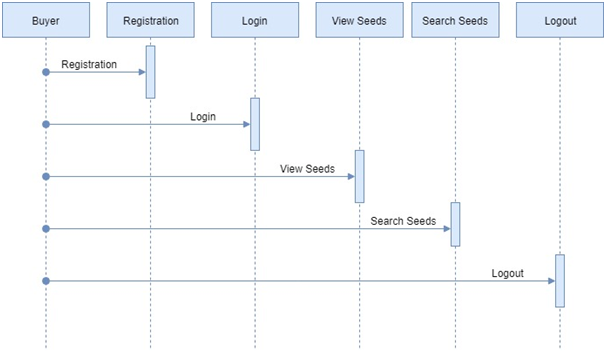
Buyer will register and login into the application he can view the crops or search by crop name and bid the amount for crop after for a particular set amount of time the bit closes if the highest bid was on his name he can view the crops which he brought in the auction. 

Existing System:

In Existing System Farmers faced the problem of getting a low price for their crops because of the medium between buyers and sellers, in which the farmers used to go to the centers with their crop and wait for their turn to sell this take long time and instability of day to day price.

Proposed System:

In the Proposed System, Farmers have a good medium through this application and they can decide the price of the crop which is a big failure in the previous system.
System Design Diagrams:

Use Case Diagram:

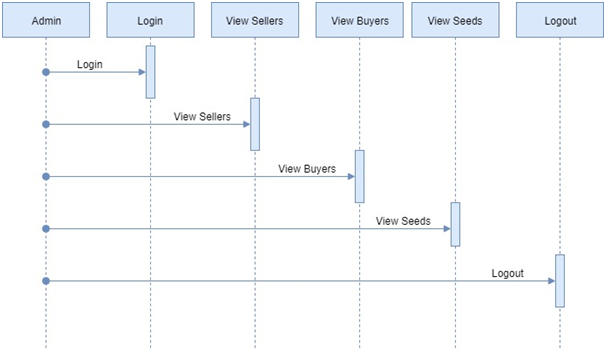
Sequence Diagram for Seller:

Sequence Diagram for Buyer:

Sequence Diagram for Admin:

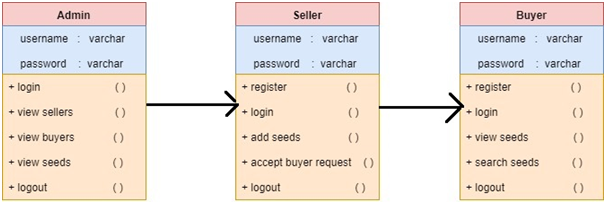
Class Diagram:

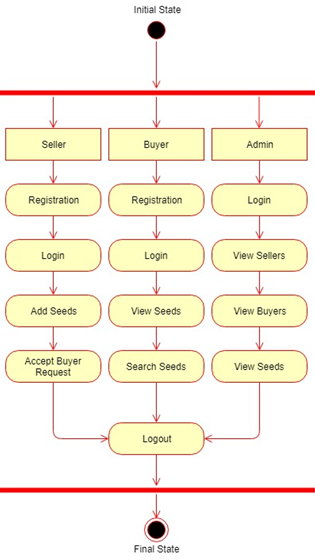
Activity Diagram:

Source Code will be uploaded soon.

Online Course Management System .Net Project

Abstract:

Course Management System tool is a web application which is useful for students who are going to choose any college or course in higher education, for them this application is helpful to make the correct the decision with the accurate information.

In this Course Management application, we are having the only module is Student. The student must register into the application by providing all the basic and general information after registration student can log in with the default username and password, the student can change the password and he can also recover his password if he forgot the password.

The student will have the college search option in that he must give the details which course he would like to take up and in which location he needs to specify. Basing on his requirements he will get the list of the colleges or universities present in that location offering that course.

In this Course Management application, only Student Module is present

Student:

The student must register and login into the application using username and password which is given at the time of registration and after successful login student will search for the universities basing on his requirements he can view the information and list of colleges present in that location. After viewing the detailed information about the university, he can decide which college is best suitable for his education.

Existing System:

In the Existing Course Management System, the student has a lot of confusion to select the course and universities so that each time a student needs to visit and inquire about the colleges that the course is available or not.

Proposed System:

In the Proposed Course Management System the student just needs to utilize the search form present in student home page and entering his requirements he can view all the information he needs in just a matter of seconds

Download Online Course Management System. Net Project Source Code, Report.
Web based Rental Application using .Net

Abstract:

The online rental application is a web-based application in which both the customers and vendors are logged into the application and view the showcased products and purchase them. Admin will login into the application after logging he can view the new inquiries and the feedback received from the customers. admin can also recover the password if he forgets by providing keyword. The user will register into the application by giving all details and provide the card details for payments. After logging, he can add the products that he wishes to advertise. After posting he can view all the products and if any products he wants to delete he can delete.

In this rental application, we are having 2 Modules

  1. Admin
  2. Customer

Modules Description: 

Admin:

Admin will login into the application using the default username and password after logging he can view the inquiries and feedbacks from the customers.

Customer:

Customer will register into the application by providing all the necessary details after successful completion of registration customer will log in and advertise the products that he wants to keep them for rent. He can also view all the products that he added.

Existing System:

In Existing System, the user cannot do this process from one location to another location means if a customer is shifting to a new place and he want to take a bike for rent before he reaches there so that cannot be done in the existing system.
Proposed System:

In Proposed System, the application is independent of location means from any location you can access this application and complete your procedure by just registering and logging.

Download Web-based Rental Application using .Net Technology Source Code, Project Report, PPT, UML Diagrams.

2018 – 2019 ECE and EEE major projects List

Hi,

Welcome to 1000 Projects ECE Projects Section., These are the below advanced Electronics and Electrical Projects List which can useful for ECE and EEE students for their final year projects submission.

  1. Face recognition based attendance management system using Raspberry Pi
  2. Finger scanner and facial recognization based door security system using Raspberry Pi.
  3. Smart garbage bin municipal operations.
  4. Agri-bot: Agriculture robot.
  5. Pipe inspection robot with live video streaming over android application
  6. Smart trolly for easy billing using a raspberry pi.
  7. Product sorting machine with color identification using a raspberry pi
  8. Advance surveillance robot using a raspberry pi
  9. Intruder alert system: IOT based home security with E-mail and photo using a raspberry pi.
  10. Web application based home automation using a raspberry pi.
  11. College notice board display over IOT.
  12. Smart toll plaza with RFID based door opening system and balance alerting over the message.
  13. Vehicle security system with engine locking over IOT
  14. Smart travel luggage bag.
  15. Accident identification based alerting location over GSM and GPS.
  16. Railway Track Pedestrian Crossing between Platforms (Movable and flexible railway platform).
  17. Greenhouse monitoring and Weather station monitoring over IOT
  18. Smart assistive device for deaf and dumb people.
  19. Semi-autonomous Garbage collecting robot.
  20. Solar power based grass cutting and pesticides praying robot.
  21. Smart Wearables: Emergency alerting with location over GSM for women.
  22. Automatic car washing and drying machine with conveyor support.
  23. The real-time voice automation system for the college department.
  24. Patient health monitoring over IOT
  25. Automatic gear shifting mechanism for two-wheelers.

Electrical and Mechanical Shed Planning and Work Distribution System

This Shed Planning and Work Distribution System project have got the scope to develop in other departments of Electrical and Mechanical Shed, like Spares department where information regarding the available spares can be stored in a computer database for faster information retrieval.

Also, there is scope to automate the process of issuing tenders to the unavailable parts of the Electrical and Mechanical Shed through online which is currently being done manually.

We can further enhance the work notification system that has been implemented in the current project through color coding by generating alert boxes in addition to the color coding.

UML DIAGRAMS

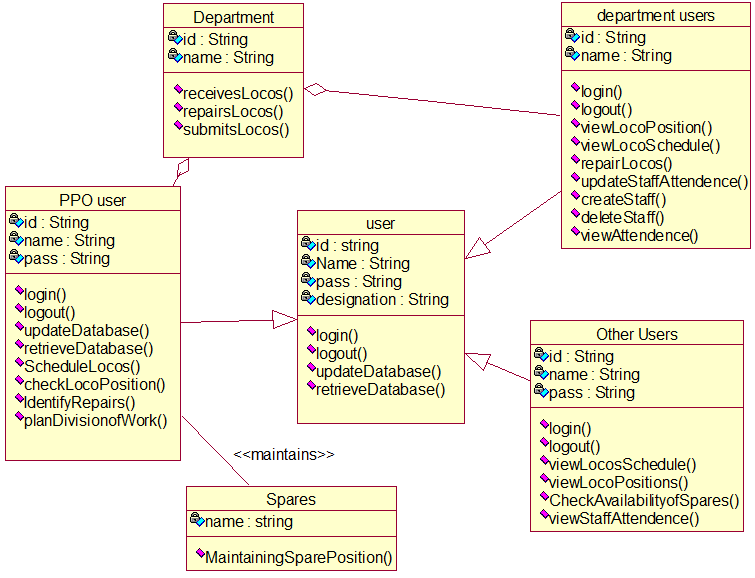
CLASS DIAGRAM

Figure 1: Relationships among the classes of Electrical and Mechanical Shed

 Description

The class diagram of the electric loco shed shows the major classes, their attributes and the operations of each class. The operation of each class has the effective utilization of the attributes.

USE CASE DIAGRAM

Figure 2: Behavior of PPO User

Description 

Actors: PPO User

Relationships: Simple Association

USE CASE DIAGRAM

Figure 3: Behavior of Other Users 

DESCRIPTION 

Actors: Other Users 

Relationships: Simple Association

The above diagram shows the behavior of other users. These other users include ADEE, Senior DEE i.e., the administrative people. Other users can Log in, Log out, can view staff attendance, view loco position which includes viewing forenoon position and the afternoon positions, view schedule.

USE CASE DIAGRAM

Figure 4: Behavior of Department Users 

DESCRIPTION 

Actors: Department Users

Relationships: Simple Association

The above diagram shows the behavior of the department users. They can Log in, Log out, can view staff attendance, view loco position, view staff attendance which includes viewing yearly/monthly/daily attendance of a particular individual, creating staff members of the particular department, deleting staff, view loco schedule, change status of the work to completed if the work is completed and to In progress when work is going on, check if there are any works given by the PPO.

SEQUENCE DIAGRAM

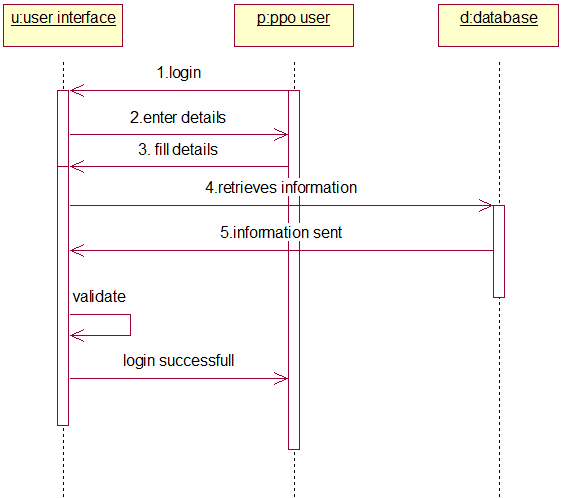
Figure 5: PPO Users and Other Users Login

DESCRIPTION

In the above diagram the user’s needs to log in. Users first enter the details and then the corresponding information is retrieved from the database. And when the database sends the corresponding information validation is performed and if the information is available then the user’s logins successfully.

SEQUENCE DIAGRAM

Figure 6: Scheduling Locos 

Description

In the above diagram the PPO user’s needs to schedule the locos. So the PPO users first schedule the locos and the information is stored in the database after which the database is updated. The PPO users then send the schedule to the department. Then the database is updated and scheduling the locos is successfully done. 

SEQUENCE DIAGRAM

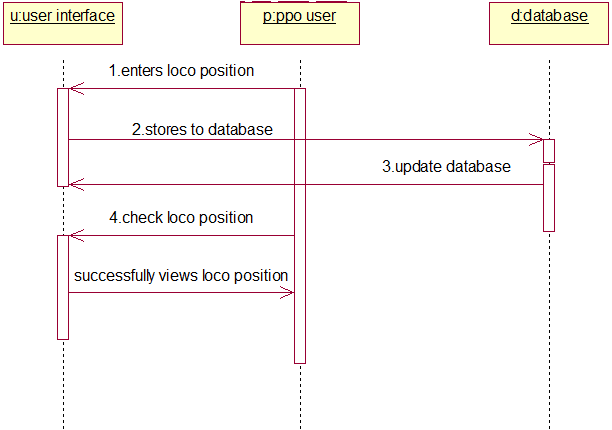
Figure 7: Viewing Loco Position 

Description

In the above diagram, the PPO user’s needs to view the loco position. So the PPO users first enter the loco position and the information is stored in the database after which the database is updated. The PPO users then send then can view the loco information.

SEQUENCE DIAGRAM

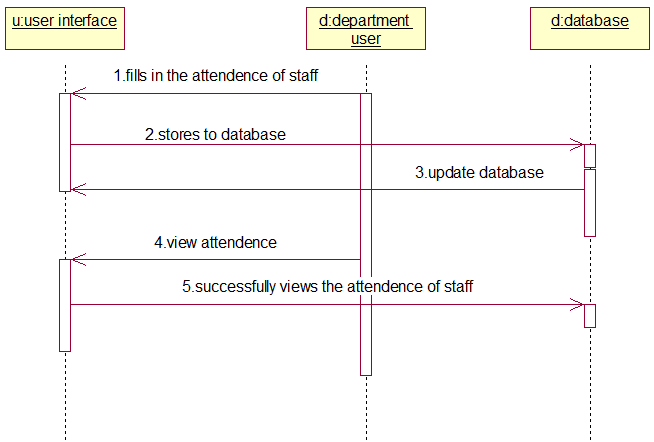
Figure 8: Viewing Staff Attendance 

Description

In the above diagram, the department user’s needs to view the attendance of the staff. So for this, he first needs to update that information. The Department users first enter the staff attendance details which is stored in the database and then updated. He can then view the attendance successfully when requested.

SEQUENCE DIAGRAM

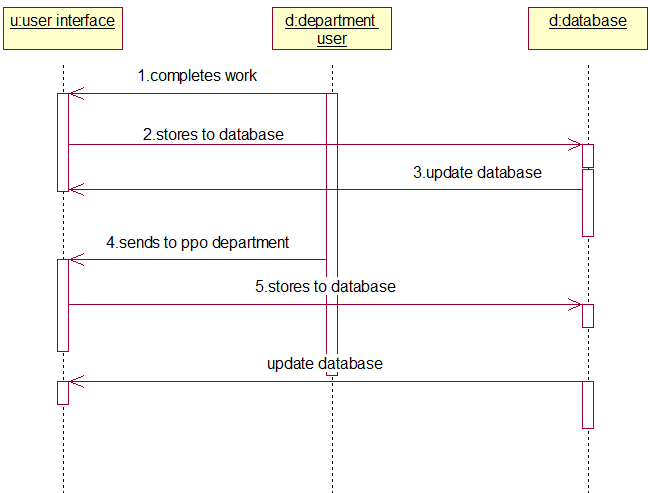
Figure 9: Departments Reporting the Completion of Work to PPO 

Description

In the above diagram, the department users need to report to the PPO department after completing the work assigned by PPO about the loco. The department user first completes the work given by the PPO and stores it in the database. This is then sent to the PPO department and then the database is updated.

Database Tables 

S.No Field Name Constraint Type
1 Token Not Null Varchar2(20)
2 Name Varchar2(30)
3 Jdate Varchar2(40)
4 Desig Varchar2(11)
5 Dept Varchar2(5)

 Table 1: Staff Table 

S.No Field Name Constraint Type
1 Cdate Not Null Varchar2(11)
2 Token Not Null Varchar2(20)
3 Attendance Varchar2(10)

 Table 2: Attendance Table 

S.No Field Name Constraint Type
1 Cdate Varchar2(11)
2 Locono Varchar2(7)
3 Type Varchar2(1)
4 Pg Varchar2(1)
5 Base Varchar2(50)
6 Comdate Varchar2(11)
7 Age Number(3)
8 Rcdate Varchar2(11)
9 Schedule Varchar2(20)
10 Lsdate Varchar2(11)
11 Place Varchar2(25)
12 Remarks Varchar2(1024)

 Table 3: Locosch Table 

S.No Field Name Constraint Type
1 Id Not Null Varchar2(11)
2 Password Varchar2(15)
3 Dept Varchar2(11)

 Table 4: Login Table 

Source code pages description:

Validate.java
For Validating user authentication based on his user id and password

DailyPos.java
For updating forenoon schedule details

Afternoon.java
For updating the afternoon schedule

Schedule.java
For updating loco schedule information

PLocoInfo.java
For Updating Loco Information and its Important Parts

WorkAllotment.java
PPO Department Allots works with various departments

UpdateWork.java
Departments Updating the work status and reporting to PPO

CreateStaff.java
For Departments Creating their Staff members

DeleteStaff.java
For deleting corresponding staff members by each department

DeleteWork.java
PPO Department deleting allotted works

SecDailyAtt.java
Updating Staff members daily attendance of each department

Search.jsp
Searching for the information of a Loco

Schedule.jsp
Forenoon and Afternoon Schedule Display

GenViewInfo.jsp
Viewing the work being carried out in all the departments

Sections.java
Department wise work display
SecViewWork.jsp
To view the particular work of a particular department
SecShowAttI.java
Department wise generating Reports for Individual Staff members

Download Electrical and Mechanical Shed Planning and Work Distribution System Java Project Source Code and Database.

College Student Attendance and Staff Profile System

The main aim of developing this java application is to provide a complete school or college based attendance management system for students and profile system for staff and management.

Faculty information is to be maintained securely and should be accessible only to the respective faculty and the administrator when required. Student’s daily attendance should be entered by the faculty and should be managed perfectly. In the existing system manually the corresponding faculty will enter attendance details in files. If the administrator or faculty want to know the student information, he must able to search the sheets, this consumes a lot of time. Here the project eliminates that problem and makes the process automation.

The Student Attendance and Staff Profile project mainly focus on maintaining of faculty profile, student daily attendance in which different levels of users are restricted to access the database. We can make the users access the data but they can’t modify or update the database. Only the authorized faculty and administrator can access and update the database. Each faculty and administrator should log in to get the details of the faculty and student attendance.

Objectives of the project

  • Complete automation is possible in this sector, which is against the main disadvantage namely time-consuming.
  • Can maintain company faculty details and student details.
  • Any kind of information based on faculty profile or student attendance can be retrieved within less time.
  • Only authorized faculty or administrator can access the database by providing necessary information.

Requirement Analysis

A requirement is a feature that must be included in the system. Before the actual design and implementation start, getting to know the system to be implemented is of prime importance.
We are overcoming the difficulty of maintaining faculty details and student attendance which were manual in the current system and here we generate detailed information about the faculty and students attendance which will save our time to maintain all information and retrieve when required. 

Functional Requirements:

This section describes the functional requirements of the system for those requirements which are expressed in the natural language style.

A faculty member should be able to login to the system through the first page of the application, and he can perform actions like viewing and entering student attendance and can update his profile. An administrator can login into his account and he will update the faculty information.

System Design:

UML Diagrams:

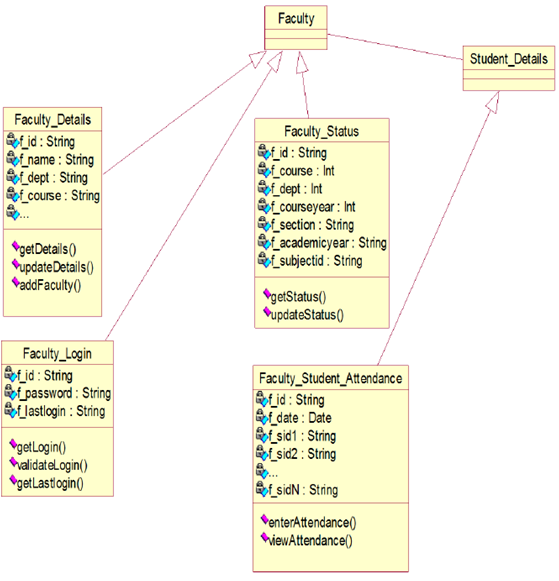
Class diagram
Fig: Class diagram

Description:

In this class diagram, we are considering the main classes administrator, faculty, and databases where we mainly perform the operations. Here we are also providing the classes for the interface as the operations can be facilitated easily and this comprises of the many options. And we maintain classes for the faculty to maintain its student details and the faculty details are also maintained.

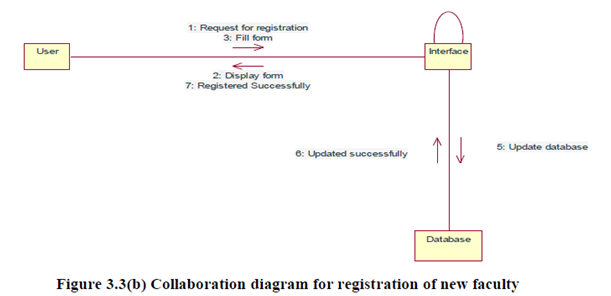
Interaction Diagram for Registration of new faculty:

Description:

In this interaction diagram, the administrator registers a new faculty member by entering his details in the registration form and updates the database.

Interaction Diagram for daily attendance:

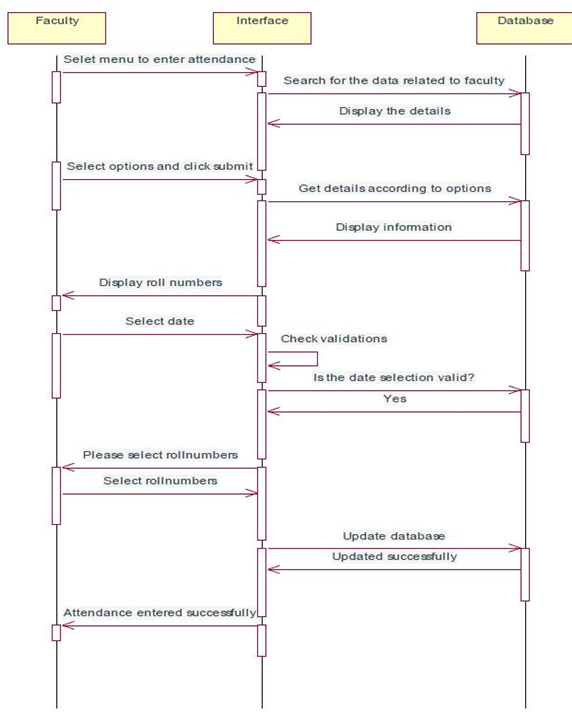
Sequence diagram for daily attendance
Fig: Sequence diagram for daily attendance

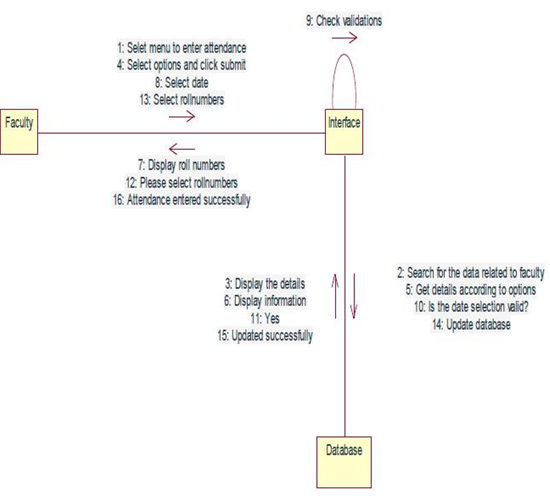
Collaboration diagram for daily attendance:

Description:

In this interaction diagram, the faculty selects a subject and a date and enters the attendance by clicking on the corresponding checkboxes of students roll numbers and updates the database by clicking submit.

Interaction Diagram for change password:

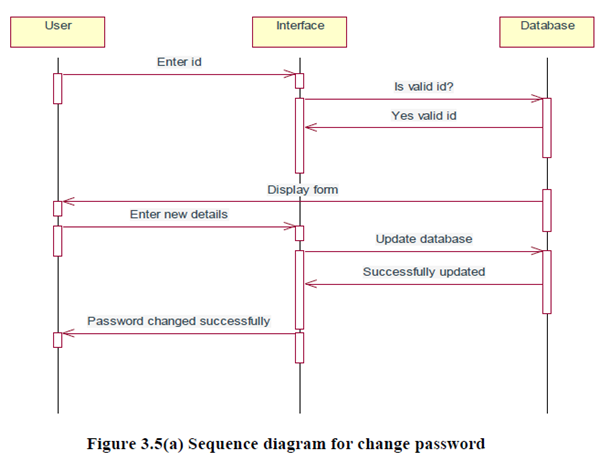
Sequence Diagram for change password
Fig: Interaction Diagram for change password
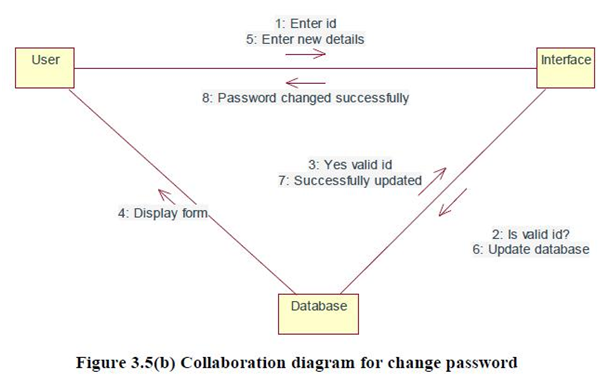
Collaboration Diagram for change password
Fig: Collaboration Diagram for change password

Description:

In this interaction diagram, the user can change the password by entering the new password and validate the password by re-entering it and update the database by submitting it.

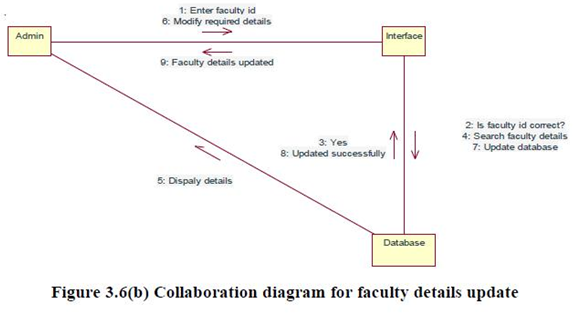
Interaction Diagram for faculty details update:

Description:

In this interaction diagram the faculty details will be displayed and he can update the details that are already available in the database from the user interface and the new details entered can be updated in the database.

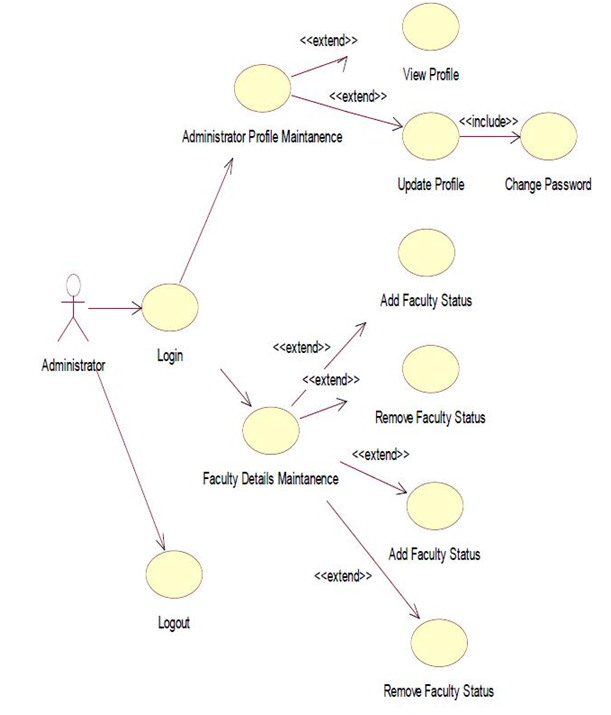
Use case diagram for administrator:

Description:

In this use case diagram, it includes the main functionalities of the administrator. Here main activity of administrator is to register the faculty, view daily, monthly and cumulative attendance.

Description:

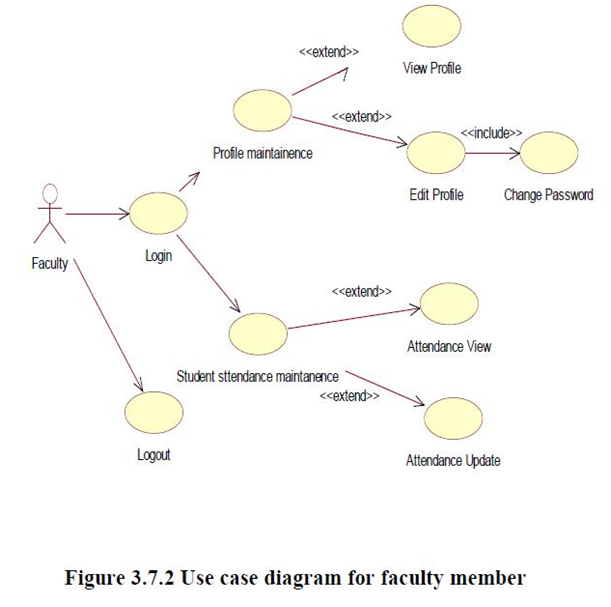
In this use case diagram, it includes the main functionalities of the faculty. Here main activity of faculty is to maintain student attendance, update the student’s attendance and to modify his profile.

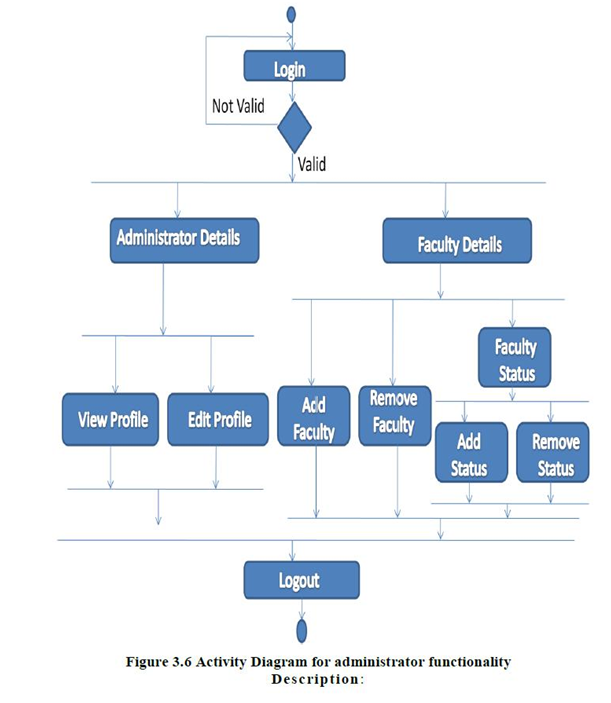
Description:

Here the activity diagram explains how the system administrator performs different operations.

Data Base Design 

DATA BASE TABLES Field Data type
Faculty_login_rowid number
Faculty_id varchar2(60)
Faculty_password varchar2(60)

Table 1:faculty_login 

Field Data type
Faculty_profile_rowid Varchar2(60)
Faculty_id varchar2(60)
Faculty_name varchar2(60)
Faculty_dept varchar2(60)
Faculty_course varchar2(60)
Faculty_desg varchar2(60)
Faculty_qual varchar2(60)
Faculty_dob varchar2(60)
Faculty_texp varchar2(60)
Faculty_rexp varchar2(60)
Faculty_iexp varchar2(60)
Faculty_spl varchar2(60)
Faculty_joinyear varchar2(60)
Faculty_emailid varchar2(60)
Faculty_phno varchar2(60)
Faculty_addr_dono varchar2(60)
Faculty_addr_street varchar2(60)
Faculty_addr_city varchar2(60)
Faculty_addr_pin varchar2(60)

Table 2:faculty_profile 

Field Data type
Faculty_status_rowid Varchar2(60)
Faculty_id varchar2(60)
Faculty_name varchar2(60)
Faculty_course varchar2(60)
Faculty_dept varchar2(60)
Faculty_courseyear varchar2(60)
Faculty_section varchar2(60)
Faculty_acyear varchar2(60)

Table 3:faculty_status 

Field Data type
rid Varchar2(60)
dt varchar2(60)
sub varchar2(60)
H71A0XX1 varchar2(60)
. varchar2(60)
.. varchar2(60)
…. varchar2(60)
H71A0XXN varchar2(60)

Table 4:f_att_bxxxxx 

Field Data type
Student_rollno Varchar2(60)
Student_joiningyear varchar2(60)
Student_course varchar2(60)
Student_dept varchar2(60)
Student_acyear varchar2(60)
Student_course_year varchar2(60)
Student_section varchar2(60)

Table 5:mic_student_status

System Test Cases & System Test Report

SNO Name Input Expected result Observed Result
1. Giving the wrong username and password Username

And password

Alert message should be displayed Alert

the message is displayed indicating

invalid

username

or

password

2. Registering faculty without proper information Faculty details Alert messages should be displayed Alert

messages are displayed.

3. Inserting attendance into the database attendance Message should be displayed if attendance inserted successfully Message is displayed
4. Click On Sign Out — User should be signed out and Login page should be displayed Login page is displayed

Output Screens:

1) Login screen
2) Administrator Profile
3) Change Password
4) All faculty
5) Add faculty
6) Remoce faculty
7) Validation message
8) View faculty status
9) Edit faculty status
10) Add faculty status
11) Select Date
12) Daily attendance
13) Select month for attendance
14) Cumulative attendance
15) Aggregate attendance
16) Report generation
17) Logout Page
18) Faculty Home Page
19) Faculty Profile
20) Update faculty Profile
21) Select subject to view attendance
22) Date wise attendance
23) Cummulative attendance
24) Selection of subject
25) Enter attendance
26) Attendance entered Successfully

CONCLUSION

The project mainly focused on the total computerization of student’s attendance details and faculty profile in which different levels of users are restricted to access the database. By restrictions, we can make the users access the data but they can’t modify or update the database like students attendance, and other information etc.

This project mainly operated by two modules mainly faculty and administrator. The administrator can view the details of the students like marks view. The faculty members can view, update, add and delete the student’s attendance. This approach has features such as less manual intervention, data security is high and confidentiality can be maintained. The user can access the student’s details within less time.

Installation Steps:

  • Install Java (Java Run Time Environment)
  • Install Apache Tomcat with port number 9090.
  • Install Oracle 10g with port number 8080.
  • Create new system DSN with data source name: project & Username: project
  • Copy the project folder to c:\tomcat 6.0\webapps
  • Load the database from a backup file.
  • Open any browser and type the following address
  • http://localhost:9090/project/login.html
  • Now use the login credentials to log in and continue.

Login Credentials:

Oracle 10g:

Username: project
Password: project

Login.html:

For administrator-> Username: admin password: admin
For faculty-> Username: 101 Password: 101

DSN: project

For attendance the database is available for the following details:

Please select these from the list:
Class: IV c.s.e Section: A or B

Download College Student Attendance and Staff Profile System Java Project Source Code and Database