Setting the Mobile Definitions to the Nodes Ad hoc Project Reference

The main constraint of a mobile launch program is the packet losses across the network. This could be kept at a minimum by keeping the nodes used in the simulation pre set against few mobility patterns and these nodes can be added using the mobile configuration program. This mobility pattern is very important as if defines the destination, source and speed of the mobile nodes and the functioning of the mobile network on the whole.

The following points should be considered to set the mobility of the mobile nodes.

  • Right click on the object to edit mobile configuration object
  • Choose random mobility profile from the various options that prop out.
  • Expand the option, default random waypoint tab and set this as the required mobility model to the nodes. Check the corresponding screenshot given below for your reference.
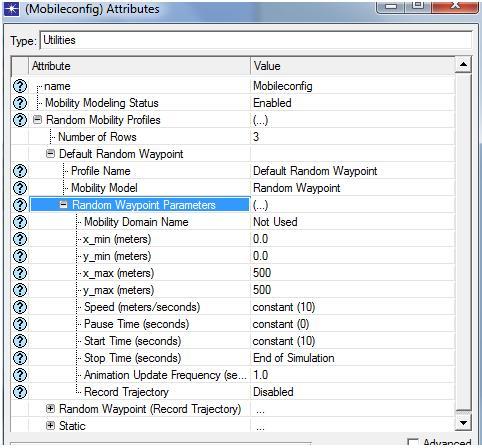
From the above said process, random waypoint parameters are set and from the above screen it is clear that the speed of the mobile nodes is set to a constant value of 10, pause time is set to a constant value of 0 seconds and start time of the mobile nodes is repeated for every 10 seconds. Stop time of the simulation is set to bring about an end to the simulation as shown in the above screen.

The edited mobility profile should be applied to all the mobile nodes and this can be achieved by choosing the option, ‘set mobility’ from the topology menu. Refer to the pictorial representation below to clear any of your doubts.
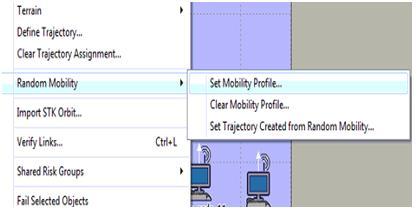
Once the mobility profile is set as shown above, all the mobile nodes should be assigned with this random waypoint mobility which helps the nodes to move randomly to process the traffic and to deliver the corresponding packets to the destination side. With this step the process of setting up the mobility patterns to the network nodes is done and the next step is to define the performance DES metrics. Its process is as follows. 
Node and Server Level Settings for Packet Analysis CSE Reference Material

In order to define the traffic as well as the packet analysis the node as well as the service level settings are needed which are against the nodes and then the overall configuration is been followed further in order to explain the server and node level settings. As discussed earlier, there are 20 different types of mobile nodes along with the single wireless LAN server and then the nodes which are been configured towards the traffic analysis as well as the packet analysis is situated in the initial step. The steps required to perform this activity are explained below:

  • Select the appropriate mobile nodes as well as the WLAN server
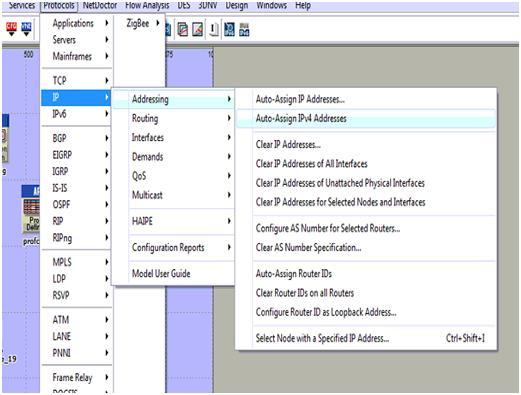
  • Then after go towards the menu called protocol -à ApplicationsàIP
  • Then after starting from the IP section select the option called Auto assign and then the IPV4 address through which the actual nodes as well as the WLAN server which are allotted are been sent to the alternate !PV4 address and the screen shot which explains this process is shown below:
server 1

The auto assign IPV4 address which are been selected for the entire process are been allotted to the different mobile node along with the wireless LAN server as explained in the below screenshot. The next step is to configure the mobile nodes as well as the server which is added towards the routing protocols. It is explained in the earlier section that AODV is been used for the purpose of desired routing protocol the applicable mobile nodes along with the WLAN server is used and the steps are explained below:

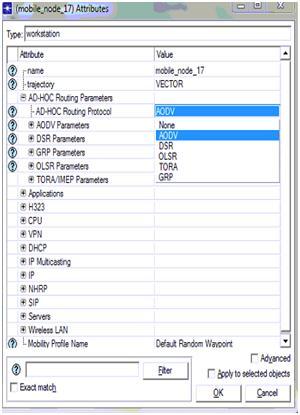
  • The routing option is available to node levels or else to the server levels which are used to select the entire mobile nodes as well as wireless LAN server.
  • Within the entire available nodes, a single node is selected as well as opened within the edit mode which can be performed by clicking on right button
  • Within this edit mode the quality such as Adhoc routing protocols are used which allows the server to display the entire list of the routing protocols towards the users starting from AODV scenario and the process will be explained in the below screen

AODV is been chosen from the available list in which the total number of routing protocols which are seen in the screen can select al the nodes along with the server that are against the AODV protocol and it can be verified in the form of selected objects shown in the screen displayed above. In the entire process if the routing protocol is all set to serve the traffic against the patters of routing parameters the nodes as well as the server will be totally against the applications and profile definitions process is explained below. The total application level settings are situated towards the nodes that are explained below:

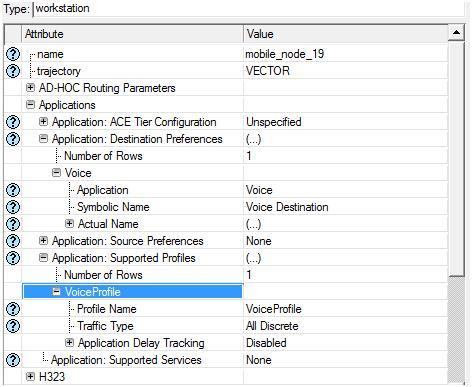
  • The total number of mobile nodes are been selected starting from the simulation networks and every node will be selected as well as edited in order to explain and define the total applications
  • Within the node level qualities there are different types of options available such as application destination preferences and then the tab which is expanded can be used to explain the application requirements
  • The total number of tows that are explained as single nodes requires support to the voice applications that are created with in the below screen

Application destination preferences is set to one rows and then the voice application is selected for this row and the symbolic server name is given as voice such that this server will generate the required voice traffic and the corresponding packets across the network.  Apart from the destination preferences now the application supported profiles are also set and in this context a single row is added to the section application supported profiles and voice profile is selected for this row as shown in the above screen. With this the node level application and profile definitions are applied to all the mobile nodes and the procedure followed to apply the same for wireless LAN server is given below

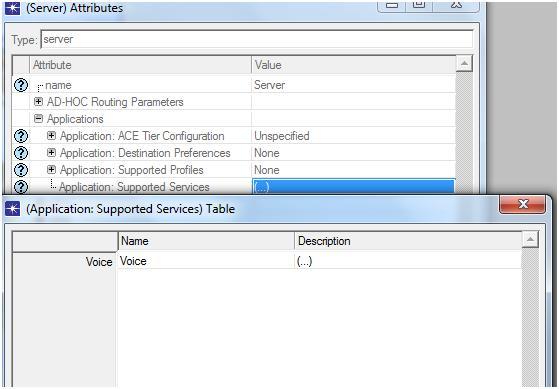
  • Select the wireless LAN server from the network and open it in the edit mode
  • There is an option like application supported profiles and expand this option to edit the profile settings for the wireless LAN server and the corresponding screen is as shown below

The above screen it can be identified that the voice profile which is been chosen as the main application facilitated and managed by the corresponding profiles the WLAN server will provide its support to the traffic that is distinct and then the voice profile will be generated and then the server will be capable of managing different types of the packets that are adjacent to the traffic. There is an alternate method which can be used to apply for the applications as well as the profile settings for the purpose of mobile nodes and wireless LAN server this particular process is known as deployment and these steps are explained in detail below:

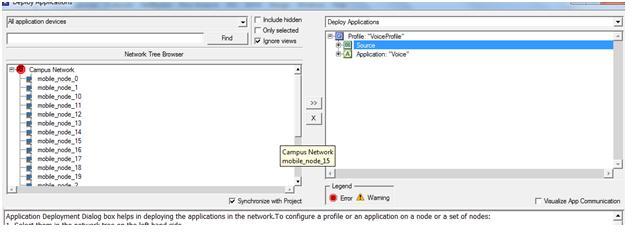
  • The user should go to the protocol menuàApplicationsàDeploy in order to define the applications
  • The new window is been displayed towards the user side and then the deployment process will be performed
  • The entire mobile nodes are been submitted towards the source and then the WLAN server is been submitted towards the destination side and the example is given below

From the above screen it can be identified that the entire mobile nodes are submitted towards the actual source. A success message like consistency check pass is displayed to the users if the deployment is done in a right manner. With this the corresponding email application and email profile are applied to the 20 mobile nodes and the single wireless LAN server. 

Profile Configuration Settings in Ad hoc Mobile Nodes

The further step in the simulation process is to define the profile configuration setting and there is a necessity of the profile definitions in order to perform the application requests that are obtained from the mobile nodes and then alternately the traffic is been produced which totally depends on the created profile definitions. The steps required to define the profile configuration settings are explained below.

  • In order to define and explain the profiles the profile configuration is used and then the profile configuration should be selected by using right click option
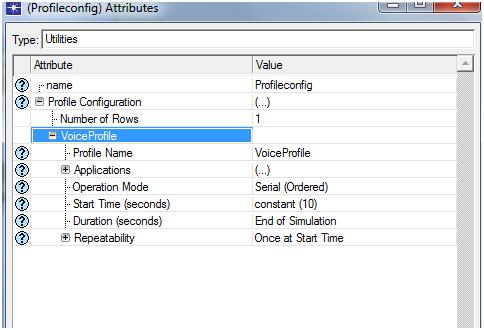
  • The different types of the rows are added to the profile definition and then the single row is been added to the context in order to support different types of voice applications that are already designed in the previous section
  • Only less number of definitions such as start time as well as end time are been set to the alternate network which is explained in the below screen.

profile configuration

From the above screen it can be noticed that the voice applications which are utilized in order to set the different voice profiles that are alternate towards the row are created for the purpose of explaining the profile definitions. 

Application Configuration Settings

In order to set the desired levels for the purpose of obtaining the traffic upon the networks the applications are needed. Depending on the type of application selected and used the traffic sending process as well as traffic receiving process are performed. Within the OPNT modeler process different types of applications are been used and then the voice application is been designed and the below steps are required to perform this action.

  • The user should give a right click on the application definitions towards the object in order to edit the different attributes that are required
  • There is a separate tab called application definition within this section and then the user can add the number of rows required in which each and every node will represent a single application
  • But within this simulation only single and unique application is utilize and for this reason only single row is created within this process
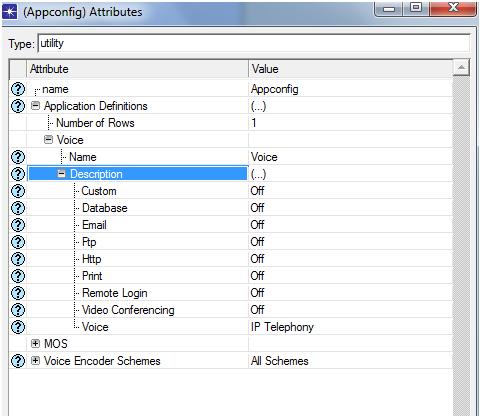
  • The application voice is created in which each and every voice based application is selected
  • The IP telephony is been selected for the purpose of application and then the next screenshot obtained is given below

application configuration settings

The IP telephony application is been used within this particular scenario in which the voice traffic is been produced upon the networks and then once if the application is selected then click on the OK button in order to apply these settings. The application definitions which are needed are been produced in this step and then in order to create the profile definition the further process is explained below.

Simulation Steps Involved in Using ADOV Protocol

Within this first scenario the ADOV protocol is been utilized along with the 20 mobile nodes in order to produce the traffic. The different types of voice applications are used within this scenario in order to identify the service requirements of the quality by using this protocol. The different steps are followed in order to perform this scenario such as follows:

Steps to form basic network

The MANET- mobile Adhoc networks is widely used within this project in order to estimate the entire performance of the AODV protocol which is totally against the different packet losses which needs some important steps to be followed to create the network which is general. A single LAN along with 20 different types of mobile nodes are utilized within the simulation process in order to set the traffic upon the networks. The steps that are to be followed to create the network are explained below:

  • Initially the user should open the OPNET modeller simulation tolls and then the user should select the option to open new file in order to start the simulation process
  • The project name as well as scenario names should be created in order to obtain the new scenario
  • By selecting a specific option users can create the scenario which is employ in which the OPNET modeler can be utilized to load the different types of default scenarios that are totally inherent into the networks.
  • In order to select specific type of topology various options have taken place and then alternately in the simulation process the simple campus network is been selected to perform the topology functions
  • In the next step the campus size should be situated and then the simulation size of the campus should be set with size of 1000X1000 square meters
  • There is a necessity of new network model family for the purpose of simulation of MANET and within the entire available models the appropriate model is selected in order to perform the simulation process. By following the above mentioned steps the basic network which is required to perform the simulation process is explained and then the different objects which are considered from object palette will be utilized in the simulation process in order to get the expected results.
  • Depending on the requirement of mobile nodes 20 different types of wireless LAN mobile workstations are utilized which performs an activity as the main source in order to get the final traffic in which the actual real packet analysis process is performed
  • The single WLAN server is utilized which acts as an individual application destination along with a server as well as the 20 mobile nodes.
  • As discussed earlier the actual aim of this project is to evaluate and estimate the different packet losses towards the Mobile Adhoc networks which requires a traffic and source applications to perform the actions. The configuration is required to the applications in order to produce the traffic that is needed to analyze the entire data packet losses
  • The profile definition is been created for the purpose of application which is performed by making use of the profile configuration nodes which are gathered from the object palette.
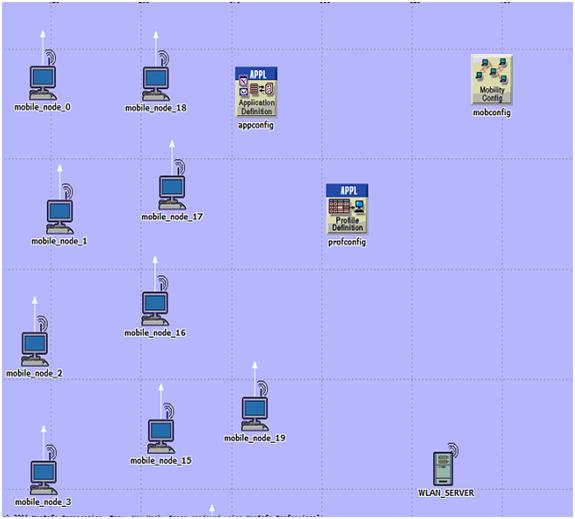
  • The major and important step within the entire simulation process is to set the mobility towards the nodes by making use of the mobile configuration object which is there to perform the process with the object palette and then the finally by following all these steps the first scenario is obtained which is explained in the form of screen shot.

simulation steps

From the above proposed screen it can be identified that the total number of 20mobile nodes starting from mobile_node_0 to mobile_node_19 is been created with the individual WLAN server with different traffic definitions.

In order to set the definitions different types of configurations such as application configuration, mobile configurations as well as the profile configuration are used. The application configuration settings are explained in the further steps.

ECE Seminar Report on Voice Morphing

Introduction to Voice Morphing Seminar Topic:

Imagine if your voice can be changed just like the president and give instructions to get your visa stamped. It looks as if kidding but technology can make it possible using Voice Morphing. Turning of one speech signal into another speech signal is called as Voice morphing.

Voice morphing technology is first developed at Los Alamos National Laboratory, USA by George Papcun and had seen light in 1999. Voice morphing is a process of cloning speech patterns and bringing accurate copy of a person’s voice using which an operator can say anything in the voice of someone else.

Voice morphing main aim is to keep intact the shared characteristics of starting and ending signals in the process of making a smooth transition while changing other properties.

Speech morphing can be successfully achieved by signal transition represented by acoustic waveform taken from sampling of analog signal. This signal is split into multiple waveforms or frames. In this way transformation can be applied to each frame of signal. Two important properties of signal to be known are pitch and overall envelop of sound. Manipulation of pitch plays important role in morphing. In order to successfully morph pitch should be smoothly changed throughout the signal.

To achieve this signals are stretched and compressed to match important sections of each signal. In order to create intermediate sounds for morphing interpolation of two sounds can be done. finally the frames are converted back into a normal waveform.

Voice morphing has military applications such as psychological warfare of subversion. It can be turned into powerful weapon in provide fake orders to the enemy’s troops as if coming from their superiors.

Download ECE Seminar Report on Voice Morphing.  

Technical Paper Presentation on Virtual Retina Display

Introduction to Virtual Retina Display Presentation:

Virtual Retina Display (VRD) is an alternative to conventional bulky power consuming video display units. In VRD’s video is focused on minuscule image right on retina. Color is produced using LED triads of Red, Green, and Blue (RGB) by mixing in required proportion. Video signal is intensity modulated when light gets scanned by retina. Collimating optics is used in raster patterns when scanning is performed directly by retina.

We can use VRD systems in military applications for helmet mounted displays. In medical field it can be used for complex operations. It can also be used in cameras for better display screen which consumes less power that the conventional liquid crystal on silicon and organic LED displays.

Key features of VRD are as follows:

Weight to Size ration: – since there is absence of intermediate screen and all parts being small and light weight VRD is portable and can be used in hand held and head mounted devices.

Power consumption: – VRD consumes power in mille watts since scanner is a resonate device with high figure of merit. Entire light enters pupil in VRD because of employing small aperture. This allows power efficiency.

Resolution and brightness: – With a million pixels and high grade scanners are having an ability to scan over 1000 lines per frame almost nearing HDTV. Even in day light SLD source provide brightness to the level of see through mode.

Stereoscopic display: – in order to provide natural vision both eyes are addressed separately using stereoscopic display. 

Download Technical Paper Presentation on Virtual Retina Display.  

Seminar Report on Virtual Retina

Introduction to  Virtual Retina Seminar Topic:

A person can be provided with virtual video streaming in front of his eye using the present technology of virtual retina. In virtual retina makes use of photon generation and manipulates to produce a high resolution colorful virtual image and is projected directly on retina of eye without any optics in between. Here the photon source is modulated with video information which is later scanned in a particular type of patterns and is projected on to user’s retina.

Here coherent or non-coherent type of photon generator can be used. Further if needed to scan a color virtual image one can use color light generator and directly project it on user’s retina. This system can also use depth accommodation cue to change the focus of photons rapidly depending on the user’s preference for different virtual pictures. For sensing of pupil of eye of user an eye tracking system is also used.

This pupil detection can be used to move the scanned photons in relation to the entrance pupil of eye. Further if there is movement in eye then the virtual picture should also move accordingly without any distortion in picture quality.

The (VRD) virtual retina display can also be called as (RSD) retinal scan display or retinal projector uses the technology to display the image directly on to retina.

The user can visualize the picture as if floating in front of his eye. With the use of LED’s and adaptive optics it is possible to create screen less display and fantastic color gamut and brightness which is far more better than conventional televisions. 

Download Seminar Report on Virtual Reality.  

Seminar Report on Virtual Reality

Introduction to Virtual Reality Seminar Topic:

We begin out topic by saying that “Reality is Relativity”. If we consider that a ball is stimulated using a computer but in reality for this to happen a combination of zero’s and one’s should work inside a computer. Similarly if a human brain imagines a beautiful girl in his mind then a bio-chemical reaction takes place in the brain. We can come to a conclusion that simulated events and simulating events exist together. Even if these two events coexist they may not be in the same form.

Super Transformation is linking of material world, human brain and simulation of computers when this happens then a virtual reality is created. This process can also be called as Lorentz transformation which sets one-to-one relation with the three worlds. We can also call this combination as super universe.

The virtual world is art work of the beings of that universe. Virtual life is the result of evolutionary changes in that universe. Virtual intelligence is combination of both virtual body and mind and when the two are superimposed it has the power to so super transformation.

In simulation we need to know about VR and 3D visualization. In order to have realistic simulation perception of depth is essential. There are various mechanisms through which we can perceive depth. They are Perspective, Light and shade, Parallax, Stereo-vision and Atmospherics.

Some of the applications are useful to schools for creating objects to show to children, simulated driving helps to learn driving in any terrain, in medical world to examine anything, military applications cannot be left aside.

Technology gets changing every day hence use the latest technology to one’s advantage for making life smooth. Many things can be achieved using virtual reality because some programs are near to real life. But nothing beat real life.

Download Seminar Report on Virtual Reality.  

Blu-Ray Technology Seminar

Introduction to Blu-Ray Technology Seminar:

BLU-RAY Features:

Blu-Ray has large storing capacity with a minimum of 24GB. The optical disc recording is protected by optical disc cartridge. These discs have a high data transfer speed of 36Mbps. The disc supports MPEG-2 technology for audio and video streams. Also, the Blu-Ray driver is capable of reading DVDs. Blu-Ray discs are available under read-only, writeable and re-writeable types.

BLU-RAYS and DVD’s:

DVD’s are capable of storing 5-7 times more than a CD and a Blu-ray is capable of storing 5-7 times more than a DVD. This makes a Blu-Ray disc a very high storage disc. Blu-rays use blue laser with shorter wavelength than red which is used to read DVD’s. Thus a smaller focus beam reads the ‘pits’ on a Blu-Ray disc. Pits are closely packed in a Blu-Ray disc which increases the storage space and speed along with precision.

ADVANTAGES and APPLICATIONS OF BLU-RAY:

Blu-Ray has large storage capacity with very high data transfer speeds which is available as read only, writable and re-writable. The disc is protected against dust and fingerprints and an encrypted algorithm protects the content of the disc. The disc has a large life span of 10-15 years. Re-writing operation does not cause any trouble to the disc unlike DVD’s and CD’s. Blu-ray also supports HD recording and transmitting. HDTV recordings are common these days which is possible only because of Blu-Ray technology. Though the cost of Blu-Ray is high at the moment, the wide set of applications would lead to decrease in the price of the discs. Thus, the technology holds a wide scope of development and its use would gradually increase with time.

Download Blu-Ray Technology Seminar.