ATM Using Pen Drive Project Synopsis

ABSTRACT 

The Project is “ATM USING PEN DRIVE” in which we use pen drive as ATM card. This project is a type of innovation according to the new technology.  According to new technology we use a pen drive port number as a primary key for user use. Actually this project is a type of future implicated application. We can use a pen drive for both data storage and also for ATM access. It provide a type of portability for us.

In today time it is very difficult to keep both the pen drive and ATM card in a pocket, the possibility of misplacing of very high but if we use pen drive as a ATM Card then we can easily maintain the pen drive for both purpose.

According to new technology pen drives are made as a very small device by which it can easily managed. In future this technology has very importance for us.

Snapshots Of ATM Using Pen Drive:

  • Front Page:
  • Pendrive Unique Number:
  • Admin Login:
  • Admin Panel:
  • User Registration:
  • Registered User Login:
  • Account Type:
  • User Account:
    Balance Withdraw:
  • Balance Enquiry:
  • Mini Statement:
  • User Account Updation:

FUTURE SCOPE

The pen drive has indeed revolutionized the way we work and also the manner in which we work. Pen drives help us to carry our work to our home and carry all our important documents in our shirt pocket wherever we move. These pen drives are immune to dust, fungus and shocks which were the chief culprits in destroying the floppies. The innumerable times aspen drives can be written on to make it a slower version of your hard disk. You can store pictures, songs, documents and all sorts of files which you need to carry around.

The newer version of pen drive with their astounding 32GBstorage capacity are capable of recording upto 12 hours of nonstop audio. These high end pen drives often have LCD displaysfor browsing through he files stored in the drive. These pendrives feature a mini USB port, an audio input and audio outputport with rechargeable batteries. Many manufacturers havecome out with tiny speakers for use with the pen drive shouldyour do not feel like using the earphones.

ADVANTAGES

1. In modern times people usually carry pen drives for data storage. If pen drive could be used as an ATM card then it will allow the user to withdraw money from their account along with the data storage.

2. Higher aggregate bandwidth

3. High speed Mbps and possibly Gbps

4. Scalabilit

CONCLUSION

Finally we manufacture a software which used to access the ATM which is easier and less complex.
It is good facility that provides money transaction ,payment bill, shopping, data storage and such type of other services.

It has no magnetic tape so it has a long life and many information like mini statement, payment slip, available amount. fund transfer and such type of details can be stored in the pen drive.
So some of these questions which will be answered after completion of final module of project.

Software Development (Pakpave) For Flexible Pavement Design

In this day and age, the street and surface disappointment of the adaptable asphalt has turned into the most imperative and consideration redirecting issue, which might be because of the low nature of materials utilized, less and lacking knowledge of the specialized staff, and mistakes that may happen amid the outlining of the asphalt.

The outline of thickness of the adaptable asphalt has assumed the spine position in deciding the general execution and giving abnormal state of serviceability of the asphalt structure for the overwhelming movement stacks under the unfavorable climatic conditions, amid the normal plan time frame.

The point of this Flexible Pavement Design exploration is to create programming for the adaptable asphalt configuration in light of the AASHTO, Group Index, and CBR.

This product can be utilized to decide the thickness of each layer, outline life assessment, knowing the relative harm consider, finding the different plan factors like computing the auxiliary number and comparable single pivot load and so forth and climatic impacts.

The outcomes gotten from this Flexible Pavement Design product were dissected and contrasted and the hypothetical (manual) plan and with the DARWin, an outline programming of AASHTO, and were discovered totally achievable and exact.

This adaptable Pavement programming can spare the valuable time and maintain a strategic distance from the mistakes and troubles happening amid the customary techniques for plan.

Catchphrases—PAKPAVE, AASHTO, CBR, Group Index, Flexible Pavement Design Software, PAKPAVE for Flexible Pavement Design

Construction of wireless matchbox for digital lantern using RF technology

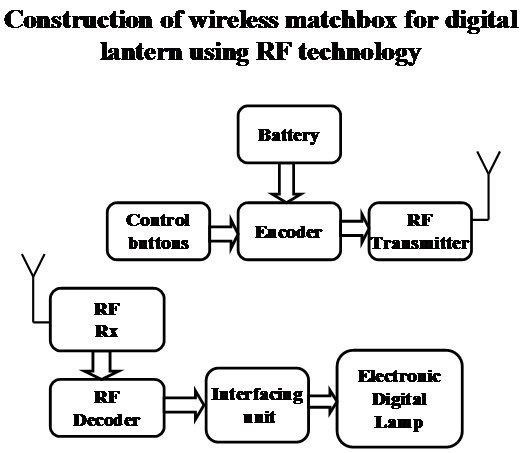
The aim of this Construction of wireless matchbox for digital lantern using RF technology project is to control a high voltage electrical lamp control operation with the help of RF. The status of lamp control either ON/OFF can be observed on receiver side with the indication of LED. Users can control the lamp operation with the help of control buttons.

This Construction of wireless matchbox for digital lantern using RF technology project consists of an input from control buttons it sends the appropriate signals from RF transmitter, then the receiver receives the signals and performs the operation either to ON/OFF the lamp. Then it processes the data and takes necessary action and updates the status through LED.

User can simply ON/OFF the device with the help of remote communication.

Features:

1. Aims at energy conservation.
2. Provides user friendly interface.
3. Provides fast access to using RF.

The project provides learning’s on the following advancements:

1. Interfacing RF to control buttons.
2. Lamp control circuitry.

Block Diagram:

Crime Records Management System Project Synopsis

INTRODUCTION

We see that when a group or society is formed then some rules and laws are made by the people, for the people and to the people. The purpose of these rules and laws are to give a comfortable life to all who are living in that society. Whenever any law is violated by any one then we say that crime is committed and who break that law is called CRIMINAL and to realize that person his/her mistake, there is also a criteria of punishment.

Some times these crimes are committed by same/different people in same /different manner repeatedly. So we have to manage a record of such type of people so that when any special type of crime is committed then that criminal can easily traced out and punish them so that they do not do that crime in future.

The basic entity of this System is FIR. Any victim can lodge a request for FIR through INTERNET from any place. It is not necessary that it should be lodged at same place where the crime occurred. As request lodged, it will automatically reached to the server of the nearest Police Station from the place of crime occurred with the help of information given in the Request Form. At the server side this request will be converted into an FIR and the case will hand over to the Investigation Officer of that Police Station. The IO will investigate the case on the basis of information given in FIR, arrest the suspect or criminal, collect the evidences, inquire the people on the spot and maintain his/her case diary, give his/her report on that case to Magistrate and case will be transfer to COURT where the final decision will taken out on that case and if suspect is proved CRIMINAL, the court will punish him/her. On the basis of court decision the information records such as crime record, criminal record are maintained.

For the easy retrieval of information or data the Databases are maintained at different levels of hierarchy of this System which are state, district, police station

Due to its easily accessible quality and complete Database this system helps the Police Force in collecting information of crime occurred, helps IO in his/her investigation by giving records of old criminal and crime occurred and helps Police Force to control on the occurrence of crime. The overall advantage of this System is basically for Police Force in achieving her objectives i.e. maintain peace in society by proper following of rules and laws.

MODULES

MASTER MAINTENANCE

Functions

This module helps the user to create a new code or modify or delete an existing code in the master tables. The system maintain master tables of items and there codes The master tables are required to codify the information at the time of data entry and decode of the digitized information while generating output.

A. POLICE STATION MASTER

This sub modules give the list of all Districts under State , Police station under each District .Also helps in add/delete new Districts and Police Station.

B. OFFICER MASTER

This sub modules help in listing all Investigation officers and their respective Ranks, rank code, address and telephone number for any future reference According to Police Station/District.

C. CRIME CLASSIFICATION

Minor Heads, Methods and Act& Section links are categorized in Major Heads. New entries modification/deletion of existing entry is possible.

D. ACT AND SECTION

This sub module provides comprehensive records of all acts and section with their linkages to their respective crime heads. A user can enter new act /section or add/edit/delete existing records.

2. ENTRY OF FORMS

Functions

This module helps to maintains the backbone of Crime Records Management System. This helps the user to call the already forms on the screen for editing and deleting the existing information in field.

A. FIRST INFORMATION REPORT

The first event in the Crime cycle starts with the reporting of a case, usually in the form of a First Information Report (FIR). The FIR is a detailed document that captures critical information about the nature of the crime, the location details, the sequence of details, information on victims where relevant and other pieces of information pertaining to the crime.

B. GENERAL DIARY

This module tells about daily working of the Police Station. Round a clock this dairy was maintained.

C. CASE DAIRY

This module is only for investigation officer & I.O. enter the information of case dairy.

D. CRIME DETAILS

Crime details is used to record the modus operandi of the case, Details of Victims, Motive of crime, Details of property involved stolen, Details of suspect, Description of place of crime.

E. PROPERTY SEIZURE

This sub module for the information of property seizure memo.

F. ARREST/COURT SURRENDER

This module show which suspect is arrested or surrendered in court and Details of that suspect and enables the user to capture the Details of arrested/surrender person.

G. FINAL REPORT

This sub module enables the user to enters the details of information collected on Final Report Form.

H. COURT DISPOSAL MEMO

Once the case is disposed off the Court details are recorded on Court Disposal.

I. TALASH FORM

This is an integrated form to enter the details about Missing, Kidnapped, Un-Identified, Dead Bodies and the like.

3. ENQUIRY

Functions

Enquiry module enables the users to retrieve the data on Enquiry parameter.

A. CRIME RELATED ENQUIRY

The user can retrieve the database on crime parameters (M.O).

B. CRIMINAL RELATED ENQUIRY

User can perform queries based on criminal parameters.

C. PROPERTY RELATED ENQUIRY

User can perform queries on parameters of properties involved in Crime or Seized.

4. REPORTS

Functions

This module of application helps to generate reports on Cases, Criminals, Properties, Matching of Properties/Persons and statistical details.

A. REPORTS ON CASE AND CRIMINALS

It helps to generate statistics on
1. CRIMINAL NAME WISE
2. MODUS OPERANDI
3. CRIMINAL DEFORMITY
4. CASE PROGRES
5. PENDING CASE

B. REPORTS ON PROPERTY

It helps to generate statistics on
1. LIST OF CULTURAL PROPERTY
2. LIST OF NUMBERED/UNNUMBERED
3. LIST OF FIREARMS
4. LIST OF AUTOMOBILES

C . STATICAL REPORTS

It helps to generate statistics on
1. COGNIGABLE
2. SECTION WITH CRIMES
3. CRIME AGAINST WOMEN
4. CRIME STATICS

D. MISCELLINEOUS REPORTS

It helps to generate list of Codes, States/Districts/Police Station, Code for Numbered, Unnumbered property etc.

SOFTWARE REQUIREMENTS 

SERVER

SQL Server

TOOLS

.NET Framework

ASP.NET Components

Microsoft Visual Studio.NET 

Services

ASP.NET XML Web Services

Architecture

Client Server Architecture

Cyber Cafe Management System C++ Project

Introduction

This project is based on the working of Cyber Cafe Management activity which is involved in allotting various types of Management like keep the record of registered User and non registered user, updating the records. And deleting the records and also generate their reports. The cyber cafe current maintains the records manually. All the working hour, user name and its addresses have to be maintained daily in record book for further reference. Due to manual method the processing is not up to the mark and prone to inefficiencies. Report generation is a very tedious and error prone procedure.

This project has been undertaken to automate the Cyber Cafe Management. One entry should be made once and further the entries are fetches as required. This makes system more efficient. The user can only login the system if they are authorized to do so.

The revolutionary change brought by computer in every walk of life has been felt as mandatory as breathing air for human survivor. Cyber Cafe management System is very important place for keeping member records as per IT Law. In the present age of I.T., each & every aspect of human life from home to office, to store the information are being affected through computer some high & mid level languages like PASCAL, BASIC & C++ with application development tool has need it quite easier for computer professionals to built several projects. Among these software development tools C++ retains high value due to its better efficiency. This is cause for our making the project named “Cyber Cafe Management System” in C++.

The “Cyber Cafe Management System” is written in C++ language for the following reasons:

  • C++ is a flexible, structured programming language.
  • C++ is widely available.
  • C++ include certain low-level features that are normally available only in assembly or machine language.
  • C++ supports Object Oriented Program (OOP).

Objective

“Cyber Cafe Management System” has been design to exhibit the significant of an automated system, which is used to manage and store information about Cyber Cafe Management, in this project no attempt have been made in reinventing a wheel but sincere attempts have been made in demonstrating a COMPUTER BASED CYBER CAFE MANAGEMENT SYSTEM using the facilities of C++.

The project begins with the separate on different topics of as menu bar items. Each heading possesses a number of models as its menu items. The project provides a user-friendly environment revealing the functioning of each part of Cafe Management automating them, which the users are facing at different level of management in any Cyber Cafe.

So in this project, We try to do best of my error and hard work to cover some part of the system process. In this project sincere efforts have been made to develop a simple and easy Computer Based Cyber Cafe Management. The users of this system are required to feed up there own data giving up appropriate constraints be able to manipulate the functioning of various highlights of system.

The user provided with remarkable facilities of adding, printing, saving, deleting, modifying, closing as well as editing the data that has been entered currently or in the past.

Salient Features of the Project:

1) Cyber Cafe Management System is dos Based Graphical software.
2) Being of its ease of access and interface, this system can be used by any specialized or non-specialized users.
3) Addition, deletion, modification of member records, machine records and surfing records are easily maintained.
4) Reduce time, money and efforts of doing a work.
5) Provide better service and accurate information to the factory.
6) Provide fast retrieval of information.
7) Restricts unauthorized person to use important data.

WORKING WITH THE SYSTEM

When the project “Cyber Cafe Management System” is started the initial startup screen is displayed which asks the user to enter a valid password.

Logging-in to the system

Every user must logging-in to the system before he/she could perform any operation. In the login screen user is provided password. After specifying correct password the main menu will open.

Main Screen

After successfully login, the user gets access to menus of “Cyber Cafe Management system”. The main menu of the project works as a mirror of the services what the software can provide.

There are following menus such as:

  1. Master Entry
  2. Cafe Management
  3. Exit

1) Master Entry: This Menu is used for getting details about Master Data about personal computer and permanent users.

The sub-menus of master entry option given below.

a) Member Entry Option Of Master Entry has following option:

  • Add New Member
  • Show Member
  • Update Record
  • Delete Record
  • Search Record
  • Return

b) Computer Entry has following option

  • Add New Computer
  • Show Computer
  • Update Record
  • Delete Record
  • Search Record
  • Return

2) Cafe Management Option of Main Screen has following option :

a) Booking : This option maintains the data about the member when he log in computers and what time spent on the particular machine ,it covers the following

  • Member Login
  • Member Log Out
  • Non-Member User Log in
  • Non Member User Log Out
  • Return

b) Charges : This Option calculate the charges against browsing:

  • Take charges
  • Show Charges
  • Return

c) Renewal: This menu option maintains the renewal process of the registered members .Old member can take new membership after paying the membership fees.
d) Return : Exit from Café Management Option to Screen option

The system can be divided into modules.

The modules specifications of the system are as follows

  1. Login process module
  2. Master Entry for member
  3. Master Entry For computers
  4. Allotment of computers (Log In)
  5. Log out Module
  6. Charges Module
  7. Renewal of Member Module

Different tasks under these sub parts are as follows

1. Login Process Module : Login process Module is the first Module in Cyber Cafe System. For logging in the application expects the user to provide a valid login password. Then application performs the validation process of the password information against some data repository where there values are stored. If the user is authenticated, they can proceed to the Cyber Cafe Automation System. If the authentication fails the user is forwarded an error page informing him of the failure of operation.

2) Member Entry : This module gives information about the registered and non-registered member . This module creates new member record, display a particular member record, list of member and modify and delete Member records.

3) PC Entry Module: This module contain the detail of about the machine used in café with full information about Memory Capacity, Processor Model ,Motherboard Company and an unique code assigned to each personal computers. This module also covers the list process, delete and modify computers information

4) Log-In Process (Allotment) : This module covers the activities of the allotment of computers to member for uses. it keeps the start time for browsing and machine detail.

5) Log-Out Module: When User left the system, log-out process keeps the time of log-out to calculate the time spent on the system that why charges can be taken.

6) Charges Module: This module calculates the charges of browsing the system from time to log in system has taken and log out. It calculates the time spent on the system and charges to be paid by member.

7) Renewal Module : This module covers the renewal of old members .The User of the system enter the old member id and verified the code and enter new membership date .The membership can taken for week-month or year.

Output Screens:

  • Main Login Form
  • Main Menu Form
  • Main Master Menu
  • Member Entry Menu
  • New Member Entry Form
  • Show All Member Record
  • Update Member Record Form
  • Computer Entry Menu
  • New Computer Entry Form
  • Show All Computer Record
  • Cyber Cafe Management Entry Menu
  • Booking Menu
  • Member Login Form
  • Member Logout Form
  • Non-Member Login Form
  • Charge Menu
  • Charge Entry Form
  • Member Renewal Form
  • Show Charges All Record

Features to be tested

In login Module

  • Check incorrect password.

In the Input Module

  1. In the Member Master Module
  • The user does not enter Member code, it is decided by the software itself.
  • Member name should not be accepted a null value.
  • Member name must be less than twenty characters.
  • Address should not be accepted a null value.
  • Address must be less than thirty five characters.
  • Phone number must be greater six characters less than 14 characters.
  • E-mail must be less than thirty five character.

2) In the Computer Module

  • The user does not enter computer’s code; it is decided by the software itself.
  • Computer name must be twenty characters.

3) Login Module

  • The user only enters member code if there is a member.
  • Member code is given. It should be present in the member record.
  • Computer code is inputted.
  • Then click at the login button to login.

4) Login Module

  • The user only enters member code if there is a member.
  • Member code is given. It should be present in the member record.
  • Computer code is inputted.
  • Then click at the login button to login.

Checks And Control

In this project entitled Cyber Cafe Management System. It is necessary to use checks and control because this make the software user friendly and this preserve the entry. In this project we used the checks for phone no., date, month, and year entry where the month should not more than 12 and less than 1, days should not more than 31 and less than 1. There is also checking valid Entry like Character Field Store Characters Only and Number Fields Store Numbers Only. There Is So Many Checks For Different Purposes.

The project maintains the controls in the fallowing ways:

When you add a new member, the system automatically creates a code for this entry but when enter address without filling up the name entry it does not allow you to do so. You cannot proceed without filling up the name column. Similarly, you cannot go to next entry without filling up the previous entry in the “new member”. In any module you cannot look any particular records without filling up the code of that record

Findings

On working with this project I have got to interact with many more ideas to make it more advanced and perfect. This project will provide a better management for any Cyber Cafe System, through Computer, which needs many information about work and control. I have tried to cover almost all the areas of a Cafe area

This project can be automatically generated introduces us to the vast areas of computers. This project inspires me to the ideas of developing user-oriented software for a cafe.

I have got to learn more new things through these projects.

The last conclusion of this projects are

1)   Caber Cafe Management System is dos based Graphical software.

2)   Being of its ease of access and interface, this system can be used by any specialized or non-specialized users.

3)   Addition, deletion, modification of records is very easy.

4)   Reduce time, money and efforts of doing a work.

5)   Provide better service and accurate information to the Factory.

6)   Provide fast retrieval of information.

7)   Restricts unauthorized person to use important data.

For future use, there are so many provisions specified with the help of which the system can also

Future Scope

For future use, there are so many provisions specified with the help of which the system can also survive in the future with its excellent capacity and robustness. This can be improved adding some new module related to accounting and inventory.

Security on data can be implemented. As well as it can be converted into GUI platform. All the works that are being held manually my software can do it very fast and in very less time.

We can also mention the special feature from company that is offered to customer. I can add some extra feature that will be new and forth coming. The Client / Server technology can be implemented.

Library Management System .Net Project

LIBRARY MANAGEMENT SYSTEM

This is the Library Management System software which is used to computerize any Library System so that all the transactions become fast and there should not be any errors in transactions. It replaces all the paperwork. Opening the software requires login with the user name and password. It performs all the features of the modern library book issue, return, and fine calculation. Readers can issue books, return books and find books in the library by a simple search done on the book id. Fine can be updated or changed depending on the requirements of the administrator. It keeps records of all the books, given to the customers, so that administrator could update his daily reports. Reader and book details are also maintained and the administrator holds the main account. Security and authentication are maintained by keeping a record of reader names and passwords; the administrator holds the main account and password. Different reports can be generated like daily reports and user reports, book type reports, and book code reports.

NEED ANALYSIS 

The advancement of Computers and their Technologies brought a revolution in the world, it hit every aspect of life. Nowadays every field and its working are computerized.

It is very beneficial as our paperwork is reduced to a minimum. So it is essential that we have a library that is computerized and equipped to deal with the daily transactions in an efficient way so that maximum work is done and the performance increased. So there is a need to develop software that can cope with all these requirements and that is cost as well as time effective. We have developed such a project that can cope with the daily needs of a library that includes transactions like issuing a book, returning a book, search a book.

Now, with the computerized Library Management System, we aim to present users with a much better and easier interface and search options and side by side provide other options like details of books and readers and options like fine management which includes calculation work. One may encounter difficulties in finding the required product or the same process might be very hectic on many websites.

OBJECTIVES

The goals of this project are: –

  • Security – The user has to provide a password in order to enter. Hence it provides security.
  • Easiness – The user simply has to follow a series of instructions which makes the project very simple to use.
  • Speedup result processing – While manually it may take time to search for books but it helps to speed up processing. And also issue and return processes are easy. Also, a database for students and books helps in speeding up the work of management of the library
  • The library management system is software for automating the manual library system of a college.
  • Functionalities of the active library like issuing books, returning books, and query processing.
  • The Books and Students are given a particular unique id no.  So that they can be accessed correctly and without errors. Our main aim of the project is to get the correct information about a particular student and books available in the library
  • The library management system is standalone in nature.
  • Keep a record of updated books & students database.
  • The project is implemented to bring a simpler interface for the users and provide them with easy search and access methods.

SYSTEM REQUIREMENTS

Software Requirement

  1. Microsoft Windows 2000 or above.
  2. .Net platform
  3. Microsoft Access.

Other Requirements

  1. Internet connection for online help

Diagrams:

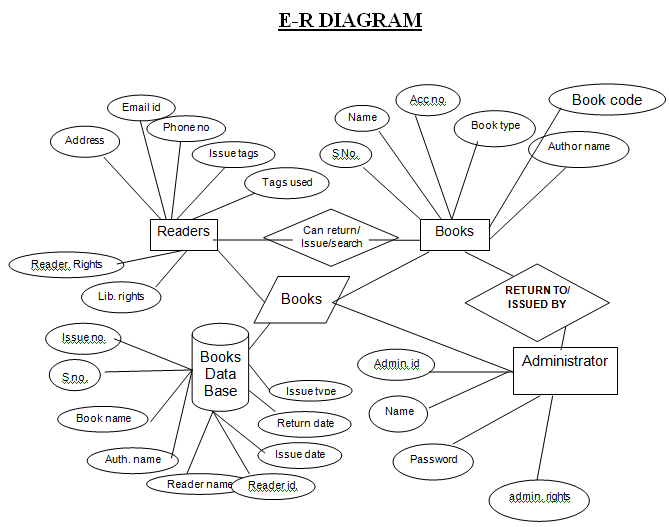
  • E-R Diagram
  • Data Flow Diagram
  • Activity Diagram
  • Database Tables

Output Screens:

Login Form
Administrator Menu (Parameters)


Administrator Menu (Security)
Security


User Maintenance


Administrators Menu (Utility)


Librarian Menu
Librarian Menu (Book Options)
Add A New Book
Reader’s Options (Find A Book)
Reader’s Options (Edit Book Details)


Librarian Menu (Readers Options)
Librarian Menu (General Options)
Today’s Issue Inquiry
Issue A Book
Return A Book
Find A Book
Reports
User Report
Book Code Report
Book Type Report
About Menu

LIMITATIONS: 

  • The project is designed to run on a single machine, with no option to run on a network of computers

(LAN etc.).

  • The design of the project is not up to the level of the software market, it has a lot of scope to improvement.
  • There is no option for the reader if he/she forgot the password. If he or she forgets his or her password they need to sign up again.
  • The reader or the administrator can use this one at a time, which means only one transaction can be processed at one time that may be issued, return, or any other.
  • The database is not vast.
  • There is no option for the payment receipt of the fine submission.

SUGGESTIONS FOR FUTURE WORK: 

  • Projects can be further enhanced with the facility to run projects on multiple machines (LAN) so that more than one library for the same institution can be connected through the same database and controlled by the same mechanism.
  • In-depth details regarding every, security aspect of the project need to prepare, and then taken steps taken or functionality included to preserve security.
  • Enhancements can be made to provide users with the option that if one forgets his/her password then it can be changed or retrieved.
  • A new option like an option for the payment receipt of the fine submission can be included.

CONCLUSION:

  • Project is fully complete and running with every aspect of coding and connectivity with the database.
  • We have tried our best to present a simple interface to the user and remove the complexity of using a manual library like searching and fine calculation.

Download the complete Library Management System .Net Project Source Code and Database

Performance Analysis of Real Time Dynamic Scheduling Algorithms Using Torsche Tool

ABSTRACT: 

Mostly all real time scheduling algorithms are open loop algorithms. So it will not support all the real world problems. While algorithms such as Earliest Deadline Algorithms, Rate Monotonic and the spring scheduling algorithms are supporting comfortable important task set characteristics such as deadlines, precedence constraints, shared resource, jitter etc. Normally real time scheduling algorithms classified into two categories: static and dynamic. Static algorithm requires complete knowledge of task set and constraints whereas dynamic algorithm does not requires complete knowledge of task set. These two open loop algorithms works poorly in unpredictable dynamic systems. Normally all dynamic real world applications have insufficient resources and unpredictable work-load. So closed loop systems are suitable for facing this situation. The performance of CPU utilization is evaluated by using these algorithms into PID controller. Normally PID controller can provide stable control and it does not need any special analytical model. For dynamic system PID controller is suitable one. In this paper I present a feedback control real-time scheduling algorithms and its evaluation corresponding to PID controller with TORSCHE tool box where TORSCHE tool box is especially very much used for scheduling algorithms. TORSCHE (Time Optimisation, Resources, SCHEduling) Scheduling Toolbox for Matlab is a freely (GNU GPL) available toolbox developed at the Czech Technical University in Prague. Performance results demonstrate the effectiveness of the algorithm when execution time varies.

INTRODUCTION:

Based on the real time scheduling categories dynamic scheduling algorithms is suitable for unpredictable environments where as static algorithms need complete idea of the task set. Dynamic scheduling can be again classified into two categories: Resource Sufficient Environment and Resource Insufficient Environment. Resource sufficient environments requires sufficient resources is required for working. Earliest Deadline First(EDF) is an optimal dynamic scheduling algorithm in resource sufficient environments. EDF scheduling is most offer able one in real time scheduling.

All three algorithms must need complete knowledge of the task set what is going to be happening continuously. Those are not suitable for sudden variations in the real time situations. For example robotics, defenses, computational loading applications and other online changes applications. In all pervasive applications the input will receive from the sensors, it will not same predictable values always, it may be different unpredictable values also. For that situation these scheduling algorithms does not suitable.

The timing requirements is the another important problem. Because the timing requirement would be known and fixed. Always the open loop scheduling algorithms work with this fixed set of timing requirements. To solve these problems the only acceptable solution is feedback control real time scheduling.

KEY WORDS:

EDF: Earliest Deadline First, PID Controller: Proportional Integral Differential Controller, CPU: Control Processing Unit, RM: Rate Monotonic.

OVERVIEW:

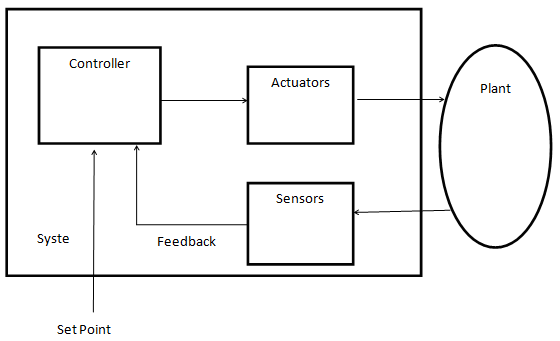
The following architecture diagram is the basic architecture of feedback control system.
The architecture contains Controller, Actuators, Sensors, and Plant. The Controller which is used to controlled the variable. It has two input and one output. The two inputs are Set point, feedback. The Set point is used to the set the correct value of the controlled variable. The difference between the correct value of the controlled variable and the set point is the error.

Architecture of Feedback Control System:


The system is continuously monitor and compares the controlled variable to the set point which is known as the correct value to find the error. Based on the error value the controller calculates the required control value. The actuator is used to change the value of the manipulated variable of the system. Here the Scheduler as the PID controller. Because of the following reasons we choose PID control as the basic feedback control scheduling.

1. In control theory, the scheduling system is dynamic system
2. The PID controller does not need any analytic model.
3. Basic PID control can provide stable control in first and second order systems.

PID Controller:

In my project the PID controller is used to periodically monitors the controlled variable missratio and computes the CPU requested utilization.

The model for Feedback Control Scheduling:

The PID controller is used to help the scheduler as a stable one. It is normally done by
simulations. The Cp,Ci,Cd are the coefficients of PID controllers. The main parameters for the
simulations are 1. The SP is a constant sampling period 2.MissRatio the difference between the
system output and the controlled variable. 3.CPU’(Z) is the estimate CPU utilization. 4. CPU(Z)
is the actual CPU utilization. 5. ug(k) is the ratio of the actual total utilization to the estimation.
6. mrg(k) is the CPU utilization gain. 7. d(k) the disturbance. The estimated CPU utilization is
calculated by
CPU’(z) = ∆CPU’(z)/(z-1)
The actual requested utilization is calculated by
CPU(z) = ug(k)CPU’(z)
The missratio is calculated by
MissRatio(z) = mrg(k)CPU(z)-d(k)
Whereas the transfer function of the PID controller is:
H(z) = Cp + Ci/(z-1) + Cd(z-1)/z
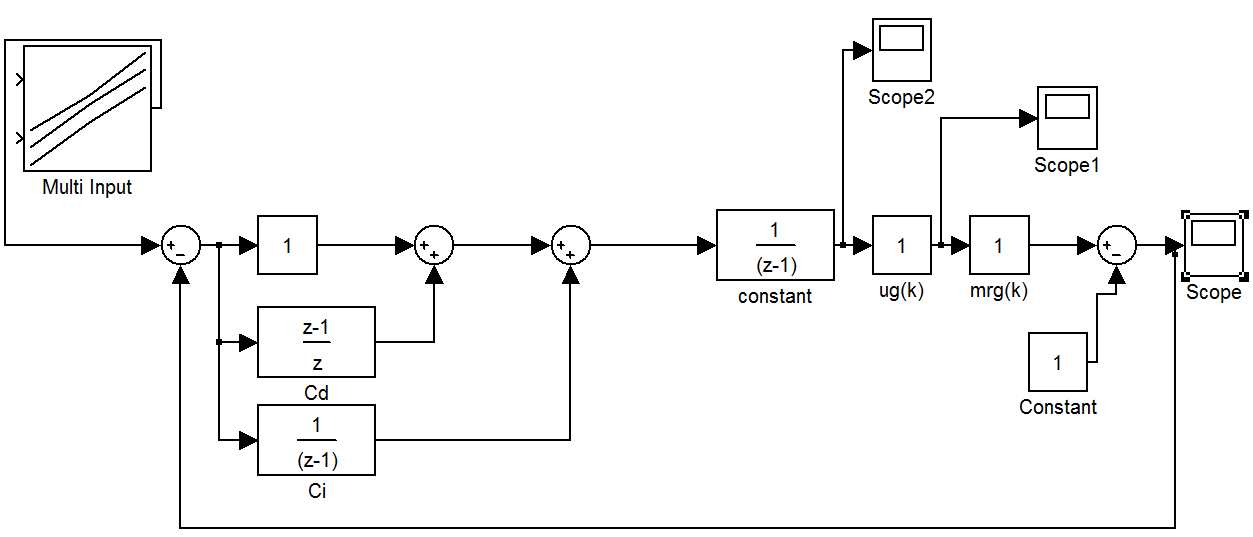
The following diagram is the MATlab simulation model for calculating
missratio. The output is Fed back to the input to improve the CPU utilization and maintain less
missratio values.


Cp,Cd,Ci has taking as constant one value. ug(k),mrg(k) are both taking as different values and find the different missratio values. Based on this simulation we can justify the following things i.e., the estimated CPU utilization and the actual CPU utilization are approximately equal and there is no domino effect is happened. The coding for scheduling algorithms like EDF,RM are written by the TORSCHE toolbox. Then it is apply in to the controller to improve the CPU utilization. The comparative statement is shown by the graphical format. Compare to the two scheduling algorithms EDF scheduling algorithm could be proved as a good one.

CONCLUSION :

In this paper we are analyzing the closed loop real time scheduling systems. Based on this paper i can improve the CPU utilization and minimizing the missratio values. Because deadline missratio is directly controlled by the scheduler. The performances of two scheduling algorithms are taken and verified using TORSCHE scheduling toolbox. FC-EDF, Least and Latency scheduling algorithms are taken and compared in future. This paper mainly based on “Design and Evaluation of a Feedback Control EDF Scheduling Algorithm by Chenyang Lu, John A. Stankovic”. But I am using TORSCHE scheduling toolbox to shown the performance analysis.

References:

[1] B. Bouyssounouse, J. Sifakis, Embedded Systems Design: The ARTIST Roadmap for Research and Development, Springer, 2005.
[2] J. P. Loyall, “Emerging Trends in Adaptive Middleware and Its Application to Distributed Real-Time Embedded Systems”, Lecture Notes in Computer Science (LNCS), Vol. 2855, pp.20-34, 2003.
[3] K.-E. Årzén and A. Cervin, “Control and Embedded Computing: Survey of Research Directions”, Proc. 16th IFAC World Congress, Prague, Czech Republic, 2005.
[4] Feng Xia, Zhi Wang, and Youxian Sun, “Integrated Computation,Communication and control: Towards Next Revolution in Information Technology”, LNCS, Vol. 3356, pp.117-125, 2004.
[5] J. L. Hellerstein, “Challenges in Control Engineering of Computing Systems”, Proc. IEEE ACC, Massachusetts, July 2004, pp.1970-1979.
[6] Sha, L., T. Abdelzaher, K.-E. Årzén, T. Baker, A. Burns, G. Buttazzo, M. Caccamo, A. Cervin, J. Lehoczky, A. Mok, “Real-time scheduling theory: A historical perspective”, Real-time Systems, Vol.28, pp.101-155, 2004.
[7] C. Lu, J.A. Stankovic, G. Tao, S.H. Son, “Feedback control real-time scheduling: framework, modeling, and algorithms”, Real-time Systems, Vol.23, No.1/2, pp. 85-126, 2002.
[Abde98] T. F. Abdelzaher and Kang G. Shin, “End-host Architecture for QoS-Adaptive Communication” IEEE RTAS, June 1998.
[Becc99] G. Beccari, et. al., “Rate Modulation of Soft Real-Time Tasks in Autonomous Robot Control Systems”, EuroMicro Conference on Real-Time Systems, June 1999.
[Blev76] P. R. Blevins and C. V. Ramamoorthy, “Aspects of a dynamically adaptive operating systems”, IEEE Transactions on Computers, Vol. 25, No. 7, pp. 713-725, July 1976.
[Butt95] G. Buttazzo and J. A. Stankovic, “Adding Robustness in Dynamic Preemptive Scheduling”, Responsive Computer Systems: Steps Toward Fault-Tolerant Real-Time Systems (D. S. Fussell and M. Malek Ed.), Kluwer Academic Publishers, 1995.
[Gerb95] R. Gerber, S. Hong and M. Saksena, “Guaranteeing Real-Time Requirements with Resource-Based Calibration of Periodic Processes”, IEEE Transactions on Software Engineering, Vol. 21, No. 7, July 1995.
[Hari91] J. R. Haritsa, M. Livny and M. J. Carey, “Earliest Deadline Scheduling for Real-Time Database Systems”, IEEE RTSS, 1991.
[Jehu98] J. Jehuda and A. Israeli, “Automated Meta-Control for Adaptable Real-Time Software”, Real-Time Systems J., 14, 1998.
[Leho89] J. P. Lehoczky, L. Sha and Y. Ding, “The Rate Monotonic Scheduling Algorithm – Exact Characterization and Average Case Behavior”, IEEE RTSS, 1989.
[Li98] B. Li, K. Nahrstedt, “A Control Theoretical Model for Quality of Service Adaptations”, in IEEE International Workshop on Quality of Service, May 1998.
[Liu73] C. L. Liu and J. W. Layland, “Scheduling Algorithms for Multiprogramming in a Hard Real-Time Environment”, JACM, Vol. 20, No. 1, pp. 46-61, 1973.
TORSCHE Scheduling Toolbox for Matlab User’s Guide (Release 0.4.0).

Ringtone Composition Application

This Ringtone Composition desktop application shall allow the user to compose the ring tones from the set of configured loops.  The generated loop sets [ringtones] would be played with external audio players.

The Ringtone Composition application has the following configurations.

  1. Configure the set of loops and association of attributes.
  2. Manage Loop Sets [ring tones]
  3. Search ring tones

Details are below:

Configure the set of loops and association of attributes:

This screen has the following features.

  1. Show the existing loops in tabular format. Columns like Loop name, Size, Play link, edit loop, delete loop and etc.
  2. Upload loops: This section have upload loop field, name field & save button.
  3. Edit loops: This section have upload loop field, name field & save button.
  4. Delete loops: By using this option the system shall allow the user to delete the loops.
  5. Mapping the attributes to the selected loop. Like name, size and etc.
  6. Play the selected loop.

Manage ring tones:

This screen has the following features.

  1. Show the existing ring tones
  2. Create/Edit the loop set by selecting the loops
  3. Generate the digital wave file from for the selected loop set
  4. Generate the chord sequence number for the selected loop set
  5. Generate the single audio stream for the selected chord sequence number.
  6. Composition the digital audio file.

Search ring tones:

This screen has the following features.

  1. The system shall allow the user to search on chord sequence and display the ring tones.
  2. If there are no search criteria, the system will display all existing ring tones.

Database

The following tables are required to implement the Ringtone Composition Application.

1. Users: For storing Login user information. Fields are listed below.

  • UserID
  • UserName
  • Password
  • FirstName
  • LastName
  • CreatedBy
  • CreatedDate
  • UpdatedBy
  • UpdatedDate

2. LoopMaster: For storing Loop information and attributes. Fields are listed below.

  • LoopID
  • LoopName
  • LoopDescription
  • LoopPath
  • LoopExtension
  • LoopSize
  • CreatedBy
  • CreatedDate
  • UpdatedBy
  • UpdatedDate

3. LoopsetMaster: For storing Loop set information and attributes. Fields are listed below.

  • LoopsetID
  • LoopsetName
  • LoopsetDescription
  • CreatedBy
  • CreatedDate
  • UpdatedBy
  • UpdatedDate

4. LoopsetDetails: For storing loops information for each loop set. Fields are listed below.

  • LoopsetDetailsID
  • LoopID : Reference Key
  • LoopsetID: Reference Key
  • CreatedBy
  • CreatedDate
  • UpdatedBy
  • UpdatedDate

5. RingtoneMaster: For storing ring tone information. Fields are listed below.

  • RingtoneID
  • ChroneSeqNumber
  • LoopsetID: Reference Key
  • RingtoneName
  • RingtoneDescription
  • RingtonePath
  • RingtoneExtension
  • RingtoneSize
  • CreatedBy
  • CreatedDate
  • UpdatedBy
  • UpdatedDate

Complete Hospital Management System Synopsis

The main aim of developing this Complete Hospital Management System is to provide best software to Hospitals to provide end to end solution for various departments. We have divided the Complete application into 7 major modules, Those are listed below:

1. Administrator
2. Patient Management
3. Materials Management
4. Laboratory Management
5. Employee Management
6. Financial Accounting
7. Operations Management

Each Module is divided into Sub Modules:

Administrator Module

In This module only admin people entered through Password and able to change or update as well as assign the responsibility to anyone. This module is further sub-divided into Doctor Registration, Employee Registration, Appointment Scheduling, and Hospital Administration

Doctor Registration:- In this sub-module all the information regarding the doctor are stored ex. Doctor ID, doctor name, highest qualification, specialization, as well as availability.

Employee Registration: -In this sub-module all the information regarding the employee is stored. Ex. Employee ID, Employee name, Employee address, Employee joining date.

Appointment Scheduling: – In this sub-module all the information regarding the appointment to the patient with the doctor are stored.

Hospital Administration: – In this sub-module all the information regarding Hospital Details

Patient Management:

In this module, all the information regarding patient are stored. This module is divided into various sub-modules. Inpatient Registration, Out-Patient registration, Itemized Patient Billing, Electronic Medical Records/Clinical History, Online Registration.

Materials Management

This module contain information related to complaint, equipment, Assets, Stock & others items maintenance management and keeps track of AMC of the equipments and the services offered by the vendor / manufacturer. This module is sub-divided into General Store Management, Inventory Management, Pharmacy Management, Blood Bank Management.

Laboratory Management

The Laboratory module is a sophisticated computer data management system designed to handle a large amount of data quickly and efficiently for all Pathology Laboratory disciplines, Clinical Pathology, Microbiology, Hematology, Serology, Cytology, Radiology, Biochemistry, and Neurology.

Employee Management

In this module, all the information regarding Employee is soared. This module is divided into various sub-modules; Attendance Management, Payroll Management. The employee management system incorporates attendance for staff, calculation of working hours, and daily, weekly, monthly and yearly analysis. The application accommodates all aspects of scheduling by assigning and maintaining records about different shifts and duty timings, hacking for scheduling conflicts with patient’s schedule, physician schedules, equipment availability and room availability. The employee management system incorporates attendance for staff, calculation of working hours, and daily, weekly, monthly and yearly analysis. The application accommodates all aspects of scheduling by assigning and maintaining records about Different shifts and duty timings, checking for scheduling conflicts with patient’s schedule, physician schedules, equipment availability and room availability.

Financial Accounting:

• Cash Book
• Bank Book
• Ledger Book
• Receipt/Payments
• Journal Voucher
• Insurance
• Invoice
• Purchase Orders
• Records

Operations Management:

In this module, all the information regarding all the available OPD. This module is sub-divided into Housekeeping, Ward Management, Bed Management, Operation Theater, Manager Assistant, Doctors Workbench, and Nursing Workbench.

Mini Projects Abstracts on Java and PHP

The below mini Projects are developed using java and PHP technologies.

School Management System:

This is a school management system project which is developed using  PHP on the CodeIgniter framework. But it is not for only a single school or college to manage. We can add multiple schools or institutions and they will be provided the proper login credentials and they can add Management, Teachers, Students, Parents, and library inventory as well.

Multi Messaging Service Encryption:

This project is a java based server-client architecture within a local area network LAN. The user will be created at the server application and then the client can log in through the client application. The client can send video/audio and text images to some other client by encrypting them using some encryption algorithms. And when the receiver client will receive the file it will be decrypted on the receiver end and then the files can be opened or text can be read.

College Management System:

It is a java based Windows/ Desktop application. This Project has featured an admin panel where the admin can register a new student, can update the existing user, can promote students to higher classes. And admin can manage the monthly fee of the student and then the admin can print the receipt using the printer.

Blood Bank Management System:

It is the management of the blood donor that if some donor is donating the blood and it will be managed into the inventory that which kind of blood is it like A+, A- and all. And when the user wants to search the inventory whether this kind of blood is available at the blood bank or not he can check into his inventory. And can purchase from the blood bank once he purchased the inventory will be maintained again. this is a website on PHP.

E- Student Management System:

It is the complete management of students, Teachers from the admin panel. This is a website with an admin panel. Admin can add the new class. Within the class, he can register new students. Admin can also manage the library. Admin can also add teachers. And can edit or delete them. And these things will be displayed on the website. It is a completely dynamic website with high features. This project is on PHP technology having the use of the CodeIgniter framework.

Online Bakery Shop:

This is an E-commerce Website for selling online cakes. Users can visit the website and can search for the desired cake by their category and then they can add to the cart and proceed to checkout. This project is on PHP technology having the use of the CodeIgniter framework.

Employee Break Tracking System:

It is a java based system that will help the employer to find out the total as well as split up of break time taken by the employees. The report will be exported to an excel file or it can display in a common console.

Automatic Backup of files to Network Drive:

It is a java based application that will be used to back up the files automatically onto a network drive. The backup can be scheduled.

Active Directory Users Management:

It is a PHP application that is used to get the last logon time of all the active directory users and will be saved in the MySql database. Then from MySql, reports will be generated and shown in the GUI.

Common Repository of Linux Syslogs:

It is a PHP application that is used to get the Linux sys logs onto a common location and it will be saved in the database. On request, the report will be generated and shown in the GUI.

ATM Management System:

It is a java based system for ATMs. It will have all the features like withdrawal, deposit, and balance summary. The user management system is also part of this.

Talent Hunt Website:

  • The objective of this website is to make people able to share their talent over the world so that more audiences can watch them.
  • The users who uploaded their videos on the website can also manage them. They can delete them also.
  • Registered user can edit their profile. They also can get the chance to make their talent their profession.
  • So this website also provides job opportunities for the user.

There are the following objectives of this website:-

  • Sharing videos, images, audio, and quotes.
  • Making talented people the best in their field.
  • Providing a chance to show their creativity
  • Providing user-friendly GUI.
  • Establishing relationship.
  • Increasing Curiosity.
  • Inspiring people to do new things to share.
  • Delivering innovative ideas to people.
  • Verification before displaying data.
  • Management of uploaded files/data.
  • Categorized display.