Online Recruitment Java Project Report

Introduction to Online Recruitment Java Project:

The IRECRUIT is totally automated recruiting system of an organization that reduces the manhandling and tedious procedure of screening of an thousands of applications. The computerizing features allows the recruiter to screen the applications in less processing time, less effort, fast response, flexibility, good performance and measurable. 

The scope of the project is to record the information of the candidate and manage the huge data of all applicants that includes Job postings, applicants, companies, resumes and the people. The web page allows us to retrieve information such as Job details, Resume reports and Applicant details and also to create information such as Use reports, Job reports, Transaction reports, usage reports and skill reports. The candidate can search for the job by logging in. The HR application allows HR personnel to shortlist the applicants and makes selection criteria. 

The IRECRUIT system possesses four major modules.

  1. Candidate or Aspirant module.
  2. Employee module.
  3. Recruiter module.
  4. Administrator module. 
  • Candidate module allows candidate to post resume, search job and manage profile. 
  • Employee module has options for the HR recruiter to find all candidates suitable and can post new job. 
  • The administrator module allows the recruiter or administrator to manage all the details regarding companies, people, and job postings. 

Software requirements:

Operating system: Windows 2000 or higher

Jboss 3.3, J2SDK 1.4, Internet Explorer 5.0 or Mozilla 

Hardware required:

Pentium III Processor

RAM 256 MB

Download  Online Recruitment Java Project Report  .
IT Enabled Academia Project

OBJECTIVE: 

The product states to automate the regular teaching-learning integrated activities which make an academic administrator to observe and regulate the ongoing matter. This includes schedule preparation for possible resources such as Programmers, courses, subjects, faculties, and lecture room or lab preferences. The IT Enabled Academia would combined with Uploading lecture notes or assignments, regular attendance, student feedback report, updated exam marks and students/faculty portfolio’s. 

Current system for Academia 

1. Current system is handled manually which possesses possibility of errors. 

2. Current system is unable to do enrolment of students by itself. 

3. Regular attendance of faculties cannot be provided in a single display, it  has to be created manually. 

4. The system is not able to present feedback from each student and even .Unable to guide student personally.  

Proposed System 

The improved system automates the whole process through Database integration approach. 

The Proposed system creates schedule for all teachers to take their classes by differentiating the days, time and class rooms which does not interrupt to other teacher.

 Faculty has option to plan their lecture and topic, display their course contents which student can easily explored. 

The students can post their feedback and suggestions to the faculty which makes academia more clear for improvements and guidance to students.

Download  IT Enabled Academia Project .

Remote Method Invocation in Java

The Remote method invocation (RMI) design has to be developed in distributed Java programs consists of similar syntax and semantics that are applicable in non- distributed programs. One has to observe or learn the Java classes and objects in single Java virtual machine (JVM) and then go for the Java classes and objects to run on distributed Java virtual machine (Multiple MVM). 

RMI architecture is about the functions of objects, to keep memory, the limits, and remote operating procedures.

To design RMI system, the steps required:

  1. To develop interface Java code to write and compile.
  2. To implement classes Java code to write and compile.
  3. To create Stub and Skeleton class files from implemented classes
  4.  RMI Client program to be developed by Java code
  5. The RMI system to be install and run 

Java RMI Architecture 

The RMI Architecture designing is combined feature of Java programming language and the local object model developed with   Java distributed object model. The RMI architects developed successfully a safe and rich of Java architecture for the distributed computing. 

The theory of RMI architecture is relied on two major concepts, the definition of behavior and the implementation of the particular behavior. It requires code to define behavior separately the implement of behavior that can run separate JVM’s. 

The distributed system segregates the system by clients to know the definition and servers should be aimed in giving service. 

Mainly the RMI’s remote service is developed by applying the Java interface. How to apply the remote service has needed to code in a class. The RMI knowledge requires to memorize the interface define behavior and classes define implementation. 

So RMI system includes the Client Program for Interface and Server Program to implement. The RMI support for running two classes on the same interface which is included first class to apply the behavior and that runs on server and second class is remote service consists of proxy runs on client. The client program is used to put method calls on proxy objects, for which RMI instructs the remote JVM for implementation. The return values of implementation by remote JVM goes to client’s program via proxy service. The RMI uses network stack and TCP/IP for communications between JVM’s.

  Download  Remote Method Invocation in Java .

Project Report on Online Billing System in Java

Introduction to  Online Billing System in Java:

The record keeping and reporting is the key of successful transactions which definitely consists of user friendly interface with easy and common application. The objective to develop the application is based on the easy way of getting yellow page information. The application can be used easily for record keeping and reporting. The application can be installed on desktop or operated via client/server architecture. 

The system is easy to use with simple knowledge of computer. The applied principles in this system are instinctive and depend on running application at user interface. 

The following steps are included in the developing of an application.

  1. Information collection
  2. Design
  3. Coding and assigning
  4. Testing
  5. Applying the application at User end 

Programming Language were used in developing this application:  JAVA with JS, Javascipt, HTML. Database application used MS Access. 

Hardware was used: RAM 64 MB and 2 GB hard disk. 

Operating Systems: Windows 95 & higher version. 

Architecture: The modules is divided into

  • Login
  • Create User
  • Add entry
  • Erase Entry
  • Modify Entry- 1. Search name, 2. By mobile number.

The online Billing application is providing with efficient GUI to the user and can be installed in other systems easily.

  Download  Project Report on Online Billing System in Java.

Virtual Medical Home Project Report

Introduction to Virtual Medical Home Project:

This application is done by rational unified process. This RUP unifies the generic process models supports the good design with three view namely dynamic, static and practice model. The RUP also hold four phases like inception, elaboration, construction and transition.

The need of the virtual medical home is to provide the health care to the people mainly in the villages via internet where the hospitals are few or nil. Four elements are included to implement VMH namely patient, internet, webcam, doctors and kiosk manager. To use this service we need markup languages, http/https protocols for communication interface, database and java.

In ancient time there is only net used to store the patient records who used to go to the hospitals directly but in this model we have included webcam software kiosk manager to treat the patient by sitting in their home itself with the help of database 2,RAD, WASCE, rational software model technologies. In this the patients records are maintained as authorized used.

Work Flow: The user, doctor and the kiosk manager need to register their details to get the login ids. These id are sent to administration for reification now the user is provided with kiosk id, password and user id. When the patient feel to see the doctors. Patient need to enter their user name and password to get the appointment from the desired doctor to know whether the doctor is available or not if the doctor is in available the patient request will be sent to the doctor id and he gives the appointment time.

At the appointment time the patient and the doctors interact through the java application and GUI interface. The doctor can also diagnose the patient through webcam by generating the complaint id. This id will be sent to the admin for the record and reification and the admin replies to the user according to the reification of the compliant. The prescription also sent to the patient though id.

Download Virtual Medical Home Project Report software requirement specifications .

Final Year CSE Computer Network Project Report

Introduction to Computer Network Project Topic:

It is a bunch of computers that are adjoined by photo-electric boundary or other act of transporting of many sketches and machinery with the by interchanging data or information for users.

Networks may be classified according to a wide variety of characteristics. This article provides a general overview of types and categories and also shows the basic components of a network.

Networks are built with adjoin of computer hardware and software.

Types of Computer Network:-

  1. LAN (LOCAL AREA NETWORK)
  2. WAN (WIDE AREA NETWORK)
  3. MAN (METROPOLITAN AREA NETWORK)
  4. PAN (PERSONAL AREA NETWORK)
  5. VPN (VIRTUAL PRIVATE NETWORK)
  6. CAN (CAMPUS AREA NETWORK)
  7. GAN(GLOBAL AREA NETWORK)
  8. SAN (STORAGE AREA NETWORK) 

Some Basic Components are:-

  1. These networks are formulated on basic hardware building blocks by linking nodes of network, such as (NICs), Routers etc…
  2. In addition, some method of connecting these building blocks is required, usually in the form of galvanic cable.
  3.  Less random are microwave links or optical cable (“optical fiber”). 

Some of the basic components required for adjoining the network nodes: –

  1.    NETWORK INTERFACE CARD.
  2.    REPEATERS.
  3.    NETWORK HUB.
  4.    NETWORK BRIDGE.
  5.    NETWORK SWITCH.
  6.    ROUTER.

Bridges are sub divided in three types:-

  1. Local bridges: It connects to LAN.
  2. Remote bridges: WAN can be developed by this bridge. Link between LANs. Remote bridges, where the adjoining link is less than the end networks, largely have been displaced.
  3. Wireless bridges: It can be used to join LAN or connect to LAN.

Download  Final Year CSE Computer Network Project Report .

Test Cases for Chess Game

Test Case 1:

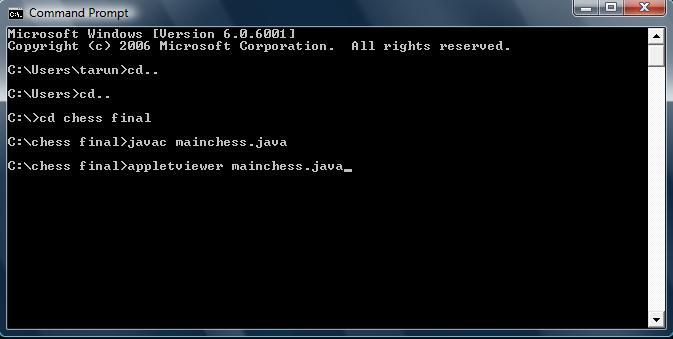
Input given: To compile the program without the errors.

Status: changed

Output: The program is compiled properly without any errors if any errors are occurred it will be displayed below the compilation input, so in this test case there are no errors so the compilation was successful and was preceded to the next step.

Test Case 2:

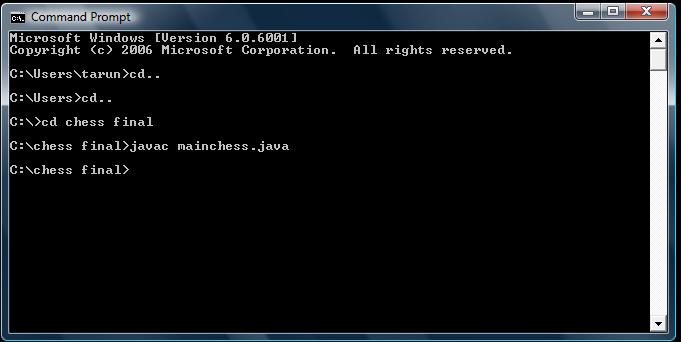
Input given: To execute the applet by giving the command.

Status: applet displayed

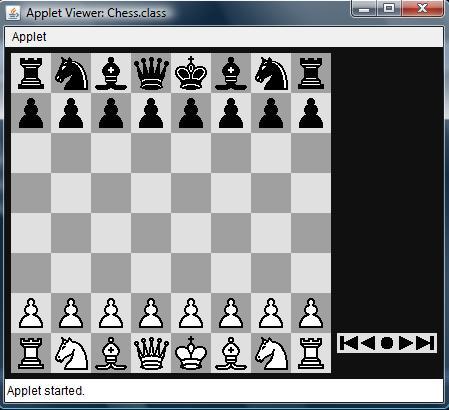
Output: After entering the code for execution of the program the command prompt will automatically pop up an applet which as shown below, if there are any internal errors in the program the applet will not appear.

After entering the command in the command prompt as shown above and executed it will be redirected to the applet which is shown below

Test Case 3:

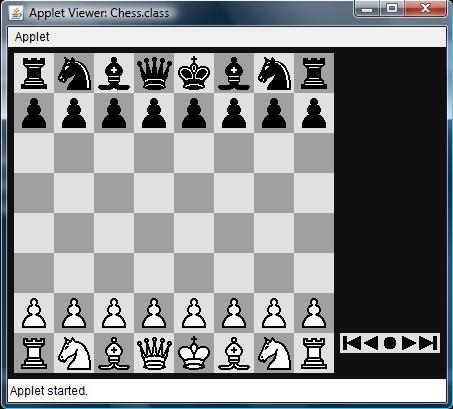
Input given: Check whether all the pieces of the both sides are available or not and also check whether they are properly organised or not.

Status:  Performed

Output: All the pieces are available and fairly organised for both sides which are satisfying the basic rules of the game is shown below.

Before going to play the chess a proper check for the moves of each and every piece is tested and the test cases of them and their results are shown below

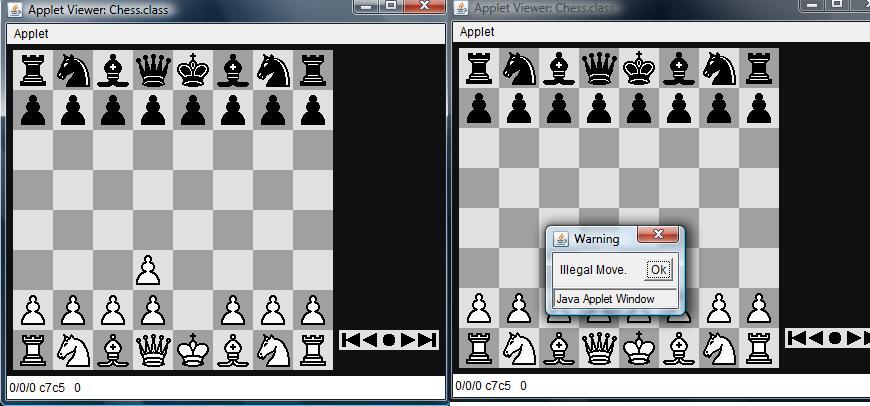
Test Case 4:

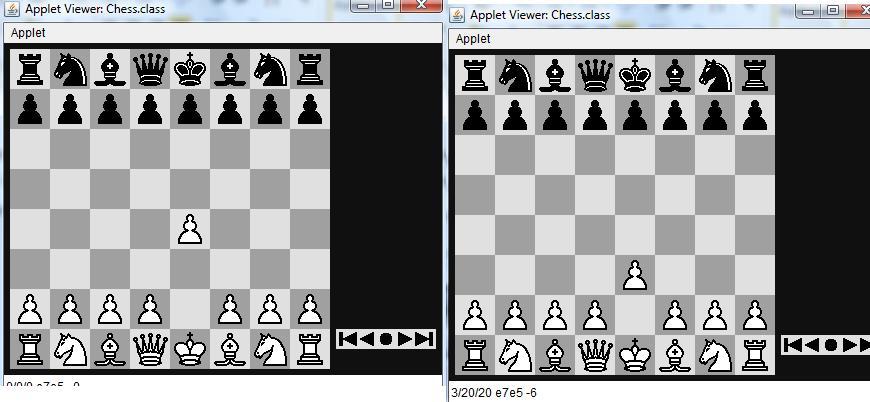
Input: checking the move of the pawn.

Status: Performed

Output: It is satisfying the rules of the game if any other move that is not a valid move of pawn is performed an dialog box will be displayed, the dialog boxes for the test cases are shown below the screen shots for the test cases.

The above screen shots shows the valid moves of the pawn, and if any other moves for the pawn are the dialog box appears as shown below.

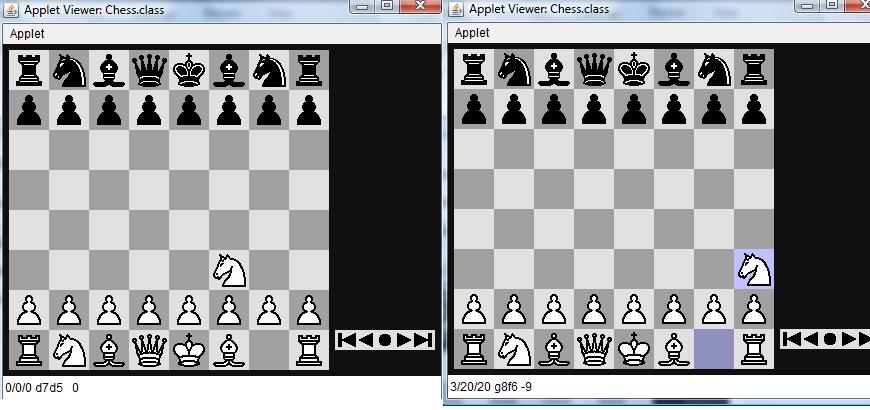
Test Case 5:

Input: checking the move of the knight.

Status: Performed

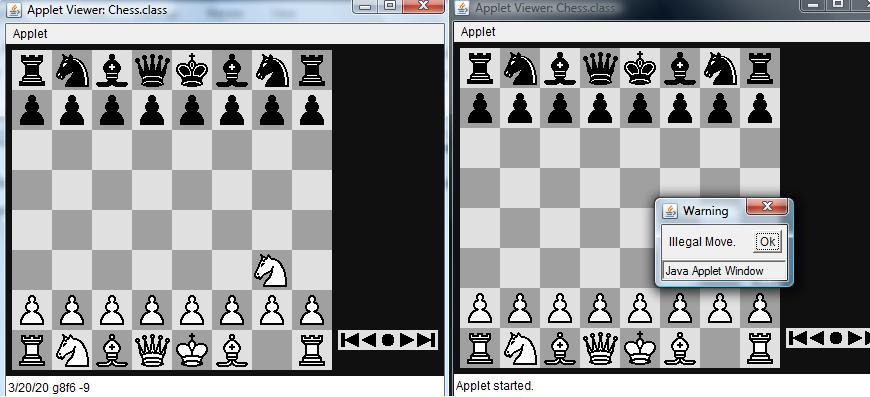
Output: It is satisfying the rules of the game if any other move that is not a valid move of Knight is performed an dialog box will be displayed, the dialog boxes for the test cases are shown below the screen shots for the test cases.

The above screen shots shows the valid moves of the Knight, and if any other moves for the Knight are the dialog box appears as shown below

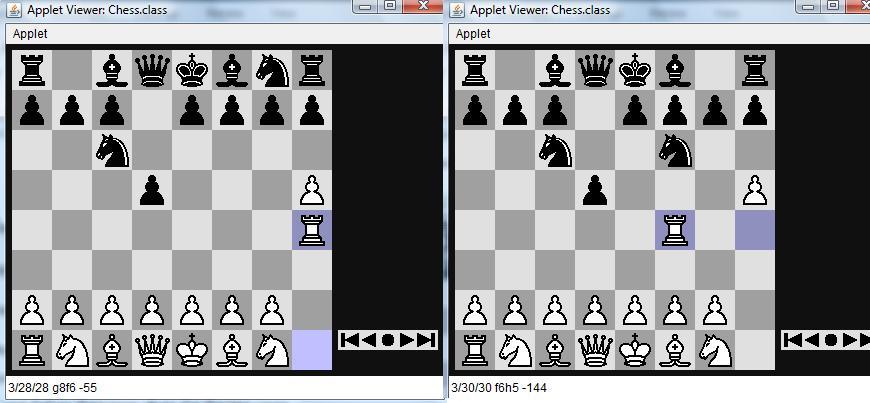
Test Case 6:

Input: checking the move of the Rook.

Status: Performed

Output: It is satisfying the rules of the game if any other move that is not a valid move of Rook is performed an dialog box will be displayed, the dialog boxes for the test cases are shown below the screen shots for the test cases.

The above screen shots shows the valid moves of the Rook, and if any other moves for the Rook are the dialog box appears as shown below

Chess Game Design Java

Design of this chess game is divided in to following modules: 

  1. Board representation
  2. Move representation
  3. Piece representation
  4. Analyzer

Move representation: 

Representing the possible moves is really an important aspect in designing the chess game and this section explains the actual procedure followed to handle all the possible moves in this application. A separate module known as chess engine is designed in this program to handle all the possible moves and a separate module of code is required as the possible moves are really high in a chess game. Move against the human move from the computer side need lot of estimations and eliminations and in there, typical tree search algorithm can be used to search for the best move possible. These moves are mainly decided by the position of the piece on the chess board and few predefined moves are assigned to the piece based on the nature of the piece on the board. A typical switch and case condition loop is used to check the type of piece initially and then based on the case identified the moves are defined. The moves are assigned to these pieces based on the square positions, the corresponding characters assigned to the squares and position of the square on the total board. All the possible conditions are checked for all the pieces with respect to the position of the board initially and later the actual moves against the human moves are done in a separate way. The famous tree search algorithm known as alpha beta pruning algorithm is used to decide the best move for the computers from all the possible moves in front of the computer. To proceed with this algorithm, initially alpha and beta variables are considered and an initial depth is assigned as an integer and then these values are incremented or decremented and compared to follow the tree search process. Moves are represented based on the depth value of the alpha and beta and the kind of piece with respect to this depth position on the chess board. Alpha and beta are used to represent the current square position of the piece that need to be moved and the beta represents the target move and thus from the value of the depth calculated as discussed above, the actual move of the desired piece is decided. Once the best move is decided from all the possible moves, the actual move is shown to the users using the same graphic class of the Java Applet package. All the required action listeners are added to the piece movements and the most common among them are the mouse listeners and the computer always recognizes the moves made by the human player using the mouse action listeners and the moves are compared to the predefined moves saved at the memory with the moves made by the human player and as discussed these moves are identified using the mouse action listeners and even the validity of the moves made by the human player is also checked against many conditions. 

Piece representation: 

The very next once the move representation is done is to represent the graphical user interface of the pieces and the corresponding moves of them on the chess board considered. All the images of the required pieces are taken in the same folder where the coding files are maintained and the reference to them are made using the file path in the design process. All these pieces are placed on the squares of the chess board based on the characters assigned to the squares using the character array as discussed in the board representation section of this document. A separate method is used to represent the pieces on the board and is named as drawFigure and the parameters given to this method are like character for the square assigned, x-axis position and y-axis position. Board design takes care of the square positions and the corresponding square positions are designed with respect to the pieces and their respective placement on the squares. Properties for the pieces are assigned at the chess engine level and the corresponding hash codes are assigned as the constant values with respect to these pieces at the backend of the chess engine design. Few methods are defined these pieces in the form of a separate interface and these methods holds the required properties for the corresponding pieces used across the board. Moment of these pieces is defined with respect to the changing positions of the board and the required attributes are set accordingly in these methods. 

Analyzer: 

Design of the analyzer include the time controls used across the chess game and a detailed coding aspects to the alpha beta pruning algorithm based on the time limits imposed across the chess game. Five different time intervals are considered in this design like 50, 100, 300, 600 and 1800 and the corresponding limitations with respect to the time are given based on the human moves. As discussed in the previous section, the human player moves are captured by the mouse action listeners and the corresponding moves are compared against the time limits set across this design.  Time frame allocated in this design is incremented using exponential functions and if the time limit is reached the corresponding action to be taken by the computer program are also defined in this analyzer module. A minimum time limit is given to the human player during the initial moves and gradually the game process, more time limits is allocated to the player in the middle of the game, as the player need more time to analyze the moves and make the right move. A multi threading program is designed in this case to handle the time limits assigned to the human players. 

Chess Board Representation Java

Introduction to Chess Board Representation Java:

Board representation is the key aspect in the chess design and in general 8X8 grid chess board is designed across many computer based chess games. There are different approaches that were followed while designing the chess board and even there are few cases where a chess board of size 10X12 grid is also used and the main reason to use this type of broad representation is to identify the out of bound and the corresponding illegal moves across the board. In this project an 8X8 grid board is used and the Java applet coding is used to design the board window.

A total of 64 squares are used in this case and the board is represented as an array of integers in the memory using the int variables. All the squared in the board are assigned either black or white color based on few conditions and they are as explained. Graphics object of Java applet class is used to draw the basic board and once the empty board is represented, now the colors to the squares are assigned using setColor method of the graphics class from the Applet package.

Few offset values are assigned to the square initially and they are incremented using the while loop and then the corresponding black and white colors are assigned to the corresponding squares by checking these offset values and this procedure is repeated for all the 64 squares and all the squares are assigned either black or white color. Few characters and alphabets are assigned to each and every square of the board and the colors to the board are assigned by checking the position of these characters using the if loop and this loop iterated till every character choosen is assigned a color.

A special character array is used hold all these characters assigned to the squares and these characters are fetched from the array as per the user requirement based on their index in the array considered. Important conditions like rotating the board at any condition of the game is also handled and the colors to the square of the board are assigned considering these entire rotation angles and the corresponding conditions. A string variable is used to handle the complete rotation aspects of the board and few conditions are used to check the board position using this string variable. 

Online National Polling Project in Java

Introduction to Online National Polling Project:

The project deals with the on line national polling the goal system is a system which enables all citizens to cast their vote online. The system is to increase the voting percentage across the country, in the present day situation the voters used to visit the Booth to vote and those people who live out of their home town they used to send their vote by the post some people will send and some people will not due to their insufficient time and somebody will send but the postman will be late some time, due to this the voting percentage will be less across the country. Through this software those people who live out of their home town will also be able to cast their votes as this system is on line.

Scope:

The software produced will be an online voting system.

The software will be used by citizens to cast their vote on line.

The main aim of this project is to increase the overall voting percentage. Through this software people get their voter-id card easily and a unique-id number.

Each and every citizens database will be maintained.

Abbreviations:

HTML: Hypertext Markup Language is a markup language used to design static web pages.

EJB: Enterprise Java Beans.

J2EE: it is a programming platform for developing and running distributed architecture Java applications.

DB2: This is a database management system that delivers a flexible and cost effective database platform to build robust on demand.

WAS: Web sphere application server is an application server that runs business application and supports the J2EE and web service standards.

HTTP: Hypertext Transfer Protocol is a transaction oriented client/server protocol between web browser and a web server.

HTTPS: secure Hypertext Transfer Protocol is a HTTP over SSL(secure socket layer).

Technologies:

J2EE: Application architecture

DB2: Database

WAS: Web server

Rational: Design tool

 Download Online National Polling Project in Java.