Detect the Intruder Actions on the Manets against the Routing Protocols

Main objective of this project is to detect the intruder actions on the MANETs against the routing protocols and for this purpose OPNET modeler is used as the simulation tool. AODV is used as the required routing protocol and the three scenarios are created against the simulation, where the first scenario works under the normal AODV parameters, second scenario has two attack nodes and the third scenario has three attack nodes.

To make these nodes as attack nodes the AODV routing parameters are changed and due to this the performance of the routing protocol is manipulated and the scenarios are run for 2 minutes against the simulation process. A simple voice application is used to generate the CBR traffic on the network and the performance metrics of AODV and Voice application are estimated against the intruder actions and the core findings are given below 

All the three scenarios are created and the simulation is run for 2 minutes to estimate the impact of the intruders on the network against the AODV parameters and Voice application parameters.

Few AODV parameters are used in this simulation and when the results for three scenarios are compared it is clear that the route discovery time is more with the attack nodes due to the lost of routes by the intruder actions and also the parameters like packets dropped, error replies sent, traffic sent and traffic received in packets per second is more with the attack nodes scenario when compared to the normal AODV scenario and this indicates the routing parameters of AODV are highly affected with the attack nodes.

When the voice application parameters are considered even in this case the attack nodes has successfully manipulated the voice attributes from their normal working conditions in terms of packet delay variation and the end to end packet delivery ratio. A more packet delay variation and end to end delay is observed with the attack nodes when compared to the normal nodes and thus in this way the actions of the intruders can be detected and prevented across the MANETS using AODV routing protocol.

Paper Written & Submitted by Harsha

Final Year Seminar Report on Biometric

Introduction to Final Year Seminar Topic on Biometric:

Bio metric means “life measure”. It keeps the identification of the person’s eye, finger print, voice etc. It is used for security reason and it contains all the physical information of the person. For example our driving license is bio metric which contain all the information about physical characteristic. The data of Biometric does not change it keep constant over large period of time. It contains only physical information because it is easy to read.

Bio metric identification system:-It is used to identified person physical characteristics and it can be inditified by finger print identification, in this we match the finger print of the person because it remain same even the person become older. Other is Hand geometry, next is Palm Vein Authentication in which we measure the vein of the person. It uses the infrared rays. Another is Ratina scan, in this we analysis the capillary blood vessel in the back of the eye as the pattern remain same thorough out the life.

Iris scan, it provides the scan of rings, furrows and freckles in the colored of eye that surrounds the pupil. This uses more than 200 points to be analysis. Next is Face Recognition, in this facial characteristic i.e. the shape and size of the face of the person is recognized. Signature matching is the way of identification. Voice matching is also used to identify the person by analyzing the pitchstone, cadence and frequency of the person.

To implement this type of technology many software has been developed for security and business safety.

Related Topic Paper Presentation:

Features and benefits: – It strengthens the security of computer. It can store anything as username and password in websites. It allows multiple authentications. By the use of this technology the data is very secure. It can secure windows and network logon.

Intrusion Detection and Monitoring for Wireless Networks Project Proposal

  •  Topic Area: Intrusion Detection and Monitoring for Wireless Networks
  • Network Security, Computer Networks, Web.
  • Keywords associated with the project
  • Intrusion Detection Systems (IDS), Detection Types, System Components.
  • MSc Courses studied that contribute towards this dissertation
  • Computer Networks and Network Management. 

Overview

The intrusion detection is the process which will detect the unnecessary traffic with in the network or else the device. The intrusion detection system is the part of the software which is been installed or else it is the physical application which will examine the network traffic to detect the unnecessary actions as well as the events or procedures like unauthorized and malicious traffic as well as the traffic which will abuse the security policy and even the traffic that will abuse the suitable utilized policies. With in the log several intrusion detection tools will accumulate the detected or identified events or results which are to be evaluated in the further process or else it will unite the events with the additional data in order to create decisions or choices about the policies or else the damage controls.

 Various number of the intrusion detection system technologies will take place because of the differences with in the network configurations. Each and every type of the intrusion detection systems are having several advantages as well as the disadvantages with in the detection, configuration as well as the price. 

Network-Based

The NIDS stands for network intrusion detection system which is one of the general type of the intrusion detection system which will evaluate or analyze the network traffic with in the total layers which are in the open systems interconnection model as well as it will create some of the conclusions regarding the function of the traffic which are been analyzed for the purpose of the doubtful activities. Many of the network intrusion detection systems can be easily organized with in the network as well for a single attempt it could even examine or analyze the traffic from several types of systems.

Wireless

The WLAN stands for wireless local area network, it nature is similar to that of the network intrusion detection systems which will examine or analyze the traffic with in the network. On the other hand it will even analyze the particular wireless traffic which will even include the scanning of the outside clients who will try to join or connect to the access points, the rouge access points as well as the clients of the physical area of an organization as well as the wireless local area network intrusion detection systems which are connected to the access points. Several times the network will help the wireless technologies with in particular situations of the topology, then the wireless local area network intrusion detection systems will play a significant role while providing the security. In order to support or help the wireless traffic analysis several earlier network intrusion detection tools systems are been included with in it.

Network Behavior Anomaly Detection

The NBAS stands for the network behavior anomaly detection which will view examine or analyze the traffic with in the network segments in order to decide whether the anomalies will happen with in the total or else the type of the traffic. Basically the segments will recognize the minute traffic or else the segments which will recognize the specific type of the traffic might convert the total or else the types of traffic when the unnecessary events will take place. In order to make the perfect snapshot with in the network the network behavior anomaly detection needs several types of sensors as well as it even needs the benchmarking as well as the base lining in to verify the supposed amount of the traffic of the segments.

Host-Based

The HIDS stand for the host based intrusion detection systems which will analyze or examine the network traffic as well as the particular settings of the system like software calls, the local security policy, local log audits and many more. With in each and every machine the host based intrusion detection systems should be installed as well as it needs the configuration which is particular to the operating system as well as the software.

Detection Types

Signature-Based Detection

The intrusion detection systems could make use of the signature based detection, depending on the recognized traffic data in order to examine or analyze the unnecessary traffic. This kind of the detection process is too fast as well as it is too easy to organize. To some extent the attacker can change the attack to make it invisible through the signature based intrusion detection systems. Though the signature based detection is limited with in its ability for detection it could be more and more perfect.

Anomaly-Based Detection

The intrusion detection systems which will appear with in the traffic network as well as that will detect the data which is wrong, illegal as well as irregular is known as the anomaly based detection. This process is much more useful to detect the unnecessary traffic with is not recognized. For example, the internal protocol packet which is abnormal is been detected by the anomaly based intrusion detection system. It will not detect that it is abnormal with in particular manner but it will specify that it is anomalous.

Stateful Protocol Inspection

The Stateful protocol inspection is related to that of the anomaly based detection, since this Stateful protocol inspection will even analyze or evaluate the traffic with in the network as well as the transport layer and even the vender specific traffic with in the particular application layer in which the anomaly based detection is not capable of doing it. 

False Positives and Negatives

It is not possible to the intrusion detection systems to be great or truthful, as the network traffic is totally difficult.  The incorrect results with in the intrusion detection systems are been divided in to two different types such as the false positives as well as the false negatives. The false positives will take place with in the process when the intrusion detection systems incorrectly detect the problems or difficulties that will happen with in the traffic. Whereas, the false negatives will take place with in the process, where the intrusion detection system detects the unnecessary traffic.  The false positives as well as the false negatives together will generate the problems for the security managers as well as they might need the system which is to be standardized.

Generally, the large number of the false positives is suitable but they may trouble the security manager with unmanageable amount of the data which is to be examined. Still the false negatives are not detected they will not pay the security manager for the chance to evaluate or analyze the data.

 System Components

Mainly the intrusion detection systems are prepared with the components as follows:

Sensors

In order to gather the data these sensors are organized with in the network. These sensors will collect the input from several resources which will include the network packets, log files as the system call traces. The input is been gathered, deployed as well as it is been forwarded to the single or several number of the analyzers.

Analyzers

With in the intrusion detection system the analyzers will gather the data which is been obtained form the sensors as well as they will verify the actual intrusion which is been happened. The output which is been produced by the analyzers must involve the verification which will support the intrusion report. The references as well as the assistance is been provided by the analyzers with in the improvement or mitigation steps. 

User interface

The vision as well as the process to cooperate with the system is been provided by the user interface of the intrusion detection system. By making use of the interface the users or clients are capable of controlling as well as organizing the system. Even the report is been generated by several user interfaces.

Honeypot

With in the totally organized intrusion detection system, some of the managers or administrators will prefer to establish the honeypot which is required to the system components to build the attraction or else decoy to the intruders. For the purpose of the attacks the honeypots could be utilized as the warning systems, that distracts form the typical systems as well as the gathering of the data resources to analyze the attacks. For the purpose of research process, several number of dealers will sustain the honeypots as well as to improve the intrusion signatures which are new. It should be notices that the honeypot should be organized only when the companies are capable of having the sources to sustain or hold it. The honeypot which is missing unmanaged might happen to be the important problem, as the attackers might make use of the cooperation honeypot in order to attack another system.

Objectives

The main objectives of this study is to

  • Literature search:  The investigation on the Impact of Feature Reduction on the Efficiency of Wireless Intrusion Detection Systems.
  • Investigate and review the types of intrusion detection systems.
  • To analyze or evaluate the impact of the feature reduction with in the efficiency of the wireless intrusion detection system.
  • To make use of opnet in order to evaluate and compare the results. 

How the objectives will be achieved:

  • The qualitative research method of approach is been used in order to collect the information or data which is required to fulfill my research work.
  •  In order to obtain the information the different articles are taken in to consideration.
  • These articles are gathered from different Internet sources to get the appropriate information.
  • If these articles will not provide the required information, then different case studies which are been already reviewed on the relevant topic will be considered.

The process of information collection will not contain any ethical issues, as the information is been gathered in a proper way, if the articles or case studies which are to be gathered have any limitations like getting permission from the researcher of that particular articles, then the required permissions will be taken to consider that articles, and the information which is been collected will not be misused.

Reasons for selecting this project

The main reason for selecting this particular topic is that I have faced some problems when I was connected in the network, so I though it would be better to do my research work on intrusion detection system and its features. And even I am much more interested with in area of the network and my subject will even include this area, this reason initiated me to do the research work on this topic.

Deliverables

The main deliverables of this study are as below:

  • Literature review on the different types of the intrusion detection systems including their performance.
  • Detection types of the intrusion detection systems and their usage.
This Paper Submitted By Harsha

Distribution Systems Project Report

In this Section, we will discuss in detail how the website will act differently for each role assumed.

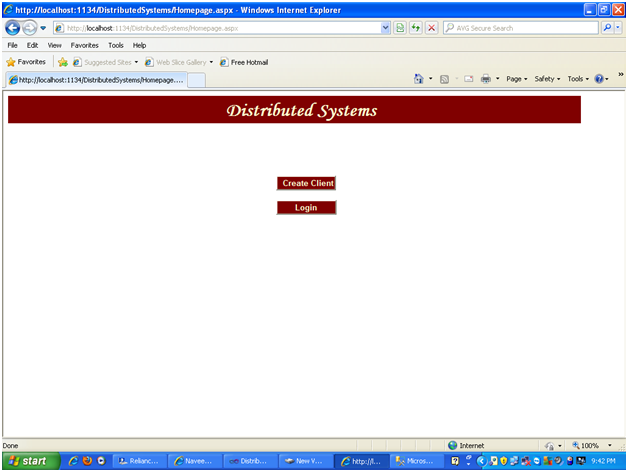
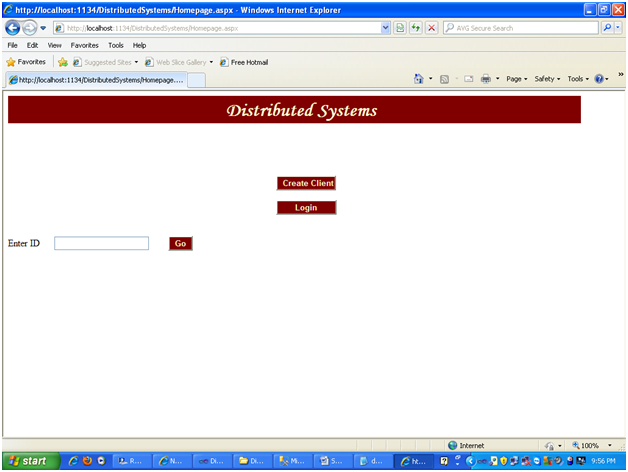
The Home page of this Distribution System is shown in the Fig which facilitates two options. One to create a new client and another to login into the Application (for the existing clients, servers, Master server).When the user clicks on the Create Client button, he can create a client which will be mapped under a server.When the user clicks on the Login button, he should provide the User ID and then can login into the website and perform required operations given to him.

Showing the home page of the Application


Showing the home page of the Application

Client creation:

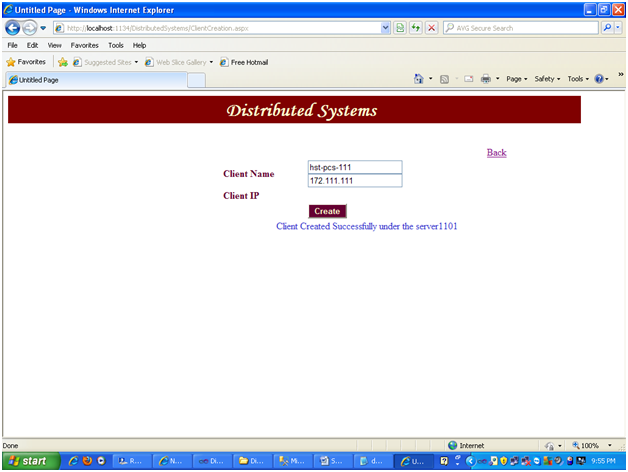
 When the user clicks on the client creation button, he will be redirected to the client creation page as shown in the Fig 4.1(a)

 Client Creation Page

Client Creation Page

 Once all the required data was entered, on clicking login button, the output will be as shown in figure 4.1(a).A message will be displayed as “Client created successfully under server —”

Login Page:

When the user clicks on the Login button, a textbox will be made visible to him ,in which he should enter his own user ID and enter into the application. The screenshot is as shown in

 When user clicks on login button

When user clicks on login button

Login with the respective ID’s to login into the application as a privileged user. (e.g.: Master page ID=1; client ID=111; server ID=1010).Click on Go button.

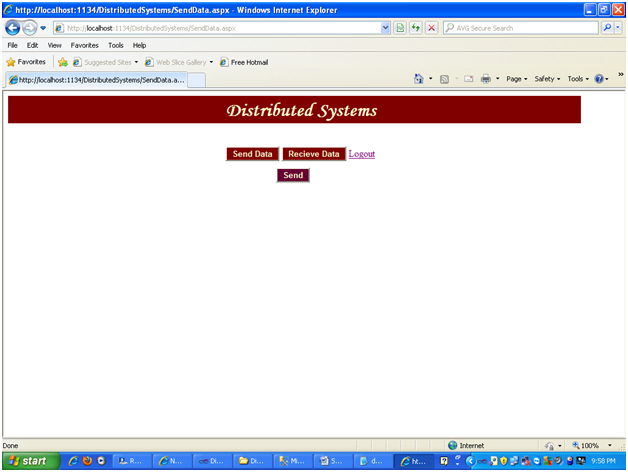
Send And Receive Data (Server/Client): When the user logs in as a client or server the screen will be as shown as  in figure 4.2 where the client/server can send or receive the date.

Send And Receive Data (Server Client)

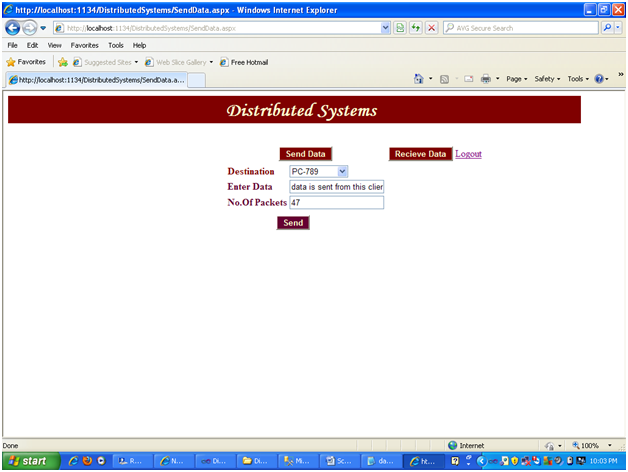
If the user clicks on the Send data button the screen shot is as shown in fig 4.3(a) where he can send the date to the other clients or its own server.

 Sending the data to a destination

Sending the data to a destination.

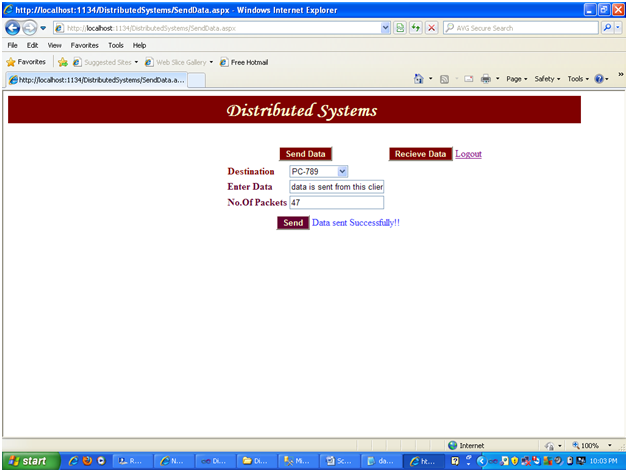
Click on the send button to send the entered data. Once sent a message will be displayed. A message will be displayed to the Client/server if the message was sent successfully as shown in.

 Message showing that the Data was sent successfully

Message showing that the Data was sent successfully

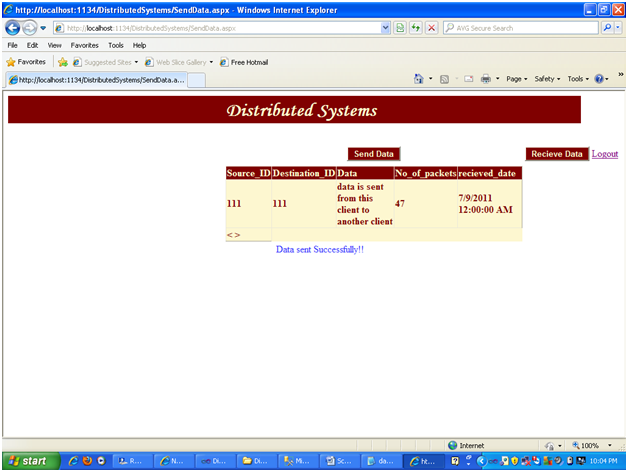
If the user clicks on the Receive data then he can view all the data received by this client as shown in the Fig 4.3(c) 

Showing the received data

Showing the received data 

For Master server Login:

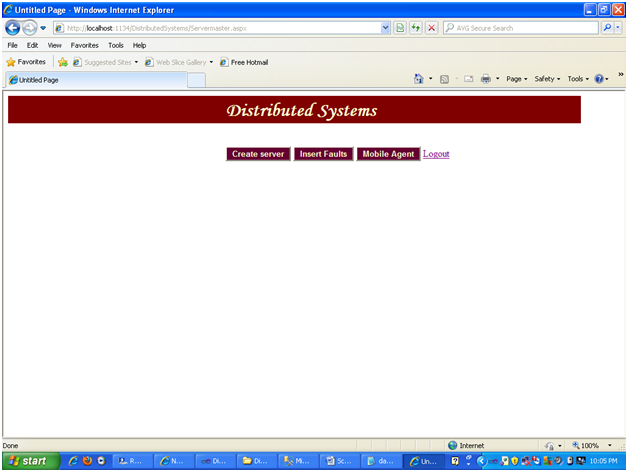
When the Login ID given  is the master server ID in the Login page then the screen will appear as shown in the fig:4.4(a).From this screen the Master server can perform any action such as Server creation, Insert faults, view mobile status.

 Main Page for the Master server login

Main Page for the Master server login

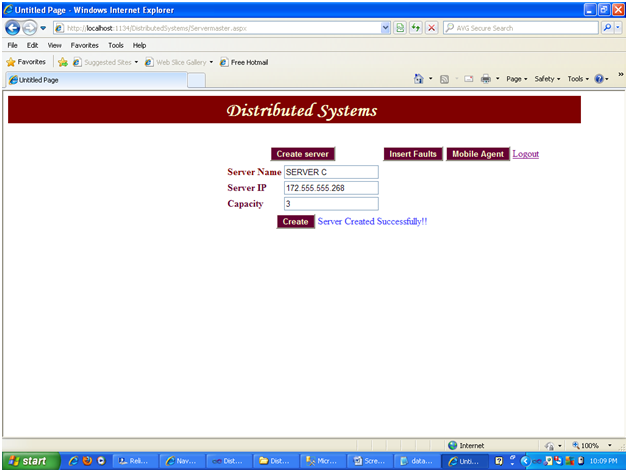
Create server: When the create server is clicked the screen will appear as shown below. Once all the data is entered, click on the create button to create a new server.When the server was created successfully then a message will be displayed as shown in the Fig: 4.4.1(a).

 Showing the Message when server was created

Showing the Message when server was created.

Insert Faults:

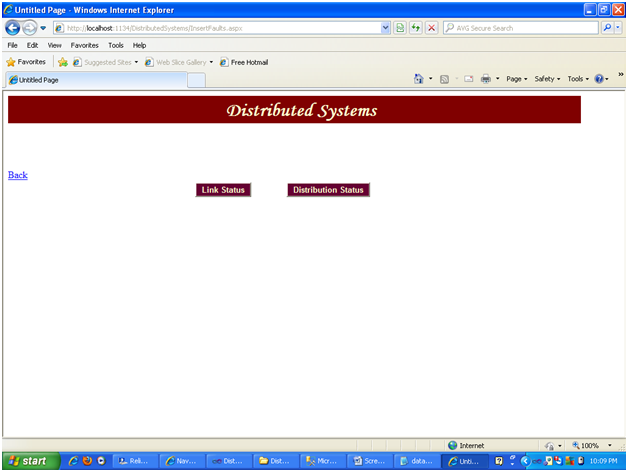
When the master server clicks on the Insert Faults button is the screen shot will be shown as in Fig: 4.4.2

 Faults Insertion Screen

Faults Insertion Screen

Once the link status button is clicked then the screen shot is as shown in figure 4.2.2(a).

 Linked Server page

Linked Server page

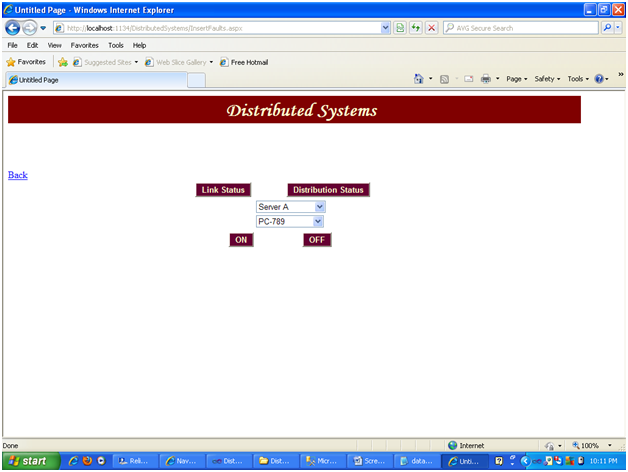
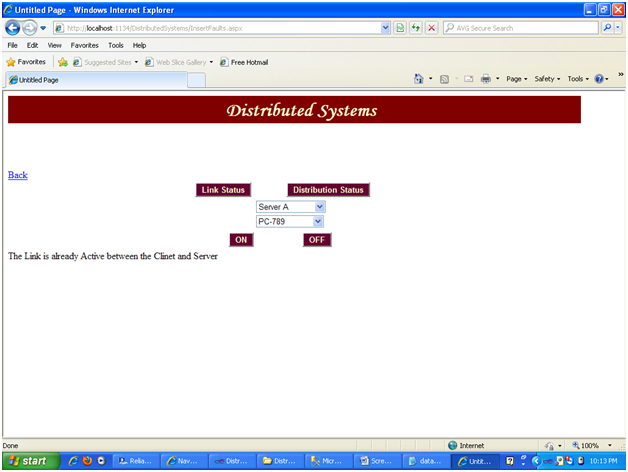
Select the server and the client between whom the connection is to be made ON or OFF. If the Link between the selected server and selected client is already off then a message will be given mentioning the link is already OFF. Same case when we are trying to ON the connections, which are already ON. The screenshot is shown in figure 

Link Status Results Page

Link Status Results Page. 

Once the Distribution Status button is clicked then there will be ON OFF options, which can be used to ON or OFF the distributed network. When the distribution system is off then no operations can be performed. Access is blocked as shown in the below screen when they try to login or create the client from home page as shown in fig

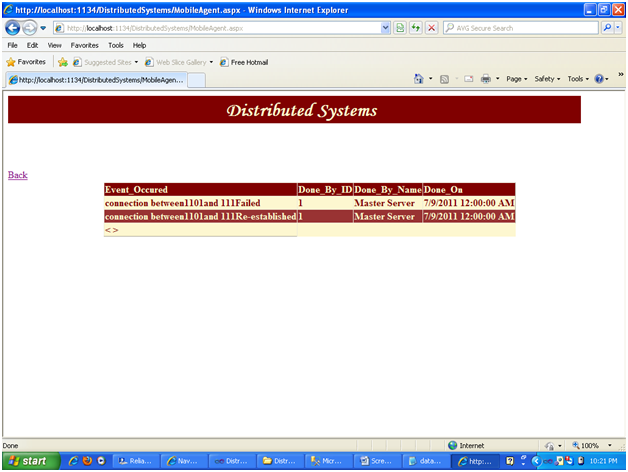
Mobile Status: When the Master server clicks on the Mobile status button, he can see the different events happened in the Network as shown in the.

 When the distribution system Link is Made In-active

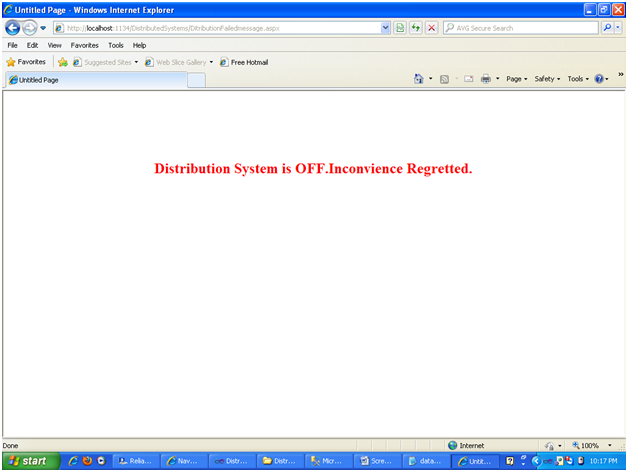
When the distribution system Link is Made In-active by the Master server the Access for all the users will be blocked as shown in the fig 4.5(b)

 Access blocked Screen when the users try to login

Access blocked Screen when the users try to login ( Distribution Link is OFF)

This can be again revoked by the master admin login ID in the same procedure as he has done to OFF it.

Paper Submitted & Written by Sathish Nagarajan

Aqua: A Framework for Providing Adaptive Fault Tolerance to Distributed Applications Project

 The most prominent networking in this generation is distributed networks and this is so famous because this network’s main aim is for vast backup for the distributed programs and nodes interlinked within them. In particular this version supports multiple servers And its supporting clients when compared to other distributed modes in which distributed and parallel computing is provided. As we discussed each sever is connected with multiple clients and this in turn are interconnected with the other clients of different servers mutually all requests are processed. Though there are less limitations a distributed networks pressure is lessened using distributed networks of these the vital one is the fault tolerance system across the network.

We discussed many faults that may fallen in the distributed networks and the most vital one is link failures as well as the distributed mode of N/w down for constant time. In these cases the contact within the nodes can be paused and also we can add the clients or servers for distributed networks easily halted the distributed networks shows so much variance in the performance by applying this. We also discussed variety of fault tolerance system around the text and all the proposed fault systems are stationary in environment hence we cannot collect the information because of link failures. The vital goal of this chapter is to access the position of agents in identifying the faults around the systems and implementing the techniques we discussed around the network.

The concept is designed using Dotnet based application and the proposed design is given in this Aqua: A Framework for Providing Adaptive Fault Tolerance to Distributed Applications Project. We also discussed about master server which can maintain two servers at a time and each of it can take maximum clients. Here new clients can also be used if the boundary is reached it is appended to the next server this way also we can down the pressure of distributed systems. Interface is also done with the help of java and the application procedure its code and the way each takes it birth is explained in detail. We also discussed its consequences.

By studying these consequences we can conclude that there is lot of scope of errors around the distributed networks and link failures as well as network failures is discussed. The link failures can be easily noticed by mobile agent and can be viewed by the user at any point of time this is retrieved from the database once it is saved in database and these are fixed easily by users and opts for another path by sitting the status link to “ON”  or else they can recommend another solution also so that connections are not braked and communication is maintained. We also discussed of options adding clients, sending data, receiving data and how the data is transmitted in this chapter.

Thu we can give a statement that the distributed systems comes around the strong fault tolerance system the faults and these are overcome by a perfect mobile agent and make sure that no communication is lost by connecting to all clients and to its respected server even in the fault occurrence time also this makes the pressure of the load also less. From this it is clear that mobile agent based approach is the right choice.

Future work

                        On the other side the work done with the help of this particular mobile agent based approach in identifying the faults around the network the next coming work is discussed in the following chapter so as it can be advanced in distributed network systems.

  • The methodology which we are using in mobile agent technology is further modified in future and this improves the worth in identifying the faults around the distributed N/W.
  • Not only sample modules but also some real time simulation tools should be introduced by originating it and these are gauged with the different agents and fault tolerance techniques throughout the networks.
  • Still many servers can be appended to this particular network system to diagnosis the real time effect of load on faults around the distributed networks.
Paper Submitted & Written by Sathish Nagarajan

Distributed Systems Final Year Project Implementation and Analysis of Results

Implementation and Analysis of Results 

The Main Aim of this Distribution system Website is to explain in brief how the original Distribution system works actually in the networking world. This is mainly designed to explain how two systems will be connected to each other and how they behave in a network. The networking concept mainly revolves around two characters namely Server and Client. Each server can facilitate n number of client or in other terms each client should be mapped to a server.

In the design of this distributed system, three roles have been incorporated. The three roles in this design are explained as below:

Master Server: This is the main server which will accommodate all the servers. This is Main server under which there can be many servers mapped. There can be only one Master server in the network. This is the system at the highest level in a network model.

Server: This is the server which accommodates the client. This server should be under Master server. There can be any no. of these servers under a Master server in the network. This is the system at mid level in the Network Model.

Client: This is the system at the lowest level in any network model. Clients should be under any server that got mapped to the Master server.

The three roles assumed in this website. The login provided for this website was a role based login. Depending upon the login user’s Role the website will be acting differently.

This website facilitates to map a new client to each server. Each server can accommodate only limited number of clients(less than or equal to its capacity).Each server will have its own capacity pre-defined while creation of the servers itself. If the maximum capacity has reached the newly created client will be mapped to other server which is free (which doesn’t reach its maximum capacity).If no servers were found free i.e., if all the servers have reached their maximum capacities then the Master server should create a new server in order to accommodate the newly created client. 

The design of the Distributed systems website was done in Micro soft Visual Studio 2010 using C#.net technology. The database used for this website development was Microsoft SQL server2008.The complete design and implementation of the website are explained clearly in the below section. This website mainly contains the following modules in it. In each module, initially the Connection component is declared and a connection string, which contains the Database connection properties, was fed. Since the Database used for this website is SQL server the connection we have created should be and SQL Connection.

The SQL connection string contains the database name, data source name, user ID and password. Once the connection was properly defined then the connection is to be opened so as to communicate with the connected database. Then the command is defined and executed over the database. Once the Command is executed, the Connection is closed. All the above-mentioned steps will be followed commonly in all the blocks of query 

Master Server Module:

Master server module includes creation of new server when there is no free server under it. The privilege to create a new server was strictly restricted to the Master server. In addition to the creation of new server the Master server can also Insert Faults, View the status of the distributed system through Mobile Agent.

Creation Of Server: When there are no free servers available on the network,. i.e. when the maximum capacity of the servers was filled the clients cannot be created. In such cases the Master server is requested to create a new server under it such the newly created server can accommodate the Clients which are going to be created. All this concept is encapsulated in servermaster.aspx page. The code of which will be explained below. 
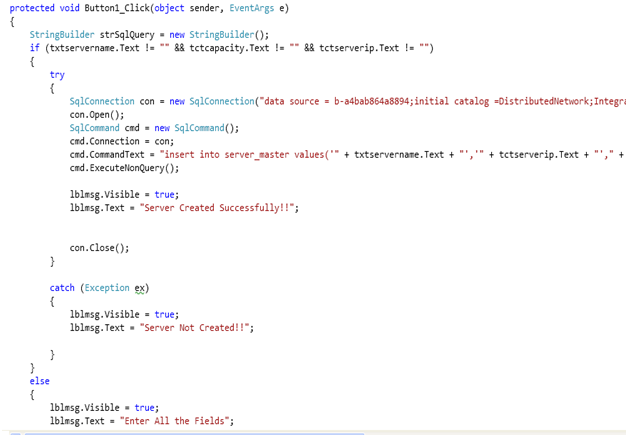
 Code for the Create button in the Server Creation Page

Fig: Code for the Create button in the Server Creation Page

From the screenshot 1.1(a), we can find out the code behind the Create button of the Server Creation Page. When the Master server enters all the necessary data for the creation of server like Server name, Server IP, Server Capacity and click on the Create button then this code will be called.  From this block of code, a new record will be inserted into the server_Master table in the database.

When the Insert statement executes successfully then a message will be displayed to the User as “Server created successfully”. If the Insert Statement didn’t get executed then the Message will b “Server Not Created.”All the values entered by the Master Server Role will be captured as values for the insert statement. This Button click event will be completed only when all the fields were properly entered.

The “Server_Master” is the Table, which will accommodate all the servers. This table is treated as a Master server under which many servers can be mapped. Each server will have one Unique ID through which it can be identified along with the Server IP, Name, Capacity, Status. The detailed Description of the table and its columns is as below:

Server_Master: This table is the assumed as master server, which contains different servers, linked (inserted) in it.

  • Server_ID: Holds a unique number for each server created. Server ID is an auto generated column starting from 1010.
  • Server_name: Holds the name of the server.
  • Server_IP: Holds the IP address of that server.
  • Capacity: This column contains the maximum capacity of the server, means the maximum numbers of clients that this server can be mapped to E.g. if the capacity of a server is 3, then only 3 clients can be created under this server. 

Insert faults:

 Faults can be inserted only from the Master Server Login. The Faults in a distributed system as assumed as two types:

4.2.2(a) Linked server: By this mechanism the Master server can Deactivate the Link i.e. break the Link between any two system mapped in the Distribution Link. The two systems here mean that the Link between the server and any of the clients that got mapped to the server can be deactivated. If the link between the server and client was broken, the to and fro data movement will be stopped. No data transfer is possible between them until and unless the link is re activated again.

ON:

The code snippet for this module was as shown in the screen shot.
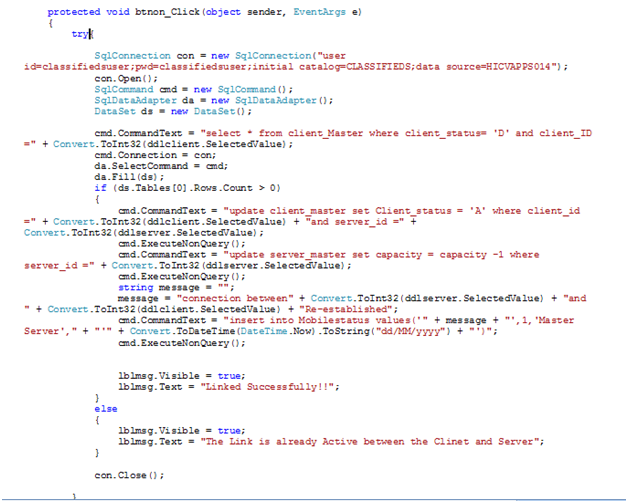
 showing the code behind the ON button in the Linked Servers

Figure showing the code behind the ON button in the Linked Servers. 

Once the Master server selects the Server and the client combination on clicks on the ON button the code shown in the screenshot will be executed. In this block of code we are first checking whether the connection between the selected server and client combination was already ON or OFF with the help of the Select Query. If the record is with status ‘D’ it mean that the Connection is OFF.

Then only we will go into the condition and update the status of the connection between server and selected client as ON. The update of the connection status is done with the help of the Update Query on the Client_Master Table .The description of the Client_master table will be discussed below. If the Select query returns no rows it mean that the Connection between the server and selected client is already ON so need not activate the link again. Once the Connection between the Server and the client is Activated then same event will be logged in the database in mobile_agent table.

OFF:

The code snippet for this module was as shown in the screen shot.
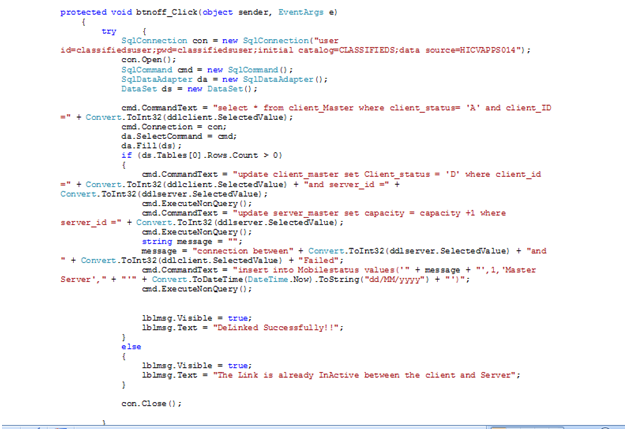
 showing the code behind the OFF button in the Linked Servers

Figure showing the code behind the OFF button in the Linked Servers. 

Once the Master server selects the Server and the client combination on clicks on the OFF button the the code shown in the screenshot will be executed. In this block of code we are first checking whether the connection between the selected server and client combination was already ON or OFF with the help of the Select Query. If the record is with status ‘A’ it mean that the Connection is ON.

Then only we will go into the condition and update the status of the connection between server and selected client as OFF. The update of the connection status is done with the help of the Update Query on the Client_Master Table .The description of the Client_master table will be discussed below. If the Select query returns no rows it mean that the Connection between the server and selected client is already OFF so need not De-activate the link again. Once the Connection between the Server and the client is De- Activated then same event will be logged in the database in mobile_agent table.

Client_Master: This table contains the information of all the clients available in this system.

  • Server_ID: T his column contains the server ID under which the client was created.
  • Client_ID: Unique number given to each client.
  • Client_name: Name of the client.
  • Client_IP: IP address of the client.
  • Client status: This column indicates whether the client is active or inactive. Means, when a link between the server and the client is delinked then the client_status column will be changes.(A:active,D:inactive).
  • Created_date: Date on which the client was created. 

Distribution List:

From this Property of the Master server, it can make the complete distribution system to become In-Active or Active. If the distribution system is made In-active then all the tractions such as creation of clients, servers, sending data, receiving date will be completely stopped.Untill and unless the distribution system status is made active again no other tractions can be done. Soon after a role logins into the application, a message page will be displayed mentioning that the distribution system is OFF.

OFF:

The code snippet for the OFF button of the distributed Link module is as shown in Fig:1.2(b-1)
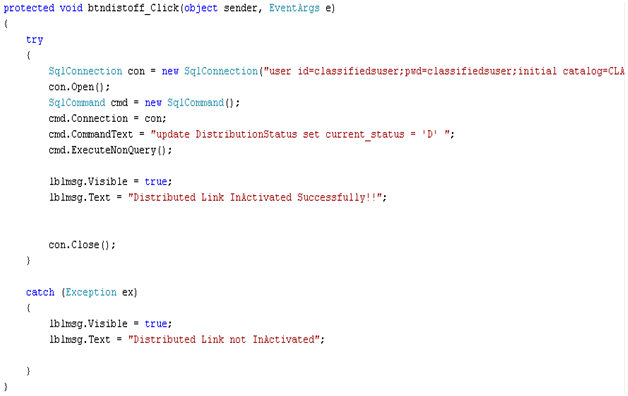
 When the Master server Clicks on the Distributed system0

When the Master server Clicks on the Distributed system there will be two button available for him. ON and OFF. If the master server clicks on the OFF button, the code in the screenshot will be executed. When the OFF button is clicked then the Current_status column in the Distrubutionstatus table will be modified as ‘D’, which means that the distributed system is made In-active. The distributionstatus table will be explained as below.

DistributionStatus: This table is created to maintain the status of the total distributed system. Whether it is ON or OFF.

  • Current_status: Specifies whether the distributed network is active or not.
  • Created_date: Date on which it was created. 

ON:

The code snippet for the ON button of the distributed Link module is as shown in Fig:(b-2)
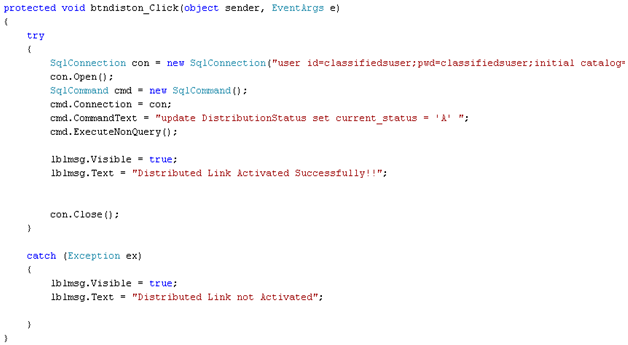
 When the Master server clicks on the Distributed system

When the Master server clicks on the Distributed system there will be two button available for him. ON and OFF. If the master server clicks on the ON button, the code in the screenshot will be executed. When the ON button is clicked then the Current_status column will be modified as ‘A’, which means that the distributed system is made In-active.

Mobile Agent:

When the Master server clicks on the Mobile agent button available in his home page thee this module will be invoked. From this module the Master Server can just view the different events that have been done on the Distribution System connections Such as activation (ON) and deactivating (OFF) status of the clients and servers, activation (ON) and deactivation (OFF) action sod the distribution links. Along with the status, he can also view the details such as by whom that event occurred, at what time was that event happened etc.

The code snippet of the Mobile agent button is as shown in the screen shot.
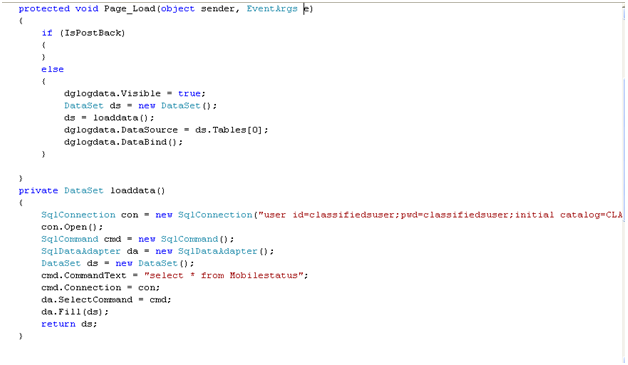
 Showing the code binding the datagrid of the Mobile agent with log data

Fig : Showing the code binding the datagrid of the Mobile agent with log data

From the figure, it can be explained as this. When the Master server clicks on the Mobile agent button then he will be redirected to a new page called as “MobileAgent.aspx”. In the page load of this page, the code to fetch the Log data was written. The log data was fetched from a select query from the Mobilestatus table. The detailed description of the Mobilestatus table can be explained as below. The data fetched from the select query is captured in a dataset. This dataset is fed as the data source to the datagrid, which will display all the fetched data to the Master server in the form of a Data Grid.

Mobilestatus: This table contains the log status informing all the events happened in the distribution system.

  • Event_occured: Mentions the description of the event what actually happed to the system.
  • Done_by_ID: ID of the client/server who was responsible for this event to happen.
  • Done_by_name: Name of the client/server who was responsible for this event to happen.
  • Done on: Date on which this event occurred. 

 Client Module:

In this module, we will cover the creation of clients, sending data from client to its server or any other client that got mapped to the same server. In a similar fashion receiving the data etc. In the home page of this website there is a button named Create Client.

Create Client:

If any user clicks on the Create Client button then he will be redirected to a new page where in which he can enterer all the data and create a client. While creating a client it is important to map that client to a server. So while creation the system which check which server was free and will map the client to that server. If No server was found free then the client cannot be created until the Master server creates a new server.

Once the users enters all the necessary data and clicks on the create button then the code attached in the screen shot will be executed. In this block of code the code will first check the availability of the servers with the help of “GetAvailableServer” the code of which is shown figure. The GetAvailabilyservers() method will select all the servers where the capacity is greater than 0 which mean that the servers were not full. 

All the servers, which are free and retrieved from this select query, will be captured in a Dataset. If there are no servers in the dataset object then the client creation will not be possible. A message will be displayed to the user mentioning the same. 
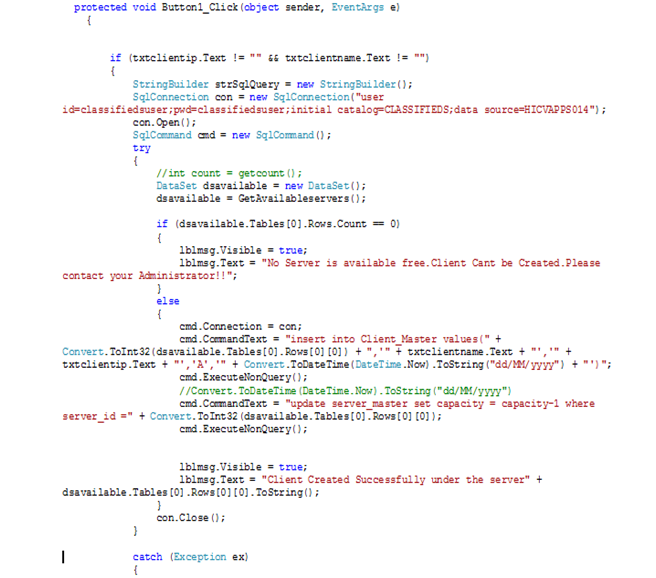
 Code behind the create button of the Client creation Page

Fig: Code behind the create button of the Client creation Page.
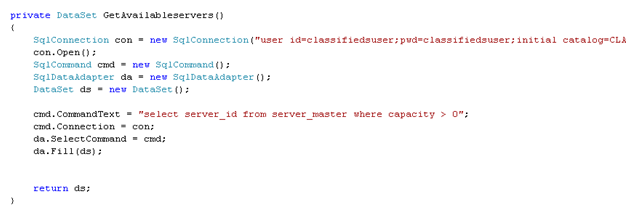
 Code for the GetAvailabilityServer() method ion client creation Page

Fig:  Code for the GetAvailabilityServer() method ion client creation Page. 

On the other side if there are any servers free then this new client will be mapped to one of the free server and a new row will be inserted into the Client_Master table which was discussed in the previous module. A simple Insert statement on the Client_master Table does this. Once the insertion is done, the capacity of the server to which this new client was mapped will be decremented by 1 in the server_master table using the update query. In the same way for each client, the server capacity will be decremented by one. Once the capacity becomes zero it mean that the server had become full and cannot accommodate any other client further.

 Send & Receive Data Module:

This module completely deals with the data movement between one client and its own server as well as between this client and other clients, which were mapped, to the same server. During the data movements there are two components assumed. The Source and the Destination. The source will be onerously the client who logged into the system with his credentials. The destinations can be any one amount the Server of this client or any other client that got mapped to the same server. Means a client can send data only to its server or those clients, which were under the same server, but cannot send data to other servers or any others clients that were mapped to other servers.

When the client logins into the website, his main page will be different from that of the master server page. The client main page will have Send data button and Receive data button.

Send Data:

When the client clicks on the Send data button, the client will be provided with an option to select the destination to which this client is wishing to send the data. The binding of the Destinations in the dropdown list is as shown in the Fig 2.2(a-1)
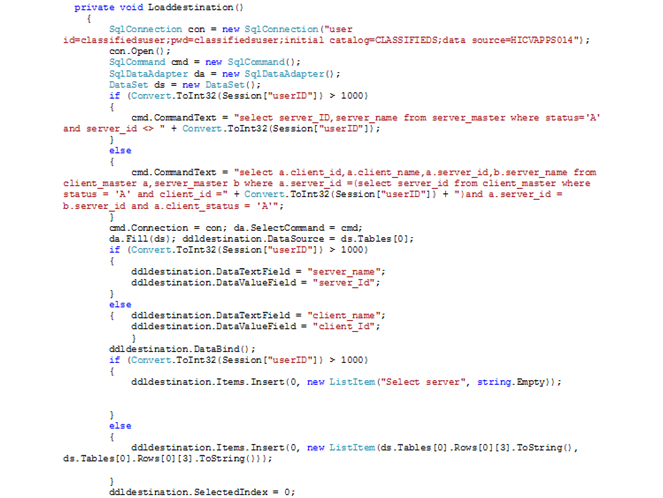
 code for the Loaddestinations method

Fig: code for the Loaddestinations() method.

LoadDestinations method implements a select query which will select the server  of the Client which is sending the data and the other clients which got mapped to the server retrieved .All the data is captured in a dataset and this dataset is fed as a DataSourse to the dropdownlist containing Destinations.

Once the Client selects the Destination to which it will send the data and enter the data in the textbox given the No. of Packets will be automatically calculated and will be shown in the No. Of Packets text box, which is a read-only control. Once all the data was ready to be sent such as Destination Name, Data, and No. Of Packets, the Send button can be clicked. Once the Send button is clicked, the Data will be inserted into the Data Movements Table, which will be described in detail next.

In the button click event an insert, statement will be written which will capture all the required fields’ data and will insert a new row into the Database in the corresponding Table. If the insert query is executed successfully then a message will be displayed to the user mentioning the success notification. If there is an exception while executing the Query then the same will be captured in the Catch Block and the insert statement will be rolled back. The code for the Button click event is shown in the figure
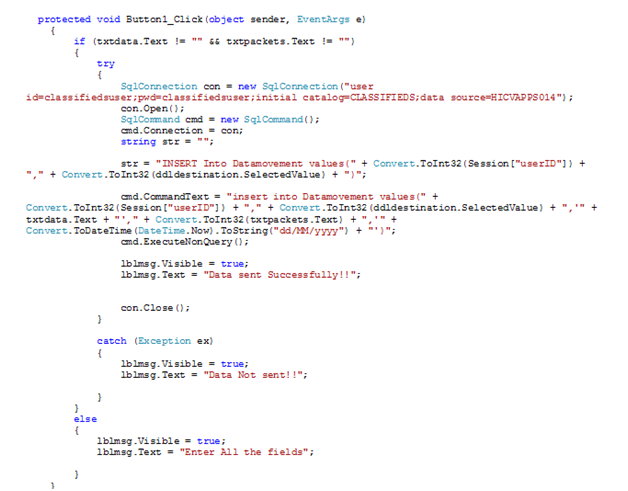
 code for the Button Click method

Fig: code for the Button Click method. 

Receive Data:

When the client clicks on the receive Data button in his main page after login, he can view all  the data he received from various sources. The Data received by this client will be shown in the data grid format. The data received by this client can be obtained by using a simple select query on the table Datamovements. The data where the destination is this Client will be fetched from the datamovement table. Therefore, the Login client ID is saved in a session Variable and this is used fro the filter condition in order to fetch only the data received by this client. The code used to select the data received by this client is shown in the figure Fig:2.2(b)
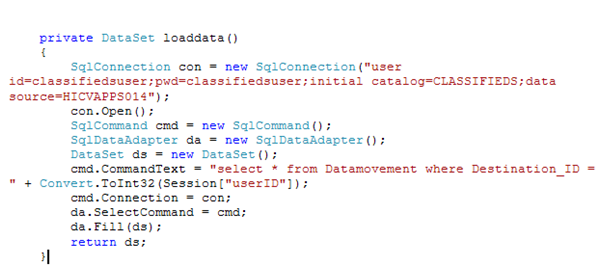
 Receive Data

Fig: code used to get the Data received by a specified Client.

The Data movement table, which is used in send and receive data module, can be explained as below:

Datamovement: This table contains the information related to the data moving to and from between the client and servers.

  • Source_id: The source(client/server Id) from which the data is sent.
  • Destination_id: ID of the client/server, which received this data.
  • Data: The actual data moved between the source and destination.
  • No.of packets: Specifies the number of characters moved (if data=”hello” no. Of packets will be 5)
  • Received_date: Date on which the data was moved.

Server Module:

In between the Master Server and Client there will be one more role named the SERVER. The server is the one, which is mapped to a Master Server and will accommodate Clients under itself. The Server role is just permitted to send and receive Data. Each server can send data to other servers and receive data from other servers as well as the client under this server. The whole logic for the send and receive module of this server role will be same as that of a client role which was already discussed in the previous module of the client. 

All these operations such as sending and receiving data, creation of clients, creation of Server under Master server, Insertion of Faults will be allowed only when the Distribution Link is Active. When the Distribution list is OFF no operations listed above will be done. When the Distribution System link is OFF, Master Server is the one who will have access to ON the Link. Until and unless he activates the Link, the Master server will also be blocked to perform any of its normal functions. So whenever a user logins into the system, the system will first check whether the Distribution Link is ON or OFF.

The code shown in the below figure explains how this logic was been implemented in this website. This check can be done by using a select query on the DistributionStatus table will will be explained below. If the Current_Status column in the DistributionStatus table is ‘A’ then it means that the Distribution system Link is ON. So all the operations can be performed. So the select query will fetch the record if the status is ‘A’.

If there are no records fetched for this select query ,it mean that there are no records with Active status, which mean the distribution link is OFF. So the dataset is checked for any rows. If the Dataset contains 0 rows in its table then the user cannot enter the website, instead he will be redirected to a page where the Message will be displayed to the user mentioning that the Link is OFF. If the user who was trying to enter into the website was a Master server then he will also be provided by a button, which can allow him to ON the link again.
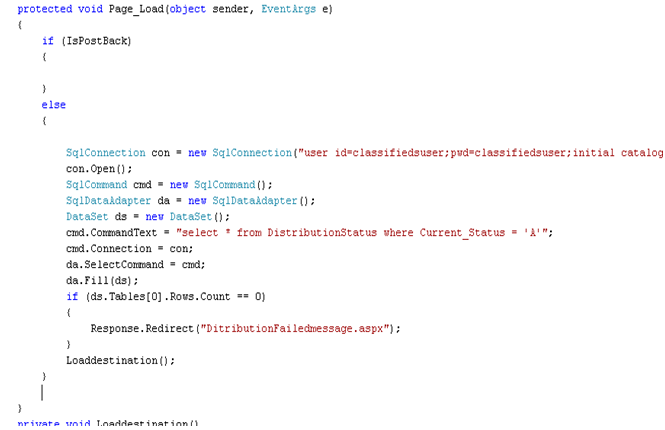
 Server Module

Fig: showing the code for checking the distribution link status in Page_Load event.

Paper Submitted & Written by Sathish Nagarajan

Front End and Backend Design of Tolerance System for Sophisticated Distribution Systems

Since the goal of this project is to develop and apply a fault tolerance system for sophisticated distribution systems with the help of mediator based approach. The entire process is clearly explained in this chapter. Here we use mobile agent as a mediator and hence it is known as mobile agent based approach. It is used to find the failures around the network systems and fault tolerant system is also given across the application. Here everything including both the front end and backend design is explained below in detail.

Front end design:

                            With the help of Java an imaginary dynamic distributed network is developed and this is supported by two servers and also four client modules and the nodes linked with these are expected as distributed in environment. Each sever cannot handle more than two clients hence required two servers to maintain four clients .These particular servers are again maintained by one master sever and these are maintained in such a way that they are distributed in single master server. These two servers act as demo of the master server. The entire scenario including design as well as programming is explained below.

Master server

                           Master server plays a very crucial role in this particular scenario. As this is required for the maintenance of the other two severs. These two servers do not depend on each other and are well distributed. Master server is shown with the help of icon and this is used by end-user makes the process to begin. Start and stop modes are provided to the clients once the start mode is pressed the master server initiates the two servers. When the users choose the “stop” mode is enabled through any of the servers the master sever automatically gets switched off .The starting process is explained in detail this process is given below. 

Server modules:

                   As we discussed two servers are developed and acts as distributed servers and these servers can hold two clients and in upcoming many clients can be attached to it while designing taking into considerations and this facility is given ate developing level itself. A sever module consists of few components which is briefed in later stages. And this server is named as sever A while other one is named as  server B ON and OFF buttons are given for each server this is done with the help of server icon once the on button is enabled the server gets started and these operations are performed as given below.

Send data

The initial operation and the important operation available is to send the information and his can be done by simply clicking the button. Once the client clicks this button a pop up window opens and asks for the file to select as the file is selected the further step is to choose the client since each server can take-up two clients, these clients can be identified with IP address or client name. A ideal number is allotted to each client for identification this is known as IP number or IP Address of the particular client as the application is outstanding it cannot be demonstrated through N/W operations.

                               Once the process is done by selecting the client automatically the sending process starts and this can be viewed graphically till the information reaches the client. Here one more option is provided to user the total number of packets transferred to client can be viewed.  In general the users can look how many data packets to be transferred and how many data packets can be received at the other end user can transmit these to the selected client as discussed earlier and the data sent is saved in the client’s back end with the server name and records its data packets and the client id.

Receive data

Servers gets the data transferred from clients to receive this another button is supplied to the users in the server icon .Once this is done the server receives the information from the particular client which contains the information and the data received is saved in server i.e. in back end we can count number of packets also. For this to happened the communication link should be perfect this is explained below

Link status

                             Link status acts as a scavenger in this process it is connected between server to client and the status is obtained from both the ends before sending it as well as receiving it once the status is ON, to know the status of the data whether received successfully or not and the off status denotes that data sent is not received and failures are given. This can be done at any point of time and if any failure occurs the status default turns to ‘OFF’ from this we can access that failures exists in the system around the network and once the failures are picked based on this a fault tolerant system is designed and by implementing it the link status is set to on for communication process   

Add clients

                         Adding of clients is also done the users this is done by the button provided in the server icon once the client is additional to the network an IP address is given to the client and everything is processed by this number. The addition of client leads to create a row in backend and all the details are registered in this row the server icon contains a add click button this gives a option to select the required server for which clients need to be appended. Adding of clients is very sensitive because each sever supports only 6 clients hence this done carefully.

Distributed network module:

                              For this application to be considered as distributed network one distributed network is shaped individually some assumptions are done in this context. In this scenario a metrics is created by fixing the clients required and the data to be transmitted and if this parameters which are chosen crosses the range a backup server is selected for addition of clients and this is utilized to maintain the requests the prerequisites to be maintained in this scenario are given below

  • A server maintains only 6 clients if more than that occurs it is automatically appended to the other server.
  • An extra server is further created depending upon the client’s requirement once the 6clients limit is reached.
  • As we know each server definitely handles the 6 client requests for to and fro of  the data once it across the boundary in this scenario.
  • Master server maintains all the updates in the level sever as discussed above

Client module:

A brief explanation to the network system (distributed) and the server scenarios are explained better. These designs are delivered for the client module is explained here. As we all know a server can maintain 6 clients these clients will intercommunicate with each other or they can also communicates from one server to other as the limit is exceed following are the important operations of the client module.

Send data

Clients can pass the data to the required server or to the successive client depending upon the strategy this strategy is designed by the end user whether to connect with the server or the successive client. Naturally the users are provided with some choices and one of them is peer clients with the particular server and in any way the distributed network circumstances are ruined a warning message appears that the sever is not free and now the servers can select another one to  send the particular request. While passing the data users are given the option to choose the field it maybe text field once the selection is over send button is pressed and these details are automatically saved in the back end. The data sent may be gathered by server or other client within he server or client of the other sever.

Receive data

Clients gather data either from the server or client and for this purpose a particular module is designed for this scenario. A link is available to check the data whether received from the server or client. Users are provided with a facility as they can click on the link if required a table pop ups showing all the particulars of the received from the sender and the columns in the table are sender id, time and date in which data is sent and also the content of the data once the entire process is done the user can download all the details when required. This data can be easily fetched from back end for identifying the faults as given below.

Fault detection module

                            The main goal of this project is to access a fault tolerance system using mobile as agent for this particular system a fault detection system is introduced in this scenario. To identify this faults few of the errors are introduced knowingly and once this is done this is invoked to identify the corresponding faults and these faults can be rectified by using this agent. These are explained in detail                      

Fail the link

                         The communication links between client and server are made to fail in this scenario this can be obtained by the end users by selecting the appropriate link in medium the server and the corresponding clients. For this purpose  a separate button is given to the users once the link is clicked it is intentionally made to fail when the user selects it particularly .The status automatically turns to OFF and this is seen in the status scenario and at the same time it is appended in the status log also. A Failure table is also created and all the log details are maintained here. This is explained with better example with link failures and count of nodes between the link and the failure time occurrence is noticed in the table  

Distributed network failures

When the users opts this one the scenarios which are discussed earlier does not work anymore and also makes the other servers or clients not to work to send the requests. the status automatically turns to off and once this is done distributed network option no more works and all the details are recorded in the failure database. This is explained by a simple scenario two simple failures are taken into consideration in this process .once the user detects these failures a special button is given once this pressed all the failure steps are viewed by the end users and these particulars are collected from the failure backend system.

Mobile agent based fault tolerance module

                         Here comes very important part i.e. mobile agent based fault tolerance to identify all the failures and to come with a better solution for these failures. For this agent selected is mobile agent this fetches all the failure results from the database table and starts operating on them. This is started by pressing the run button and after detection it delivers solution this are explained further. 

                         The link failures are easily detected if they occur here this agent will approach other parallel links this can be understand by example suppose there is link failure from client to server B or other client this mobile agent does it works by scanning it and proposes other links to the server or client sometimes both bypassing through other clients .the users always has best option to choose with the help of this mobile agent And the link status is set to ON the users can move on with this mutual transmission.

                         The other failure is distributed network failure when the user doesn’t make utilize of this choice. The particular mobile agent repairs it the particular scenario in the discussed manner. Mobile agents work is to add more servers to this request and clients are originated based on these servers provisionally and make sure the network option is ready to work and disconnects once the actual fault is cleared and the distributed network is enabled and this choice is made regularly whenever the problem occurs above discussed manner.

Paper Submitted & Written by Sathish Nagarajan
Fault Tolerant Techniques in Dynamic Distributed Systems

The dynamic distributed systems have several domain mangers in general and it is very tedious task to handle the issues and faults in the domain managers. Many fault tolerant techniques are also based on various mobile agents, but the only problem here is lots of computational overhead in gathering the mobile agent’s updates.

The failures and faults in the distributed systems always need an effective monitoring system for handling them and because of few reasons the performance of these monitoring system is degrading and such reasons are several tasks from various independent are to be monitored and endless growth in the infrastructure and so in order to address these issues the monitoring techniques should be even more perfect and so it should be in better mobile agent based systems are required for handling all these issues. Here there is also some possibility for the system updates that are heterogeneous and resources that are managed becomes strong and therefore the mobile agents and current static monitoring are not enough as the updates of monitoring are obtained by the dynamic mobile agents for improving the performance of the distributed systems.

Generally a mobile agent is a module of software which is independent and autonomous and this can monitor the user request from the individual users working on individual systems in a distributed network and can also visit all the mobile nodes in the network and gather monitoring information from those. There are some advantages for the mobile agents and they are enabling and delaying the execution of programs asynchronously, controlling the traffic across the network, obtaining updates of the networks very dynamically.

There are two types of mobile agents that depend on monitoring and they are hierarchical and centralized, in the hierarchical method the agents will visit all the mobile nodes in the network depending on a hierarchy that is defined already and in the centralized method the updates are returned from architecture that is centralized. Scalability is the significant issue in case of the centralized method and this in various factors can be solved by the hierarchical method.

The network is divided in to various hierarchies by the hierarchical monitoring system and for every hierarchy a monitoring agent is deployed and then the scalability problem is solved with ease. Developing a “mobile agent based monitoring system” that is based on the hierarchy is the chief aim of this project, for this a network is entirely classified into several hierarchies and for every hierarchy a strong mobile agent is deployed for every hierarchy and this agent will collect all the statistics and updates from the nodes of each and every hierarchy. 

The concept of “dynamic distributed systems” is simplified by considering a wireless sensor network as a dynamic distributed system by default and the nodes of the wireless sensor networks are considered as the independent computers.Depending on the node model the complete wireless network is separated into various hierarchiesand for every hierarchy a software module that is a mobile agent is deployed for gathering the statistics and updates related to the nodes of that hierarchy in that network.

Across the wireless sensor network few faults are incurred for developing an effective system and those faults are delays, requests of large database and lots of network traffic. Therefore these mobile agents are used for monitoring the behavior of the wireless sensor network and that results are tracked and expected and available solutions are discussed in this application.

Paper Submitted & Written by Sathish Nagarajan
Fault Monitoring System in the Dynamic Distributed System

A perfect fault monitoring system is required in the dynamic distributed system because as already discussed previously there are many chances for the occurrence of several faults and problems and so these faults must be monitored by the fault monitoring system.

The literature part of this document covers different fault tolerant techniques and these techniques uses few agents for handling the faults in the dynamic distributed systems, and the agents used will gather the updates and the statistics of the distributed systems and these updates and statistics are considered as the inputs by the fault tolerant techniques and even the decision regarding the real plan of action is also taken depending on the inputs gathered by these agents.

The range of application that is involved in the distributed system is the basis for the working mechanism of the agents and these are agents are called as mobile agents because of the reason that these are in the wireless sensor networks or mobile networks.

The responsibility of monitoring the network and the network performance in all the circumstances is handled by the mobile agents and the information regarding this is provided to the fault tolerance techniques for making them know about the condition of the system whether it is on track or not and all this is based on the outputs that are expected and the conditions that are already defined.

Generally the nature of the mobile agents is dynamic and asynchronous and also the wide ranges of faults across the distributed systems are handled by these agents. These agents also take the responsibility of adding the resources and removing the resources in a network.

Paper Submitted & Written by Sathish Nagarajan
Distributed Systems Introduction Paper

The distributed systems provide difficult polices and services and this was the reason for the wide increase in usage of these distributed systems. Across the distributed systems, connecting of various independent computers at a single place is the general process for creating a distributed architecture. These systems provide accessibility for the resources of the system such as the local memory. The communication process among these independent computers is carried using the technique called “message passing technique”.

Solving the logical problems and computational problems is the most common and significant goal of the distributed systems and the problem is divided in to separate entities and the independent computers work on solving these entities of problem by an individual user. In any type of the distributed systems the significant aspect is distribution of resources among the connected computers, the sharing of resources among the independent computers is done using three different methods and the literature review chapter includes the detailed explanation of these methods.

The problem considered in the project can be achieved in the distributed system by monitoring the individual computers and computational nodes. The problems and faults that can occur in the individual systems during the monitoring can be considered as faults and these are recorded during the monitoring of computational nodes. The faults observed in the independent systems that are caused by those computers only must be tolerated perfectly and for this the distributed systems must be implemented in a perfect approach.

Distributed computing or distributed systems supports a good range of applications and the mostly supported applications are the telecommunication networks, peer to peer networks, distributed database management, wireless sensor networks, internet systems, routing algorithms and network file systems. Achieving the main goal is the main aim of distributed systems and this is carried by combined working of several independent entities using all these applications and the performance of these systems can be estimated on the whole by considering all the systems connected in that particular network. A dynamic distributed system is an advanced version of distributed system which is arrived because of the advanced growth in the technology.

This new version system has several new features which are advanced like allocation of resources for all the independent systems on the distributed systems and dynamics sharing of data and few algorithms are used for providing these features.

This dynamic distributed systems have several problems that are already present with it and the significant issues among them are controlling the mobility of processor, tolerating the failures observed in the network, when there is change in the topology then the system is updated with a update and controlling the requests of dynamic database. Across this dynamic distributed systems the most important responsibility is passing the messages and during the communication of these messages several distributed memory objects are used and simultaneously there are many chances for the occurrence of failures in the process of distributing the “shared memory object”.

The other most common problem in the dynamic distributed systems is maintaining a duplicated “database base objects” and the energetic updates from the independent systems in the network may interrupt the process of duplication and the distributed system is made ready for the faults by the kind of communication that involves the communication in groups and logical techniques of message massing.

Paper Submitted & Written by Sathish Nagarajan