Fault Tolerance in Distributed Systems Project Abstract

In present days the usage of distributed networking has increased rapidly, using these networks has many advantages; in addition to the list of benefits distributed networks also has some disadvantages and the faults that are observed among the network are considered as the important disadvantage of distributed networks. Switching the mode and failures of distributed networks are considered as the significant faults and these faults can be retrieved using fault recovery methods and the literature review part of this Fault Tolerance in Dıstrıbuted Systems document covers several fault recovery methods.

Many of these techniques of fault recovery are static in character and even the dynamic link failure over the distributed network cannot be deleted by these techniques. Evaluating the role of the “mobile agent” of the distributed system by depending on the fault tolerance system is the significant aim of this project. An application based on Dotnet is used for achieving the proposed aim of the project. The tables required in the project are handled using the SQL and the user interface required is created using the swing framework.

A master server and other two servers are established and distributed network off and link failures are the faults inserted here and two clients can be handled by each and every server. The entire performance of the distributed networks can be improved by using the mobile agent and even the potential link failures can be handled by the mobile agent and all this is proved from the results obtained.

Aims and Objectives:

This Fault Tolerance in Dıstrıbuted Systems research has the few aims and objectives and they are represented below:

Aim: To design an energetic mobile agent very that depends on the hierarchical model in order to tolerate the faults that are caused among the vigorous dynamic systems.

Objectives:

The research is preceded with the objectives given below:

  • To estimate the drawbacks in the literature by the disparate analysis of various mobile agents that depends on the fault tolerant systems which are implemented for monitoring the faults in vigorous distributed systems.
  • To implement a fault tolerant system based on the energetic mobile agent with the utilization of Dotnet application and that fault tolerant system should be developed in such a way that it can gather all the statistics from various mobile nodes of the WSN.
  • To maintain the routing tables by developing a SQL database and to save the information of monitoring that is gathered.
  • To estimate the results by testing the applications over the aim of the research project.
Paper Submitted & Written by Sathish Nagarajan

Security in Cloud Computing using OPNET Project Proposal

Project background 

Cloud computing is the widely used technology across the software organizations these days. In general cloud computing refers to the on demand usage of the resources required for the clients and these requirements can be on the lines of data and software through a typical computer network. If the clients or users of the cloud computing need some resources like word processing, they can request the service providers even if the required software or data is missing at their local location. All the data and the required software operations as per the need of the clients and the users are provided by the service providers.

If the client or the end users has a minimum set of software’s like a operating system or a web browser, they can be connected easily to the cloud computing service provider and enjoy the privileged benefits of the cloud provider. In general a cloud computing technology works under the guidance of sophisticated techniques and the minimum requirement for this technology to work is a well established network with the appropriate connections to the end users and the service providers. The cloud can be accessed through an internet or an intranet or both in some cases and the service providers utilizes the network connections to provide the required services to their client or end users as per their requirements.

Security across the cloud computing has an important role and there is lot of research done towards the security of the clouds and the corresponding data security issues. There are lots of security issues with the implementation of cloud computing which were unsolved yet and the most common among them are the network security and the common cloud security. Information security is also another important aspect to be considered across the cloud security and there are different models to provide the cloud security. In this project the important network and information security across the cloud computing are evaluated and the main aim and objective of this project are as listed below 

Aim: To evaluate and develop a network and information security model for cloud computing security using OPNET. 

Objectives 

Following are the research objectives 

  • To critically review the cloud computing technology and the current trends in cloud computing
  • To evaluate the security issues with cloud computing and in specific information and network security.
  • To design a cloud computing security model using the OPNET and the corresponding scenarios
  • To simulate the proposed design using OPNET and compare the scenarios
  • To evaluate the results by running the simulation
  • To compare the results and evaluate the performance of the proposed cloud security model with respect to network and information security. 

How these objectives will be achieved 

  1. Literature review on cloud computing is done based on few articles, journals, academic publications and ACM digital library reference
  2. Different security issues of cloud computing are studied with the help of above mentioned references and the corresponding issues are evaluated with respect to affect on the cloud security.
  3. Information and network security are studied and the importance with respect to cloud security are evaluated
  4. A detailed design is done with the help of different scenarios using OPNET simulation tool
  5. Information and network security issues are evaluated in this design and the performance metrics are set against the simulation process
  6. Now all the designed scenarios are simulated using OPNET tool and the simulation is run against the performance metrics to measure the security model aspects
  7. Results of the scenarios are compared and analyzed to evaluate the security model created for the information and network security of the cloud. 

Reason to choose this project 

I am interested in cloud computing and has done some research towards the security issues of cloud computing. As per my findings there are lot of security issues to be addressed with respect to the information, network and data security and thus I thought of developing a feasible security model for cloud security with respect to information and network security using OPNET simulation tool. 

Resource requirements 

Software requirements 

OPNET modeler 14.0 or later

Operating system: Windows 7 

Hardware requirements 

PROCESSOR        :    PENTIUM IV 2.6 GHz

RAM                    : 1 GB

Project Plan 

Task Description Start Date


End Date


Duration
Introduction


Basic introduction to the project along with the problem definition and aims and objectives are defined in this section.


    1 week


Literature review


Following aspects are covered under literature review

  • Introduction to cloud computing
  • Review on usage of cloud computing and different clouds
  • Review on security issues of cloud computing
  • Analysis of information and network security issues with respect to cloud security and the possible solutions to be implemented.


    4 weeks


Design


Following design aspects are covered under this section

  • Scenarios design
  • Parameters design


    3 weeks


Simulation


Following aspects are covered under the implementation section

  • Network setup
  • Simulation of the scenarios
  • Running the scenarios against the parameters


    4 weeks


Evaluation of results


Results achieved after running the individual scenarios and after comparing the scenarios are explained in this chapter with reference to the aims and objectives of this project.


    2 weeks


Conclusion and Future work


Conclusion from the total work done and the results evaluation is given and the better ways to improve the project in future are also explained.


    1 week


 Deliverables 

Following are the project deliverables 

Initial reports holds the below information 

  • Literature review on cloud computing
  • Review on security issues of cloud computing
  • Report on possible measures to be taken against the information and network security issues of cloud

Interim report holds the below information 

  • Design aspects of the simulation to create the security model
  • Detailed explanation to the scenario design and security model design
  • Simulation steps and the corresponding explanation 

Final report contain the below information

  • Information from both the initial and interim report
  • Simulation procedure done
  • Simulation results
  • Results evaluation and
  • Conclusion and future work

Final product contain the below information 

  • Simulation of the proposed security model
  • Better security for information and network for the cloud security.

Project Proposal Submitted by Sathish Nagarajan

Introduction to Chess Game Algorithm

Similarly some other studies have ways of different approach,  (Quon, 2005) like concentrating mainly on the algorithm and gaming tree but not concentrating on the AI in the program, in the similar study of  this type  (S. Russell, 1995) has developed a game tree by producing a minimax algorithm, russel has produced some moves from certain position by giving the tree evaluation way, and also he suggested to reduce the search whenever it reaches a certain point of limit. The author also evaluated a method called alpha-beta pruning which will remove the branches of the tree so that it will not affect the final result.

At the same time André Pereira (André Pereira, 2009) suggests that pervasive chess game like programs are very helpful for the AI techniques in games and he also proposes a development that has made in chess game using AI techniques has resulted a very success. So in reference for his way  (Levinson) proposed an article about role of chess in artificial intelligence research  which has evaluated that many AI techniques have their evaluation of devopment in the gaming field in way to make the computer to grand master level and gives a perfect outcome.

For example, Hypothesis Model for developing the game, (Lemeire) (Michelle Cowley, 2004) in this Lemeire comes with outcome that will come by the step by step where each step is related with the next one, in the initial step that is ‘Cognitive study’ he checks the design with the current existing algorithms and  assumes whether the desired outcome is expected or not , in the next step that is the ‘Hypothesis Validation’  he makes an evaluation of the current situation whether it is success or not, then in the next step

‘Theoretical Proof’ after verifying the results from the above stages the inputs for the next step are available then the author has different hypothesis levels for getting the desired outcome, observing the theoretical proof the next step is the implementation where the actual hypothesis way starts, which is by hypothesizing the patterns for the outcome by going in an explanation based research  and verification will done so that the expected outcome is delivered

Similarly there is an approach in the model which was given by Michelle Cowley and that approach is a ‘Scoring Confirming and Falsifying hypothesis’ test in this approach at each stage ways the path to the next stage, in the scoring stage the inputs for the confirming stage are produced, then in the confirming stage the inputs from the scoring are tested in the confirmation bias, then in the Falsification stage the actual results will be produced. 

Introduction to Computer Chess Game Algorithm

There are so many types of Artificial Intelligence (AI) techniques such as (Marsland) (Bernstein)

  • Minimax Search Algorithm
  • Alpha-Beta Algorithm
  • Minimal Game Tree
  • Aspiration Search
  • Minimal window Search

So in this development the MiniMax approach is suitable for the development, so a small description about Min-Max approach

MiniMax: From a lot of AI techniques minimax approach is one of the best approaches for gaming, as chess in a two player node game there are two nodes for a move and the best move that is the most successful one has to be selected for the sides, so for a perfect minimax search the every node of the sides has to be searched and the search will start from the length and the depth of the nodes, because the result of the game can’t be known until and unless there is an end or checkmate of the search so that the depth of the game can be known, so search involves the best move for the each side.

Quality of Service of Crash Recovery Failure Detectors Project Proposal

Project background 

Distributed systems are widely used across these days and the performance of the distributed system can be measured against different factors and dependability is one of the important factors among them. As the usage of distributed systems has increased a lot worldwide, there are different ranges of fault tolerant mechanism to ensure the exact dependability across the distributed systems. There are many research papers submitted against the dependability of the distributed systems and still it is a great research area. There are different fault tolerant techniques that were introduced to achieve the desired dependability across the distributed systems and to enhance the quality of the service oriented applications across the distributed systems. Apart from the tremendous efforts kept towards achieving the dependability for the distributed systems, still there are many problems across the service oriented applications like detecting the exact failures across the distributed systems and also identify the failed components across the application implementation.

Among many recovery techniques in place to identify the failures, crash recovery has a great importance and there are different models presented across the crash recovery aspect. Detecting the failures across the distributed systems is the common task executed and apart from that the key achievement should be to provide the desired quality of service (QoS) against the failure detection techniques and in specific the crash recovery. In general a simple crash recovery should contain few aspects like identifying the affect on the target, level of effect on the target and observing few aspects like whether the target can be recovered or self healed and the perfect crash recovery should focus on these aspects to detect the exact crash recovery measures. 

In general, whenever there is a crash across the distributed systems, the crash recovery program should stop the joining of the new members to the distributed system and once the recovery process is completed, the joining of the new members should be allowed and this can be considered as the key step across implementing the perfect crash recovery and also to achieve a perfect quality of service. To implement a perfect crash recovery across the distributed systems, always self-repairing and self-healing techniques should be implemented and also the level of this self-healing can be used to measure the accuracy and reliability of the crash recovery implementation across the distributed systems.

In general across the global scale distributed systems, there could different types of crashed and detecting the crashes and recovering them is really a tedious job with respect to providing the quality of service metrics. In this project, the quality of service requirements for a perfect crash recovery program is evaluated with respect to mean time to failure (MTTF) and  mean time to recovery are estimated and the actual aim and objective of this project are as given below 

Aim: To evaluate the quality of service requirements for crash recovery models across the distributed systems 

Objectives 

  • To critically review the distributed systems and their working methodologies
  • To review and investigate various crash detection and recovery techniques and evaluate their performance and limitations
  • To design the quality of service metrics like mean time to failure (MTTF) and mean time to recover (MTTR) across the crash recovery techniques for the distributed systems
  • To implement the proposed design using the dot net coding
  • To evaluate the results against the MTTR and MTTF parameters and evaluate the quality of service requirements for the crash recovery across the distributed systems. 

How the objectives will be achieved 

  1. Literature review is prepared by referring the academic articles, journals, publications, ACM digital library and few websites
  2. Various aspects like the review on distributed systems, crash detection, failure detection and crash recovery techniques are analyzed using the references as mentioned above.
  3. Different quality of service requirements are analyzed against the crash recovery technique for distributed systems and they are reviewed
  4. Design of the application is done using dot net framework and the front end and back end are designed
  5. All the required screens are designed and the required database is created using SQL server
  6. Proposed system is developed using dot net coding
  7. Results are evaluated and the performance of the crash recovery technique is studied against the quality of service requirements
  8. A sample distributed system with multiple applications running is considered and the system is eventually crashed at the programming level and the corresponding crash recovery module is invoked and the required quality of service parameters like MTTF and MTTR are evaluated across the implementation part
  9. Results are evaluated against the aims and objectives of this project with reference to the future work to be done by concluding the actual work done. 

Reasons for selecting this project 

Distributed systems are widely used across these days and even the range of application support for the distributed systems is high. Crash recovery and the corresponding quality of service requirements are really essential to estimate the performance and dependability of the distributed systems. I am interested in developing a perfect crash recovery technique with reference to the required quality of service metrics and thus I have chosen this topic. 

Resource requirements 

Hardware Requirements: 

PROCESSOR        :    PENTIUM IV 2.6 GHz

RAM                    : 512 MB 

Software Requirements:

Software requirements 

Operating System       :  Windows XP/2003 Server

Coding Languages         :   C#.Net, VB.Net,

 Data Base                  :  SQL Server 2005

  Front End                :  Microsoft Visual Studio .Net 2008 

Project Plan 

Task Description Start Date  End Date  Duration
Introduction  Basic introduction to the project along with the problem definition and aims and objectives are defined in this section.      1 week 
Literature review  Following topics are covered under literature review 

  • Review on distributed systems and different crash recovery techniques
  • Evaluation of various crash detection and recovery systems and their limitations
  • Review on quality of service requirements to implement a perfect crash recovery technique


    4 weeks 
Design   Following design aspects are covered under this section


  • Front end design of the application
  • Database design
  • Modules design


    3 weeks 
Coding and Implementation  Following aspects are covered under the implementation section 

  • Coding all the modules
  • Establishing the database connections
  • Implementing the modules
  • Explanation to the important coding functions


    4 weeks 
Evaluation of results  Results achieved after running the individual scenarios and after comparing the scenarios are explained in this chapter with reference to the aims and objectives of this project.      2 weeks 
Conclusion and Future work   Conclusion from the total work done and the results evaluation is given and the better ways to improve the project in future are also explained.


    1 week 

 Deliverables 

Following are the project deliverables 

Initial report contain the following deliverables 

  • Introduction to the project and problem definition
  • Literature review on distributed systems, crash detection and crash recovery techniques
  • Review on various quality of service metrics to measure the performance of the crash recovery systems 

Interim report contain the following deliverables 

  • Detailed explanation to the front end design
  • Detailed explanation to the database design and tables used
  • Explanation to the QoS metrics chosen like MTTF and MTTR across the crash recovery technique

Final project report holds the below information 

  • Information from both the initial and interim report
  • Implementation procedure
  • Results and explanation
  • Conclusion and future work to be done
  • References used

Final product holds the below information 

  • Front end of the application with rich user interface
  • Business logic with a sample distributed system
  • Crash detection module
  • Crash recovery module
  • QoS metrics module
  • Database and the corresponding tables
Paper Submitted & Written by Sathish Nagarajan

Test Case Chess Game Design With Implementation

Test Case 12:

Input: when it is a checkmate for the king.

Status: Performed

Output: if there was a checkmate for the king then the system will display a message box as shown below.

Errors that occurred during the development of the project:

There are some errors that occurred during the development of the project which are rectified are given below

Error 1:

Input: Moving a pawn diagonally.

Status: Performed

Output: Pawn has moved diagonally as shown below.

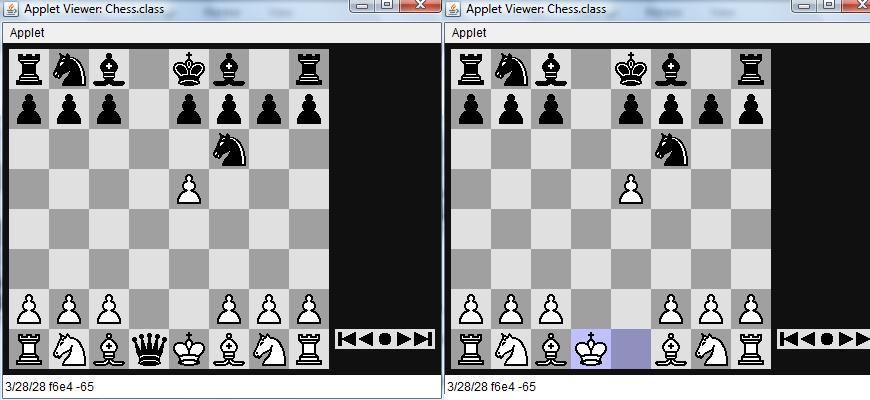
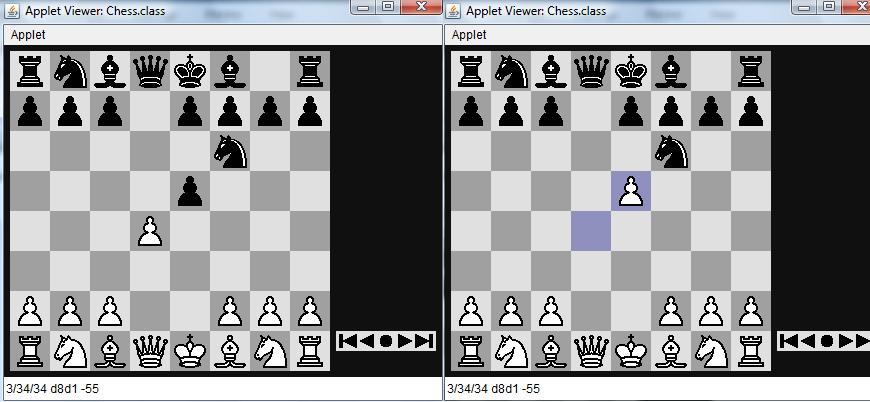
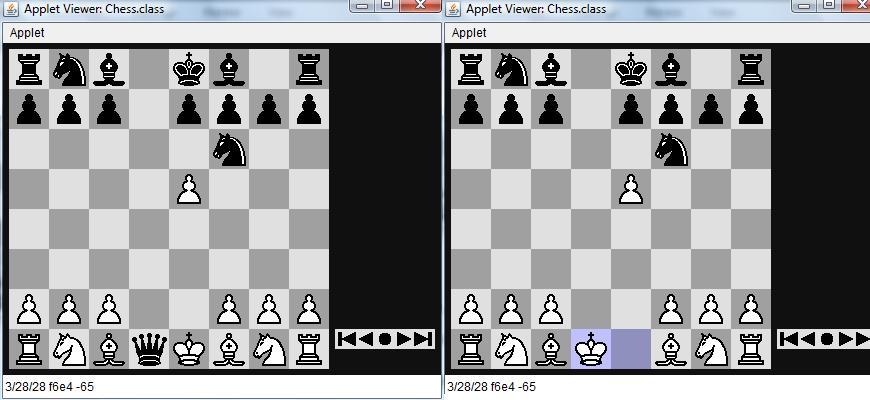
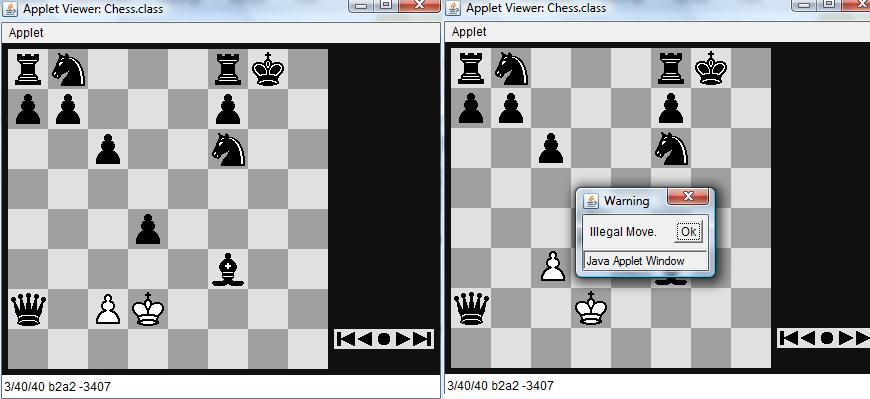
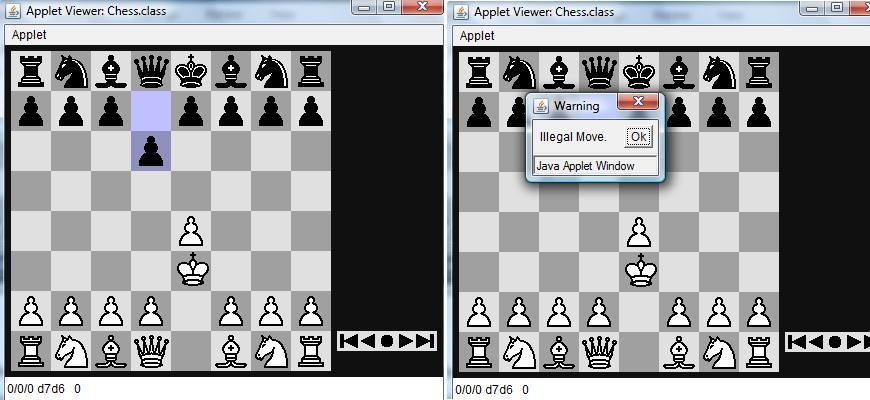
The above figures shows the illegal move of the pawn which is going diagonally ,as per the rules of the game moving of the pawn diagonally  without having a castle against the opponent piece is an illegal move  and will not satisfy the rules of the chess.

So this is one of the type of error that is occurred at the start of the development which was later on rectified , similarly type of errors has occurred with the other pieces has also been managed and rectified.

Error message 2:

Input: Moving the black pawn

Status: Performed

Output: The move is performed, black pawn moved a step.

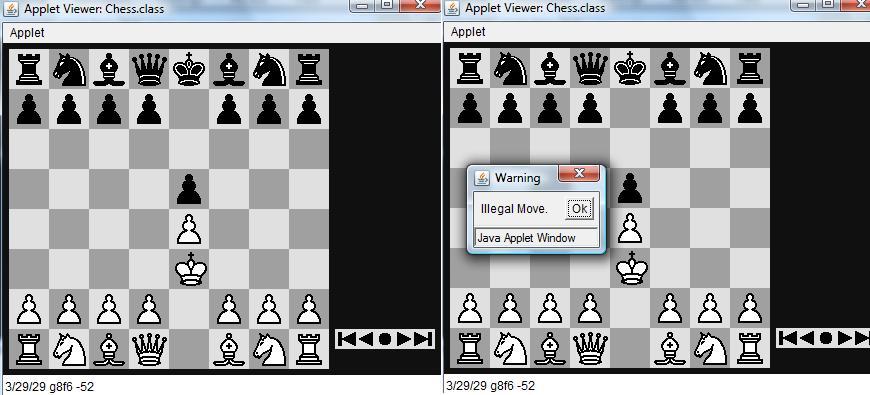
From the above figures we can see the pieces of black can be moved which can’t be possible as the game is developed between human and computer we can’t the move the pieces of the computer but which are moved here, so this type of error are notified and rectified.

Error Message 3:

Input: Kill the king and move next step.

Status: Performed

Output: The king was killed and the next step is also moved.

The above figures describes that even after the king is killed the game is still commencing without displaying any messages of whether the game is over or not, or it is a checkmate or not, this is error is also rectified.

Test Case for Chess Game Document Sample

Test Case 10:

Input: checking the move of the kills performed each and every piece.

Status: Performed

Output: It is satisfying the rules of the game if any other move that is not a valid move for killing is performed an dialog box will be displayed, the dialog boxes for the test cases are shown below the screen shots for the test cases.

In the above figures when the white pawn is in a castle position with the black pawn according to the rules of chess it can kill the opponent piece.

Similarly in the case of the king.

In the above figures when the white pawn is in a castle position with the black pawn according to the rules of chess it can kill the opponent piece.

Like above each and every piece is following its rule which are shown below

Staring with knight:

Similarly with Rook:

Similarly with Bishop:

And finally the Queen:

Test Case 11:

Input: when it is a check for the king.

Status: Performed

Output: if there was a check for the king then the system should allow any other moves except king if any other move has been made a message has to be displayed.

When there is any other move that is leading for check would be cautioned by a message box as shown below

Project Report on Study of Viruses and Worms

Conclusion and Future work

Virus and worms are very crucial in nature and imposing lot of security threats on the networks and applications these days and there is lot of research done towards this across the literature and there is no perfect solution found till now. The impact of the virus and worms is not at all expected on the overall system performance and application performance and thus impose a new challenge every day towards the security of the network. In general the type of virus and worms can be differentiated against the level of impact shown by them on the overall system security and also the level of damage done to the application and the worms are more dangerous when compared to the virus.

There are different types of worms and they are identified by the simple worm detection systems and in general there are some critical worms that can’t be detected by these detection systems. The level of impact shown by the virus and worms purely depends on their overall operations done towards the system resources and also they can occupy the complete system and application space and thus a perfect detection system is required in this context. In general these virus and worms can replicate themselves and occupy the complete system resources and delete the important operating system files and backup files and thus the overall network and system resources are deleted forever.

There are many antivirus and worm detection software’s and techniques and most of them are proved to be successful in detecting these worms and but most of them are complex in nature at the implementation level. When the impact of C-worms is compared to the traditional worms there are many difference and the key among them is that C-worms generates more traffic on the network and due to this traffic the actual required information is lost due to the highly generated traffic on the network. 

The main aim of this Project Report is to detect and prevent the impact of the C-worms and ensure a maximum security to the system and the complete design followed to achieve the proposed system is given in this project. To develop the proposed system, a java based application is created and evaluated to understand the technical specifications of the algorithm used to detect the C-worms.

Different levels of system scan are provided to the users and the corresponding users can use this application to detect the worms at the complete system level and also individual user defined drives level.  The overall performance of the scan process can be viewed by the users and the list of infected files by the C-worms can also be tracked using the corresponding log files. 

Few metrics are also used in this context to understand the system resources being consumed during the scan process against the CPU performance and thus users can understand the level of technical operations being performed against the worm scan process. When the performance of the worm detection application is evaluated, it is proved that C-worms and the corresponding network traffic generated by them can be detected easily with this application and the detection rate an detection time are also calculated in this application. 

Future work 

A detailed analysis of the C-worm detection system is done in this project and the key development aspects are also discussed and apart from the work done in this context, there is some future work to be done to improve the application in few aspects and they are as listed below 

  • A detailed analysis of different affects shown by the C-worms on the system security can be discussed and evaluated in future at the application level
  • Current algorithm can be extended further to show the end users the actual procedure followed to find out the virus across the user defined directories
  • Overall traffic analysis can be done in a better way to understand the level of impact shown by the C-worms in future
  • A standalone application is created in this project and in future the same can be extended to a distributed network such that the scan progress can be extended to remote systems as well.

Results and Analysis of camouflaging worm Final Year Project

Results and Analysis 

The detailed implementation procedure followed in developing the proposed camouflaging worm Final Year Project application is given in the previous chapter and the explanation to the key class used in developing the code is explained and the actual results achieved are given in this chapter. All the screens achieved are explained against the evaluation of the proposed concept of C-worm detection is presented in this chapter. Detailed explanation to all the screens and the process followed to detect the C-worms is given in this chapter with reference to the aims and objectives of the this project identified and given in the introduction chapter of this project and is as given below

 camouflaging worm1

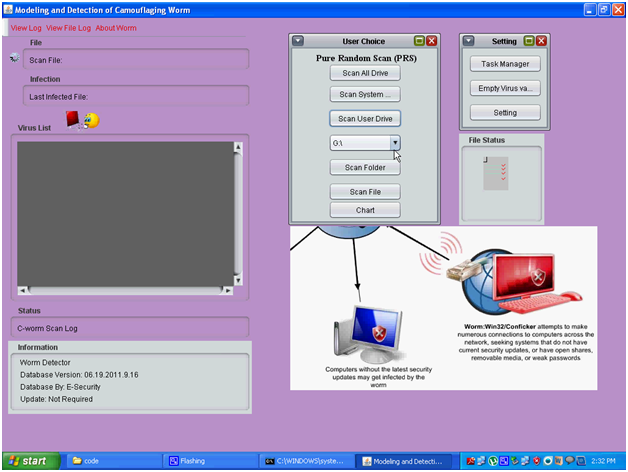
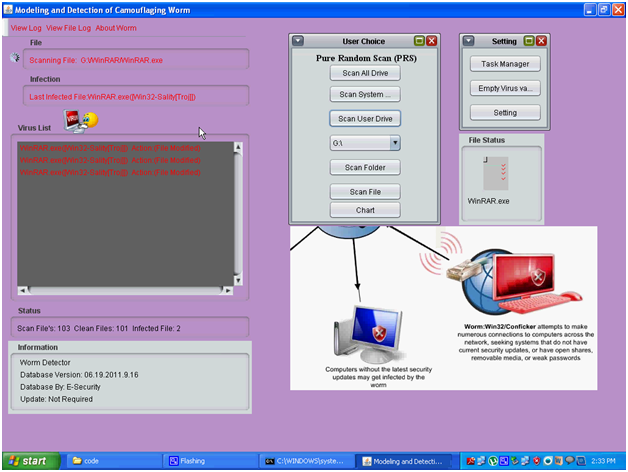
Above is the screen capture of the complete functionality of the application and from the above screen it can be observed that the entire windows created and user options are provided in this screen.  There are mainly three components in this window and they are Pure Random Scan (PRS) , task manager and the virus list components and the actual design and implementation procedure followed are explained in the previous chapters of this project. Users are provided with some options like scanning all the drives, scan the user drive, scanning the desired files and folders and this option can be selected by the users and the corresponding buttons used are given in the above screenshot. 

Users are also provided with an option to create the chart as discussed in the previous chapters and this chart can be used to track the detection time and detection rate of the C-worms.  A separate settings window is also created to view few key settings to be done to the scan process and these includes the aspects like Task manager, empty the virus files and this operation is used to delete the infected files and a separate settings button is also provided to update the settings of the C-worm scan process. The status of the files being scanned are also displayed to the users across this window and a separate text area is provided to track the number of infected files and the corresponding details like the actual folder and directory of the file along with the impact on the corresponding file due to the affect of the C-worm and the respective screenshots are as given below

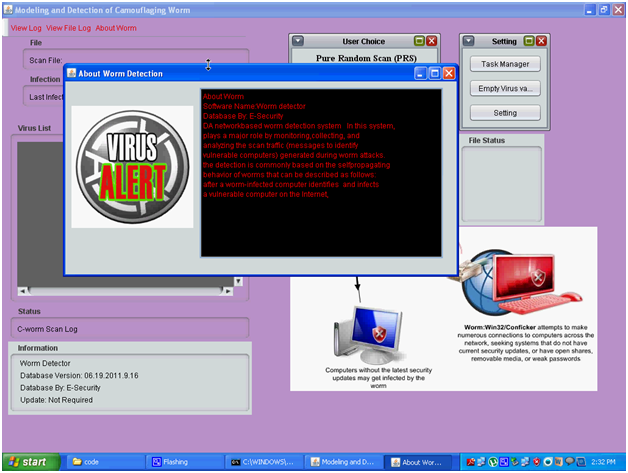
 camouflaging worm2

Above screen shows the technical specification of the C-worm and this option is provided at the left top corner of the actual home window.  Once the users click on this option, a separate window is opened and the required technical specification and description of the worm is displayed to the users as shown in the above screen.

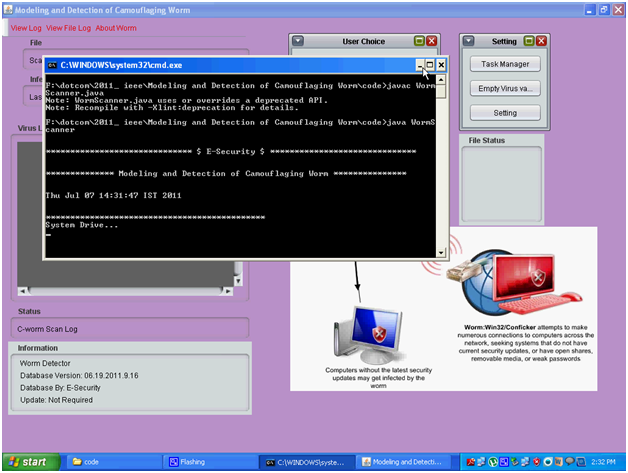
 camouflaging worm3

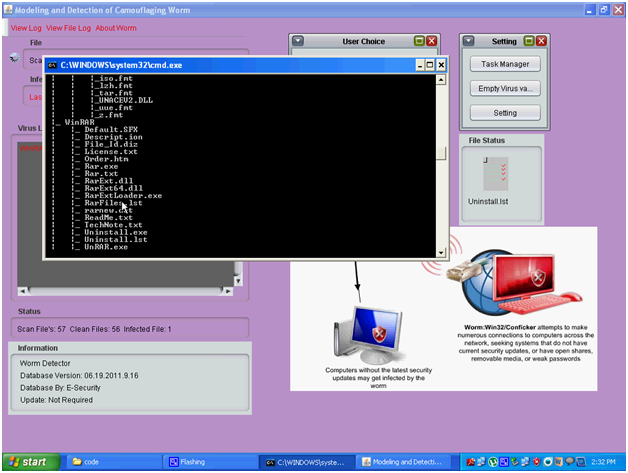
Above screen is displayed to the end users when they chose the desired drive or folder to scan the files and a separate command prompt window is opened to show the background process being run across the application. A widow is opened and shows the status of the current drive being scanned as shown in the above screen.

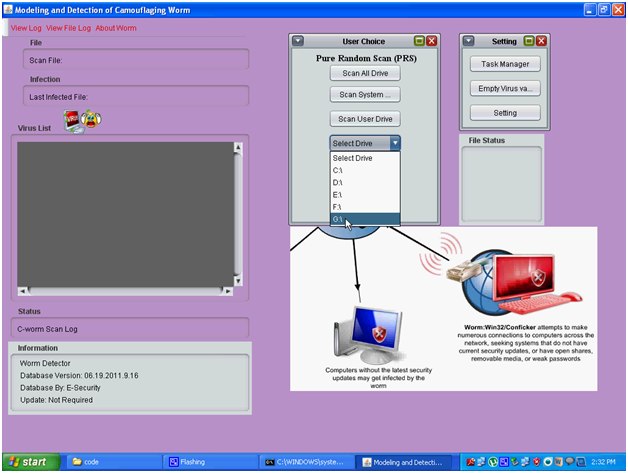
camouflaging worm4

From the above screen it is clear that the user can select the desired drive from the drop down list provided to the users and they can select one of the drives available to proceed with the C-worm scan. Similarly the users can also choose the few options available like the scan all the drives, scan the complete system and scan the user drive based on this opinion the actual scanning process is initiated and is as shown in the above screenshot.

 camouflaging worm5

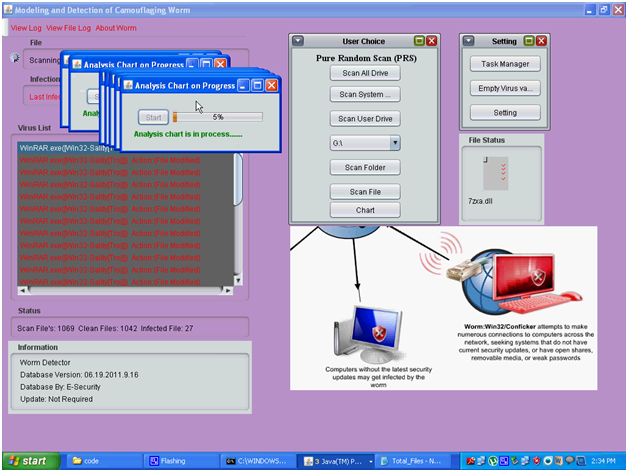
From the above screen it is clear that the status of the fie being scanned is shown in the separate text area. The percentage of the scan operation is shown in the desired text area and is as shown in the above screen and the corresponding status of the scan is done is also shown in the above screenshot.

camouflaging worm6

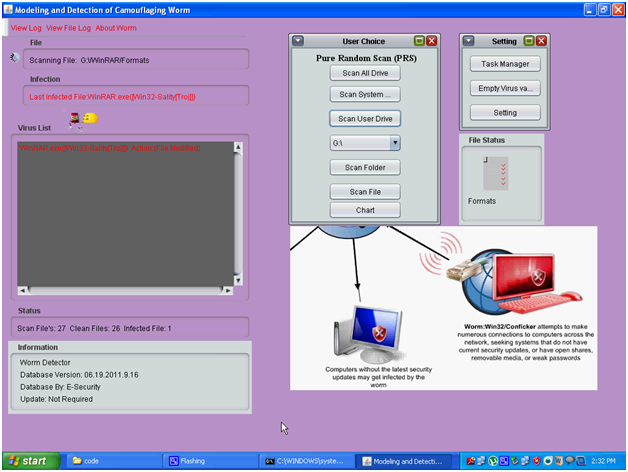
From the above screen it can be observed that the status of the current file being scanned is displayed in the virus list text area and also the columns like File and Infected file are also displayed to the user against the scan operation as shown in the above screen.  The virus database is updated against scanning operation and the level of impact of on the files is also tracked and is shown in the above screen.

camouflaging worm7

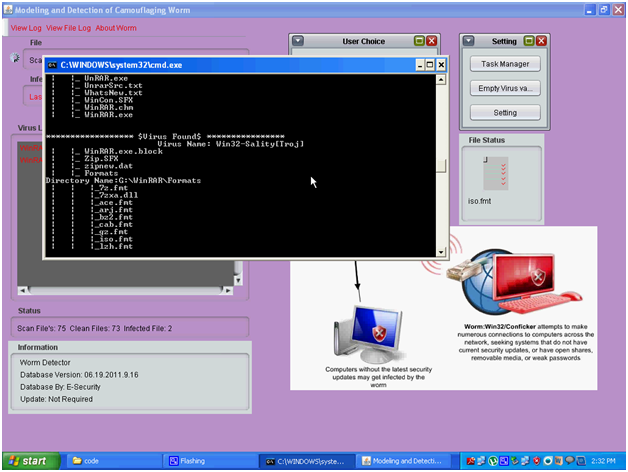
Above screen shows the actual list of files being scanned and a separate command prompt is opened. All the extensions of the files are shown in the above screen and the process being followed to scan the files is also shown in the above screen and the corresponding files being scanned is shown in the File status window on the right side of the window. The files are scanned based on the extension of the files being visited and if any malicious activity is found across the scanning process, immediately the same file is update to the virus database and also the log files maintained across the application as discussed in the previous section.
camouflaging worm8

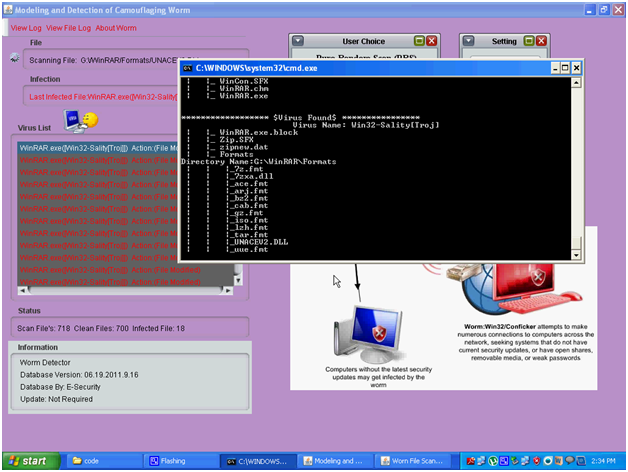
When any virus or worm is found across the scan process, the above screen is displayed to the end users with the exact details of the virus and the level of infection done to the corresponding file selected during the scanning process.

camouflaging worm9

Above screen shows the virus list text area and all the infected files are tracked in this area. Key details like exact file name, the folder where the file is existing and the action performed by the C-worm on the corresponding file is displayed across the text area as shown in the above screen. The current infected file is also shown at the infection area as shown in the above screen and once the values are listed in the virus list area, the same are updated to the scan log file and the corresponding screenshots are shown below

camouflaging worm10

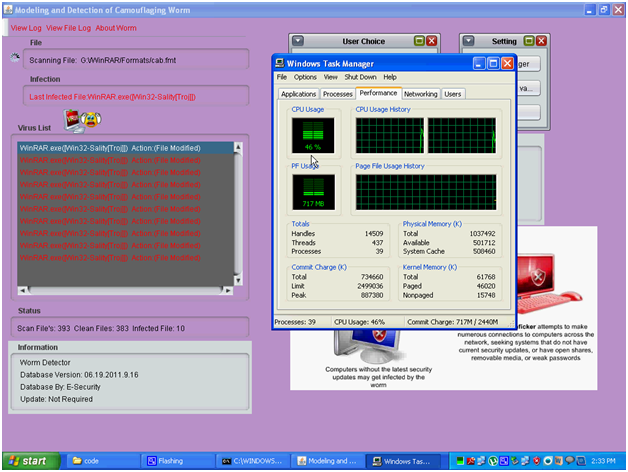
The task manager operations are shown in the above screen and the performance of the CPU against the scanning operations are tracked using the settings window that was created in the main window of the application. Few usage of the CPU like CPU usage and Page file usage history are tracked in this section and the corresponding screenshot is as shown above.

camouflaging worm11

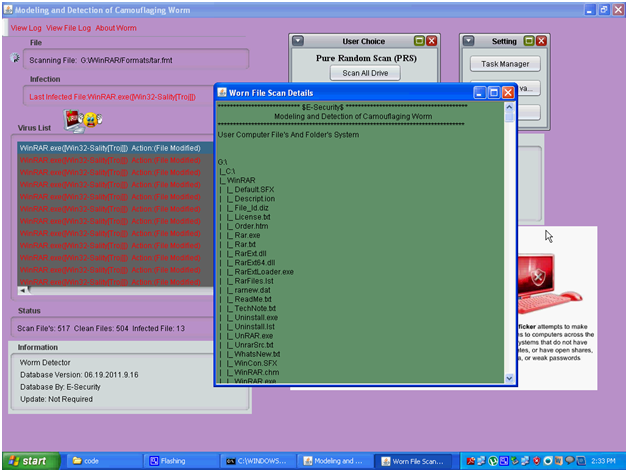
The worm file scan details are shown in a separate window and are as shown in the above screenshot. Current files being scanned and the corresponding directory are shown in this particular window. All the files in the user directory are displayed and the level of files and directories scanned till the point of time are shown to the end user as shown in the above screen.

 camouflaging worm12

Above screen shows the command prompt level of the infected files and these details includes all the folders and directories also and is shown in the above screen. A separate batch file is created to view these details and these values are actually tracked from the scan log files as discussed in the previous section.

camouflaging worm13

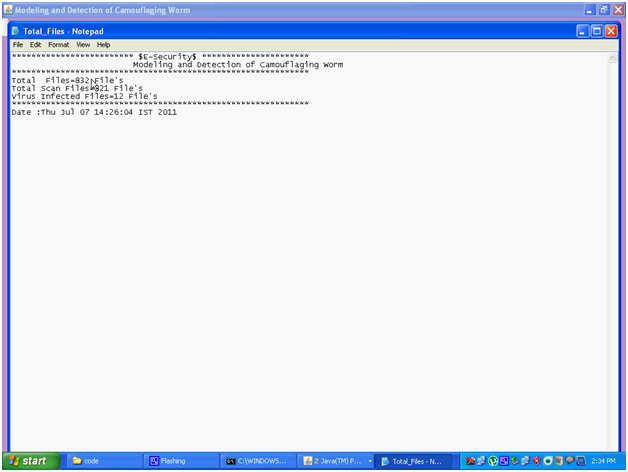
Above the actual log file created after the scan process has completed and the log file is created in the notepad and the corresponding screenshot is as shown above. These details include total file scanned, total file infected and the corresponding date and time details are displayed and is as shown below

camouflaging worm14


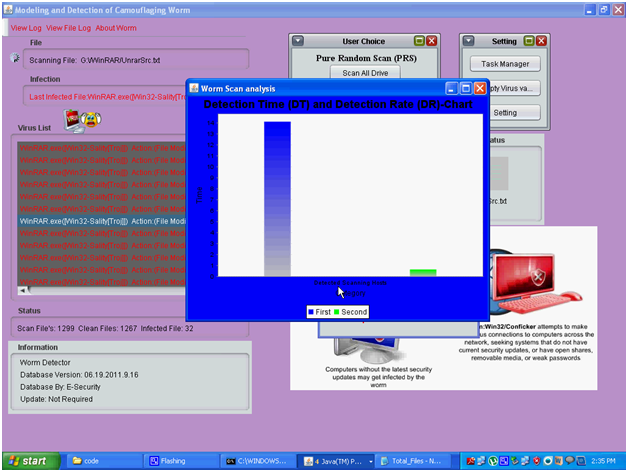
The actual analysis of the scan progress in the form of chart is as shown in the above screen and the corresponding graph generated is shown in the below screenshot

camouflaging worm15

Summary and Implementation Procedure of Camouflaging Worm Project

Summary

Thus to summarize the complete design, the required user interface is created using the java swings and the key components used here are to choose the desired drive, folder or file of the system and the users can choose the desired location to start the C-worm scan operation. All the infected files are maintained in the few files and logs and these can be viewed by the users at any point of time and a detailed analysis of the worm and the corresponding scan operations can also done using this application. The actual implementation procedure is explained in detail in the next chapter. 

Implementation procedure 

Detailed explanation to the design procedure followed to implement the application is explained in the previous chapter and in this chapter the actual implementation procedure followed and explanation to the key coding blocks is given.  As discussed in the design chapter, java swings framework is used to design the application and there are different java classed used in this process and this chapter provides an overview of all the important classes used in this application and important coding functionality used is provided in this chapter. Explanation to the classes is also given as per the flow of the application and is as given below 

Important java classes 

This section gives explanation to the important java classes used in this application and they are as given below 

Worm Scanner 

This is the main class of the complete application and the complete flow of the application is initiated from this application. When this java file is executed, the corresponding window is created where the users can choose different options in proceeding with the scanning process. As discussed java swings are used to create the required user interface of the application and the key components used in this application extends the key java swing frameworks.

The required window in this class extends the interface known as JFrame and thus it can inherit all the key components provided by the JFrame component.  A default constructer is loaded at the beginning of the class implementation and the required logic is created in this constructer. Whenever the constructor is called at any point of the code, the complete coding logic can be inherited at the required place and re-writing the complete code can be avoided a lot.

Once the constructer is loaded across the class, all the variables are initiated and even the database created in this application is also invoked from this constructer. All the required log files are initiated in the try block of the code and this block is used to catch the default exceptions that may be raised while writing the information to the log file and the key code function written in this case is as given below

 From the above code it is clear that all the components are designed and added to the windows with the corresponding parameters. Few labels, buttons and images are also created in this coding process and these files are maintained in the home location of the code where it is created. Complete layout is created in this process and required sizes to these layouts are also defined using the predefined methods of the java swings package as shown in the above piece of code. Once the required components are added to the main window, now the actions performed on these components should be tracked and analyzed further to implement the scan process.

There are few action and item listeners available with the java swings package and they can be inherited to track the actions performed by the end users with respect to the scan process in this application. Each and every button is provided with an action listener and whenever the action is performed on the corresponding button, the code written is invoked and the corresponding action is performed and the sample code used in this context is as shown below


From the above piece of code it is clear that the button b2 is added with an action listener and the corresponding method is written to capture the action to be done when the respective button is clicked. In this particular code few files are defined as the affected files and these files are written to the infected files section and then finally the process is on idle state for 1000 seconds and this is achieved using the multi-threading concept of java LANG package. When all the files are detected, the corresponding files are deleted from the database as shown in the above code.

Few run time executions are initiated in this process and these methods are to capture the runtime files and give the same as the input to the scanning process.  Java IO package is used to write the files to the virus database and also the log files and the key method used in this process is File Write function is used to write the required content to the desired location across the application. Thus java class holds the key logic used in this application and the important coding functionalities used is discussed above. 

View 

This class can be used to view the details of the files infected by the C-worms and the corresponding text area used in the main window is created using the java swings concept.  This class also extends the JFrame component in the java swings package and this class holds the key logic to create the text area and this text area is used to display the list of infected files till the time when the scan is under progress.  The required input to this text area is given from the log file and buffered readers from the java IO package are used to read and write the content to the text area and the key coding functionality is used is as given below


From the above piece of code it is clear that a default constructer is used in this java class and the main logic of loading the required text area is given in this constructer. A default content pane is used to hold the text area and the required text area is added using the Text Area class of the java swings class. A super constructer is used in this context and this constructer is used to set the required title to the text area and the corresponding content pane and once the default values are set, now the actual components are added to the text area.

Background to the text area is added using few parameters with respect to the color attributes and the corresponding attributes used are 100, 151 and 104 and then the required color is set to the background of the considered text area. Once the default settings are created to the required text area, the corresponding text area is added to the content pane and size of the pane is also set using the setSize method of the content pane interface as shown in the above code. Once all the required parameters for the text area and the content pane are added, the text area is set to visible and the parameters is set to true such that all the components added are visible to the users. 

Now once the required components with respect to the user interface are added, the actual files infected are fetched from the log file and inserted to the text area and the corresponding coding logic developed in this context is as given below

 From the above code block, it can be observed that initially a file reader object is created and then initiated to the Scan.log file and now the same file reader object is given as the input to the buffered reader. All the classes are available with the Java IO package and they can be inherited in this piece of code by importing the required packages. A new string variable is created and assigned with the values of the log file and the key logic used here is that, a loop is iterated from the buffered reader and this loop is repeated till the last line of the log file and these values are added to the string variable and separated by a new line as shown in the above piece of code. Read line is the key method used in this process to iterate the loop and this function always returns the last line and when the last line is encountered the loop is stopped and all the corresponding values are added to the string variable as discussed above.

Task manager

This is another java class used in this application, and this class can be used to track the overall system performance against the virus scan operations. This class almost shows the functionality of the task manager of the operating system and the key performance metrics of the CPU can be tracked using this java class. As discussed in the previous classes, java swings are used to create this interface and the corresponding coding logic followed is explained in this section.

This class extends the JFrame class from the java swings package and this is extended to create the basic user interface features to the windows being created against tracking the CPU performance against the C-worm detection. Few buttons, labels and a text area are used as the required components across this class and all the components are added to the content pane and finally the pane is set to visible using the same procedure as discussed in the previous section and the key coding logic used in this class are as given below


From the above block of code it is clear that, a typical run time environment is captured in this logic and this run time environment includes the CPU tracking and the required commands entered by the users. All the commands entered by the user are tracked and executed using the exec command and these commands are provided as the inputs to the buffered reader class that is inherited from the java IO class as discussed in the previous sections. All the buttons used in these classes are provided with some action listeners and the corresponding actions are captured when the end users click on the desired buttons and the corresponding screens are shown in the appendix section of this project.

Chart 

This class is used to display the status of the scan operations and the corresponding graph generated against the detection rate and the detection time of the C-worms and even this class is created using the Java swings. All the required components are added to the chart using the key components of the java swings components and the required bars for the graph are created using the methods like jfree.chart package and all the required packages are imported to the class and the charts are generated and the key coding logic used for this class is as given below

From the above piece of the code it is clear that, the required chart components are imported using the corresponding packages and few colors assigned to the bars for the user display. All the possible chart options are used to create the chart to track the detection rate and detection time as discussed in the previous section.