Tour Guide Java Project

The Tour Guide is a java based website that helps the tourists in planning their tour of a completely anonymous place he wants to explore. This website plans the tour such that the user can save more time in exploring maximum places rather than wasting time in reaching his destinations.  It takes the information such as location, the list of places the user wants to visit, the start and end place of the tour to make the plan.

Initially, it takes the information about the location the user is in. Then it will show the list of places of attractions of that place from which the user can opt the places of his choice according to his priority. Then it takes the start and the end place of the tour. After making an analysis of the distances between all the places into account a route map with the shortest possible path is displayed.

This website is very useful to all the people who love to travel in planning a time efficient trips where he or she can save time to visit new places rather than getting lost in an unaware place.

PROPOSED AND EXISTING COMPARISION

For people who want the trip planned entirely, who don’t want to use the filtering method of pen and paper or trace filtering tour guide helps them completely. The tour guide is a website that helps vacation goers plan out where to go and what to see based on their interests.

The website like Trip advisor shows only the places to visit in a city but not with an appropriate plan. Some other existing websites like Inspirock, Make My Trip shows the plan on its own basis but not with customer’s priority. The tour guide shows the best plan that matches with your interest of places to visit in a city.

Software Requirements:

NetBeans7.4, JDK 1.7, MySQL 5.5, SQLYog, HTML, JavaScript and CSS.

UML Diagrams:

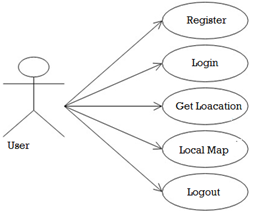
UseCase Diagram:
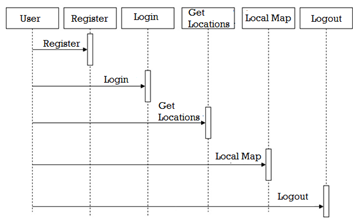
Sequence Diagram:
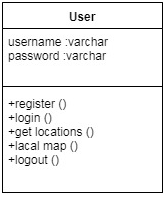
Class Diagram:
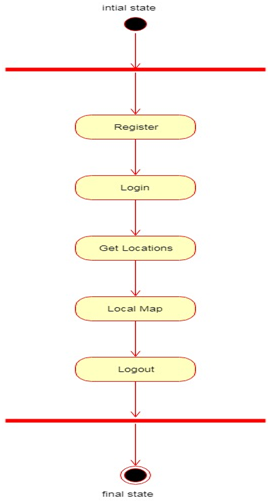
Activity Diagram:
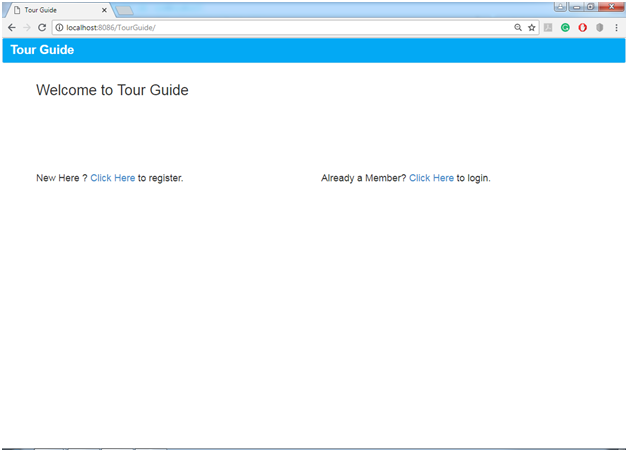
Home Page:
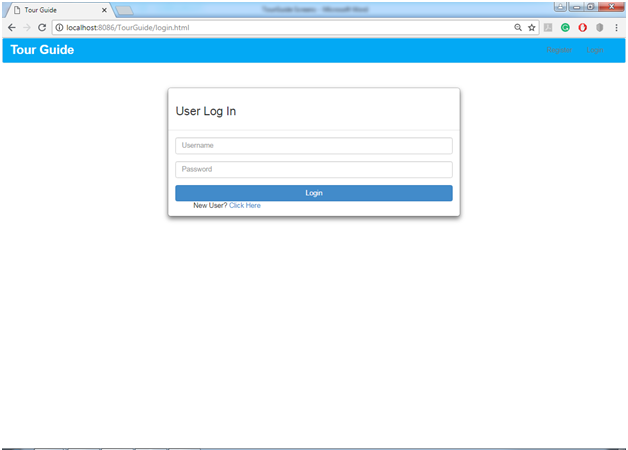
User Login Page:
Get Location Page:
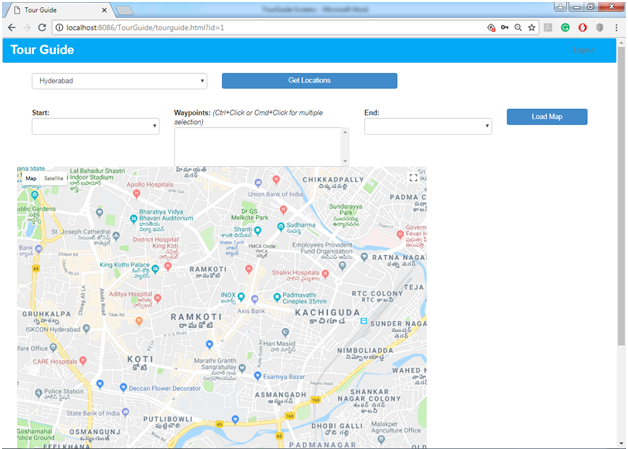
Load Map Page:
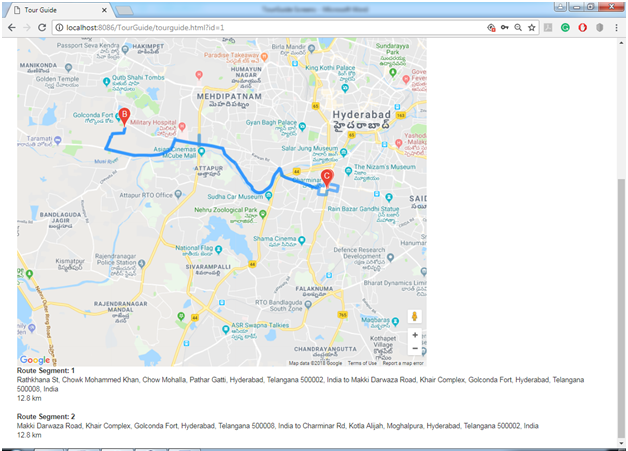
Multiple Locations Page:
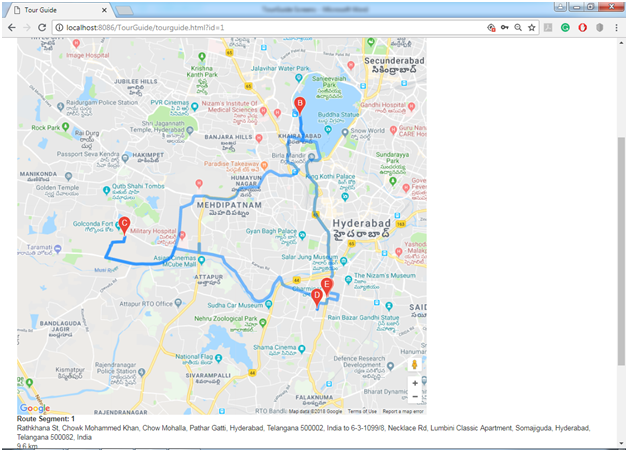
[code lang=”sql”]
DB Scripts

CREATE TABLE `locations` (
`id` int(11) NOT NULL AUTO_INCREMENT,
`name` varchar(60) NOT NULL,
`address` varchar(80) NOT NULL,
`lat` float(10,6) NOT NULL,
`lng` float(10,6) NOT NULL,
`city` varchar(30) NOT NULL,
PRIMARY KEY (`id`)
)

CREATE TABLE `userdetails` (
`id` int(11) NOT NULL AUTO_INCREMENT,
`firstName` varchar(255) NOT NULL,
`lastName` varchar(255) NOT NULL,
`emailAddress` varchar(255) NOT NULL,
`password` varchar(255) NOT NULL,
`mobile` varchar(255) NOT NULL,
PRIMARY KEY (`id`)
)

INSERT INTO `locations` (`id`,`name`,`address`,`lat`,`lng`,`city`) VALUES (1,’Charminar’,’Charminar, Hyderabad, Telangana, India’,17.361431,78.474533,’Hyderabad’);
INSERT INTO `locations` (`id`,`name`,`address`,`lat`,`lng`,`city`) VALUES (2,’Golkonda’,’Golconda Fort, Hyderabad, Telangana, India’,17.382330,78.401604,’Hyderabad’);
INSERT INTO `locations` (`id`,`name`,`address`,`lat`,`lng`,`city`) VALUES (3,’Hussain Sagar’,’Hussain Sagar, Hyderabad, Telangana’,17.423880,78.473824,’Hyderabad’);
INSERT INTO `locations` (`id`,`name`,`address`,`lat`,`lng`,`city`) VALUES (4,’Ramoji Film City’,’Ramoji Film City, Telangana, India’,17.255827,78.682419,’Hyderabad’);
INSERT INTO `locations` (`id`,`name`,`address`,`lat`,`lng`,`city`) VALUES (5,’Chowmahalla Palace’,’Chowmahalla Palace, Telangana, India’,17.357725,78.471703,’Hyderabad’);
INSERT INTO `locations` (`id`,`name`,`address`,`lat`,`lng`,`city`) VALUES (6,’Salar Jung Museum’,’Salar Jung Museum, Telangana, India’,17.371201,78.479797,’Hyderabad’);
INSERT INTO `locations` (`id`,`name`,`address`,`lat`,`lng`,`city`) VALUES (7,’Lal Bagh’,’Lal Bagh, Karnataka, India’,12.949859,77.583282,’Bangalore’);
INSERT INTO `locations` (`id`,`name`,`address`,`lat`,`lng`,`city`) VALUES (8,’Bannerghatta National Park’,’Bannerghatta National Park, Bannerughatta, Bengaluru, Karnataka 560083′,12.800359,77.577606,’Bangalore’);
INSERT INTO `locations` (`id`,`name`,`address`,`lat`,`lng`,`city`) VALUES (9,’Cubbon Park’,’Vasanth Nagar, Bengaluru, Karnataka 560001, India’,12.981182,77.596886,’Bangalore’);
INSERT INTO `locations` (`id`,`name`,`address`,`lat`,`lng`,`city`) VALUES (10,’Bangalore Palace’,’Palace Road, Bengaluru, Karnataka 560052, India’,12.998696,77.592026,’Bangalore’);

[/code]

Download Tour Guide Java Project Source Code, Database, Project Report Documentation, PPT, UML Diagrams
Secure Web Portal for Water Distribution and Quality Assurance

Abstract:

Water Distribution and management is a web application which enhances and emphasizes the way water is distributed and maintaining the quality. The people who are in search of water for their regular uses can contact us by using this application. We Provide water to different areas in the city with monthly packages at affordable rates. We also construct the harvesting pits based on square feet’s in different areas. In this application, there are two modules.

The Water Distribution and Quality Assurance Web application used for water distribution and quality assurance. The users can order water tankers. This portal also helps the user to check the amount of water distributed in each locality of the city limits.

UML Diagrams:

Use Case Diagram:

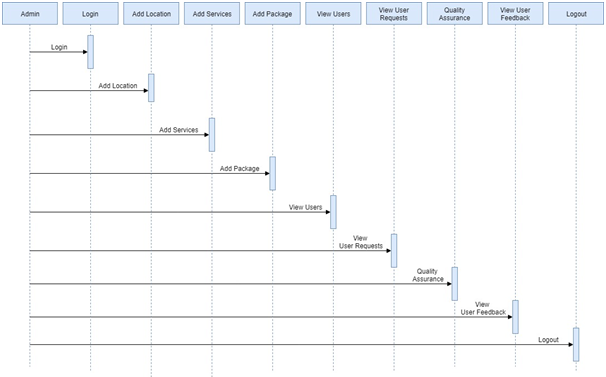
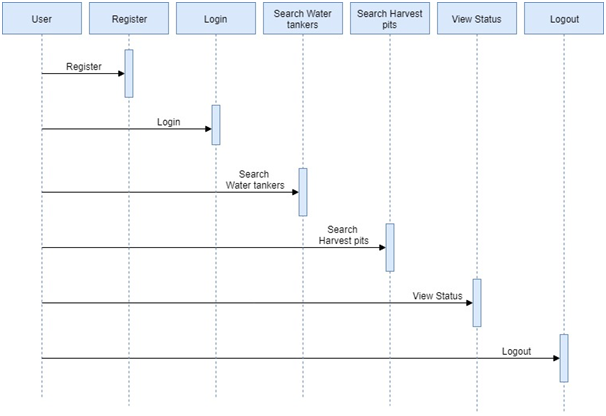
Sequence Diagram:

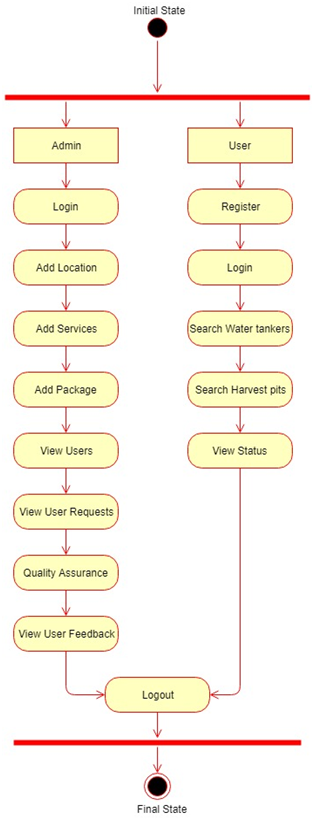
Activity Diagram:

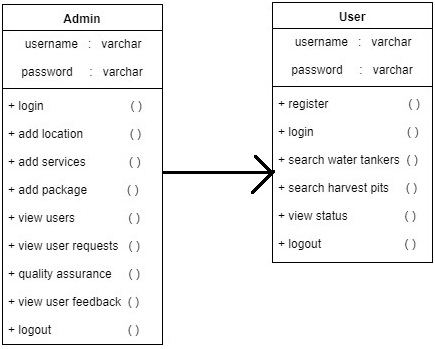
Class Diagram:

The web portal also describes the different levels of quality assurance tests done on the water before its supply.

  1. Admin
  2. User

Modules:

Admin:

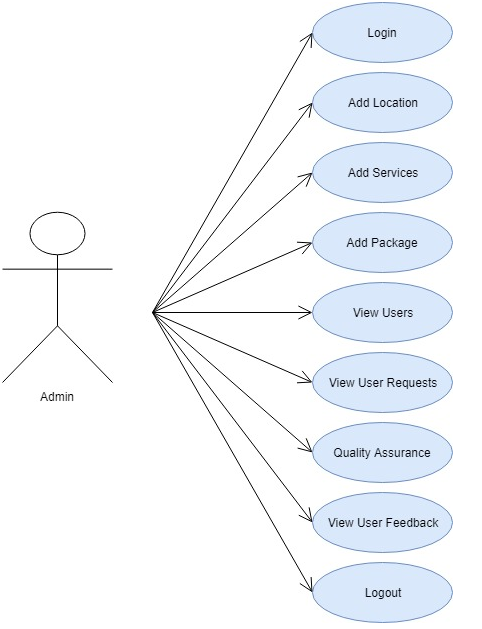
Admin will log in into the application using username and password and he can add the locations to which he wants to make service available for that location. Admin can add packages for water and harvesting pits and he can view the user request and accept accordingly and admin also view the user feedback and he will give the quality assurance for each location.

The admin module manages the service providers. That is the admin has to provide the services such as

1. The online payments for monthly payments of water distributed to different houses.

2. Onlinetanker booking.

3. Quality assurance of the water supply

User:

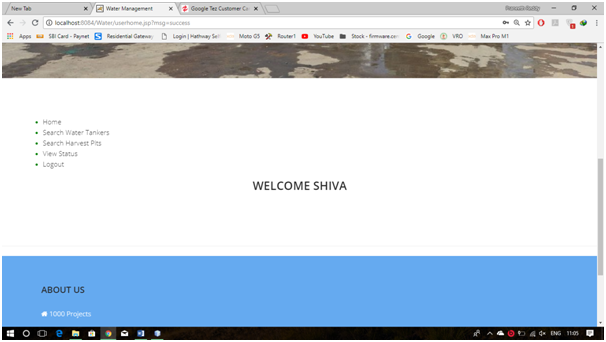
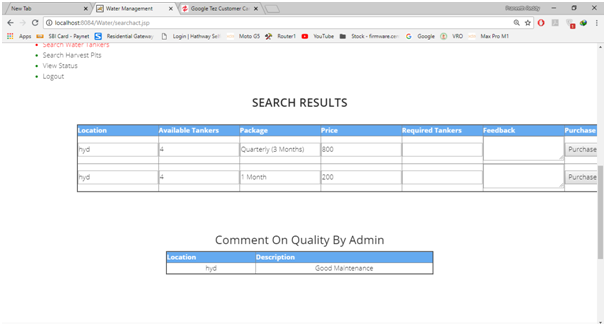
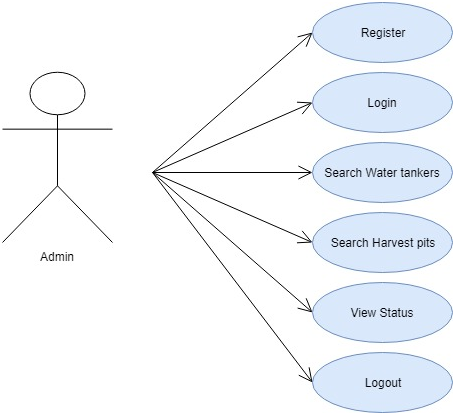
The user will register and login into the application using username and password and he can view the services added by admin and user will search services based on location and he can book the service then the request will be sent to admin and he can also view the status of the booking.

Any user whether he/she is registered or unregistered can access the portal, except for the ones who order water tankers have to use their given username and password for payment details and to make online payments for monthly water distribution. The unregistered users can register by filling the registration form.

Output Screens:

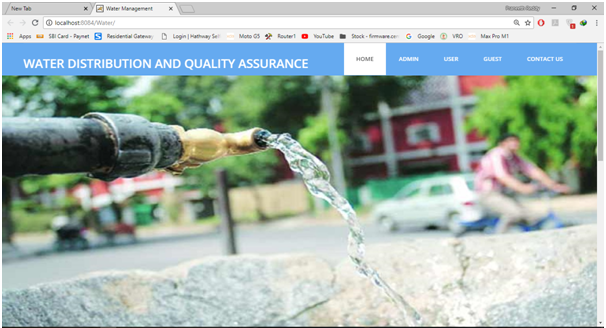
Home Page:

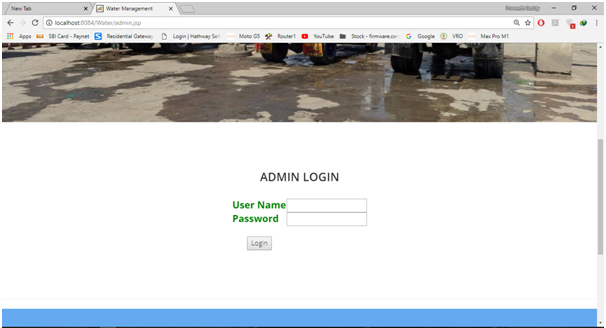
Admin Login:

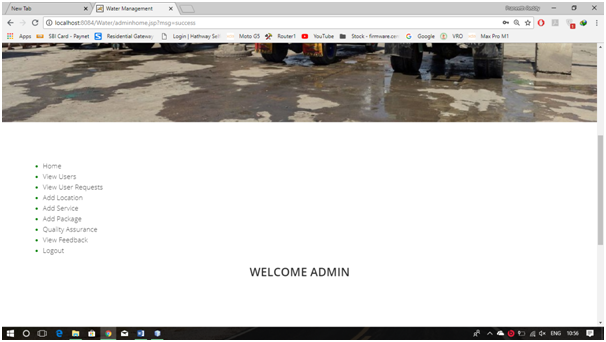
Admin Home Page:

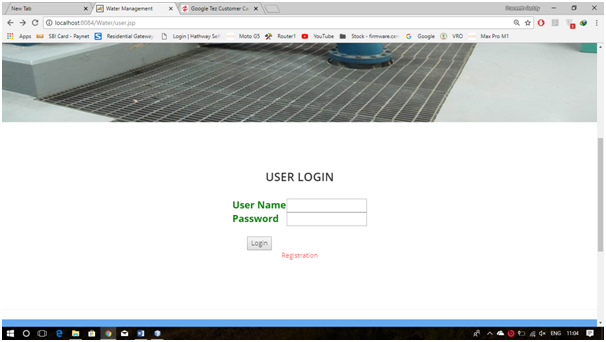
User Login:

User Home Page:

User Search Results:

Existing System:

In the existing system, the water distribution having a lot of problems all the people cannot able receive the tankers and if at all they need the service they need to visit the nearest want maintaining service agencies and book a request, this is a lengthy process.

Proposed System:

In the Proposed system, the water distribution is reachable to many users they can just login into the application and complete the process in an easy manner and they can also see the quality assurance of the service provided by admin.

All Output Screens:

  • Home Page
  • Admin Login
  • Admin Home
  • View Users
  • View User Requests
  • Add Location
  • Add Service
  • Water Services
  • Add Harvest Pit Services
  • Add Package
  • Quality Assurance
  • View User Feedback
  • User Login
  • User Registration
  • User Home
  • Search Water Tankers
  • Search Results
  • Search Pits Results
  • View Status
  • Guest Page

Software Requirements:

  • JDK 1.8
  • NetBeans 8.0.2
  • MySQL 5.5
  • SQLYog

ABC Courier Management System PHP Project

ABC Courier Management System

ABSTRACT

Courier management application will be a comprehensive and complete application wherein ABC systems will be able to manage all its operations and also the franchise/dealer related registration, manage their employees and dealer employees, manage delivery info all registered consignments or packages, manage customer related information and provide necessary info to  the same as notifications when he or she logs in to check the status of booked package or consignment.

It will allow the addition of ABC systems necessary information through the admin panel. Will also allow registration of employees working in ABC systems directly. Also, manage various departments in ABC systems. Will also allow adding a different type of packages or consignments that ABC systems deal with. Will also have necessary reports to check monthly wise packages delivered and amount earned by the company in a month. ABC systems can also register their own customers from their branches.

It will also allow registration of dealers who register themselves as franchises to ABC systems. Once registered dealers will be able to book packages or consignments which ABC systems deal with. Dealers can also log in and manage their employees who work for maintaining the courier process whichever are all involved. It will have the option to manage the packages that have been booked by dealers and also allow them to update the delivery status. Dealers can also register customers and manage their bookings.

Both dealers and ABC systems will have modules specifically to manage the packages that are booked, update the information related to the delivery of booked and confirmed packages, also have the option to cancel any packages or consignments. Once delivered registered delivery employees will be able to update the status of package delivery or it can be managed by respective admins.  

User Types: Super Admin, Admin, Employee, Customer, Executive

Modules:

ABC Admin module: It is accessible only to Super admin. This Module will have the option to first save data related to ABC systems and then add departments in the company and the additional locations and then add branch as per location. Roles will also be added by super admin. Once departments are saved super admin will be registering the employees working in ABC system and assign them to related departments and also assign to location. Super admin will also add the service types in the sense different type of packages that they deal with.

In the registration process super admin will create the logins too for the employees who can thereafter login to the application. This module will also have a reporting module. In reporting they will have a different type of reports like Package report, employees report, dealer report. This will application will basically automate the whole process of managing employees, package handling, handling branches and locations.

There will be no need to write down and maintain all documents in the form of files and papers. It will also have the option to book packages for customers and can also cancel any packages. While booking packages necessary info will be saved like the cost of the package, a number of packages, location, customer details, delivery address, customer delivery details, phone number, email id etc.

Booked packages can also be canceled within 2 hours of time. Super admin will also approve dealer registration and assign dealer manager who will manage all related operations of a dealer whichever assigned to him.

UML Diagrams:

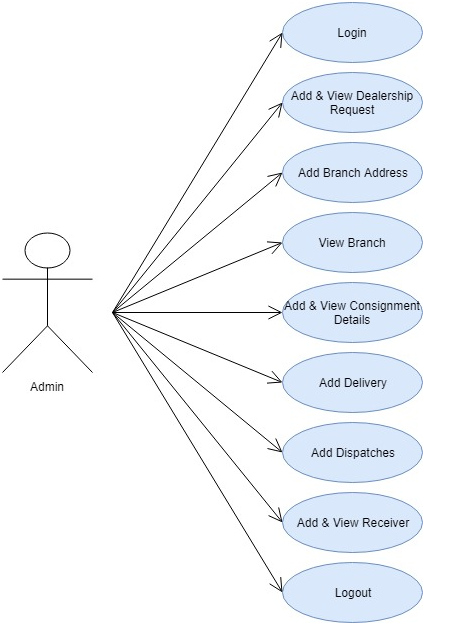
Use Case Diagram:

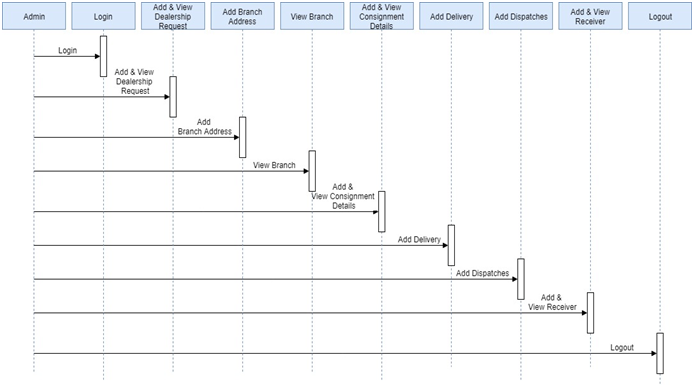
Sequence Diagram:

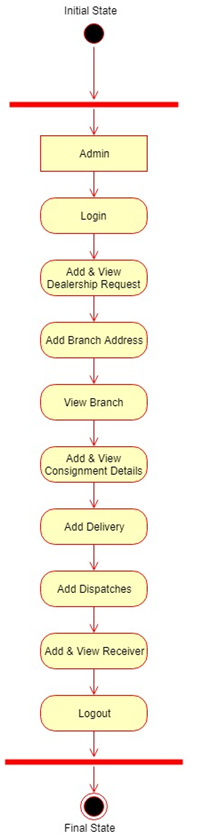
Activity Diagram:

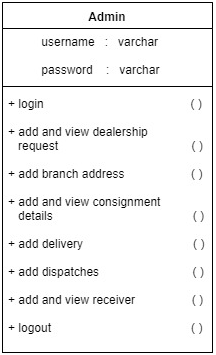
Class Diagram:

Submodules will basically be the one listed below:

  • ABC Info
  • Add Department
  • Add Location
  • Add Branches
  • Add Roles
  • Add Service Types and their cost
  • Manage Service Types and their cost
  • Add Employees
  • Manage Dealers
  •  Add Customer
  • Manage Customers
  • Manage Customer Packages
  • Book Packages
  • Manage Delivery
  • Reporting
  • Login / Logout

Dealers Module:

Dealers will register and in this process will create their login too. Once their registration is approved by Super admin they can log in. Registered dealers will have the option to register customer first and once they add that info they can book the packages which need to be delivered for a customer.

For delivery of packages, employee executive will be assigned. Info related to delivery can also be updated in the delivery module. The option will be provided to update info related to the delivery of package as delivered or pending. Booked packages can also be canceled within 2 hours of time. Submodules for Dealers will be as listed below:

  • Add Customer
  • Manage Customers
  • Manage Customer Packages
  • Book Packages
  • Manage Delivery
  • Reporting
  • Login / Logout

Customers Module:

This module is for customers who will register online via the application. The will be asked to provide all the important info at the time of registration. Once registered they can log in and book package.

They will have the option to add their profile info wherein the address, email id, phone number etc can be updated.  The option will be provided to view the status of the packages that are booked online.

  • Registration
  • Book Package
  • View delivery
  • My Profile
  • Logout / Login  

Employees Modules:

This module will be available for Managers and executives. Executives once logged can update the status of delivery. Managers once logged in can view the status of all packages that are being managed by dealers. Managers will have the option to cancel dealer registrations too.

  • Delivery management
  • Manage dealers

Output Screens:

Admin Sign In Page:

Admin Home Page:

Admin Add Dealership Request page:

Admin View Dealership Request page:

Admin Add Branch Address:

Admin View Branch Page:

Add Consignment Details Page:

Add Delivery Page:

Add Receiver Page:

View Receiver Page:

Get Corporate ID Page:

View Consignment List:

Advantages:

The following are the advantages of the proposed system

  1. Easy to track the status of applications at any level at any point in time
  2. Can generate required reports easily
  3. The centralized database helps in avoiding conflicts
  4. Easy to use GUI that does not require specific training.

Future Enhancements:

  • Notifications via email for registration approval, package delivery
  • Online payment for booking packages

Software Requirements:

Technical Aspects:
Database: MySQL
Language: PHP
Front-end: HTML, CSS,

Hardware Requirements:

Intel Core processor
RAM 4GB and Above
HDD 100 GB Hard Disk Space and Above
64 or 32 bit OS Windows 8 and above

Download ABC Courier Management System PHP Project Code, Database and Screens.

E Place Online Website Project

Objective: This E Place Online Website application can be a centralized repository sort of application for a user that registers. Once a user registers he or she will have access to different modules of the application. It will allow registered user to upload their digital documents and can also share it whenever needed.

The option will be provided to download the files that have been uploaded. Categorized modules will be provided as it will increase user to save and upload whatever they can as per requirement.  In the sense allow the user to upload certificates in an education doc module, images can be uploaded in Pictures module etc.

The E Place Online application will be secured as we can integrate captcha for any document upload or download activity, which can further be enhanced with a password protected security option. In day to day life, there are a lot of documents or certificates or scanned documents which we need at different time frames as per different activities that we do on any day. We can save all related important docs, images, or any type of doc via this application and access them whenever needed without much confusion and hurry.

User Types:

→ Admin to manage all back-end data and category modules
→ User who can register and save all type of docs

Modules:

Admin: Admin will manage users and approve user logins. Admin will manage modules that will allow the user to save data for different categories. Admin will add modules and related description will provide an option to save various docs and hence manage it.

User: In user login, there will be different modules like Add documents, Add Certificates, Add Images, Share and download option will be provided.

S. No Type
1 Dashboard:
→ Will list out added documents for logged in user→ Show the count too with heading as Inbox→ Refresh / share and select multiple doc option
2 Admin panel ( for all related modules that has to be managed)
3 Documents: it will be used to add documents  to different folders created under Documents heading

→ Add new folder / Share / Remove / Rename / View options

→ Show folders and related count, when clicked it should show a list of documents saved in that folder
→ If no doc is attached at the time of creating a file, then it will show the option to upload when the related file is viewed or we will make it compulsory that a file has to be uploaded so as to avoid null image situation.

(it will have a related admin panel to manage the base tables)

5 Category Admin panel: It will be used to Add categories for like Certificates module, a Documents module, Images module etc

Software Requirements:

Technical Aspects:
Database: Sql Server 2008  and more
Language: C# and Asp
Framework: .Net
Front end: HTML, CSS, Javascript

It can also be done in Php, MySql as the back end

Hardware Requirements:

Intel Core processor
RAM 4GB and Above
HDD 100 GB Hard Disk Space and Above
64 or 32 bit OS Windows 8 and above


Product Sales Analysis Qlikview Project

Project name: Sales Analysis

The main aim of developing this Product sales analysis QlikView application is to analyze the total sales data in a company year wise, month wise and week wise and day wise.

This analysis includes the ratio of sales data, profit maximization, etc.

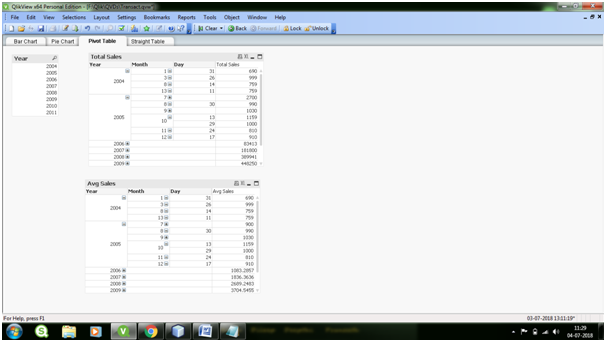
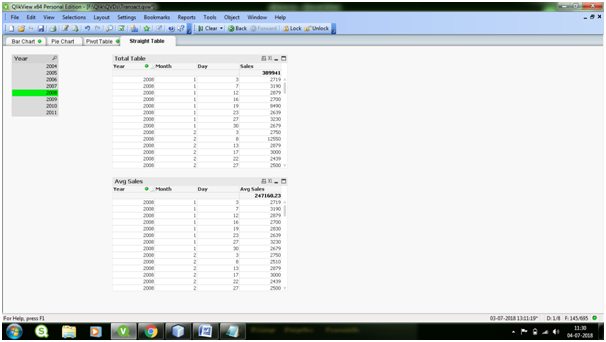
The Analysis has done with the below 4 Charts namely Bar Chart, Pie Chart, Pivot Table and Straight Table.,

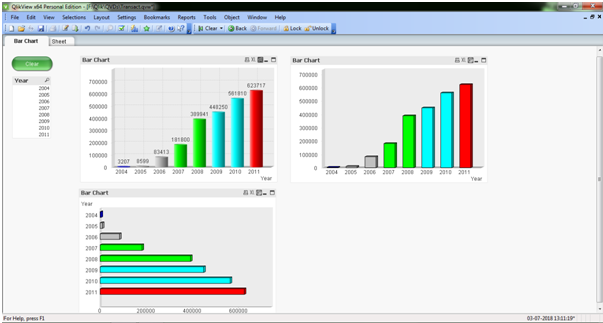
Bar Chart:

A bar graph shows comparisons among discrete categories. One axis of the chart shows the specific categories being compared, and the other axis represents a measured value.

In the above screen, it shows the different types to represent the Bar Chart (Sum of Sales per Year)

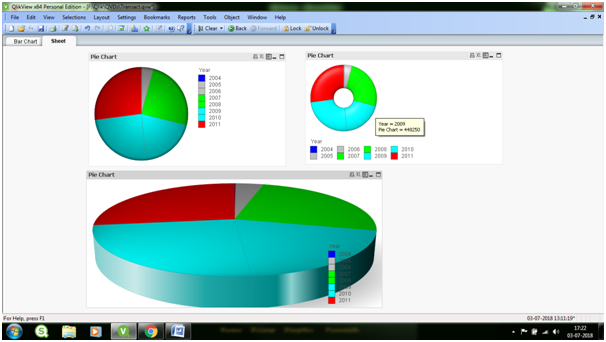
Pie Chart:

A pie chart (or a circle chart) is a circular statistical graphic which is divided into slices to illustrate the numerical proportion

In the above Screen, it shows the different ways to represent the Pie chart (Sales per Year) 

Pivot Table:

Pivot Tables are widely used in data analysis to present the sum of values across many dimensions available in the data.

Straight Table:

Straight Tables are the most widely used sheet object to display data in QlikView. They are very simple yet powerful with features like column rearrangement, sorting and coloring the background etc.

Download the Product Sales Analysis Qlikview Project

Analyzing Online Shopping Data QlikView Project

In this Analyzing Online Shopping Data application load the data from MS Excel and Resolved Synthetic keys with Concatenate and by renaming the field names.

We are using different sheet objects like the List box, Input box, Straight table, current selection and Charts (Bar Chart, Pie Chart, and Line chart).

List box: A list box represents the list of all the values of a specific field.

Current selections box: In the current selections box, selections are listed by field name and field value.

Search Object: Search objects can be used for searching for information anywhere in the document.

In this QlikView application, we are implemented four functionalities

  1. Return Analysis
  2. Shipping Analysis
  3. Report
  4. Comparative analysis

Return Analysis:

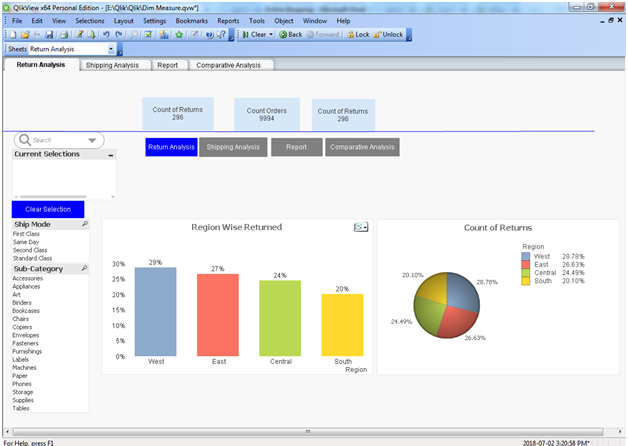
In Return Analysis calculate a total number of orders and returns.

We create fast change. Fast change to convert bar chart to line chart. Bar chart analyzes Region Wise Returns and line chart is primarily suitable when you want to visualize trends and movements over the region.

Use Pie Chart to represents a count of return value percentage in a circle with different colors.

Shipping Analysis

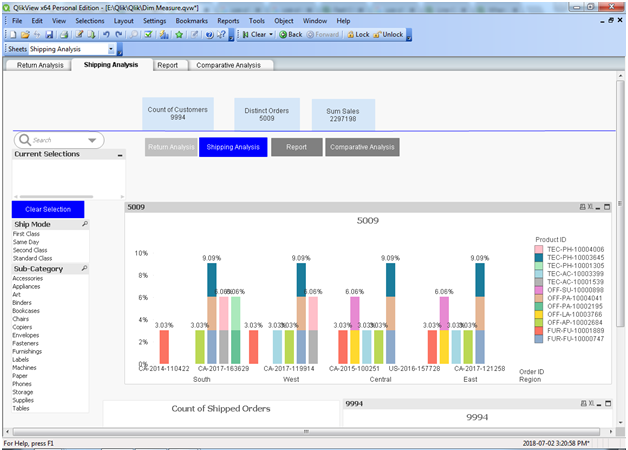
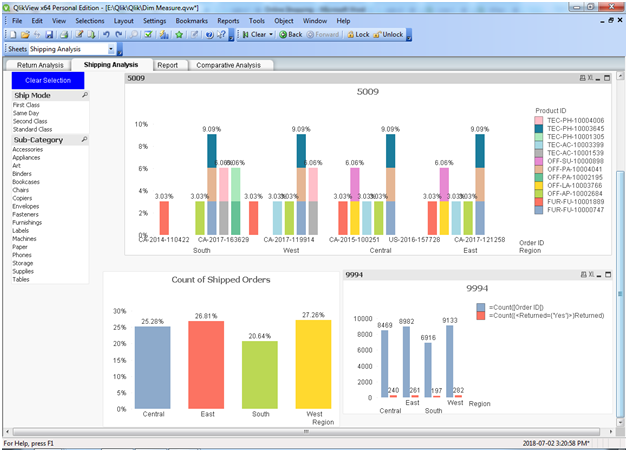
In Shipping Analysis to calculate the total number of shipped orders on region wise.

In Bar chart use ship mode and product category to calculate region wise shipped product sales and orders.

We can use a pie chart to calculate the percentage of shipped orders in region wise.

Report

In report calculate total no of sales and returns based on product category and region wise.

Comparative analysis

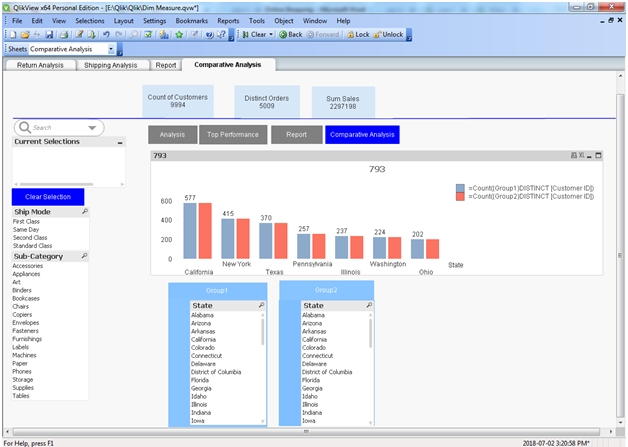
The comparative analysis we are going to compare state wise distinct customers.

Download the Analyzing Online Shopping Data QlikView Project.

Training and Placement Cell Java Project

Synopsis:

Training and placement cell is smart java based web application used to find the placements around you and this final year project allows you to directly apply for the drive and the company who is conducting the drive will see your request and if they interested in your profile they will accept the request.

This procedure is very much easy and time saving for those who are attending drives. In this application, the admin will log in and add the companies by giving all the necessary details. The admin can view the user requests if any registered user’s login and view the drives and send a request for a drive.

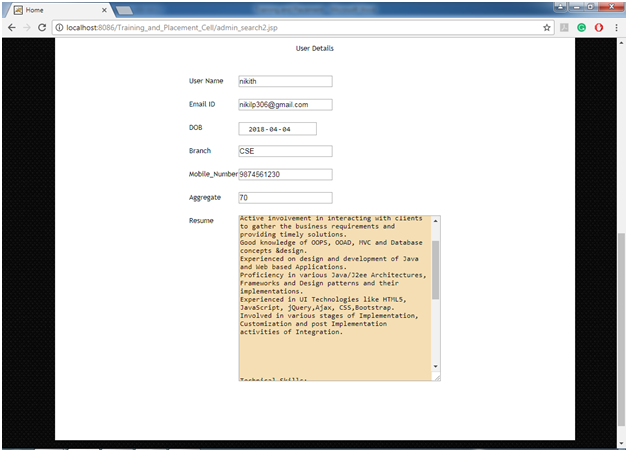
Now the admin can accept the user requests by seeing his details in user details like his percentage in Engineering etc. Before accepting the user admin will search the user by the name he can find the details of user like Resume etc. This application will help the user in finding right jobs to apply.

There are two modules in the application

  1. Admin
  2. User

Admin:

Admin will login into the application by giving username and password and admin can view the registered users in the application and their basic information about academics. Admin Will post the Drive notices if any campus placements or drives taking place in the college. Admin can also search the registered users and admin can view the users resume by clicking on the users.  Admin can accept the drive requests from the user.

User:

The user will register and login into the application by giving username and password. The user will see the drive uploaded by the admin. If the user is Interested in the drive he can send the request for the drive and if admin accepts the user request he can attend the drive.

Existing System: 

In the existing system, we need to search for jobs on different websites and we may not know whether they are correct or not so there may chance of misguiding users. In the existing system if the recruiter needs to the user resume by the details given by him.

Proposed System:

In the Proposed System, the registered user can directly view the jobs, which are posted by admin. If the user is interested, he can directly send the request. If the recruiter wants to see the user resume he can just directly search the user and he can find the username.

Output Screens:

Home Page

Fig 1: Home Page

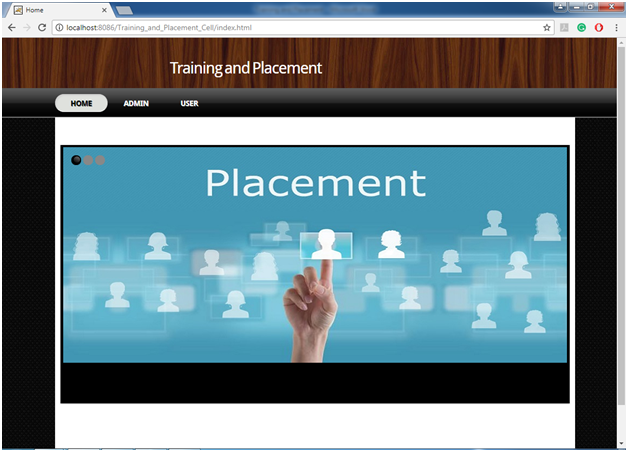
This page shows the basic view of how the home page of the application looks showing the modules present in the application.

Fig 2: Admin login

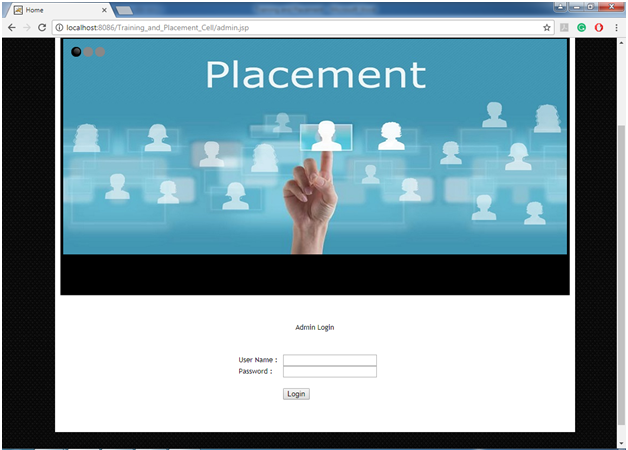
In this Admin login page admin can login into the application by giving username and password.

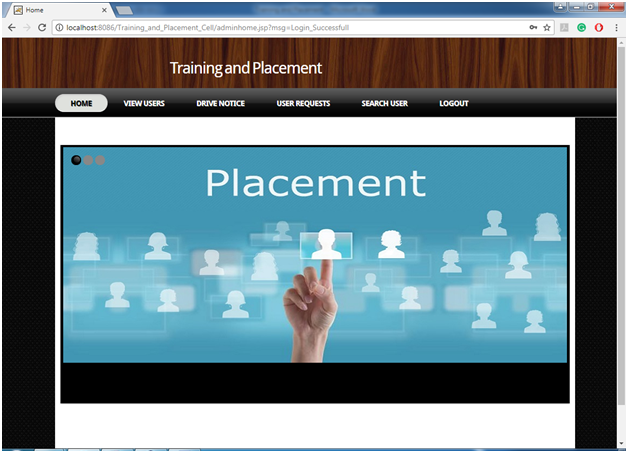
Fig 3: Admin Home Page

Successful login the home page of admin shows the basic functionalities of admin.

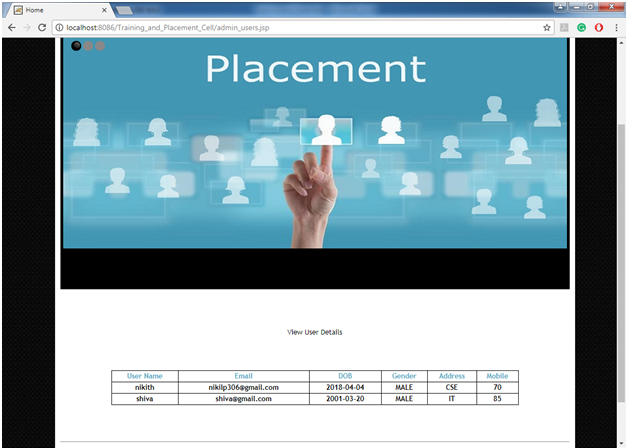
Fig 4: View User Details page

In this view user details page admin can view the user details and their academic details.

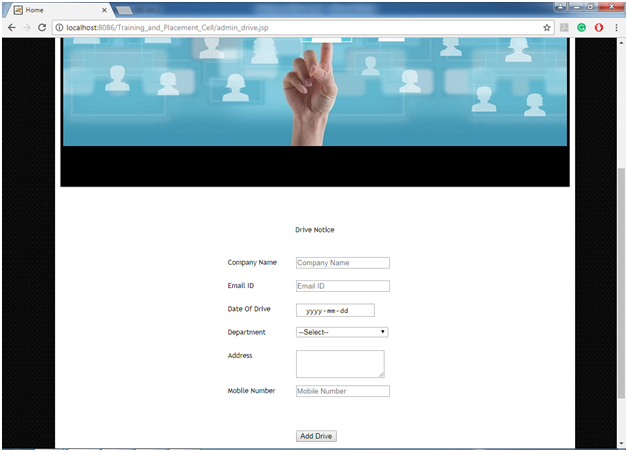
Fig 5: Add placements Drive Notice

In this add placements drive notice page admin will ad the drive details like company name, department etc.

Fig 6: View User Requests

In this view user requests page admin can view the user request for a drive and admin accept the users.

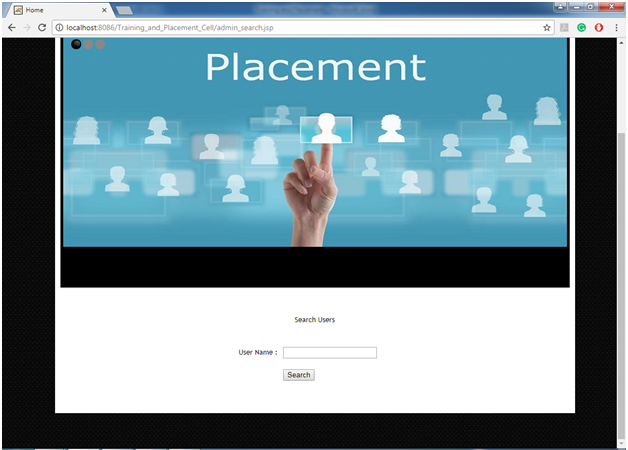
Fig 7: search Users page

In this search users page admin can search the registered users in the application.

Fig 8: View Search Results Page

After searching the user’s admin will get results as a list of students and click on the user you will get above results.

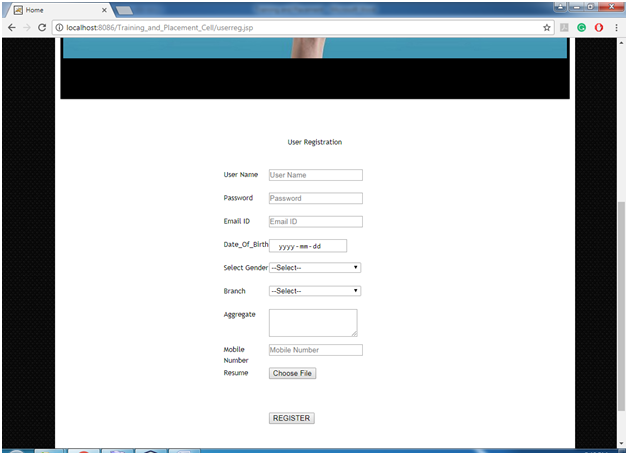
Fig 9: User Registration

In this user registration page user will register into the application by giving necessary details.

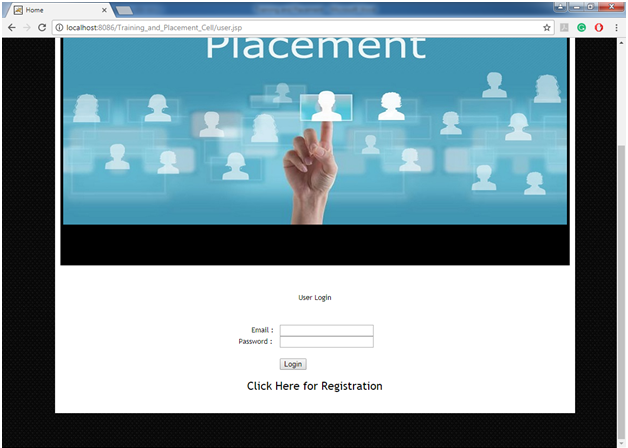
Fig 10: User Login page

In this user login page user will login into the application by giving username and password.

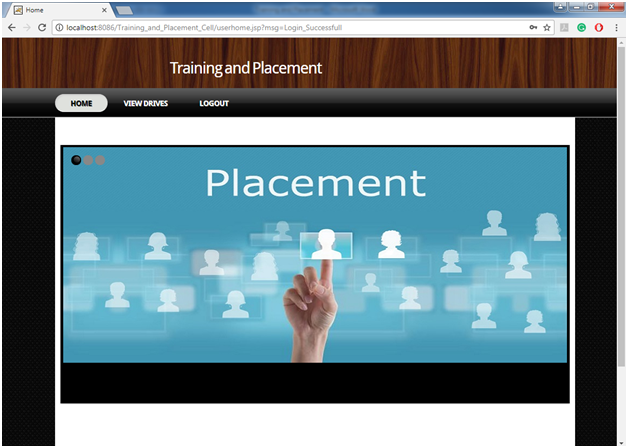
Fig 11: User Home Page

Successful login user will enter into the page showing the basic functionalities of the user.

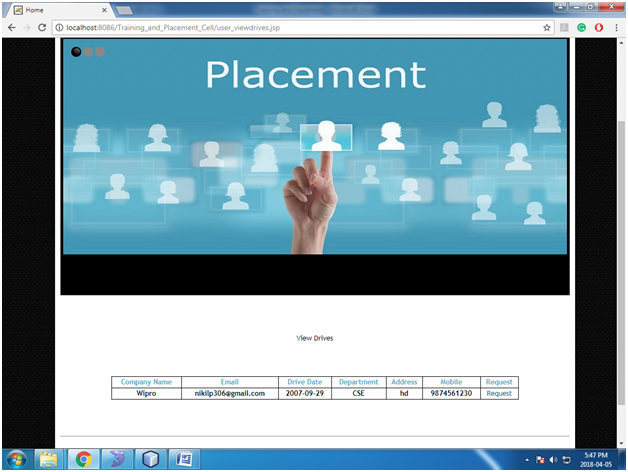
Fig 12: View Company Placements Drives Page

In this View Company Placements Drives Page, the user can view the placement drives uploaded by the admin.

Software Requirements: 

JDK 1.8, NetBeans 8.0.2, MySQL5.5, SQLYog

Exam Branch Management System Java Project

Abstract

It emphasizes two main concepts of the examination branch that results in the analysis and distribution of memoranda. The results analysis focuses on the percentage of class passes in each subject and the number of students approved in all subjects. The note distribution includes information about the list of students who took the memos and the date of receipt.

Existing System

• Maintaining all the data manually by records.
• Don’t have Subject wise marks display process in Examination branch related to class or Subject.

Disadvantages

  • Take Time consuming process for search memorandums.
  • No Efficiency for usage.
  • Maintaining records as Cost effective.

Proposed System

An application is developed so that the information of the students who have received the memos and the date of issue of their memos is stored.
Along with the pass percentage of every class, we can also view pass percentage of every subject of a class.

UML Diagrams:

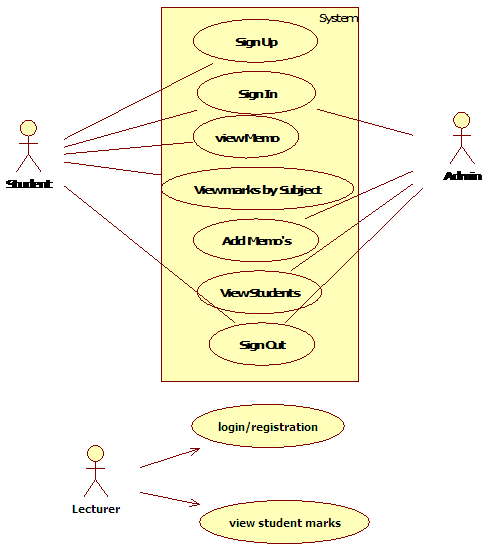
Use Case Diagram:

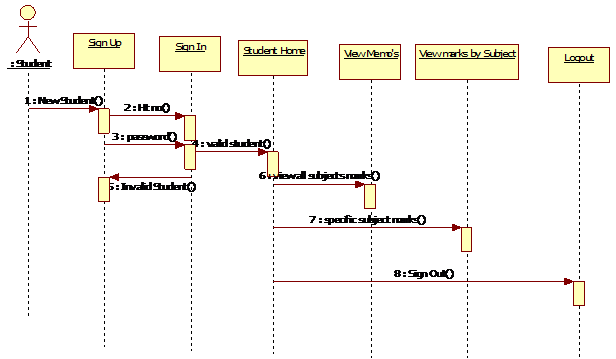
Student sequence Diagram:

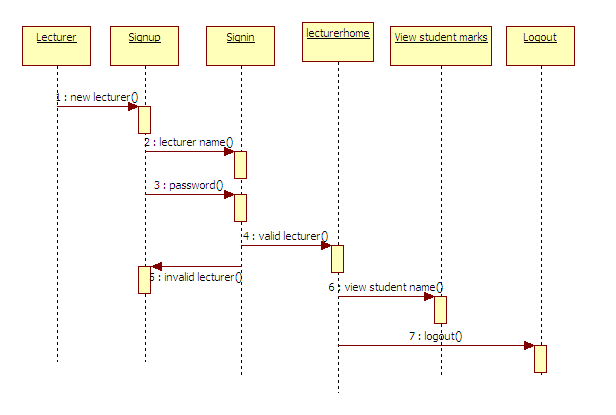
Lecturer Sequence diagram:

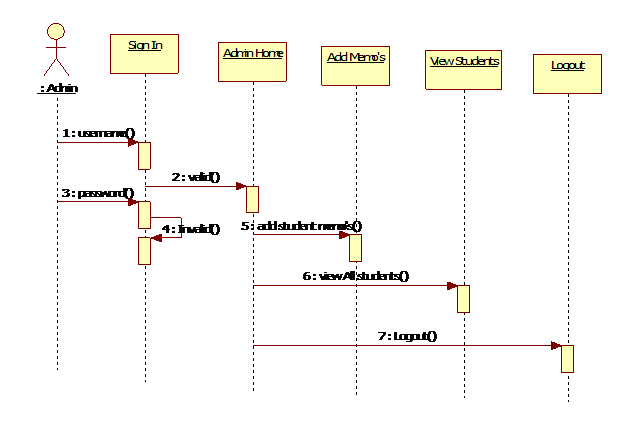
Admin Sequence diagram:

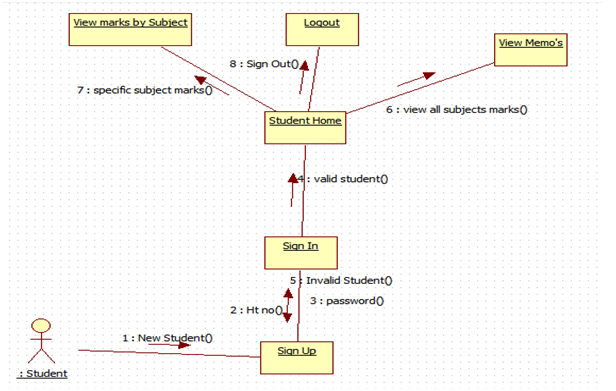
Student Collaboration Diagram:

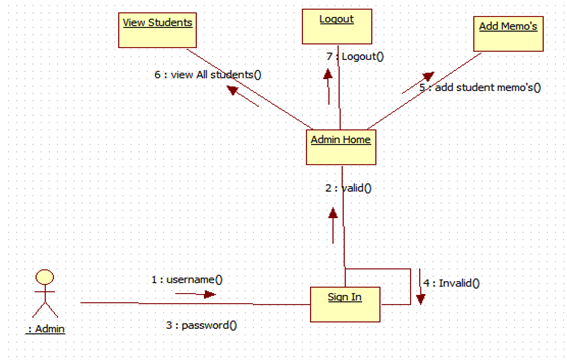
Admin Collaboration Diagram:

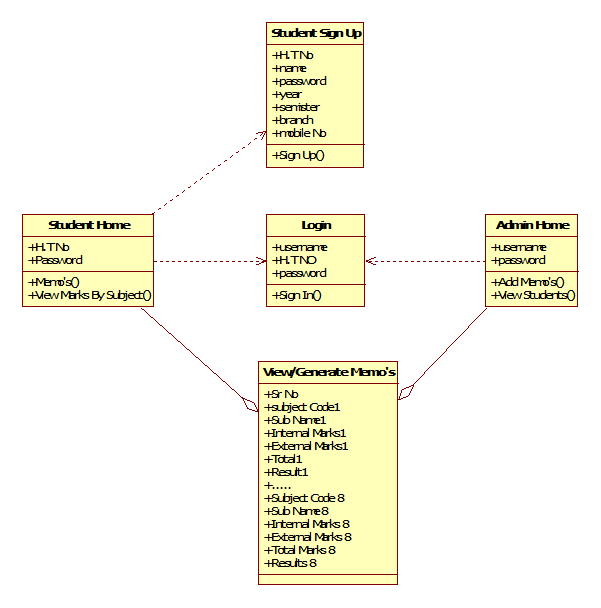
Class Diagram:

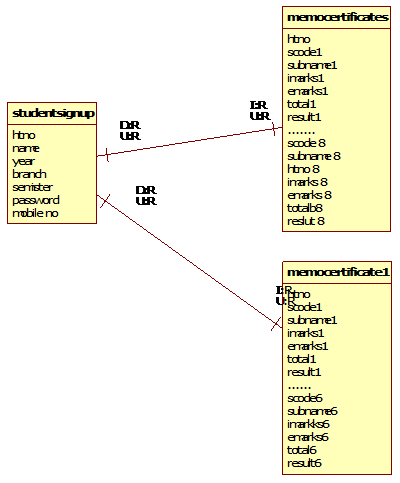
ER Diagram:

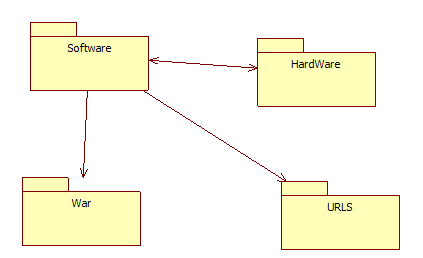
Deployment Diagram:

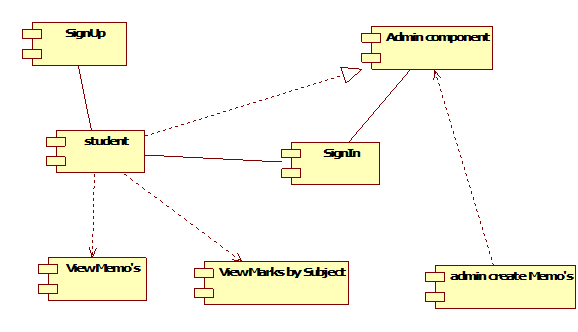
Component Diagram:

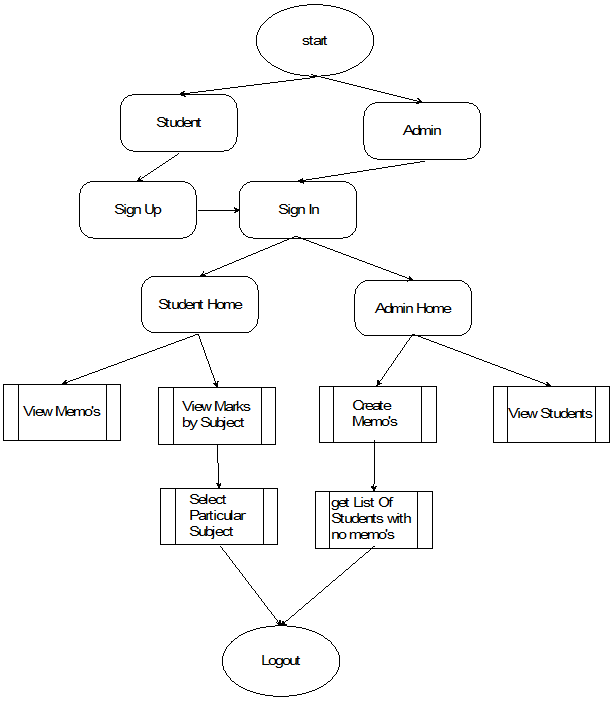
DFD Diagram:

Implementation

Admin Module:

Here admin can log in and maintain student and store their details in the database. Distribute required details to students.

Students Module:

Student contains authentication process mean registration and login fields. The student has individual hall ticket number and also views total result with overall subjects and related results. In this Module, the Students can view their marks information and with the particular subject marks of every class.

Output Screens:

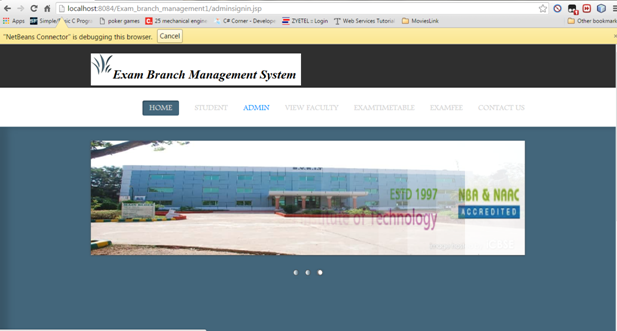
Home Page:

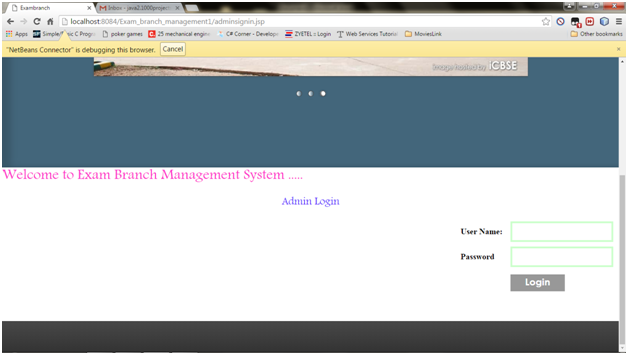
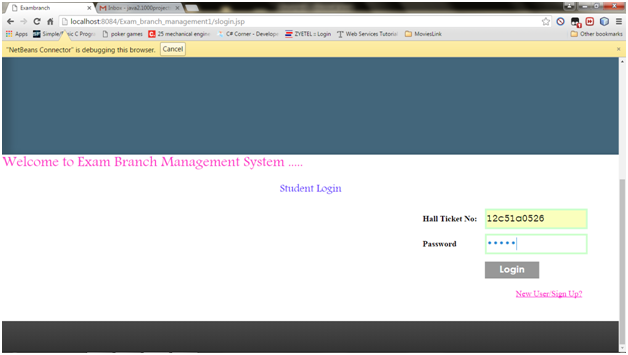
Admin Login Page:

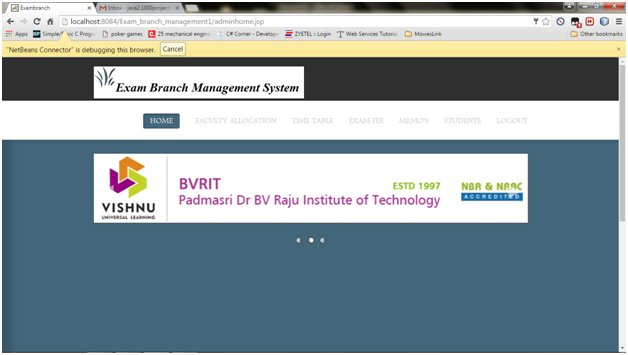
Admin Home Page:

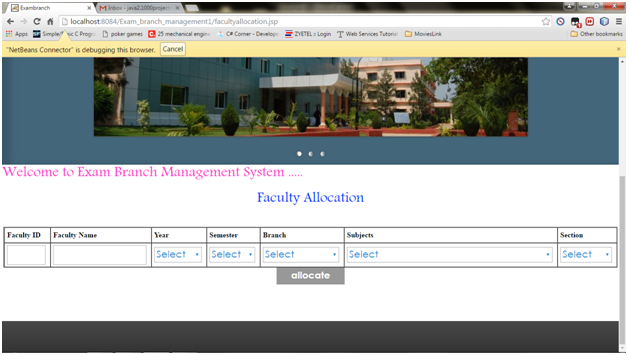
Faculty Allocation Page:

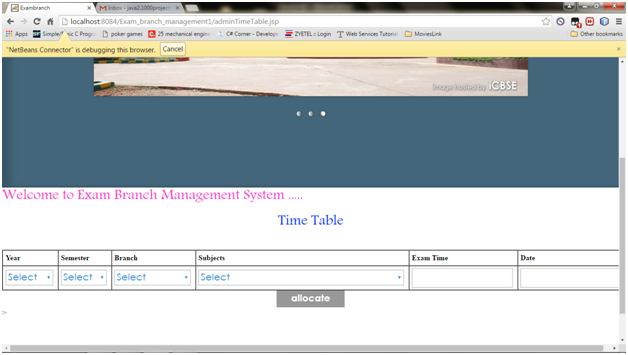
Add Time Table:

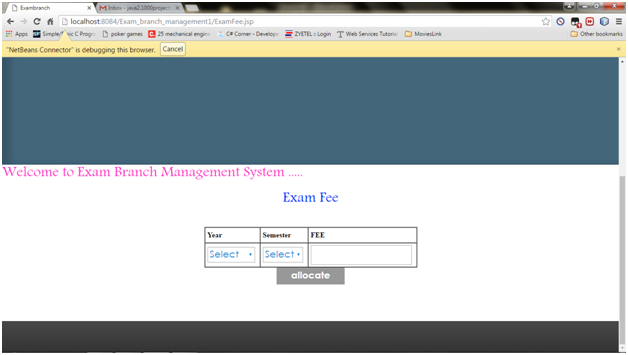
Exam Fee Details:

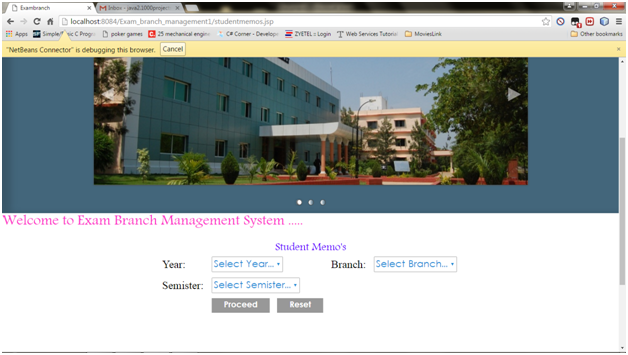
Student Memos:

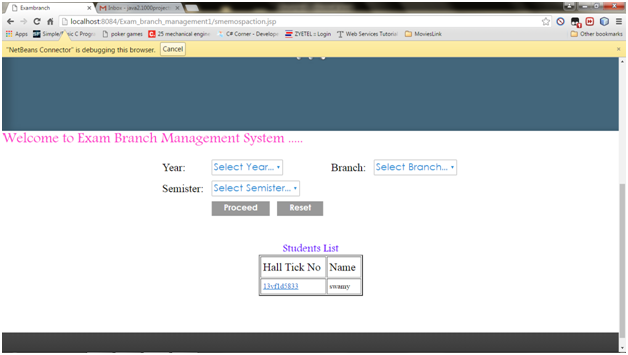
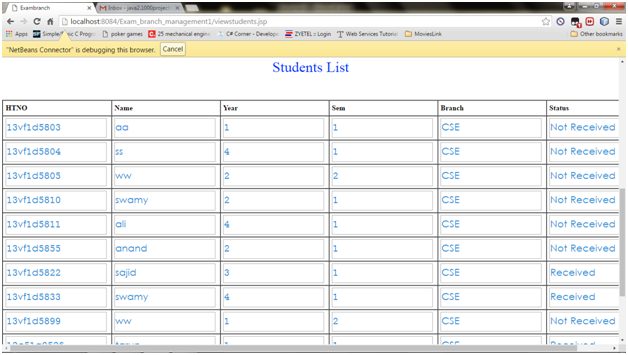
Students List:

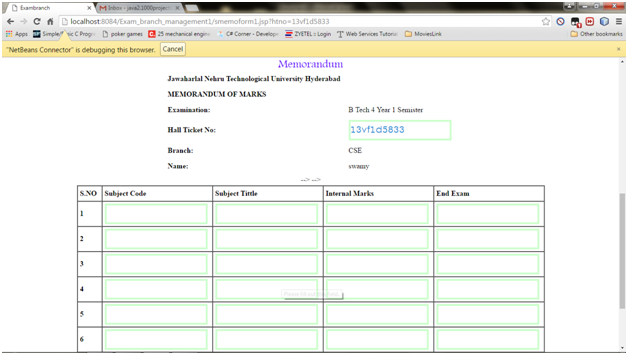
Memorandum:

Students Full List:

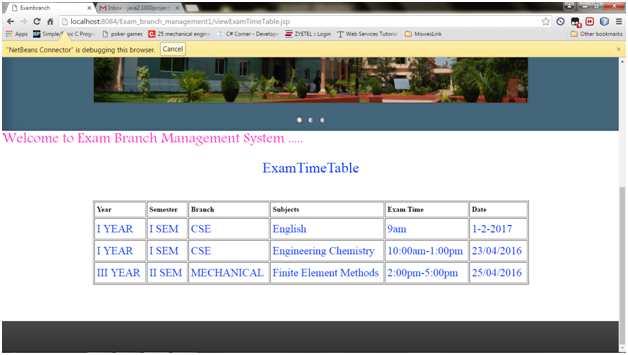
Exam Time Table:

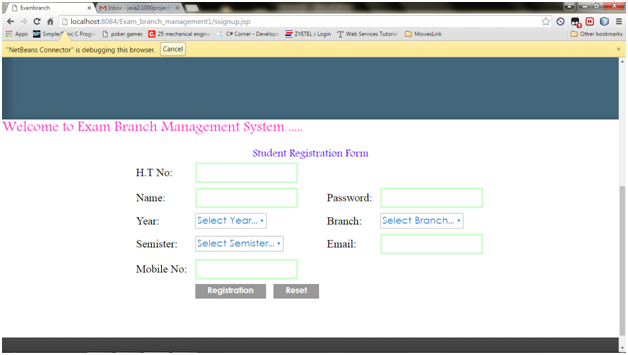
Student Registration Form:

Student Login:

Download Exam Branch Management System Java Project Code, Report, Database

Event Organization System Java Project

Event Organization is a smart web application which allows users and organizers meet at a place which is very flexible. In this application, Organizers need to be registered and get a login, after login he must add the venues by providing the necessary details about the venue like address, parking facility AC or Non Ac, etc.

After adding the Venues the Customer who want to book a venue for an event basic on his locality or area, he will search for the venues by giving the location in the map. If the venue added by organizer is in the list it will be shown and the customer can see all the details of the venue and he will send the request to book for an event.

The request was forwarded to admin and he will see the user request and he will send the request to Organizer and the organizer will see the availability according to the date if he accepts the same will be sent to the user.

The user can see his status in the application if the booking was confirmed and same will be sent to the user mail id.

The Following Modules are present in the project

  1. Admin
  2. Organizer
  3. Customer

Modules Description

Admin:

Admin needs to login into the application using the username and password and he can view the registered users and registered organizers. Admin can also view the requests sent by the user and admin will forward to the organizer and the rest is done by the organizer if the organizer accepts the request the same will be shown in admin saying that organizer is ready to accept the request and finally admin need to accept and the booking is confirmed.

Organizer:

Organizer needs to register into the application before getting logged in after getting login the application welcomes organizer with organizer home screen, showing the functionalities of the organizer. He can add venues and view the user requests which are forwarded by admin. He can also view the feedback given by the user.

User:

The user needs to be registered into the application before getting logged in, after getting the login access user will search for the venues based on the location, the user will select the address in the map. Then the user will see the list of events available in that location and user can book any one of them the request will be forwarded to admin, the admin will again forward the request to the particular organizer who is conducting the event if he accepts the admin request the admin will confirm the same to the user. The user can see the booking status whether the event is confirmed or not. The user will also receive the mail that the booking is confirmed.

Existing System:

Generally, in the existing system customer has no idea of which events are going on and when they are taking place. Even though the organizers publish the ads through flex posts etc. It will not reach to all people. Customers who need to book for the events they need to visit the organizer’s place.

Proposed System:

In The Proposed System the customer need not go anywhere he can just get all information about events in a single click. The Customer needs to register need login there he can find the list of events which are added by the organizer and he can book by checking the availability. Then customer needs to wait for the response and if he confirms he can take part in the event. 

Software Requirements:

NetBeans7.4, JDK 1.7, MySQL 5.5, SQLYog, HTML, JavaScript and CSS

Output Screens:

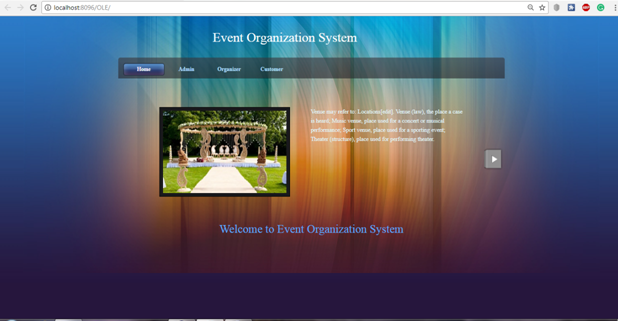
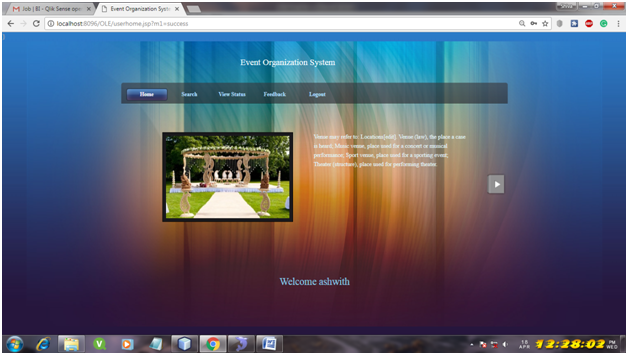
Home Page:

The Homepage of the application shows the view of the application and the list of modules embedded in the project

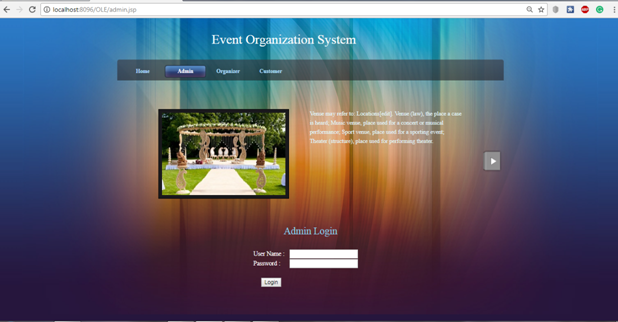
Admin login Page:

This is the admin login page and using the username and password enter into admin to perform basic functionalities.

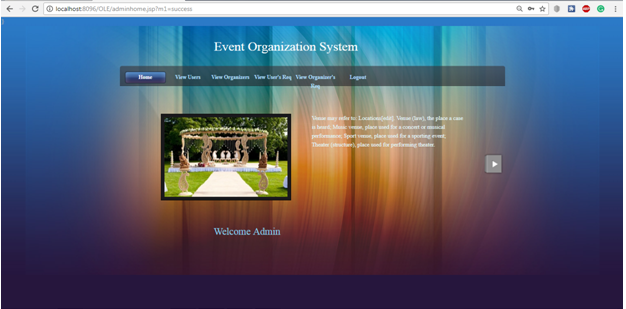
Admin home Page:

After Logging, it welcomes with admin home screen showing the basic functionalities of admin.

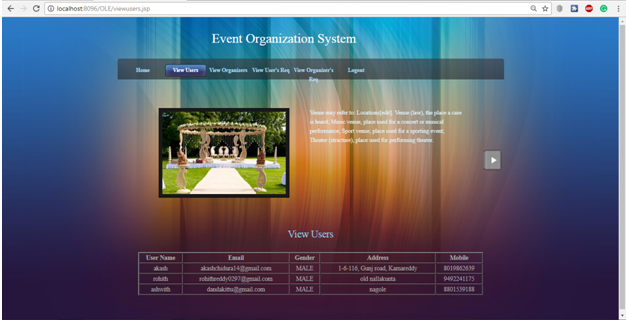
View users Page:

In this page, admin can view the list of registered users.

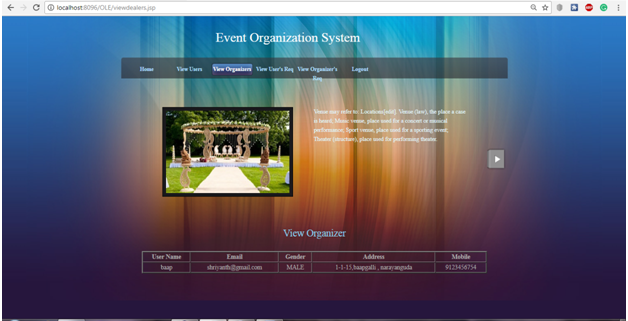
View organizer Page:

In this page, admin can view the list of organizers registered into the application.

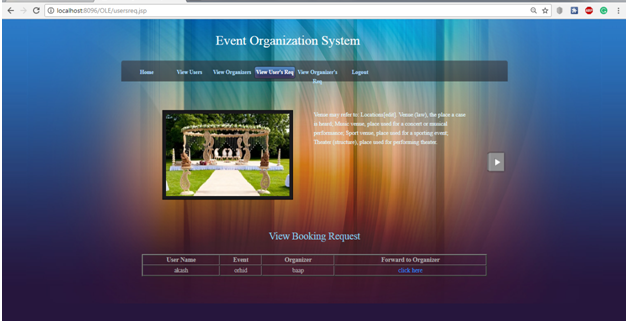
View user’s request Page:

In the user request page, the admin will see the request of the user for booking of an event
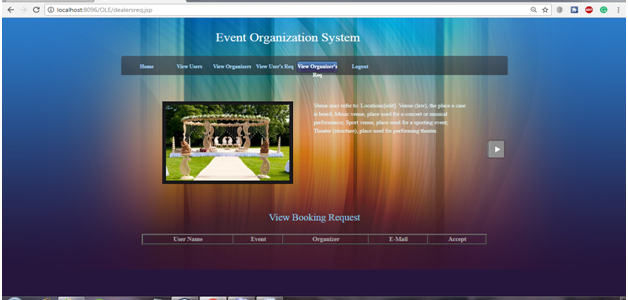
View organizer’s request Page:

In the organizers, view request page admin will see the list of organizers who accept the user request which is forwarded by admin
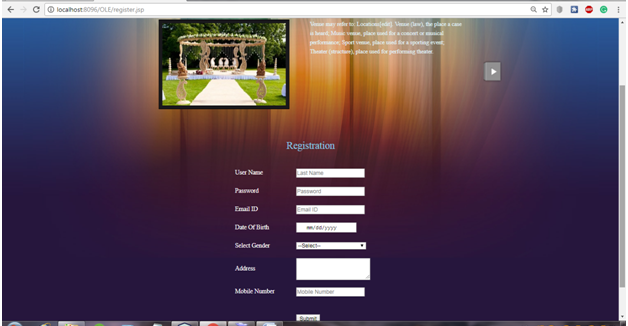
Organizer registration Page:

In the organizer registration page, he will register by entering all the necessary details.
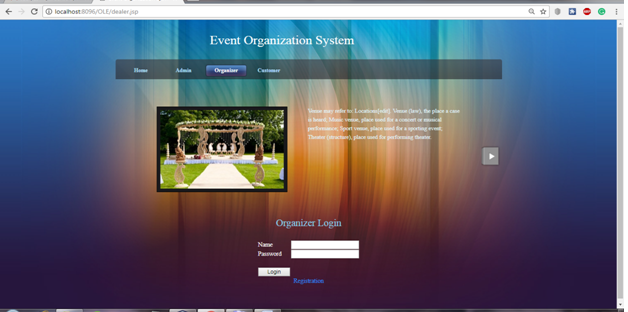
Organizer login Page:

In the organizer login page, he will log in with the username and password which is given while registering.
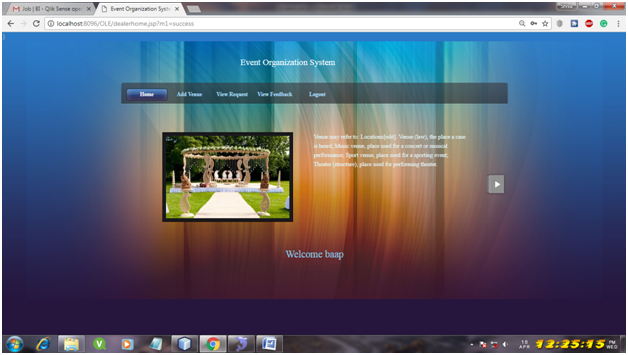
Organizer home Page:

The organizer home page, we can see the basic functionalities of the organizer
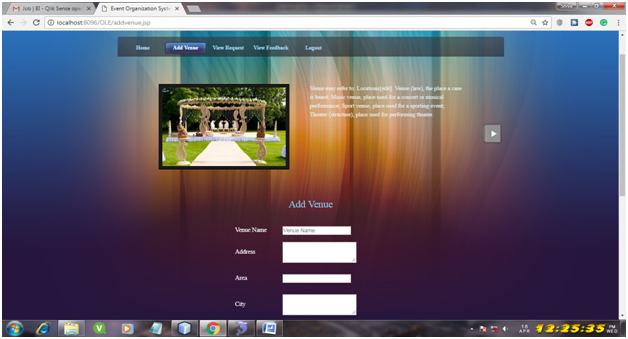
Add venue Page:

In this page, the organizer can add the venue by giving all the necessary details.

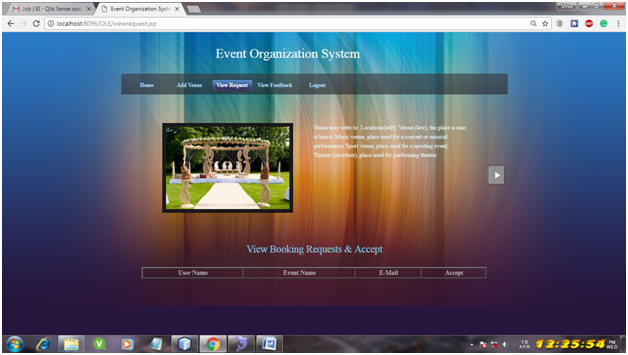
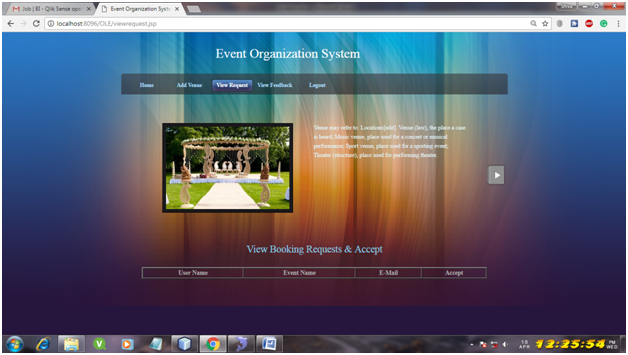
View request Page:

In this page the organizer will view the request forwarded by the admin and organizer can respond accordingly.

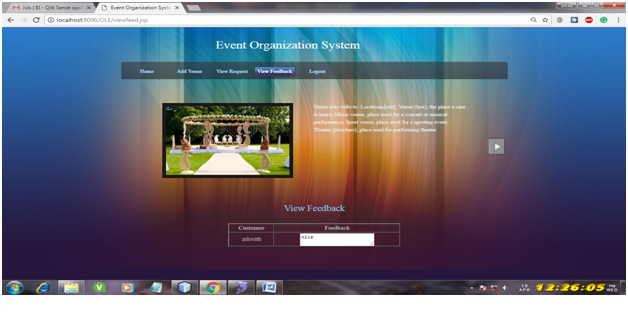
View feedback Page:

In this page, organizer can view the feedback given by the user.

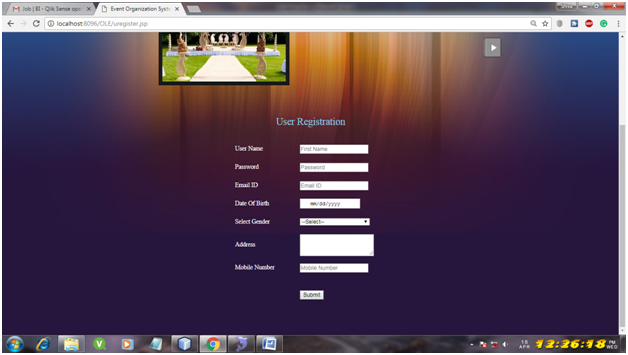
Customer registration Page:

In this page, customer can register into the application by providing all necessary details.

Customer login Page:

In this page customer can log in by providing username and password.

Customer home Page:

In this page the customer after getting login it shows the basic functionalities of the user.

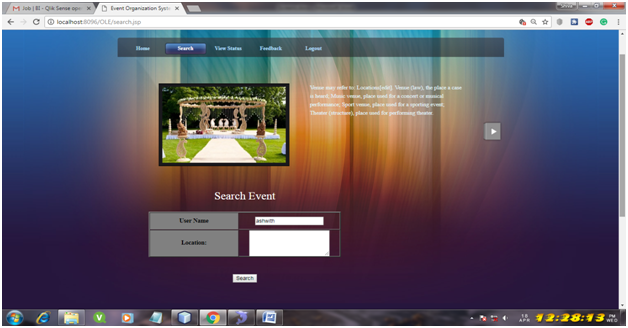
Search Page:

In this page, the customer can search the event based on location.

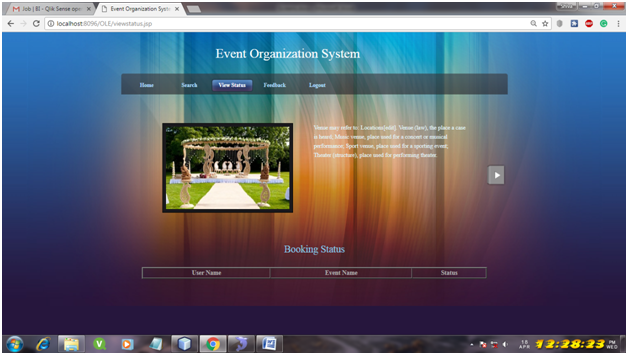
View status Page:

In this page, the customer can view the status of his booking which confirmed or not.

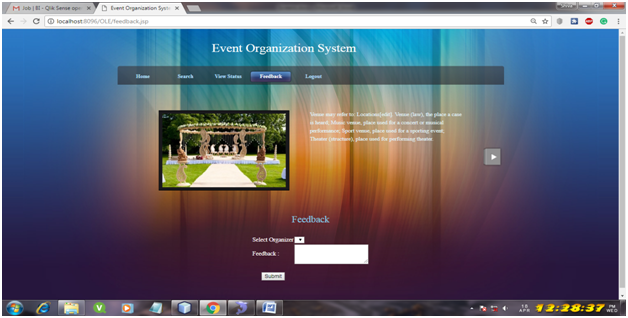
Feedback Page:

The customer can also give the feedback based on organizer performance in conducting an event.

Campus Pedia – College Management System PHP Project

Introduction:

Campus Management System is educational network project which aims to completely managing colleges, institutes and universities by providing better interaction between students, faculty, and administration. It will provide seamless interaction between the stakeholders enables small administration and management of various teaching, non-teaching and administrative activities.

Motivation:

To have unique projects and develop our own innovative ideas. To become an original thinker by weighing up differing arguments and draw your own conclusions without copying others work.

The objective of the thesis:  

To produce Campus Management System in the undergraduate projects and create awareness about it.

Proposed Work:

Campus Management System is an advanced network information sharing system. Here we can share the information in an effective manner. We can post our ideas and any information instantly. It is interrelated with the different management systems. It will help full to exchanging and providing the latest information and updates quickly. It will provides seamless interaction between the different users.

Database Design:

Here we have seven modules. They are:

  • Admin
  • HOD
  • Counselor
  • Staff
  • Librarian
  • Student
  • TPO

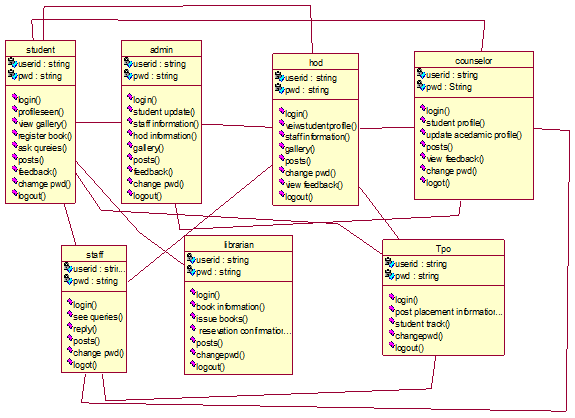
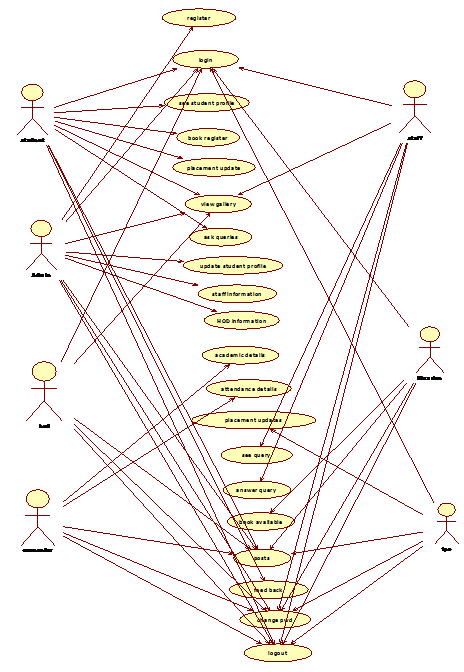
Admin Module: Admin is the person, who works in the administrative department. In Campus Management System he has the ability to activate new users, who are accessing the application, like STUDENT, HOD, COUNSELOR. He can Track the details of any staff or student from his Account.

HOD Module: Person how Are acting as a head of the Department, they having their own account to control the department activities. Like: Assign Councilor’s, Adding new users like Staff and Student etc.

Councilor Module: Councilor is the person who monitoring particular students, who assigned by the HOD. He/ She can update student profiles based on student`s request.

Staff Module: Staff can see the timetables belong to their Own department. And the can update their own profiles. The can ask quires and they can give their answer for the quires which is sent by others.

Librarian Module: In this module home posts gallery, library, settings. Librarian can handle the student requests. He can update the book’s information.

Student Module: He/She can able to post any ideas can able to reserve books from the library.Can give feedback to their HOD or Councilor or ADMIN. He can see his profile if any modification is there in his profile he can post some message to his counselor as a feedback.

TPO Module: He can post the any latest information about placements. And he can track the student profile based on their academics and backlogs.

System Design:

Class Diagram:

Usecase Diagram:

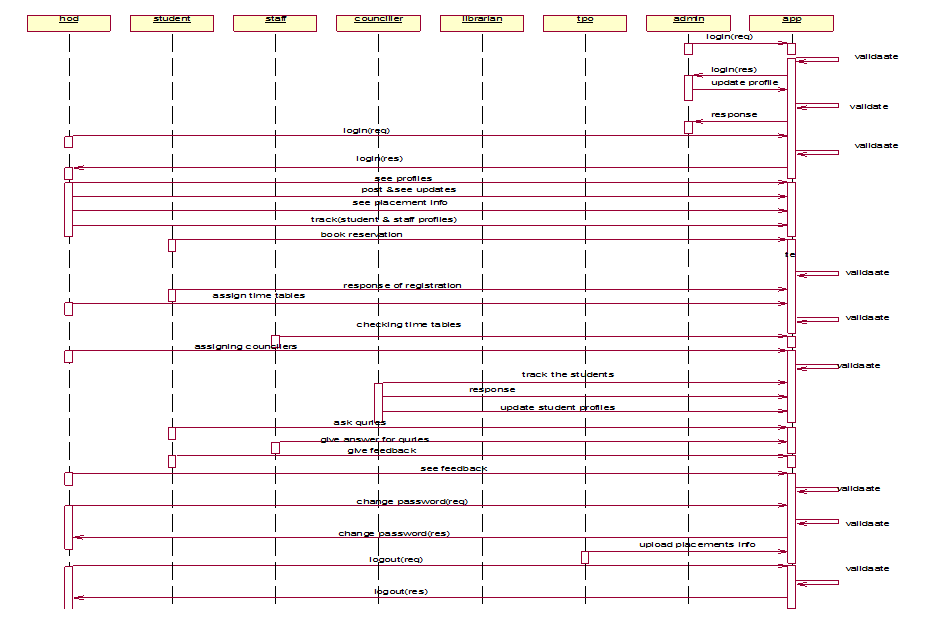
Sequence Diagram:

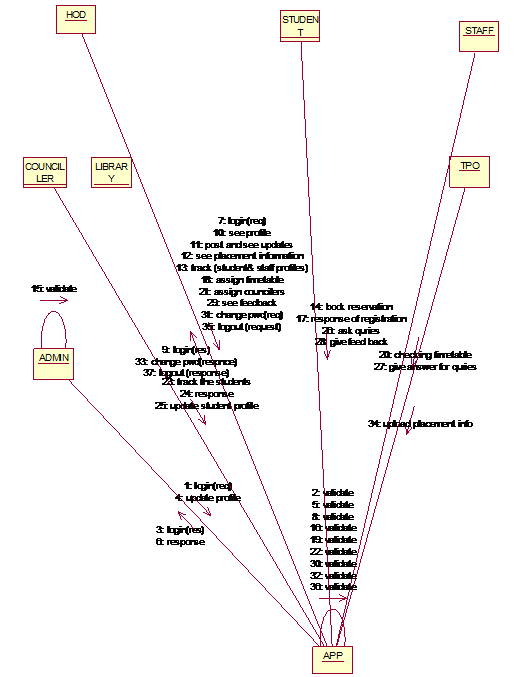
Collaboration Diagram:
Activity Diagram:
Software Requirements:

Operating System: Windows Family.
Application Server:    Xampp.
Web designing languages :  HTML5, CSS3.

Scripts :   JavaScScripts:

Server side Script :   PHP.

IDE IDE: beans

Database: MySQL.

Database Connectivity : PhpMyAdmin.

Browsers support: IE9, Firefox, Chrome, and Opera

Hardware Requirements:

Processor Speed: 1.1GHZ

RAM:   512MB RAM & above

Hard Disk:   80GB & above

Keyboard: Standard Windows Keyboard

Mouse:   Two or Three button

Monitor:   VGA

OUTPUT RESULTS:

Fig: 7.1 Login page

Fig: 7.2.Admin Home Page

Fig: 7.3 : HOD Home Page

Fig.7.4: Student Home Page

Fig.7.5: Counselor Home Page

Fig.7.6: TPO Home Page

Fig.7.7: Librarian Home Page

Fig.7.8: TPO track

Fig.7.9: TPO Upload

Fig.7.10: Change password

Fig.7.11: Posts

Fig.7.12: Library reservation

Fig.7.13: Ask queries

Fig.7.14: Student feedback panel

Fig.7.15: Assign counselor

Fig.7.16: Feedbacks

Fig.7.17: Activate new users

Fig.7.18: See timetables

Fig.7.19: Track User

Fig.7.20: Student requests library

Fig.7.21: Upload Books Details:

Fig.7.22: Counselor track

Conclusion:

Campus Management System is an Educational Network Which Will Helpful To Share The Information between the different users Effectively and quickly and also provide good interaction between the different users.

Future Scope:

1. Now in our project, we are using the MySql Database, in future, we would like to implement in Oracle.

2. In future, we would like to provide more services to the users.