Simple Intra Network Sniffer .Net Project Synopsis

PURPOSE OF THE PROJECT

Intra Network Sniffer is a tool designed for the purpose of searching for files and folders which are shared over a Local Area Network. It is particularly useful in organizations where a lot of folders are shared on individual systems.

Here’s how the application works. We need to specify an IP range. The tool searches for live hosts. It then determines the list of folders shared by each system and looks for files (according to a keyword that we specify).

PROBLEM IN EXISTING SYSTEM

In the existing system, workgroup list won’t populate or is incomplete.  Says network resources are unavailable or cites permission problem. The system doesn’t understand sharing files among all range of system IP address. There is no interface designed to search the files on a specific LAN. High-level views of the system network activity are not provided by the existing system. In applications ranging from financial institutions to manufacturing facilities, network engineers will find Serial test easy to work with but loaded with features.

SOLUTION OF THESE PROBLEMS

In the proposed system workgroup will be populated in the interface completely, by using this workgroup the only administrator will know the architecture of the LAN. The proposed system is a passive and easy-to-use network monitor that helps network personnel understand what is occurring on their communications LANs.

By observing the workgroup range administrator will arrange the IP address range in the proposed system. A high-level view of the system network activity is provided in this proposed system. A good user interface will provide the administrator to watch the network sharing files among the LAN. Whenever a file is transferring between a range of IP addresses, the administrator can watch the file content on its own file mode.

Software Requirements:

  • WINDOWS OS
  • Visual Studio .Net
  • Internet Information Server
  • Visual Studio .Net Framework (Minimal for Deployment)
  • Microsoft Visual C# .Net

PROPOSED SYSTEM

In the proposed system workgroup will be populated in the interface completely, by using this workgroup the only administrator will know the architecture of the LAN. The proposed system is a passive and easy-to-use network monitor that helps network personnel understand what is occurring on their communications LANs.
By observing the workgroup range administrator will arrange the IP address range in the proposed system. High-level view of the system network activity is provided in this proposed system. A good user interface will provide the administrator to watch the network sharing files among the LAN. Whenever a file is transferring between a range of IP addresses, the administrator can watch the file content on its own file mode.

UML Diagrams:

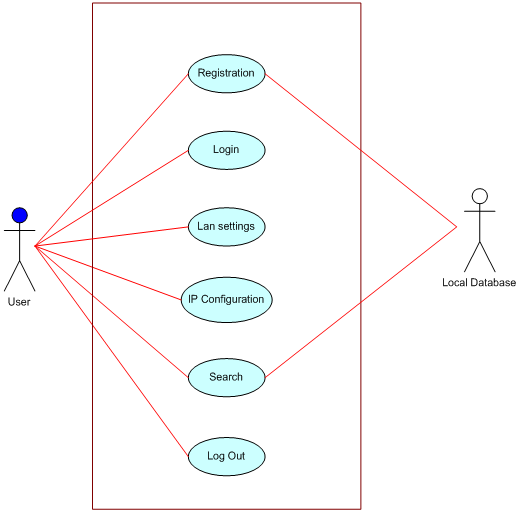
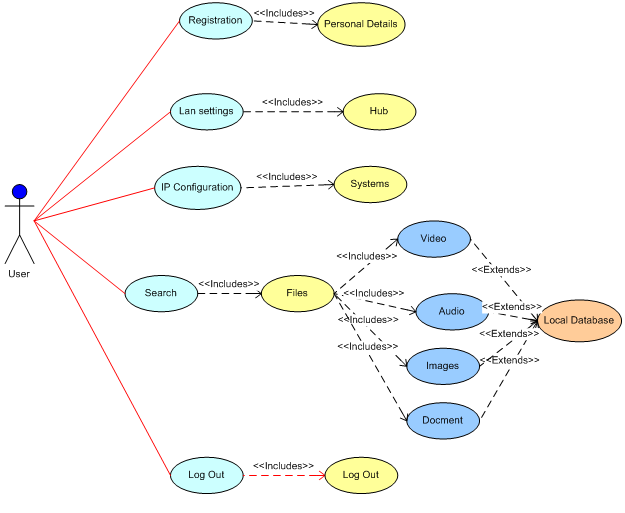
Use case Diagram:

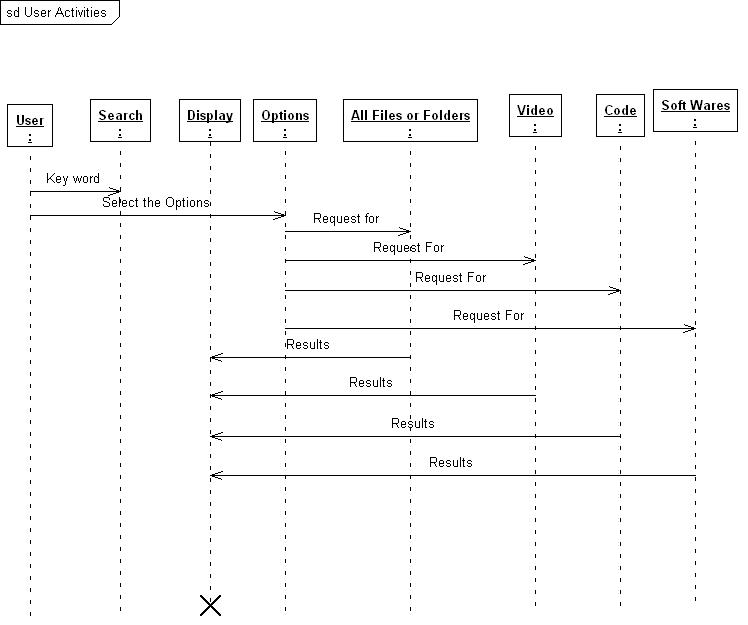
Sequence Diagram:

INPUT AND OUTPUT

The major inputs and outputs and major functions of the system follow:
Inputs:
• Specify the IP address range
• Select the File or Folder Type
• Give any keyword for searches like file name or extension
• Open the file in different file modes.

Outputs:

• The search starts for the given IP address range
• Catch the file depends on the file type
• The selected file will be opened depends on the file mode.

PROCESS MODEL USED WITH JUSTIFICATION

In this system, two types of process modules are developed.
• Text Module
• File Module
Text Module
Text module is the method in which the image is uploaded in the required path and then text to be hidden is given in the textbox and a retrieval key is given in the module to retrieve the information from the image while the extraction occurs.
File Module
File module is the method in which the whole file is extracted from a local disk and it is sent to another location by hiding the file and it is extracted to a required location with help of the key.

Project Execution Process:

  • Home Page Before Execution
  • Select a Bit Map Image
  • Add a string for Key
  • Type Secret Message and Hide the Message
  • Save the Hide Message in another Image
  • Extract the Secret Message Using Image (Uploading Image for Message Extracting)
  • Press Extract Button for Retrieving Secret Code
  • Finally, Secret Code Received

Query Redressal System .Net Project

The Query Redressal System is designed for the customers of the Global Bank. Through this system, the bank will manage the complaints from the customers and provide the better services for their customers.

The other target of the bank is to provide the services to its customers all over the world. This project enables the customers of the Global Bank to see the general information about the products, services, and schemes offered by the bank.

The Customers of the bank will be given an email id for each product, where they can send an e-mail when they have a query to register.

The email will be converted into complaints and then assigned to the persons handling the product. Persons handling the complaint will have a facility to communicate with the customer via emails through the system.

Advantages:

  • No wastage of time to send a query.
  • We also can know the complaint details.
  • Requires less man power.

Modules:

  • Administrator
  • Products
  • Services
  • complaints

UML Diagrams:

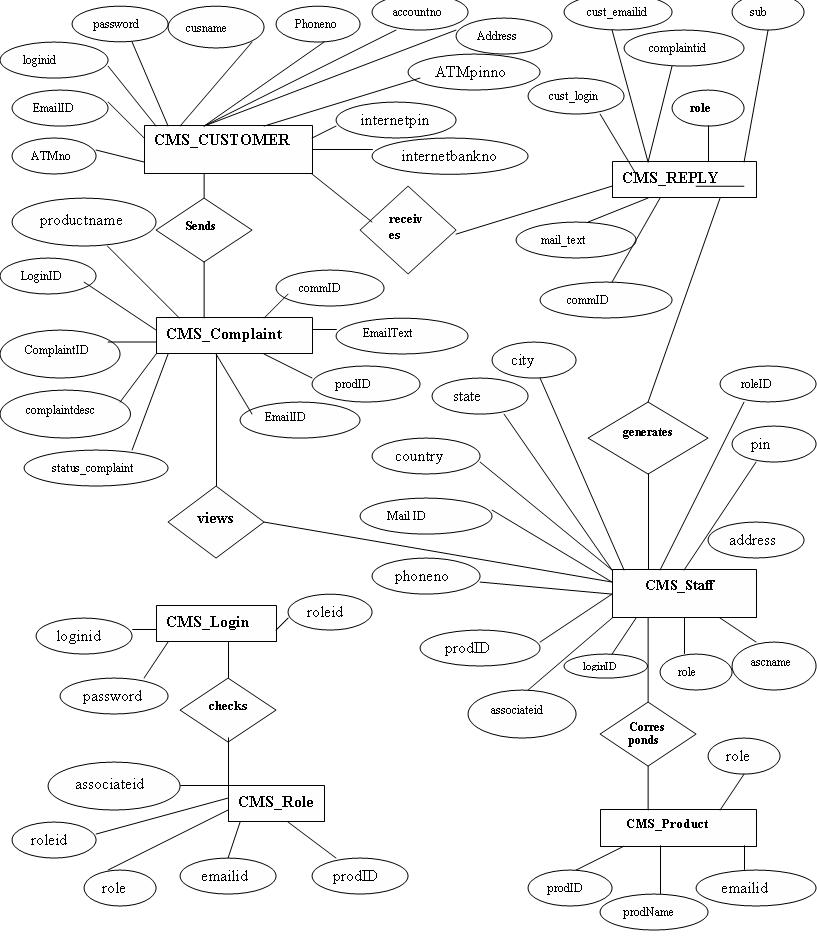
ER Diagram:

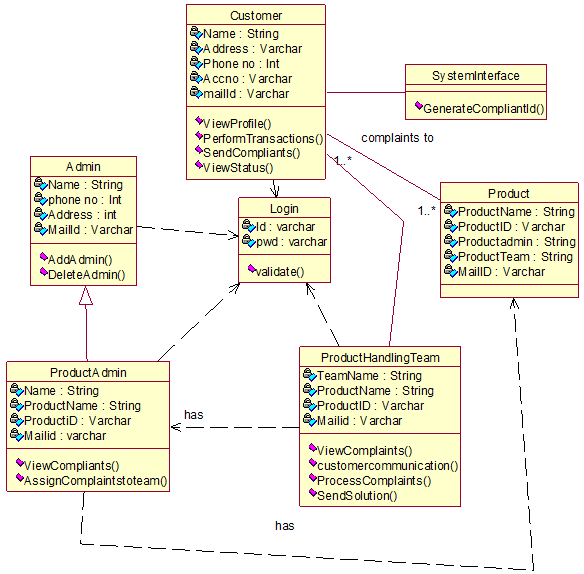
Class Diagram:

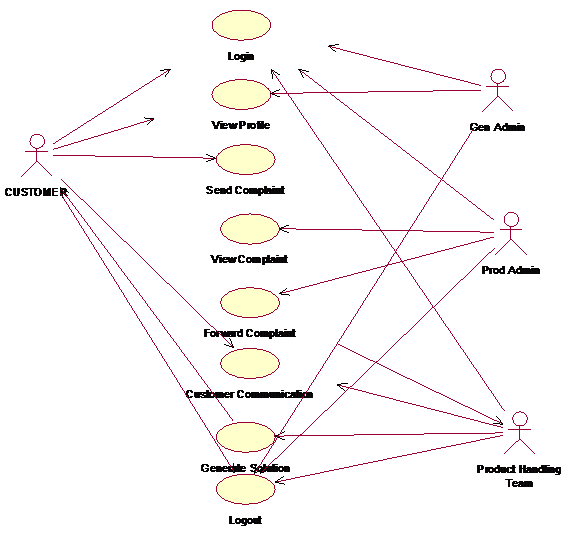
Use Case Diagram:

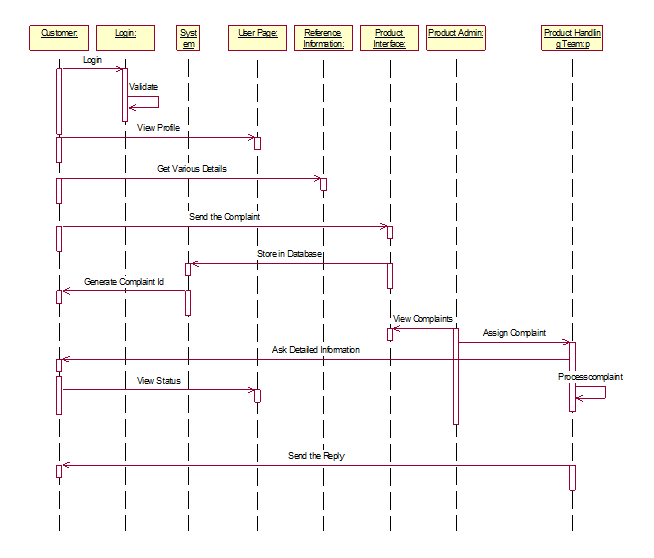
Sequence Diagram:

SOFTWARE REQUIREMENTS

Operating System: MS

Languages: Asp.Net with C#

Database System: MS-SQL Server

Web Server: MS IIS

Download Query Redressal System .Net Project.

Medical Emergency Caller Android App Project

Abstract:

In case of any emergency patient may not be a state of speaking with anyone or searching through the contact list and calling the desired person, hence we are making an application to solve this problem.

The Emergency Caller Android App is needed in case of a medical emergency. The user can make an emergency call to the nearest hospital.
The user of the application needs to configure the application for the first time use where the user will fill in a short medical survey (that will help to generate a medical history of the patient).

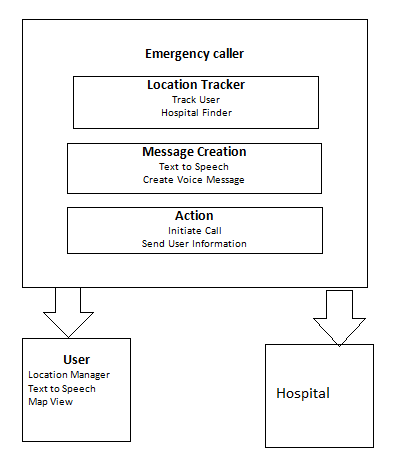
In case of emergency the system will find out the nearest hospital based on the current location of the user and the call will be initiated also the medical details about the patient will be sent to the hospital.

The call will contain a pre-recorded message by the user and the location of the user which will be detected by google maps and then the information will be converted to the voice message.

The Novelty of Idea:

As the Patient’s basic information is available with hospital beforehand the kind of treatment to be given will be decided in advance and the patient can be treated immediately as soon as he/she arrives.

Relevance and Applications:

The system will help the user when he is in an emergency and importantly not in his own area ( Some not well-known place for the user).

In case of emergency as mentioned above it is not possible for a user to speak and also if there is no one nearby to help, the situation can become worst.

Solution:

Technology Layer/Solution

Attached is the diagram

Proof of Concepts:

As of now, we have used a google maps basic example (rendering map) and soon we will be finding nearest hospital based on users current location and prepare a voice message.

Research & Development:

Designing the UI in such a way that will solve the purpose in the least number of clicks.

what kind of information to store about the patient that will help to generate a medical history of the patient, depending on the storage are (phone/cloud).

In order to make the system more lively, we are planning to use the cloud to store patients information that will be sent to the hospital in case of emergency.

We will try to figure out some shortcut ( gesture, tapping, pressing screen ) in order to initiate emergency help.

Improvement on Existing Solution:

In the current Situation, it becomes very difficult for a patient to locate a nearby hospital in case of emergency but with the help of this android app, we can find nearby hospitals easily.

Development of RunAway Holidays .Net Project

Our Development of RunAway Holidays Project has one Module and it had developed by using .net technologies.

  1. Agent

Administrator:-

Features:-
1.  Register
2.  Forgot Password
3.  Login
4.  Edit Profile
5   Agent Menu
a.  Booking Details

  1. Retrieve booking
  2. Check Fare
  3. Cancellation

Description:-

The administrator has to register first of all.
* Registration is allowed for only one administrator i.e once an admin is registered no other person is allowed to register again.
* After registering, if he/she forgets his/her password, he can get it by giving valid id & emailid and then answering the secret question correctly.
* Once admin provides valid id & password for login, he/she can go to the menu. 

Using this menu admin can

  • edit his/her profile.
  • Add/update/delete/view Booking Details

UML DIAGRAMS

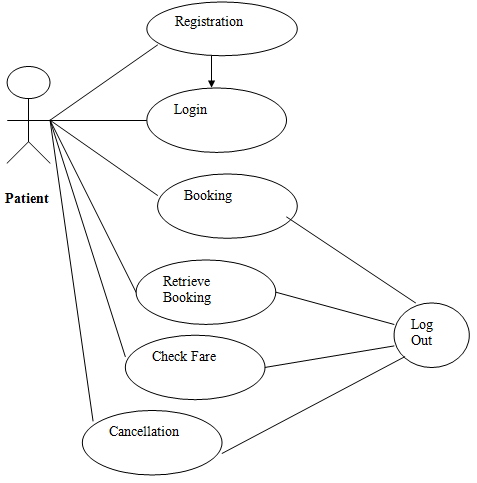
USECASE DIAGRAM:

Use Case Diagram for Agent

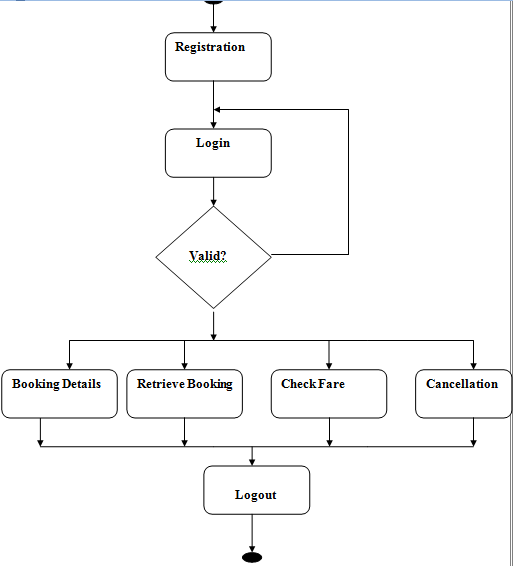
Activity Diagram for Agent

Deployment Diagram

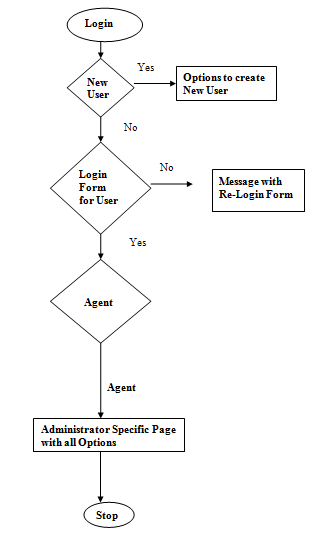
Login Flow Diagram

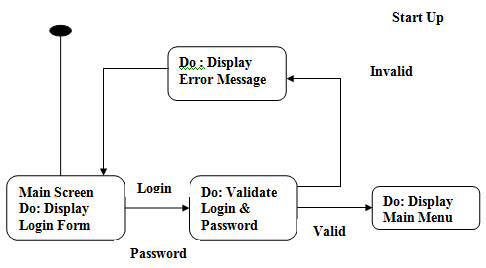
State Diagram:

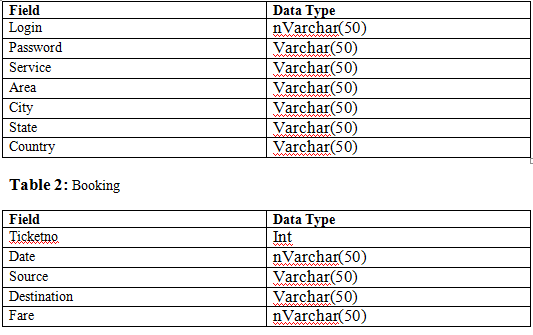
Database Table:

Output Screens include:

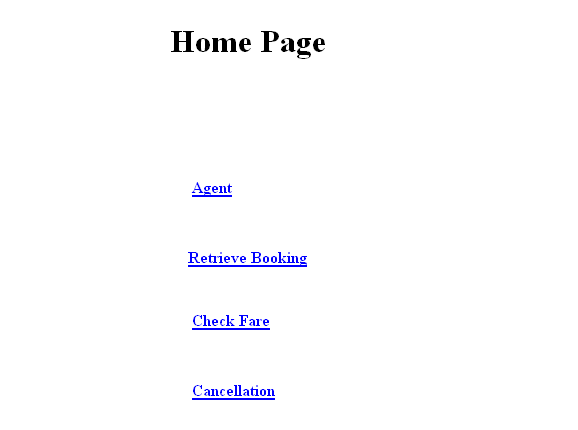
  • Home Page:
  • Agent Login Page:
  • Agent Home Page:
  • Booking Details Page:
  • Retrieve Booking Page:
  • Fares Page:
  • Cancellation Page:
  • Ticket Cancelled Page:

SOFTWARE REQUIREMENTS:

Operating System: Windows

Database: Sql Server

Server side technology: ASP.Net

Server side scripting : ASP

Client-side scripting : HTML, JavaScript

Web-Server : IIS

Database Details below:

Admin Table

  • admin name
  • admin password

Agent Table

  • first name
  • last name
  • mno
  • email id
  • date of birth
  • address
  • city
  • state
  • country
  • pin code
  • agname
  • agpswd
  • agcpswd
  • pswdhint

bbooking Table

  • tname
  • bno
  • type
  • nos
  • bfrom
  • bto
  • atime
  • dtime
  • tcost
  • bdate

Bus Table

  • tname
  • bno
  • type
  • nos

Card table

  • type
  • bname
  • validity
  • number
  • hname

Customer Table

  • fname
  • lname
  • mno
  • eid
  • dob
  • address
  • city
  • state
  • country
  • pin
  • uname
  • upswd
  • ucpswd
  • pswdhint

Feed Table

  • fto
  • ffrom
  • sug
  • per

hbooking Table

  • hname
  • reg
  • type
  • noa
  • nona
  • place
  • address
  • phno
  • ac
  • nonac
  • cac
  • cnonac

hcard Table

  • type
  • bname
  • validity
  • number
  • hname

Hotel Table

  • hname,
  • reg
  • type,
  • noa
  • nona
  • place,
  • address,
  • phno

hticket

  • hticket
  • uname
  • hname
  • reg
  • aday
  • dday
  • type
  • typer
  • place
  • nor
  • cost

Map Table

  • place
  • district
  • state
  • country
  • img_pk
  • img_stream
  • img_type

tcard Table

  • type
  • bname
  • validity
  • number
  • hname

Ticket Table

  • ticketid
  • uname
  • bname
  • bno
  • type
  • nos
  • bfrom
  • bto
  • atime
  • dtime
  • cost
  • bdate

Tour Table

  • packid
  • package
  • nop
  • cost

tticket Table

  • tticketid
  • uname
  • packid
  • package
  • nop
  • cost

Download Development of RunAway Holidays .Net Project Code and Database

Information Pool System .Net Project

The Information Pool provides a number of services to the users in terms of events management, classifieds, discussion board, news, polls, blogs etc depending on the handling of this Information Pool it is broadly divided into two major modules. They are

  • Administration
  • User

Administration: This section of the Information Pool System has all the features of the user as well as added features of administration such as news hosting, site management, configuration, registrations etc.

User: This section is a restricted one and has all the below-mentioned areas.

Welcome Page

The welcome page is the main Information Pool System navigation area. It consists of several blocks that display partial content of the module or other data. The blocks also serve as access points for navigation into module pages.

Welcome page components are laid out into 3 columns:

left column

  • search block that allows to search Information Pool content by keyword
  • events summary that displays several nearest events
  • discussions overview that displays most recent threads
  • links area that display selected links to external sites

the middle column contains short articles extracted from the database

right column

  • classifieds summary presenting most recent classified ads
  • news section displaying news articles or other content extracted from external news sites
    In the default setup, the news section is utilizing JavaScript component

User Registration And Login

First-time Information Pool System user can register to access restricted Information Pool areas and services using the “Join Us” button located in Info Pool header. The registration form can also be used to modify user information if the user is already logged-in.

The user is logged-in if the welcome message contains username displayed below header buttons.

All new users are automatically assigned Security Level 1, which allows them to participate in Info Pool community activities. The Administrator (Level 3), can upgrade the security level of a user to Level 2 (Editor) or Level 3 (Administrator).

Additionally, the Administrator has options to configure email notifications so that users receive Email Confirmation upon successful registration. They can also retrieve lost password via email.

Info Pool Administration

The Administration Module is accessible only to Editors (Security Level 2) and Administrators (Security Level 3) and can be used to manage Info Pool content and configuration.

Most of the administration pages are organized as two-page editing schema. One page contains a list of available items (optionally with searching capabilities) and by clicking items in this list one can navigate into another page containing a form for modifying item data or entering new item data.

Articles/Content

This section is used for review and maintenance of articles appearing in the middle column of Information Pool System’s welcome page. The articles will be ordered by “order” number assigned to each one.

News

This section is used for review and maintenance of news articles appearing in the right column of Information Pool System’s welcome page. By default, the Info Pool is configured to display news headlines.

Events

This section is used for review and approval and of Events submitted by users, as well as for adding new and maintaining existing Events.

Links

The links section is used for review and approval and of Links submitted by users, as well as for adding new and maintaining existing Links.

Link Categories

This form allows the review and maintenance of link categories.

Forums

This section is used for creating and maintaining Discussion Forums. Forum details contain forum information and allow selection of forum moderator from the list of registered users.

Classifieds

This section is used for review and maintenance of Classified Ads submitted by users. Inappropriate ads may be deleted or marked as inactive.

Ad Categories

This form allows the review and maintenance of available classified ad categories. It contains the current category list and forms for editing the category.

Members

This section is used to search, review and edit the list of registered Information Pool System users. The administrator can modify user information, delete users, as well as assign security access level to each user. The Member List page contains “Export To Excel” link, allowing to export Members to Excel.
Members can also be assigned a membership status for organizational purposes, such as candidate, member, or supporter. This status is not used elsewhere in the Information Pool System, except in the Email module.

Member Statuses

This form allows for review and maintenance of user statuses, for organizational purposes.

Send Emails

This page can be used to send email messages to selected Information Pool System users. It allows selection of Member Status to whom the email should be sent. The administrator also needs to enter email parameters, such as From, Subject and email Body.
Email history is also shown on the screen.
Email functionality may require additional email component to be installed on the server, such as CDONTS for Windows. Please contact your hosting company, if you experience issues with sending emails.

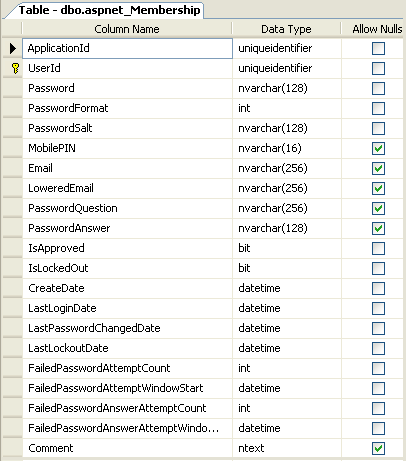
Data Dictionary
Info Pool Security

The Information Pool System is configured with 3 default users and 4 security levels, as shown to the right.

Security Level 0:

All visitors who are not logged in have security level 0 with limited permissions, allowing them to view Information Pool System areas. The administrator may configure the Information Pool to allow or disallow anonymous visitors from submitting new content like Events, Links, and Classified Ads.

Security Level 1:

All users who register and log in to the Information Pool are automatically assigned security level 1, allowing them to fully participate in Information Pool community activities. They can submit new content, although some of such content may require approval by an editor or administrator.

Security Level 2:

This security level can be assigned to users only by the administrator and is usually assigned to editors who may submit, review, approve, change and delete content.

Security Level 3:

This is the highest security level, available only to Information Pool owners/administrators and allows them to modify and delete users, configure Information Pool settings, and send email notifications to users.
Information Pool Configuration screen allows the administrator to specify if users need to login to be able to submit new content.

UML Diagrams:

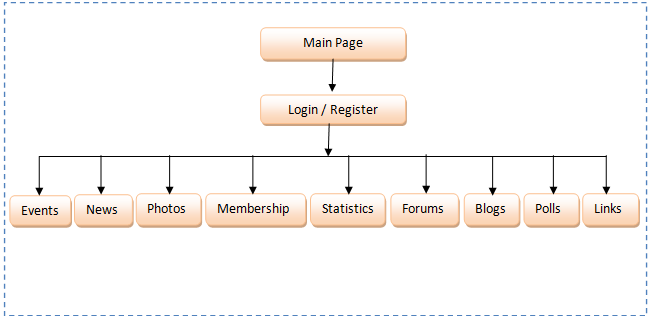
Context Level Diagram
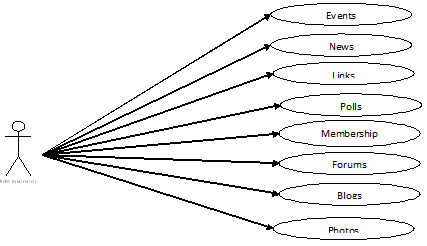
Administrator Use Case Diagram:
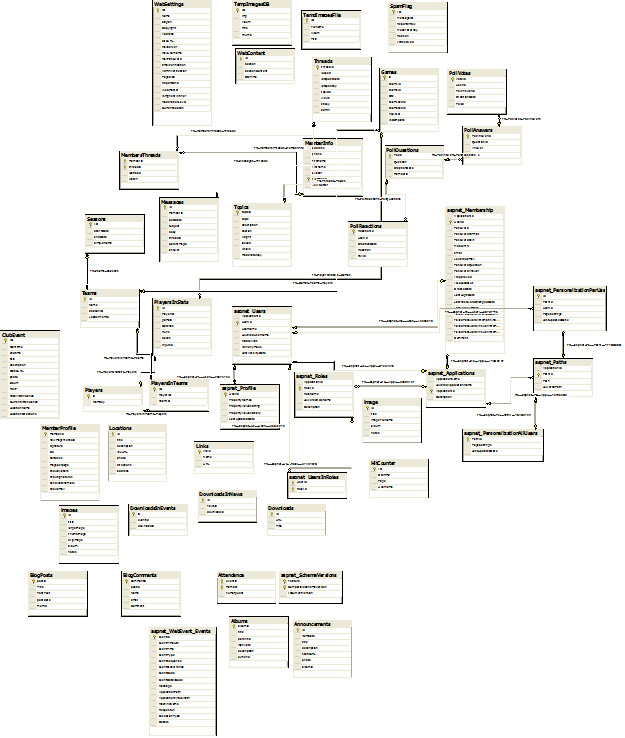
ER Diagram:
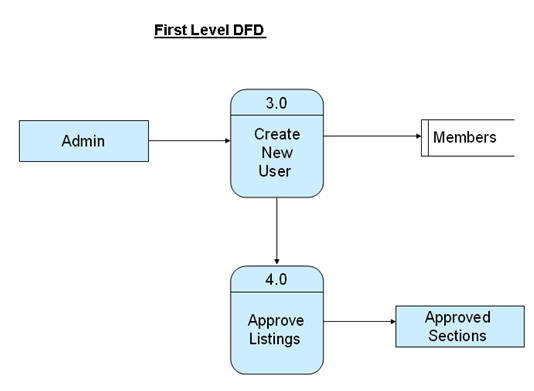
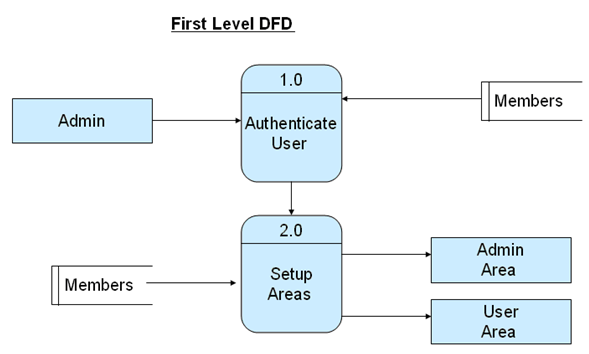
First Level DFD:
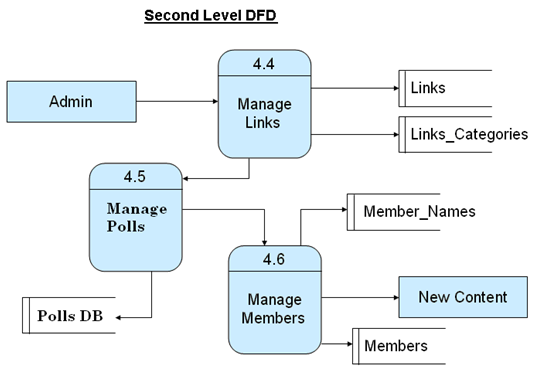
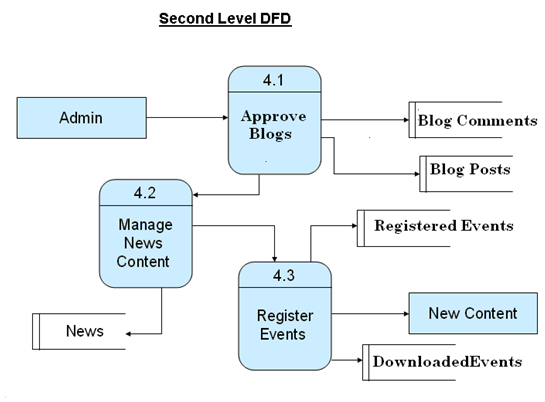
Second Level DFD:
Info Pool Layout

Every Information Pool page contains 3 areas:

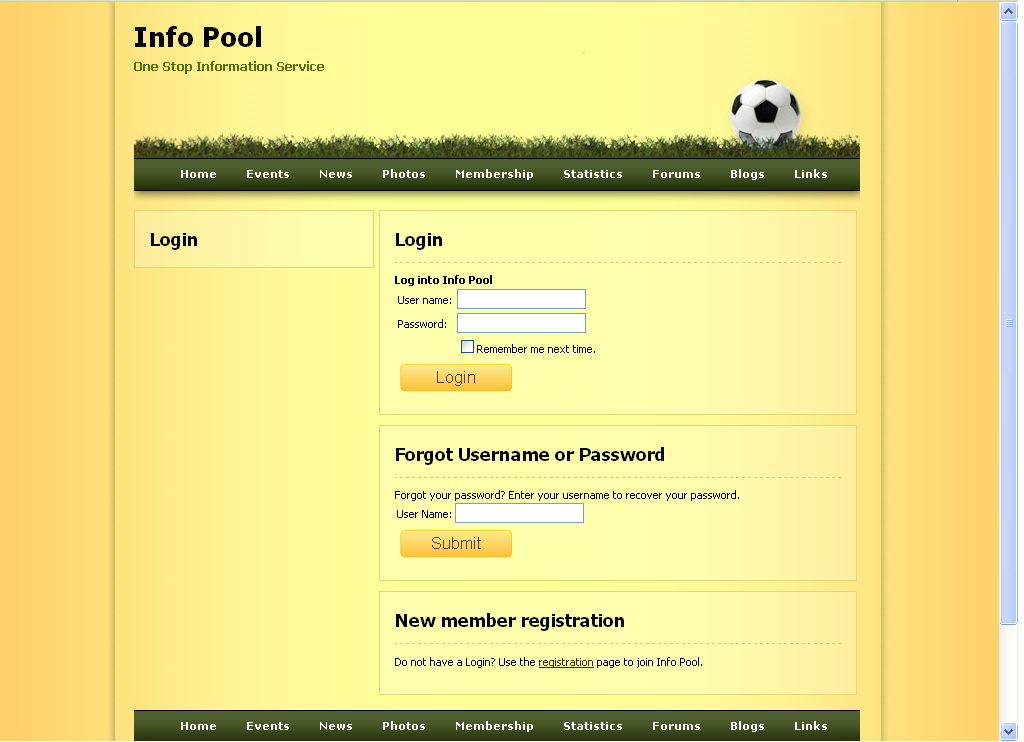
Header: contains navigation buttons, Information Pool logo, and Welcome message or User Login information.

Main Content: welcome page or module content is displayed here

Footer: contains Information Pool navigation hyperlinks

Info Pool Configuration

This form contains Information Pool configuration options that affect Information Pool functionality. They include:

  • Information Pool URL
    URL of Information Pool welcome page used to redirect users back to the Information Pool, when they submit event payments via PayPal.
  • Users must be Logged-In to submit new content
    Global setting determining whether only registered Information Pool users are allowed to submit events, links, discussion messages and classified ads
  • Expanded Discussion Search
    this setting turns on/off alternate Discussion Search Results page. When “On” Discussion Search Results show individual replies instead of discussion topics.
  • Email Sender Address
    Default address for “From” field when sending emails
  • Enable Email Registration Confirmation and Password Retrieval
    If you want to utilize emails on your website, you should turn on this feature. It enables users to retrieve their lost passwords via email. It also confirms new user registrations via email
  • Registration Confirmation and Lost Password Body
    In this area, you can supply the email message that you want to send to users when they register or forget their password. You may also use special tags {login} and {password}, which will be replaced with the actual Login and Password of the user that is being emailed.

Info Pool Registration

This URL connects you to Smart Registration Page where you can register the usage of this application. The registration is free and allows you to be notified about the availability of future upgrades.

Support

This URL connects you directly to the Smart Support System where you can submit technical questions, issues, and requests.

Output Screens:
SOFTWARE REQUIREMENTS:

  • WINDOWS
  • Visual Studio .Net Enterprise Edition
  • Visual Studio .Net Framework (Minimal for Deployment)
  • SQL Server

Download This Information Pool System .Net Project.

Freight Forwarding Management System .Net Project Synopsis

This Freight Forwarding Management System software keep track of all activities (booking, container allotment, stuffing, customs clearance, raiment, ship-on-board, delivery, debit note, credit note etc

The containers for Shipping are delivered to Consignee after a relevant process including order booking, stuffing, customs clearance, raiment, delivery etc.

A freight forwarder is an individual or company that exports the goods from one place to another.

The freight forwarder does not actually carry the cargo or conduct business for the ship.

It is an intermediary between carrier and owner of goods being transported.

This software is based on 3Tier Web Architecture powered by the Microsoft’s Dot Net Technology. This software will be implemented in ASP.NET. With this software will handle all the Freight Forwarding Management system software, the user can have access to world-class services any time, any place in the world.

This software keeps track of all activities (booking, container allotment, stuffing, customs clearance, raiment, ship-on-board, delivery, debit note, credit note etc. The Containers for Shipping are delivered to Consignee after a relevant process including order booking, stuffing, customs clearance, raiment, delivery etc. A well Standard reporting will be included in this software which will be very beneficial for the clients and users.

Design Of Solution

Functional Scoping of the Software

  1. Customer Module:- Includes all details of the customer/consigner
  2. Consignee Module:- Includes all details of the consignee.
  3. Agent Module:- Includes all details of the Agent who is dealing with the order.
  4. Shipping Line Module:- Includes all details of the shipping lines.
  5. Booking Module:- In this module booking of a order is done.
  6. Stuffing Module:- In this module container stuffing information is provided.
  7. Customs Clearance:- In this module custom clearance process is provided
  8. Railment Module:- In this module railment process is provided.
  9. Ship-on Board Module:- Finally the container goes to the destination(to the consignee).
  10. Delivery Module:- Goods to be handed over to the consignee.

Reports

  1. Master Daily Activity report
  2. Booking Report.
  3. Pending container allotments vs Bkgs and Containers Allotted Vs Bkgs
  4. Pending Stuffing on containers vs stuffed
  5. Pending Railouts Vs Railed out
  6. Railed Out Vs Shipped on Boards / Planned vessels
  7. Pending Shipped on Boards Vs Planned Vessel
  8. Outstanding Reports ( Clients ) Vs Receipts
  9. Outstanding Reports ( Agents ) Vs Receipts and Payables
  10. Pending Invoices / B/Ls and Invoices and B/Ls released vs Docs or SI Received
  11. Pending SI From Clients vs Cut off Dates/ Rail outs / Planned Vsl
  12. MSI Submitted Vs Cut offs and Pending MSI submissions vs Cut off Dates / Rail outs/ Planned Vsl
  13. Pending Prealerts / Manifests to agents Vs Shipped of Board
  14. Shipping on Board Vs ETA
  15. Arrivals Vs ETA
  16. Transshipments Vs Planned Transhipments
  17. Delivery Vs Arrivals

Facilities Required For Proposed Work

Technologies Used: – ASP.NET with C#.NET

Database Used: – Microsoft SQL Server

Web Services Used: – Advance XML Web Services.

Domain Required: – Any new domain registration is required.

Logistics Automation and Management System Java Project Synopsis

Project Analysis:

The main aim of this project is to provide a complete logistics based management system. This Logistics Automation and Management System application consists of following modules

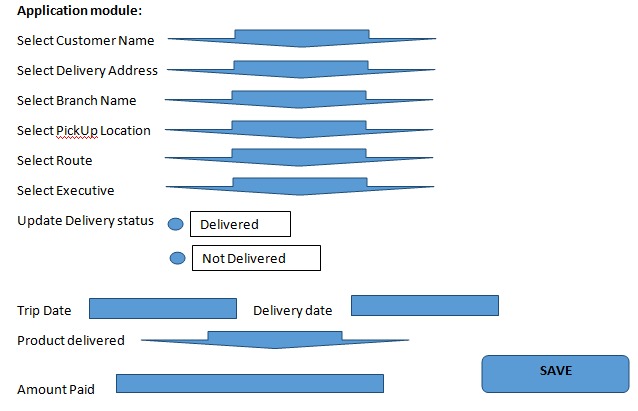
  1. Application Module
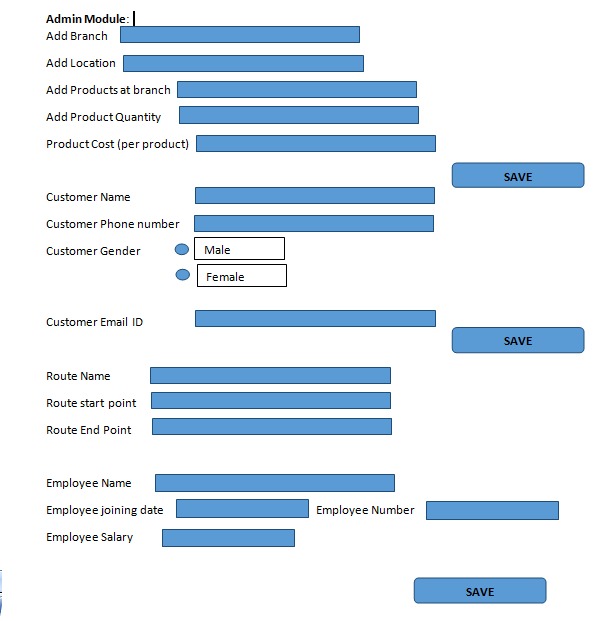
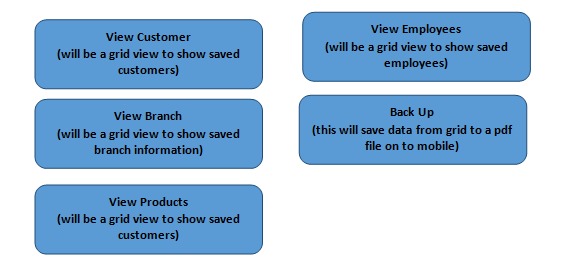
  2. Central Admin Module
  3. Online Admin Module
  4. Application Sync Module
  5. Multi-Phase Automation Management Module

Module I:  Application Module:

The application module provides the solutions for the branch installations and corporate installations. The features of this module are

  • Route Based Trips Management.
  • Door Pick Up Support
  • Door Delivery Support
  • Location Based Door Delivery Loading Sheet
  • Entire Customer Details at All Branches

Module II: Central Admin Module:

Central Admin module is the administrative module to be operated by the Head Office of the company. Here are the various options are provided to control the Application module. The features of this module are

  • Paid, Payable, Partial Pay Feature
  • Operational Accounts
  • Centralized Administrative Controls
  • User-friendly Local data Backup
  • User Initiated Local data Restoration
  • Centrally Controlled Invoice Rate Settings.

Module III: Online Admin Module:

The Online Admin Module controls Branch Creation and Editing, application user creation and their permission management etc. The features of this module are

  • Versatile Branch Commission Setting
  • Admin Controlled User Management
  • Consignments Temporary Unloading
  • Temporary Trips Management
  • Branch Locked Customers
  • Multi-Branch Customer.

Module IV: Application Sync Module:

It serves as a communication tool between branches and head office. The features of this module are

  • Duplicate Customer Merger
  • Customer Credit with Limit
  • Multi-Phase Automation
  • Multiple Companies through Single Interface
  • Automatic remote Data Backup
  • Automatic Online Data Restoration.

Module V: Multi-Phase Automation Management module:

This module provides the advantage of allowing phased automation of branches and later adds new branches with previous data backup. The features of this module are

  • Inter-Branch Intranet Synchronization
  • Auto Bug reporting System
  • Automatic Application Updates
  • Extended web portal
  • Online Customer Support
  • Online Booking enabled
  • Intelligent Consignment Tracking.

Software requirements:

  • Operating System: Windows 7
  • Technology: Java/J2EE (Servlets, JSP, JDBC)
  • Web Technologies: Html, JavaScript, CSS
  • Web Server: Tomcat 7.0
  • Database: Oracle 10g Express Edition
  • Software ’s: JDK 7

Hardware requirements:

  • Hardware: Pentium based systems with a minimum of P4
  • RAM: 1 GB (minimum)

Phone as Remote Server Based Android and Java using cloud

Abstract:-

Phones can do a lot of things these days. Remote Phone Access is an easy-to-setup and reliable application providing fast and secure remote access to your Android phone. All you need for that is to have an Internet access and connect yourself to your personal Remote Phone Access account.

Remote control your desktop or laptop computer with any Android phone can Shutdown, Restart, hibernate operating system. Start and stop windows applications. Here to develop this Phone as Remote Server Based Android and Java using cloud application. We are using Java for desktop applications where all operations are performing as per the commands in a cloud database.

Android for mobile remote applications, it stores commands in the cloud by hitting the web. And also we are using cloud web server were mobile stores and get commands.

Existing System:

There are many more applications for Phone as a Remote server. They are providing the limited features only like:

Can Operate within the limit distance because of using the server.

Business Scenario:

Remote control your desktop or laptop computer with an Android phone.

Modules:-

Majorly we have 3 modules. The following are the modules of the project.
  • Java Desktop Module.
  • Cloud Web Server Module
  • Android Mobile Phone Module

Software Requirements:

Technology: Java 2 Standard Edition, JDBC, Servlets, MySQL, Android.

Web Server: Tomcat.

Hardware Requirements:

Operating System: Microsoft Windows, Android Mobile.

Hard Disk: 40GB or High

RAM: 512 MB or High

Processor: Dual Core

Project Activity Duration:

Duration: 7-8 weeks

Secure File Sharing System Java Project

Secure File Sharing

Abstract:

Many Users will store the files in the cloud and share with other users but the information in the cloud is not encrypted so it cannot be secure so, we proposed this web application. In this project, we can encrypt the user’s uploaded files and we can also generate a secret key if any user requests for the file then we can verify and respond to their requests. Using the key, he can access the file.  In this Project, there is only one module

User:

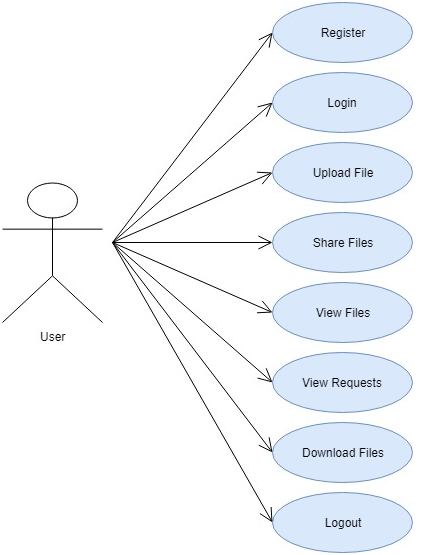
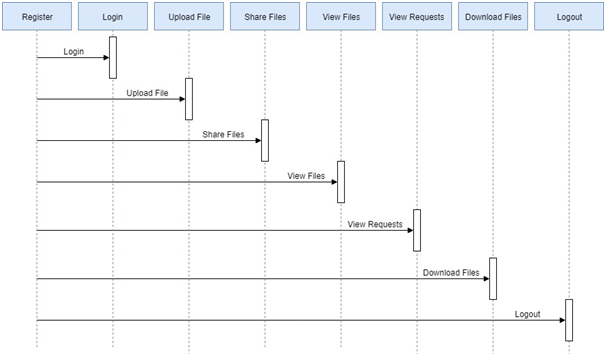
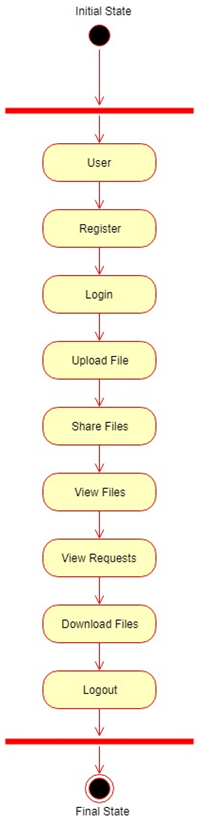
The user will register into the application by providing all the necessary details and therefore he can log in into the application using username and password and the user can upload the files to cloud and share with the other registered users. He can also view the files uploaded by him and can also view the requests for a secret key from the other users and we can respond and the key will be sent to his registered email. Using that key, he can download the file and view the information.

UML Diagrams:

Use Case Diagram:

Sequence Diagram:

Activity Diagram:

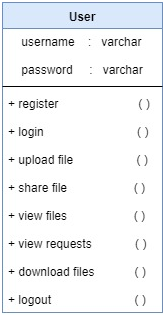
Class Diagram:

Existing System:

In Existing System user cannot share the files with multiple users at a time. And the files do not have security as the user who received the file can share to a number of users.

Proposed System:

The proposed System user can share the files with multiple users at a time. Users will have at most security in this project using AES Algorithm as a result users can encrypt the files and share to other registered users.

Output Screens:

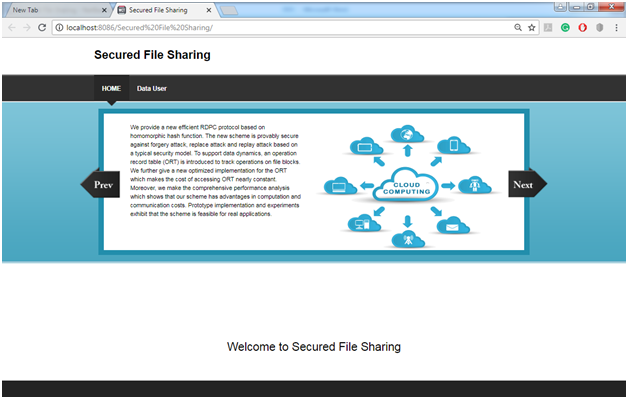
Home Page:

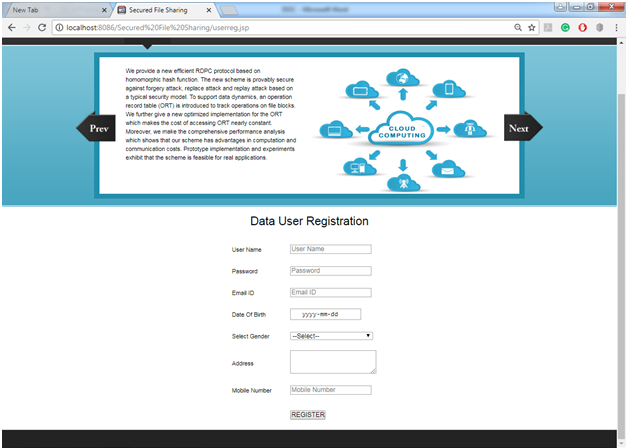
User Registration Page:

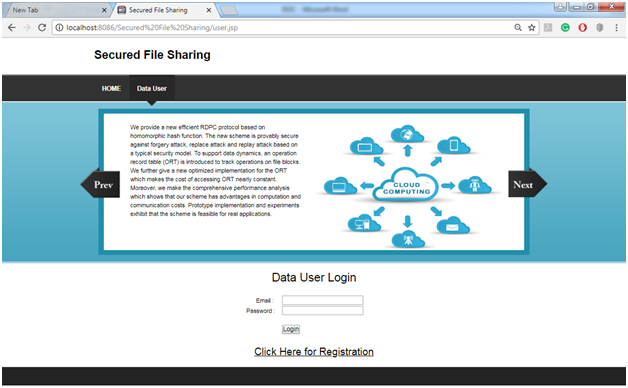
User Login Page:

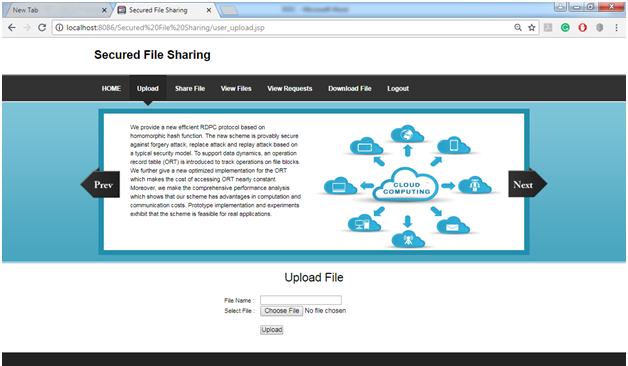
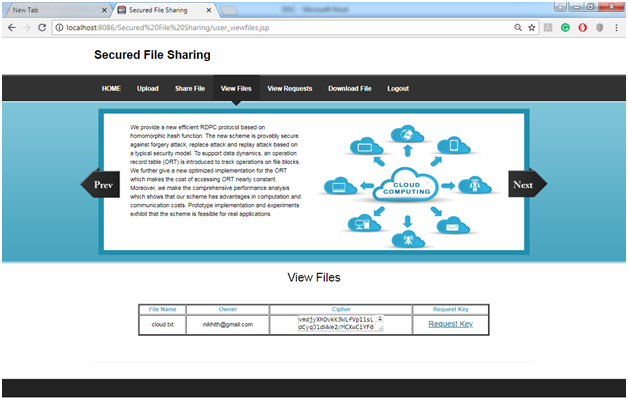
User Upload File Page:

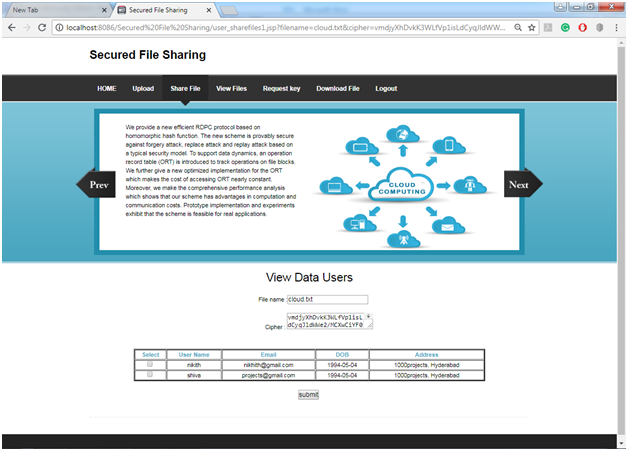
Select users and Share Files Page:

View Files Requests Page:

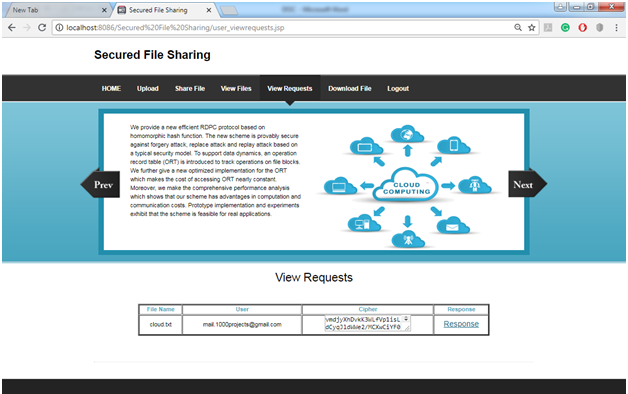
View Requests and Response Page:

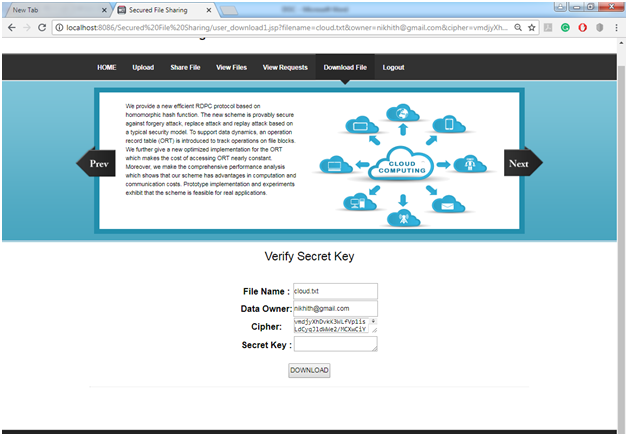
Verify Secret Key Page:

Analyzing Customer Loan QlikView Project

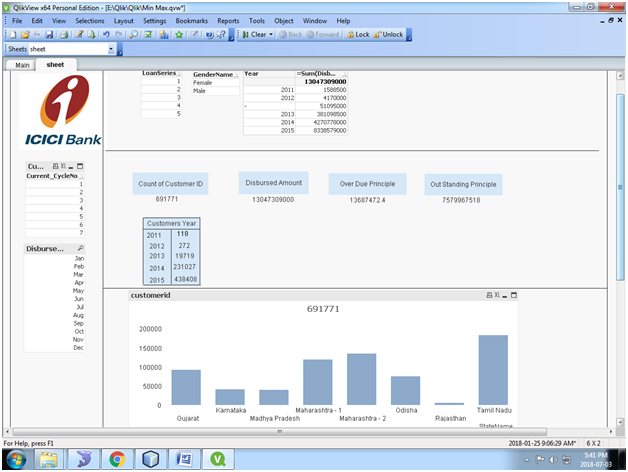
The main aim of developing this Analysing Customer Loan QlikView project is to provide an easy way to extract, transform and load the information from the Microsoft Excel Sheet to remove synthetic key using renaming field name and concatenation.

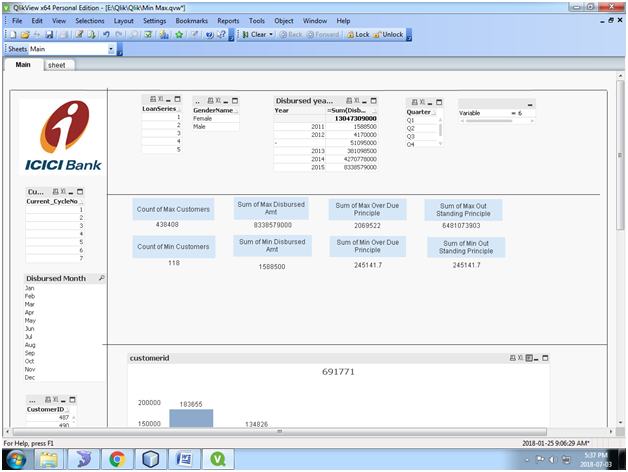
Here we are creating KPI’s to calculate customers number, disbursed amount, Over Due Principle amount, Outstanding Principle amount and sales on year wise, month wise, etc.

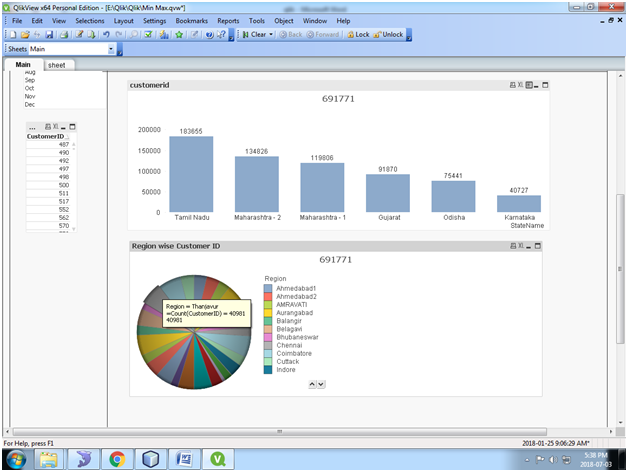
We can create Dashboards and analyze Customer Loan Data by using different types of Charts example Bar Chart, Pie Chart, Line chart, Pivot Table and Straight Table.

Calculate the below:

1) Minimum and Maximum customer values
2) Minimum and maximum Disbursed Amount Month Wise, Year wise.
3) Minimum and maximum Due Principle

Using Set Analysis to Analyze & Calculate the Data:

State and region wise Loan Analysis using Pie & Bar Charts:

Area wise Distinct Customer Loan Analysis:

Download this Analyzing Customer Loan QlikView Project.