Food Ordering System using Context Aware Computing Project

Abstract:

In this Food Ordering System project, pop-up messages will inform the user about the existence of this application in the mobile device once moving from one location to another. This Food Ordering System application provides more comfort for the users in ordering the food and to avoid the railway catering system.

Features:

  • Uses the GPS from Android mobile to match the current location.
  • Automatically sends a message for Order once it is placed.
  • Displays on the Screen a message.

Existing System:

  • The user needs to Order the Food from the platform which seems to be unhygienic food.
  • Food which ordered not correctly packed
  • Use of unhygienic plastic to serve food

Proposed System:

  • In this Food Ordering System project, we use the GPS of an Android-based Smartphone to record and analyze various locations that could give alert to the user, then asking the user to select particular food from given hotel list and place an order.

Modules:

  • Device Background module
  • Phone Orientation and Location module

UML Diagrams:

Activity Diagram:

Class Diagram:

Collaboration Diagram:

Sequence Diagram:

Use Case Diagram:

Download the Food Ordering System using Context-Aware Computing  Android App Project

Online Verification System Project Synopsis

Online Verification System

Verification process in other words background verification is very important nowadays for a lot of companies. It actually allows companies to validate the info provided by their employees are true and correct without any discrepancies.   

User Types: Admin, user, verifier

Admin will basically approve verifier login. Admin will also validate all data has been posted to the portal via a user and gives final approval for a submitted proof and details once a verifier validates the data. This portal will have 2 step validation process making it a secure and accurate verification system. Admin will upload content related to rules for different sort of documents which need to be uploaded by a logged in user and also set up rules which will be considered while verifying data provided by a user for a logged in verifier.  

The verifier will log in and validate the details and attachments that have been uploaded by a logged in users as per criteria and rules for documents that are needed. Once verifier validates the details provided and verifies the attachments uploaded by the user, he or she will update verification status for a particular user. This will be then sent to admin for final validation approval or verification approval.

The user will register and once registered they will have a dashboard which will show them rules related to various points under scrutiny. Once registered they will have different modules where they will save the details whichever required.

Modules:

  • Personal Details
  • Educational details
  • Professional details
  • Documents
  • Login / Logout
  • Dashboard
  • Admin

Personal Details: This module will ask the user to save details like First name, Middle name, Last name, DOB, Marital status, Residential Address, Father’s Name, Mother’s Name, Spouse Name if married,  Email, Phone Number, Alternate Number, City, State, Country.

Education Details: User has to save all details related to 10th, 12th Graduation and post.Information related to certifications.

Professional details: User will save all details related to job exp and companies wherein he or she worked previously. Date of joining in the current organization.

Documents: User will upload related documents to verify the professional details saved in the portal.

Admin: Will have a grid to approve and validate data related to a user for final approval. Admin will also have a grid to approve verifier login. Reports will also be provided to see how any users submitted data, how many validated by the verifier, how many users have been validated completely. Different type of reports can be added depending on the requirement.

Future Enhancements:

  • We can come up with SMS / email alerts for registration messages, validation complete messages etc.
  • We can provide reports module with the different type of reports for admin login related to sales, order and customer reports.
  • We can introduce plans like getting contracts from different organizations and managing users on the basis of organizations.
  • We can add payment related module for online renewals related to licenses concept related to organizations.

Technology to Use

Design and Markup

– HTML5, CSS3, JavaScript & jQuery

– Bootstrap / Angular JS

Server side

– PHP OR .Net with framework

Database 

– MySQL

– SQL Server

Hardware Requirements:
Intel Core processor
RAM 4GB and Above
HDD 100 GB Hard Disk Space and Above
64 or 32 bit OS Windows 8 and above

Online House Rental Management Java Project

House rental portal is a webpage where house owners, clients, customers can exchange information effectively and inexpensively.

Provides user-friendly interface, satisfying the needs of the consumers.

Employs a new strategy that facilitates easy management of rental houses.

MODULES:

 OWNER:

This module is operated by the user who is the owner of the property and wants to give it for rent. The owner should register with an application which will be authorized by the client. The owner can upload room details, pictures, location, rent ..etc. which comes under owner module. The owner can view the house and add house form his module.

CLIENT:

This module is operated by a client who is an admin to this application who will look after users registering with the application (owners and customers ) and active and deactivate them.

CUSTOMER:

This module is operated by a customer who needs to register with the application. A customer is a person who is looking for rent. The customer is activated by client and customer can search based on specifications and get results about rent details.

Output Details:

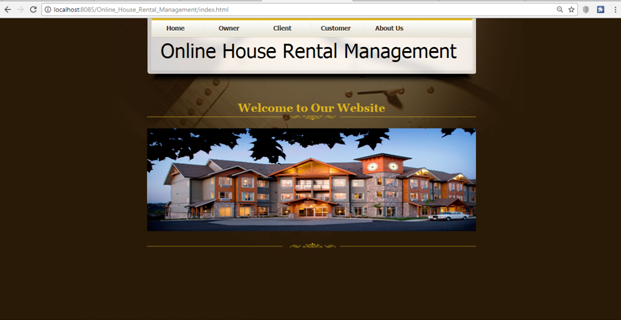
  • Home Page:
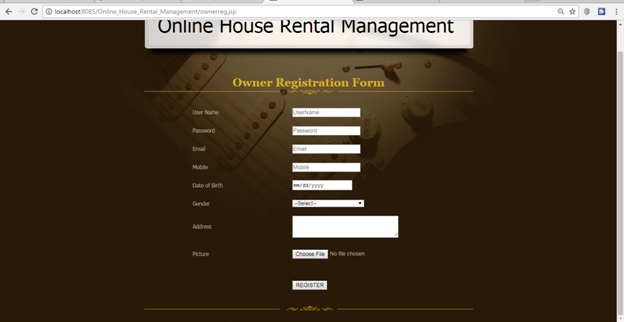
  • Owner Registration Page:
  • House Owner login Page:
  • House Owner home Page:
  • View Owner profile page:
  • Add House details:
  • View added House details:
  • Client login:
  • Client Home:
  • View owner and activate:
  • View user and activate:
  • Customer Registration:
  • Customer Login:
  • Customer Home Page:
  • View Profile Page:
  • Search Houses:
  • Results Page:
  • About us:

INTRODUCTION

  • Online rental house portal is designed to meet every aspect of the consumers.
  • Features commercial and residential properties for the sale and rent properties.
  • To simplify work for the rental managers so that work can be efficient and effective.

EXISTING SYSTEM

  • The housing sector remains vigilant to face the challenges of the change of the existing system.
  • People migrating to other cities or states either for different purposes.
  • Finding a shelter, which fits all the requirements of the customer is hard, most of them don’t match their needs.

Mini Project on Courier Service System

Nowadays its very important to receive and send many things like important furniture, electronic items, gifts and many more.
Courier service system is very easy and allows many users to perform the job simultaneously.
The courier service system is all about delivering a product to its destination with the help of their personal details like the address of the receiver and other details.
The cost is decided depending on the product and the weight of the product.
We also provide an option of quick delivery but it costs a little more.
The user will always receive a message whenever his/her order is dispatched or delivered or canceled.
It makes the user work easier.

Modules:

  • Admin module
  • Delivery module
  • User module

Admin module

In the Admin module, Admin has all the control over the Websites.
The admin plays a major role in this application and only admin can add, view and remove item details.
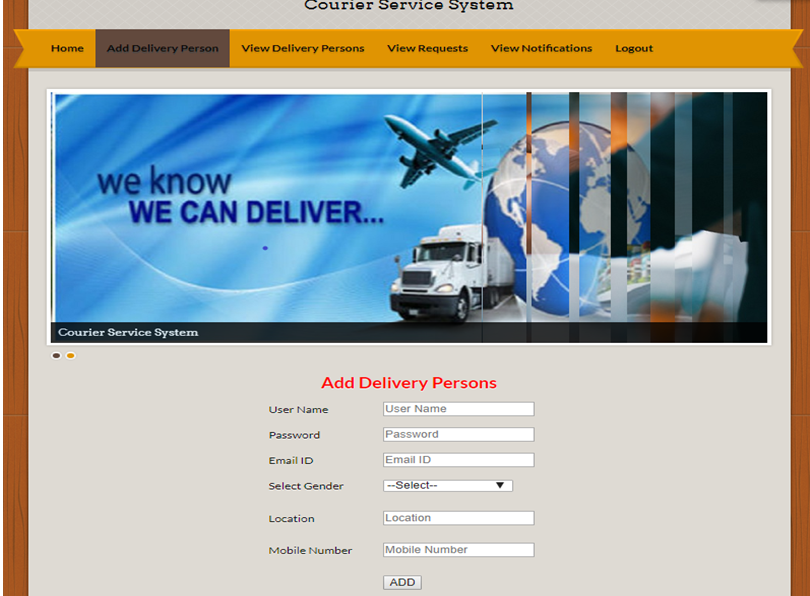
Additionally, the admin has the possibility to add or remove the delivery person.
Before doing the above-mentioned process, at first, the admin has to create a separate login in that Web application.

Delivery module

In this module, the details of the delivery man are notified
A delivery person gets a notification whenever admin matches the delivery person with some order.
Here the delivery person goes to the user/sender, takes the item and checks the weight of the item.
After all this process the delivery person delivers the item to the receiver.
Delivery person’s job is done when the order got delivered.

User module

Here in this module user has to enter the personal details like name, mobile number, the address of the user as well as the receiver, Aadhaar number.
The user should also enter the details of the item like the weight of the item and name.
And the order gets placed.

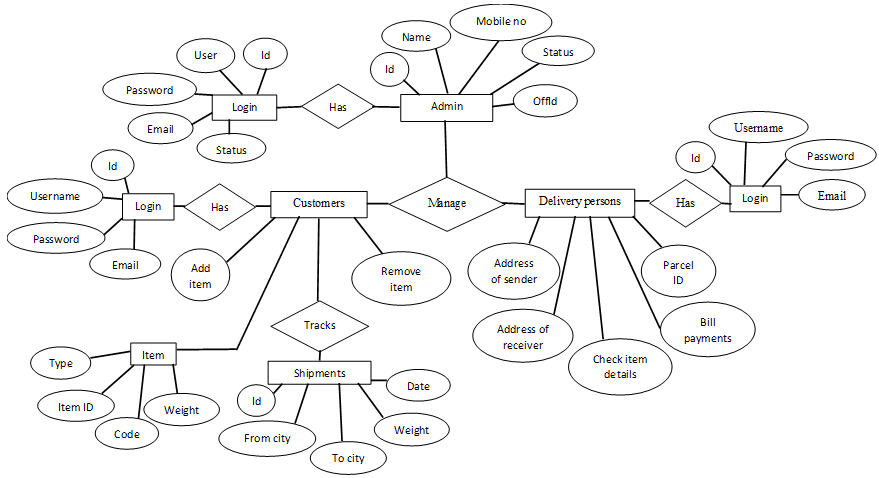
ER Diagram:

Admin Work Flow

Step 1: Start
Step 2: Admin logs into account and checks the orders which have been received.
Step 3: Admin will approve the orders and allow a delivery person to each and every confirmed order.
Step 4: Admin will send all the information of the user and parcel to delivery person by a message.
Step 5: Admin will send the messages to the user that the parcel is dispatched or delivered or canceled.
Step 6: Stop.

Delivery Work Flow

Step 1: Start
Step 2: As soon as the delivery person receives the message from the admin the delivery person will go to the user immediately.
Step 3: the Delivery person will check all the details entered by the user and checks the weight of the parcel.
Step 4: After checking all the details the delivery person will deliver the parcel.
Step 5: After every step, the delivery person will inform the admin from the account.
Step 6: Stop.

User Work Flow

Step 1: Start.
Step 2: User will log into an account.
Step 3: If the user is not having the account then creates an account.
Step 4: After logging in, the user will enter all the details of the item, receiver, and personal details.
Step 5: If the user wants quick delivery user can select the option for quick delivery.
Step 6: After entering all the details user can see the cost of delivery if it is reasonable user can submit.
Step 7: Stop.

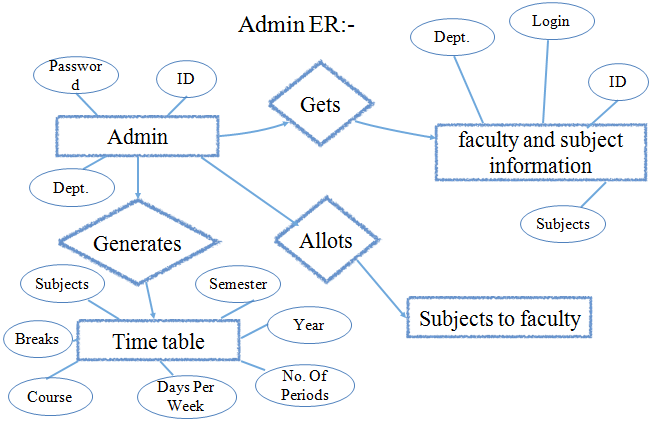
Mini Project on Time Table Generator

Abstract:

The timetable is needed to be scheduled in such a way that the number of different courses with a number of subjects in each, handled by a limited faculty provided with their slots and timings does not overlap.

Introduction

Timetable generator automatically schedules timetable for students and faculty which reduces the manual work.
Once the inputs like faculty with their respective subjects are given it will generate the period slots for the entire week and also for the substitutional hours.

Existing System:

Previously timetable was manually made by the head of the departments that involves a lot of manual work and is a time consumptive process.

Proposed System:

This system will help the colleges to generate the timetable automatically without any manual workload and saves a lot of time that plays a prominent role in the present lifestyle.

Modules:

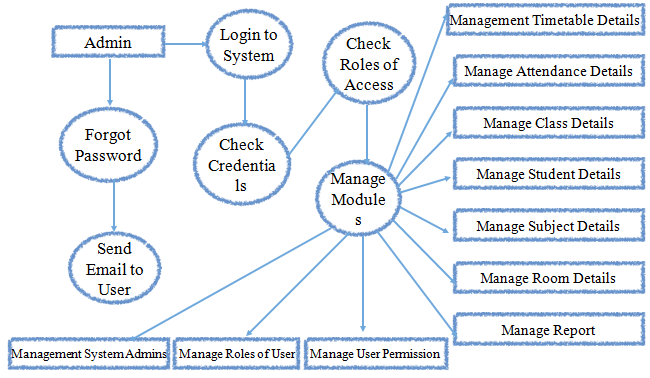
1. Admin Module

The admin is responsible for taking all the details of the faculty, course, subject, semester and how many hours a day the classes last. The admin generates the timetable according to all these factors.

2. Faculty Module

  • The faculty gives all of their details to the admin
  • In the case, at times the faculty could take a leave as well
  • In times like these, the facility is responsible to send the reason, date and on which period the leave is to be taken.
  • The substitute faculty gets the request.
  • The substitute faculty has the facility to either accept or reject the substitute hour.
  • Then this is sent back to the faculty informing about the request.
  • According to the timetable is modified.

3. Time Table Generation Module

In this module, generation is done by considering the maximum and minimum workload for each faculty. This will be generated by the admin and viewed by the faculty who are the users of this system.

Work Flow:

Step 1:- Start
Regular timetable
Step 2:- The details of the hours, subjects and faculty names handling each subject is taken.

  • a. 7 hours per day
  • b. 6 subjects per semester
  • c. 4 labs per semester
  • d. Number of faculties, 10

Step 3:- Read the details provided.
Step 4:- Validate the details and a timetable is created accordingly.
Substitute timetable
Step 5:- The details of the substitute faculty is taken.
Step 6:- Read the date, reason and substitute faculty available for the subject.
Step 7:- The request is sent to the substitute facility.
Step 8:- The substitute faculty accepts or rejects the request.
Step 9:- The details are read.
Step 10:- Accordingly the timetable is generated.
Step 11:- Stop

ER Diagram:

Data Flow Diagram:

Graphical Representation of Student Performance and Project Reporting System

Abstract:

This project can implement features like: The first feature is “Graph”, it shows the graphical representation of the student’s performance (attendance and aggregate). The second feature is the “Projects”, here all the project titles with description are stored in the database so that it will be helpful to our juniors and it also helps to know if the new projects are colliding with existing.

Existing System:

  • In our college, the projects are stored in the CDs so there is a problem in accessing.
  • In our college website, the student’s performance is not shown clearly.

Proposed System:

In our application, we are introducing “Graphs” and “Projects”.
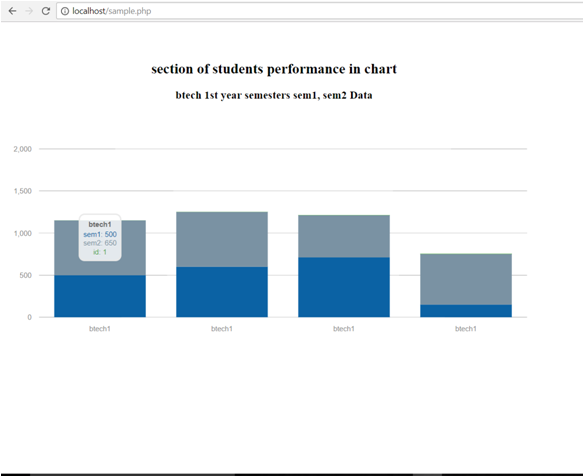
Graphs – Here the student’s performance(like attendance, marks) is shown in charts. Where bar graphs are aggregate in semester wise and curve graph for attendance.
Projects – Here all the projects are stored, we create a hyperlink of all the project titles when we click on it the page will be redirected to the project description. There is a search bar where we can search any project by the project’s name or by guide’s name or by the year and duplication of projects can be eliminated.

Modules of Project

Modules Description

Back End: Database, which stores the student details and list of projects with their description.
Front End: User interface, where the client can view charts and project lists.
Middle End: It is the logic or Java code which retrieves data from the database(backend) and display it in the form of charts and it also displays the project lists so that it is easy to access rather than from the CDs.

Methodology/Algorithm/tools

  • We used MySQL for storing student information and list of projects with descriptions.
  • Java language for coding the logic and HTML & CSS for designing the page.
  • Morris.js chart, JChart are the packages helpful for projecting the charts.
  • Every project title is hyperlinked to its description.

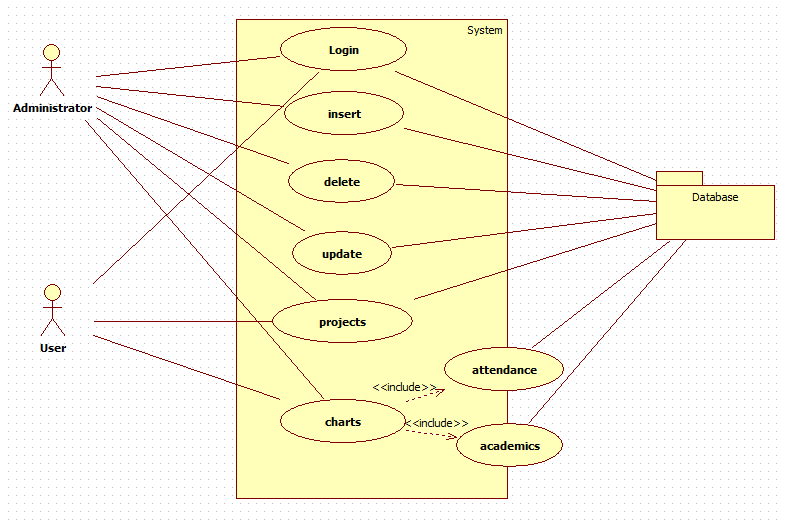
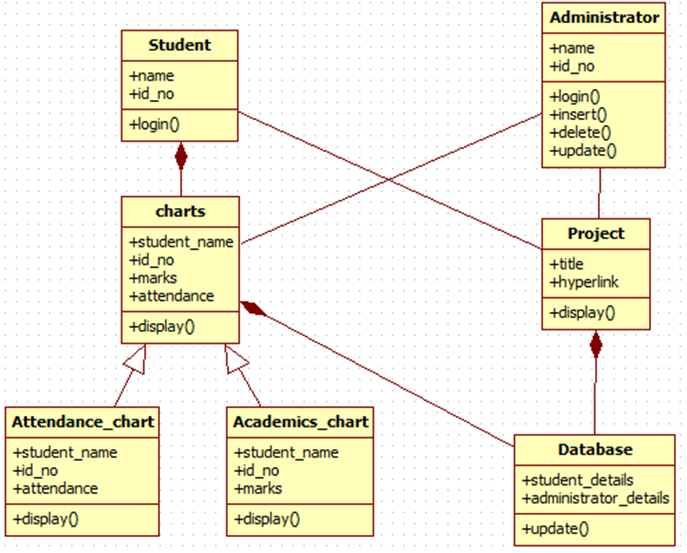
UML Diagrams:

Use Case Diagram:

Class Diagram:

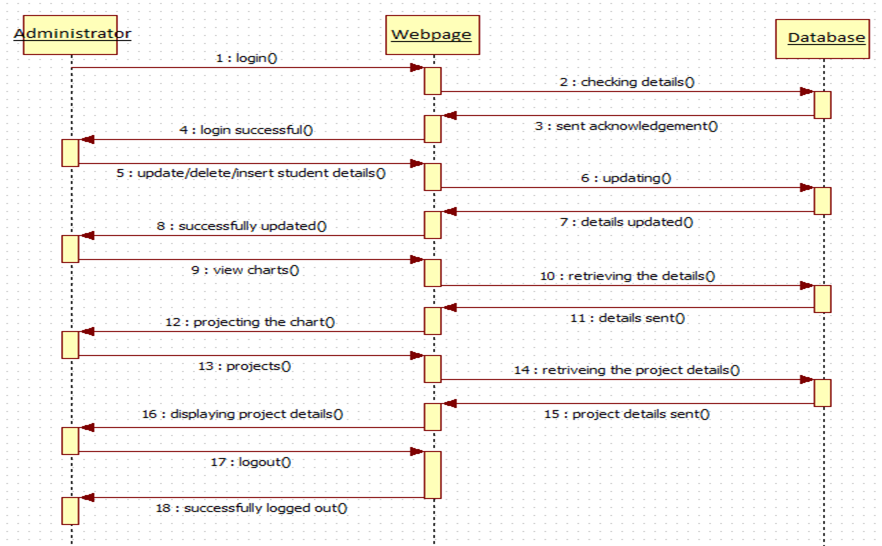
Sequence Diagram:

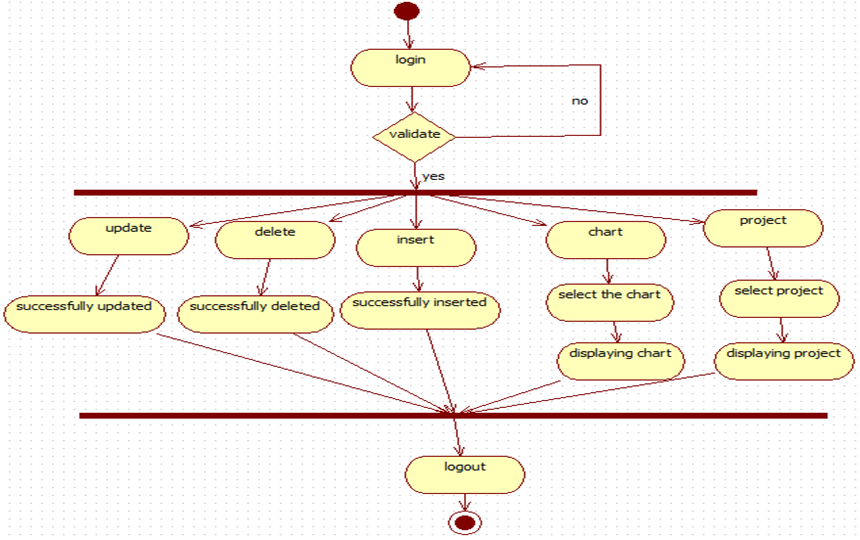
Activity Diagram:

Screen Shots:

Dataset

Our data set includes student’s details of our college like every semester marks, attendance percentage and details of all the projects done by students of CSE.

Conclusion

In this project, we showed the students performance in the form of charts so that it is easy to know the student’s overall performance.
This project also consists the details of all the projects done by the CSE students in our college.

Mini Project on Agile Project Management System

AIM:

To know how many action items can be completed in each sprint, which helps in reducing the time taken to finish the given project.

DESCRIPTION:

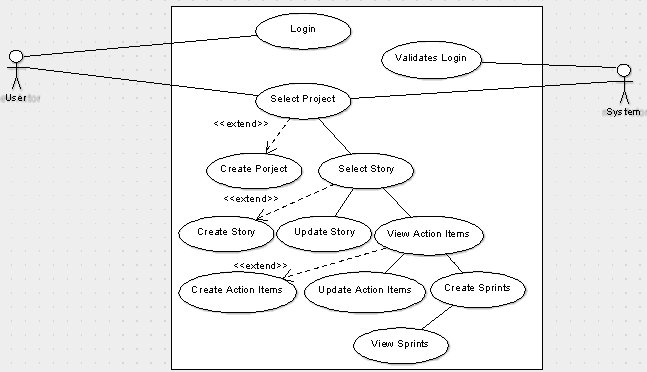
In this management system, the users can create projects in which the stories, sprints and action items can be created or updated respectively. Here stories represent the overview of the project, action items represent the procedural flow of the story, sprints indicates the time interval in which the action items can be completed.

MODULES:

• User
• System

USER:

1. Authorized users login into the application.
2. The user selects from the list of projects.
3. The user creates or updates the story.
4. The user creates the action items for the selected story.
5. The user creates sprints by using required action items.

SYSTEM:

• The changes done in the project by the user are updated in the database and are saved for a future purpose, validates the user.

Use Case Diagram:

Knowledge Zone and K Blogs Project Synopsis

Abstract:

The project is aimed at developing a utility application that can enhance the teaching-learning curve in an institution. It further gives the students an opportunity to improve their research abilities in a particular subject area. The knowledge zone system will provide file upload and publish content option. This application is intended to develop the research skills of the stakeholders such as, faculties and the students. Administrator creates the master data which initiates the system, and enables the users to use the system. Users at different levels register with the system to post their articles on a particular subject with the keywords and also the subject related details. The Search feature will be enabled based on the keywords / authors and the article titles. Search can also be done based on the dates of the articles posted. This further can be complemented with a blog facility/option wherein users of the system can review the articles posted and add their point of view on the specified topic. This enables to group all the related information on a specific topic/subject area thus creating a knowledge base for the benefit of all the users concerned

Modules:

Admin: System will have a separate admin or it can be HOD. Will approve student and faculty registrations. Will post the initial master data like categories, sub-categories, topics, description and related information for added topics. Once the content or information for a topic is published, it can be viewed by students and faculty both. Admin will also manage permission which will allow publishing content to the portal. If permission is provided to publish then a logged in student or faculty can publish content for a topic. Admin will also review the content and topics that are published by logged in users and once admin approves it, they are available for viewers in the portal.

Article Module: This Module will be used by admin and other logged in users to publish their own content for different topics. Articles once published will be forwarded to admin and they will be approved for viewer availability.

Dashboard: It will basically be the front end frame which will showcase the latest published topics and show a link which when clicked will open the content for the topic. It will be the catchy responsive part of the portal which actually will have search option too for searching specific topics. Topics that are shown in the dashboard (latest ones) will also show info related to the author who published it and publication date. It will also have download option which will allow content download for the selected topic.

Features In the system:

  • The option will be provided in the portal to like a published content.
  • The option will be provided to comment on a published content.
  • Share option will be provided for the posts that have been posted to the system by admin and faculty.

User Types: Admin / Faculty / Student / HOD

Technology to Use:

Design and Markup

– HTML5, CSS3, JavaScript & jQuery for markup, design and interaction behaviour
– AngularJS will be used for making the site responsive and secured as per scripting is concerned.

Server side language (anyone can be used depending upon your preference)
– PHP (Core PHP or any framework like CakePHP, Phalcon or Laravel)
OR
– C# and Asp (with a bootstrap framework or DNN skin)

Database Software (anyone can be used depending upon your preference and server setup)
– MySQL
– SQL Server

Hardware Requirements:

Intel Core processor
RAM 4GB and Above
HDD 100 GB Hard Disk Space and Above
64 or 32 bit OS Windows 8 and above

Crystal Market E Kart Web Portal Project

Abstract

This concept basically related to a portal which will allow dealers or vendors and customer linking on a common platform. This portal will be a web platform wherein vendor will register and add crystal products. They can also differentiate and highlight special crystals as per horoscope ( as they have a huge market). Once crystals are added they will be available for sale which can be searched and added to kart by customers for buying. Portal will provide an easy to use and responsive website.

Project Description in Brief:

The requirement will be to develop an admin module which will be used to sell products, register vendors, register customers, cart functionality and related crystals functionality. We can also manage coupons from admin panel. This will also involve web service / API which will communicate with Website front end and database and save data securely via admin panel.
We will also have employee management wherein executives delivering the sold products to customers will be registered and in turn, will track the delivery part. The application will involve order management and delivery. This will involve executive, the order created and tracking id.
The application will have an informational part too like About US, Terms & conditions, Privacy policy etc which basically will be static pages.

User Types: Admin, Customer, Employee logins (no vendor login as discussed)

  • Admin will have access to all modules in the web and can monitor everything in the application.
  • Customer / Buyer will have access to crystal products view and can browse through and access offers and then finally add products to the kart and order the same.
  • The employee is basically the delivery executive login who will actually manage the deliveries and will have access to the related delivery management screens only
  • Vendor / Seller is basically related to sellers who will register themselves, add their products to the admin panel and the added products will be marketed via the website.

Modules:

Users Modules: Will involve login, registration and log out as the basic functionalities. Users will also have My basket functionality to manage the crystal products added to the kart. My orders will deal with the story of transactions and orders for a logged in and registered customer. My profile will have edit, delivery address manage option, change the password and other details that are necessary.

Admin Panel: Admin being an important module will manage delivery executive employees and their delivery history as it will be linked to order and delivery management. Customers also will be managed by the admin panel. Vendors will register to the application and we can manage vendors via admin panel. Registered vendors will be able to add their products which will be advertised for sale in the crystal market portal. Admin will most importantly manage the categories and subcategories that are involved in adding products and then their sales via the portal. It will also manage the filters that will be provided for searching for various types of crystals.

Kart Module: This Module actually will handle the addition of crystal products which are anticipated to be ordered by a viable customer.  It will be then linked to order management and delivery tracking.

Delivery / Order tracking: It will basically show which order is linked to a particular executive as admin will assign it to a particular executive. Complete delivery status can be tracked in this module. As per order management is concerned once a product is confirmed in kart it will be transferred to order tracking as an order id is assigned to it. And then a delivery executive is assigned an order. This workflow actually provides a flexible tracking system.

Future Enhancements:

  • We can come up with SMS alerts for delivery tracking and registration messages.
  • We can provide reports module with a different type of reports for admin login related to sales, order and delivery reports.
  • We can also introduce a comprehensive invoice module too.
  • Add coupon management system via admin panel

Technology to Use

  • HTML5, CSS3, JavaScript & jQuery for markup, design and interaction behavior
  • Bootstrap / Angular JS will be used for making the site responsive and as a framework.
  • PHP (CodeIgniter, CakePHP, Phalcon or Laravel) OR .Net with framework
  • MySQL
  • SQL Server

Hardware Requirements:

Intel Core processor
RAM 4GB and Above
HDD 100 GB Hard Disk Space and Above
64 or 32 bit OS Windows 8 and above

Java Mini Project on Vehicle Hiring System

ABSTRACT

Vehicle hiring system is a web-based application designed to provide the user with an easy way to hire vehicles like cars, buses, vans, lorries etc on rent.
The customer has to choose the vehicle of his choice, the location where he wants to board the vehicle and pay for the rental online.
This application calculates the fare based on three categories short distance, medium distance, and long distance.

INTRODUCTION

Vehicle hiring system is a web application which includes an end user i.e, a customer in which they can make a reservation and view other related information about their reservation.
The administrator has all authorities to change and manage the system such as adding a new vehicle, removing and updating any related information about the vehicle and keeping track of all vehicle reservations.

Existing System

  • The current system does not have wide ranges of vehicles available.
  • The customers do not have the facility to give feedback.
  • Description of vehicles is less.

Proposed System:

  • A wide range of vehicles including vans, two-wheelers, buses etc., are available.
  • Feedbacks and reviews from the users can be taken.
  • A detailed information about the vehicle is available.
  • Notification on timings and pickups is available.

Modules:

ADMIN MODULE:

Admin can view/edit/delete vehicle and driver details and has authority to view transaction details of the users.

USER MODULE:

This module enables the user to Login/ Register, view vehicle details and hire vehicle and perform the transaction.

Admin Login Details:

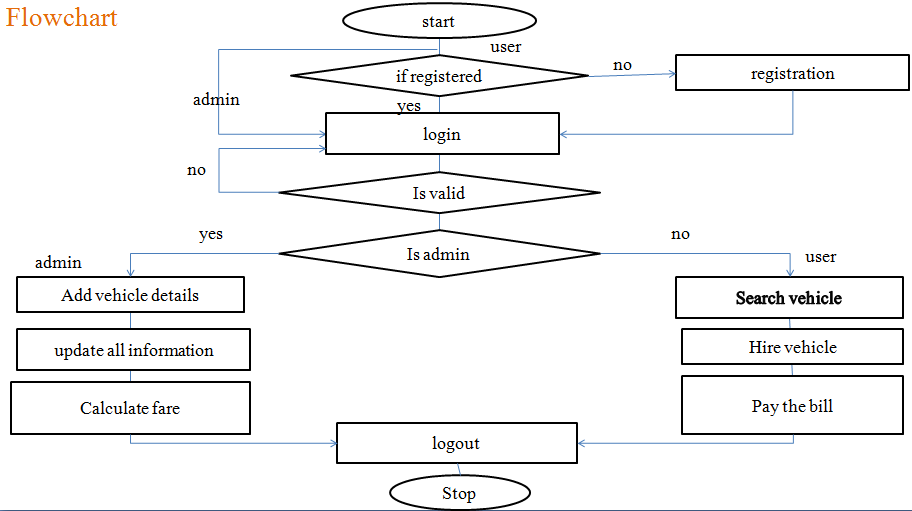
  • Step1: Start
  • Step2: Login to the account with a unique username and password
  • Step3: Choose from the options
  • Add vehicle (car/bus/2 wheeler etc.,)
  • Add/Delete/update vehicle details
  • Step-4: View vehicle reservations of the users
  • Step-5: Confirm vehicle reservation and calculate fare based on distance.
  • Step-6: Stop

Customer Login Details:

  • Step1: Start
  • Step2: Login to the account with username and password.
  • If not registered, register by filling required details.
  • Step3: Hire the vehicle and enter details such as date, duration, and boarding location.
  • Step4: Confirm the reservation.
  • Step5: View bill and make payment.
  • Step6: Stop

Flow Chart:

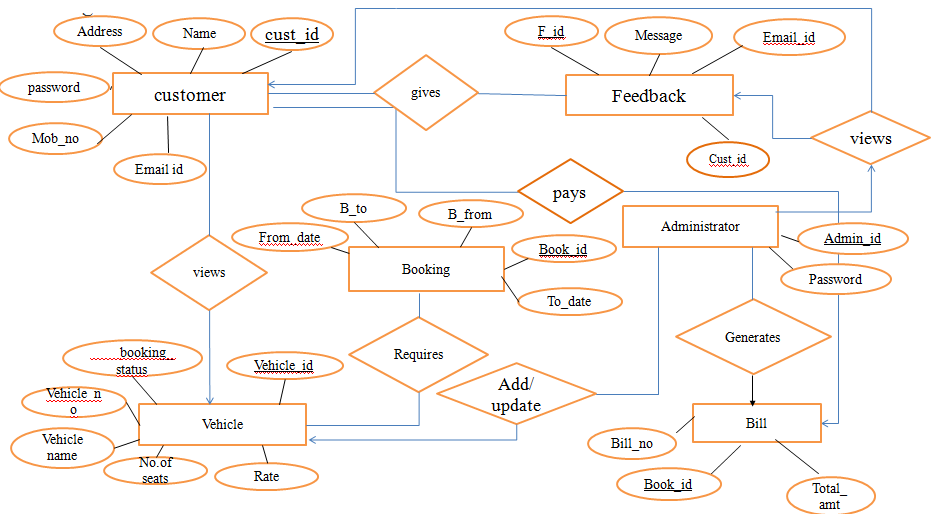
ER Diagram:

Sequence Diagram:

Collaboration Diagram:

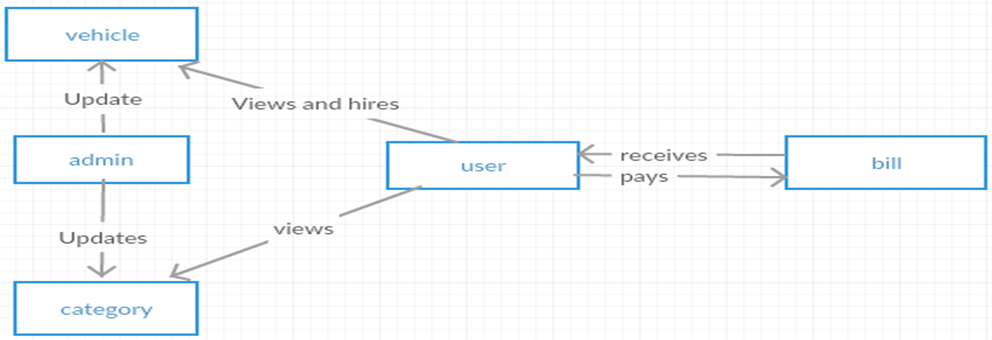
DATA FLOW DIAGRAM:

Database Tables:

Admin Table

  • admin_id number(32),
  • name varchar2(256),
  • email_id varchar2(256),
  • constraint pk_admin primary key(admin_id)

Vehicle Table

  • vehicle_id number(10),license_no varchar(20),model varchar(20),
  • status varchar(20),
  • drate number(10),
  • Status varchar2(20),
  • constraint pk_vehicle123 primary key (vehicle_id),
  • unique (license_no)

Customer Table

  • c_id number(32),
  • name varchar2(256),
  • email varchar2(256)
  • address varchar2(256),constraint pk_customer123 primary key(c_id)

Feedback Table

  • fid number(10) not null ,
  • message varchar(140),
  • email varchar(50),customer_id number(10),
  • constraint pk_feedback primary key (fid),constraint fk_feedback foreign key(c_id) references
  • customer(c_id)

HIRE Table

  • hid number(10) not null ,
  • hdate date,
  • amount number(10),
  • vehicle_id number(10),
  • constraint fk_hire primary key (hid),
  • constraint fk_hire foreign key (vehicle_id) references vehicle123(vehicle_id)

BILL Table

  • bno number(10) not null,
  • bdate date,
  • Famount number(10),
  • hid number(10),
  • Constraint pk_bill primary key (bno),
  • constraint fk_bill foreign key (hid) references hire(hid)