Online Laundry Management System Project Synopsis

Online Laundry System is an Integrated System of Laundries functional work, organize and maintain the Data necessary for operations.

This Online Laundry System provides user-friendly dashboards with login access for Admin, Web Admin, Accountant of Laundry.

Online Laundry System has modules to manage Customer Invoices for Pisces, weight, Package, Delivery of Pisces, weight, Package wise, and Barcode Generations many more. It has a fully-fledged Human Resource module to manage the payroll and pay slips.

  • Front End: ASP.NET, C#, Entity Framework
  • Back End: SQL Server 2017

The modules included in the Online Landry System are as follows:

  • Customer Registration: This Module Created and Registered new Customer in an application with their necessary and Basic information. Admin has Rights to create, Edit View and Delete all customer information. Search Customer also included in this.
  • Invoice Generation: After Registered customer, Admin can create Invoice for Customers.

Customer Have three option-1) He/She can choose Pisces wise Invoice-He/She can give a Clothes by Pisces wise.

2) He can choose Weight wise Invoice.-He/She can a bunch of cloth weight wise.

#) He can choose Package wise Invoice.-He/She can select a package for a month, in that no of Pisces are fixed.

In one screen admin can able to create an invoice and also he can see a last all invoices for a particular customer.

Bar Code Generation: Admin can generate a Bar Code for all selected items for a particular invoice for a customer. After generation, he can able to print barcode on label printer and tag on clothes.

Delivery: Admin can Deliver cloths depend on their status-(Ready, Pending, Delivered), Different Color show Different status, He can also take Remaining payment from and generate an invoice for taking payment.

Reports: Different Report are a presence in a system like

  1. Customer List,
  2. Due Payment,
  3. Daily Collection,
  4. Garment-wise Collection,
  5. Cash Book,
  6. Customer Total Business etc.
  • Dash Board– User-Friendly Dashboard available. Graphical Representation is also available. which shows
  1. Total Business
  2. Financial Collection.
  • SMS Integration –This system also includes SMS sending on all action and transaction performed for a customer like a Customer Registration, Invoice generation, Payment given etc.

Android Banking Application Development Student Project

Objective

The objective of this project is to create a small android project based on the statement given (below) by using the concepts and examples learned during the course of the basic Android Application Development training. The conceived project requires about a dedicated 8 – 10 hours of effort (spread over 1 – 2 weeks) and the users can create the project based on the learnings on the Android Application Development Program. The essential idea of this project is to ensure an overall understanding of the subject of the Android platform by the student, his / her ability to understand the concepts of the Android mobile platform, features and use these in the project building exercise. Completion of this project helps the participant to gain more hands-on experience, better confidence in thinking in terms of mobility and its framework, its limitations, and its importance in the present-day technology context.

Project Statement

Banking Organizations managing Savings, Current and Loan and other variety of operations for its worldwide clients. Invasion of the Internet and the rampant revolution in the usage and spread of smartphones by individuals and professionals in the world have made it think of enabling their clients to do all the banking activities using their smartphones. In this direction, it has approached you (as an expert on Android Development Platform) to create an Android Platform based application that is capable of doing the following operations:

  1. Log in to the account securely
  2. View Statement of Account
  3. View last 10 Transactions
  4. Fund Transfer to another internal bank Account
  5. Receive Fund Transfer from another internal bank Account
  6. Make Utility Payments
  7. Logout Securely

The Student should use the following key features of the Android Platform:

  1. Activities
  2. Intents
  3. Content / SQLite Database
  4. Services

User Interface Components

Each participant is encouraged to use one or more of the following UI features in one or more activities in the mobile application. Make sure that you use appropriate View and View Group combinations from the following to create the final App.

  • Layouts
  • TextView
  • EditText
  • Button
  • Dialogs
  • Lists and Adapters
  • Scroll Views
  • Radio Buttons
  • Checkboxes
  • ImageView
  • ImageButtons
  • Progress Bar
  • Date Picker
  • Time Picker
  • Fragments
  • Navigator Drawer
  • Toggle Button
  • Custom List
  • Recyclerview
  • Testing the Application

Resources and Miscellaneous

The participants must make suitable use of the following Resources

  • XML, including themes
  • Res/drawable images
  • Material design, including polish and, publish

Mandatory Features in the Application

  • Intents – Implicit or Explicit as appropriate
  • Services (mandatory)
  • Content / Content Provider / SQLite Database (mandatory)

Other Features

  • The flow between activities must be logical and smooth. Don’t force-fit a component or a feature.
  • Use Images, colors, and themes for Application, Group of activities or a specific activity.
  • Use appropriate components for appropriate features. For example, Phone EditText for a phone number, or E-mail EditText for Email, etc.
  • Use your own Logo (your own PNG logo file instead of the default ic_launcher.png) for the application.
  • The application should use domain related features as well. For example, a transaction initiated after 5:30 PM should be effectuated the next working day at 9:00 AM. Bank holidays should be observed for initiating the transaction. (optional)
  • Threads and AsyncTask features for background application (optional)

Deliverables

As a part of the application, the student will develop a fully functional application that is tested for all errors and/or exceptions. Additional features, components, UIs etc. not mentioned in the project statement above, can be appropriately used.

Please note that Android Studio 2.1.2 should be used and the minimum SDK Version that needs to be compiled is for Android SDK Version 17.

Blood Bank Management System Web and Android App

  • Project Title: Blood Bank Management System
  • Category: Application Development, Enterprise. 

Objective: The Main Objective of this System is to design an Android Application to maintain considerable information of the Patients, Donors, report details for any blood-related organization.

Description: To develop an Android Mobile Application where blood donors can install the application and register with their name, E-Mail, valid ID, phone number, providing them Navigation for hospitals. And web-application where hospitals request blood bank for blood and blood banks with admin. Admin will send notifications to the users with Hospital details for the user to locate the hospital in their nearby area. The application also keeps a record of the donor’s health record for future reference. Blood seekers can request for blood to the administrator.

Purpose:

This project consists of two parts:

  • Users (mobile application)
  • Administrator and blood banks (web application)

Users (mobile application):  User should register for using this app. With their name, contact no, emailed, blood group etc., after successfully register user can get notification of blood request. The user can make a decision on the request whether he accepting the request or ignore the request. The user can share that request through facebook, twitter. The user can get directions from his current location to blood requesting location (hospital). The user can get information if the requesting person got a donor. The user can update details. The user can get the feedback about blood if they caught any problem in the blood. The user can get information of symptoms, telemedicine link, and doctor details.

Administrator and blood banks: A web application that can be used by the Admin to add blood requests of the patient after successful login. Admin will fill the details of blood request like patient name, blood group, contact number and choose the patient (hospital) location on the Google map address and latitude and longitude are filled automatically when admin click on a particular location in the map, admin can edit the address. Immediately after the location selected by admin displaying a list of a donor who is near to that particular location. Admin can increase the radius to get donor list more. If admin submits the form for blood request notifications will send to the donors. If there is any problem find in the blood admin will notify that to the user. Admin can select the donor by mobile number or name or serial number.

Functional Requirements:

  1. ADMIN PAGE who have contacts with blood banks,
  2. Donors will download the application and REGISTER with ID, DOB, phone no., blood group etc.
  3. Admin will send NOTIFICATION to the application users.
  4. Admin can locate people who are nearby.
  5. Admin can sort-out people who can come in emergency and send a notification to everyone if he gets a donor.
  6. Provide NAVIGATION to the hospital who require blood to reach as soon as possible.
  7. RECORD of donors information along with their details

No. of Users

Authenticated users only.

Hardware Requirements: 

  • Android mobile with a minimum version 2.2.
  • The processor is not less than 500MHZ.
  • RAM is not less than 2048MB.
  • SD card with a minimum of 512MB.
  • Resolution is not less than 480*800pixs.

Software Requirements: 

  1. Mobile Operating System: Android 2.2 or Later
  2. Server Operating System: Windows XP or Later
  3. Tools (IDE): Eclipse or Android Studio
  4. User Interface: XML
  5. Code Behind: JAVA and XML
  6. Telephony Service: Yes
  7. Internet: Yes

Online Medicine Donation System Portal ASP.Net Project

Objective:

The aim and objective of this medicine donator project are to prepare a portal for the collection of unused medicine for further utilization by a needy person. The website must be like user can donate the unused medicine to NGO.
That NGO can help needy people. The user can donate the medicine.
It’s can be claimed by NGO.  They can collect from a particular place. There must be a login for the user, ngo, admin. Admin can see all details of user donated medicine. There must be a form like registration of the new user.
Medicine donate form. It’s must be tracked in the SQL Server database.

Project Description:

The Project is about the collection of medicine which is unused by the patient who recovers completely and medicine becomes waste that medicine can be collected and used further.

Modules:-

  • Membership and Registration:- To register and get membership donation of medicine.
  • NGO Details:- Different NGO’s can connect with portal and donate Medicine.
  • Donator’s details:- To Keep Donators details.
  • Help Desk:- To solves query of people.
  • Complaint and Suggestion:- Forgiving views and suggestion and also complaints if any.
  • Invoice:-Generate an invoice to give a record of their donated medicine.
  • Record Management:- To maintain the entire record properly about donators and their donation.
  • Collection of medicine:-Collection of medicine through courier.

Features:-

  • Easy to Access
  • User-friendly
  • Reliable and coordinative
  • Easy to handle

Tools and Language:-

  • Frontend: ASP.NET
  • Back End: SQL Management System
Requirements Requirements description
Registration for a new user The user firstly needs to register with the website.
Sign in for an existing user The existing user can sign in directly to the website.
Donation of medicine The user can donate any kind of medicine.
 Selection of  NGO The user can select the NGO.
Advance notification to the user The user will get a prior notification once the collection team will reach at the user end.
Notification through email The user will get a notification once the medicine is delivered.
Feedback form The user can fill up the feedback form.

Student Fees Management System Android App

Abstract

Hello, to develop an Android program related to Student fees management system consisting of Homepage, login page and features of the app are students can check their fee details, due fees, and date etc., through app along with SQLite database (local server).

Our project Student Fees Management System tracks all the details of a student from the day one to the end of his course which can be useful for all reporting purpose, tracking enrolment, status and all these will be available for future references too. We are developing an Android App using which every aspect related to fees can be involved.

Today majority of mobile users are Android users. So, we choose Android as a platform to develop the App. Through this, parents need not approach college every time for fees. They can get entire information like pending fees, paid fees, due date etc., just on single click on their mobile. Also easy for the college to maintain all these aspects just by updating the database.

This App is entirely GUI based i.e., user-friendly since the users also include the parents it is easy to understand and operate. It also includes the attendance of the student apart from the fees details.

want this app as user-friendly because we want to provide this to our college so that parents can check the fees details of their children through this app. Our main aim is that all the fees details like total fees, due fees, due date and all categories like a bus, tuition, exam, university fees etc, of a student, can be checked through the app. Whenever a student pays some fees in the college his/her record should be updated and can get same info through the app.

Home screen should have Admin login(college staff) and normal login(for students and parents both can log in through student id)

Admin should have rights to add, delete, update a student record and normal users should be able to check the fees details only.

Also, they should get notified about due date ie., last date for fee payment.

The student should log in through his unique ID has username and password and can change his/her password.

Forgot password option should be worked through student mail.

SQLite database should be used. As part of an academic career, we want to show the working of this app through our phones with some 50 records. And we ask our college management to provide economic help in order to implement it in a full-pledge manner. So that all the students can utilize this facility.

Mobile Canteen Web Application Java Project

We are in an environment where we are trying to reduce our stress and time. In today’s world time plays an important but we are but we are waiting a lot of time near canteens. Our pitch is to develop a web app to cut the lag in developing the meal to the patron. Generally, in all eatries, they follow a q-system, where we wait till our turn comes consuming a lot of time.

This Mobile Canteen web app consists of POS (Point of sale) model comprising of Inventory Management. Supplier request Functionality. Estimated time of Delivery. Users are connected to the web app through our website, where they have the liberty to order through an extensive menu without standing in the long q-lines to make orders. The user is notified with an estimated time for the meal to be ready. The user is required to complete the transaction electronically after which he is given a QR code which he needs to produce at the meal collection area.

The web app uses HTML/CSS for the displaying. At the back end, it uses Php, the database used for the cataloging the information is mysql.

INTRODUCTION

  • It is a web app.
  • It is based on the POS (point of sale) Model.
  • Its main functionalities are ‘Supplier Requests’ and ‘Estimated Time of Delivery’.
  • It comprises the Inventory Management

Process:

Users are connected to the web app through our website, where they have the liberty to order to an extensive menu without standing in long Q-lines to make orders.
The user is requested to register and make the order as he wishes, as we provide the completed data of the menu in that web app and the user is asked to select the time of delivery of the order and requested to complete the billing transaction electronically, and we provide the QR codes by showing it user can collect the preferred meal.

MODULES:

  • User
  • Admin

MODULES DESCRIPTION:

USER:

As he gets login into the account, he can view the list of food items and also can order the food. 

ADMIN: 

After validating the user details, admin generates the menu and he will confirm the list of items selected by the user.

SYSTEM FEASIBILITY

EXISTING SYSTEM:

To give the food order we have many applications like swiggy , foodpanda , spoonly, freshfood ,fasoos etc.

In this we have to choose the nearby hotels and food items then a person will come and deliver the food

PROPOSED SYSTEM:

Here we have to order the food items in the canteen application. Firstly we should register for the canteen application.

Here we don’t have any third party person to delivery the food item

Instead of standing in “Queues” at the canteen we are giving orders in applications

UML Diagrams:

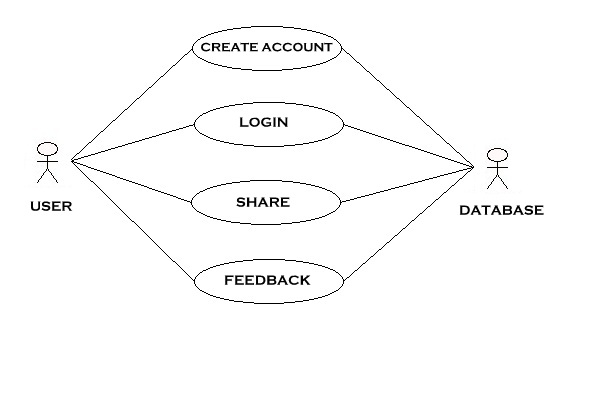
Use case Diagram:

Sequence Diagram:

Activity Diagram:

Collaboration Diagram:

Eye Blink and Alcohol Sensor Based Vehicle Accident Prevention System

Accidents are the most common cause of death for the peoples who drive vehicles. Accidents happen, even to the people who are careful, but many accidents may be avoidable if simple precautions are taken. One of the major reasons for the accident is drink and drive. We can avoid these accidents by providing the eye blink and alcohol sensors to the drivers. The eye blink switch responds to the voluntary blink of the eye and requires minimal calibration. It discriminates between voluntary and involuntary blinks.

Existing System:

Most of the accidents occur due to lack of concentration and tiredness of the driver. The number of accidents increases due to lack of preventive measures.

Proposed System:

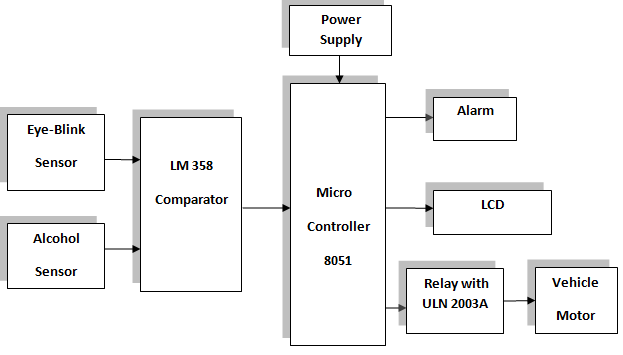
In this system, to overcome these problems we make use Eye-blink and Alcohol sensors to monitor the status of the driver. In one application when the driver is tired, the eye-blink sensor compares with the predetermined count in the microcontroller and if it is abnormal, the microcontroller generates an alarm signal and the alert message is displayed in the LCD. In the meanwhile, the motor gets stopped.

In other application, if the driver is in a drunken state, the alcohol sensor detects the abnormality by comparing the predetermined values in the microcontroller and the alert message is displayed on the LCD. Meanwhile, the motor gets stopped ant driver is in a safe condition.

Applications:

  • Can be used in vehicles for safer driving.

 BLOCK DIAGRAM:

Hardware Requirements:

  • Microcontroller Unit and Power Supply.
  • Eye-blink and Alcohol sensor.
  • Alarm & LCD.
  • Relay unit. 

Software Requirements:

  • Embedded C.
  • Keil Compiler. 

Advantages:

  • Cost effective.
  • High safety.

Online Library Management System (Summer Project using J2EE) Source Code

This is a website project created by the University students especially for the students of college campus.
Here a student can Search, Apply, Reserve or Cancel the Reservation for the Library books.
The Student must sign in with their College Library username and password to access these services.

High-Level Design

1. Login:

It accepts the username and password and checks them. There are two types of users: Administrator and Student.
There are three attempts if the supplied input is wrong.

2. Main Module:

This is the main screen window which contains different menus for a particular user.
The main module contains several sub-modules like adding/deleting users or books to the database, issuing/returning books.

3. Student module:

3.1 Search: Search a book.
3.2 Apply: If the book is available to apply for the book.
3.3 Reserve: If the book is not available to reserve it.
3.4 Cancel: Cancel the request for the book.

4. Student Record :

Contains the details about book issue, return and fines etc
4.1 Issue: Issuing the book
4.2 Return: Returning the book.
4.3 Status: Status about the borrowers and pending requests etc.
4.3 Report: Generating the report.

5. Data Entry :

This includes sub-modules for adding/deleting the users and books to the database.
5.1 Books :Add/Update/delete the books
5.2 Users : Add/Update/Delete users

6. User Accounts :

It includes sub-modules for adding or changing the username and passwords for the users, enabling and disabling etc

Unit Test Plan For Online library management system

Sl No Test  Case Name Test Module Expected Result
   1 Login_fnValidate_Valid() Calls fnValidate() after entering valid User Name and Password. Displays the Welcome Screen
   2 Login_fnValidate_Invalid() Calls fnValidate() after entering invalid User Name and Password. Displays error message as “Invalid username or password!!”
   3 Student_fnAdd_Valid() Calls fnAdd() and saves entered details to the database if all the validations are met. Displays a message “Employee details are successfully added to the database”
   4 Student_fnAdd_Invalid() Calls fnAdd() and displays error message if any of the required field is left empty and other validations are not met. Displays an error message “Sorry Cannot Add… Please fill all the mandatory details!!” or “Sorry Cannot Add… Invalid details!!”
   5 Student_fnApply_Valid() Call fnApply() and saves all the valid entered details to the database. Displays a message “book details are available in the database”
   6 Student _fnApply_Invalid() Calls fnApply() and displays error message if any of the required field is left empty and other validations are not met. Displays an error message “Sorry Cannot Book details are not available!!”
7 Student_fnSearach_Valid() Call fnSearch() and saves all the valid entered details to the database. Displays a message “book details are available in the database”
8 Student_fnSearach_Invalid() Call fnSearch() and displays error message if any of the required field is left empty and other validations are not met. Displays an error message “book details are not available in the database”
9 Student_fnReserve_Valid() Call fnReserve() and saves all the valid entered details to the database. Displays a message “book has been reserved successfuly”.
10 Student_fnCancel_Valid() Call fnCancel() Displays a message “book that has been reserved is cancelld”.
11 BookInfo_fnAdd_Valid() Calls fnAdd() and saves entered details to the database if all the validations are met. Displays a  message “Bok Information details are successfully added to the database”
   12 BookInfo_fnAdd_Invalid() Calls fnAdd() and displays error message if any of the required field is left empty and other validations are not met. Displays an error message “Sorry Cannot add Book details!!”
13 BookInfo_fnIssue_Valid() Call fnIssue() and saves all the valid entered details to the database. Displays an message,book is issued successffully
 

14

BookInfo_fnIssue _Invalid() Calls fnIssue() and displays error message if any of the required field is left empty and other validations are not met. Displays an error message “Sorry Cannot be able to issue the book. Book is already issued…
15 BookInfo_fnReturn_Valid() Call fnReturn() and saves all the valid entered details to the database. Displays an message,book is returned

successffully

16 BookInfo_fnReturn _Invalid() Calls fnReturn() and displays error message if any of the required field is left empty and other validations are not met. Displays an error message “Sorry Book is not received.
17 BookInfo_fnStatus_Valid() Call fnStatus() and saves all the valid entered details to the database. Displays an message regarding the status of the books.
18 Admin_fnAddUser()


Calls fnAddUser() and saves entered details to the database if all the validations are met. Displays a message “Student details are successfully added to the database”
19 Admin_fnAddBook()


Calls fnAddBook() and saves entered details to the database if all the validations are met. Displays a message “Book details are successfully added to the database”
20 Admin_fnDeleteBook()


Calls fnDeleteBook() and saves entered details to the database if all the validations are met. Displays a message “Book details are successfully deleted from the database”
21 Admin_fnDeleteUser()


Calls fnDeleteUser() and saves entered details to the database if all the validations are met. Displays a message “Student details are successfully deleted from the database”

UML Diagrams:

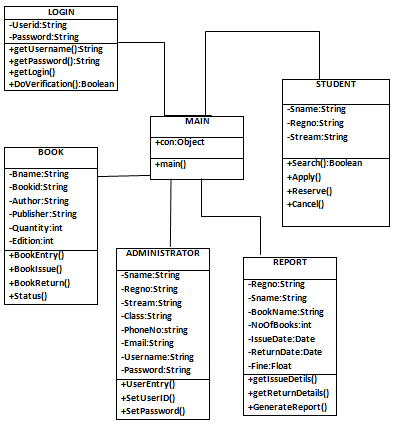
Class Diagram:

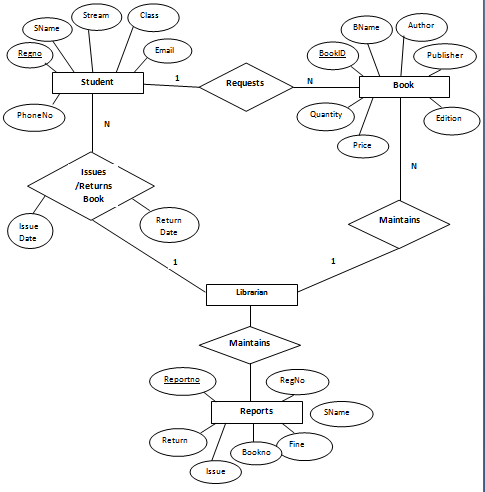
ER Diagram:

Download the below attached Development of an online Library Management System Project Code & DB

Social Integration Computer Science Java Project

PROJECT REQUIREMENT

  1. Gather the information of top five colleges in Pune under Pune University.
  2. Need to study how we can add Facebook like and recommend button to our website.
  3. Need to study Twitter API’s for how we can tweet on user’s Twitter account.
  4. Login using social networking site leads to study login authentication API’s provided by social site’s.
  5. Study of meta-tags which we are going to add to our website. These meta-tags are going to help our website to come into Google search.
  6. Study of Google Analytics to collect analytics of the website. eg. How many users have visited our website & which browser they are mostly using to browse the site?
  7. Social sharing: User can be able to share the information available on the website with their respected social networking sites.
  8. We can retrieve info of the user he’s like’s hobbies and gain his feedback.

FUNCTION’S:-

Supports social login for your web – we can log in to your web application using social sites.

Social sharing – We can share the content of the web into the social sites.

Recommend & Like’s – We can recommend the contents displayed on the particular URL.

Adding required meta tags into the pages as per the social site provider

Due to the popularity of social networking site, to capture web market, posting advertising of the product  & making our product popular it’s very important to have our web supports social integration. Social integration helps for the Search Engine Optimization (SEO), Having social integration with the web it’s easy to get the popularity of the product.  Social Networking has become an integral part of our daily lives. Friends and family are really important to us and keeping in touch with them & knowledge sharing. Social networking is becoming a   way of communication.

S/W  REQUIREMENT:-  JAVA ( J2EE ) version 6.0, MySql , Apache tomcat 6+, Eclipse.

H/W  REQUIREMENT:-

  1. 512 MB main memory. (1 GB Recommended).
  2. At least 80 GB HDD (Secondary Storage Device).
  3. 14′ Monitor (Color or Black & White) for display.

UML Diagrams:

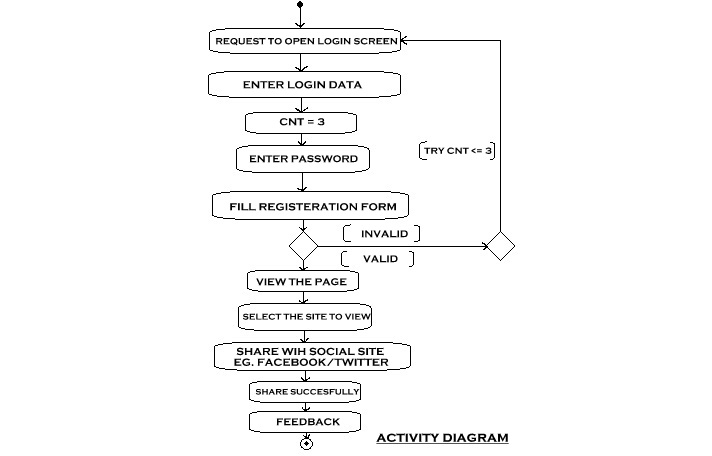
Activity Diagram:

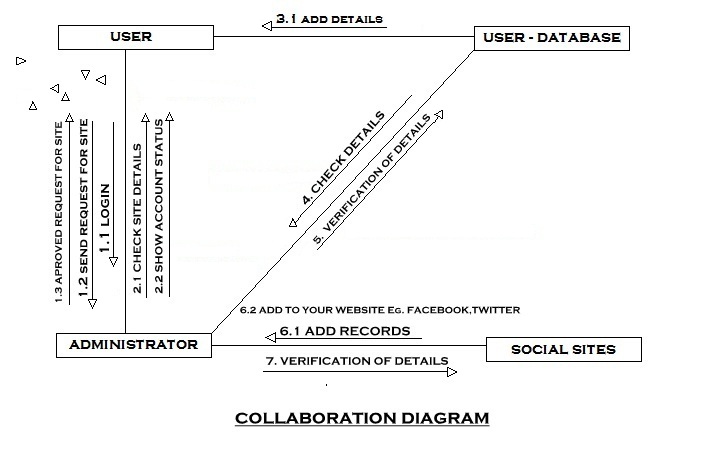
Collaboration Diagram:

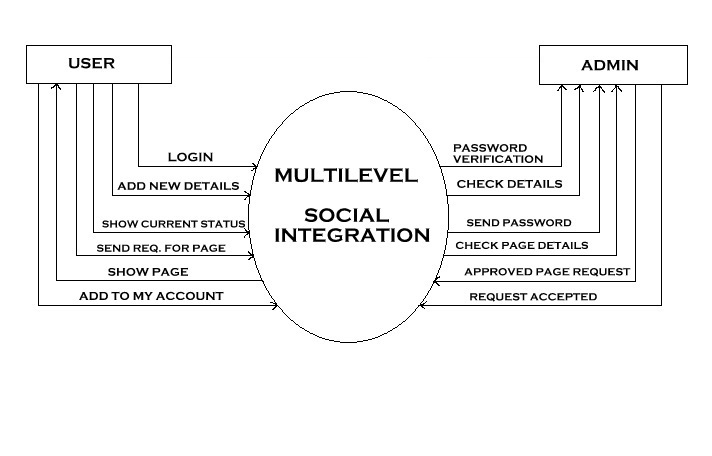
DATA FLOW DIAGRAM:

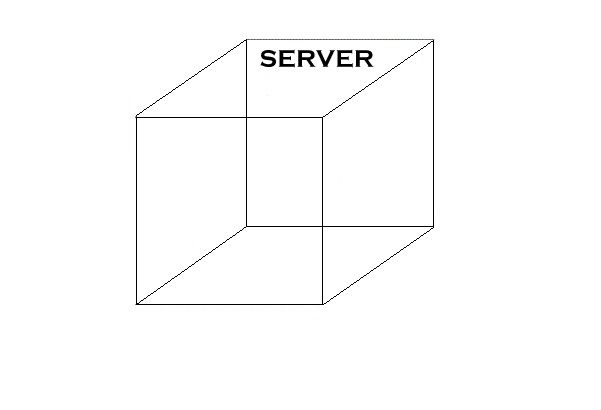
DEPLOYMENT DIAGRAM:

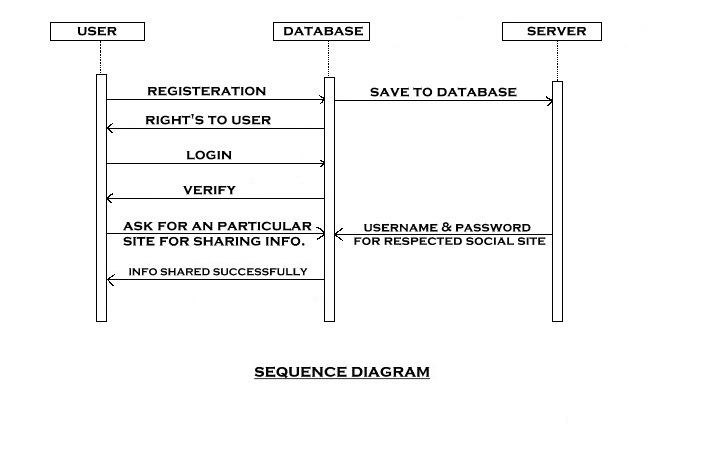
SEQUENCE DIAGRAM:

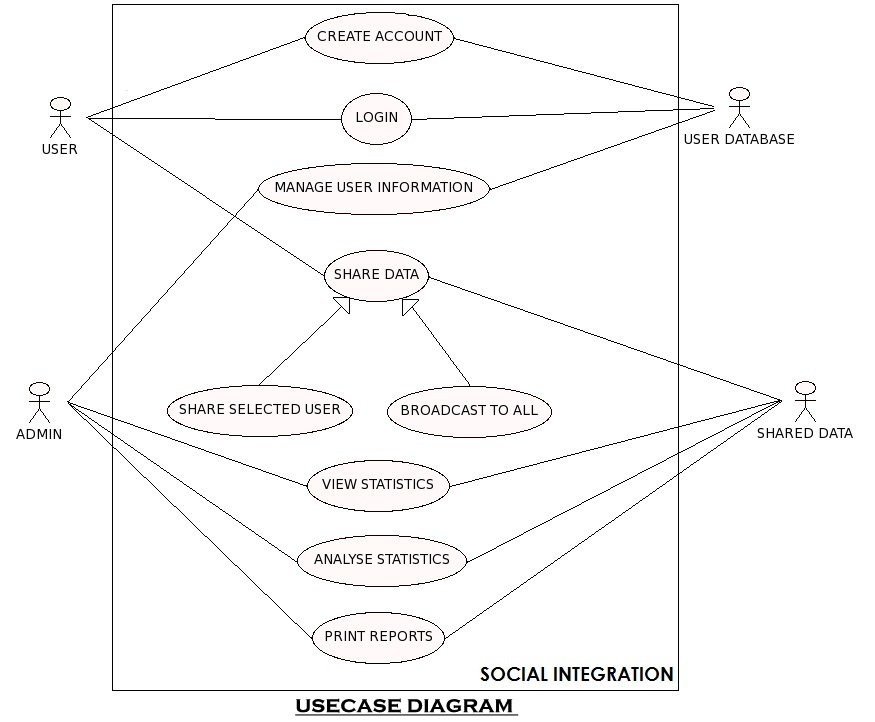
Social Integration ( USECASE DIAGRAM ):

Use case Diagrams:


Download the below attached Social Integration Computer Science Java Project Code & Database

Online Medicine Search Web Application .Net Project

SYNOPSIS

This “GOOGLE A MEDICINE” is an online medicine search web application. This application allows a visitor to search for a medicine and addresses of medical stores (wholesale and retail sales) where the medicine is available. This application is a solution. So, this web application is planned to develop based on the requirements of the client.

The client is a small scale pharmaceutical company that is distributing generic medicines to emergency medicines and having a good network of medical (retail) stores. Main need of the client is to prepare an online application to help the needy people in finding the availability of the medicine and a list of medical stores where the medicine is available. The visitor can quickly find the nearest medical store by selecting the area in the search tools.

This application also provides a login account to a registered medical store. Using this account a person from the medical store can update the list of medicines and their stock on daily-wise. This avoids providing outdated data to the visitor.

Emergency medical services for chronic health problems are depending on the availability of medicines. Most of the times, unavailability of medicines affect the lives of deceased persons. Addresses of medical shops that are providing 24 hours service should be made available to all. Some medical shops provide door delivery service for the needy people in an emergency even though the medical shop or distributor is not providing 24 hours service.

PROJECT DESCRIPTION

The application software is titled “ GOOGLE A MEDICINE ”.The tailor-made software which suites the requirements of a medicine searching software is developed using ASP.NET as front end and SQL SERVER as the backend

This project is an online medicine search web application. This application allows a visitor to search for a medicine and addresses of medical stores (wholesale and retail sales) where the medicine is available.

This application is a solution. So, this web application is planned to develop based on the requirements of the client.

This project contains the following module:

PUBLIC PAGES MODULE:

These modules are useful in providing information to a visitor (login is not required) about the website and contact address and numbers. The homepage displays the main features of the website.

MEDICAL STORE MODULE:

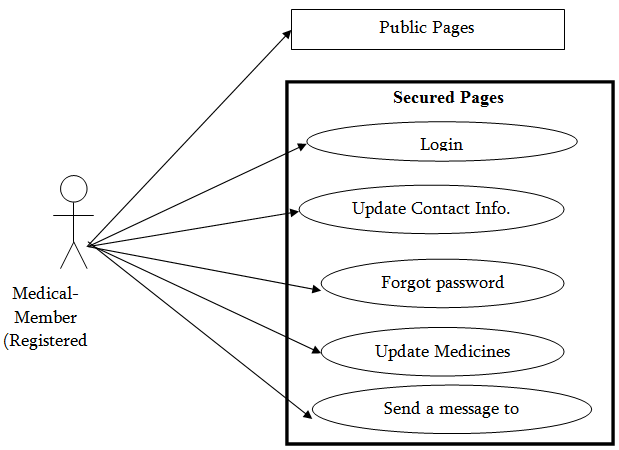
These modules can do add a new medicine to list, manage existing Medicines List, and edit or Update medicines stock and maintain the application settings

MEDICINE SEARCH MODULES:

This module can do for Search and advanced search for search results and search results filtration

ADMIN MODULE (Operator):

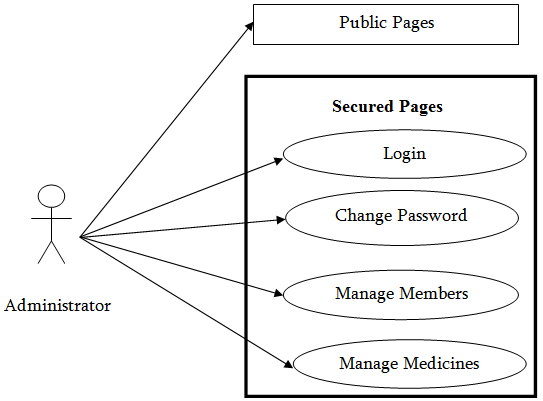
These modules allow an administrator of the website to manage cities and manage master data. And also provide Manage Medical Store User Accounts.

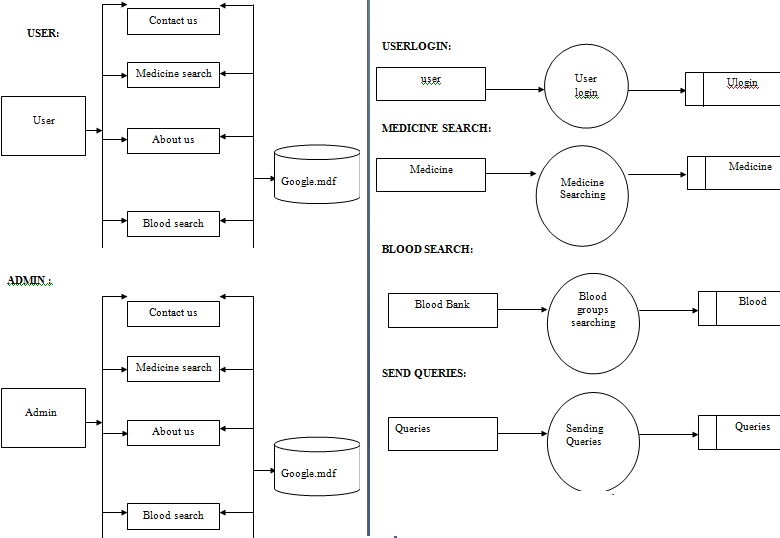
DATA FLOW DIAGRAM:
USER, ADMIN, USERLOGIN, MEDICINE SEARCH, BLOOD SEARCH, SEND QUERIES Dataflow Diagrams:
 

UML DIAGRAMS

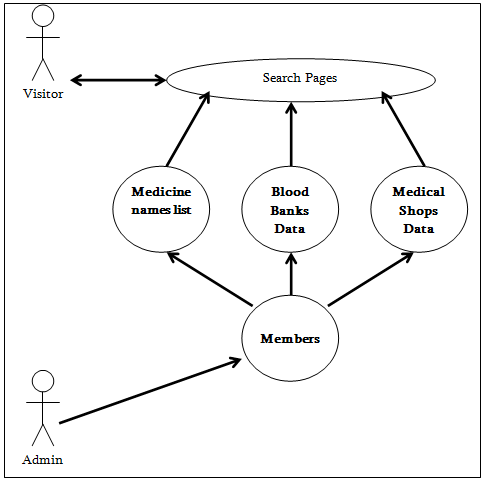
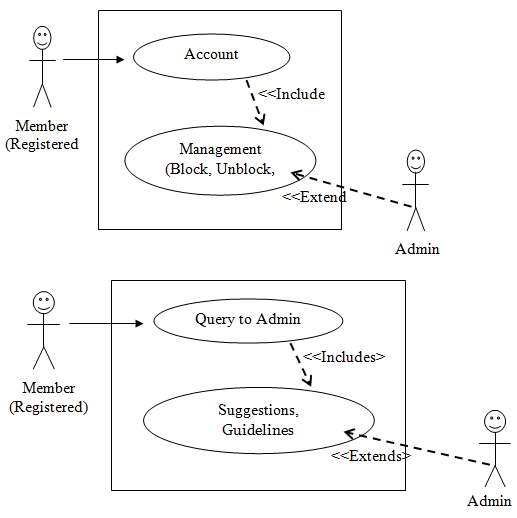
Use Case Diagram: Visitor and Facilities

Use Case Diagram: Medical-Member and Facilities
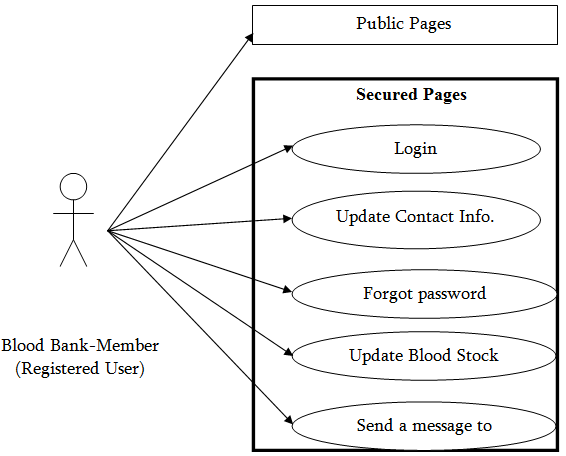
Use Case Diagram: Blood Bank-Member and Facilities

Use Case Diagram: Administrator and Facilities
USE CASE RELATIONSHIP DIAGRAMS

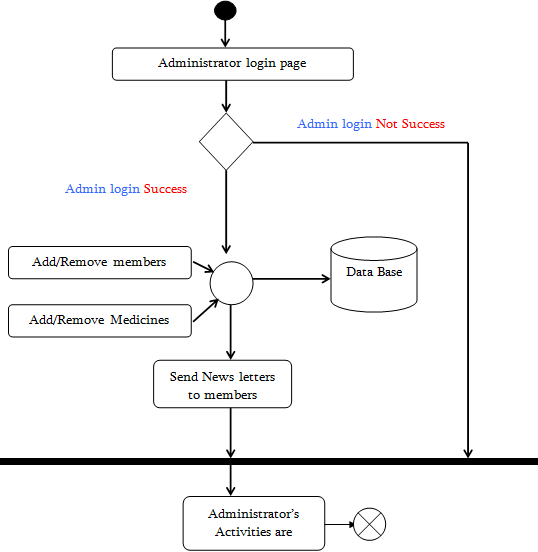
ACTIVITY DIAGRAM FOR ADMINISTRATOR’S ACTIVITIES

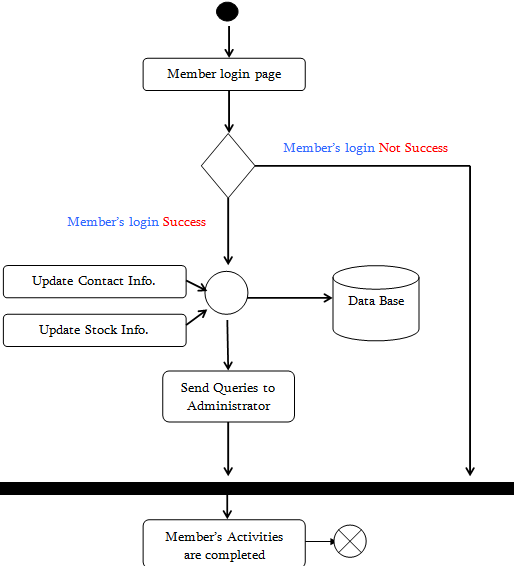
ACTIVITY DIAGRAM FOR MEMBER’S ACTIVITIES
HARDWARE SPECIFICATION:

Processor: Pentium IV

Ram: 2 GB RAM

Hard DDisk: 80 G.B Hard Disk 

SOFTWARE REQUIREMENTS

Operating System: Windows Server

RDBMS: SqlServer

Web Browser: Internet Explorer

Web Server: IIS

Technology: ASP.NET

Languages used: C#.NET

DATABASE DESIGN

TABLENAME: USER LOGIN

ColumnName DataType Description
Sno Int Sno
UserID Varchar(10) UserID
LoginTime Datetime LoginTime

TABLENAME: USER QUERIES 

ColumnName  DataType Description
UserID Varchar(10) UserID
UserQuery Varchar(max) UserQuery
Reply Varchar(max) Reply
Status Int Status

 TABLENAME : BLOOD BANKS    

ColumnName  DataType Description
Sno Int Sno
UserID Varchar(10) UserID
BankName Varchar(50) BankName
Bgroup Varchar(10) BGroup
Stock Int Stock

 TABLENAME: MEDICINES

ColumnName  DataType Description
Sno int Sno
UserID Varchar(10) UserID
MedicineName Varchar(100) MedicineName
Dosage Varchar(50) Dosage
Stock int Stock
Pdate DateTime Pdate

 TABLENAME: PASSWORD

ColumnName  DataType Description
UserID Varchar(10) UserID
SQuestion Varchar(100) SQuestion
Answer Varchar(100) Answer

TABLENAME: USER DETAILS

ColumnName  DataType Description
UserID Varchar(10) UserID
OrgName Varchar(100) OrgName
Area Varchar(100) Area
Address Varchar(200) Address
City Varchar(50) City
Contactphones Varchar(50) Contactphones

TABLENAME: USER

ColumnName  DataType Description
UserID Varchar(10) UserID
OrgName Varchar(100) OrgName
Area Varchar(100) Area
Address Varchar(200) Address
City Varchar(50) City
Contactphones Varchar(50) Contactphones

TABLENAME: USER

ColumnName  DataType Description
Sno int Sno
UserID Varchar(10) UserID
Password Varchar(10) Password

Download the below attached Online Medicine Search Web Application .Net Project Source Code & database