Web Based Training Management System .Net Project

PRELIMINARY INVESTIGATION

1) Interview:

For making software for a company, we need knowledge of their existing system. For this purpose, we take interview of some persons working in that company.
We gather information from taking interview of that person who is related with this software. As- Training Coordinator, Hostel Warden, Trainee, Guest Faculty.

2) Group Discussion:

It was the discussion among the company people who were involved in the project. At first, many ideas were pooled in and existing themes, concepts which the other web applications were using were chosen. And then all these ideas were brought into action by the programmers.

3) Online observation :

It is the process of getting close details of the existing software or web application from the internet. The major objective is to get as close as possible to the system.The information on the TRAINING MANAGEMENT SYSTEM software was obtained from the existing web applications which are running successfully.

4) INFORMATION DESCRIPTION

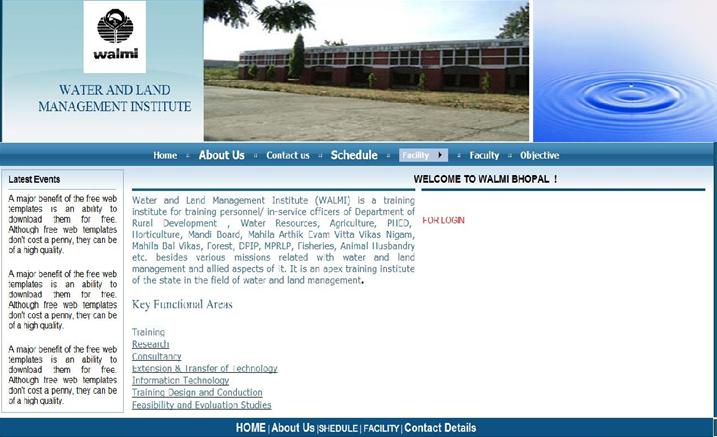
Training Management System and web application:-.

1) The purpose of the application is to help the director to get details about the training, hostel, feedback, employee, expenses etc.

2) Training Details, Feedback Report, Bill generate automatically.

3) It helps the Training Coordinator to manage the training details, Trainee Information easily.

4) This application also helps to hostel Warden to manage the hostel and mess details in an easy way.

5) This application is also useful for manage detail of Guest Speaker and their lecture information.

6) It helps to manage all visits during training.

7) It also calculates the total gain and expenses of walmi from a training.

Project Objective

To facilitate the process of management of training.
To provide a software for managing trainee registration and maintaining the records.
To generate feedback information from trainees in different aspects.
To generate feedback report for a particular duration.
To maintain an account for a training easily.
Project Introduction

The application provides a login facility to different uses of the organization.
If the login successfully then they use their form.
The application provides facility to manage trainee record and account for a training to the coordinator.
The application provides facility to hostel warden to maintain the record of a trainee who is staying in a hostel.
With the help of this application, the Director sees the feedback report in a different aspect.
This application is useful for calculating expenses for a training and also calculate profit.

Data Flow Diagrams:

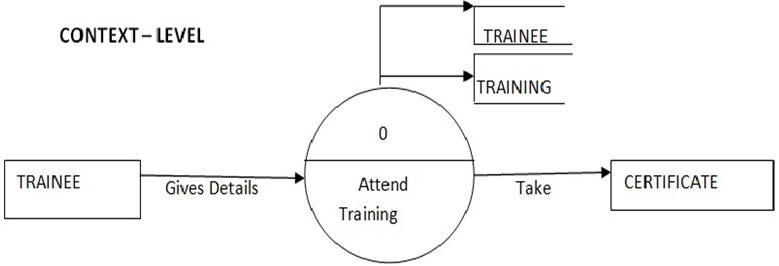
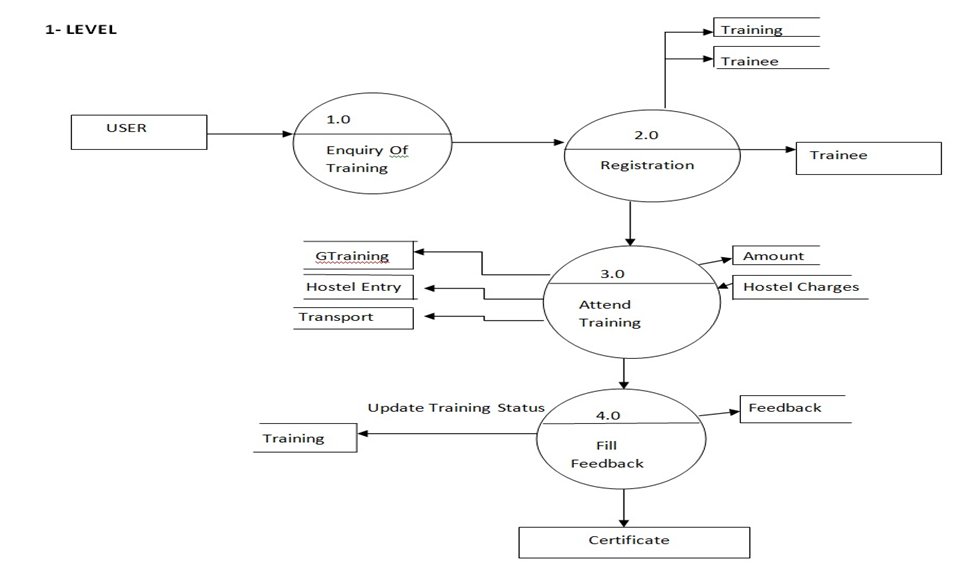
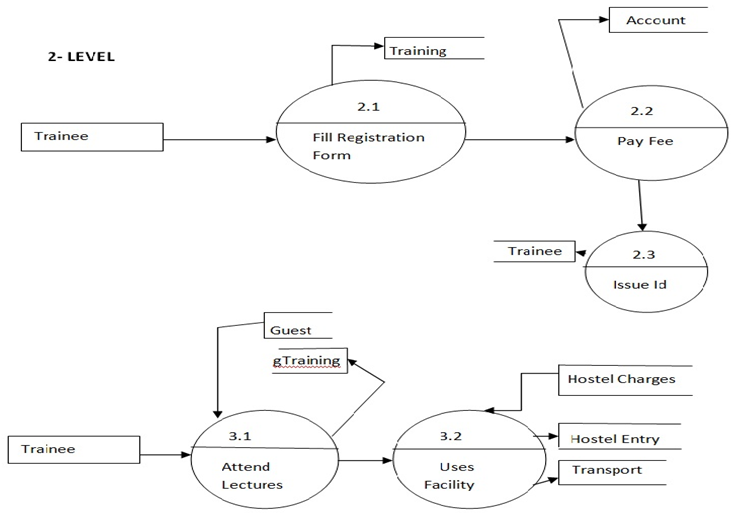
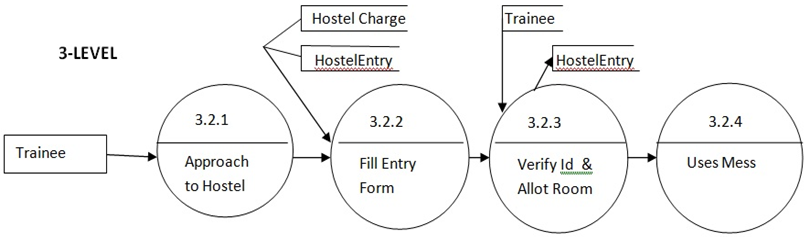
Data Flow Diagram of Trainee:

Context Level DFD:
Level 1 DFD:
Level 2 DFD:
Level 3 DFD:
Minimum Hardware Requirement

Microprocessor : Pentium or Core-i series.
Primary Memory (RAM) : 512 MB
Secondary Memory (Hard Disk) : 16 GB
Video Display Unit : VGA Monitor.
Compact Disk Drives : 52x CD-ROM.
Keyboard : 101 Key Enhanced Keyboard.
Mouse : Serial Mouse.

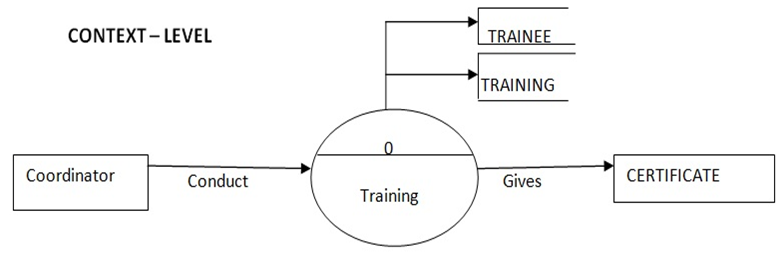
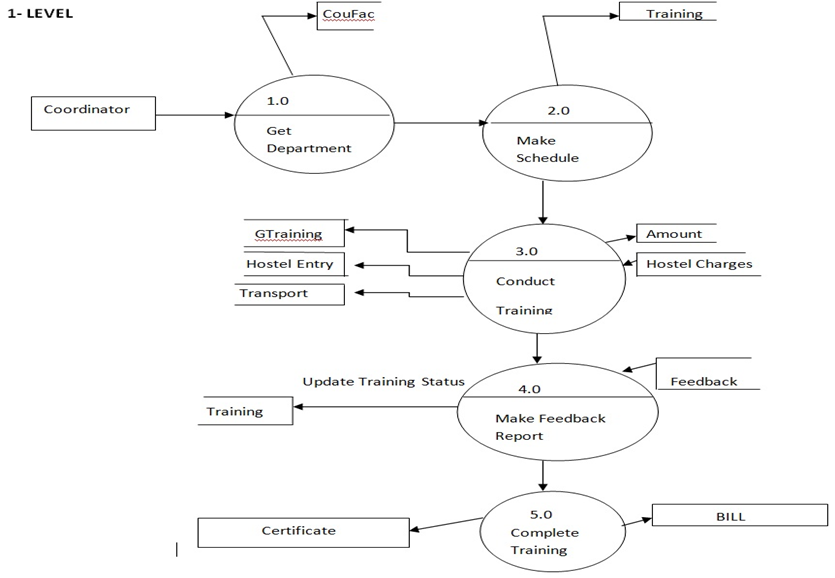
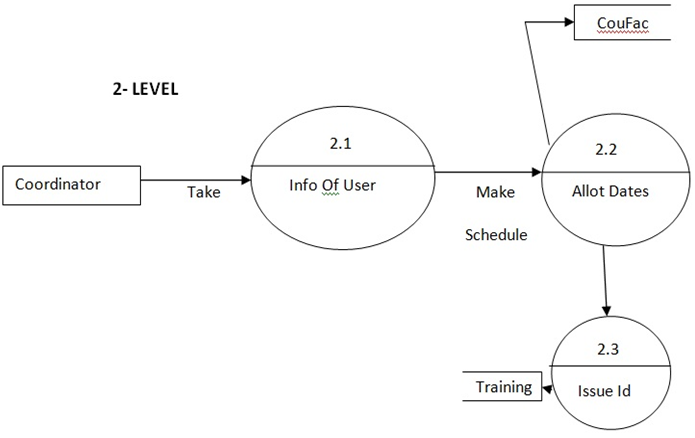
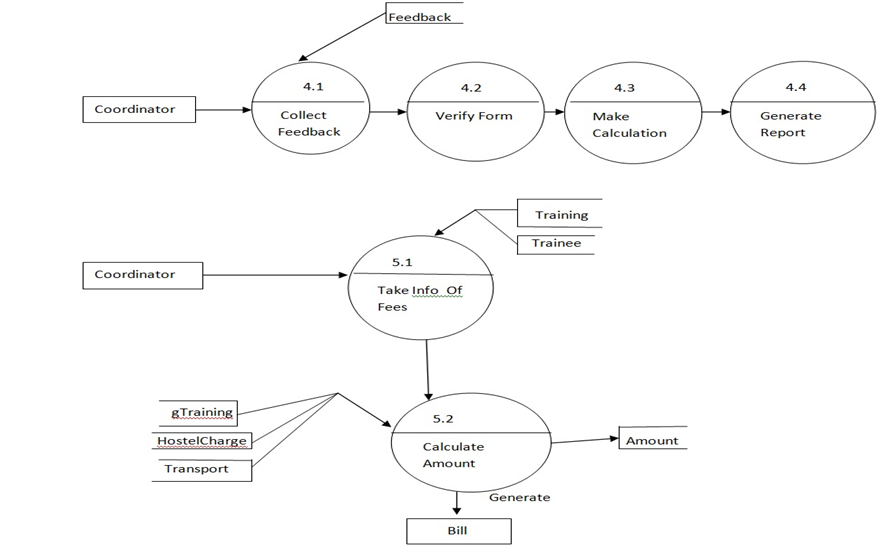
Data flow Diagram for Training Coordinator

Context Level DFD:
Level 1 DFD:
Level 2 DFD:
Level 3 DFD:
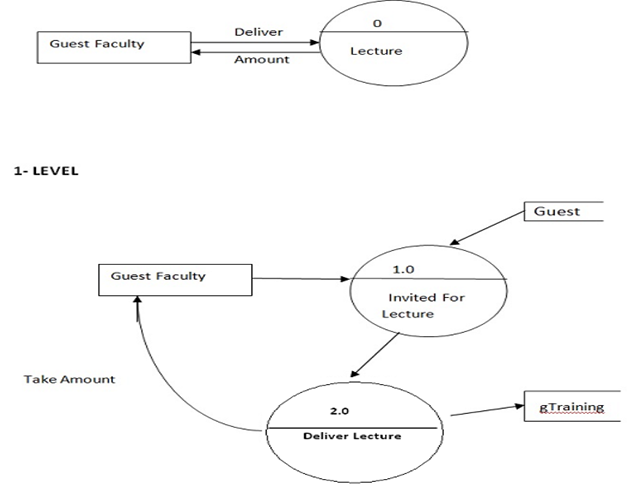
Data flow Diagram for Guest Faculty:
Software Requirement

Operating System : Windows XP , Windows Vista , Windows 7

Language : Asp.net (C#.net)

Database : SQL Server 2005

Browser : IE, Mozilla Firefox

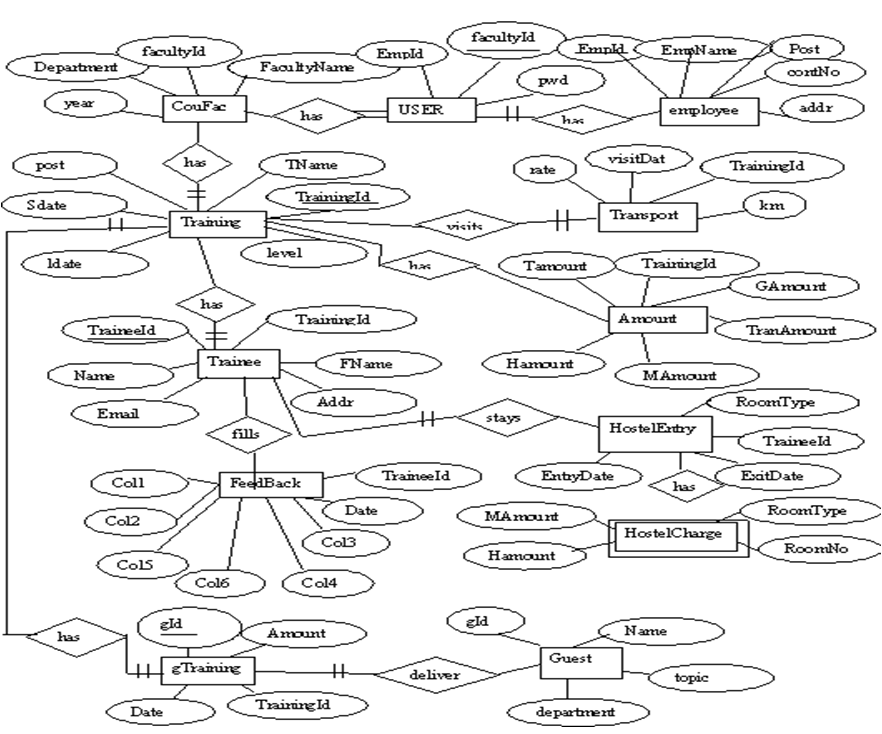
ER Diagram:
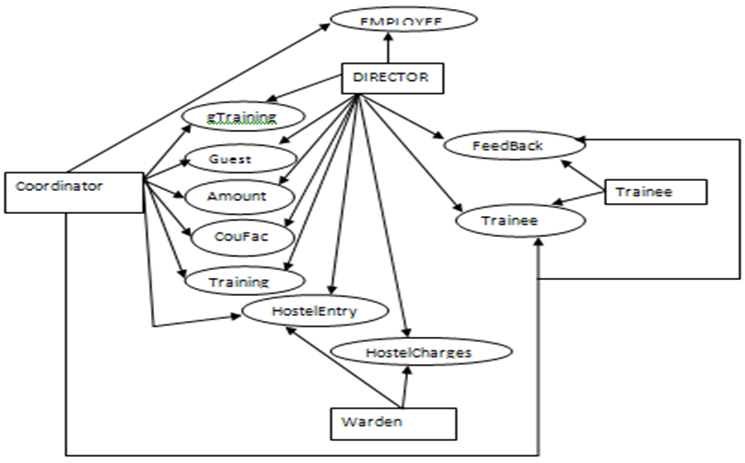
Use Case Diagram:
LIMITATION

  • After every lecture, we have to maintain the honorarium record.
  • There is no provision for suggestion box in feedback form as it was omitted by concern authority.
  • Only Check-in and check-out record from the hostel is maintained within the software.

FUTURE ENHANCEMENT

  • Online booking facility.
  • We maintain an attendance record of a trainee during training.
  • We Provide male – female reservation in hostel.

Above limitation can be rectified as per authority requirement

Tables Description:
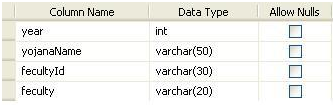
This is table of “CouFac”, In this table we put the information of department of faculty head.
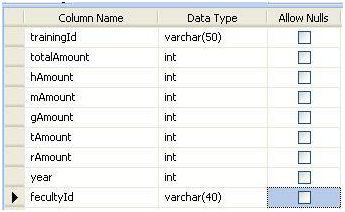
This is table of “Amount”, In this table we put the information of Amount of whole Training..
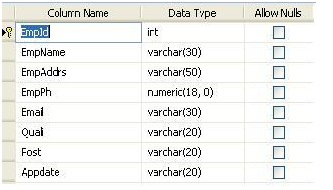
This is table of “employee”, In this table we put the information of employee.
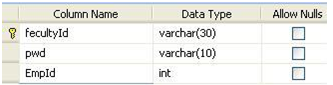
This is table of “Faculty”, In this table we put the information of UserId and Password.
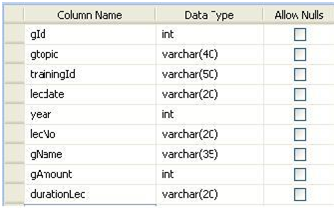
This is table of “gTraining”, In this table we put the information of lecture of Guest Speaker..
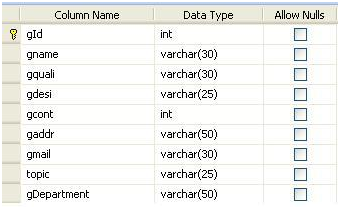
This is table of “Guest”, In this table we put the information of Guest Speaker..
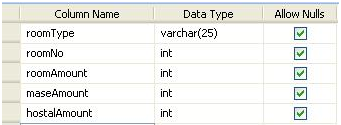
This is table of “hostelCharges”, In this table we put the information of hostel charges..
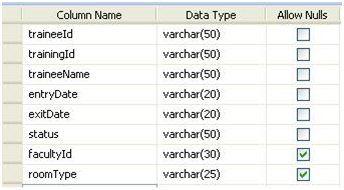
This is table of “HostelEntry”, In this table we put the information of trainee stay in hostel.
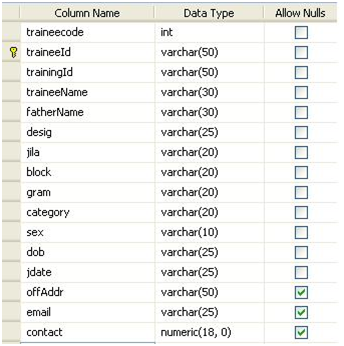
This is table of “Trainee”, In this table we put the information of trainee comes for training.
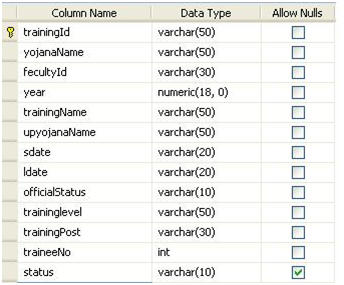
This is table of “Training”, In this table we put the information of training conduct in organization.
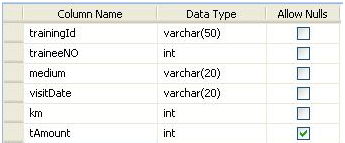
This is table of “Transport”, In this table we put the information of transport used for training.
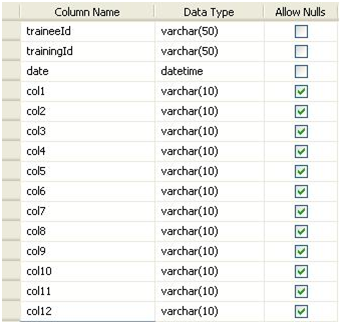
This is table of “FeedBack”, in this table we put the information of feedback of trainee given for training.

Conclusion:

We made a “Web Based Training Management System” for water and land management institute. This application provide them a automated system, which is very time saving then existing system in walmi.
We test this application by the different testing method and it works properly hence it is useful for the organization.
This application easily manage the training system.
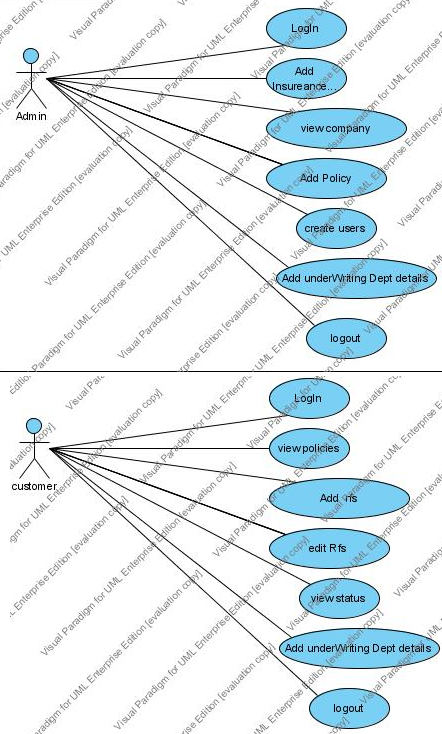
Loss Control System for Insurance Producers .Net Project

Introduction

Insurance companies issue various types of policies to protect home and business owners from various types of unforeseen calamities such as fire, floods, theft etc.  However, prior to issuing or renewing a policy, the insurance company conducts a field survey of the property to ensure that the property is adequately secured and is not vulnerable to damage.  Thus the insurance company ensures that the chances of damage or loss are controlled.  For example, if a petrol pump has to be insured, the petrol pump owner should provide for adequate fire safety equipment, signboards prohibiting smoking near the fueling area etc.

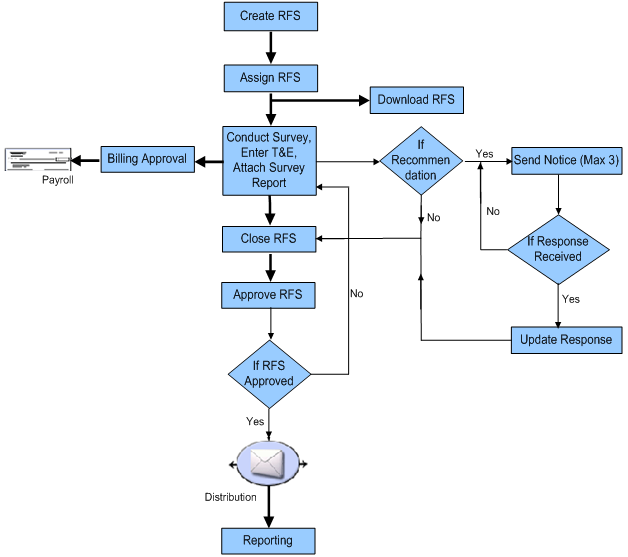
In order to conduct these surveys, the insurance company enlists the services of independent surveyors residing near the property.  These surveyors are trained personnel and are pre-approved for certain types of activities.  The aim of the project is to develop a system used by insurance companies and surveyors to record the surveys to be done, assigning a surveyor to conduct the survey, capture, and approval of survey results, recording and approving of the surveyor’s Time and Expenses (T&E) Report. 

Workflow of the proposed system

Detailed Functionality

 1.    Record the Surveys to be done

Prior to issuing or renewing an insurance policy, the underwriting department raises an RFS (Request for Service) in LCS.  The details to be entered include –

Location to be surveyed

Type of insurance coverage (fire, theft, flood etc.)

Date by which the survey should be completed

Surveyor ID  (to be searched based on the location’s pin code)

Type of service requested (eg. Survey.  In future, the same system can be extended to verify insurance claims)

The estimated budget for the survey (This is the amount of money that the insurance company is willing to spend towards surveyor’s T & E)

The underwriter may also attach a copy of insurance policy application to RFS.

  1. Working with an RFS

Once an RFS is assigned to a surveyor, he/she starts working on the RFS.  The surveyor should be able to query the status of various RFS’s assigned to him/her.  Typical activities that are carried out by Surveyor on RFS include –

Scheduling a visit to the location – Enter the scheduled date and time in the system and update the status.

Survey the location and Write a Survey report – Attach the survey report to RFS on completing the site visit.

Writing recommendations and following-up on recommendations – Writes recommendations on the corrective actions to be taken at the location and updating the action taken on the recommendation.

Entering time and expense details – Record the time and expenses incurred to carry out the survey and the follow-up actions.  These details have to be entered by date and activity.

Close RFS – After all the details are entered, the surveyor closes the RFS.

  1. Approving Time and Expenses

The underwriter reviews the T&E reports and either approves or disapproves the expenses based on the budget.

In case it is disapproved, he/she cites the reasons for disapproval.  The surveyor is informed to update the expenses accordingly.

If it is approved, it is sent to the finance section for payment.

  1. Reporting

This module generates various reports for surveyors and underwriters.

For surveyors –  List of RFS by status,  List of RFS received or completed during a given period, Report on T & E for a given period

For underwriters – List of RFS by status (across surveyors or for a specific surveyor), List of RFS raised or completed during a given period,   T&E claimed and paid during a given period.

UML Diagrams:

Use Case Diagram:

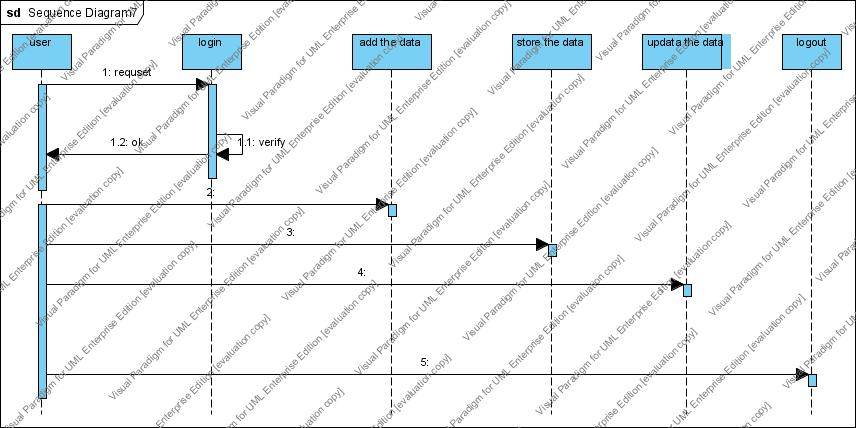
Sequence Diagram:

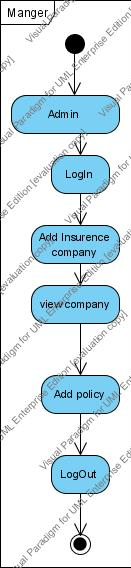
Activity Diagram:

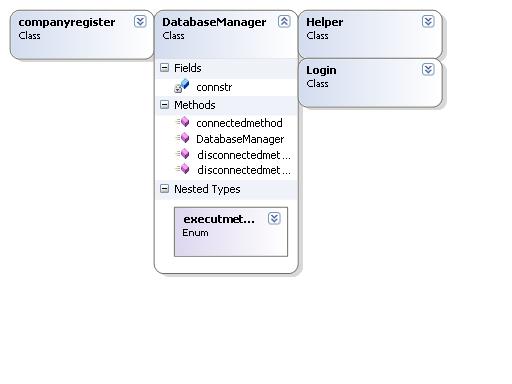
Class Diagram:

REQUIREMENTS

Software Requirements:

Visual Studio .NET

Front-End: C# in ASP.NET

Back-End: SQL Server

Hardware Requirements: 

RAM: 2 GB

Hard disc: 80 GB

Test Cases:

s.no Test case name Test procedure Pre-condition Expected result output Specification
1 Login Enter userid and password Displays pay bills form success Login
2 Login Enter admin and password  

Displays the status

success Login
3 Login Enter user and password Error message success Login
4 Pay bills Enter details Select billername, date, accountno Displays bill paid successfully success Pay bills
5 Add biller Select the biller Select billername Add biller successfully success Add biller
6 Add biller Select the biller Select name Displays as already exists success Add biller
7 View details As admin Displays list of pending transactions success View status
8 View details As admin Update status Displays status success View status
9 View details As user Edit date, amount Displays all transaction of that user success View report

Download the below-attached Loss Control System for Insurance Producers .Net Project Source Code

Motor Vehicle Loss And Damage Claimform .Net Project

MOTOR VEHICLE LOSS AND DAMAGE CLAIM FORM (E-COMMERCE TEAMWORK)

Project Requirements

In the motor vehicle, damage and loss can be claimed online by client and insurance company store those data.

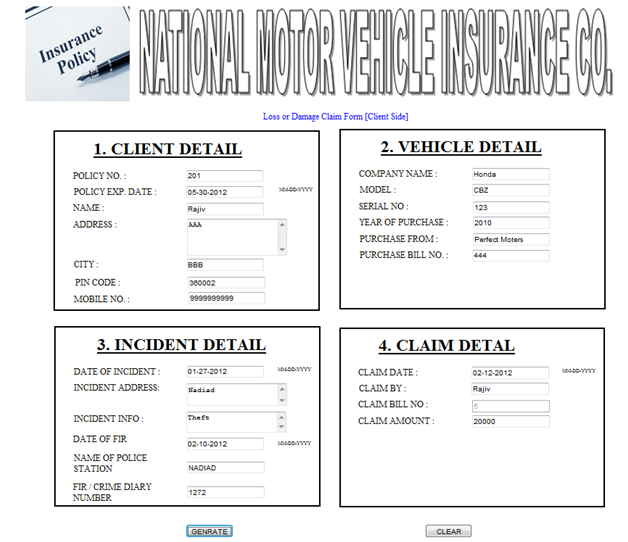
In this client fills his personal information and then the vehicle information and incident information and claim detail.

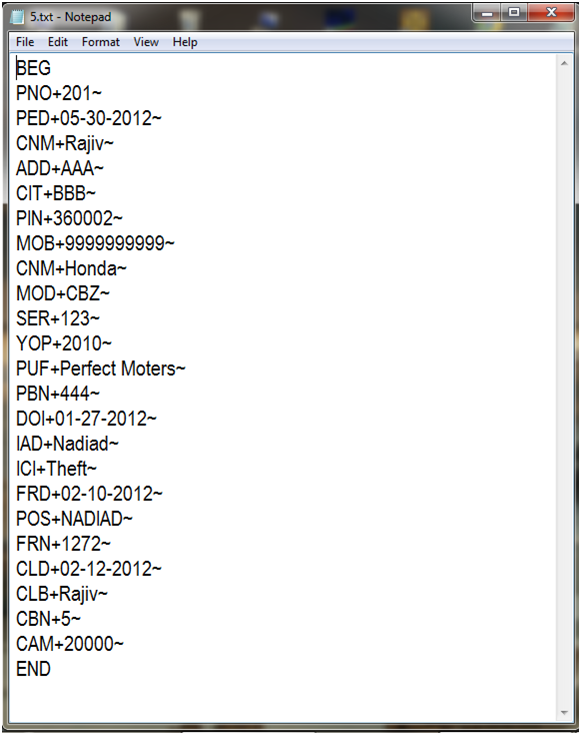
Then when the client submits the claims details form it generates the flat file and stores the entry in the database of client side. When the server will check the form of server-side and will enter claim bill number if that flat file does not exist then will show file is corrupted and if the file exists then will show all the information and if the server accepts that the information is stored in the server database.

Data dictionary

  • Client Database
Field name Data type Description
Policyno Numeric Take policy no of client
Poexdate Date/time Enter policy exp date
Cliename Text Enter client name
Address Text Enter address
City Text Enter city
Pincode Numeric Enter pincode
Mobile Numeric Enter mobile number
Comname Text Enter vehicle company
Model Text Enter vehicle model
Serialno Numeric Enter vehicle serial number
Yearofpurchase Numeric Enter vehicle purchase year
Purchasefrom Text Enter the place from where vehicle purchase
Purchasebillno Numeric Enter the billno
Dateofincident Date/time Enter date of incident
Incidentadd Text Enter incident address
Incidentinfo Text Enter incident information
Firdate Date/time Enter fir date
Policystation Text Enter police station name
Claimdate Date/time Enter the date on which client claim
Claimby Text Enter the name who claim
Claimbillno Text Enter Claimbillno(p.k)
Claimamount Numeric Enter the claim amount
  • Server Database
Field name Data type Description
Policyno Numeric Take policy no of client
Poexdate Date/time Enter policy exp date
Cliename Text Enter client name
Address Text Enter address
City Text Enter city
Pincode Numeric Enter pincode
Mobile Numeric Enter mobile number
Comname Text Enter vehicle company
Model Text Enter vehicle model
Serialno Numeric Enter vehicle serial number
Yearofpurchase Numeric Enter vehicle purchase year
Purchasefrom Text Enter the place from where vehicle purchase
Purchasebillno Numeric Enter the billno
Dateofincident Date/time Enter date of incident
Incidentadd Text Enter incident address
Incidentinfo Text Enter incident information
Firdate Date/time Enter fir date
Policystation Text Enter police station name
Claimdate Date/time Enter the date on which client claim
Claimby Text Enter the name who claim
Claimbillno Text Enter Claimbillno(p.k)
Claimamount Numeric Enter the claim amount

Snapshots

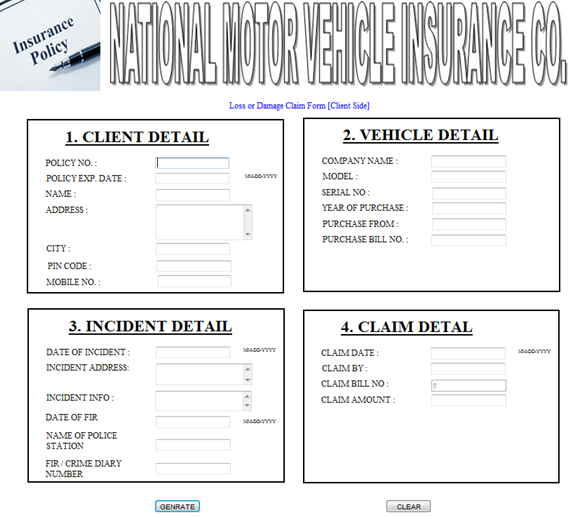
CLIENT SIDE FORM


Client filled form and by clicking on submit button flat file is generated and will be stored in client database.

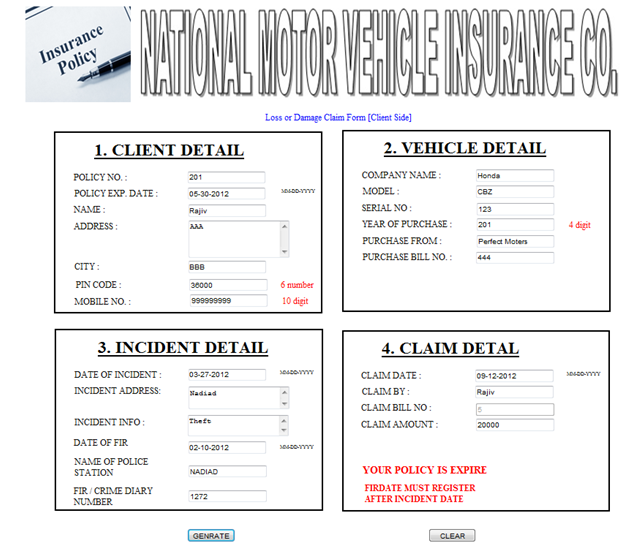
ALL THE VALIDATIONS

FLAT FILE GENERATED

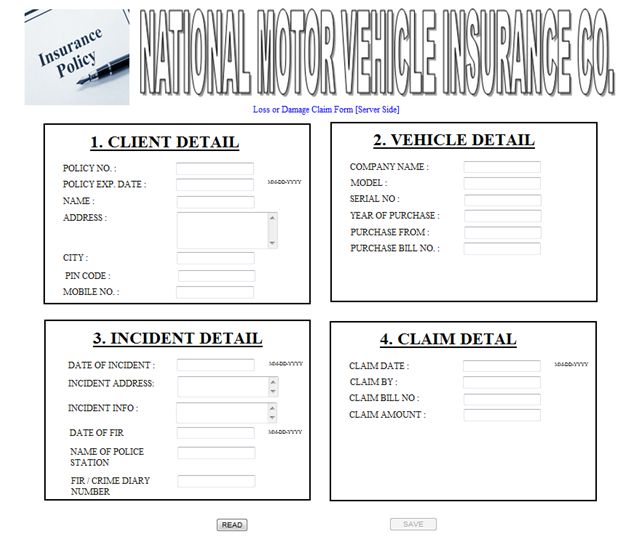
Server-side form

Sever side auto-filled from by entering a claim bill number and pressing read button and by pressing the save button will be stored in the database.

Download the below-attached Loss or Damage Claim form for Motor Vehicle project code

Pick and Drop Courier Service PHP Project Synopsis

Introduction

The pick and drop item delivery Courier Service system is used to pick a product from one place and drop it to another place within the city in a specific time. This system can be mainly used when you have forgotten your product (Example: File and you’re not able to back and pick it up. This system will do this for you).

In this system, you have to enter your pick up point and delivery point. The main advantage of this Courier Service system over the courier system is you can decide the time limit i.e. within 60 minutes, within 90 minutes and within 3 hours. Based on the time you will be charged the lesser is time more you will be charged.

Existing System:

The existing Courier Service System, If you want to deliver a product from one place to another place in a city. We have to look for a courier system, But the drawback of the courier system is that you cannot decide time limit and major concern is the weight of the product to be delivered. If we need to deliver product immediately then we cannot use courier system nowadays.

If not courier system, then we have to deliver the product by ourselves and invest our time, this becomes a tedious and hectic task.

Proposed System:

Pick and place item delivery system will help you to overcome all the above problems. This System will allow the user to deliver their product within the specific timeslots within 60 mins, 2 hours or within a day. This system is not concerned with the weight of the product. This system is quick and can be used in emergency cases, example if you forget your file at your home and you want to get it to deliver at the office for an emergency meeting one can use this system.

Front End

  • PHP

Back End

  • MySQL / MySQL

Feasibility Study:

1) Technical Feasibility Study:

The System is Technically feasible because here we are using PHP and Postgresql / MySQL database which is free to use even for commercial purposes. From the user’s point of view, it is feasible because it can fulfill users requirements and maintain their records and additional feature like deciding specific timeslots are also available.

2) Operational Feasibility Study:

Operational Feasibility is the measure of how well the proposed system solves the problem and specifies the requirements in system development. Our System is Operational Feasibility as the user will get a single place where She/He can decide the pickup and drop location along with time. One will not wait for days to get deliver their product. The website will be user-friendly

3) Economical Feasibility Study:

The purpose of the Economic Feasibility is to demonstrate the net benefit of the proposed system. Our system is economically feasible as the basic amount will be decided by the system depending on distance and the user will decide the timeslot and according to that, the user will get additional charges. Less is the time more the user will be charged. The expenses will be dependent on the user.

Bank Management System .Net Web Application project

System Analysis

System Summary: The West Bank Management System project involves the creation of a Web application that will enable the customers of West bank to:

View the details of all accounts that they hold with West Bank.

View the accounts statements for all accounts that they hold with West Bank.

  • Apply for loans online.
  • View the status of loan requests.
  • Requests for checkbooks for any of their accounts.
  • View the status of checkbooks requests.
  • Transfer funds from any of their accounts to another account in West Bank.
  • The Web application will also be used by the employees of West bank to process the requests for loans and checkbooks.

In addition, the application will be used by the administrator to:

Create User-IDs for customers, employees, and administrator and assign them the respective roles.

  • Link User-ID created for customers to the respective Customer-IDs.
  • Upload, edit and delete news items that will appear on the homepage.
  • Upload, edit and modify the information related to various types of loans.
  • Upload, edit and modify the information related to various types of accounts.

Each of the three types of users should also be able to change their password and retrieve their password in case they forget the password.

West-Side bank already has a computerized system in place that maintains the details of all the customers and accounts. The proposed Management System Web application will use the existing database to obtain the details of customers and accounts. Some additional tables may have to be created in the database to accommodate the specific requirements of the Web application.

HARDWARE & SOFTWARE REQUIREMENTS

Hardware: CPU, Mouse, Keyboard, CDs, Printer etc.

Operating System: Window 7 Home Basic-E Series, I3 Processor

Software: Microsoft SQL Server 2008, Microsoft Visual Studio 2008, Microsoft Office etc, Microsoft Office Word, Microsoft Office Visio, Google.

UML Diagrams:

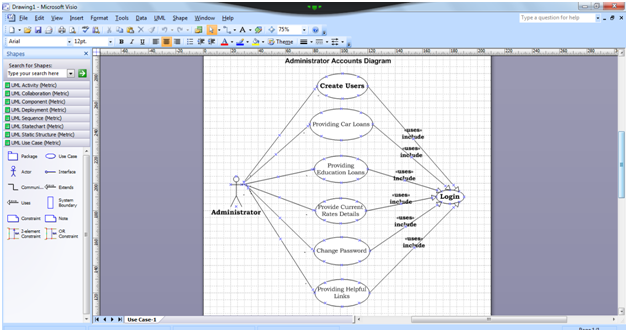
Administrator Accounts Diagram

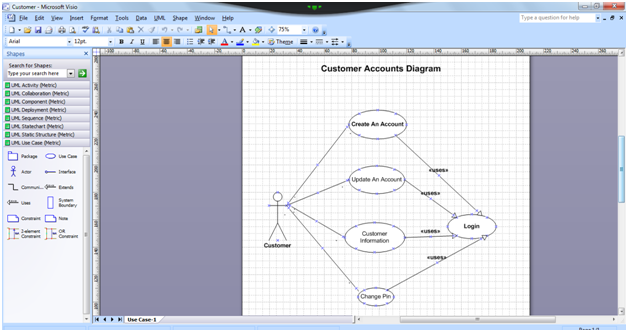
Customer Accounts Diagram

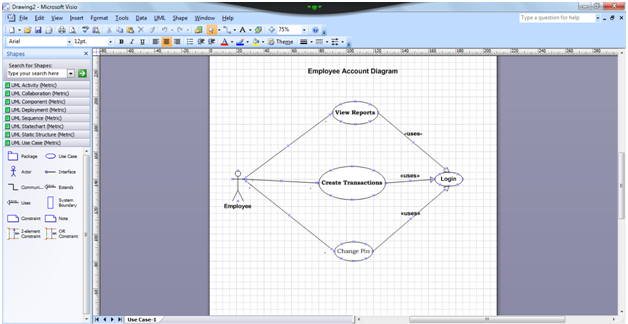
Employee Accounts Diagram

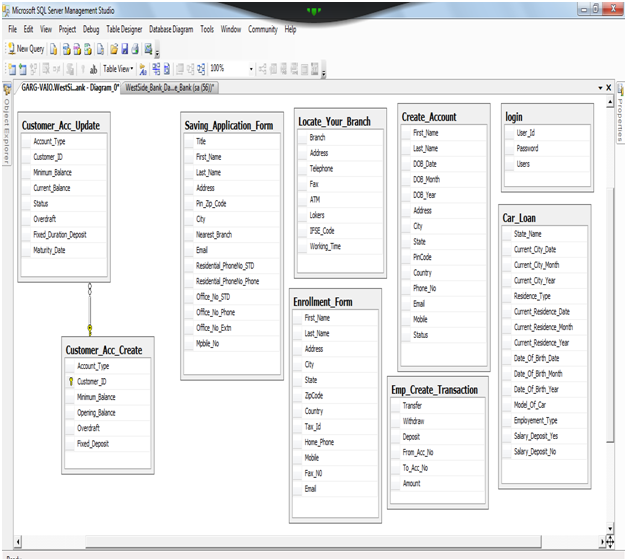
ER Diagram:

Database Coding:

Database Name Westbank

Car_Loan Tables Details:

  • State_Name
  • Current_City_Date
  • Current_City_Month
  • Current_City_Year
  • Residence_Type
  • Current_Residence_Date
  • Current_Residence_Month
  • Current_Residence_Year
  • Date_Of_Birth_Date
  • Date_Of_Birth_Month
  • Date_Of_Birth_Year
  • Model_Of_Car
  • Employement_Type
  • Salary_Deposit_Yes
  • Salary_Deposit_No

Table Create_Account Details:

  • First_Name
  • Last_Name
  • DOB_Date
  • DOB_Month
  • DOB_Year
  • Address
  • City
  • State
  • Pincode
  • Country
  • Phone_No
  • Email
  • Mobile
  • Status

Table Enrollment_Form Details:

  • First_Name
  • Last_Name
  • Address
  • City
  • State
  • ZipCode
  • Country
  • Tax_Id
  • Home_Phone
  • Mobile
  • Fax_N0
  • Email

Table Locate_Your_Branch Details:

  • Branch
  • Address
  • Telephone
  • Fax
  • ATM
  • Lockers
  • IFSE_Code
  • Working_Time

Table Saving_Application_Form Details:

  • Title
  • First_Name
  • Last_Name
  • Address
  • Pin_Zip_Code
  • City
  • Nearest_Branch
  • Email
  • Residential_PhoneNo_STD
  • Residential_PhoneNo_Phone
  • Office_No_STD
  • Office_No_Phone
  • Office_No_Extn
  • Mpbile_No

Table Customer_Acc_Create Details:

  • Account_Type
  • Customer_ID
  • Minimum_Balance
  • Opening_Balance
  • Overdraft
  • Fixed_Deposit

Table Customer_Acc_Update Details:

  • Account_Type
  • Customer_ID
  • Minimum_Balance
  • Current_Balance
  • Status
  • Overdraft
  • Fixed_Duration_Deposit
  • Maturity_Date

Table Emp_Create_Transaction Details:

  • Transfer
  • Withdraw
  • Deposit
  • From_Acc_No
  • To_Acc_No
  • Amount

Table login Details:

  • User_Id
  • Password
  • Users

APMC Management System Project Synopsis

APMC management system project is for farmers and traders to sell and buy the products and manage them.

  1. Admin
  • Admin should log in and he can manage formers and traders like deleting them.
  • He can able to buy the products from the formers.
  1. Former
  • Former should register first then he can log in to the system.
  • He can sell the products where he should upload the product name product image, quantity, price per quantity.
  1. Trader
  • The trader should register and then he can log in.
  • He can purchase all the products uploaded by the formers.
  • Payment method for the selected quantity.
  1. Feedback system formers and traders. Admin can see the feedbacks.
  2. Separate product uploads option for the farmers who don’t want to register and login.
  3. View all products option at the home page.

Need 5 entities and at least 5 tables in the database and triggers should be added.

Front end: VB .net / Java

Back end: MySql/oracle

Online Restaurant Management System Project Synopsis

This Online Restaurant Management System project is for managing the online bookings of customers for the food in a restaurant.

  1. Customer
  • The user should register first then he can log in to the restaurant. After successful login, he can order the food in that particular restaurant.
  • He should be able to see the menu items uploaded by the admin.
  • He should select the food required from the admin and quantity.
  • Then order option, after this he should enter the payment option,

Finally, order food option.

  • After booking he should be able to see the status of the booking like “your order will be received in 30 minutes”
  • Feedback system for the user
  1. Admin of the Restaurant
  • Admin should log in and he can upload the menu items like North, south and Chinese and in that he should upload the name of the food item, image, price.
  • And admin should be able to manage the food orders from the users.
  • Feedback system management.

Need 5 entities and at least 5 tables in the database and triggers should be added.

Front end : vb .net / Java

Back end : MySql/oracle

Online College Management System PHP Project

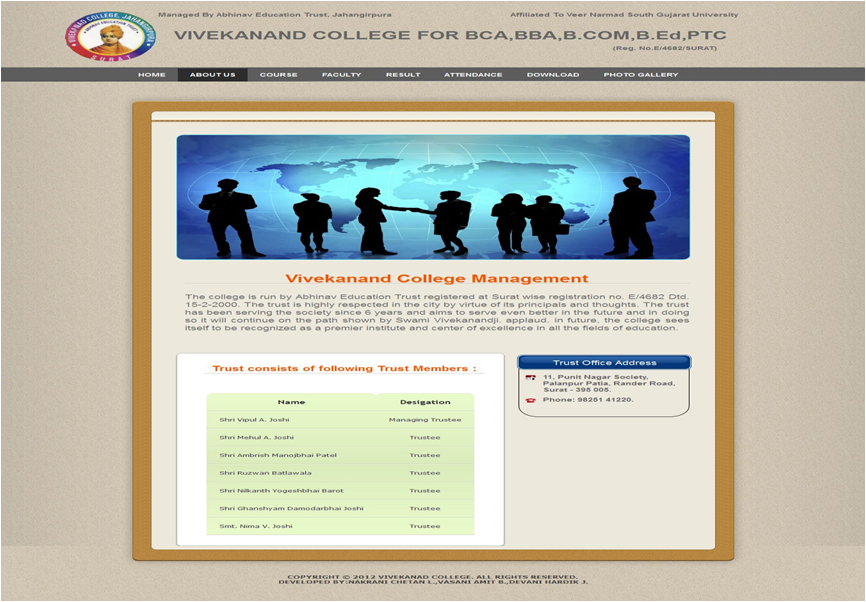
The “Online College Management System” is concerned with three categories of modules:

1) User( student, parent or any user)
2) Admin
3) Faculties

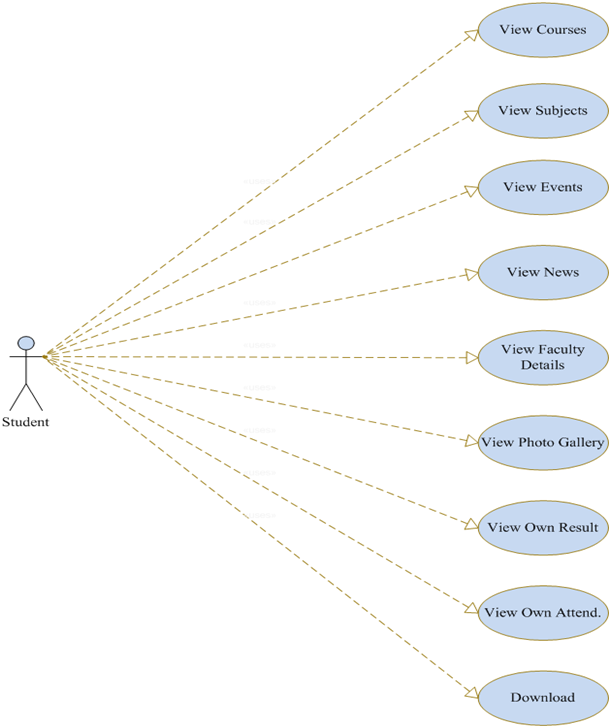
User (student, parent or any user):

The user can view own result & attendance.
The user can know about college info., management, goal & objective.
The user will display fresh news & event.
The user can download fresh exam time table, syllabus, assignment as well as view blacklist which created by admin based on its attendance.

The user provides facility to know the fresher message from the director.
The user can easily view courses details as well as subject details which are college given you.
The user can view faculty details as well result of own subject which takes on college.
The user can view fresh album which uploads by admin.

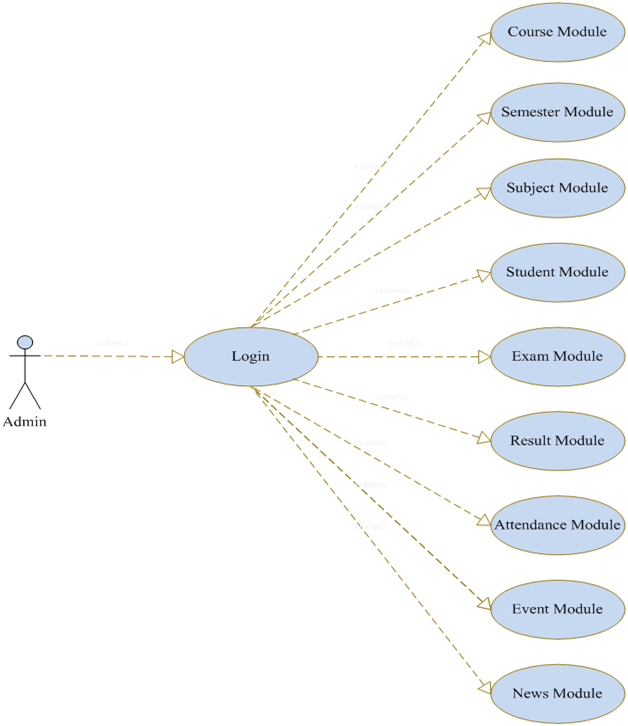
Admin:

Admin can perform add/update/delete and search following module :

  • course module
  • semester module
  • subject module
  • Student module
  • exam module
  • result module
  • the attendance module
  • faculty module
  • college info module
  • download module
  • event module
  • news module
  • login module & user type module

Admin can create an online blacklist using student attendance
Admin can upload student data as excel file as well as syllabus, blacklist, exam time table, student result & attendance, and fresh photo gallery.

Faculty:

Faculty also give a login to manage his/her profile.
Faculty can view own subject result so faculty can easily analyze own result so they will try to better result.
Faculty can view own subject attendance.
Faculty can upload own subject assignment.

Use case Diagrams:


Puducherry Tourism Statistical Report and Information System

Synopsis:

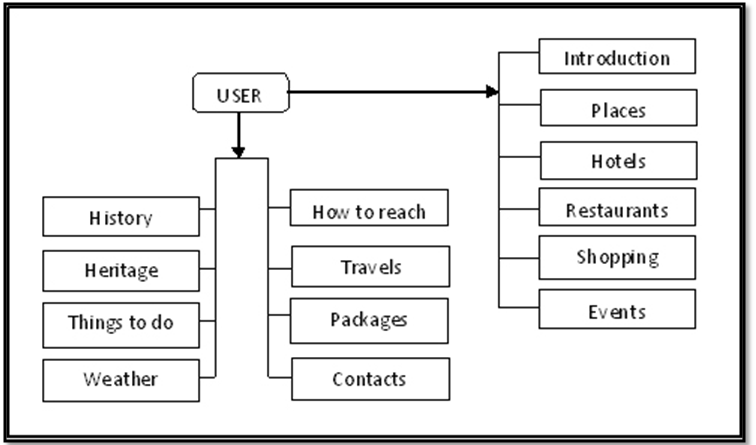
Puducherry statistical analysis and information center is a website designed for Puducherry tourism Department. In this web site people who all over the world can know the details about Puducherry. One can find its location, specialty and can find their place to stay in Puducherry. As an information center, peoples can get all the important details about Puducherry like the Hotels, Restaurants and its location. They can also find the available travel services and packages in Puducherry are. Help Desk allows one to know the important contacts in Puducherry.

This project contains various modules like User, Admin, and Hotel.  The whole project has been developed by using PHP, HTML, CSS, and MYSQL as a back-end tool.

The User module is a complete Web site for the peoples to see. Peoples can enter into the Web Site freely can collect information’s, know its location and can see photos of Puducherry. The whole website will be User-Friendly and attractive.

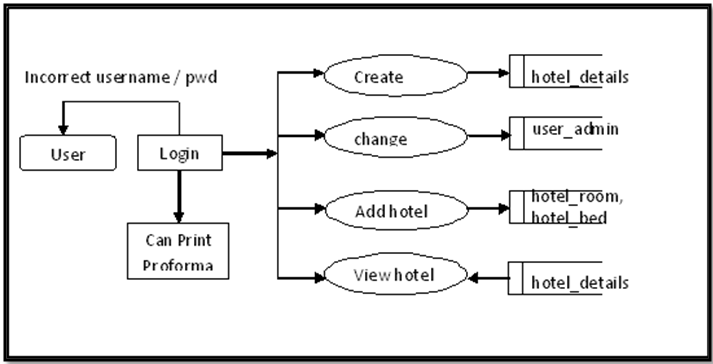
Admin module concerns with maintaining the tourist information of Puducherry. They have to collect this information from the hotels located in Puducherry and have to send the details to Indian Government. This manual work is now changed as a computerized work. The department can collect the information from the hotels through the website and can print the details in the given proforma.

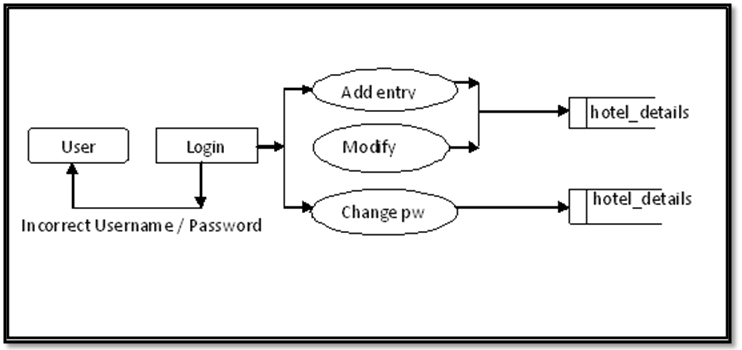
Hotel module concerns with updating hotel data’s to the admin database online. The person who is managing the details of the customers who is coming to a particular hotel has to update the database with a unique username and password. They can change the password to their sufficiency. The hotel management updates the database to the Tourism department through the website.

Both the Admin and Hotel module are designed with high security with username and password.

PROJECT GOALS

To develop a better website for Puducherry tourism department
To increase Security for information’s
To update the information using internet facility
To reduce manual work in a simple way.
To reduce the Paper works

PROBLEM DEFINITION

The organization is undergoing major work through human interventions.
Maintaining Tourist information
Maintaining Hotels in Puducherry
Sending Details to the Government
Maintaining the Proforma of every month

PROPOSED SYSTEM

The proposed system reduces the manual activities in the existing system.
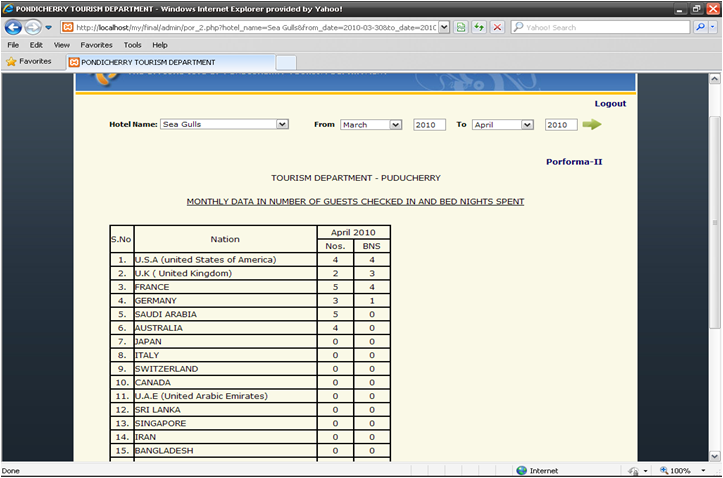
It helps in maintaining the information of tourist and hotels in Puducherry in a database which replaces the paper.
Writing the details in the paper is replaced by printing the information in the paper.
The proforma will be printed whenever necessary so no need to maintain it the information in the paper.

MERITS OF THE PROPOSED SYSTEM

Database files are maintained instead of papers, which contains all the necessary details about the hotels and tourist.
The proposed system provides faster access.
The system provides effective report generators.
The organization’s cost and time effectively reduced by the automated system.
MODULES

1) User

This module is a complete website which is designed for the Department of tourism.
People can collect information about Puducherry with this site.
As the concept of AJAX is implemented with this Web site people find it easier to load the pages.

USER MODULE DESIGN

2) Admin

This module concerns with maintaining the tourist information of Puducherry.
The information’s collected from the hotels can be saved in the database and can be used to print proforma.
They can add a new hotel and view the information of a particular hotel.
This module was designed with a secured login hence the user has to log in with the password.

ADMIN MODULE DESIGN

3) Hotel

Hotel module concerns with updating hotel data’s to the admin database in using internet facility.
The person who is managing the details of the customers coming to a particular hotel has to update the database.
The updating of the database was carried out with a unique username and password by using the Pondicherry Tourism Web site.

HOTEL MODULE DESIGN

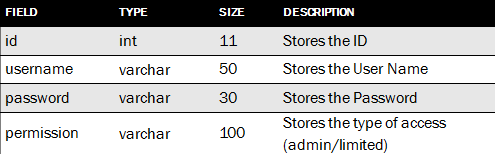
TABLE DESIGN (user_admin)

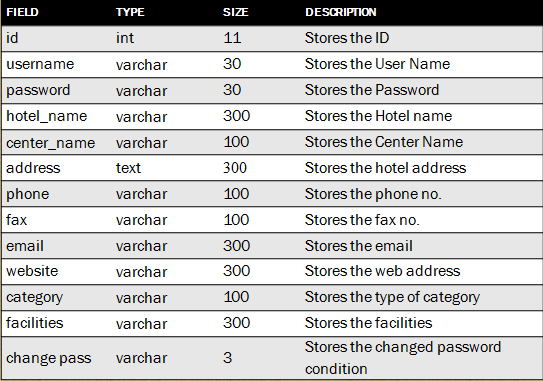
TABLE DESIGN (hotel details)

FUTURE ENHANCEMENTS

  • A search system can be incorporated to search for a particular place in Puducherry.
  • Facility of booking of tickets and rooms can be done through the internet.
  • May enhance the payment scheme for ticket booking through internet.
  • Calendar events of Puducherry can be added.

TOOLS:

  • HTML
  • CSS
  • API

SCRIPTING LANGUAGE:

  • PHP (for server-side scripting)
  • JAVASCRIPT (for client-side scripting)

BACK END:

  • MySQL

TECHNIQUES:

  • AJAX

Output Results:

Home Page


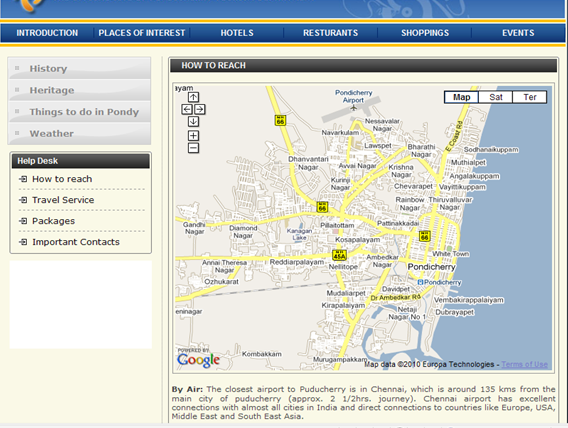
How to reach


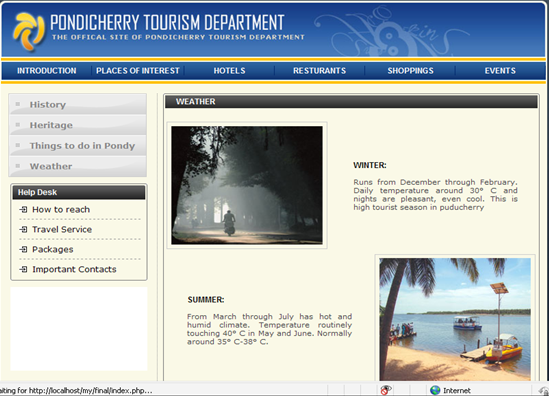
Weather


History
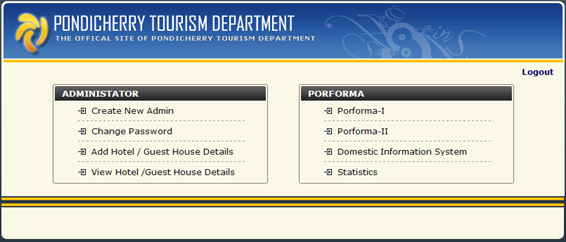
Admin


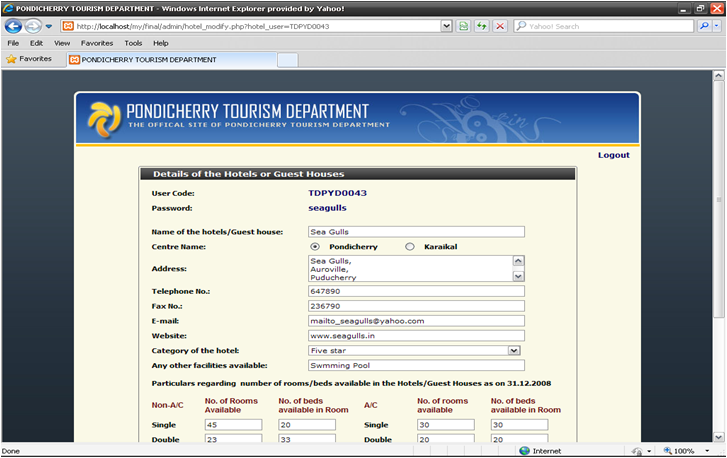
View Hotel


Printing Proforma

  1. Install XAMPP
  2. How to connect the DB
    • Go to the URL http://localhost.
    • U will be navigated to another screen
    • In that click on PHPMyAdmin on the left side panel
    • On the new screen in the create new database text box type” tourism_pdy” and click on create.
    • In the new screen comes up you can find the option to create a new table for the existing DB. There look for Import option in the upper navigation.
    • Now click on import and import the text file “tourism_pdy” which I gave with the project and click on go
    • Now it will show “Import has been successfully finished, 29 queries executed.”
    • Database part is completed
  3. How to run the project
    • Copy the source code and paste it here in the path “C:\xampp\htdocs”. Means that the project source code should be inside the htdocs folder of the XAMPP. (This is very important)
    • Now open the browser and give the URL like “http://localhost/project_folder_name/index.php”
    • If the source code is copied as such it should be http://localhost/pondi/index.php
    • Now you will be able to see the project

Rocker Bogie Suspension System Mechanical Project

Abstract

The aim of this Rocker Bogie Suspension System project is to develop a surveillance robot for defense which is capable of moving in all surfaces and is capable of driving in rock terrains and live video streamlining with help of a camera.

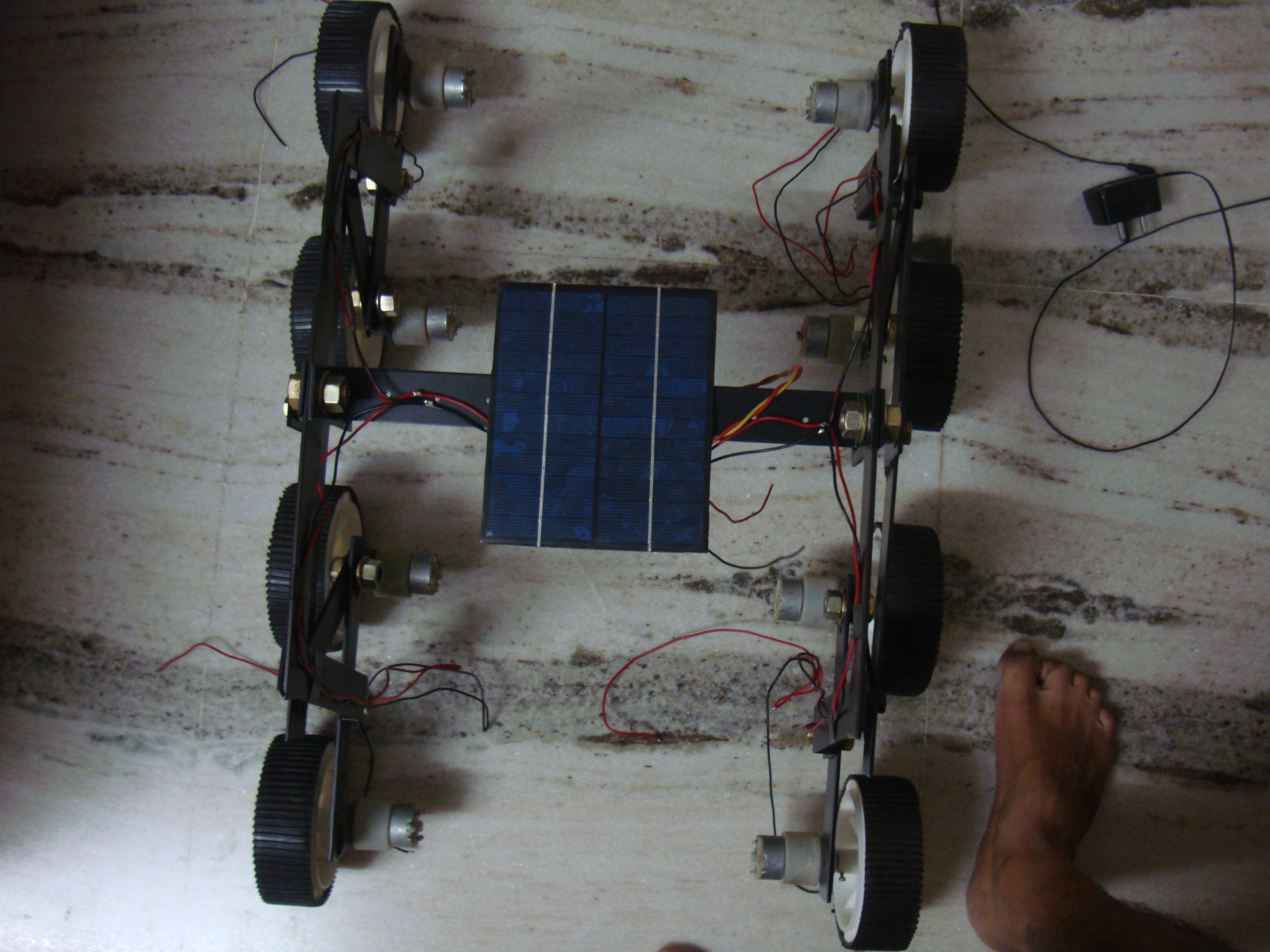
This robot has a special mechanical structure which is capable in driving rock terrains which is only possible with chain robot, but chain robot has some bugs and to overcome those bugs we designed a mechanical structure as following in figure

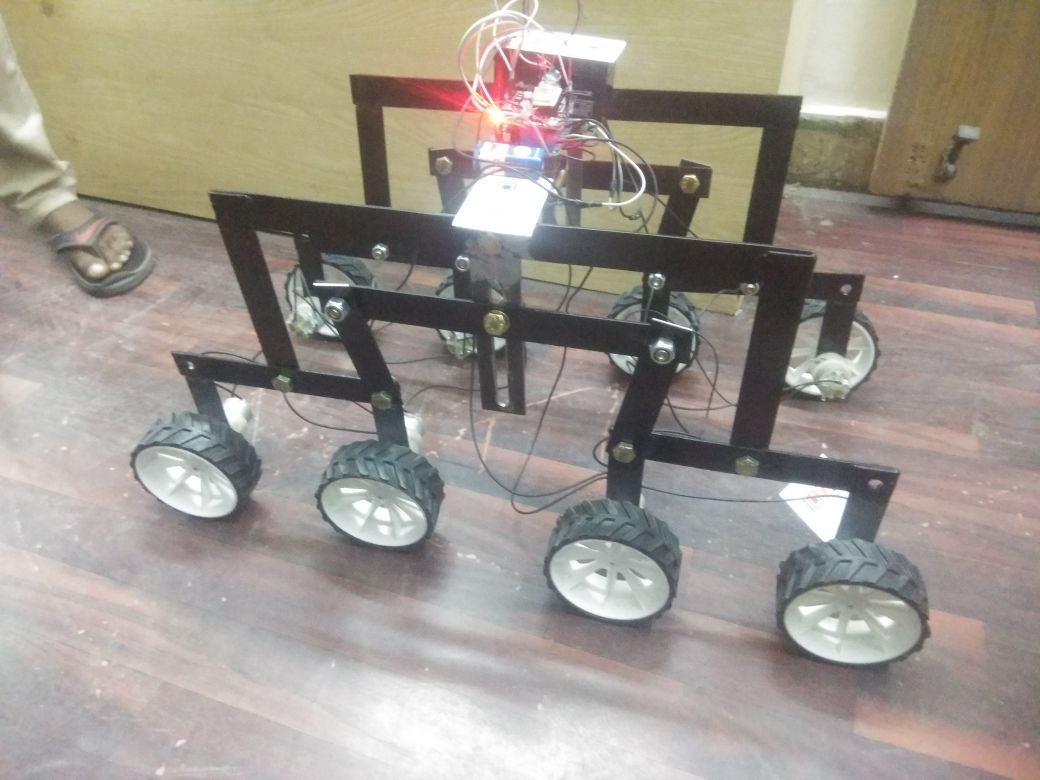
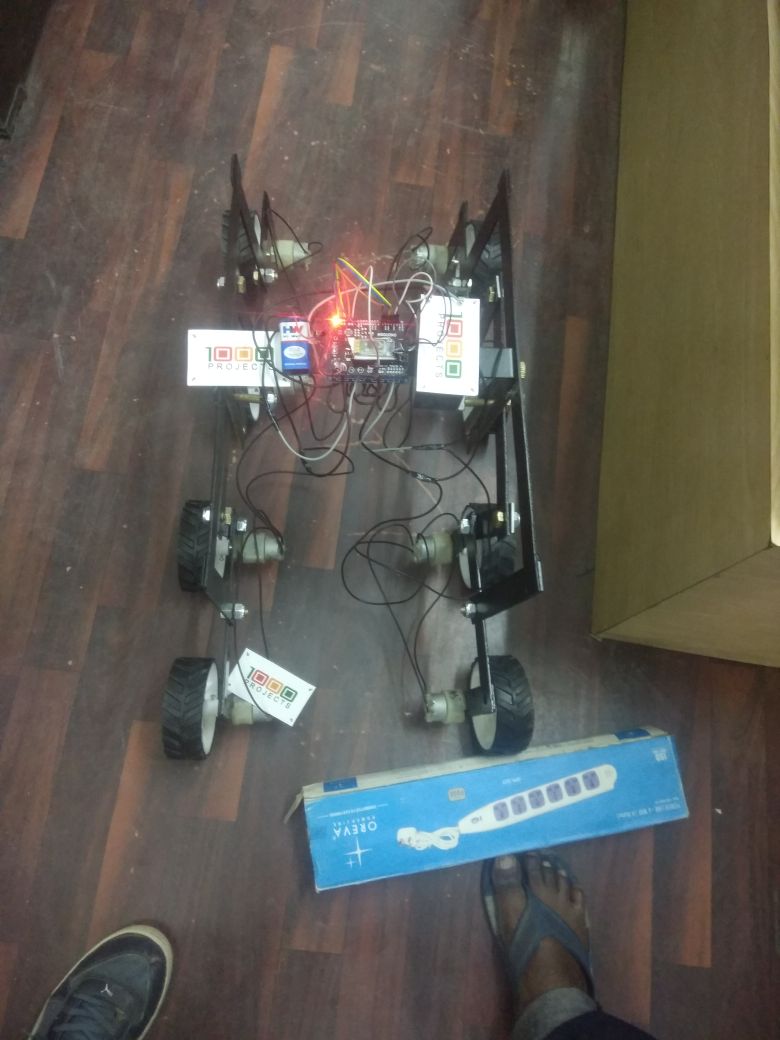
Coming to the mechanical structure of this robot it contains 8 wheels which are derived with DC motor and these motors are fixed to aluminum plates which are 220mm length, 30mm width, and 3mm thickness this has 12mm drill in the center for fixing C shape wing.

The shaft in the center is for balancing the mechanical structure for either side of robot There is push rod mechanism on either side of the robot which is helpful in limiting suspension height when driving terrain rocks which is also adjustable manually as per the requirements.

In this project we used some aluminum material as well as metal steel depending on the mechanical structure where it needs more strength and weight in particular area used metal steel material and remaining place aluminum is being used.

This is the Rocker-Bogie Suspension System with the dual bogies and this has the rocker in between to protect the vehicle from over collapsing

  • Existing model was in 6 Wheels
  • Proposed System is with 8 Wheels which can protect itself from over falling
  • This can be controlled via the android app with the help of Bluetooth Network.
  • This can be navigating multiple terrains in uneven surfaces can travel in mud areas
  • We have developed the entire robot in MS Sheet.
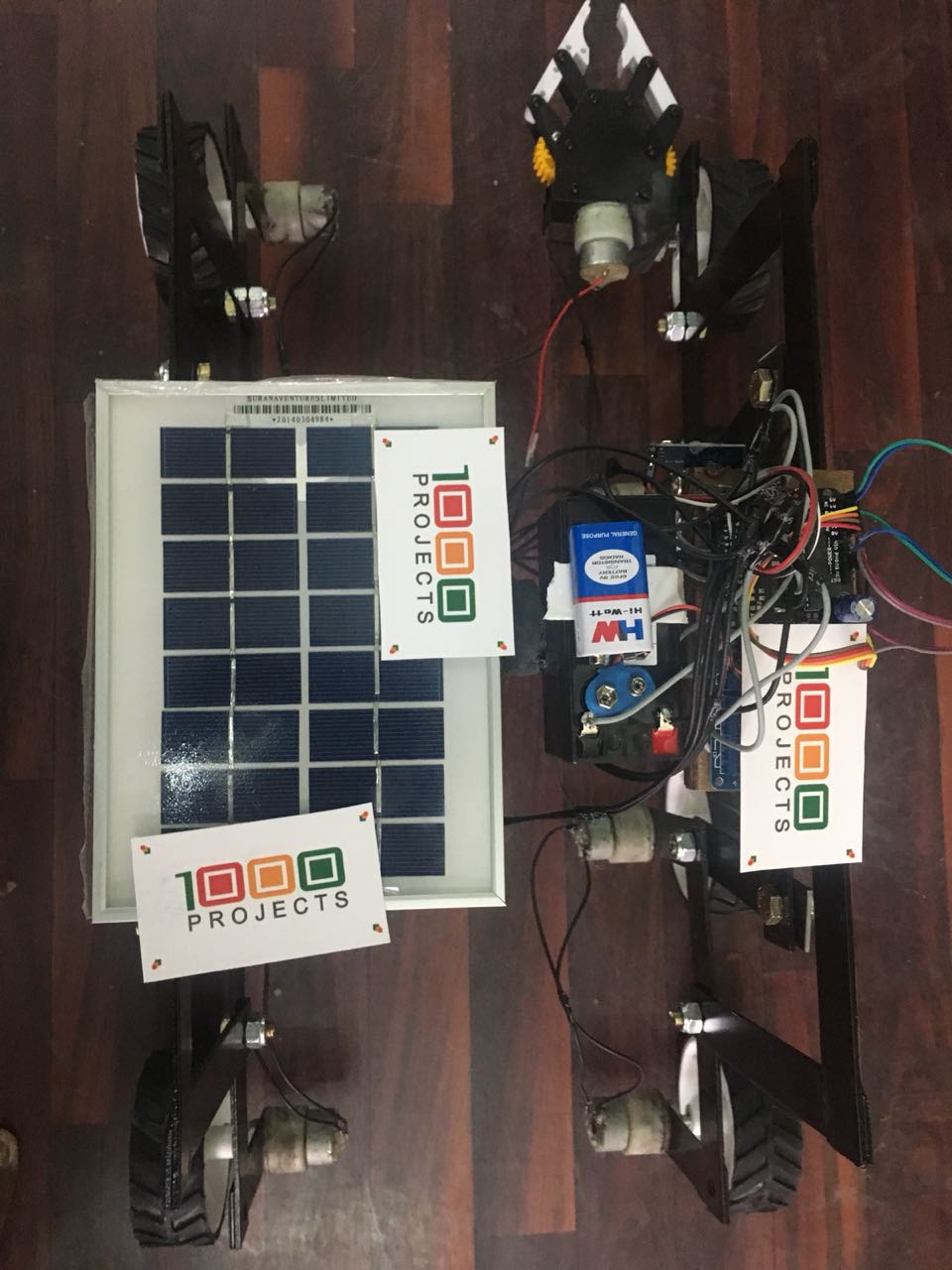
  • The below Project is solar based Rocker-Bogie Suspension System with Gripper attachment.
  • The previous one is for surveillance Purpose and this one for pick and place operations