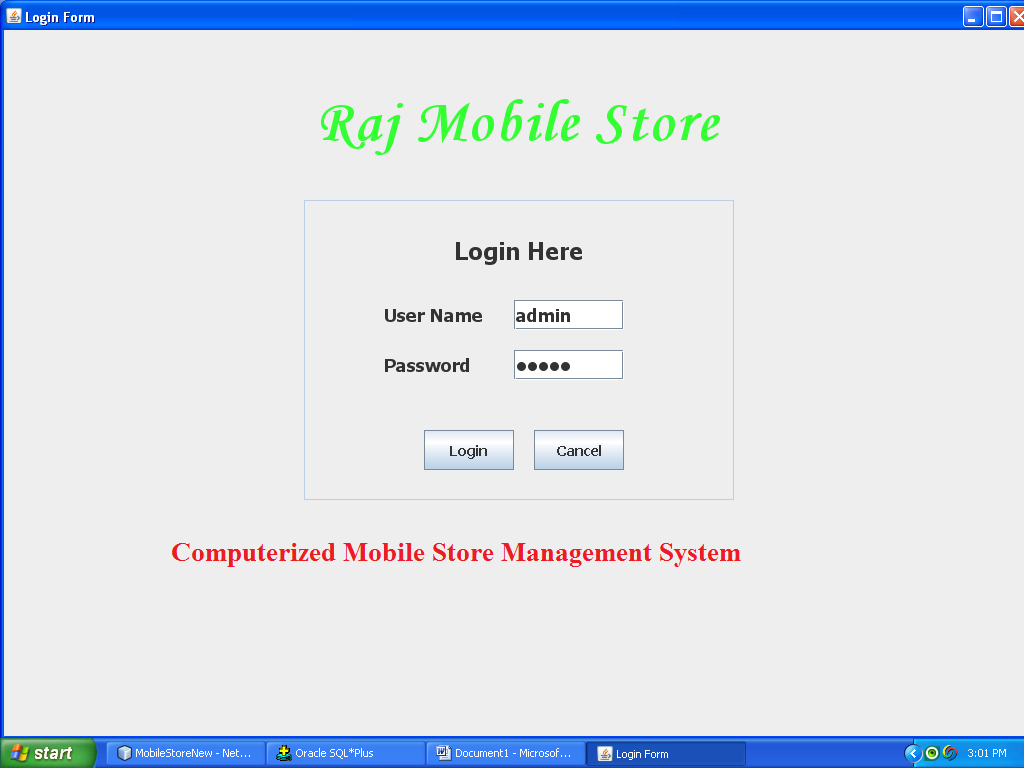
UML Diagrams of Java and Oracle Mobile Management System

UML Diagrams of Mobile Management System

The unified modeling language is a language for specification, constructing, visualizing and documenting the software and its components.

The UML is a graphical language with set of rules and syntaxes. The goal of UML is to keep the modeling simple.

ACTIVITY DIAGRAM

            Activity diagram is used to model an entire business process. The purpose of the E-R Diagram and activity diagram is below.
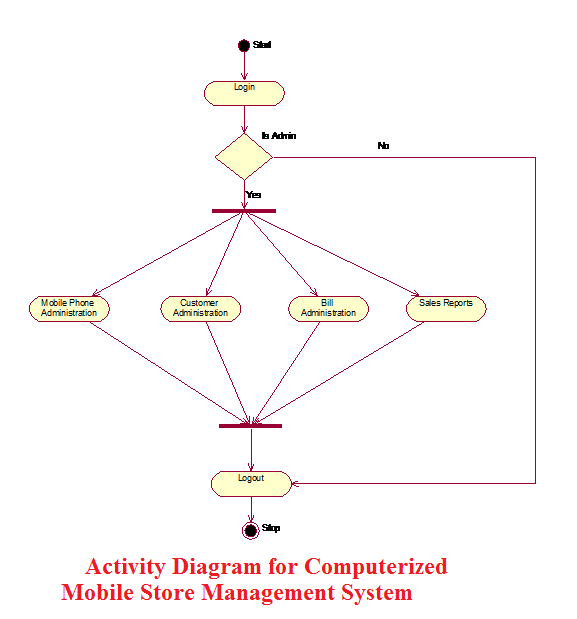

Activity Diagram for Computerized Mobile Store Management System
Activity Diagram for Computerized Mobile Store Management System                                                                                             

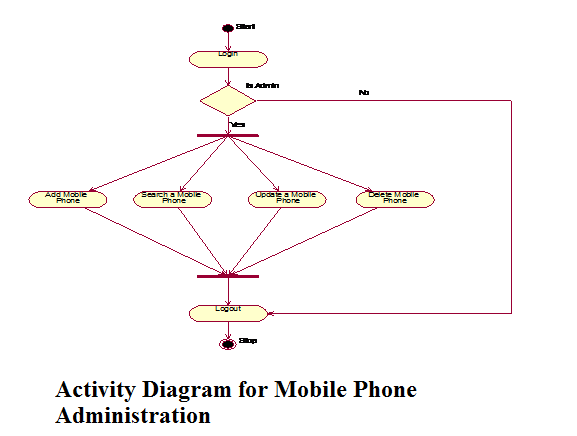
 Activity Diagram for Mobile Phone Administration
Activity Diagram for Mobile Phone Administration

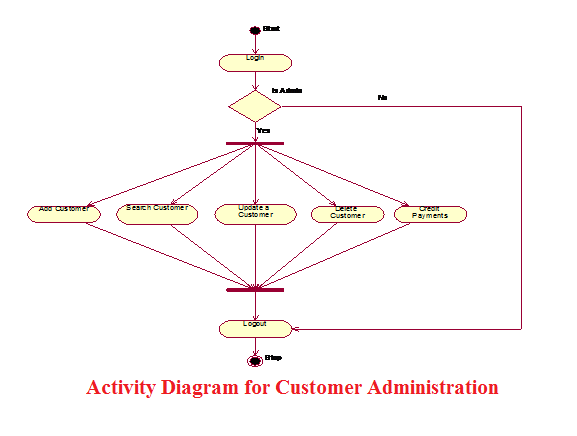
 Activity Diagram for Customer Administration
Activity Diagram for Customer Administration

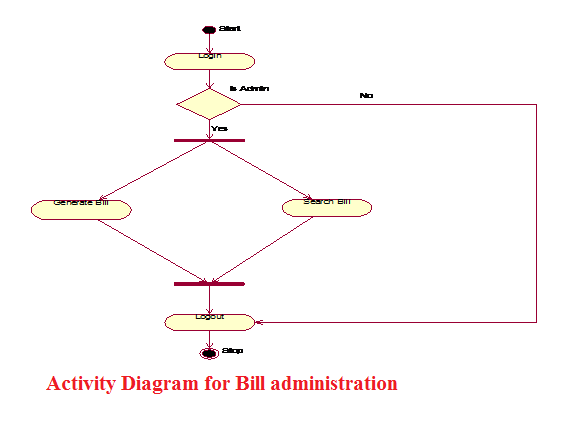
 Activity Diagram for Bill administration
Activity Diagram for Bill administration

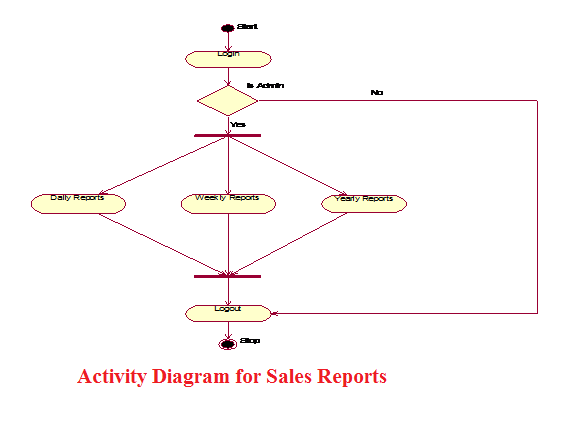
 Activity Diagram for Sales Reports

Activity Diagram for Sales Reports

USE CASE DIAGRAM
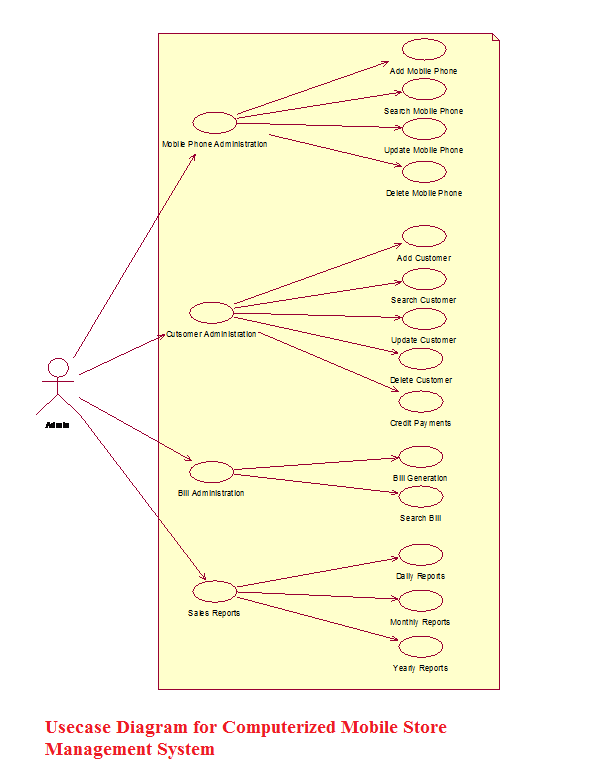
 

Usecase Diagram for Computerized Mobile Store Management System

 Usecase Diagram for Computerized Mobile Store Management System.

Use Case Descriptions

  • Mobile Phone Administration:

In the “Mobile Phone Administration” the Administrator adds, updates, searches, and deletes the Mobile Phones details on his system.

Add a new Mobile Phone:

Here the administrator adds the new Mobile Phones into his system. Here administrator enters the Mobile details like MobileId, MobileModel, Mobile Price, Mobile Phone Color, etc.

Search for a Mobile Phone:

Here the administrator searches a Mobile Phone details by entering the input like Mobileid, Mobile Phone, and Price.

Update a Mobile Phone Details:

Here the Administrator Updates the Mobile Phone details by modifying the Mobile Phone details.

Delete a Mobile Phone:

            Here the Administrator Deletes a Phone details by entering the details like MobileId or IMEI no.

  • Customer Administration:

In the “Customer Administration” the administrator adds, updates, searches, and deletes the customer details on his system.

                   Add a new Customer:

Here the administrator adds the new Customer details into his system. Here administrator enters the Customer Name, Customer Address, Mobile purchased, MobileId etc.

Search for a Customer:

            In the ‘Search for a Phone’ system the administrator searches a Customer details by entering the input like CustomerId, Customer Name.

Update a Customer Details:

            In the ‘Update a Customer Details’ system the administrator Updates the details by modifying the details like Customer Address, Customer credit details.

Delete a Customer:

            In the ‘Delete a Customer’ system the administrator Deletes a Customer Details by entering input like CustomerId. 

  • Bill Administration:

In the “Bill Administration” the administrator generates and searches the bills.

Generate a Bill:

Here the Administrator generates the bill for sold Mobiles. Here he enters the information like Customer Name, Customer Address, Mobile Purchased, MobileId.

Search for a Bill:

Here the Administrator searches the bills by entering the details like Billid. 

  • Sales Reports:

                        In the “Sales Reports” the administrator can generate the Sales Reports for daily, monthly and yearly.

                        Daily Reports:

                        Here the Administrator can generate the Daily Sales Reports by giving the  input information like Date on which the Sales Reports are needed.

                        Monthly Reports:

                        Here the Administrator can generate the Monthly Sales Reports by giving  the input information like Month and Year on which the Sales Reports are                             needed.

                        Yearly Reports:

                        Here the Administrator can generate the Yearly Sales Reports by giving the input information like Year on which the Sales Reports are needed. 

SEQUENCE DIAGRAM
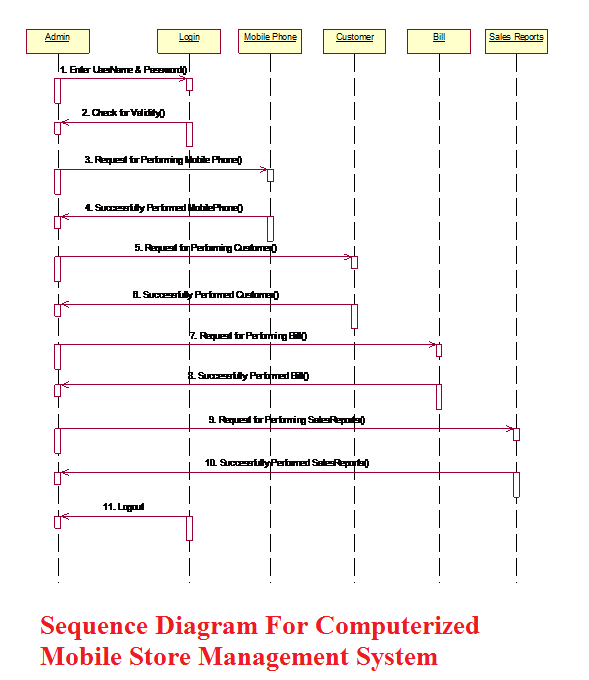
Sequence Diagram For Computerized Mobile Store Management System

Sequence Diagram For Computerized Mobile Store Management System 

CLASS DIAGRAMS
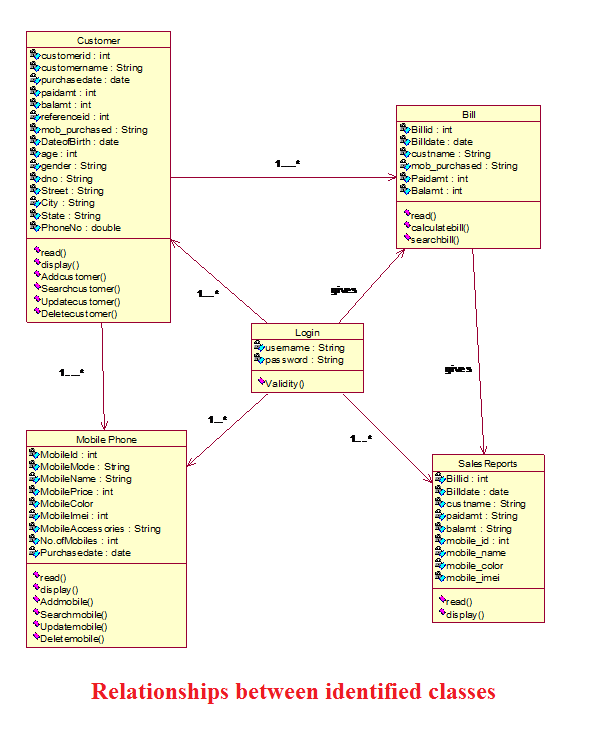
Relationships between identified classes

Relationships between identified classes.
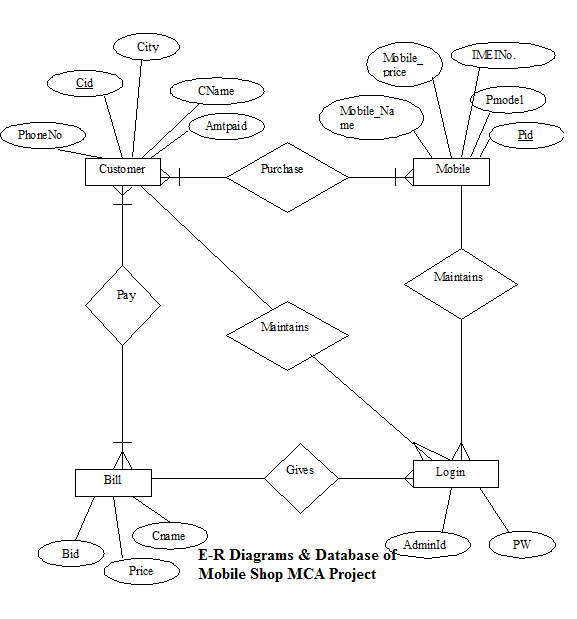
E-R Diagrams & Database of Mobile Shop MCA Project

Oracle Database Table Description for Mobile Store Java Project Report

Tables: Login

Description: Stores the information of User Id and password

  Field    Type    Size    Key Description
Username Varchar 30 Not null Admin Identification
Password Varchar 20   Password

Tables: newcustomer_details

Description: Stores the information of Customer.

  Field    Type    Size    Key Description
Cid  Int 4 Not null Customer Identification
Cname Varchar  20     Customer Name
Pdate Date     Purchase Date
Paidamt Int 7   Paid Amount
Balamt Int 7   Balance Amount
Refid Int 3   Reference Id
Date Of Birth Date     Date of Birth
Age Int 3   Age
Gender Varchar 7   Gender
Dno Varchar 10   Door No
Street Varchar 15   Street
City Varchar 20   City
State Varchar 20   State
Phno Bigint 15   Phone Number
Mob_Purchase Varchar 2000   Mobiles Purchased

Tables: newmobile_details

Description: Stores the information of Mobile Phones.

  Field    Type    Size    Key Description
Phone_Id  Varchar 20 Not null Mobile Phone Id
Mobile_model Varchar 15   Mobile Phone Model
Mobile_name Varchar 20   Mobile Phone Name
Pcolor Varchar 10   Mobile Phone color
Imeino Varchar 20   IMEI No.
Mdate Date     Manufacture Date
Accessories Varchar 55   Accessories

 Tables: newbill

Description: Stores the information of Mobile Related Bill Details.

  Field    Type    Size    Key Description
Bid Int 4 Not null Bill Id
Bill Date Date     Bill Date
Cname Varchar 20   Customer Name
Price Int 7   Total Price
Amtpaid Int 7   Amount Paid
Mob_purchased Varchar 2000   Mobiles Purchased
Mob_Name Varchar 20   Mobile Name
Mob_Price Int 8   Mobile Price
Mob_color Varchar 10   Mobile Color
Mob_imei Varchar 20   Mobile Imei

Entity Relationship diagrams of Mobile Shop MCA Project

E-R Diagrams & Database of Mobile Shop MCA Project

Related Academic Project: Shop Management System

  • In this application, a user (Admin), can log in as an Admin or Staff to perform different activities.
  • By using this application the admin user can maintain the Staff and Customer Bill records and also manipulate it.

Methods of Software Development:

  • Rapid application development for making the user interface screens.
  • Prototyping Model used for development

Operating System and Languages:

  • Shop Management System is designed in .net.
  • Admin Or staff can Manage Products and Bill. The application is connected with Database using JDBC architecture.

Scrabble Java Game Source Code Free Download

Scrabble game project is implemented in java platform. Scrabble game is one of the oldest games which have lot of popularity all over the world. Because of its fame this game was developed for different operating systems and mobile devices. In present trend users are playing games on mobile devices which are of different platforms. In mobile market android, iphone, bada os , symbian are few mobile operating systems which are mostly  used by users all over the world. Companies are providing free game apps for  users for increasing there market. 

Source Code Sudoku Game Android

Sudoku game is one the popular game played by most number of users all over the world. Because of it puzzle words it has created interested in users. Initially this game use to be available only for systems. But in present trend mobile market had rapidly increased in developing mobile games.

There are many mobiles operating system providers like android, windows, bada. In present trend android is the leading operating system for mobiles. This is because of free apps and games provided in app store for free download. 

B Tech Mini Project on Mobile Bill Management System

INTRODUCTION 

STATEMENT OF THE PROBLEM

The objective of the Computerized Mobile Store Management System Final Year Java Windows Application is to develop software for monitoring and controlling the transactions of mobile phones in a Mobile Store. The project “Computerized Mobile Store Management System” is developed in java, and it is window based application.

SCOPE OF THE PROJECT

The Computerized Mobile Store Management System B Tech Mini Project is developed for Suresh Mobile Shoppe, Nalgonda.

In scope:

  • Analyzing the system environment in Mobile Store.
  • Testing the system whether the new mobile details are stored in the database correctly or not.
  • Testing the system whether the searching a Mobile Phone and updating a Mobile is working correctly or not.
  • Testing the system whether the bills are generating properly or not.
  • Testing the system whether the credit customer details are stored properly or not.

Out Scope:

  •  The Administrator can navigate through the software without any training.
  • The Administrator can provide better services to the customer by providing better search results of mobile phones and appropriate bill services.

LIMITATIONS

It is a windows based web application.

ANALYSIS

System analysis is an important activity that takes place when we are building a new system or changing existing one. Analysis helps to understand the existing system and the requirements necessary for building the new system. If there is no existing system then analysis defines only the requirements.

One of the most important factors in system analysis is to understand the system and its problems. A good understanding of the system enables designer to identify and correct problems. Based on the drawbacks of the existing system the system is being planned. So the defining of the given problem has to be analyzed.

 Analysis Objectives:

1        Identification of customer needs

2        Create system definitions

3        Perform technical analysis

REQUIREMENTS SPECIFICATION

Software Requirement Analysis Phases:

 Problem Recognition:

            The problem is recognized by discussing with the employees in the organization and identifying the problems faced by the current system and how the future system should be and its specifications.

 Evaluation and Synthesis:

            After getting the clear problem definition we focused on what to do but not how to do. Ways to solve the problem and the different ways we found and we select the best way to solve the problem.

Modeling:

            We made a rough diagram of the proposed system and showed it to the clients to verify whether their specifications are completely mentioned in that or not.

EXISTING AND PROPOSED SYSTEM

Existing System: 

The Existing system is manual. The Mobile details and bill details will be maintain in the books.

The following are the drawbacks with the manual system.     

  • Delay in Searching a Mobile Phones in Mobile Store.
  • Unable to maintain huge Mobile Phone details in the books.
  • Unable to maintain the perfect Billing Details.
  • Less security for Mobile phone details. 

Proposed System:-

            Proposed system is a computerized Mobile Store. Through our software user can add Mobile Phone details, search for Mobile Phone, Update Mobile Phone details, and Generate credit and normal bills.

Mobile Store Management System Java MCA Project

The “Computerized Mobile Store Management System” MCA Final Year Project has been developed effectively in such a way that it meets all the criteria that are expected by the user and in further, if any further enhancements are required by the user, it can done with minimal coding.

We gathered all the requirements by studying the existing system we have analyzed the system in terms of the tasks it is performing and the types of users using the system and problems that to be overcome in the proposed system.
All the requirements that are gathered in the Analysis phase are given a basic structure by following the Design principles in the Design phase and data from the analysis stage is converted in to design in the form interface.
In the next stage, the coding is done following coding standards and the testing of the system has been performed by different testing strategies and techniques.

Computerized Mobile Store Management System

Features of this Java Mobile Store System

  • Login Form Mobile Store Management System
  • Menu form for Mobile phone
  • Add Mobile Phones form
  • Search Mobile Phone form 
  • Update Mobile Phone form
  • Delete Mobile Phone Details
  • Delete Mobile Phone Details
  • Menu form for Bill Administration 
  • Generate Bill form
  • Bill Print Preview form
  • Conformation message for requesting to select this customer is new one or existing one. 
  • Add Customer form
  • Search a Bill
  • Search Results of Bill
  • Menu form for Search Customer
  • Search Customer Form
  • Search Results Form
  • Menu form for Customer
  • Input Dialog Box requesting to enter Customer Id for customer Update
  • Update Customer Details form
  • Menu form for Delete Customer Details
  • Input Dialog box requesting to enter customer Id
  • Message Box Showing Customer is Deleted
  • Menu form for Credit Payments
  • Input Dialog Box requesting to enter Customer Id
  • Input Dialog Box requesting to enter Amount
  • Message Showing Remaining Balance
  • Daily Reports Menu form
  • Input Dialog Box Requesting to enter Date
  • Daily Reports form
  • Menu form for Monthly Reports
  • Monthly Reports Form
  • Monthly Reports Form showing Monthly Reports
  • Menu form for Yearly Reports
  • Yearly Reports Form
  • Yearly Reports form showing Yearly Reports
  • Menu form for Exit & Log Off Buttons
For Source Code Refer to Related Projects:

Store management system project in Java

Online Insurance Management System Project Report in Java

Introduction to Online Insurance Management System Project Report:

This project deals with Insurance in online. This tool taking care of the policy in online using tracking the details of the customer and the company.

if the user enter into the website it will show  the details about insurance and other schemes of  the policy through this online registration form

It helps the customer to view their own insurance status system analysis focuses on the application is require to do. The system allows to see the logical elements from the physical components it uses (computer, terminals and storage system)

The existing system is the manual system. The manual system is prone to error. It is time consuming it is very difficult to produce the report for any person and there is chance for changing the scheme report by doing malpractice. Usage of paper in the payment process leads to less efficiency, less accuracy and less productivity.

Proposed system is to eliminate the drawbacks of the existing system. It is designed in order to provide a permanent solution of the problem.

Online insurance services in the middle ages policy agents and policy holders have used the paper to take money from the insurance transaction but know the technology is fully developed everything is being converted to computerized. Now a day’s everyone is using the internet in this fast race the business and money making people are also using. No country, no company and no individual want to fall back in this fast generation everyone wants to the lead the group.

The hardware requirement of this project is PROCESSOR PENTIUM 4, RAM 128MB HARD DISK 40GB, memory 32MB.

The minimum software requirement is WEBSERVER apache tomcat server 6.0.20 and browser is internet explorer, server side scripting is jsp, java bean, data base is ms-access and clint side scripting is html and language is j2ee.

Download Online Insurance Management System Project Report in Java .

Training and Placement Cell Project in Java

Introduction to Training and Placement Cell Project in Java:

This project is used to develop an online application for training and placement department in the college. This project uses an application for the TPO of the college to provide the student information. Each and every student’s information should be present in the record for logging the form of CV. For training and placement of the students the TPO’s have to collect the CV;s and manage them. and also  check the CV for further corrections.

Document convention font style time’s new roman, and font size main headings 16, sub headings 14, content 12 and line spacing 1.5.

Scope of the project we can store the information of the students various companies can access the information of the students and the student can update his CV up to date. And the company will call the student or he will send the mail to the student mail ID for any placements.

This project is mainly intended to help the people who belong to t&p cell by saving time.

This activity is under goes into 2 steps the first one is we have to maintain the list of students record and the second one to maintain the company record based on the company requirement we need to select the students and make a list of it.

Existing system filling form by students in this project  a form is given to the student in which he/she has to fill his complete details such as name, roll no, branch, percentages etc.

Marks of students should collect from each and every department.

Proposed system in this project the user have to provide the information to the system the company name, date and venue at which the campus drive takes place. The system will generate this information and will place in college notice board for the student’s placement.

Hard ware requirement processor intelp2, ram 512mb and hard disk 40 GB.

Download Training and Placement Cell Project in Java .

Net Auction Project Java

Net Auction Project is being designed for the user so that he can easily take part in the auction conducted online. The auction takes place in a normal way the people interested in buying the things placed in auction are supposed to bid for that particular good, the person who bids highest on the item. The person placing the highest bid gets the right to own the item at the end of the bid. Bid is the exact amount of money offered on a item in auction in the bid by the seller. The buyer with the highest bid is the one who finalizes the purchase of the item with the seller of the item. Generally winning an auction means placing the winning bid on a selected item in the auction and then winning that item .Winner is generally the person offering the highest bidding amount is called the winner of the auction the proposed system has been divided into four main modules as follows.

a.)     Buyer Module:

In this module bidding can be carried out automatically. By the feature provided by the system called as automatic bidding feature. This feature provides user with an Enter Automatic Bidding Amount. It is optional facility been provided. Automatic bidding amount is the one of the highest amount which user wants to pay for the item user is bidding for, all you need to do id just enter the highest bidding amount in the “Enter Automatic Bid Amount” text box and click on “Bid Now” button.

b.)    Seller Module.

A bid can also take place normally, without using automatic bidding option. Automatic bidding bids for you when you are offline the system send you email notification every time it bids for you using automatic bid. The seller is the one who decides the starting bid amount or from what amount he/she want to starts the bid and also tell about the number of items available for bid. A auction is said to be multiple auction if more than one number of item is available for auction. The number of items available for auction can be verified from the “Quantity” box of the item for bidding. This type of auction is called Multiple Quantity Auction (MQA).

c.)     Admin Module:

Admin module is the one which has hold over the Seller Module and the Buyer Module. It also contains the reports regarding the expiry of auction held every day.

d.)    Reports Module:

This module helps the user to generate or get review of the various reports such as the buyer and seller report and the number of transaction held. 

SOFTWARE AND HARDWARE REQUIREMENTS:

            The operating system required is Windows. The technology used for developing this system is Core and Advanced java. At the back end we will be using oracle for database. IDE and server used will eclipse and Tomcat. Software’s required are J2SDK 1.5, Tomcat 5.5, oracle 9i. The Hardware requirements are Pentium 5 and RAM 256MB.  

Download Net Auction Project Java.

Terminal controller Java Project Abstract

This project Terminal Controller java project aims at developing windows based functionalities for a network connected terminal system. This system is server based as the system will be performing the application level function and tasks on the terminal from the remote machine. The system will perform all the admin based tasks and functionalities. As mentioned the proposed system will perform administrative based function on the windows terminal this function includes searching for a particular file, searching for the permissions of a particular file. The system helps the administrator to handle the administrative tasks from a remote system connected through the network. This will help the administrator to avoid time consumption by performing the tasks from his own machine and by not performing the tasks from the machine he wish to perform tasks on. This will also help in securing the machines in the network from unreliable attacks.

The number of modules to be designed in the project will be.

a.)    Remote Handling:

This module involves handling the terminal from the remote machine in the network.

b.)    Remote File Searching:

This module helps in searching a file in any machine in the network by using the terminal controller.

c.)    Privileges:

This module involves or tells us about what privileges should be provided by the administrator.

d.)   Remote system Configuration:

This module of the proposed system tells us about how the configuration of the 

e.)    Remote Process Management:

This module of the proposed system tells us about how the processes which take place on the terminals in the network can be handled and how to control them.         

SOFTWARE AND HARDWARE REQUIREMENTS.

The language used to develop the proposed system is JAVA. The technologies used for proposed system are RMI and Swing basically. The operating system used will be Windows XP or Vista. The above stated are the software requirements. Lets have look at the hardware requirements. The processor required will be PENTIUM 4. Minimum 256 GB RAM will be required. Minimum 20 GB Hard disk will be required. The VDU required will be SVGA Color Monitor. Key Board required will be of 104 standards. LAN should be enabled. 

Download Terminal controller Java Project Abstract.