
Quantum Key Distribution Protocols Java and SQL Project

Introduction 

The main aim of this Quantum Key Distribution Protocols chapter is to evaluate the results obtained once the code that was explained in the previous chapter and to estimate the performance of the application results with respect to the aims and objectives identified across this Java and SQL Project. The entire process of encryption and decryption and the actual quantum key generated across the execution of this application with respect to the quantum cryptography are evaluated and their performance against the secure communication is explained in detail across this chapter. The corresponding screens achieved once the code is executed and the performance of database is also explained with respect to the quantum key cryptography aspects. 

Configuring the database 

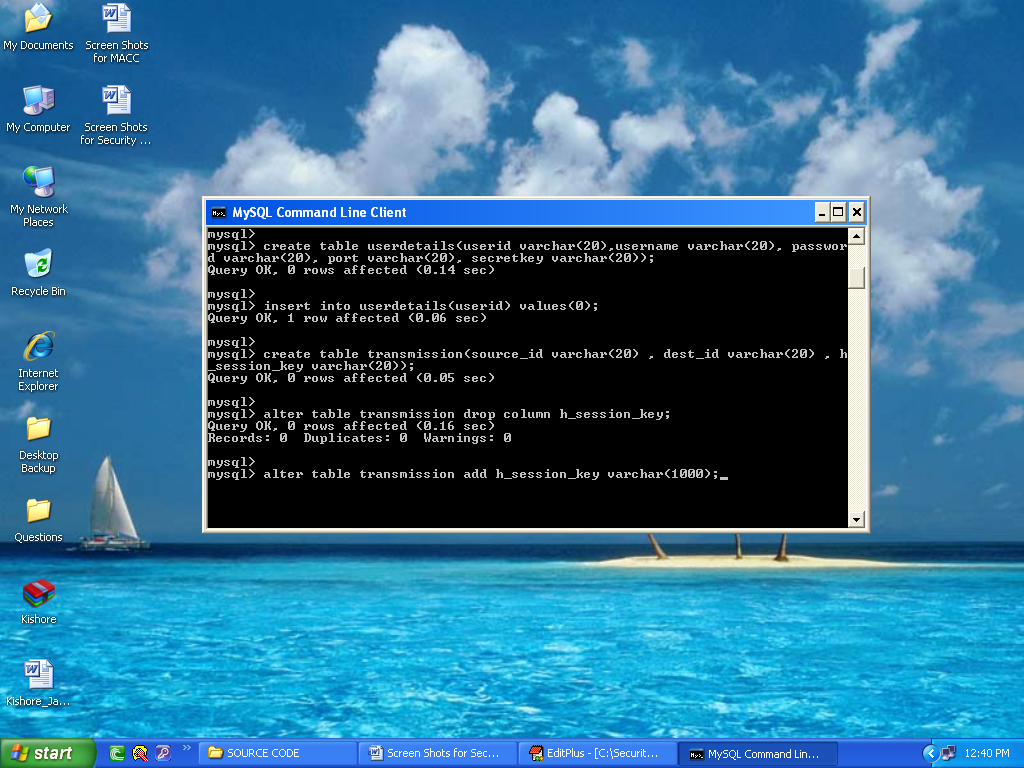
The initial step to test the results achieved across the application, is to configure the database and in this application as explained in the previous chapters, My SQL is used as the database and the corresponding configuration steps and the resultant screens are explained as below. Once the SQL command is opened successfully and the database is loaded, the next step is to load the required data to the database and then it is done by just simply copying all the required data to be communicated to the database folder Quantum1.sql and after that the below screen is displayed to the users 
Configuring the database

From the above screen it is clear that all the required tables are copied to the My SQL database and those tables are displayed to the users as shown in the above screenshot. Few tables like User details and Transmission are displayed to the users and also the corresponding columns holds the details of the users like user  id, password, port number and the session key values respectively as shown in the above screen.

Trusted center 

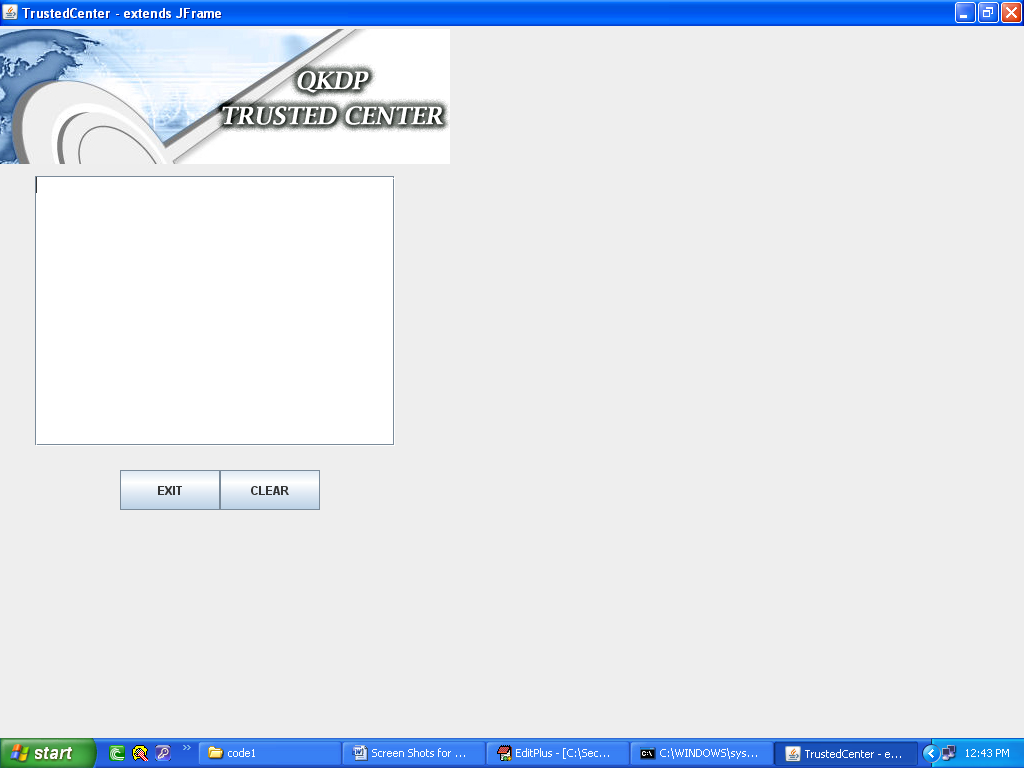
Trusted center, is the programming module, where the sender and receiver across the communication process trust a third party and share their public and private keys and exchange the required information and the corresponding screen related to the trusted center is shown in the below screenshot.
Trusted center

From the screen, it is clear that either the sender or receiver can exchange the private keys and the share the required information. The functionality of the trusted center is displayed on the text area as provided and the information can be cleared or exited by using the buttons as shown in the screen. The actual nature of information that is displayed across the trusted center is shown in the next screens as shown below. 

User login 

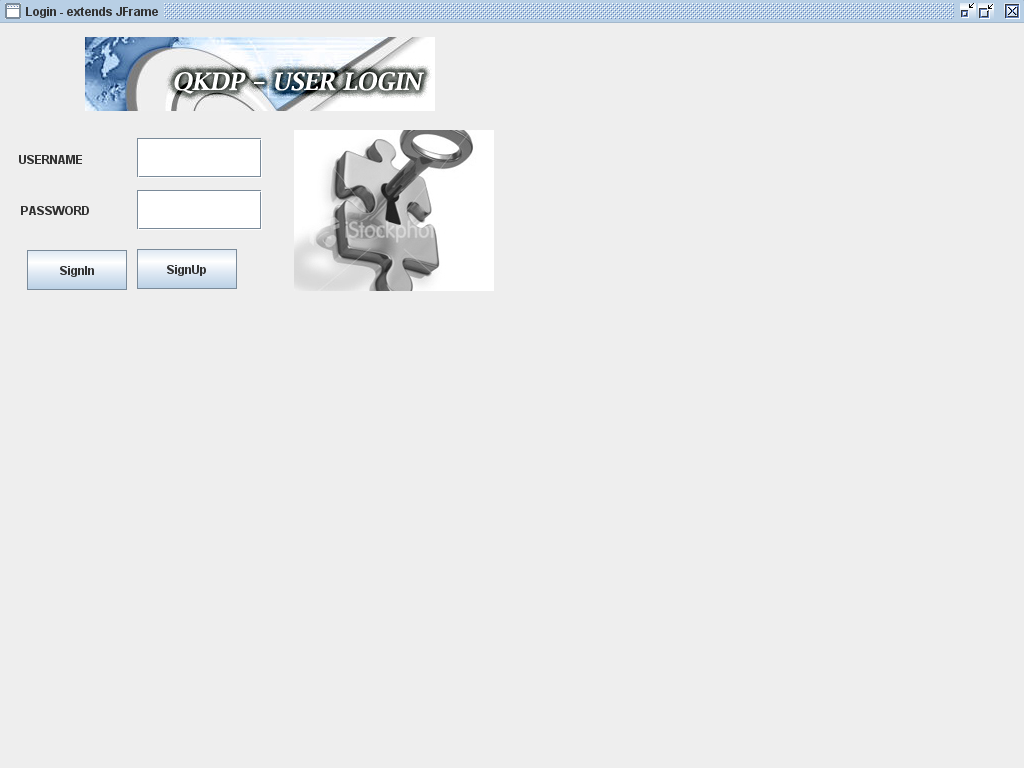
Any user who need to use this application, should login to the system by entering their id and password that were provided to them during the registration process. Any client or server user should initially register with the system to share the quantum keys and also exchange the corresponding confidential information. If the users are not registered, a separate process module is invoked to register the users and the corresponding resultant screens are as shown below
User login

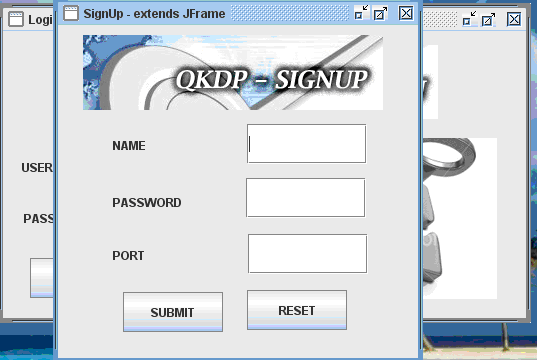
From the above screen it is clear that the users can either login to the application, if they are already registered and can also raise a request to register with the system. Two different text fields are provided to the users to login to the system with their user id and password and once they enter a valid set of data, they are redirected to the actual application and if they provide an invalid data, they are made to wait on the same screen. The actual process to be followed to register with the application is shown in the below screen
User login1

From the above screen it is clear that the users can enter their user name, the desired password and also they should enter the port number to process with the further communication process. Once these values are entered and the submit button is clicked, the corresponding values are saved across the database table that was shown in the previous screenshots.  Once the use enters the required values to the user name, password and the port number, a separate secret key is generated across the server and the key is shared with the user for the further communication process like sending the files. Below screen shows the actual procedure implemented to generate the secret key once the values are entered across the fields in the registration process.
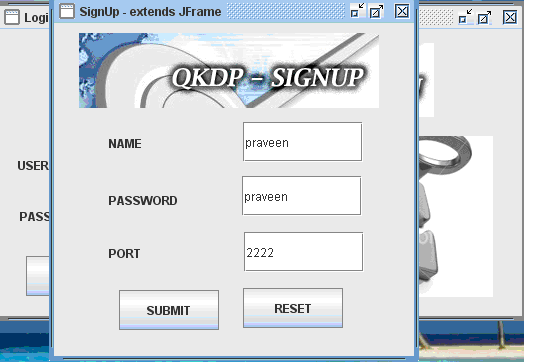
User login2

Secret key generation 

 Once these values are entered and the submit button is clicked, the corresponding values are saved across the database and the server window is launched where the actual process of secret key generation is displayed and the corresponding screenshot is as shown below.
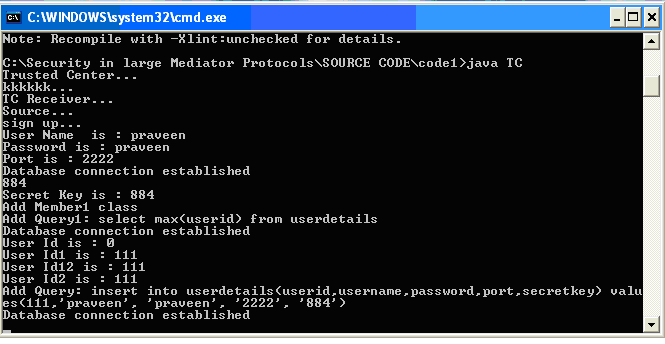
Secret key generation

From the above screen it is clear that once the user enter the values across the registration process, the server module is invoked and the sign up process is initiated. A random secret key is generated and displayed to the corresponding user and the same values are also stored across the UserDetails table as shown in the above screen with respect to the user id, password, port number and the random secret key generated as the row values as shown in the above screen. 

Choosing the destination 

Once the user has registered successfully and the secret key is generated, the corresponding user can login and use the application. The first step in this application is to send the file and choosing the destination to send the file and the corresponding screenshot is as shown below.
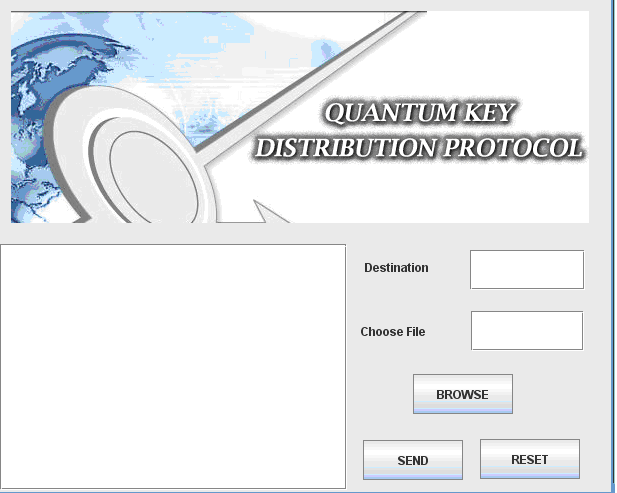
Choosing the destination

From the above screen it is clear that users can enter the destination address at the text field provided and also choose the required file by just clicking on the browse button and once done, by clicking on the send button, the file can be send across the network to the destination and the further process actually implemented is shown in the below screenshots.
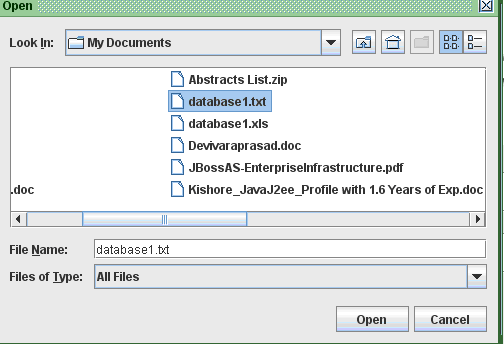
Choosing the destination1

Once the browse button is clicked, a browse window is opened and the users can select the desired file to be sent across the destination by just clicking on the open button and once done below screen is displayed.
Choosing the destination2

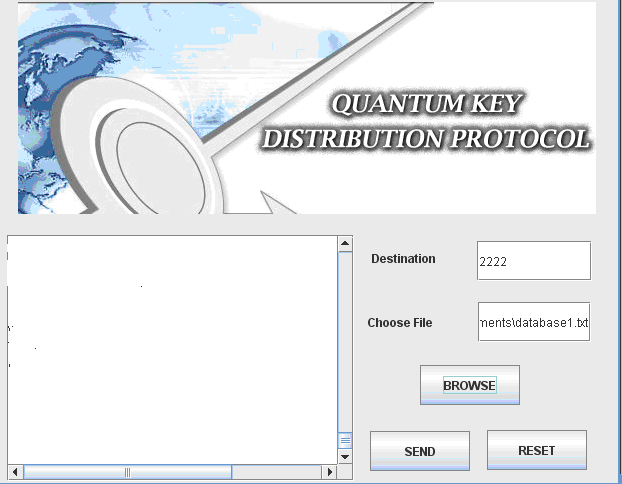
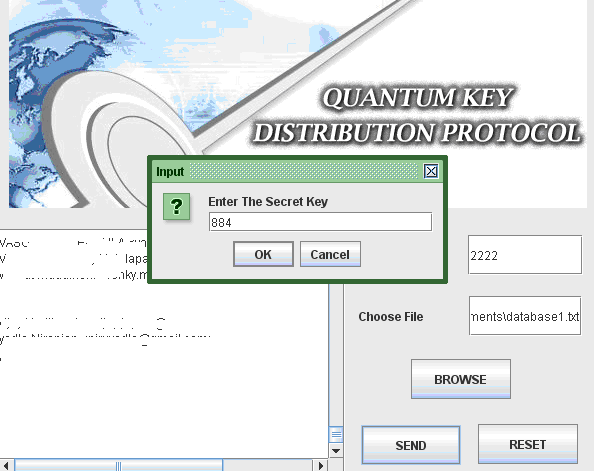
From the above screen it is clear that, the selected file path is displayed on the Choose file text field and also the contents of the file choosen are displayed on the text area provided as shown in the above screenshot. Once the required file is choosen, now the users can click on the send button to the destination and the destination is set to the port number of the user and also the users should enter the secret key that was generated across the registration process as shown in the below screenshot. 
Choosing the destination3

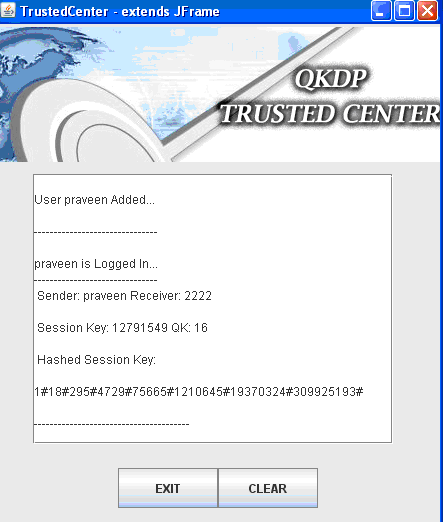
Now the users should enter the secret key as shown in the above screen and once the value is entered now the server verified the key and then if the value is correct, the trusted center is invoked to test the validity of the data sent and the destination details as shown in the below screenshot.
Choosing the destination4

From the above screen it is clear that the user details are verified and the corresponding receiver details are also fetched from the database based on the destination port number and in this project, the sender and receiver are set to same values to avoid the complexity in connecting the ports and also a separate Hashed session key is also generated and displayed across the text area of the trusted center window and the corresponding quantum key generated is also displayed to verify the validity of the quantum cryptography as shown in the above screen. These values are generated based on the random functions used as discussed in the previous chapter. 

Receiver side results 

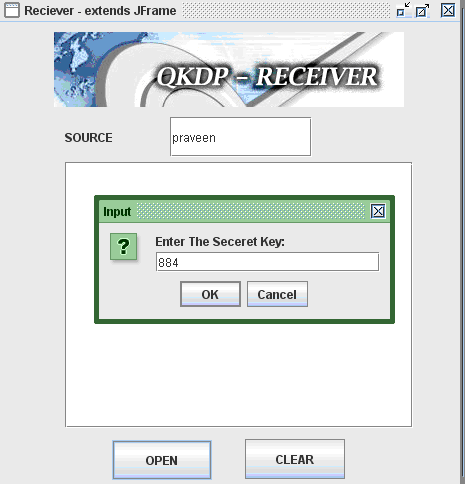
Once the sender has sent any file by using the destination port number and also once the validity is approved across the trusted center, now it’s the turn of receiver to check the data being sent and for this purpose receiver should enter the source name and the corresponding screen is as shown below. 
Receiver side results

From the above screen it is clear that the source name and the corresponding secret key of the sender should be enter to view the actual file sent by the sender once the secret key is entered, the connection to the sender and receiver is check as shown in the below screenshot.
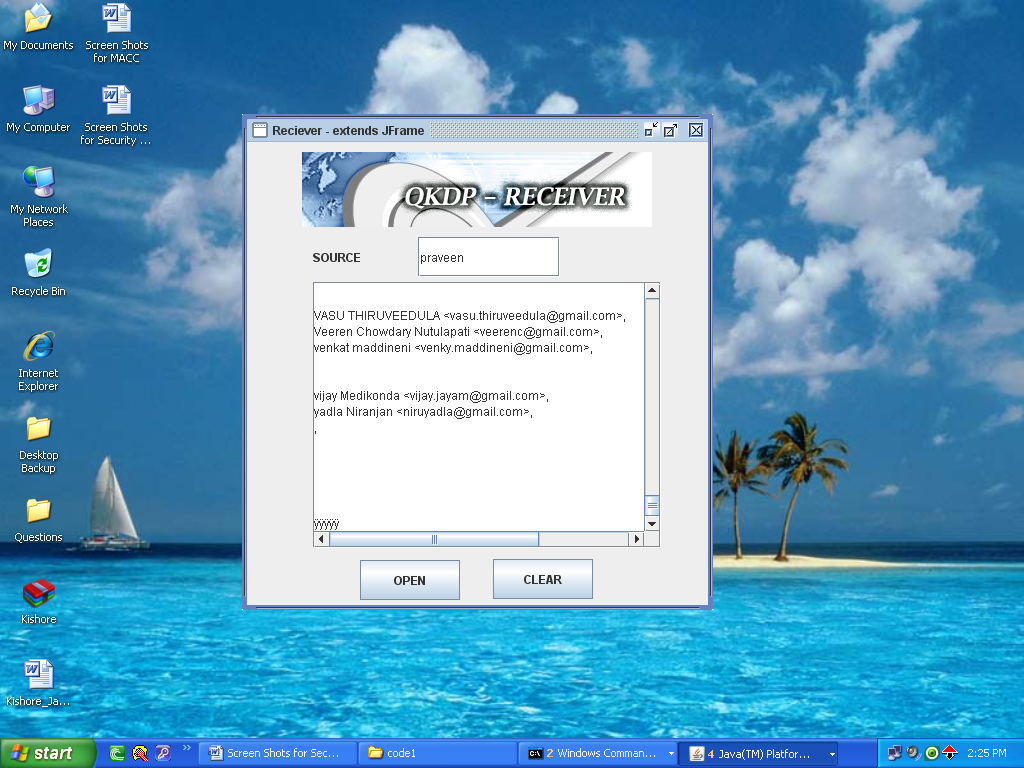
Receiver side results1

From the above screen it is clear that, now the receiver can receiver the actual data sent by the sender and in this process several steps like verifying the quantum key at the trusted center are also done and they are shown in the appendix section as the screenshots.

This Paper is written & submitted by Vamshidhar A.
Corporate Recruitment System

Corporate recruitment system is a web based tool that has come into existence to reduce the gap between job seeker and job provider. It makes the recruitment of required skilled employees easy and faster as especially in fast growing IT companies that grown on trend technologies the recruitment should be done fast. The existing recruitment procedure is time consuming so there is a need for efficient recruitment process such a process is our corporate recruitment system. The corporate recruitment system is designed using java web technologies like servlets, JSP, JDBC, JavaBeans, Java Scripts, HTML and windows XP server with a hard disk of Intel Pentium III , RAM of 128MB and a CD drive

This system is designed on a number of different modules

  1. Registration of job seekers and job providers: Both parties should register in the system .Separate forms are provided for both the job seekers and job providers.
  2. Advanced search option for  job providers: System provides a database to the job providers that contains all the data about suitable candidates
  3. Job provider’s module: Administrator maintains all site users.
  4. Listing jobs for job seekers: new jobs are updated by the job providers
  5. Sending mails to job seekers: When any of the job provider selects a job seekers profile that particular person will be intimated by the administrator.
  6. Conducts online tests: CRS also conducts online tests as designed by the organization that recruits the job seekers. Here the job provider provides a password to job seeker
  7. Generation of reports: CRS allows job providers to generate reports based on tests or on any of their requirements.

Through this corporate recruitment system process certain business requirements are also met they are

  1. Search capabilities
  2. User friendly
  3. Tracking management
  4. Value added service
  5. Security

In CRS structured analysis is also carried out that allows user to understand a newly designed system. It is a detailed step by step investigation of related procedures to see what must be done and to determine the best way.

Download Corporate Recruitment System  Report.

Network Security MSc Computer Networking Dissertation

Other important classes: 

Apart from the Java classes, following are some of the important classes used in this coding process 

Sender: This class holds the coding logic to activate the sender and handle the request to decide the sender. 

Signup: This class holds the coding logic to create a new user, if he or she is new to the system and a separate login id and password are created using this class 

Login: The basic code to check the validity of the login credential is done in this class and the corresponding steps in the case of successful or failure login is decided in this class. 

Important Database tables used: 

Different database tables are created in this Network Security project and they are as given below

  • QuantumKey, this table is used to save the actual quantum keys generated using the random functions. These keys can be used for the purpose of encryption and decryption as described in the previous sections
  • UserDetails, this table is used to save the users created during the signup process and the users are maintained along with their login credential and the corresponding rights and access permissions to the network.
  • Transmission, this table maintains the details like sender id, transmission id, routing configuration and all the IP addresses. 

All the important coding aspects are discussed in this chapter and there are still many other aspects like, detailed encryption and decryption procedure followed. The actual process followed to create the quantum keys is important in this project. Quantum key distribution is done using these keys and the actual keys are composed of binary information and the corresponding quantum keys are distributed among the users using the DES algorithm as explained in the above section. The process of quantum key distribution MSc Computer Networking Dissertation is done using the mediator protocol as discussed in the design section.

This Paper is written & submitted by Vamshidhar A.

Compressing Bitmap Images Project Report

Introduction to Compressing Bitmap Images Project:

This project is about compressing the bitmap file to a RLE file format. Compressing the files into smaller saves the storage space on the hard disk and also the transferring the images over the Internet  through emails etc becomes fast and easy .The RLE file obtained by compressing  bitmap file can be decompressed to get the original bitmap file. Here not only bitmap file formats but some other file formats can also be compressed by employing the some concepts of algorithms. 

The term bitmap was a throw backs from when monitor could display one other color besides black for two color data files that stores an image, each bit in data file represent one pixel a 1 meant pixel was on, a 0 meant pixel was off. 

A bitmap store the information a computer needs to recreate a picture. For example we can see a beautiful colorful scenery on the computer screen as  screensaver but the computer looks at it  as Zeros and ones it is what the  computer does with those zeros and ones that enables it to produce original images. The bits and bytes in the bitmap tell the computer what color a pixel of the image has to be painted. 

Usually BMP, GIF, JPEG, TIFF are the mostly known file formats. Among these BMP file format was the native bitmap file format for windows as it closely matches the format in which windows stores the bitmaps internally.

Files are fairly simple to compress but some file formats like GIF are difficult to compress. The default extension of windows DIB file is .BMP.

Being the oldest image formats the bitmap is called as the mother of all image formats as all the images in one or the other way are compressed forms of bitmaps only. It is wise to store uncompressed  large bitmaps to smaller forms and thus the other file formats like JPG, GIF are developed but the core of them is bitmap because while displaying these files must be decoded to bitmaps as it most closely resembles the way the images are displayed on the screen.

Download Computer Science Project Topic on Consumer Gift card Program.

Computer Science Project Topic on Consumer Gift card Program

Introduction to Consumer Gift card Program:

Consumer gift card program is a new initiative launched by a store to attract customers for the purchase of wide variety of goods that are sold at their store or through commercial online websites thereby maximizing their sales. Gift cards come in customable denominations i.e the customer can decide the denomination of gift card and they may be valid for 1year or more after which their validity can be extended for another term by paying a nominal renewal fee.

The system maintains all the details of gift card issued only the administrator can access this module to perform transactions like purchase, redemption, renewal and query of cards. Administrator even maintains the global parameters like minimum purchase amount, validity period, validity renewal period, renewal fee. He can also do following queries for MIS information the queries like cars sales, average duration between purchase and redemption of card, expired balance, aging of undue balance.

The development team should ensure that there is reusability of code between two modules. For a given functionality the same code should be invoked whether it is requested administrator either from online system or by merchandise application through web services

Gift card administration system

This maintains all the details of gift cards issued

  •  Only administrators will have access to administration module. Admin can perform all the transactions purchase, redemption, renewal of cards etc 
  • Administrator can maintain global parameters like
  • Minimum purchase amount
  • Validity period
  • Validity renewal
  • Renewal fee 

All transactions either originating from administrator or merchandising applications are logged for audit and verification.

Download Computer Science Project Topic on Consumer Gift card Program.

Constructing And Testing Of Polynomials Predicting Software Maintainability Abstract

Introduction to Constructing And Testing Of Polynomials Predicting Software Maintainability:

In non object oriented software system module modularization quality is calculated based on modules without using classes. Theoretical validation implies conformance to a set of agreed principles. Re-organization of millions of  lines of code residing in thousands of files in hundred of directories into modules , where each module is formed by grouping a set of entities such as files , data structures, functions and variables.

In this project we set design principles for code modularization and produce set of metrics that characterize software in relation to those principles. Some metrics are structural, architectural and notions. The structural metrics refer to inter module coupling based notions. The architectural metrics refer to horizontal layering of modules in large software systems.

This project makes use of three types of contributions cohesion, coupling and complexity of metrics to modularize the software. Modularization algorithm is based on the combination of coupling and cohesion metrics .Finally two types of experiments are made to validate the metrics using open source software system they are                                                                       

 1. Apply metrics to two different versions of the same software system

 2. Experimental validation consists of randomizing a well-modularized body of software and seeing how the value of the metrics changed. Our project thus provides metrics that seek to characterize a body of software according to the enunciated principles. 

Download Constructing And Testing Of Polynomials Predicting Software Maintainability Abstract.

Compressed Telephone Directory CTD C++ Project Abstract

Introduction to Compressed Telephone Directory CTD Project:

The telephone system is a database system in which all the details of telephone administration are provided to the user .The Compressed Telephone Directory (CTD) is a live project and provide flexibility and  a  good service. It’s designed using C++ as front end  and  RDBMS (relational database management system) as back end.

The compressed telephone directory contains two modules they are

1. Registration

2. Evaluation

Registration module: Administration module is a sub module of it. This contains complete information about the telephone exchange like customer details, std codes, telephone number etc. The user can easily enter the data into the fields of form like name, address, age etc.

Evaluation module: Evaluation module contains all the details of the users. Every telephone directory needs to do this process. The  evaluation  of users  used to be a complex and time consuming process  in the past days .But  now with the help of our project the entire time  consumed for evaluation  is remarkably  less .When the admin enters the telephone number of a user the CDC automatically checks for the details stored on that number in its database .These details are provided by the user itself at the time of registration .If the details are not found the system once again asks to enter the number correctly  or displays a message that the details are not found.

The main purpose of designing the project is to make the telephone administration easy, efficient, user friendly, scalable and to provide brief description about the telephone exchange to the users.

 Download Compressed Telephone Directory CTD C++ Project Abstract.

Container Terminal Management System CTMS Project Report

Introduction to Container Terminal Management System CTMS Project:

The aim of the project is to develop a Container Terminal Management System for a larger container port terminal having one of the biggest container handling facilities in the country. The terminal occupies a strategic partnership with major shipping lines to provide customers in the country and the regions with links to more than 100 ports around the world.

CTMS has two major modules they are

1. Containers module.

2. In-Yard operations module.

Containers module: The containers modules handles the following areas they are

Export Containers: The voyage call has been registered container port through system with reference by shipping agent. The shipping agent will assign the hauler to handle the container to port. The customs clearance will be handled forwarding agent appointed by shipping agent. After clearance the container enters into hauler and is then accepted by port terminal and is stacked in yard location. On arrival of vessel the container will be loaded in the vessel and necessary bill will be generated by the system.

Import Containers: The voyage call has been registered by the container terminal through the system with reference to shipping agent. On the arrival of vessel containers are discharged from vessel and stack is allocated in yard location.

Empty containers: Empty containers are same as import and export containers

Reefer container handling: Refrigerators are stored in the yard as it requires necessary cooling before loading the ship or delivery to the customer.

In-yard operation module: The following activities take place in this module they are

  1. Packing or unpacking
  2. In-yard movement
  3. Yard planning

Packing or unpacking: The forwarding agent may request the port terminal to pack their cargo into the container empty container which is stacked in the yard. The port terminal will pack all the cargo into specified container and convert this into export.

In-yard movement: All the containers inside the yard are handled by private carriers. The necessary data to move the container by the carrier are communicated through wireless system called RDT. The CTMS application will communicate with RDT system to receive and send data based the VMT/HMT requests.

Yard planning: The location for stack import or export containers is planned prior to container arrival. In turn the yard planning is controlled by CTMS.

 Download Container Terminal Management System CTMS Project Report.

Complaint Management System DFD Diagram

The Complaint Management system has following modules they are as follows

1. Login and session management.

2. Registration module.

3. Operation module.

4. User activity module.

5. Search module.

6. Report generation module.

7. Database administration module.

8. Feedback module.

9. Discussion forum module.

10. Help module. 

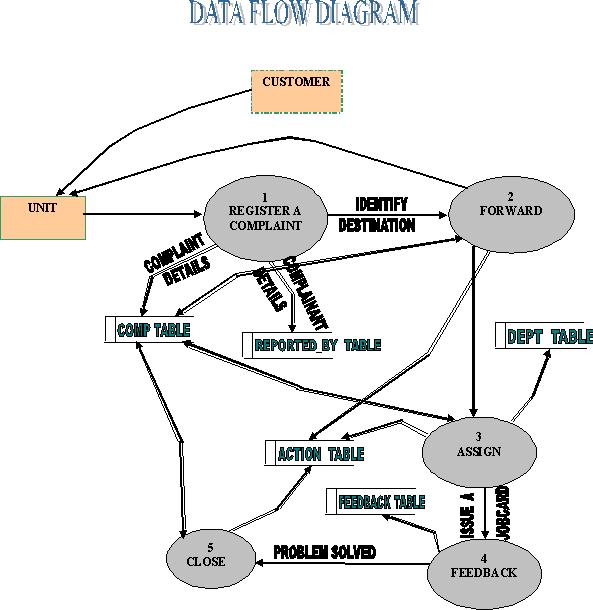
When a user Logon to CRMS website he can see a home page. The homepage collects information about name and details of user from him .User writes complaint about the difficulties faced by him. On entering the complaint a complaint ID is generated by which he can access the status of complaint made by him. User can also go through a list of pages to get the required information that he needed to register the complaint successfully.

dfd diagram for complaint management system:

customer management system dfd diagram

 Download Complaint Management System DFD Diagram and project report.

Complaint Management System Asp.Net Project Report

Introduction to Complaint Management System:

The Indian railways are the fourth largest rail network in the world and the largest civilian organization under a single management. It is crossing the vast geographical area of our country .It’s covering almost one lakh kilometers with a work force of 1.65 million across the country.

In most of the cases the railways are the cheapest means of transportation in the developing country like India approximately 12000 trains run all over the India daily. 

The complaint registration management is web enabled, centralized information and management application to build good relations among the railway department and   its customer community by providing faster mechanism to track the deficiencies and customer grievances .

The CRM is an implementation towards easy registration of complaints for railways. It is designed using ASP.NET as front end and MYSQL as backend.

Any user can access the CRM website by logging into it. The user can simply enter the station name or code and click on submit for logging on .It also invites topics for discussion through web forum irrespective of the language as it has a multi language support .So people from any part of India can participate in the discussion forums, they also have a freedom of making suggestions to the management .CRM is mainly designed for the railway customer satisfaction. 

 Download Complaint Management System Asp.Net Project Report.