Student Automated Registration Desk for Events & Activities Python Project

Abstract

The Python GUI project entitled “Automated Registration Desk for Events & Activities“ is made to suit the needs of the registration process. The purpose of this desktop application is to allow the registration of students in a particular course. It is intended to have complete specifications of what the registration process has.

The Events & Activities Python Java Final Year project is developed using Python and Tkinter library inbuilt into it. Python is now widely used for various projects because it is easy to understand and use. Being a database project, we used SQLite, which concentrates on the use of database objects. This application is loaded to the raspberry pi which acts as the CPU for our monitor. It handles registrations for various courses.

Purpose, scope, and limitations

This Student College Event registration project aims at enrolling the students in various courses in college or university. It contains the registration form for entering the student’s data for enrolling. This data is stored for later times.

The section wants to computerize the existing system to increase the speed of processing as well as for simplifying the activities, without losing accuracy.

The system is expected to computerize the activities of the college in enrollment. This desktop application is for registering for a particular course. It is planned to implement retrieval of data in the future.

Scope of Study

The Automated Registration Desk for Events project is aimed at implementing basic concepts of python-Tkinter, SQLite database, and using Raspberry pi.

This will help the college in generating its daily reports by providing the necessary information. The system is expected to computerize the activities of the college in enrollment.

PRESENT SYSTEM

The present system is manual. The flow of activities is as follows:

The registration details are written on paper and are kept in one file.

LIMITATIONS OF THE PRESENT SYSTEM

The present Events & Activities Python Project system is too slow, since entering details in files and registers and generating reports from them is to be done manually.

If we need to change any details, it is quite difficult to search for a specified student.

Human-induced errors are more like to occur in this system.

USER REQUIREMENTS

The section wants to computerize the existing system to increase the speed of processing as well as for simplifying the activities, without losing accuracy.

TECHNICAL FEASIBILITY

The Events & Activities Python Project software can be developed using the existing technology. Python and SQLite databases can be downloaded for free. Raspberry pi is available at a reasonable cost.

REGISTRATION PROCESS

We have built a GUI application where candidates register himself/herself through the self-registration desk.

Using this Events & Activities Python Project application provided basic entry columns for the candidate to enter their details.

The details are as follows:

  • Name
  • Gender
  • Roll no
  • Branch
  • Section
  • Phone number
  • Parents phone number
  • Email-Id
  • Inter marks
  • 10th GPA
  • EAMCET Rank
  • JEE-mains Rank
  • Intermediate college
  • Permanent address
  • Date and Time of form filling
  • Should agree to the Terms and Conditions

After this, we linked our Automated Registration Desk for Events project to the SQLite database to store the entered details of the candidate.

Related Projects on the Automated Registration Desk for Events & Activities:

Alumni Event Management Portal Android App

Event Portal Project

Event Organizing Committee Java Project

Events Manager & Planner Android Application
College Classroom Appliances Repair and Maintenance System App

Implementation

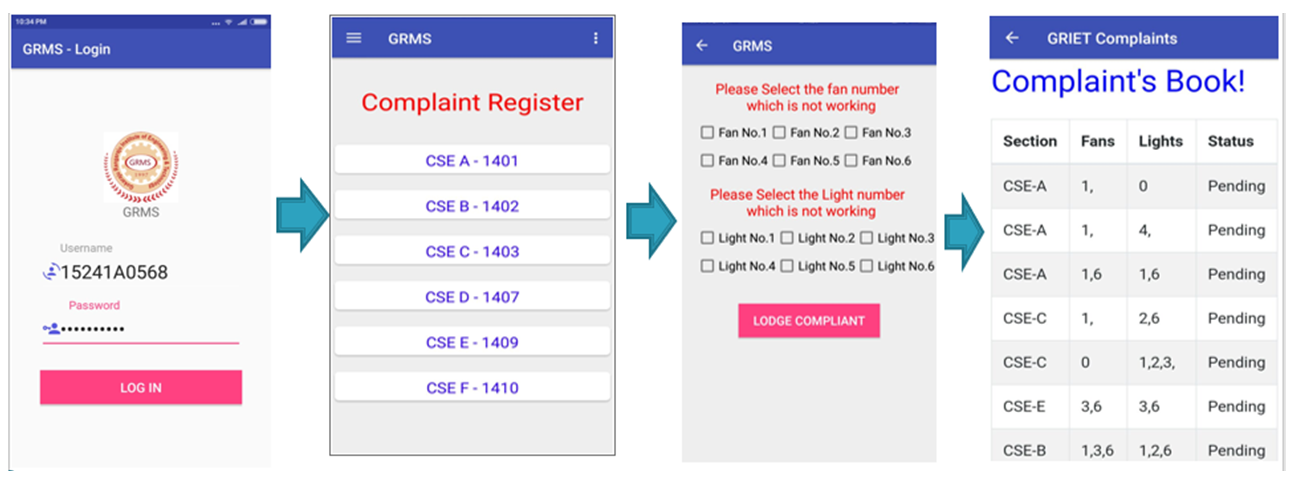
This College Electronic items Repair and Maintenance System App has been implemented to accept complaints against damaged fans and lights in the classroom and to show the status of the registered complaint.

The college classroom-specific android mobile app has two sides, the user end, and the admin end. The user end is for the class CRs which allows them to lodge complaints, view the status of the complaint, and see the complaint’s history. Whereas, on the admin end, the admin can view the lodged complaints and can update the status of the complaint.

User end Project development:

First, after opening the Repair and Maintenance System App, a login page appears. The user must log in to the app, with his/her respective login ID and password. If the details match with any of the CR’s details, then the app will be directed to the user side. After logging in, a page with all the room numbers is displayed.

When the respective room is selected, the user is directed to a page where he will be asked to select the fan number or the light number that needs repairs. On clicking the submit button, the complaint will be lodged successfully.

On the home page, there is a menu bar towards the extreme left, which has two options-complaints books and logout. The complaints book has information about all the complaints that have been lodged to date.

The status of the complaint whether it is repaired, or it is still pending, is shown for each complaint. By using the logout option, the user can log out of the app. This is the user side of the app.

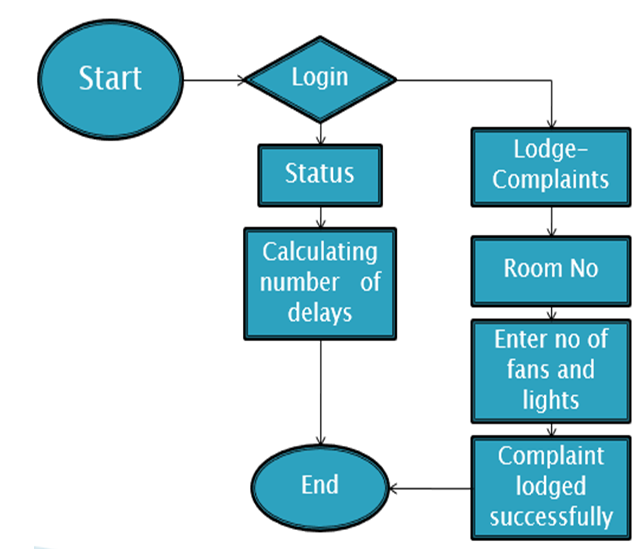
Dataflow of the App (User end):

DFD of College Classroom Fan & Lights Repair System App                                         

Working Flow of the App(User end):

Output Workflow results of College Classroom Fan & Lights Repair System App

Admin end project development:

When the given user ID and password match with the details of the admin, then the College items Repair System App will be directed to the admin side. After the admin logs in, he will be directly navigated to the complaints book. Here, he can view all the complaints, old as well as new ones, that have been registered. At the end of each entry, he has the option to update the status of that entry.

Conclusion:

The ultimate goal of this Final year android-based mini or major project is to eliminate the huge loss of man-hours and manual intervention. The goal is to provide an effective platform to lodge complaints and also to maintain a chain of responsibility and efficiently attend to complaints.

The entire academic project has been built according to the requirements stated and can be implemented without errors. The complaints can be stored and can be monitored. The is very useful as it would reduce stress and it is very easy to use. This process is less time-consuming and is highly reliable.

This Repair and Maintenance System App project was developed with HTML, CSS, XML, Java, JavaScript, and MySQL databases. It can be scaled to add even more sophisticated features and be made more flexible.

The application can be integrated by adding several other complaints regarding infrastructure etc. A communication system can be provided where the students can clarify their queries. This would enhance the standard of the application.

Farm Assist – An Android Application for Farmers Assistance Project

Introduction:

Farm Assist (The farmers assistant project) is an android mobile application that is used to get the details about the crop price, and crop insurance details as insisted by the government. We can also get tips for skillful cultivation and get better yields. The farmer’s assistant application also provides the dealers to interact with the farmers so that they can enter the crop price details and buy the farmer’s crop.

Problem:

The main problem of the Farm Assist – Farmers Assistance project is that we are considering the loss of farmers due to the price of the crop that is sold to the dealers, the nonprofitable methods of cultivation, and the details regarding the crop loan issued by the government.

Technology stack :

1. Android studio.
2. CSS
3. Java
4. HTML
5. MYSQL
6. JSON
7. JavaScript
8. BootStrap.

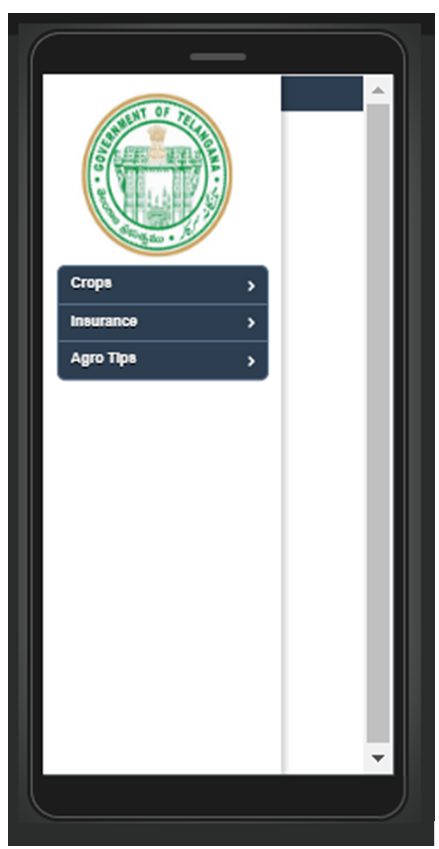
The farmer’s assistant project mobile app consists of a basic entry for any user means anyone is allowed into the app without any login but the dealers are given a special button to register as a dealer.

In the crop section, the dealer information is stored in the database and shown when the farmer is searching for the best dealer the dealer’s list is displayed for him. the dealer is allowed to update the prizes when the updates are to be done.

In the Insurance section, the insurance of every crop is given and is updated in the database periodically when it is needed. In the agro-tips, the farmers are given the best tips for good crops and crop diseases.

App Home Screen of Farmers Assistance App

AGENDA:

  • Problems faced by farmers.
  • What are the solutions that others had given in the past?
  • Application demo.
  • Crop details.
  • Insurance.
  • Agro tips.

Problems faced by farmers:

  • The main problem that we are concerned is about the sale of crops to the dealers.
  • General market rates which are provided by Government are not implemented at the root level.
  • So to overcome this problem we are developing this application for the benefit of farmers and future generations.

What are the solutions that others had given in the past:

  • In the past govt. has started some committees in India to overcome this problem.
  • But it is not implemented all over the state due to the lack of knowledge of farmers and few inconveniences.

APP Demo:

The facilities which we are providing in our Farm Assist – farmer’s assistant app project

Crop details:

The first farmer will enter into the crops and then he moves into the district then the prices of the crop in that district will be shown in the farmer’s assistant android mobile app.

Insurance:

In this, the periodical update of the amount that the government has provided to the crop will be updated.

Agro tips:

  • Different suggestions like fertilizers, crop rotation, etc. are provided to the farmers.
  • The agricultural officers give these details regarding fertilizers, crops to be grown, etc.

Related Projects on Farmers & Agriculture based below:

Real-Time Assistance to Farmers and Health Sector Android App

Farmer’s Medium of Communication for Support Price of Crops

Farmers Buddy Java Project

Automatic Humidity Monitoring and Pumping System for Farmers

Design & Development of E – Agriculture Java project

Patient Medicine and Appointment Tracking System Java Project

Introduction

Patient Medicine and Appointment Tracking System is a web application that provides an interface through which Admin, Patient, Doctor, and Receptionist can register to the portal. The Java, HTML application will be used as Medicine and appointment tracking system.

The proposed Patient Medicine booking system eliminates the paperwork at hospitals and provides an easy solution through which the users would be able to read and update the data on the portal.

Description

This Patient Medicine and Appointment Tracking System project is a web application in which the Admin, Doctor, Receptionist, and Patient can register where Receptionist will ask for the email id of the patient for registration and the patient will get an email having a key generated by the receptionist through which patient can authenticate and can register on the portal.

The patient will be able to log in, create and view a medical report which comprises of clinic name, disease, doctor name, receptionist name, appointment date, etc, which are going under his guidance. The portal will provide information about the patient’s Medical Report and Appointment with the doctor.

This Medical Report will be maintained by the Patient, and the Approval/Disapproval of the appointments directly depends on the receptionist /doctor. The patient will get an email regarding the appointment in either of the cases.

Data Modelling of the Patient Medicine and Appointment Tracking System

Problem Formulation

We often forget about the small things in our day-to-day life because of our fast and busy schedule. But these small things like taking medicines and our weekly or monthly doctor’s appointment, have greater impacts if they are ignored. So, the main objective of building this project is to maintain the health of the user in his busy lifestyle.

The medication should not be ignored and thus MediTrack will help the user by reminding them timely about the medicines and schedule of appointments with the doctor. It also provides the doctor (receptionist) to keep track of and schedule the appointment with the patient.

Motivation

Existing technologies in the market carry out only online delivery of the medicines as per the prescription. Meditrack serves the patient’s needs by allowing them to make an appointment with the doctor and can keep a track record of their prescriptions, and appointments.

The Patient will be able to keep track of medicines, Appointment details, stock of required medicines, and scheduled reminders at appropriate times for prescribed medicines.

Software Requirement

Front End: HTML, Bootstrap. Angular
Backend: SpringBoot
Operating System: Windows 7 & 8
Database: MySQL

Visit the developer’s Page and Download the complete Java & MySQL project on Patient Medicine and Appointment Tracking System

Grocery Store Management System Python Database Project

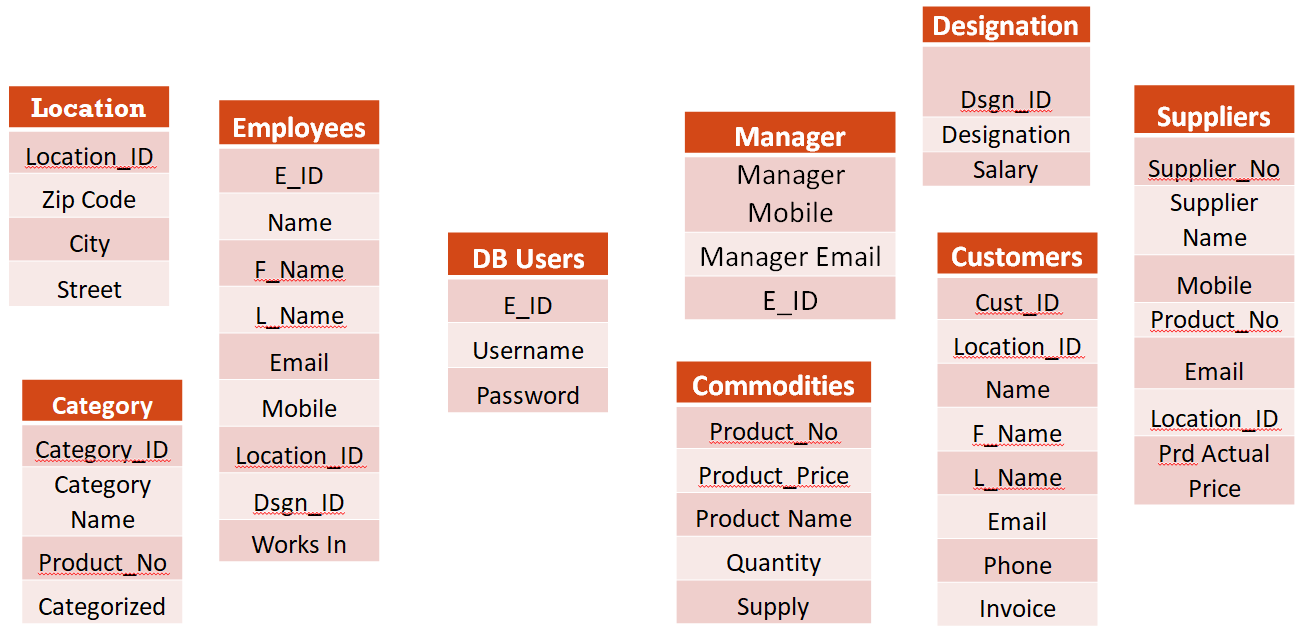
The objective of this python project is to design a GUI for the Grocery store Management System which incorporates details of the Employees, the Manager, the Designation of the employees, the categories of the products, the details of the Customer, and a list of available commodities, and location information of the grocery stores.

Suppliers and details of commodities which shows which items are going to be out of stock for the store which has various branches situated in various areas with different Managers taking care of that data set.

This database is efficacious in running the grocery stores. The users of the database will be the store managers.

  • Grocery Store Management System is designed to provide the grocery stores with the benefit of having everything online, from products data to customers data.
  • It helps the store managers to perform various functions like checking the products stock, suppliers information, customers information and also allows them to check if a particular product is available in any other branch.
  • It also helps to keep track of the store employees.
  • Provides a user-friendly interface where everything can be accessed with just a button click.

Database

  • Created views using joins to have a virtual table that can be accessed anytime.
  • Created a table for login credentials that allow only the managers of the store to access the database.
  • We have used the database queries effectively and carefully to implement the insert, update, delete and search. We have also used a view to join our tables and view the records. A database with the name grocery store has been created.

In Grocery store management, we have the following tables which will store the corresponding data

Database table Design for Grocery Store Management System

Location

The Location table has records of the location information of the grocery stores. For now, we have defined grocery stores in 20 locations.

Employees

The employee’s table has records of the Employees working in the grocery store. As we have defined our model to have managers for each store and they exclusively have the access to the database of the grocery store (DB Users), for now, we have defined all the managers for all the grocery stores listed in the Location table.

Designation

The Designation table has various records of different designations applicable/available in the grocery store.

Customers

The Customers table holds the details of the customer

Manager

The Manager table holds the details of the employee

DB Users

DB Users are the Managers

Commodities

The Commodities table holds the details of various products such as the product number, product name, product quantity, and product price. 

Suppliers

The Suppliers table holds the details of the product suppliers

Categories

The Categories table holds the details of the Product categories

GUI

The GUI for our project, the Grocery Store Management system is built using Python Tkinter. We have created GUI for all our tables, where we can perform operations, such as INSERT, UPDATE, DELETE, and SEARCH on all the tables of our Grocery Store database. 

Database connection to GUI

 To establish a connection to the database and GUI the following syntax needs to be used.              

Here, I have used the credentials of my localhost database connection, however, one has to replace it with the credentials in their system. By using this, the user can connect to the database and a GUI will be displayed accordingly.

Description of GUI

The main.py file has to be run, in which all the other modules are imported. Each module is for each table in our database. Main.py holds everything and it directs us to different modules with the help of buttons. When we run “main.py”, a login window, where we have to enter the credentials will be displayed and will only take you inside, if you enter valid credentials. If the credentials are correct, then a window is displayed with image buttons for all our tables.

When we click on each button, it will be redirected to the respective module, and a connection is established with the database. To establish a successful connection with the database “grocery store”, it should be available in our system.

View the developer’s page on Github and download the Grocery Store Management System Python Tkinter Project & MySQL Database Design Project source code, Project Report, and Project PPT for academic project guidance and reference purposes.

Quora for College Full Stack Academic Project

Wikipedia is a collection of Human Knowledge whereas Quora for college is a collection of Individual Knowledge. Being on Quora for college will make you a better thinker, which will be handy in whatever else you may pursue. It’s a bit like going to school, except way better.

Fortunately, many of you humans have been enlisted to provide both questions and answers as a cover, maintaining the appearance of just another innocuous website. Just as the purpose of humanity is for the creation of the one great individual Quora is the quagmire from which springs ‘The Wonderful Lizard of Awes’.

Quora for college’s project mission is to share and grow the world’s knowledge. Quora for college is a knowledge exchange platform on the college campus, which can be shared by anyone who knows something. Sharing knowledge is a part of wisdom. It will reach the people who have a desire to acquire knowledge.

The main aim of developing the Quora-related website for college students is to quality communication between the students regarding the question and answer-based platforms. This project was developed using the Full-stack.

Modules

Our project Quora for College will be divided into different modules

  • Login and Sign-Up page
  • Add Question
  • Reply to Pre-existing question
  • Feed up

The login/signup page: There will be a validation form for the login to the website and login details will be stored in the database. And it is mandatory to log in foe entering the website without login/signup you will not able to access the website. We will also provide the way to login through google means Gmail or sign in with Facebook.

Ask Question: Quora for College will provide you a better chance to add a question of your interest and wants public opinion on it. Then Quora for College is best for you.

Reply to the question: Quora for College will provide you with a better chance to showcase your knowledge. It allows you to answer the questions asked by others on subjects in which you’re knowledgeable.

Feed: Quora for College will provide you feed option in which you will be able to see questions related to the different topics.

Mern Stack was used to develop this Academic project. Mern Stack Consists of

  • MONGODB
  • EXPRESS
  • NODE JS
  • REACT JS

Development of Student Book Finder Mobile App Project

In this project, we are creating an android mobile application, basically, a Student Book Finder Mobile application will provide us with a platform to access the books we want to read at the ease of our fingertips. All the users will be having their separate accounts on this app which will be connected to their email id.

Any book that the user wishes to read, will be entered by him in the search box which works based on query input. The query may be an author name, the book name, or the subject to which the book is related, and will also work on specific keywords input. Apart from searching the books online, the user can save the book he/she likes in the favorites bar.

The Book Finder Mobile App is suitable in the present scenario as the world is being digitalized then why not the education system? On the profile of the user, one can easily view the books he/she has read.

The Book Finder Mobile App will be completely efficient and transparent to the reviews of the people on the book and its price. To get more details about the book one can click on the book and get further grave details.

This Book Finder Mobile App will be using The Google Book API for providing all the books. Further, the FAQ section provides all the necessary details that the user may need about the app.

The app also has a complete User Interface attached to the firebase a perfect login system with an email id and password and a forgotten password too.

This mobile-based application stands for the need of students at any time at their fingertips without any barriers in place.

Objective

The objective of the Student Book Finder Mobile App Project is to be a source of Virtual education allowing its users to search for the book of their choice according to the criteria set by them on the search page, read the book, add it to their favorite section, see the reviews of the book and decide which can be a better source for their knowledge and store them at the storage of their profile’s cloud.

This student project will be transparent and efficient in searching all the books it could as available on the Google Book API. Furthermore, new books will be added automatically as they will be updated on the API.

General Introduction to the Topic

Student Book Finder Mobile App Project, an android application is a user-friendly app, with a well-developed User Interface, a login module using the email address and the password, and a signup system for new users provides the user with the ability to search for any book one wants to read.

Besides the user Interface of the Login system, we have also created a navigation bar to provide various other features that the app provides,

It has various fragments the profile page, the favorites column, the About us section, the FAQ section, and an option to Sign Out from the account recently logged in. We have abstracted the android application using the Google Book API which supports us in enabling the various books to the users they are searching for.

We felt the need of developing this app looking at the current scenario where it is impossible to learn or get a book from the library and so the user can access the book from the app store the book whichever one likes on the cloud storage available for the profile.

For testing our application, last we will connect the app with the Google Book API and will allow a user to create a new account and access all the features of the app. This is all our app does and will be the outcome of our project on completion.

How does the App work?

  • As soon as the user enters there would be a splash screen displaying the app name and the copyrights reserved.
  • Then there would be a login page for the user to enter the email address and the password as set if the user has already signed up. For new users, there will be a sign-up page.
  • After logging in, there will be a search page having a search bar, an opportunity for users to enter any keyword related to the book.
  • As the app will be connected with the Google Book API the resulting books found will be displayed on the page itself.
  • According to interest and the choice of the user, the user can click on the book and know details about the book(the price, the author name, the reviews of the book, what the book is all about, and even maybe the pdf copies of the book if we can)
    The user will have the choice to read the book then and there on the spot or can add it to the favorite section.
  • The favorite section will store the book till the user wants it.
  • For any help or details about how the app functions, one can visit the FAQ section.
  • After the work is done the user can sign out from the account.

Software Requirements

Android Studio
Database: Firebase
User Interface Design: Android Application

Visit and Download Student Book Finder Mobile Application Project code, report, PPT, and execution steps

Student Exams Backlog Management System Project using PHP & MySQL

The main aim and objective of the Backlog Management System project are to provide the subject Backlogs to the student in a college in a simple way with the help of PHP, HTML, CSS, and MySQL database web applications. This project is useful for college students and educational institutions for getting the subject backlogs in a simple manner. As a result analyzer with subject status is an application tool for displaying the Backlogs insecure way.

The Backlog Management System is intended for the students and Faculty. The whole Student failed subjects analysis system analyzer will be under the control of the administrator and the admin has full privileges to read, write and execute the failed exams or Backlogs. And admin gives privileges to the Faculty and student and the guest user to access the reports.

  • Provides the search facilities based on various factors such as subject-wise backlogs, student-wise backlogs, department-wise backlogs, and Total backlogs.
  • Backlog Management System also manages Regulation details, department details, subject details, and academic year details.
  • It tracks the information on students, regulations, departments, semesters, and academic years.
  • Adding, viewing, Editing, and Deleting operations of records are improved.

Background of the System

The background of the Backlog Management System problem is that all the records are maintained manually at the time of results being released. In this case, there may be a chance to mislead students by changing their record values. So that valuable student data/information can be stored for a longer period of time with easy access and manipulation can be done. Basically, the Student Subject Backlog Management System project describes how to manage for good performance and better services to the users.

Purpose and Scope

Purpose

The purpose of this system is to maintain the details of the Backlogs of all students for their external or final examinations which are conducted by the university in the college. This system is managed by the staff of the department. Staff updates the backlog of student details along with course details for example Regulations, Department, Subject codes, Subject names, etc. The subject backlog of all students can be viewed manually. This system generates the reports of the students like subject wise, roll number wise & cumulative. In this case, faculty and students can check the details whenever they needed.

Scope.

This web-based Backlog System application will manage the information about various students enrolled in this course in different years, the subjects offered during different semesters of the department the backlogs obtained by the various students in various subjects in different semesters. The application will greatly simplify and store the details. Retrieve the particular student information accurately and efficiently

System Analysis

Existing System

 In this system backlogs of all students can be viewed manually at the time of results are released. In this case, there may be a chance to mislead students by changing their record values.

Proposed System

 This proposed system maintains the backlog of subjects and details of all students. This system generates the reports of the students like subject wise, roll number wise & cumulative. When the students clear their backlogs they remove from this system.

Advantages
  • Students can monitor their backlog subjects.
  • No need to maintain manual reports.
  • All the staff members can view the backlog of student data based on their requirements.
  • Staff can analyze which subjects are frequently failed by students.
Requirement Analysis

 The project is to provide Backlogs to the student in a simple way. This project is useful for students and educational institutions for getting the Backlogs in a simple manner. As a result analyzer with subject status is an application tool for displaying the Backlogs insecure way. So that valuable student data/information can be stored for a longer period of time with easy access and manipulation can be done. Basically, the project describes how to manage for good performance and better services to the users.

Module Division

This system contains two modules namely:

Admin Module

Admin performs the basic tasks of Add/View/Delete Regulation, Subjects, and Backlogs of students. And generate the reports student-wise, subject-wise, department-wise, and cumulative.

User Module

User Faculty can search different types of reports such as student wise, subject wise, department wise, and cumulative. User Student can search their Backlogs using valid roll numbers.

Conclusion and Future Work

The project “Backlog Management System” is a PHP, HTML, CSS, MySQL web portal that is useful to store the details of Backlogs. This system is managed by the staff of the department. Staff updates the backlog of student details along with course details for example Regulations, Department, Subject codes, Subject names, etc. So that valuable student data/information can be stored for a longer period of time with easy access and manipulation can be done. This project is useful for students and educational institutions for getting the Backlogs in a simple manner.

This Final Year academic project generates the reports of the students subject-wise, roll number wise & cumulative. Finally, staff can analyze which subjects are frequently failed by students. In this case, faculty and students can check the Backlogs whenever they needed.

Design & Development of E – Agriculture Java project

The main objective of this E Agriculture Project is to build a website that will help Indian farmers to make effective cultivation by providing information on crops and making a path to earn more money from Indian villages by selling their products to different cities online and by registering their crops to get their suitable price for their crops. They can open this site and register with it and sell and buy their products and register their crops online etc.

  • The website “E Agriculture Project” is for farmers.
  • This website contains information about different types of effective farming and irrigation techniques.
  • This website gives information on crop management to satisfy the demand for a particular crop to reduce crop prices.
  • Through this E Agriculture website, the government can buy products directly from farmers.
  • Through this website, farmers can buy seeds, and fertilizers directly
  • The farmers can have a deal with the government for a certain cost.
  • So farmers can have a lot of profits.

Software Requirements:

Operating System: Windows 10,
Technology: Net Beans
Database: MySQL

Modules Description:

Login:

This helps the farmer to login by which they can know about soil information Crops suitable for different regions and government schemes and register the crops which they want to produce.

New Register:

If the farmer wants to log in the has to first register by clicking new register and Filling in the details

Home:

Once the farmer has logged in he can register the crops in their region, buy products, Sell products, Know crop information, soil information, schemes given by the government, update details, available at home

Crop Management:

It has all information about crops suitable for different regions, soil information, and all crop Information, scheme of the government

Crop Registration:

It helps the farmer to register for the crops that they want to produce in their region. This leads to the balancing of crops and certainty in the price of crops

Buy Products (seeds, fertilizers):

It helps the farmer to buy fertilizers and seeds from the government without agents between

Update details:

It helps the farmer to update their details which they have filled in the new registration

Download the Design & Development of E – Agriculture Java project Source Code, Report.

College Vehicle Security Management System CPP Project

Purpose

The purpose of this College Vehicle Security Management System project SRS is to provide a detailed description of the development and operation of the college campus in and out management. It will illustrate the purpose and complete declaration for the development of software. It will also explain system constraints, user interface, and the response of the system to any external factors. This document is primarily meant for the client, but will also be used by the developers as a scale measure to gauge the progress.

Scope of Project

This College Vehicle Security Management System project will be designed to increase the security of the college and manage who and for how much time the person can stay inside the campus. Someone should not use our campus for some kind of shortcut so someone not belonging to the college campus can enter the campus for a valid reason only and then he/she can get off the campus through the same gate he/she used to get into the campus other gates will not be opened for them to get out.

Students on college premises are only allowed to get in/out of the campus till 2:00 AM so the student who wants to get in should have some special kind of permission otherwise the student’s luggage will be checked as it should not have any kind of alcohol, etc. and then will be allowed to get into the hostel he/she will be given a special room where the student will spend his/her night and the student will not be allowed to get out after 2:00 AM till 6:00 AM.

Constraints

1. Permission according to the purpose of the person to get inside.
2. Guard must be present at the gate.

Assumptions and Dependencies

1. Every person has Id either an Institute Id or a valid Personal Id.
2. Only one Admin.
3. Initially all the Institute members are inside the Institute and Non-Institute members are outside the campus.
4. Institute member’s vehicles are initially green-colored.
5. Special guests’ vehicles are registered before they have entered.
6. Guard will check the ID card very carefully.

Glossary

  • Person One who wants to enter the campus
  • College Member Student, Institute Workers, Security guard, Faculty
  • Non-Institute Member Anyone not belonging to the Institute Member
  • Invalid Time Time at which a particular actor is not generally allowed to get in/out

User Characteristics

  • There are only two types of users who can use this software, and that are security guards and Admin.
  • The Security Guards will use this software to maintain and improve the security of the college campus by allowing what kind of person/vehicle will enter the campus and for what amount of time some vehicles should be allowed into the campus.
  • Guard will also define a color for the kind of Vehicle if someone’s vehicle is banned from the campus then that vehicle is marked as black listed and the guard will not allow such kind of vehicle to enter.
  • Guard will also make sure that the vehicle is only allowed to exit through the gate from which it enters the Institute except for the registered vehicles.
  • Admin can add new users, remove existing users and change their passwords.

Key features of the project

  • Non-College, same gate in and out.
  • Store all entries with real Date and Time.
  • Only Guard is allowed to do entries.
  • Admin manages guard’s account.
  • Only Admin can see all Gates entries.
  • Student’s entry on the bases of time.
  • Provide color to the vehicle.

Things that could not be implemented

  • Clear Dues of Non-College Vehicle.
  • Date for validity for Student’s Special Permission.

Visit here and download the project on College Vehicle Security Management System for reference purposes.