Interactive Hostel Management System Java and MySQL Project

Objective

The main objective of this Java and MySQL-based project is to create an interactive Hostel management GUI application that helps in the management of Hostel records about registration of students and employees, and fee and salary management. Through this application, the admin can register & manage students & employees of the hostel.

MODULES IN HOSTEL MANAGEMENT SYSTEM:

Admin:

Admin can log in to the software using the Username and password provided by the developers. After login, he can register students and employees. He has to update the data of all the participants of the system i.e., Students and employees. He can Insert, update and as well as delete records from the system.

Student:

This module is about the residents of the hostel. It holds the data of the students residing in the hostel eg. Names, addresses, USN, RoomNo & Phone. The complete information about a particular student can be obtained by referring to this module.

Fee Payment (Insert):

This module is necessary to hold the information related to the Fees of the residents of the hostel. It has fields for Name, total fees, the amount paid, mode of payment, and balance amount remaining to be paid by every individual student. The individual student details can be accessed by providing a unique USN.

Employee:

This module is related to the employees of the hostel. It holds the data of the employees like Name, Age, Eid, Designation & Salary. The complete information of a particular employee can be obtained by the unique employee ID.

Salary Payment (Insert & Update):

This module is necessary to hold the information related to the salary of the employees of the hostel. It has fields for Name, Eid, total salary, the amount paid, and balance amount remaining to be paid for every individual employee. The individual employee details can be accessed by providing a unique Eid.

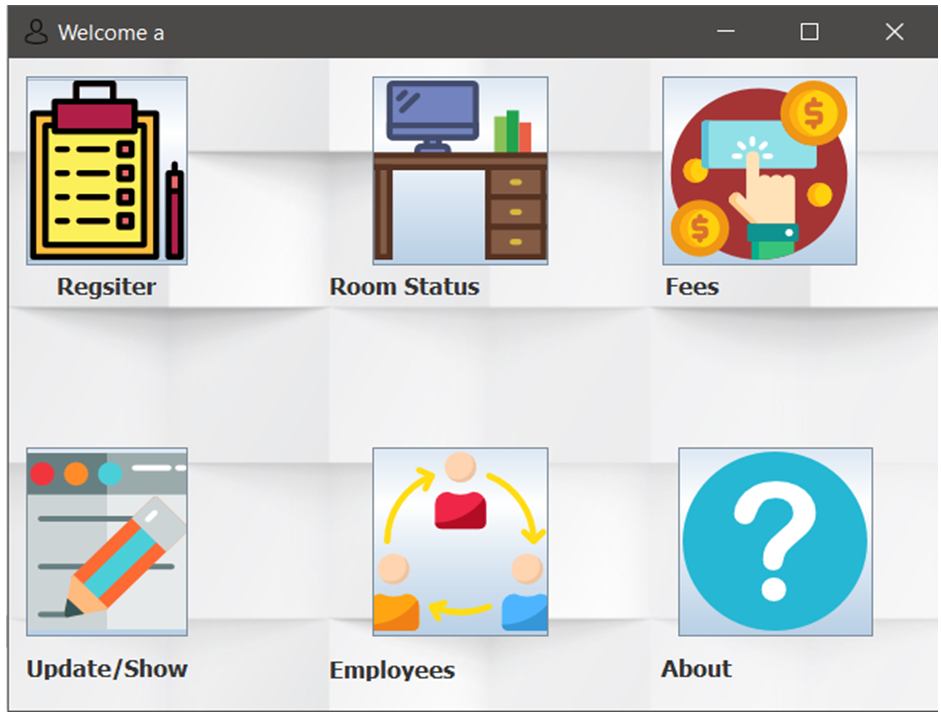
Features page of the Hostel Management project

Output Pages will be below:

  • Login Page of the project
  • Features page of the project
  • Registration page for new Students
  • Employee registration page
  • Options for employee management
  • Fee update and fetch the page
  • Fetch fee details of individual students
  • Maintain student records of the system
  • Update fee details of a specific student

Download the complete Hostel Management System Project source code and Project report.

Blood Bank Management System DBMS Mini Project

The main purpose of the PHP & MySQL-based blood bank management web application system DBMS mini project is to provide the blood bank with an easier way to store and retrieve data and keep a record of the availability of blood in the blood bank.

After inserting the data into the database, staff need not register the same person again. They can simply search for recorded data and retrieve them for future blood donation or receiving purposes of that person.

In the nutshell, it can be summarized that the future scope of the project circles around maintaining information regarding:

  • The person can fix their donation schedule using an online reservation for the donation of blood.
  • The person can search for the availability of required blood in the local blood bank in the case of an emergency.
  • The blood bank stores the details of the blood donated by a person, like RBC, WBC, platelet count, etc.

The above-mentioned points are the enhancements that can be done to increase the applicability and usage of this project.

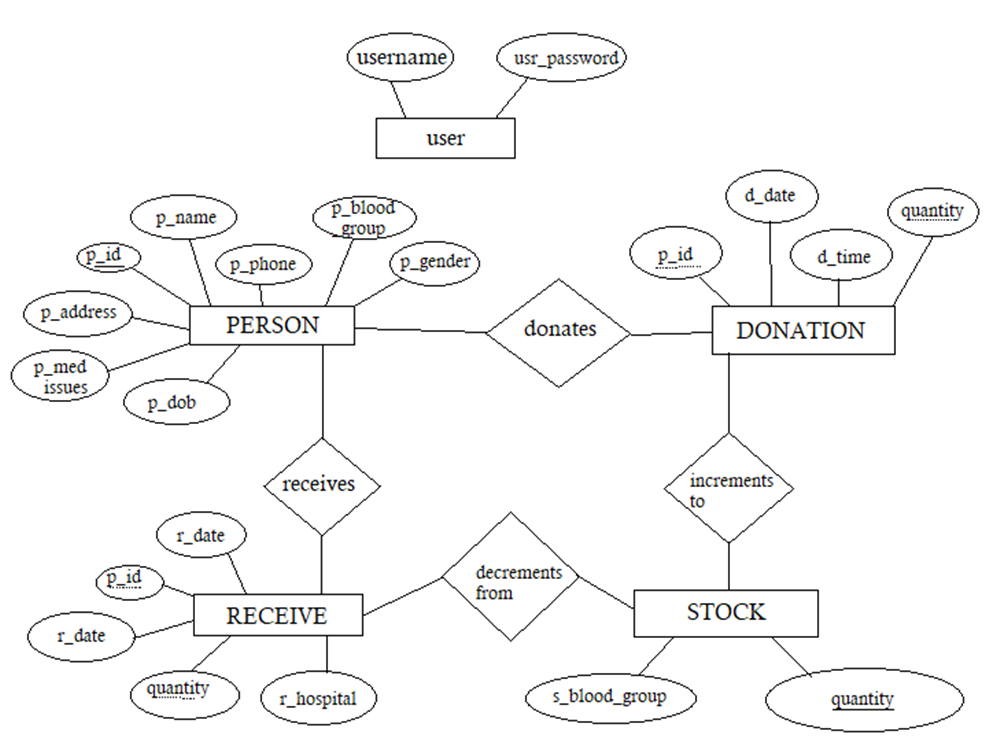
E-R diagram of the blood management system

E-R diagram of blood management system

MODULE DESCRIPTION

the list of modules incorporated with the “blood management system” is:

Login module:

This module is for employees of blood banks to log in so that only they can access the database.

Person module:

This module is used to store all the personal details of the donor or receiver.

Donor module:

This module is used to record the date and time along with the quantity of blood donated by a person. Personal details are accessed using a personal ID.

Receiver module:

In this module date and time, the quantity of blood received along with hospital details is recorded.

Stock module:

Here we can check the availability of each blood group blood.

RESULT AND ANALYSIS

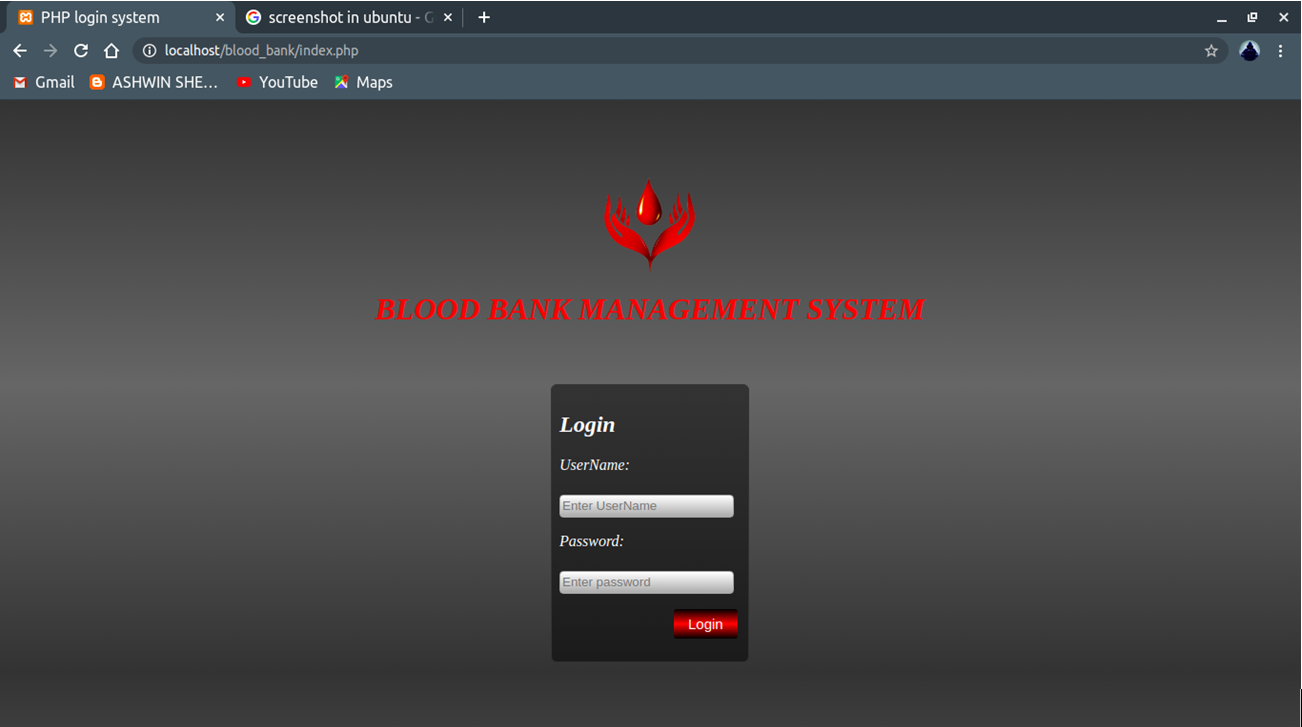
Home Page of blood bank management system
The login page shows the login page, if the user wants to log in, they must enter a valid/registered username and password and click on the login button.

The home page shows information about the blood bank management system.

Add person page shows the Add person page, here details of the donor/receiver are registered.

Add person page shows once the entry of personal details is done.

The search person page shows the result of the search we have done. If we enter the person’s id it will return all the personal records present in the database.

The donation page shows the New donation page, here person id and units of blood donated are recorded, and submit button is clicked. On successful completion of entering it displays “Your donation is successful”.

Receive page shows the New Receive page, here person id, units of blood donated, and hospital details are recorded, and submit button is clicked. On successful completion of entering it displays “Your receiving is successful”.

Check the Stock page shows the stock details i.e units of blood present in the blood bank of each blood group.

The donation History page shows the Donation history page, the user has to give the time interval from when he wants to see the donation history details. Upon clicking submit he shows the donation history. If there is a donation that took place at that time interval it displays “No record found in the specified time interval”.

Receive History page shows the Receiving history page, the user has to give the time interval from when he wants to see the receive history details. Upon clicking submit he shows the received history. If there is receiving of blood that took place at that time interval it displays “No record found in the specified time interval”.

Add user page shows the add user page, where it asks for the super admin password. Next, you have to enter the new username, and password and confirm the password. Click on create user button. If the super admin password is wrong or the password and confirms password don’t match. It will pop an invalid password. On successfully creating a user it will display “New user created successfully”.

Download the complete Blood Bank Management System DBMS PHP & MySQL Project source code, project report, and execution steps here.

College Campus Students and Faculty Activities Tracker Java Project

College Campus Activities Tracker deals with the tracking of both student and faculty performance and the activities done by them in and out of the college. This project can help us to know all the activities happening in the college campus area and even get to know who has scheduled the activity. Different certificates of the students based on their performance are generated department-wise and academic year-wise.

Our Students and Faculty Activities Tracker system has two users, faculty and student.

The student will upload their certificates that they have participated in other colleges and the faculty will schedule the activity and upload the respective student’s certificates to those who have participated in the activity.

College Activities Tracker is a java web application that will allow the users (both faculty and students) to upload their documents and intimating each activity (hackathon, workshops, competitions) that they participate in and out of the college with certifications as proof.

And it should also allow the user to register for ongoing or upcoming events through the form and after registration, A successfully registered message should be sent to the user to their corresponding phone number. The faculty must be allowed to check or keep track of student and faculty performance and previews the data student-wise, faculty, wise, section-wise, department-wise, event-wise, and duration wise. And faculty should be allowed to add/update the upcoming event happening in the college.

Results Page of College Activities Tracker

INTRODUCTION

College Campus Students and Faculty Activities Tracker is an application that will aid users in uploading their Documents and intimating each activity that they perform in and out of the college with Certifications as proof.

This is a centralized system that keeps track of students and faculty activities and previews the data student-wise, faculty-wise, section-wise, Department wise, Event wise, and Duration wise. It is mainly used to maintain the data for Department’s weekly report.

Modules of the Project

We have three modules in our Activities Tracker Java Project.

● Admin
● Student
● Faculty

SOFTWARE SPECIFICATION:

Software Requirement:

1. Language – Java (JDK 1.7)
2. OS – Windows 7- 32bit
3. MySql Server
4. JDBC
5. JSP

Alumni Management Portal for Educational Institutions PHP Project

This Alumni Management Portal project aims to develop a platform for the Educational Institutions to maintain communication between faculty, alumni, and students. The main objective of this PHP & MySQL web application is to enhance or improve employability opportunities for students, organize alumni lectures and events, and increase networking skills and opportunities for students.

INTRODUCTION

Our Institutional Alumni Management Portal project is a web-enabled application through which administrators, students, and alumni will be able to continuously communicate. For this, we need an application that is user-friendly. The needs of all three users of the portal should be covered.

Administrators can log in, maintain, verify and manage alumni and student records, and create events and group chats. Administrators can also generate reports in excel and pdf format and view placement statistics of the institute. Once an event is created, all the alumni and students registered on the portal will receive emails automatically.

Alumni can log in, register, update their details, view events, participate in group chats, and post job opportunities and materials. Students can log in, register, view details of alumni, register for events, download materials posted by alumni, job materials posted by alumni, and participate in group chats with other alumni and students.

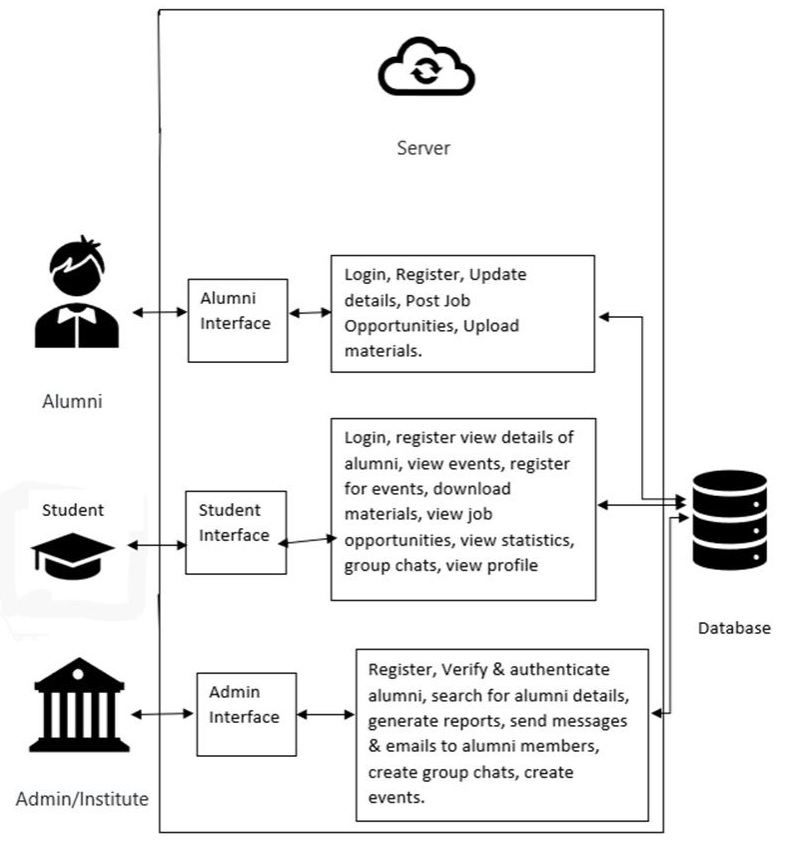
The below figure shows and explains the Architecture Diagram of the Alumni Management Portal website.

Architecture Diagram of Alumni Management Portal

Objectives

To build a responsive Educational Institutions Alumni web application to manage and track students and alumni of an educational institute and build a portal that facilitates continuous communication.

Organization of Project

We have three modules in our project.

● Admin
● Alumni
● Student

Alumni management portals can be used by educational institutes to maintain and manage records of alumni and students of the respective institute in an efficient manner. It leads to better outcomes in terms of student placement opportunities, and knowledge transfer and improves the structure of communication between current students and alumni thereby increasing networking skills and opportunities.

In traditional methods where student data is manually stored, a lot of time is wasted doing redundant and repetitive work. Here storing data, statistics, and report generation all are automated. Furthermore, there is no need for paperwork since everything is done online and stored in a refined database.

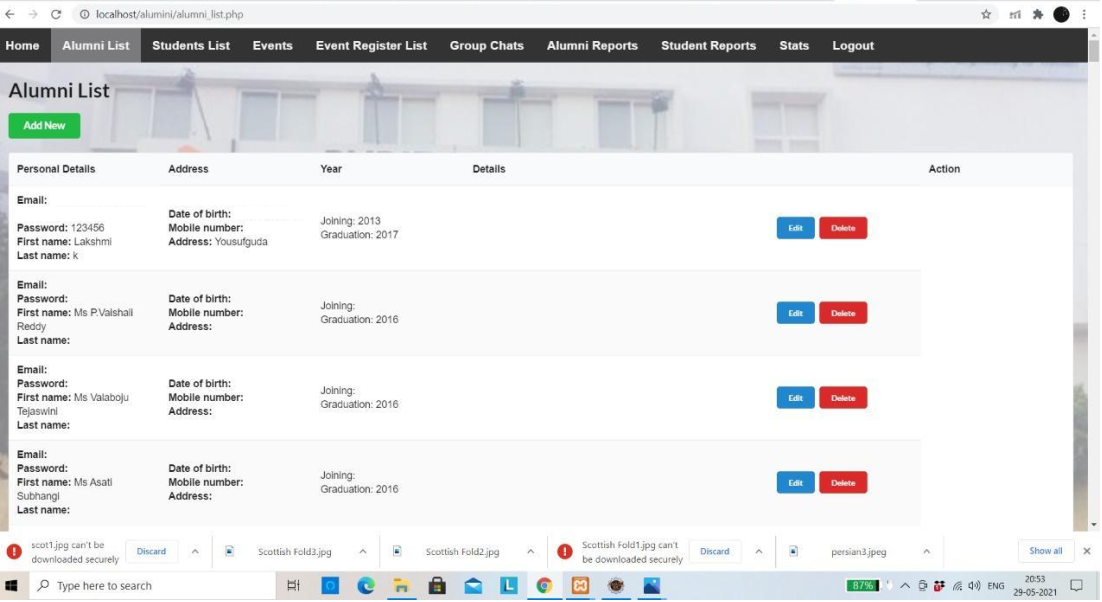
The output screenshot of the project explains about “Test case check whether the admin is able to view all users”

All Users List of Alumni Management Portal Project

Blood Donating System Web Application Project Software Requirement Specification

This is the Software Requirement Specification for Blood Donating System Project and it explains the project overview, project scope, project problem statement, Hardware and Software Requirements, Project Phase wise, review wise development process and Functional Requirements.

Project Overview

A Blood Donating System Web Application can help many people to donate blood those who are in need. So they will have a pure registration, with necessary details and those who are in need of blood will log in and check for the donors’ list based on their locality and contact facility will be given such that both will be in contact and also they shall do the process necessary for blood donation.

Project Scope

In India, due to many accidents in many situations and in different locations. According to the EMRI Survey, in a two-day Conference, it stated that​ “​40% of road accident victims in 2018 died due to excessive loss and due to very less source of contact for donating the blood”.​ So Actually the scope is that, In a very short span, it provides users with many facilities. The main purpose of the Blood Donating System project is to interconnect donors into a single network with receptors. So the proposed Blood Donating Web Application project could ensure the necessity of blood and blood donation by saving the World.

Problem Statement

So many people are losing their lives without having the availability of blood in correct time for example if a person met with an accident and for surgery he needs blood urgently in short period of time and sometimes it is very difficult to get blood in time so to overcome this problem our team decided to develop a website for blood donation.

Phase 1

  • Project Idea
  • Evaluation of Idea in technical Aspect
  • Research of The Idea and Analysis
  • Scope of the Project evaluated

Phase 2

  • Front End
  • Developing Responsive Web Pages in Front End
  • Login
  • Logout
  • Introduction Page
  • Donor Form Fill
  • Signup

Phase 3

  • Donors Details Page
  • Backend Development
  • Access of Donors to contact
  • Technologies used are django, mongos
  • Login/Logout Validation

Development Process

● Register & Log-in Portal
● Blood Donation System
● Donor History after successful login
● Both Donor and Receptor pure validated registration
● Donors are available based on the Receptor Locality
● Easy UI
● Backend without any issue in Domain Specifications
● Login and Logout Creation2. Requirements Specification

Functional Requirements

● HTML, JavaScript, BootStrap (Main Focus on these.)
● Registration
● Login and Logout Portal
● Blood Donation Management
● Donors History
● Donors List based on their Locality
● Pure Backend Establishment using Javascript

Non-Functional Requirements

● Reliability
● Usability
● Maintainability

Fresh Online Grocery Ordering Website Project

Project Overview

Fresh Online Grocery Ordering Website is an online web application for automating the process of ordering grocery products from suppliers and paying for them in advance. Therefore, there is no need for the suppliers to wait for a long time and pay in cash at the time of delivery. This system also helps farmers to sell their products through this system.

The current Grocery Ordering system is not much efficient and can lead to a major waste of time as the supplier needs to wait for a long period. The main purpose to design this Online Grocery Ordering application is to provide an environment where the users will be able to order products from a supplier and pay in advance.

To what extent the system is proposed?

The proposed Grocery Ordering system automates the manual process of users the shop owners which can be used for ordering products from suppliers online and farmers visiting the shop with their products for selling and physically paying for the products with cash by introducing an online automated system that sends product requests online. The current system is not much efficient and can lead to a major waste of time as the supplier needs to wait for a long period. The main purpose to design this application is to provide an environment where users will be able to order products from a supplier and pay in advance.

Specify the Viewers/Public who is to be involved in the System?

The Viewers/Public that are mainly involved in this system include staff, suppliers, and farmers. The staff, suppliers, and farmers can also register to this system with valid information. They can buy/sell products and also include payments

List the Modules included in your Grocery Ordering System?

The system includes 4 modules. They are:

• Admin Module

Admin is the one who does the staff and supplier registration and approves or rejects the leave request of staff and farmer’s product request, publishing notifications to the users, fulfilling staff and farmer’s product requests, and can view and block and unblocking of existing users. Admin can do a secure payment for their products through the online payment system. Admin can also view their request status from Suppliers and notifications from the Staff. Admin can approve or reject the leave requests as well as admin can view the existing products and order the products and view the status of the ordered products.

• Staff Module

The staff can view the current stock and update the stock. After product stock reaches a critical value the staff can issue a notification to the admin. Staff can send leave requests and see the status of the requested leave and also
able to update their profile.

• Supplier Module

The suppliers can view and update their profile as well as their stock.
Suppliers can add new products and can view product requests send by shop owner/admin and process orders. Suppliers can get a secure payment for their products through the online payment system.

• Farmer Module

The farmer can send a request for selling their products through that shop.

Farmers can see the status of product requests send to the admin as well as can view and update their profile. Farmers also can get a secure payment for their products through the online payment systems and can also view their
request status and notifications from the admin.

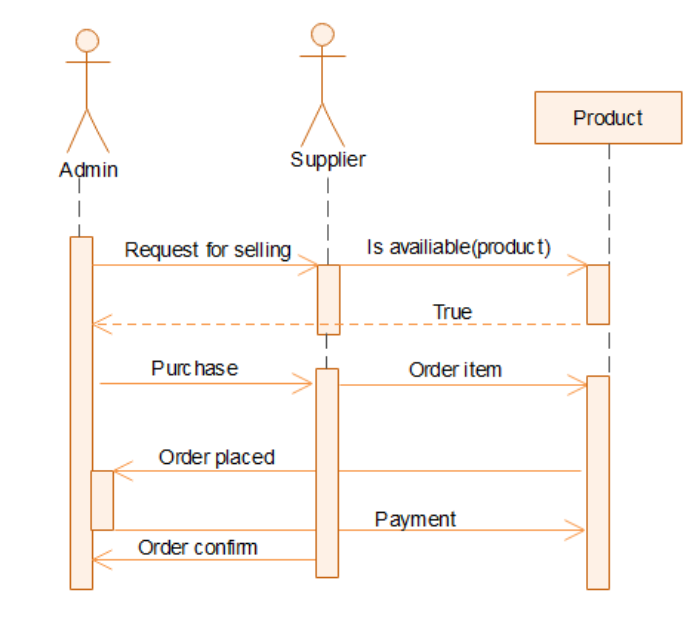
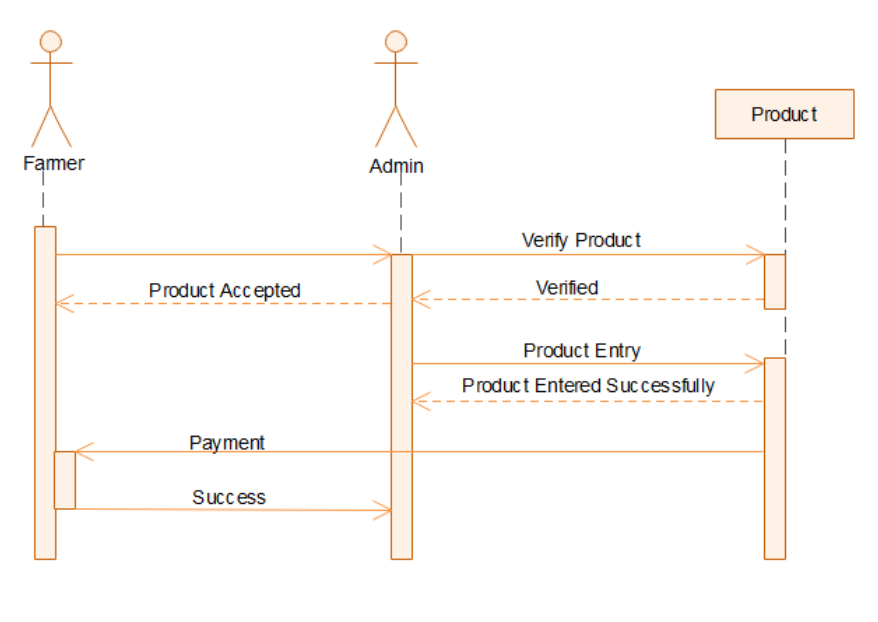
Sequence Diagrams for the Project:

Farmer Supplier Sequence Diagram Online Grocery Ordering system Online Grocery Ordering Farmer Admin Sequence Diagram

Identify the users in your project?

The main users of this project include:

  • Admin who controls and coordinates the entire activities of the system including provisioning users to buy/sell their products and responding to requests from farmers.
  • Staff who manages the day-to-day activities of a grocery shop including updating seller stock and logging and maintaining transactions to and from the grocery shop.
  • A supplier who processes the order that was made by the admin.
  • The farmer who requests products online.

Who owns the system?

The owner of Online Grocery Ordering is the grocery shop in which the system is implemented. A system administrator is appointed by the organization for managing and coordinating the system activities.

The system is related to which firm/industry/organization?

Online Grocery Ordering is a grocery shop management system and it is associated with a grocery shop in which the system is implemented.

Details of the person that you have contacted for data collection?

Questionnaire to collect details about the project? (min 10 questions, include descriptive answers, attach additional docs (e.g. Bill receipts, certificate models) if any?)

1. Is there any discount streams available?
Several discounts are available for a range of products if the customers purchase products in a bulk range.

2. Is there any products available in your shop other than grocery items?
Yes, we also sell products including vegetables and fruits as well as sweets.

3. Is there any wholesale products in your shop available?
Yes, we provide products for wholesale.

4. Which among the products are most frequently sold out?
Sugar, cerials, vegetables.

5. How do you maintain the records of day-to-day transactions? What all features do you expect if this system gets automated?

6. How do you keep track of inventory?

7. How do you transport your groceries?

We use paper bags for the transportation of products.

8. What are the pricing strategies that you follow for selling your products?

It depends on the market value/price.

9. Is your supplier responsible for restocking?

Yes, our supplier is responsible for restocking, if the products meet their time limit.

10. How do the details and contacts of suppliers maintained?

The details and contact of suppliers are maintained in records physically.

Download the complete Grocery Inventory Management System PHP & MySQL Project.

Online Platform for adding Student Classroom Notes PHP Project

Introduction:-

This Student Classroom Notes web application has helped to take only important notes in a relevant way. No user needs to spend more time taking notes. It’s a very easy way to take notes. Any kind of user can upload their notes at whatever time they want. It takes very less time to open the ”Student Classroom Notes”. Due to the very easy design of these apps, school students can also use this app to take their notes inefficient manner.

Importance and need of Student Classroom Notes:-

As it is developed for user-friendly so any sort of user can add their notes from any educational platform. They needn’t need go through any other online-offline software. These iNotes apps help to take the key point of important notes. As we are in this technical world so hard copy notes are not portable. There is a lot of chance of losing notes so this app makes the free risk of losing notes. User can keep their notes for future reference without any risk.

The motto:-

The main motto of this project is to the user can add or upload notes easily and very quickly as other software.
User can modify their notes in a very easy manner compared to other software.
Notes repositories are available in the form of a table manner so it is easy to identify your notes without wasting your time.
Users can log in from any location and upload notes and can share too.

Requirement Gathering:-

“Student Classroom Notes” is developed for all kinds of users from higher levels to lower levels. Many students and people do not want to take their notes with themselves every time. To remove such sort of problems, this “Student Classroom Notes” App been developed.

Working Principles & Methodology:-

In this project “Student Classroom Notes” every user has a username and password to access these Apps and can keep their notes personally.
He/she can keep their notes with the Title name and description so that the user can easily recognize the notes he/she uploaded.
This is very easy to identify their notes repositories on the home screen itself.
The user can easily search their notes in the search bar and filter too.

Software requirements:-

  • Operating System- windows10
  • Visual studio code
  • PHP
  • Google Chrome
  • MySQL database
  • Xampp Control panel (for local server)

We will be using visual studio code basic as our front hand because it is easier to use and provides features to the users which are used for the development of the project.

Future Scope & Conclusion:-

This web application has almost all the features of CRUD and smart online/offline notes taking.
The project has altos benefits. Managing the project is quite easy as per storing the notes. It is easy to maintain notes and update them as required.
As we know that technology is increasing day by day so hard copy note-taking will be decreased, at that time it will helpful for those who will use this app.
Still, some additional features are not added to the apps. As we are seeking features, if it’s required we will add them as soon as possible.

Hope every user has a clear idea of using our “Student Classroom Notes” Apps.

Academic Mini Project Ideas using Python Django and SQL Lite

These are the python academic project ideas that can be developed with Python, Django, and SQL Lite and can be run on any computer with Windows Operating System. The Agile methodology is adopted for the development of the entire project. Several Sprints usually up to one to two weeks in duration are fixed where a part of the project is delivered in working conditions. During each sprint, the output is tested manually for the production of runnable and correct software. Finally, system testing is to be conducted on the final product before deployment.

Breast Cancer Prediction Using IBM Cloud

Procedure

  • Collect the dataset (Histopathology Images)
  • Build the model by Training and Testing using CNN
  • Integrate the model built with the flask in the python file
  • Create the HTML and CSS for developing the webpage.
  • Display the output by selecting the Histopathology Image & predicting it.
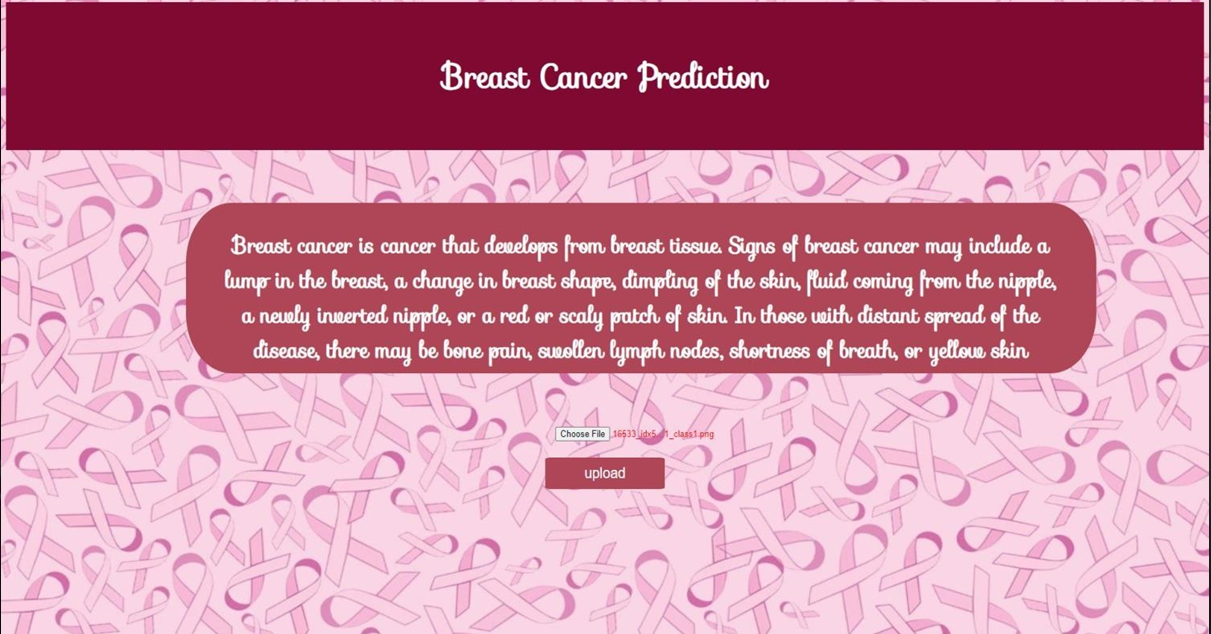
Breast Cancer Prediction

Summary

Our Problem statement is to predict the risk of Breast Cancer using Deep Learning Techniques. First, we have collected histopathological images of breast cancer of types benign and malignant. Next, we trained and tested the images using a Convolutional Neural Network made to classify the type of Breast Cancer i.e., Malignant and Benign. Further by using Flask, the python model is deployed and the prediction of Cancer is further rendered with HTML pages to display the type of breast cancer on a webpage.

Online Plants Store

Online plants store is a new way of buying plants online. It presents an online display of all the items they want to sell. The Customer can view all details of the products. Nowadays, plants are very useful to mankind. So, this online store helps customers to buy plants easily. It Includes the Home page, the About page, and other details.

Front End: HTML, CSS, And Bootstrap

Back End: Django and SQLITE

You can add a plant, Delete a plant, Update a new plant, etc.

We Can Use CRUD Operations.

Crime Management

In the Current system under consideration, the basic problem is crime details are managed in registers with much more effort, huge memory loss, and time wastage. Online Crime Management System is helpful in the reduction of paperwork and also helps in less time management. It is an efficient and reliable system that provides a computerized system for maintaining records. It also reduces inconsistency, redundancy, manipulation, human errors, and efforts. The Project will provide a new experience to the crime branch through online Crime Management.

E-Learning

In the Current Education system under consideration, the basic problem is students are not aware of new technologies in this digitalized generation. They only mesh with book pages and the third party is also involved. The main objective of this project is to concern students about new and better technologies without third-party involvement. The summary of this project is about giving students practical working base knowledge that is used in real life and also beneficial for parents they can also know about their children’s knowledge and performance. Students can also learn as their wish and get a certificate with extra knowledge too. The Project will bring new experiences to students through online learning.

Employee Management

The purpose of the project that provides information regarding the employees in the company. The Project will provide a new experience to Employees, Managers as well as Hr through online Employee Management.

House Rent Management

The goal of the project is to create a better relationship between tenants and landlords.

Insurance Management

This system maintains information about branch managers who can deal with agents and customers. The application is developed in Python, Django, and SQL Lite and can be run on any computer with Windows Operating System. The Project will provide a new experience to the Insurance Company through online insurance management.

Inventory Management

In the Current system under consideration, the basic problem is inventory details are managed in registers with much more effort, huge memory loss, and time wastage. An online inventory Management System is helpful in the reduction of paperwork and also helps in less time management. We can easily add a new well and also manage the sale details, payments, etc. It is an efficient and reliable system that provides a computerized system for maintaining records. It also reduces inconsistency, redundancy, manipulation, human errors, and efforts.

Student Management

In the Current system under consideration, the basic problem is students’ details are managed in registers with much more effort, huge memory loss, and time wastage. Online Student Management System is helpful in the reduction of paperwork and also helps in less time management. It is an efficient and reliable system that provides a computerized system for maintaining records. It also reduces inconsistency, redundancy, manipulation, human errors, and efforts.

Vehicle Break-Down Assistance

The main theme of this project is to serve the users (Victims suffering from lack of petrol and any vehicle issues with their vehicles) with a mechanic nearby them and solve their problems.

Here we are having three modules. Namely

  • ADMIN
  • MECHANIC
  • USER

Campus Management System

The main purpose of this Campus Management System project is to manage the details of the college, company, and students. It manages all the information about the college, placement, vacancy, etc. The project is built at the administrative end and only the admin can control the whole system. The objective of the Campus Management System project is to build an application program to reduce the manual work for managing the college, company, student, placement, job, interviews, etc. It tracks all the details about the job vacancies and placement offers. This software is fully integrated with college, student, and company relationship management and developed in an easily manageable manner, time and cost-relieving one from manual work.

Online Furniture Store

My Project name is an Online furniture store. It allows the customer to check the various types and designs of furniture. online furniture store application consists of a list of furniture lists and designs. The user can visit all the information about furniture including furniture model, type, price, and quality of the product. For every product, the user can check the feedback before they are ordering. the customer can view all the details of the product.

There are types of users in this project—i.e; owners, workers, and the customer.

Clinic Website

The Clinic website is a website that is used for maintaining the database of the patient that comes to the clinic. It contains the authentication that is used to increase the security of the site. The user login contains a form that is submitted to the required doctor at that clinic then this form is further used by the doctor to diagnose the patient and perform check-ups.

This website is responsive and can be opened in any browser. Since this website uses a framework for styling so some of the effects may vary according to the browser.

This project mainly focuses on data management so we can perform various operations like creating a patient list and deleting the data. The database can be managed through the admin page and has separate login which can be used to access the data.

Online Result Notification

The online Result Notification website basically uses for Educational Institutes.

This website is working to show results easily to students about to this website. Students easily get their results as well as internal exams. Faculty easily adds the marks of the students and easily sees the TOP 10 students. Admin adds Course, Class, Subject, Faculty, and Students. And see all the details or data or changes.
There are three modules on the website. And this website is used for all the modules and they use easily and make their work easy. This website is online working so now the generation easily understands it. This site get students the option to print their results copies and also download them. This website is based on the student’s result process to easily give to the students.

As a student in Computer Field, we are encouraged by the growth and rapid development in the software industries, keeping in mind the increasing demand for software and software engineers the university has arranged project work for the third year.

Thus it is our moral and obligatory duty to take this project as a part of our studies with great enthusiasm and seriousness. For this, we have gone through a development program of 3 months.

Download a simple Restaurant Food Billing System Project Using Python

Home Safety and Security System Using IoT Project

The main objective of the Home Safety and Security System Using IoT project is to implement a home safety and security system with the following features:

  • Monitoring and detection of leaks in LPG gas
  • Unauthorized opening of door/window

Hardware Requirements:

The hardware for the project consists of:

GISMO-V board with:

  • ESP32 dual-core 32-bit processor with Wi-Fi and BLE
  • MQ6 sensor module
  • Magnetic switch assembly
  • 0.96” OLED display with 128×64 resolution

Cloud Platform:

In this project, we are going to use Google’s firebase as a cloud database. It is a No-SQL database in which data is stored as Key-Value pairs.

To access the database the following credentials are required

  • Host URL
  • Database authentication key

These credentials are put into the ESP32 firmware to access the Google Firebase.
The keys used to store the parameter values in the project are:

  • IOTLAB/HSSS/Gas_Leak
  • IOTLAB/ HSSS/Window_Open

Mobile App:

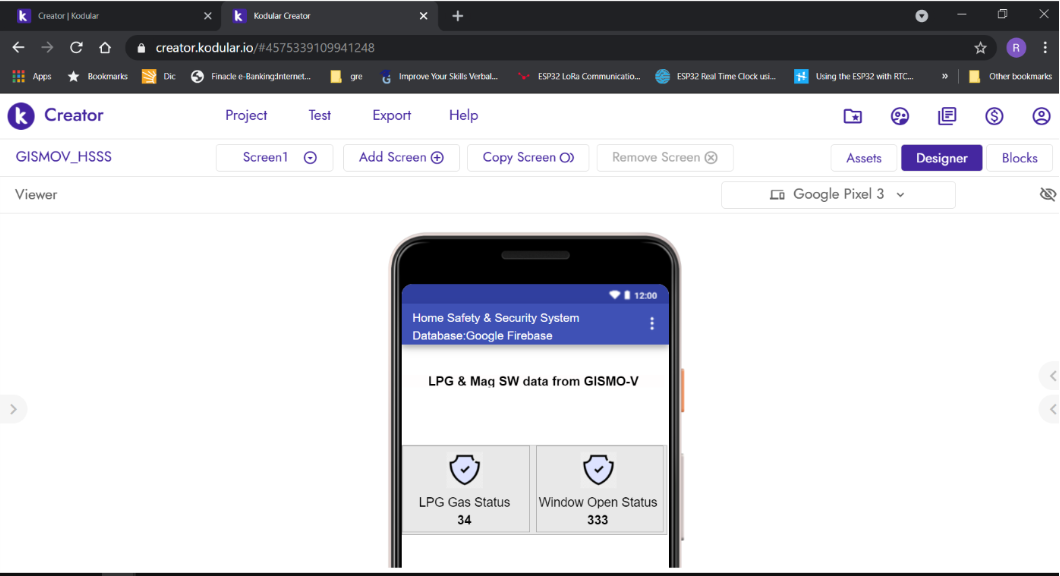
  • The Modular rapid mobile app development utility is used for the development of the mobile app. The utility has two modes, a Developer mode, and a Blocks mode. Different functional blocks are available in developer mode, they are – User Interface, Sensors, Connectivity, Firebase, and so on.
  • In the Blocks mode, a timer with timing set to two seconds will fetch the LPG gas concentration and magnetic switch status values from the Firebase database and fill it in the appropriate place in the UI.
  • To access the Firebase dataset its credentials will be placed in the Firebase component of the Modular app.

Mobile App development of Home Safety and Security System Using IoT Project

Results and Conclusions:

With the help of the MQ6 sensor and magnetic switch, we monitored the leakage in LPG gas and also the window/door open status.
We can get notified with the help of the mobile app.

Download the complete Home Safety and Security System Using IoT Project code, report, ppt, design document, and SRS.

College Student Results Analysis Android App Subject wise and Department wise

Abstract

The College Student results app is an android application. It enables the students to check and get their each semester results within their mobiles by using their College Registration ID/Hall Ticket Number.

This College Student results in mobile app system is developed for students as well as their parents to check both the internal & external examination results.

Currently, the students are using the University website which is displaying only the individual subject marks and is lacking in some other advanced features which we will supplement through our mobile application.

Primarily, by using this result app project we can generate student individual results and analyze subject-wise and department-wise analysis (toppers list, Max marks, Min marks).

Android Project Features:

  • Latest user-friendly interface with a neat layout.
  • The total marks of the student with percentage will be displayed.
  • Push notifications whenever the results are out.
  • The list of toppers in the individual departments.
  • Sharing results on social networking sites.

Hardware Requirements:

Internal Memory: 512MB RAM
External Memory: 1GB
Speed: 1GHz Processor
Device: Mobile or Tablet

Software Requirements:

Operating system: Android
Programming languages: HTML5, XML, java
Database Used: Android SQLite Database
Others: Android Studio SDK

Related Projects on Student Exam Results System:

Student Result System Desktop Application in Java
Results Through Emails Java Project

Student Exams Backlog Management System Project using PHP & MySQL