Information Screen in Share Marketing .Net Project

In this Information Screen in Share Marketing system, Login Screen contains an online catalog for the user, The menu should contain following screens: Registration Screen it is used by Insurance agent which is for registering this system, Stock registration Screen facilitates the trader to add a new share that he/she has purchased and sold those stocks which are not  purchased. Other forms like Stock Performance Screen 1, Stock Performance Screen 2, Asset Indicator screen, Buy Stock Request screen, Sell Stock Request screen, Sell Stock
Request screen, Buy Stock screen, Sell Stock screen, Sell Stock screen.

PROJECT DESCRIPTION

The project titled “INFORMATION SCREEN IN SHARE MARKETING” is designed using Active Server Pages .NET with Microsoft Visual Studio.Net 2005 as front end and Microsoft SQL Server 2000 as backend which works in .Net framework version 2.0. The coding language used is C#.Net.

The project contains the following main modules:

The project contains three main modules:

1. Home
2. Administrator
3. Share Holder
4. Company
5. Contacts

Home:

The home module is the main page of this system. In this page all modules link are available.

Admin:

The Admin Login page contains the following submodules.
1. View Share Holders
2. View Company Information
3. View Shares.

View Share Holders

• It consists of the information of the shareholder
• Company name, city, mobile number, share amount, number of shares and the name of the shareholder
• It contains the hyperlink to go to first, last, previous and last page

View Company Information

• It consists of the information of the company who announces their Shares
• And also display owner of the company, company name, city, mobile number, Number of the employee, last year profit, and current year profit, group.
• It contains the hyperlink to go to first, last, previous and last page

View Shares:

This page contains all the information about shares who are sold and buy.

Share Holder:

The Shareholder login page contains the following submodules.
1. Buy Shares
2. Sell Shares
3. My Profile
4. View Shares

Buy Shares:

It displays the Share rate and how much shares are available for which company. From that page, we can buy the particular shares online.

Sell Shares:

It is the option of selling our shares to the broker through online.

My Profile:

The profile page consists of the details of that shareholder.

View Shares:

It displays the whole share details with all modifications.

Company:

The Company login page contains the following submodules.

1. Buy Shares
2. Sell Shares
3. New Shares
4. View Shares

Contacts:

The contact page contains the Address of the broker as well as owner.

SYSTEM SPECIFICATION

SOFTWARE SPECIFICATION

The software used for the development of the project is:

OPERATING SYSTEM : Windows 2000 Professional, Latest OS
ENVIRONMENT : Visual Studio .NET 2005, Latest Edition.
.NET FRAMEWORK : Version 2.0
LANGUAGE : C# .NET
WEB TECHNOLOGY : Active Server Pages.NET
WEB SERVER : Internet Information Server 5.1
BACK END : MS-SQLSERVER 2008
REPORTS : Web Form Data Grid control
Mobile Payment System .Net Project

Abstract

The project entitled Mobile payment system is an application to assist mobile phone users to access the information of different bills, send and receive a request from almost anywhere, anytime.
At the single touch of a button, the user is provided with an array of information. This project mainly caters to the professionals. Housewives and also business people who like to save their time and do their work in the home.

Mobile Bill Online Payment system has the most advanced set of accessibility features for providing users with a flexible, user-friendly interface. Some of the exclusive features of this application include accessing the data at the server and retrieving the data from the database.
When a user selects to launch Mobile Bill Payment, he is logged on to a screen where he is asked to select which service he would like to access. Then based upon the users choose the user is presented with a list of the particular service bill details. If the user selects the options provided on the screen given he is instantly provided with the information pertaining to that particular service.

Scope:

The objective of this system is to provide a solution to make payment of the Bills and recharge the mobiles using a single window system. In this system, the Administrator should able to add new Vendors of the mobile company to the system. The Administrator will add or update the different offers provided by the company which can be done through online. If the customer is facing issues in Online payment or other transactions he/she should able to register Complaint to the Administrator to the system.

Out of Scope:

• Online Payment for recharge amount is should reflect in customer bank account.
• After recharging to the mobile the SMS should be sent to the mobile as confirmation of the transaction.

Modules:

1 Administrator
2 Customer
3 Web Registration
4 Reports
5 Authentication

Administrator

• Should able to add new Vendors of the mobile connection company.
• Should able to add or update the different offers provided by the Vendors which can be used by the customers through the internet.
• Should able to receive the Complaint from Customers for the transaction related issues.
• Should update the Mobile numbers from Vendors into the system.

Customers

• Should able to register to the site to get pay the Mobile bill online.
• Should able to Recharge their mobile with different top-ups provided by the vendors. The mobile number given by the customer will be cross verified by the Vendors (using the vendor database).
• Should able to register Complaint against the issues in Recharge or Mobile Online payments.
• Should able to check the previous payment details as History.

Registration:

The system has a process of registration. Every User need to submit his complete details in the form of registration. Whenever a User registration completed automatically he/she can get a user id and password. By using that user id and password he/she can log into the system.

Reports

Different kind of reports is generated by the system.

1. Customers Report
2. Complaints Report

Marketing plan to expand services in a private hospital and to be the provider of choice in the region

Marketing plan to expand services in a private hospital and to be the provider of choice in the region.-Analytical Business report Format-5000 words excluding references.

The assignment is to construct an initial marketing plan, in the capacity of a newly created role of a marketing manager in a private healthcare organisation. The marketing manager reports to the director responsible for organisational strategy, who herself has been recently appointed from a private healthcare provider.

The plan will review the current situation for the organisation, with special regard for the provider role the organisation plays and then specify the services that will be included in the scope of the marketing plan for submission to the board. The organisation has current deficit and you have been tasked to generate additional income for the organisation, meanwhile other parts of the organisation are managing to cost cutting exercises.

Your challenge is to produce an initial marketing plan for a range of services you have defined.

It should include:

1. Executive summary
2. Background
2.1. Summary of preconditions and assumptions.
2.2 Defined objectives
2.3 Defined budget
2.4 Past performance against plan
2.5 Resource allocation cascade
3. Analysis
3.1. Corporate vision, corporate strategy
3.2. Internal market research
3.3. SWOT analysis
3.4. External market research
3.4.1. Demography
3.4.2 Target market and target customer
3.4.3 Customer segmentation
3.4.4. Reasons for diversion of referrals to other providers
3.4.5. External market competition
3.4.6. Risk analysis for the option of NOT introducing promotion to the expansion of services
3.5. Analytical Tools
3.5.1. STEEPLE
3.5.2. Analysis using Boston matrix (Boston consulting group)
3.6. Growth Strategy
3.7. Resource allocation cascade for the marketing
3.8. Performance analysis
3.9. Forecasting
3.10. Return On Investments
3.11. Risks
3.12. Contingencies
4. Marketing strategy
4.1. Major programmes
4.2. Measures of success
5. Conclusions-marketing execution / call to action.
6. References

Web Mining Project in .Net

Abstract:

Web mining is the useful website for students in this we have a large amount of data which is very useful to different category students it has data about many subjects. In this, we have mainly two types of sites like adaptive sites and video library. Adaptive sites contain information like java and .net framework. Video library has information about different things like databases, technologies, multimedia, and scripts. In this it again divided into subtypes like Oracle, SQL server etc. in this we have large amount of information

Modules:

  • adaptive sites
  • video library.
  • search. 

Adaptive sites:

In this, we have information about different programming languages like Java and .net in this there is a huge amount of information about programming languages it is very useful for basic learning students.

Video library

In this, we have very large amount of information for different technologies like databases, technology, multimedia, scripts in this it is again subdivided into different types like if we take database we have information about Oracle, SQL server. If we take script languages means we have java server pages, active server pages, PHP, python etc

Search:

In this module, if you have any doubt you can search it in the search bar in this enter your language you need and press search button you will get information about related search item.

System Specifications:

Hardware Requirements:                      

  • Pentium-IV (Processor).
  • 256 MB Ram
  • 512 KB Cache Memory
  • Hard disk 10 GB
  • Microsoft Compatible 101 or more Key Board 

Software Requirements:                                

  • Operating System:           Windows XP
  • Programming Language:           C#
  • Web-Technology:           Asp.Net 2.0
  • Back-End:           SQL Server 2005
  • Web Server:           IIS

Real Estate Management System Java Project Synopsis

REAL ESTATE MANAGEMENT SYSTEM

ABSTRACT

Existing System:-

Whenever searching is done for a new house, the main focus is on the location. If you want to buy it in the city it is very difficult thing to search the land in the big city and if we search it manually it takes a lot of time at the same time if we want to sell our land meance it will take a long time to do it manually.

proposal System:-

This Real Estate Management System will provide facility to the user to search Residential and Commercial property and view property. This system will provide facility to view the property by admin and user. The user will able to upload the property information to the site and able to manage it.

This java project will provide facility to the user to fill up their requirement and according to their Requirement Admin can add the Requirement property.

This system will provide facility to the user to publish advertise to the Site and view. This system will provide facility to the user to feedback to the site.

Software Requirements

  • Language: Java
  • Web technologies: JEE (Servlets/JSP)
  • Front-end Design : Html, CSS, JSP
  • Database: MYSQL
  • Scripting: JavaScript
  • Server: Tomcat

Hardware Requirements

  • OS: Windows 7
  • Ram : 2GB
  • HardDisk: 500MB
  • Processor: Intel Core i3

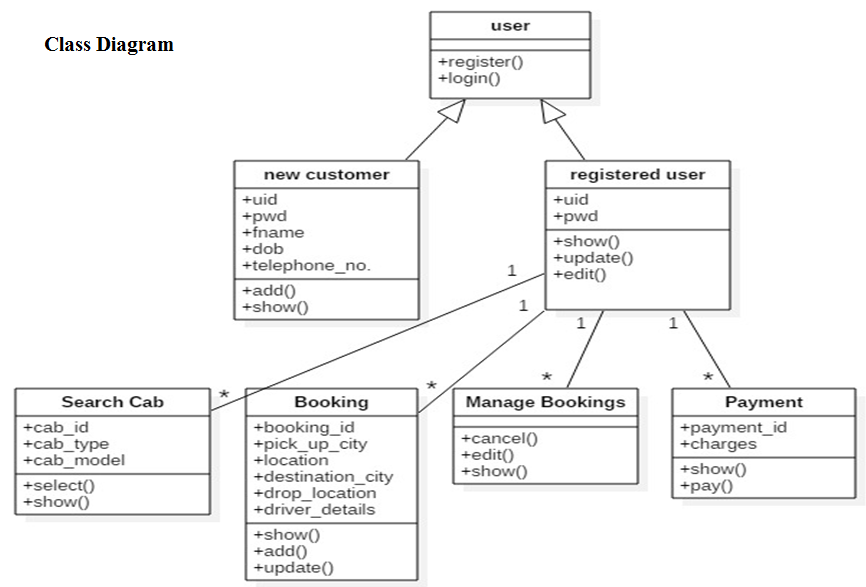
Online Cab Booking System Java Project

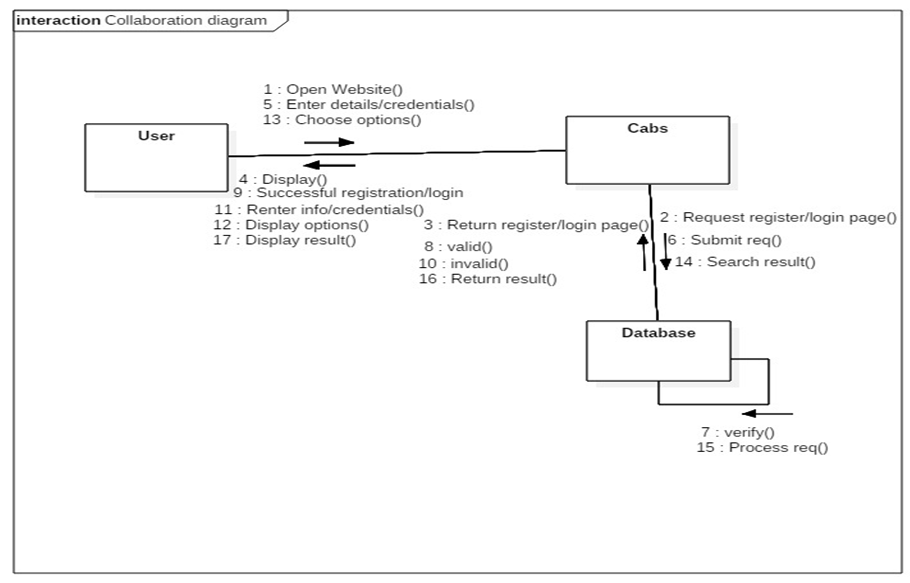
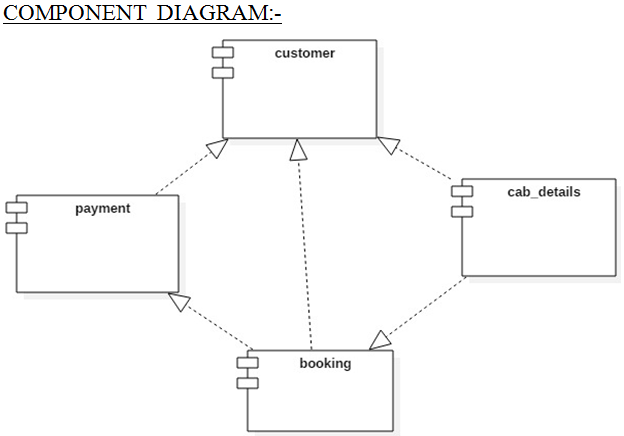
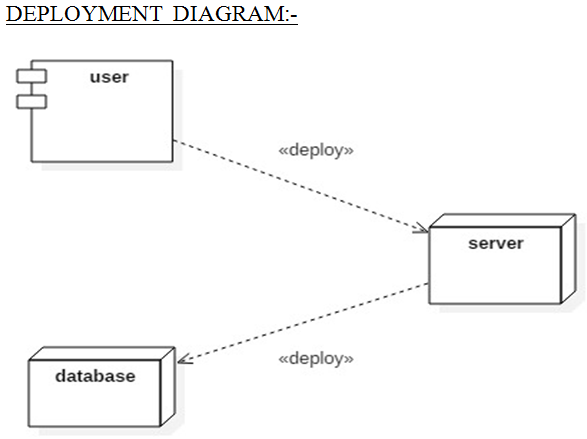
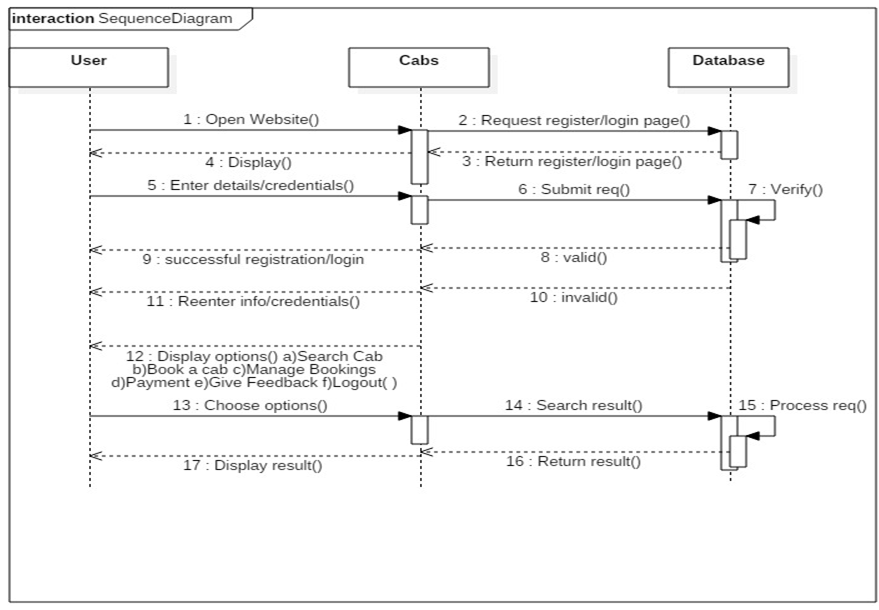
This Online Cab Booking project deals with an online system designed for booking cabs as per the requirements of the customers at their convenience.

The current system is manual and it is time-consuming. It is also cost-ineffective, and the average return is low and diminishing.

We give customer satisfaction the utmost priority and so give ample options to book cab by entering details like their journey date and time, origin, pick-up point, destination and the drop-off point they need to reach.

EXISTING SYSTEM:

Existing Online Cab Booking project system requires lots of physical and mental efforts as cabs are booked manually on call.
Many chances of human errors such as wrong entry of journey date, time and location are recorded manually in a register by an employee thereby increasing chances of misregistration.

No clear communication among drivers, passengers and the office leading to a denial of service.
Punctuality is not maintained and faster accessibility of cabs is not possible due to traffic and miscommunication issues.

Level of sharing of information is weak.

Customers suffer a lot in terms of comfort and safety.

Maintaining and assigning responsibilities to the cab drivers by the service providers becomes difficult in the long run.

PROPOSED SYSTEM

The proposed Online Cab Booking project system ensures that the users can book the cab as per their requirements by logging on to the website.

It allows users to book their cabs online, manage their bookings and cancel their bookings at any point of time.

The users will get notified about the driver and his mobile no. so as to communicate with him.
Regular updates are provided to the customer so that they are aware of their bookings, driver details, and booking status.

The user can also drop in their suggestions or queries in the feedback form.

ADVANTAGES

It enhances business processes since it makes use of internet technology to increase their profits.

The software acts as a 24/7 office due to its all-time availability.

It increases the efficiency of the system in offering quality services to its customers.

It’s user-friendly as they can book cabs from the comfort of their homes or offices.

It’s highly secure as it requires only a logged in person to book the cab which prevents misuse of their details by intruders.

EASY XML EDITOR VB.Net Project

PROJECT DESCRIPTION

The project “EASY XML EDITOR” is designed for the purpose of creating XML pages in an easy way.

The project contains the following menus:

File

New,   Open,

Save,   Save As,

Page Setup, Print

Exit

The new option is used to create a new file. During this option, if the current file is not saved, then a message box will appear to save the current file and the new file is created. It contains the XML file header information.

The open option is used to open the file. During this option, if the current file is not saved, then a message box will appear to save the current file and the selected file is opened.

The save option is used to save the file. During this option, if the current file is not saved, then a message box will appear to save the current file and is saved with the given name.

The save option is used to save the file. During this option, then a message box will appear to save the current file and is saved with the given name.

Edit

      • Cut,     Copy, Paste
      • Delete
      • Select All
      • Find,    Replace

This is same as normal operation.

      • Insert node

A node name is typed to insert the node.

View

  • Code

The default coding view is displayed.

  • Design

The output of the XML file is displayed in the browser.

  • Print Node

All the node details are listed out.

Format

  • Font
  • Background,   Foreground
  • Tag, Attribute, Values, Punctuation
  • Reset

Font, as well as color, can be selected for individual tokens. The reset option will set the colors back to the default.

Check

  • Reformat

This is used to change the color values if the tags are not well-formed.

  • Syntax Verification

All the error situations are identified here and reported. At any time, only one error is displayed.

EXISTING SYSTEM

In the existing system, editors such as notepad are used for XML file creation. Otherwise, we go for .Net environment, which is costlier. In addition, in that editors, the error checking may not be possible. Moreover, only during runtime, the error is displayed in the browser.

PROPOSED SYSTEM

To avoid the drawbacks of the existing system, an enhanced editor is developed. The editor is particularly designed for XML code generation. With less effort, a maximum of coding lines can be prepared. The new system is having the following advantages.

HARDWARE CONFIGURATION

The hardware used for the development of the project is: 

PROCESSOR:           Latest

RAM:           128 MD SD RAM

MONITOR:           15” COLOR

HARD DISK:           20 GB

CD DRIVE:           LG 52X

KEYBOARD:           STANDARD 102 KEYS

MOUSE:           3 BUTTONS

SOFTWARE CONFIGURATION:

The software used for the development of the project is:

OPERATING SYSTEM:           Latest OS

ENVIRONMENT:           Visual Studio

LANGUAGE:           Visual Basic.NET

Limitations :

  1. Tags with the different case may not be identified.
  2. Syntax checking is not present.
  3. XML data cannot be viewed in tabular form in some editors.
  4. Individual colors separation and fonts are not possible for tags, attributes, and values.

Advantages :

  1. Automatic Ending tags are provided.
  2. Case Sensitive tag checking is possible.
  3. Syntax checking and Error notification at design time.
  4. The output can be quickly viewed.
  5. Individual colors separation for tags, attributes and values are given.
  6. Colors as well as fonts can be selected for individual tokens as well as background and the data.
  7. XML Data can be viewed in tabular form so that easy interpretation of data is possible.
  8. Easy interpretation of coding.

Web E-Market for buy/sell luxury goods

• luxury goods such as a watch, jewelry, bag, How to make sure it is not a fake product.
• Buyer, Seller, Review, feedback, check, payment.

Overview of project:

Needs an E-Market website where sellers can keep their products.

The scope of this E-Market project is only luxury goods.(bags and watches) or any 2 products.

Firstly buyers and sellers should fill a registration form to get access to our website.

After registration, they can log in from next time. (both buyers and sellers)
You can once go through https://www.shopify.com/ this website.This is only for sellers in our case.
We should be able to identify a product is fake or not.

We want a similar E-Market website like Amazon but only related to luxury goods.

We are acting as a middleware.

We should be able to identify fake products, fake sellers, fake buyers.

Once a seller wants to keep this product on our website he needs to fill a registration form, it should have certain credentials by which we need to identify he is fake or not.After filling of the registration we the seller should only keep a product which is a luxury and not small products.

The products which are kept by the seller should also be not fake.

Seller has the freedom to edit the content posted by him on our website.

Buyer should be given assurance that the product is unique and not fake. Payment can be done through PayPal.

Refer about shipping from SRS.

In this website, we need categories for men and women and under that, we need only bags and watches and nothing else…when the order is placed it should redirect to the payment.

Under the registration with the seller, we need an agreement form which makes sure that the product which they place is not fake.

and needs a database to store all the details of the seller and the product.

Internship, Inplant Training & Real Time Project Training

About Our Internship & Inplant Training:

1000Projects IT Technologies (India) Pvt Ltd is providing an option for students to take part in Internship & In-Plant Training (IPT) by considering the demand for trained students under various software technologies. This program helps a student in gaining practical knowledge of both Hardware and software subjects. By being part of this program students can get exposure on real-time projects with complete support from experienced trainers for both theoretical and practical areas. If you are a student who is looking for practical exposure before job this program will be helpful. After training is completed we will provide a certificate of completion.

Why Internship &  Inplant Training:

Students who move from college to job need to have a trained knowledge and have practical exposure to get a clear idea about how companies work and what type of works will be handled in companies from documentation stage to project completion. This Internship &  Inplant training will polish students to gain this basic knowledge and give confidence while facing interviews, companies will welcome candidates who are familiar with this knowledge.

Why Internship &  Inplant Training Important:

Comparing the difference between with and without Internship &  Inplant training. Students with In-Plant training will face interview with practical exposure at each stage of real-time project development from documentation to testing and have interaction with real-time developers. Students without In-Plant training will face interview with just theoretical knowledge. This training helps students to face interview with confidence.

Methodology:

  • Our Internship & IPT concept is basically a practical knowledge based solution for students which will cover theoretical concepts required for project development and detailed analysis of project design and architecture with document preparation (SRS, SRD) at the initial stage.
  • At second stage group discussion with the project leader and team members on design and architecture and functionality.
  • In the third stage, we move to project development with the technically experienced team supporting you for project completion.
  • Away from this students will have interaction with real-time experts who will give a brief overview of different topics.
  • Duration: 6 Months
  • Course: Java, Android, MySQL
  • Location: Hyderabad

Software Requirements Specification for Student Management System

This is the Software Requirements Specification for Student Management System, Which is developed using .Net and SQL Server.

1: Introduction

1.1 Purpose

Our product is student management system gives all the services that must be provided to a student over the internet to find fee details provided by that administrator of the college.
This product contains each and every data regarding student, payment etc., personal details which can be updated by the student and viewed by the administrator. It provides the detailed information about the fee details and the location (place) of college. Our product is a subpart of university management system.

1.2 Intended Audience and Reading Suggestions

The intended audience for this Student Management System document is the internal guides of the organization where the team has developed the project. Further modifications and reviewing will be done by the organization and deliver a final version. The final version of this document is reviewed by the Internal Guides and Head of the Department of the college.

1.3 Project Scope

Our Student Management System product usage makes work done at the faster way the software is applicable to view the fee details provided by the administrator of the organization and student can edit his personal details which can be viewed by the administrator.

2: Overall Description

2.1 Product Perspective

Student Management System is capable of managing each and every data regarding student, payments etc. Student Management System helps us in managing in an extremely efficient way. This Student Management System works in an efficient manner.

We have two modules in this project. One is admin and other is the user. Admin can maintain the fee details of students and can generate the reports can export the details to excel. User module can edit their personal details and can view the fee details.

2.2 Product Features

  • Reduces the manual workload.
  • Complete details of the student can be stored and retrieved.
  • Admin can see all the student’s payment details and also export to excel sheets.
  • The student can view all his details, payment details and the location of the college.

2.3 Design and Implementation Constraints

The Student Management System software is designed in such a way that the user can easily interact with the screen because of GUI. The admin and the user are the two users who use the project. The admin inserts the details of the students and the fee details that the students have paid. User/ student can view his/her details, update if required and check the fee details.

Software requirements:

• Microsoft .Net framework 3.5
• Microsoft Visual Studio 2008
• Microsoft ASP.Net 3.5
• Microsoft C#.Net language
• Microsoft SQL Server 2005
• ADO.NET
• HTML

Hardware Requirements:

Processor: Intel Pentium 4 or more

Ram: 1 GB or more

Hard disk: 40 GB hard disk recommended for the primary partition.

2.5 User Documentation

In our user manual, we are going to keep the information regarding our product which can be understandable by a new person who is going to use it. If a new person is using it online help will be provided in that we are going to explain each and every step clearly by our product can be useful for any user.

3: System Features

This Student Management System project is divided into 2 modules

1. Administrator and
2. User

Module Description

Admin: Admin is a person whose responsibility is to maintain the database that contains each and every data regarding the all the student. Admin can add student details into the database, can be able to delete student details and can update the student fee details.
Admin has some other responsibilities they are
• Admin is can maintain the fee details of each and every student.
• Admin can generate the reports of the students and
• Admin can export the details to excel.

User: Here the user means the student. The responsibility of the student is to login into the site and can view his/her fee details and can able update his/her personal details if there is any wrong details are present. Whenever the student will register his/her name then the student will be given by one individual username and password. When the student will type the correct username and password then the will enter into another page. In that page, the student can select two options that are updated details and view details. A student can able to update his/her personal details and can be able to view the fee details but cannot update the fee details.

4: External Interface Requirements

Hardware Interfaces

We require LAN connection for interacting with the database and local computers for any help or any other requirement. We use TCP/IP protocol for communicating with local hosts. We also need a system with P4 processor; 1GB RAM and database memory.

Software Interfaces

We use MS.Net 3.5 and C#.Net 3.5 Programming language for writing the code for the project. ASP.Net 3.5 for creating the web pages, using GUI for login screens and interacting with the database. SQL server 2005 is used for creating the local and global database (server). Microsoft Visual Studio 2008 IDE for writings the programs. Operating system: Windows XP or higher version.

Communications Interfaces

The communications functions required by this product are LAN connection within the whole company so that the Admin, employee, and customer can interact with each other. We use TCP/IP protocol.