
Travel Management System Project in C#.Net

Travel Management System Project Offers & Deals:

This Project was developed in C#.Net & SQL Server 2000, By using this project we can book airways, train, bus tickets. Mainly this project can be used in all traveling Agencies.

Customers will be able to browse through available travel deals, discounts and offers and corresponding pricing.

This application provides access to lucrative travel deals and offers and gives pricing information for each of them.

Accumulate Mileage:

This module allows a customer to accumulate mileage that he/she has traveled.

By accumulating mileage, the users have an incentive to fly more. This promotes business on the site and allows the site to compete

with other similar sites that offer mileage accumulation

Redeem Mileage:

This module allows a customer to purchase a plane ticket using the mileages accumulated. 50000 miles can be redeemed for a domestic flight and 75000 for an international flight.

The customer has been given the ability to accumulate mileage as the book flights. They must have a way of spending those miles.

This page will present the controlled environment that is necessary for this type of transaction

Account Update:

The update account information function shall give customers access to edit their information.  They can modify name, mailing address, billing address, credit card information, and login password.

This module offers convenience to the customers by allowing changes to account information immediately.

View Booking Status:

The view booking status function shall allow customers to login into their personal website account to check status of booked flight and hotels

This offers convenience to users so they can find out necessary status information to help them prepare for their travel.

Download Travel Management System Project in C#.Net
Airline Reservation System Java Project

The modes of operations for the user are secured and unsecured.  
All activities except for making online payments and customer account registration will be in unsecured mode. Making payments and user account registration will be in secure mode. Secure mode means the information entered by user will be encrypted before transported about in the website system. For security, in addition to secure mode, if the user is inactive for 10 minutes the session will automatically time out.  

The database will be backed up every night at 1 am central time.  If any primary server fails, the processes will fail over to the secondary server which serves as a back up server.

Airline Reservation System Java Project Site Adaptation Requirements

The site adaptation requirements are as follows:
•    Internet access
•    Computer System
•    Web browser

Product Functions
The following list of function descriptions explains the major features of the Texas Travel Website.

User Registration

The registration function shall allow users to create personal accounts.  To set up an account the users will provide their name, mailing address, email address, credit card information, username, and password.  
This offers security by allowing customers to create a secured account with username and password.   This also offers convenience so the customer only has to enter the information listed above once and then it is stored in the account.  

User  Login

The account login function shall allow customers to enter their username and password.  Once the username and password are verified, customers will be able to access history of bookings made, make new bookings, and update their account information.
This provides security to the users by setting up an account that is password protected.  

Flight Search

Customers will be able to search through available flight schedules and pricing. The flight search function shall offer users the ability to search for flights by supplying desired departure and destination airport information, departure and arrival date information, information on number of adults and children embarking on the journey, and desired price range. Once flights that meet the user’s specifications are located, their schedule and pricing information (departure/arrival date and time, departure/arrival airport, and prices) will be displayed to the user for the user to select the actual departure/arrival flight he/she desires to go with.
This offers easy access to a number of available flights and gives pricing information for each of them.

Download Airline Reservation System Java Project

Online Airline Reservation System Project in Java

Overall Description of Online Airline Reservation System Project in Java

Project Perspective:

The Internet is used to interface between the Customer and Company representatives and the Online Airline Reservation System.

Customers with access to the Internet will be able to use the application for booking flights tickets and hotel rooms, and to buy travel

deals and offers.  The Online Airline Reservation System will collect information from customers unencrypted, except for the point

of purchases and user account registration. Online purchases and user account registration information will be collected encrypted

and the customer will be provided immediately with success or failure status of such operations.

Airline Reservation System Interfaces:

The following internal systems and external systems will allow the Online Airline Reservation System to communicate with users:

External System:
•    Internet – Will provide the bridge for the customer to the Airline Reservation System website.
•    Customer – Will send requests over the Internet to the Airline Reservation System website.

Internal System:
•    Web server – Will serve static web pages ( html, java script) to users as well as dynamic web pages (PHP, JSP, ASP)

built by gathering corresponding page information from the flight schedule and cost, hotel availability and cost, deals and offers

availability and cost, user accounts, and feedback database server.
•    Database server – Will store all flight schedule and pricing, hotel availability and pricing, deals and offers availability and

pricing, user accounts, and feedback information.

Hardware Specifications:

Specification of the hardware that is used in the system interface:
•    Database servers
o    Server will run on a platform that has proven to be reliable.
o    Fully supported by administrators
o    Provides powerful database searches where 1000 different users can make bookings and purchases simultaneously.
•    Web servers
o    A platform fully supported by the administrators.
o    Powerful and flexible for everyday need for change, and supports 10000 different uses hitting servers simultaneously.

Software Specifications:

Software that will run on the web and database servers in order to establish a communication between the servers:
•    Database servers: Unix (system V) platform
•    Web servers: Windows 2000 Advanced Server platform

Communications Interfaces:

The following Protocols are valid to communicate to the website:
•    TCP/IP Protocol
•    HTTP Protocol
•    HTTPS Secure Protocol

Memory Constraints:

The characteristics of the memory constraints on the Web Server are as follows:
•    160 GB of storage
•    2 GB of memory (RAM)

The characteristics of the memory constraints on the Database Server are as follows:
•    500 GB of storage
•    2 GB of memory (RAM)

Download Online Airline Reservation System Project in Java

Airline Reservation System Project Report

This Airline Reservation System Project Report Document uses the following Abbreviations:

Airline Reservation System:    The name of the Final Year Project.
Client:This refers to Airline Reservation System Travel, the company that requested the Airline Reservation System development.
Client Representative:A representative of Airways Travel. Client Representatives will use the website for administrative purposes.
Developer: The company to design and develop the Airline Reservation System.
Customer:    Will refer specifically to anyone that will use the website for booking flights or hotels or both. But we will also use the term ‘user’ for client representatives that will use the website for administrative purposes. We will disambiguate between the external users that use the website for booking from client representatives as necessary.
VeriSign:A Company used by Developer to provide secure online transactions.

Software & Hardware Requirements:

Front End: HTML, Java Script, VB.Net.

Tools: Visual Studio 2005.

Database: MS Access.

Download Airline Reservation System Final Year VB Project Report

Airline Reservation System Project

The purpose of this Software Requirements Specifications (SRS) is to fully document the specifications and requirements for the Airline Reservation System Project, The audience of the Software Requirements Specifications will be the client, Airways Travel (referred to as “client” in this SRS), who wants the software built and the technical Engineers developing the software.

This Airline Reservation System Project will provide the user with the following functions:

I.    Flight Booking System: Paying online for purchase of airline tickets. Customer will be able to choose from a number of available airlines.
II.    Hotel Booking System: Paying online for hotel reservations. Customer will be able to choose from a number of available hotels.
III.    User Website Accounts System: Creating and maintaining an online account on the website, in order to see status and updates on booked flights and hotels.
IV.    Mileage Management System: Accumulating and Redeeming Mileage.
V.    Travel Deals and Offers Purchase System: Paying online for purchase of travel deals and offers.
VI.    Feedback Management System: Submitting comments and website satisfaction rating feedback.

The Airline Reservation System Project will provide the client with the following administrative and auditing functions:

I.    Flights Schedule and Pricing Update: Feeding the Airline Reservation System system with updates of flights schedule and pricing.
II.    Hotels Availability and Pricing Update: Feeding the Airline Reservation System system with updates of hotels availability and pricing.
III.    Travel Deals and Offers Availability and Pricing Update: Feeding the Airline Reservation System system with updates of travel deals and offers.

IV.    Feedback Monitoring and Response: Accessing users’ comments and website satisfaction ratings feedback. And responding to users as necessary.
V.    Income Audit: Viewing purchases summary.

We will not deal with transportation from airport to hotel, car hires, cruises, and any other travel concerns not specifically mentioned above.

The Airline Reservation System will provide easy and straight forward flights and hotels booking for the users, and corresponding administrative facilities for the client.  

Geo Spatial Info Tech Solutions A Asp.Net Project

Geo Spatial Info Tech Solutions A Asp.Net Project  main idea is to provide automated application for government offices for providing fast and secured service to citizens. This application is developed in seven modules where each module has different functionality.

       Existing System:

          The existing system is a manual system.  Here the employees needs to save the information in the form of excel sheets or Disk Drives. There is no sharing is possible if the data is in the form of paper or Disk drives. The manual system gives us very less security for saving data; some data may be lost due to  is management. It’s a limited system and fewer users friendly. Searching of particular information is very critical it takes lot of time.

        Proposed System:

The development of this new system contains the following activities, which try to automate the entire process keeping in the view of database integration approach. User Friendliness is provided in the application with various controls provided by system Rich User Interface. The system makes the overall project management much easier and flexible.  It can be accessed over the Intranet. The employee information can be stored in centralized database which can be maintained by the system

            Modules: 

  1. Administrator
  2. Citizen’s
  3. Web Services
  4. Citizen’s Bill Information
  5. Search
  6. Reports

download  Geo Spatial Info Tech Solutions A Asp.Net Project.

Airways Travel Website Final Year Project

 The objective of this Airways Travel Website project is to create and implement a website for Airways Travel Companies. The website is intended for use by any air travel customer (referred to as “user” in this Software Requirements Specifications (SRS)), wishing to book a flight or hotel, or, both flight and hotel.

Table of Contents

1.         Introduction to the project

1.1         Purpose of the project

1.2         Scope of the project

1.3         Definitions, Acronyms, and Abbreviations

1.4         References to the project

1.5         Overview of the project

2.         Overall Description about the Airways system

2.1         Product Perspective

2.1.1     System Interfaces of the project

2.1.2     User Interfaces for the application

2.1.3     Hardware Interfaces & Requirements

2.1.4     Software Interfaces & Requirements

2.1.5     Communications Interfaces

2.1.6     Memory Constraints

2.1.7     Operations Required

2.1.8     Site Adaptation Requirements

2.1.9     Product Functions

2.1.10  User  Registration System

2.1.11  User Login System

2.1.12  Flight Search System

2.1.13  Book Hotel Module

2.1.14  Flight + Hotel Search Module

2.1.15  Make Payment Module

2.1.16  Travel Deals and Offers Search Module

2.1.17  Accumulate Mileage Module

2.1.18  Redeem Mileage Module

2.1.19  Feedback Module

2.1.20  Update User Account Information Module

2.1.21  View Booking Status Module

2.1.22  User Account Logout Module

2.1.23  Help Module

2.2         User Characteristics Module

2.3         Constraints Module

2.4         Assumptions and Dependencies Module

2.5         Apportioning of Requirements Module

  3.       Specific Requirements

3.1       External Interface Requirements

            3.1.1   User Interfaces                

3.2       Functional Requirements

            3.2.1   Stimulus: Click “Login” Button Function

            3.2.2   Stimulus: Click “Register” Button Function

            3.2.3   Stimulus: Click “Search Flights” Button Function

            3.2.4   Stimulus: Click “Book Flight” Button Function

            3.2.5   Stimulus: Click “Book Hotel” Button Function

            3.2.6   Stimulus: Click “Book Flight + Hotel” Button Function

            3.2.7   Stimulus: Click “Make Payment” Button Function

            3.2.8   Stimulus: Click “Cancel Flight” Button Function

            3.2.9   Stimulus: Click “Flight Status” Button Function

            3.2.10 Stimulus: Click “Accumulate Mileage” Button Function

            3.2.11 Stimulus: Click “Redeem Mileage” Button Function

            3.2.12 Stimulus: Click “Finding Deals” Button Function

            3.2.13 Stimulus: Click “Feedback” Button Function

            3.2.14 Stimulus: Click “Logout” Button Function

            3.2.15 Stimulus: Click “Account Update” Button Function

            3.2.16 Stimulus: Click “Contact Us” Button Function

            3.2.17 Stimulus: Click “Help” Button Function

  1. 4.    Non-Functional Requirements

4.1       Performance Requirements

4.2       Logical Database Requirements

                        4.2.1   Anticipated Frequency of Function Used by Users

            4.2.2   Data Entities and their Relationships

4.3       Design Constraints

                        4.3.1   Reliability Constraints

            4.3.2   Availability

                        4.3.3   Security

                        4.3.4   Maintainability

Interactive Correction and Recommendation for Computer Language Learning and Training

Interactive Correction and Recommendation for Computer Language Learning and Training has the below classification modules:

           1. Authentication module

        2. Theoretical study module

        3. Practical implementation module

        4. Visual study module

       5. Recommendation module

1. Authentication module:-

In this module we need to check the authentication weather the concern person is authorized or not. For that purpose we put user id & password to check the validity. We put the authentication related data on to the database when user want to log in it check with database if matching takes place then only the concern person will use the functionality.

2. Theoretical study module

In this module, user needs to study the text document. For that purpose user must be an authenticated one. We have no of documents based on sqlserver. User need to study required documents for implements the ideas as well as to generate some knowledge regarding the database software.

3. Practical implementation module

In this module use need to implement the ideas generated by reading the theory. For that purpose we need the concern software in general. Here itself we programmatically call the concern software so that user can practice & implement the theory.

4. Visual study module

In this module user can visualize some video as well as user can hear some audio file so that he can get some more knowledge regarding sql server.

5. Recommendation module

Here itself some artificial intelligence will added so at the time of practice if some error occur some recommendation comes into picture ,how to rectify that particular mistake.

Hardware Specification:

Processor                  :  PENTIUM IV

Ram  Size                      : 1 GB

Hard disk drive         : 40GB

Software Specification:

Front End                            :  vb.net

OS            :  Windows Vista

Server                              : Sql Server 2005

Final Year Project on Account Tracking System

Abstract:

      The Account Tracking  System validates the user details and checks for the access permissions. The access to the various modules of the System is provided based on the privileges of the users.

Scope:     

       The following is the scope of this project. The following modules will be developed as part of the final product to be delivered to the organization. The detailed scope for the below mentioned modules will be provided in software requirements specification document.

            Basically this project consists of four modules.

 1.      Project Tracking.

2.      Resource Tracking.

3.      Personal Tracking.

4.      Task Tracking. 

Introduction To Account Tracking  System:

The Project Information consists of all the information about the particular project that includes Project name, duration, cost, start date, end date etc.,.The operations are performed in the similar way  as the User information operation does. Here projected is the primary key.

Project-Resource will have ability to enter tasks related to the project. Tasks include task name, duration, start date and end date .Privileges on the tasks create, update and delete for the current week. 

New Project

Task Creation will be consisting of the task name, resource-id, create date, end date, project id and task description. For a  particular Resource-id and its associated Project-id  a task name ,task id ,creation date, end date and its description will be entered in the Resource Task Creation form to create a new task. Which will be entered in the task table. In this Task Creation we are not considering the Status field, because the Resource (him/herself) is creating a new task after completion of the Task assigned by the PM-TL. 

View/Modify Project

In the Resource Task Updating the Project-Resource will be updating the tasks in the update task form by  hyper linking the loginid. which will be directed to the Updating form that doesn’t contain the Task id Depending up on the taskid  the updating will be done to the remaining fields which are in the form. After submitting the form, the updating will be reflected in the task table. 

Resource Tracking

In the Resource Task Updating the Project-Resource will be updating the tasks in the update task form by hyper linking the loginid. Which will be directed to the Updating form that doesn’t contain the Task id depending up on the taskid the updating will be done to the remaining fields which are in the form. After submitting the form, the updating will be reflected in the task table.

In the Resource change password operation only the resource that entered can change the old password with a new password to provide more security for the information .The user is provided with a confirmation password field to confirm the new password field. If the password field is not confirmed by the user then the password will not be changed a warning will be displayed If the password field is confirmed the user can login with the new password.

Resource Task Creation will be consisting of the task name, resource-id, create date, end date, project id and task description. For a  particular Resource-id and its associated Project-id  a task name ,task id ,creation date, end date and its description will be entered in the Resource Task Creation form to create a new task. Which will be entered in the task table. In this Task Creation we are not considering the Status field, because the Resource (him/herself) is creating a new task after completion of the Task assigned by the PM-TL. 

Time  Tracking  

 The Task Information consists of the tasks assigned to the user and  it consists of all the information about the user and the project. The Assigning task consists the  project information and resource information .After selecting the particular project  it displays the associated resources  of that project then we select one of the resource  and assign the task to that resource after giving the task description . 

Personal Tracking

            This subsystem enables the project resource to enter the task of the project. The entire project task includes the task name, task duration, task start date, task end date.

Enhanced Greedy Routing with Anti-Void Traversal for Wireless Sensor Networks

SOFTWARE AND HARDWARE REQUIREMENTS

 Once the destination file and the destination is selected now its time to select the file which is to be transmitted.

  1. Once the open button is clicked, a file dialog box is displayed to select the file which is to be transmitted.
  2. Now the selected file is displayed.
  3. Finally the “TRANSFER” button is clicked.
  4. We can view the path i.e., through which nodes the data is being transmitted.
  5. We can notice that there is no packet loss in the entire data transmission.

EXPLANATION

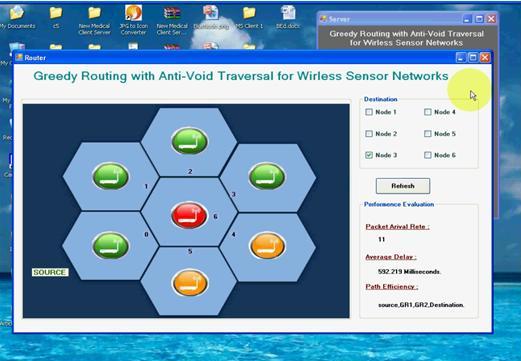
  1. Here we can view the simulation of how the nodes are routed in a network.
  2. The sender have to select the destination node in order to transfer the data.
  3. In this simulation the error node (the node where the void problem occurs) is also selected.

Here we can view the Packet Arrival Rate, Average delay and Path efficiency

Enhanced Greedy Routing with Anti-Void Traversal for Wireless Sensor Networks Software Requirements:

Operating System       : Windows XP/Vista.

Front End                    : Asp .Net 2.0.

Programming Language       : Visual C# .Net

Hardware Requirements:

System Architecture        : Pentium P IV

Hard Disk Size                    : 80 GB.

Ram Size                               : 512 MB.

Download Enhanced Greedy Routing with Anti-Void Traversal for Wireless Sensor Networks Project