Web Based Time Tracking System Project

              The web based time tracking system Final Year Project will automate the activities of the employees working in various departments of 1000 Projects  Soft Solutions private Limited. The project will implement a system, which will be plugged into the “1000Projects” network of the 1000 Projects Soft Solutions. The main tasks of the proposed system are:

  •     To register the employee targets and detailed working hours of particular employee.
  •     To register the employee job responsibilities.
  •     To register the work done by the individual employee.
  •     To verify the achievements made by the individual one.
  •     To verify the deviations made.
  •     To perform the rating of the employee in particular organization.

To generate reports for an individual employee:

   a) Comparative achievements and deviations report.

   b) Comparative performance grade wise report.

   c) Achievement/target report employee wise.

   d) Rejections and rework report.

   e) Responsibilities/ achievements report.

   f) Performance indicator report.

The inputs to the system are from varied quarters. The system has three types of users. They are the

  • The employee
  • The administrator
  • The project manager
  • The organization

The employee is the one who works in the organization he enters the office at starting time and he gives his work sheets to an administrator at the time of leaving and in that work sheet he should give accountability to every minute .

The Administrator maintains the employee information, operates the database, sets, and he can add, update, and delete the employee details. And he checks the work sheet given by the employee rechecks it and prepares reports and submits to the project manager.

The project manager verifies the reports and decides weather a particular employee is working properly on project and the time taken by the employee to finish the task then he can correct the employee when there are any corrections in completing the task.

The organization is the place where all the employees work and finally it determines the employee efficiency.  

Motivation                

Presently in the existing system, normally in a company, employees enter the office at different times. To administer the timings of the employees, we write the entry time and exit time of the employees in a register, which had some problems such as, a person can cross the door multiple times which cannot be monitored, and not only that, this existing system cannot absolutely tell the authorities the individual working hours and capability of an employee.                  

The proposed system will help the administrator or the manager to reduce its time spent on various data maintenance tasks, reduce time spent in report generation, and help it in providing better and user friendly services to its employees.

The important features of functionality of the proposed system are listed below

  • The proposed system will give the significant amount of time and effort invested by the employees time to time, by helping the management to know about their employee’s capability.
  • The System also provides various metrics to analyze the performances of the employees to the department.
  • It helps the management to dynamically add questions to the database.
    • It provides a mechanism through which the administrator can save the existing database to   file.
    • The employee can immediately know his capacity and the working hours weekly once or when the task allotted to him is finished.
    • The project leader or the management generates desired reports.
      • The system will be plugged into the network of spoorti software solutions. This means that the system will be available to the administrator for use at any time, anywhere in the company.                  

         The system will be developed in a modular fashion and will be well documented. This facilitates new modules and functionality to be added without much unwarranted effort and troubles.

Problem definition

 In the manual system the staff productivity and the performance they exhibit are maintained in the records. In the organizations with many departments, each department having many employees working, it is difficult if the data regarding the employee performance is maintained manually. There may be a lot of time delay in order to retrieve any information regarding the employee performance. If the data is maintained in the records the comparisons between the employees regarding their achievements may become difficult. The duplication of the data may be seen since the data is maintained in many books for each department. Since the data has to be maintained in the registers the organization has to maintain many records.

The reports have to be generated manually and the collection of the data for the reports is a difficult process. The enquiry for a certain data regarding a particular employee is difficult, as they have to refer to the books and judge.

              If the information is maintained using a computer the services may improve. The data can be dealt more effectively and efficiently. The time taken to retrieve any data regarding the employee performance is easy using the system. The evaluation of the employee is easy by his rating stored in the system. The comparisons of the employees at the same level in each department are easy. At any given time we can also get the pending activities. The organization can evaluate the department wise performance in a better way. Since the reports are generated periodically the expertise of each employee can be judged.                   

               For the development of an organization it sees that the employees are working properly and completing the tasks properly or not and how much time they are spending on a particular project to determine the efficiency of an employee.                  

               The 1000 Projects Software Solutions recognized the need to create a system, which is more efficient than the current one. It needed a system, which will help it in its commitment to select value added and efficient employees for the company. The company is also currently in the process of acquiring a more efficient employees. This project is also aimed at helping spoorti software solutions the rating by automating its activities, which is an important requirement towards this end.                  

 Keeping the above points in view the management decided to automate all its activities and select the best employees in a better way. It also helps in keeping tasks for the department, which could now rededicate itself to providing better services and value addition to the company.

Objective of a Project

                 1000 Projects  Software Solutions requires an efficient system, which will record the activities of employees automatically. The proposed system will help the administrator or the manager to reduce its time spent on various data maintenance tasks, reduce time spent in report generation, and help it in providing better and user friendly services to its employees.

The Objectives:

  1. To register the employee targets and detailed working hours of a particular employee.
  2. To register the employee job responsibilities.
  3. To register the work done by the individual employee.
  4. To verify the achievements made by the individual one.
  5. To verify the deviations made.
  6. To perform the rating of the employee in a particular organization.
  7. To generate reports for an individual employee:

          a) Comparative achievements and deviations report.

          b) Comparative performance grade wise report.

          c) Achievement/target report employee wise.

d)   Rejections and rework report.

          e) Responsibilities/ achievements report.

f) Performance indicator report.

Limitations of a Project

                        This Computer Science Mini Project has no limitations because, this project is developed in a java platform (jsp Technology) and it is platform independent. The major limitation of the project is now it is running inside the company and employees can access this application in side the work area of the company. We need to make this Application in the Web so that employees can access the forms from anywhere through Internet.
Investigation and Analysis of ‘WAN’ Technology of a Multinational Organisation project

                 The Investigation and Analysis of ‘WAN’ Technology of a Multinational Organisation project deals with the WIDE AREA NETWORK technology in Networking. In this application a Multi National Company has been considered. This company has got the Head office at Australia and branch offices at Chicago in United States and at Hyderabad in India. The administration monitors the branch offices from the Head office Australia connected through Internet service Provider ‘ISP’ using routers. The branch offices have a number of systems within the organisation which are interconnected by using hub or switch. The importance of the project is that due to globalisation the world has become small. This leads to the need for new technology to be used to accomplish the requirements of having interaction across the world. One of such things is video conferencing. This helps in easy interaction and doing things across the nations irrespective of their presence at the site. This saves a lot of time and money.

OBJECTIVES:-

                 The main objective of the Engineering project is to analyze the performance of the WIDE AREA NETWORK by considering different topologies and network models. This project investigates the strength of the network structure and its functionality by changing different attributes and observing the obtained results. This also suggests the enhancements in the network structure and modelling as well as the attributes of the network scenarios so that the traffic flow, packets size everything would be in perfect way to give good results.

DEVELOPMENT:-

                 The objectives of the project can be achieved by planning what to do to model the network scenarios, perform research on the subject by referring to the materials, edit the attributes of the network, performing simulation considering different scenarios, obtaining the results, taking comparison of the results for different cases e.t.c. Thus this is the process of development of the project.

RESOURCES:-

               The software required for this project is OPNET.

               The hardware being a system connected to net connection and having this software to simulate the scenarios to obtain the results.

SCHEDULE:-

             A well planned project is a perfect executed project. Hence scheduling the tasks is important for the project to give the results in a desired way.

The schedule of this Final Year project involves planning, research, implementation, evaluation, review and documentation.

GANTT CHARTS:-

                  The schedule of a project can be well represented in the form of GANNT CHART.

Inventory Management System Project in Java

The Inventory Management System Project is developed in Java as used only by the manager. But we are not providing the User interface design for point of sales, so the further enhancement is to design the User interface design for POS device.

The system can be effectively utilized by the customer, but the information should be updated in the database via SQL command set, so it might be a back drop, which can further be enhanced.

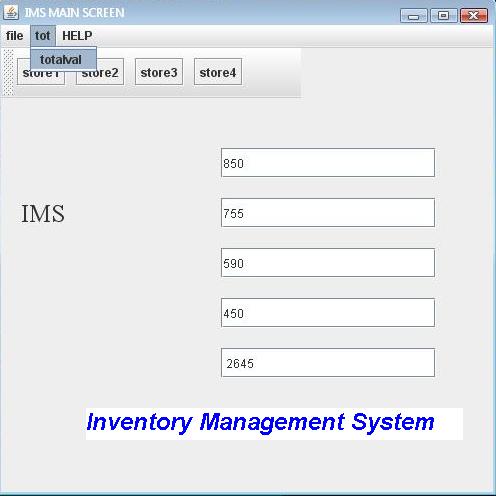
  The modules into which the Inventory Management System Project is divided are as follows:

Inventory Management System

 Manager.
Automatic data calculation.
Authentication module.
Help.

 Manager module:

 The manager, after got authenticated can interact with the system so that the inventory information at all the stores can be gathered.

 The manager can also view the information that is provided by the point of sale devices to him from the HELP module.

Automatic data calculation:

The automatic data calculation module is used for calculating the inventory information at all stores, where the inventory is stored. The information about the inventory is calculated automatically.

Also See:

Inventory Management System Project

Authentication module:

The authentication module is used to authenticate the manager, until and unless the manager is authenticated, he can’t use the system.

Help module:

The help module is used for helping the manager to show when and where the inventory information is updated.

Download Inventory Management System Project in Java.

Task Management System Project in ASP Net

Task Management System is a web based application was developed in ASP.Net which takes care of the employees within an organization. It takes care of the activities that are scheduled and helps in the management of daily tasks of the employees in the organization.

In a company where the hierarchy of employees spans over thousand managing the work with them is a difficult job. And in an environment where number of jobs is done simultaneously picking the right person for the job is also difficult task, as you are not aware of their availability.

This application is designed for such an environment where the work is divided into group of employees and during the course of division the employees are selected to be part of the work in hand.

Task management system project is also implemented in .Net Technologies using SQL database.

The application can now be run.  One user has already been created, the administrator user.  This user

has a password of admin and a single task list – General Task List.

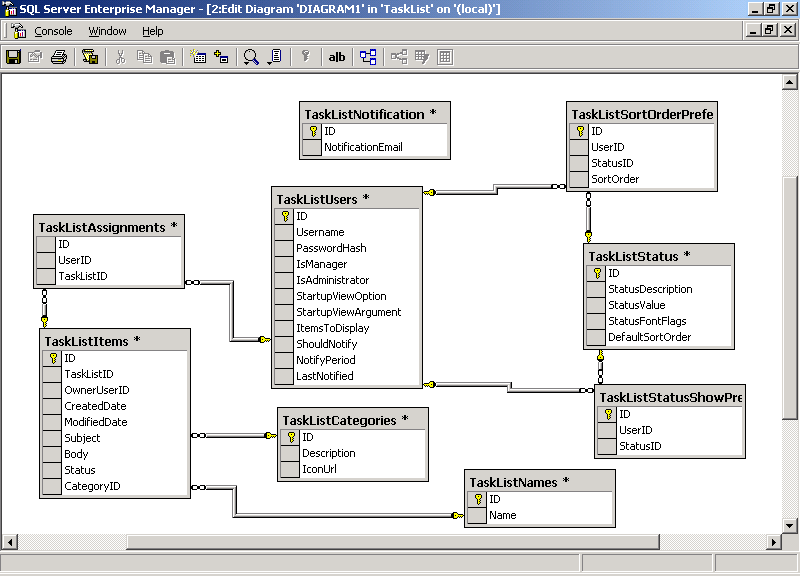
These are the below Database tables for the Task Management System:

 Task list Assignments

S.No         Column Name  Data Type    Description
  1   ID bigInt(8)
  2 UserId BigInt(8)
  3 TaskListId BigInt(8)

 Task List Categories 

S.No         Column Name  Data Type    Description
  1 ID Binint(8)
  2 Description Varchar(50)
  3 IconUrl Varchar(500)

  Task List Items 

S.No         Column Name  Data Type    Description
  1   ID  BigInt(9)
  2 TasklistID Bigint(9)
  3 OwnerUserId Bigint(9)
  4 CreatedDate Datetime
  5 ModifiedDate Datetime
  6 Subject Varchar(255) Allow Null
  7 Body Varchar(5000) Allow Null
  8 Status Int(4)
  9 CategoryID BigInt(8) Allow Null

 Task List Names 

S.No         Column Name  Data Type    Description
  1   ID  BigInt(9)
  2 Name Varchar(255)

 Task List Notifications: 

S.No         Column Name  Data Type    Description
  1   ID Bigint(9)
  2 NotificationEmail Varchar(5000)

 Task list Sort Order Preferences 

S.No         Column Name  Data Type    Description
  1   ID Bigint(9)
  2 UserId Bigint(9)
  3 StatusID BigInt(9)
  4 SortOrder Int(4)

 Task list Status 

S.No         Column Name  Data Type    Description
  1   ID Bigint(9)
  2 Status Description Varchar(50)
  3 StatusValue Int(4)
  4 StatusFontFlag Varchar(500)
  5 DefaultSortOrder Int(4)

 Task list Show Preferences 

S.No         Column Name  Data Type    Description
  1   ID Bigint(9)
  2 UserId Bigint(9)
  3 StatusID BigInt(9)

 Task list Users 

S.No         Column Name  Data Type    Description
  1   ID Bigint(9)
  2 UserName Varchar(50)
  3 PasswordHash Varchar(50)
 4 IsManager Bit
 5 IsAdministrator Bit
 6 StartupViewOption Varchar(20)
 7 StartupViewArgument Bigint(8)
 8 ItemstoDisplay Varchar(20)
 9 ShouldNotify Bit
10 Notify Period Int (4)
11 LastNotified Datetime

ER Diagram:

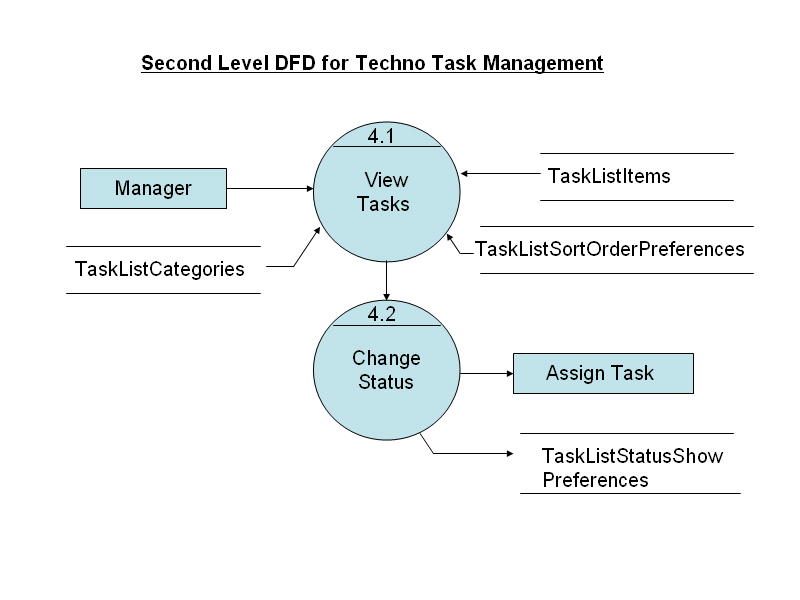
Data Flow Diagram:

FUTURE SCOPE OF PROJECT

The application is capable of managing only tasks and their respective allotments where as there is not scope of communication between two groups or between the employees other than mail notification. The information between them is still in terms of documents. The application can improve in these areas of communication and document preservation as well as client maintenance.

The application can be converted into a Mobile based using ASP.net with which the deployment of application will be done only on enterprises server and is accessible to all other departments of the organization. The current application is confined to only one enterprise.

Output Screens of the project below:

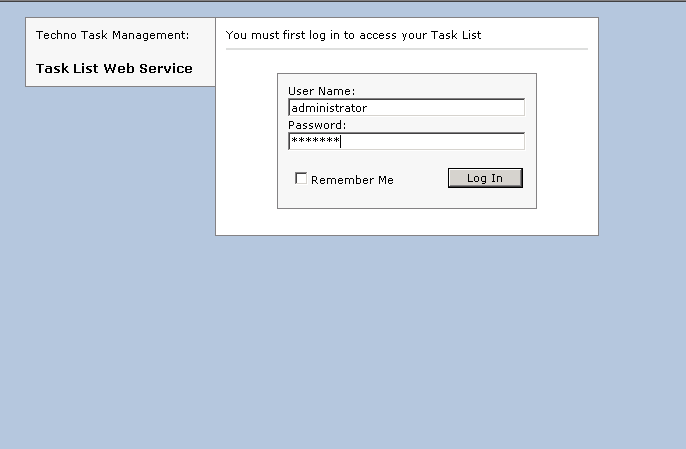
  • Administrator Login:
  • Task List Display:
  • Creating New task:
  • Newly Created Task:
  • Preferences Settings:
  • Task List Properties:
  • User Assignments:
  • Creating New Task List:
  • Renaming the Existing Tasklist:
  • User Configuration:
  • Changing UserName:
  • Changing Password:
  • Changing Permissions:
  • Delete Confirmation:
  • Creating New User:
  • Configuring Application States:
  • Notification Area:
  • Viewing the Tasks:
  • Moving Task from one category to other:
  • Changing the state of Task:
  • Task list with Changed State:
  • User with unassigned Task list:

Download Task Management System Project in ASP Net

Project on Airline Reservation System

Non-Functional Requirements of Airline Reservation System:

Performance Requirements:

The performance requirements are as follows:

  • System login/logout and all transactions shall take  less than 10 seconds.
  • Searches shall return results within 5-10 seconds.
  • All Bookings shall be processed within 5-10 seconds.
  • Application shall support 500 users at a time.

Logical Database Requirements:

There are various functions in the website that require the interface of a database. The three Tables below show the different types of information used by various functions, their frequencies of use, and the data entities and their relationships, respectively.

Expected Frequency of Function Used by Users

The figure below illustrates the anticipated number of users utilizing functions during peak time.                                             

Function Frequency of Use
Registration Function 100 –150 users
Account login Function 200 – 300 users
Search (Schedule & Status) 250 – 300 users
Update account info   50 – 100 users
Book Flight & Reserve   50 – 100 users

 Data Entities and their Relationships:

The data entities and the relationships table describe the attributes of the types of data that shall be sent to the database.


Table Names


Column Lengths

City Information

 – Airport Code

– Airport Name

– City Name

– State

– Zip code

10 characters

20 characters

20 characters

15 characters

10 digits

Flight Bookings

Book Flight ID

– Flyer Number

– Flight Schedule ID

– No of Seats     

10 digits

15 characters

10 digits

10 digits

Hotel BookingHotel name-Hotel ID

-Number of persons

20 characters

2 digits

2 digits


Flight Information

 – Flight Number

– Flight Name

– No of seats

 8 characters

20 characters

4 digits


Flight Schedules

 Flight Number

– Flight Schedule ID

– Flight Departing Time

– Flight Arrival Time

– Origin

– Destination

– Flight Status

– Cost

– Reserve Seats

– Booked seats

– Left Seats

– No  of miles


10 digits

20 characters

Date time

Date time

15 characters

15 characters

15 characters

5 digits

4 digits

4 digits

4 digits

6 digits

User Information

– Username

– Password

– Address

– Zip Code

– E-mail

– Phone Number


15 characters

8 characters

25 characters

10 digits

15 characters

13 digits

Design Constraints

The Airline Reservation System shall conform to the following design constraints:

  • Able to support all operating platforms like Windows, Linux, Mac etc.
  • System logs out user after a ten minute inactivity period. 
  • System supports all web browsers (i.e. both graphical and non-graphical like Mozilla, IE, Google Chrome).

Reliability:

         The system will have redundant hardware. In the event of a website outage, support personnel will respond within 30 minutes. In the event of a less severe problem support personnel will respond within 3 hours.                                                                              

Availability:

Airline Website application will be available to Customers with access to the Internet.

 Security:

Customers will be able to access only their own personal information and not that of other Customers. Payments will be handled through a server to ensure the protection of user’s credit card and personal information.

Maintainability:

This product shall be maintained by an administrator in case of any defect. In addition, any update or change that is made will be changed on server-side computers without any patches required by the Customer.

Airline Ticket Booking System Project

Airline Ticket Booking System Project was developed by Visual Studio 2003 with C#.net for final year BTech students, Mainly  it has the below functions:

  • Flight Status function
  • Accumulate Mileage function
  • Redeem Mileage function
  • Finding Deals function

 Stimulus:  Flight Status

Click “Flight Status” :

Description:  The customer can use this function to check the status of a flight.

Inputs: Confirmation Number, date, origin and destination.

Source: The input is provided by the user.

Outputs: Date, Departure time, Arrival time, Origin and Destination.

Destination: The outputs are displayed on the screen by retrieving information from the Database.

Requires:  User needs to have a confirmation number while inside the secure website.

Pre-condition: The user is on the website.

Post-condition: The user has viewed the information about flight status and schedule.

Side-effects:  None

Stimulus: Mileage Accumulation

Click “Accumulate Mileage” :

Description: This button allows a user to accumulate mileage that he/she has traveled. Once the user clicks on this button, the current flight mileages adds to the previously traveled mileage.

Input: The data will come from the database

Outputs: User gets the message:” Mileage accumulated successfully”.

Source: The data will be in the database

Pre-Condition: The user should be logged in and traveled recently.

Post-Condition: The miles will be posted to the user’s account in the database

Side-effects: None.

Stimulus: Redeem Mileage

Click “Redeem Mileage” :

Description: After user logs into an account, the function should display a mileage redemption form. This form will have the same fields that exist on the Book a flight page, with the exception that it will display the payment costs in miles instead of other traditional payment methods. 

It will also contain a calendar that shows days that are blacked out from mileage users.

Input: Source station, Destination station, Departure date, Return date, number of travelers, one way and round trip, dates available for rewards travel. For new user, first name, last name, middle name (if any), date of birth, gender, mailing address, billing address, and email

Outputs: User gets the message:” Mileage accumulated successfully”.

Source: The keyboard

Pre-Conditions: The user should be logged in.

Post-Condition: The user will be shown verification information regarding their mileage purchase

Side-effects: None.

 Stimulus: Finding Deals

Click: “Finding Deals”

Description:  This function allows the user to search for deals. The user enters the source, destination, time period that  the user wants to go on a vacation, and the price range.

Input: Scheduled flights on the selected date with origin and destination, class( single/double/), check-in and check-out date and time.        

Outputs: A list of deals satisfying the criteria will be displayed by prices from the lowest to the highest.

Source: All the inputs are provided by the user.

Pre-Condition: The user should be logged in.

Post-Condition: The user has viewed the information about stay schedules  and flight schedule

Side-effects: None.

Airline Ticket Reservation System Project in Java

Airline Ticket Reservation System Project in Java has the below functions:

  • Flight Search Module
  • Book Flight Module
  • Cancel Flight Module
  • Make Payment Module

Stimulus: Flight Search
Click ” Flight Search “

Description:  The “Flight Search” module allows the account holders/customers to check for flights on the selected date without any login. Once the user have decided to make a trip he can directly login and book flight.   

Inputs: source station, destination station, class type( economy/business/elite), date and time.

Source: All the inputs are provided by the customer.

Outputs: Scheduled flights on the selected date with source place and destination station.

Destination: The outputs are displayed on the screen by retrieving information from the Database.

Requires: User needs to fill out the information about trip.

Pre-condition: The user is inside the website and provides required data.

Post-condition: The user has viewed the information about flight schedules.

Side-effects:  None

Stimulus: Book Flight
Click “Book Flight”:

Description:  The “Book Flight” module allows the users to book tickets by giving valid username and password. The user can book the reserved flight or by selecting flights from the list. On the final hand the total cost of the travel is displayed.

Inputs: origin, destination, date, time, class, Number of passengers

Source: Inputs provided by the user or saved data.

Outputs: Flight fare, Air miles and payment options.

Destination: The outputs are displayed on the webpage.

Requires: User has to input details of the trip.

Pre-condition: The user is within his/her account and website.

Post-condition: The user can select the flight from the choice of flights. And can proceed to payment.

Side-effects:  None

Stimulus:  Make Payment

Click “Make Payment”:

Description:  The “Make Payment” function allows the users to make payment by his/her accumulated air miles or by credit card. In order to book flight by mileage, the person should cover 25,000 miles so that he gets ticket for $0. If Payment is by credit card, the user has to give the information about credit card. Finally, the payment is saved into your account and Itinerary issued.   

Inputs: Card Number, expiry date, security number, first name, last name, billing address.

Source: Inputs are provided by the user and card authentication.

Outputs: Deducted mileage account or charged credit card.

Destination: The outputs are displayed on the screen with print option and an e-mail.

Requires: User’s air miles/mileage / credit card.

Pre-condition: The user is within his/her account with all credit card details or air miles.

Post-condition: The user gets an itinerary form with confirmation number to track flight status/cancellation.

Side-effects:  None

Stimulus:  Cancel Flight
Click “Cancel Flight”:

 Description:  The “Cancel Flight” module allows the users to cancel trip. This function erases all the data about travel from the database. After the user cancels the ticket, the system generates a cancellation number and displays it for the user’s reference..

Inputs:  Confirmation number and departure date.

Source: Inputs provided by the user.

Outputs: Cancellation Number.

Destination: The outputs are displayed on the screen with print option and an e-mail.

Requires: User should have confirmation number.

Pre-condition: The user is within his/her account with confirmation number entered.

Post-condition: The user gets cancellation number displayed on the screen for further use (if any).

Side-effects:  None

Feedback Management System Project

This Feedback Management System Final Year Btech/BE/MCA Project has the below functions:

The feedback management module can give customers a means to send/share comments to the client regarding their own experiences on the Feedback Management System website, as well as provide a means to give client a satisfaction rating of the website.This feedback system helps the client know what user experiences are and how to improve the application in future. so that they can enhance their product.

Help Module: The help module shall give the user an overview of how to use the different functions listed above.  This allows the user to get answers to immediate questions on using the website.

Click :”Feedback”

Description : This feedback button allows a user to give feedback of his/her experience with the website.

Input: User enters comments about his/her experience with the system.

Outputs: Output message: “ Thankyou very much for your comment”.

Source: All inputs are provided by the customer.

Pre-Condition : The user should be logged  in.

Post-Condition: To enter the feedback, the user should be the valid  customer/member/registered member of a project.

Side effects: None.

Stimulus:  “Contact Us”

Click “Contact Us”:

Description:  The “Contact Us” module is a customer’s service module. It allows the user to get details like e-mail ids, telephone numbers and toll free numbers of the airline website service.

Inputs: No inputs.

Source: None.

Outputs: E-mail ids and phone numbers.

Destination: The outputs are displayed on the screen.

Requires:  Contact us webpage.

Pre-condition: The user is inside the website.

Post-condition: The user is given with contacts of airline website service.

Side-effects:  None

Stimulus:   “Help”

Click “Help” ;

Description:  The “Help” function shall give the user an overview of how to use the different functions listed above and detailed explanation in a separate window.
Inputs: Queries.
Source: Input provided by the user.
Outputs: Function explanation.

Destination: The outputs are displayed on the screen.

Requires:  Queries to get information.

Pre-condition: The user is inside the website.

Post-condition: Knowledge on use of specified function.

Side-effects:  None

Flight Booking System VB Final Year Project

External Interface Requirements of Flight Booking System VB Final Year Project
User Interfaces: System will provide the ability for users to access the AW online, view flight schedules, book tickets and make payment.

The user must be required to login in order to book a ticket and make payment, while for other purposes he need not be logged in.

He can view the status and schedule of a flight directly, tabs for which are provided on every page. The administrator will be required to log in at all times. However, they will have limit access via the web-interface only being able to pull predefined reports. 

The administrators will have to log in to a host machine inside the AW in order to build reports and ensure backups are running.

Functional Requirements

Stimulus:  Login :

Click “Login” :

Description: The ‘Login’ function allows the user to input the user name and the password. After verifying username and password,

account holder/user can Book flight or Update the account information.

Input: User name and password.

Source: All inputs are provided by the user.

Outputs: successful login/failure login.

Destination: The outputs are displayed on the webpage.

Requires: User needs to fill in login information inside secure website.

Pre-condition: The user is inside the website and has a Username and Password.

Post-condition: successful login/failure login

Side-effects:  None

Stimulus: Register:

Click “Register”:

Description:  The “register” function allows users to create accounts.  

Inputs: The user name, address, phone number, email (userID) and password.

Source: All inputs are provided by the user.

Outputs: The user name, current address, permanent address, phone number, email (userID) and password.

Destination: The outputs are displayed on the screen (webpage) and store the data into the Database.

Requires: User needs to fill out His/her information inside the website.

Pre-condition: The user is inside the website and not an account holder.

Post-condition: The user is an account holder that has a valid username and password to login with, as well as stored personal

information (inputs) in the Database.

Side-effects:  None

Hotel Management System Project in VB

Hotel Management System Final Year Computer Science Engineering student Project was developed in VB.Net is the front-end & MS Access is the back end. This project has the below modules:

Hotel  Booking Module:

Customers will be able to search through available hotels and costs of rooms. The restaurant search function shall offer users the ability to search for hotels by supplying desired location in the city of destination, desired room size and standard, and the price range.

Once restaurant’s that meet the user’s specifications are located, their location, room sizes and standards and pricing information will be displayed to the user for the user to select the actual restaurant and room he/she desires to lodge in.

This module offers easy access to a number of available restaurant’s and rooms and gives pricing information for each of them.

Flight Booking Module:

The function allows a user to book a flight and a hotel. A user will get a 30% discount of the total if he/she does so. This module offers easy access to a number of available hotels and rooms and available flights and gives pricing information for each of them.

Make Payment Module:
This module allows user to present payment information after choosing a flight or restaurant. It will bring the user to a page in which they can submit payment information. Once they have agreed, their payment will be processed & will be posted to the database.

The customer must pay at the end of the transaction to complete it. For this, they must enter their payment information and provide agreement to be charged. That is what this function provides.