Project Research on Wireless Ad-Hoc Networks Flooding Using SMAC Layer

Introduction to the project:

A network is said to be a group of computers or people connected together to share information for their business purpose. In a computer terminology network can be defined as a group of computers connected logically for information sharing such as file printing, multitasking etc. these networks may be wired or wireless. A wireless network is with the no physical connection between node to node.

 The number of devices that can be connected wirelessly in a wireless network is increased greater. Therefore packet flooding on a wireless network would create high processing power by aggregation of processing power of the nodes. In my project I have aimed towards the packet flooding on a wireless networks with new layer called SMAC (sensor medium access control) layer. This layer contains all the required services for packet flooding implementation.

Before going to the aim and objectives of the project, we have to know about the MANET (mobile ad-hoc network). MANET is an autonomous system of mobile nodes.

For construction of MANET all the needed is a node which is willing to receive the data. A MANET infrastructure is less approach to a wireless local area network (WLAN/WLL) etc. it has a self configuration of network nodes and routers wirelessly. Therefore a rapid change topology takes place in packet traffic. Different types of MANETS are used for a packet delivery. 

AIM & OBJECTIVES: 

The main aim of our project is to research on wireless ad-hoc networks flooding using SMAC layer.

AD- hoc networks are the networks which can be used for a particular purpose.

The main objective of our projects is as follows: 

  1. To investigate about Ad- hoc networks and MANET
  2. To understand the various routing protocols involved in a Ad-hoc networks.
  3. To research about the packet flooding on a wireless sensor networks. 

For a packet flooding in a wireless network first we have to know about what is Ad-hoc network and a MANET.

On doing the research work, it is known that MANET (mobile Ad-hoc network) is a kind of  an wireless Ad-hoc network which can be usually routable at the top link layer. 802.11 wi-fi wireless network was the best example for a MANET.

The packet flooding on a network can be done by using many routing techniques which include routing protocols. Therefore it focus on our objective points, which is understanding various routing protocols. So, it is advisable to know various protocols involved. Routing is a mechanism which is used to find the path in between two nodes or entities. The different routing protocols are RIP (routing information protocol); IGRP( interior gateway routing protocol); OSPF(open shortest path first); BGP(border gateway protocol). Therefore our main objective is advisable for our research work.

After having an idea of all above we can able to research on our main objective i.e. packet flooding on a wireless sensor networks. In this I am going to research on wireless Ad-hoc routing protocols in order to packet flooding. It splits into sub-topic research work on prospective protocols, reactive protocols and hybrid protocols.

As this my masters level project I split into these main above objectives for my research work. This will help in clear understanding of packet flooding concept in detail. 

Rationale:

      The main reason for choosing this particular topic as my dissertation work was to overcome the disadvantages of a present wireless networks to overcome problems in the present wireless communication and by knowing the importance of proposed network for packet flooding and its benefits over existing networks. This was an interesting experience to do research work on a wireless network. 

Explanation:

    It is expensive to maintain cables over an entire network and even it causes to failure for some reasons. Therefore we switched towards a wireless network. In a wireless network a network can be extended to places. Some of the major problems with the wireless are total throughout output will be effected when the multipath propagation, pathless are very big problems in a wireless medium. 

     My research work moved me towards the mobile wireless communication networks due to  its properties such as extended coverage. The Ad-hoc networks used as a single access point for few users can access network. The communication can be done even when no infrastructure exists. 

             The routing protocols are very interesting in a Ad-hoc networks. This driven towards choosing this project work and where as and this project also related to my masters course. Such as proactive protocol, which are used to make request to their neighbor in the network? The reactive protocols make the route when they have the data to send. Where as the hybrid protocol follows the both proactive as well as reactive protocols. These routing protocols are very interesting ones to understand. 

             Coming to the literature survey Bekim cilkyu, Aksenti Granrov proposed the Ad-hoc grid layer technique in order to implement grid systems. This layer contains all the services for a grid implementation.

                 The service discovery in a mobile Ad-hoc networks, MANET base on grid by Hau-Wen, Tsai, Tzung-shi chen, Member IEEE and chih-ping chu, member IEEE service discovery is an important operation for usability of mobile Ad-hoc networks (MANETs). Because of their dynamic nature, no traditional solutions to service discovery were adopted here. My research work presents protocol based architecture in an Ad-hoc network. The geographical area of a MANET was delivered into 2-D logical grid. By this scheme we can efficiently decrease the cost of discovery and register and this mode case to large networks. 

Justified Methodology: 

                 Research is defined as an activity which involves in a search for information. According to the knowledge gained by me, research is done for choosing a particular field this can be done by different research methodologies and justifying the methodology which suits to our work with some questionnaire. Methodologies in research are classified into two. They are 

  1. qualitative method
  2. quantitative method 

Both the qualitative and quantitative methods having their individual merits and demerits.

The research work can be undertaken to exploring an idea of a work, to probe an issue and to solve a problem. The methodology can be justified if it suits and meets all the requirements of the desired selected topic undergoes a survey then qualitative methodology can be opted. Here in my dissertation work I have selected the qualitative methodology as my work undergoes a simulation.  

The qualitative analysis can be defined as to manage, shaping and making sense of an unstructured information. It involves in a clear study and analysis of the particular work. I opted qualitative methodology since my work includes a full study and analysis. Where as qualitative method does not, quantitative methodology does not refers to large number of people/ events. A qualitative method was chosen in my work, since my work involves on a case study simulation work. In my current dissertation work the questions used are 

Semi Structured Interviews and surveys are used in this project for most of data collection. More of which are analyzed in detail below. 

Semi structured interviews: 

The respondents for the interviews required to process technical know how and as a result the network administrators are the main participants.

The interview begins with the set off pre determined topics of discussion and further data is collected depending on the responses received. The data thus collected is reviewed, analyzed and grouped against specific characteristics. 

Secondary sources: 

Existing data in this field is collected and analyzed to get a clear overview of ad hoc networks and the issues that accompany them. The sources include past academic research papers, articles, journals, government publications and past research thesis. 

In this project an OPNET simulator is used for a network design and for simulation to obtain results. 

  1. What are the effects of problems arrised in a wireless network?
  2. What are the reasons that driven towards a mobile Ad-hoc networks? 

Generations of this methodology: 

The current methodology can be generalized by answering following factor. 

Is it possible that current methodology is unique to the circumstance? 

To overcome this situation a simulation process can be done where we can get results for each and every section i.e. the results can tell the mobile Ad-hoc network can be able for packet flooding. 

The answers for above two questions can be done by our selected methodology some of the problems involved in a wireless network are multipath propagation, pathloss, interference and a limited frequency spectrum.

The current methodology helps to do research work on the above mentioned areas and also helps to find out the reasons that cause driving towards an Ad-hoc for packet flooding. The extended coverage and all research work can be helpful here.

Therefore we can say that the methodology we have chosen is justified for our project “packet flooding using SMAC layer”. 

Project Plan: 

Since my engineering I got used to perform tasks by creating a To-do list. With the application of project planning table, I have presented the project plan. The table shows the allocation of time on weekly basis to do a particular task. I have marked the weeks on which I completed and pursued a specific task in the below table. The table even shows my future time distribution and by when I would complete the divided tasks. By following the below plan I am confident that the final submission would be done well within the deadline. 

Collecting Existing Data: By refering to the past information regarding the project like journals, articles, thesis, publications, books, contemporary issues, I have collected the data that would be useful in the preparation of the project. I have identified the scope of the project and tried to collect the required data accordingly. 

Selecting participants for interviews: In order to perform the interview, I willl choose ten technical engineers who has a good knowledge in this particular arena. 

Constructing questions for the interviews: I will be constructing the questionnaire by which it could be explained about my research. Questions will be prepared by taking the  help of supervisor.

Scheduling the interview: After completing the questionnaire, I will approach the selected candidates for their responses. I will try to mail them or meet them personally and collect the responses. 

Conducting the interviews: The interviews would be carried and held based on the availability of the candidates. I will make sure all the responses are collected in two weeks after completion of the questionnaire. 

Compile and segregate the data collected: Once all the responses are collected from the technical engineers, analysis will be done on them. I would seggregate the responses accordingly. 

Network simulation design: Once the questionnaire part is done, I will start to construct the network design by using a simulator. 

Obtaining results from simulation: Later after running the network simulator, results would be collected. 

Evaluating results: All the collected results will be then observed and analyzed to come to a conclusion. 

Drafting final report: Once the practical work is done, I will start drafting the work which is carried to get to the conclusion. 

Editing Final Report: After the completion of the draft, by including all the required criteria to complete the dissertation, I will make necessary changes. 

Preparing Final Report: Once everything is done, I will do proof-reading before submitting. I would also take my supervisor’s help, to review the final submission.
Conclusion and Future work of Quality of Service in Wireless LAN Using OPNET MODELER

Conclusion and Future work 

Conclusion 

Security plays an important role in estimating the performance of any type of networks like wired and wireless networks. Wireless networks are more popular across the networking world these days and they are used against much outstanding application to ensure a safe and wireless communication mechanism. Improving the security across the wireless networks is the key research area and there are many security models proposed in this context and most of them are successful. The main aim of this project is to improve the security across the wireless LAN networks and for this a mobile ad hoc network is considered.

OPNET modeler is used as the required simulation tool and the nodes are wireless LAN workstations and a simple wireless LAN server is also used across the simulation mechanism. To proceed with the simulation two scenarios are created and among these scenarios the first scenario is an ordinary configuration and the second scenario deals with the improved security for the wireless LAN. The simulation process adopted in this context is explained in this document and few results are used to estimate the performance of the secure wireless LAN and based on the results achieved following analysis is done in this research. 

Less amount of traffic is received across the safe wireless LAN settings when compared to the normal scenario. From this indication it can be analyzed that the overall traffic is reduced by changing the settings of wireless LAN and if the total traffic reduced across the network, then the nodes across the network will generate ample packets to the server without any loss and when the first scenario is considered there is more traffic and a maximum value of 750 bytes per second is observed.

This value is much greater than the modified scenario where the maximum amount of traffic received is only 150 bytes per second and this indicates that if secure wireless LAN parameters are used, the congestion can be reduced a lot across the network and if there is more traffic received across the network in terms of packets, it indicates that there are chances for flooding and this situation can be eliminated with the implementation of secure wireless LAN parameters. When the second scenario is observed it is clear that a constant rate of traffic is received throughout the simulation process and this value is very less and also the chances for packet flooding is very less. Traffic sent is less with the secure wireless LAN setting when compared to the normal settings scenario.

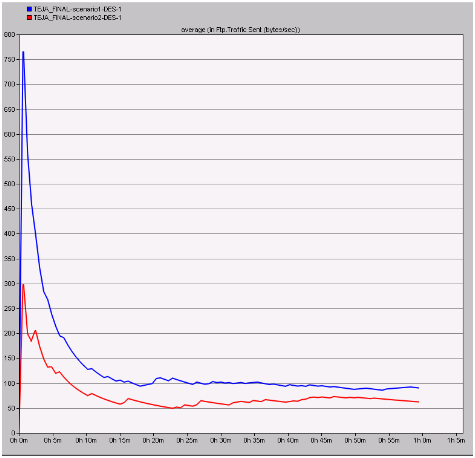
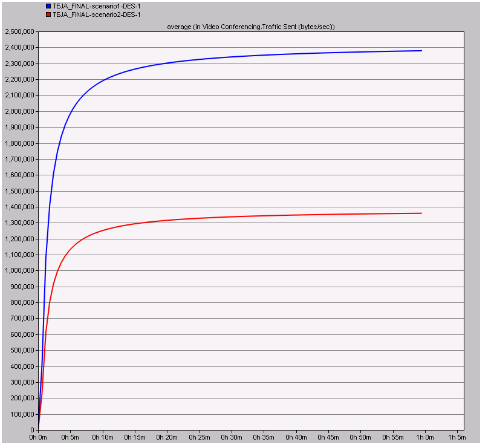
If the traffic sent in bytes per second is low it can be understood that the chances of network congestion are low and this fact is proved with the secured wireless LAN settings and the actual traffic sent with the normal wireless LAN is more when compared to the secured scenario and a very less number of packets are sent across the network by the nodes towards the wireless LAN server and also across this situation the server will be free enough to handle all the client requests and thus the overall congestion on the network can be reduced a lot due to the secure wireless LAN parameters and If the traffic sent by the video application on the network is low it can be concluded that congestion on the network is reduced and also the packet flooding can be minimized when compared to the unsafe wireless LAN parameters.

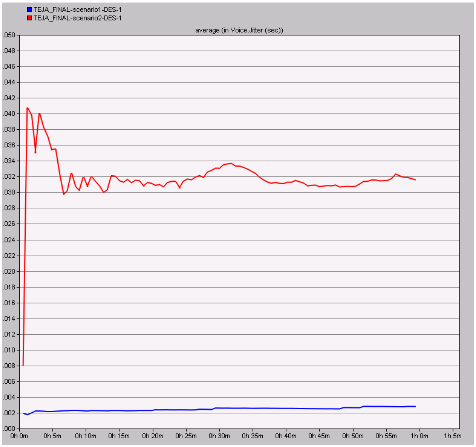
Jitter is more with the secure wireless LAN configuration and it indicates that the packet are sent at a constant rate without much delay where the normal scenario has very less jitter and thus the packets are sent with more variation in delay terms and even in this perspective the performance of secured wireless LAN scenario is better when compared to the normal scenario. MOS value is constant and also less with the secured wireless LAN configuration when compared to the normal configuration. From this analysis it can be concluded that the quality of the voice application is improved and maintained at a constant rate across the secured wireless LAN when compared to the unsafe wireless LAN.

The average packet end to end delay is more with the secured wireless LAN configuration when compared to the normal configuration. From this it can be understood that the delay is more with the secure wireless LAN configuration and it sends the packets at a slow and constant rate such that there is no packet loss across the network, where the delay is very less with the unsafe wireless LAN and this indicates that packet flooding is achieved across the network and there is ample scope to lose the packets against the wireless LAN server. Almost same amount of traffic is sent across the network for both the scenarios and on a while the overall traffic sent is less with the secure wireless LAN parameters.

From this it can be understood that the voice application are more open to the attacks and thus the traffic sent is equal even a secure wireless LAN is implemented and a better optimization is done with enhancing the security of the wireless LAN performance metrics and if the delay is more means the wireless LAN server is free enough to handle the packets sent from the corresponding clients and also they can be processed accordingly to their own destinations without any loss in packets.

The delay with the normal configuration is very less and this situation will make the wireless LAN server busy and it will lose the important data packets sent from different applications. Secured wireless LAN parameters are giving ample freedom to the medium in accepting all the networking requests from the corresponding nodes and also the medium can add more nodes and servers with the security provided by the wireless LAN metrics and if the load on the network is more due to the unsafe wireless LAN the rest of the nodes stop working and thus the secure wireless LAN metrics are helpful in reducing the load to a maximum extend and even in this context secure wireless LAN performance is more when compared with the ordinary LAN configurations. 

Future work 

Future work to be done in this project to improve the scope of the research is given below 

  • More scenarios can be added to the simulation and wireless LAN parameters can be added against these scenarios to improve the research in future
  • Security protocols can be added to the network in future to estimate the performance of the wireless LAN at the protocols level. 

Results and Analysis of Quality of Service in Wireless LAN Using OPNET MODELER

 Results and Analysis 

Introduction 

Evaluation of results is done in this chapter and all the scenarios created across this simulation are differentiated and compared against the performance metrics used to get the results as discussed in the previous chapter. As discussed in the design and simulation procedure chapter, there are two scenarios in this simulation process and the main aim of this project is to evaluate the security threats across the wireless LAN and for this purpose a simple MANET is considered along with the wireless LAN mobile workstations and the wireless LAN server as discussed in the previous chapter. Few performance metrics with respect to all the applications like voice, video, FTP and wireless LAN are evaluated against the comparison results and the actual results got after running the simulation are analyzed in this chapter along with the graphs as shown below 

Results against FTP performance metrics 

Three applications are used in this simulation and they are FTP, Voice and video and few performance metrics are also used against the analysis process and in this section the actual results achieved for the FTP against the comparison of both the scenarios is considered. As discussed the first scenario deals with the normal and unsafe wireless LAN settings and the second scenario deals with the secured wireless LAN metrics and they are compared using the simulation graphs and they are as given below 

Traffic received in bytes per second 

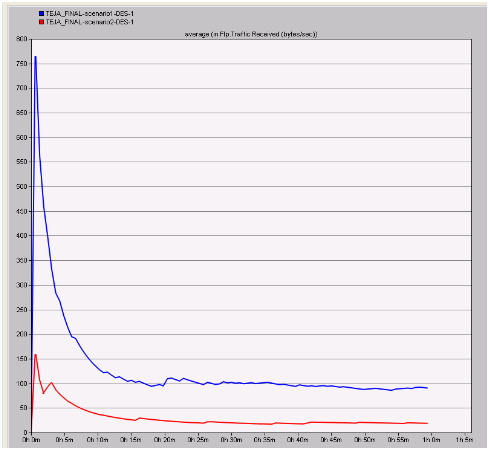
Traffic received in bytes per second can be used to estimate the total count of bytes sent across the wireless LAN server due to the changed metrics in the second scenario and these values are compared with the normal settings and the respective graph that was obtained is as shown below

In the above graph the blue line indicates the actual traffic received

In the above graph the blue line indicates the actual traffic received due to the unsafe wireless LAN scenarios and the red line indicates the modified and secure wireless LAN scenario. When these lines are compared in the graph it is clear that less amount of traffic is received across the safe wireless LAN settings when compared to the normal scenario. From this indication it can be analyzed that the overall traffic is reduced by changing the settings of wireless LAN and if the total traffic reduced across the network, then the nodes across the network will generate ample packets to the server without any loss and when the first scenario is considered there is more traffic and a maximum value of 750 bytes per second is observed. This value is much greater than the modified scenario where the maximum amount of traffic received is only 150 bytes per second and this indicates that if secure wireless LAN parameters are used, the congestion can be reduced a lot across the network. 

Traffic received in packets per second 

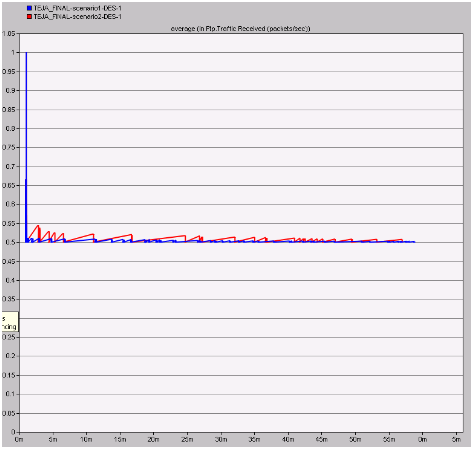
The actual number packets sent across the network indicates amount of flooding across the network and in this process the total traffic received across the network in packets per second for both the scenarios is analyzed and the corresponding graph obtained is as given below

From this graph it is observed that more packets per second

From this graph it is observed that more packets per second are received across the normal scenario when compared to the modified scenario. This analysis can be done such that if there is more traffic received across the network in terms of packets, it indicates that there are chances for flooding and this situation can be eliminated with the implementation of secure wireless LAN parameters. When the second scenario is observed it is clear that a constant rate of traffic is received throughout the simulation process and this value is very less and also the chances for packet flooding is very less. 

Traffic sent in bytes per sec 

Traffic sent indicates the actual traffic sent by the nodes across the MANETs to the destination wireless LAN server. If the traffic sent is more from the nodes it indicates that the communication is unsafe and need a secure way of sending the traffic at a constant rate and in this context the results obtained for both the scenarios is as given below

From this graph it can be observed that the traffic sent is less with

From this graph it can be observed that the traffic sent is less with the secure wireless LAN setting when compared to the normal settings scenario. If the traffic sent in bytes per second is low it can be understood that the chances of network congestion are low and this fact is proved with the secured wireless LAN settings and the actual traffic sent with the normal wireless LAN is more when compared to the secured scenario. 

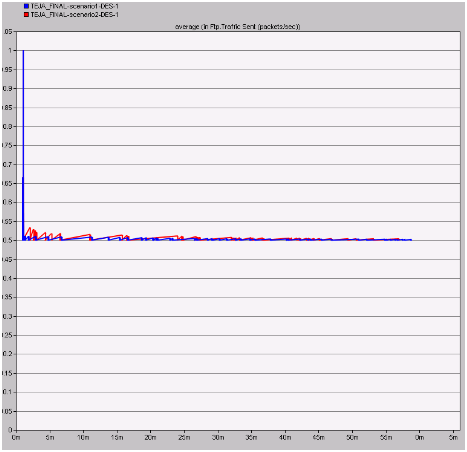
Traffic sent in packets per second

If more packets are sent across the network by the nodes, then it indicates that the nodes are behaving like the attackers and in this process the actual number of packets sent per second for both the scenarios are analyzed and the resultant comparison graph is as shown below

The average amount of traffic sent in packets per second across

The average amount of traffic sent in packets per second across the two scenarios is given in the above graph. From this graph it can be observed that a very less number of packets are sent across the network by the nodes towards the wireless LAN server and also across this situation the server will be free enough to handle all the client requests and thus the overall congestion on the network can be reduced a lot due to the secure wireless LAN parameters. 

Results against video metrics 

Voice metrics are also used in this results analysis process and only one performance metrics is used in this context and the corresponding graph is as given below. Total traffic sent in bytes per second is analyzed to understand the total amount of traffic sent across the network by both the scenarios is analyzed and the resultant graph is as shown below

From this resultant graph it is observed that the total traffic

From this resultant graph it is observed that the total traffic sent is low with the secure wireless LAN parameters when compared to the normal LAN settings. If the traffic sent by the video application on the network is low it can be concluded that congestion on the network is reduced and also the packet flooding can be minimized when compared to the unsafe wireless LAN parameters. 

Results against Voice application 

Results obtained after comparing the scenarios against the voice metrics is given in this section and the resultant graphs are also shown. Important metrics are used in this context to evaluate the performance of the secure wireless LAN metrics and they are as shown below 

Jitter 

Jitter can also be referred as the packet delay variation and this value indicates the delay of the packets being sent across the network and if the jitter is more the packet are sent at a constant rate and the actual comparison graph obtained in this context is as given below

From the above resultant graph it can be observed that the jitter

From the above resultant graph it can be observed that the jitter value for the modified wireless LAN scenario is more when compared to the normal scenario. From this value it can be understood that the jitter is more with the secure wireless LAN configuration and it indicates that the packet are sent at a constant rate without much delay where the normal scenario has very less jitter and thus the packets are sent with more variation in delay terms and even in this perspective the performance of secured wireless LAN scenario is better when compared to the normal scenario. 

MOS value 

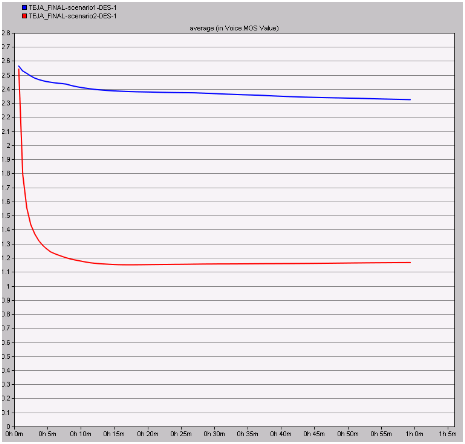
MOS value indicates the quality of the voice application and it should be less enough to ensure more quality. In this context the MOS values are compared for both the scenarios and is given in the form of resultant graph as below

From this graph it can be observed that the MOS value is constant

From this graph it can be observed that the MOS value is constant and also less with the secured wireless LAN configuration when compared to the normal configuration. From this analysis it can be concluded that the quality of the voice application is improved and maintained at a constant rate across the secured wireless LAN when compared to the unsafe wireless LAN. 

Packet end to end delay in seconds 

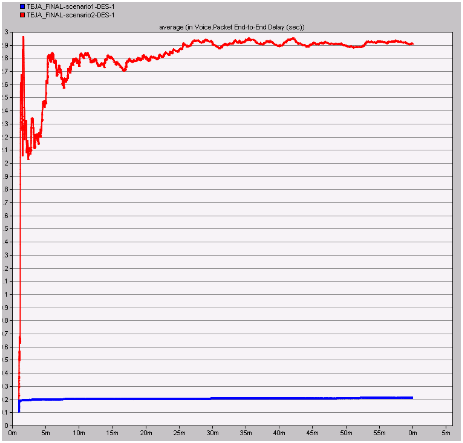
Packet end to end delay is used to measure the actual delay in sending the packet to the server and if this value is more then it indicates that packets are sent continuously across the network and the resultant graph after comparing the scenarios is as given below

The average packet end to end delay is more with the secured

The average packet end to end delay is more with the secured wireless LAN configuration when compared to the normal configuration. From this it can be understood that the delay is more with the secure wireless LAN configuration and it sends the packets at a slow and constant rate such that there is no packet loss across the network, where the delay is very less with the unsafe wireless LAN and this indicates that packet flooding is achieved across the network and there is ample scope to lose the packets against the wireless LAN server. 

Traffic sent in bytes per second 

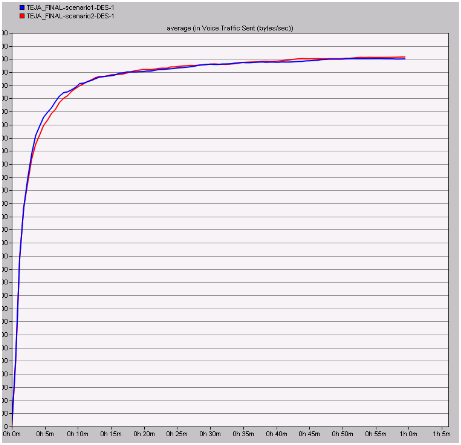
The actual amount of traffic sent in bytes per second is shown in the below graph after comparing both the scenarios

Almost same amount of traffic is sent across the network

Almost same amount of traffic is sent across the network for both the scenarios and on a while the overall traffic sent is less with the secure wireless LAN parameters. From this it can be understood that the voice application are more open to the attacks and thus the traffic sent is equal even a secure wireless LAN is implemented and a better optimization is done with enhancing the security of the wireless LAN performance metrics. 

Results against the WLAN metrics 

Wireless LAN metrics are the important metrics used across the simulation and result analysis the resultant graphs obtained after comparing these metrics is as shown below 

Delay 

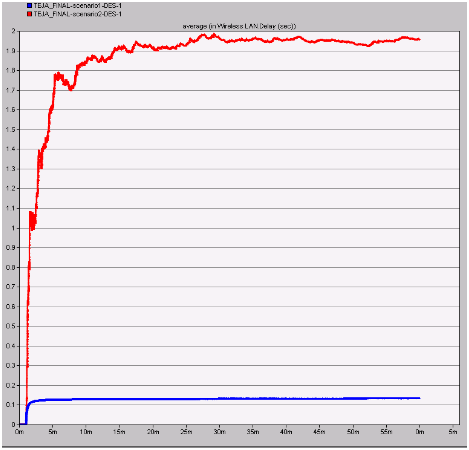
Delay on the wireless LAN server is evaluated in this section and if the delay is more on the server it indicates that the packets are sent at constant rate and the corresponding flooding is eliminated. The resultant graph of both the scenarios is shown below

From this graph it can be observed that a maximum delay

From this graph it can be observed that a maximum delay is incurred with the secure wireless LAN configuration when compared to the normal configuration. This indicates that if the delay is more means the wireless LAN server is free enough to handle the packets sent from the corresponding clients and also they can be processed accordingly to their own destinations without any loss in packets. The delay with the normal configuration is very less and this situation will make the wireless LAN server busy and it will lose the important data packets sent from different applications.

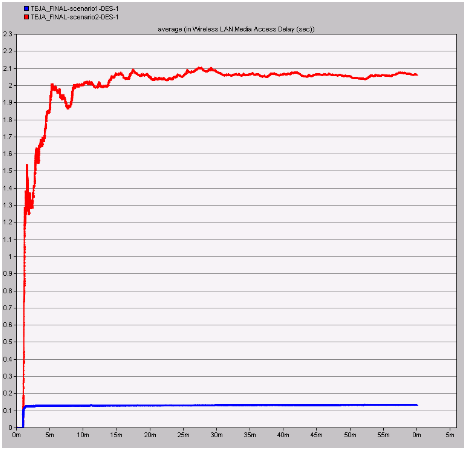
Medium access delay 

Medium access delay is the important metrics and this value is should be high enough such that the communication patterns are worked as per the defined situations and the resultant graph is as shown below

From the above graph it can be observed that the delay

From the above graph it can be observed that the delay is very less with the normal wireless LAN conditions when compared to the secure wireless LAN. This indicates that the secured wireless LAN parameters are giving ample freedom to the medium in accepting all the networking requests from the corresponding nodes and also the medium can add more nodes and servers with the security provided by the wireless LAN metrics. 

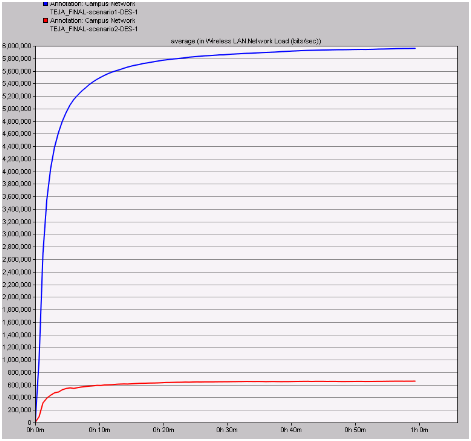
Network load 

Network load plays an important role in estimating the overall performance of the network and in this context the actual load on the network from both the scenario is estimated and the resultant graph is shown below

Load on the network is very high with the normal wireless LAN

Load on the network is very high with the normal wireless LAN metrics when compared to the secure wireless LAN. From this indication it can be understood that, if the load on the network is more due to the unsafe wireless LAN the rest of the nodes stop working and thus the secure wireless LAN metrics are helpful in reducing the load to a maximum extend and even in this context secure wireless LAN performance is more when compared with the ordinary LAN configurations. 

Summary 

When all the scenarios are compared against the performance metrics used, it is observed the performance of the secure wireless LAN is high when compared to the normal wireless LAN configuration. Key aspects like FTP, Voice, Video and Wireless LAN metrics are compared against the scenarios and across all the comparison process the secure wireless LAN parameters has imposed an optimal conditions on the network in terms of routing, traffic sent, traffic received, jitter, load and delay. From this indication it is understood that if the parameters of the wireless LAN are changes to ensure the safety across the network then the overall performance of the network is improved a lot across any application used in the network. Secure wireless LAN settings has ensured a optimal packet delivery ratio, reduced the congestion on the network by minimizing the traffic sent and received across the nodes and thus it is proved that wireless LAN performance is optimized with the required security considerations.


Simulation Procedure of Quality of Service in Wireless LAN Using OPNET MODELER

Simulation Procedure

Introduction:                                                   

                           The previous chapter describes the design of the simulation and this chapter concentrates on the explanation of the corresponding simulation process that is implemented in the project. The explanation of the process that is followed to create the scenarios that are required for the simulation is done step by step in this chapter in addition with the other procedures like network configuration, configuration of nodes, configuration of wireless LAN server, setting profile config, application config, mobile config and setting the DES metrics. All these explanations are done to provide a better understanding about the simulation procedure for achieving the aim of project, the respective screen shots are also appended in the sections below. As discussed earlier the simulation of this particular application considers two scenarios and the process involved in creating both the scenarios and the process involved in simulating the scenarios in order to obtain the results is explained clearly in the further sections of this project.

Simulation process of first scenario:          

                             The design chapter of this document already explains about the requirements for the simulation of scenarios, in this scenario the network selected for the simulation is the Mobile Adhoc Network and the sensor nodes needed are selected as the mobile nodes. The number of mobile nodes used for the simulation is taken as 10 and a wireless LAN server is selected as the server which can behave as a sink node and the general settings that are required to forma a required network are as follows:

Simulation process of basic network:

The basic network selected for the simulation of this project is “Mobile Adhoc Network and this section explain the process that is implemented to create a network and to make the basic settings for the network as required. Based on the requirement of the user a new scenario is deployed and renamed as the initial step of the simulation procedure. The steps involved in creating the scenario and the screenshots that explain the process involved is shown below:

  • The file menu is selected by starting the OPNET modeler and new project is chosen.
  • Based on the interest of the user the name of the project and name of the scenario is changed.
  • In order to create a blank scenario “Create blank scenarios” option is selected
  • MANET is selected as the network required for the simulation this is also set as the model family.
  • Campus is selected as the network area required for the simulation
  • 1000 X 1000 square meters is taken as the size of the network and therefore the creation of a fresh scale of network is done and when once all these settings are done, then the network is said to be prepared for using.

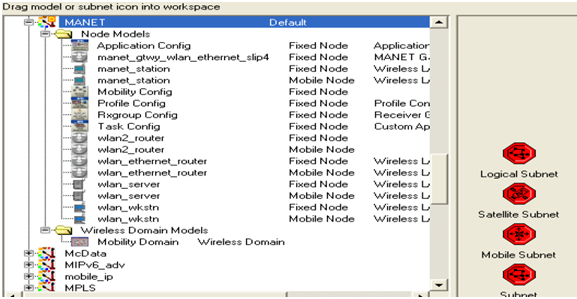
                          Once the creation of the basic network is done, at the user interface level the object palette is opened and then the operations needed are dragged from the object palette and dropped on the work space. The object palette that is opened in the simulation is shown using the screen shot given below the shown screen of the object palette also includes the objects that are needed for the simulation of the scenario. 

There will be different kinds of nodes provided

There will be different kinds of nodes provided by the object palette shown above and these nodes ate selected for simulating process through the MANETs and the nodes selected are the process involved in the creation of the network is given below:

  • From the opened object palette a fixed node that is a wireless LAN server is dragged on to the work space and this server will act as a sink node which can handle all the mobile nodes.
  • 10 mobile nodes are selected and dragged on to the work space and these nodes behave as the sensor nodes that are needed.
  • An application configuration node is used for forming the applications that are needed.
  • A profile configuration node is used for the forming of the definitions of profiles.
  • A mobile configuration node is used for providing mobility for the sensor nodes.

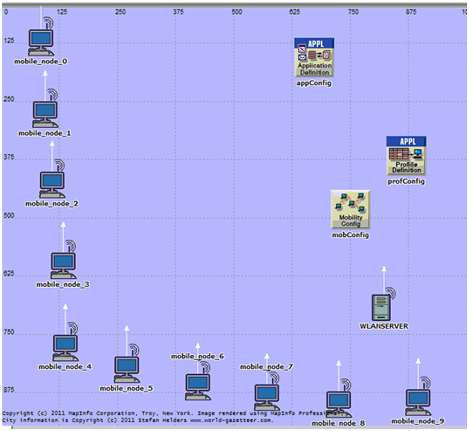
                                 All these nodes listed above are dragged from the object palette and placed on the working station and the process of placing these nodes is very easy and very helpful in the creation of the network needed. The setup required for the basic network required for this particular scenario is represented in the screenshot given below and this contains all the required nodes listed above.

The nodes needed for the creation of the network

The nodes needed for the creation of the network are represented in the screenshot given above and the simulation process is set ready when once the network setup is done. The sections below explain the other steps involved in the simulation procedure.

Application definitions process

The above section explains the steps of simulation process involved in the demonstration of the network required for the project and here this section focuses on the settings of application configuration and definitions needed for the simulation of the scenario. The application needed for the simulation is defined by using the application configuration node as discussed in the previous chapter. In this particular scenario three applications are used for the generation of the traffic needed. The three applications used are the FTP, voice and video conferencing and these are used for the generation of TCP traffic across the MANET. This section explains the configuration of the application by creating the FTP, Voice and video conferencing as the applications. The steps given below are followed for the application configuration.

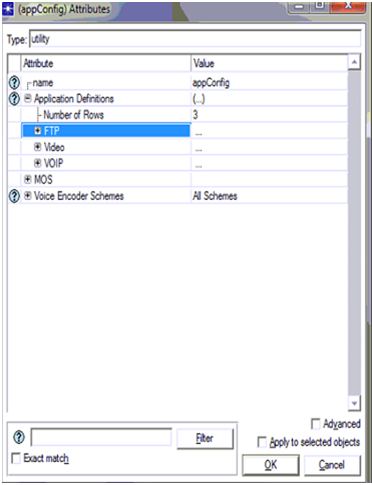
  • The attributes of the application config can be edited by selecting the “Application configuration node” and then by giving right click on that and then by selecting the edit attribute option.
  • While selecting the edit attribute option a window is popped out for processing the editing.
  • Then the attributes required are added for the application

                          The following screen shot will represent the actual process of setting the application configuration. 

procedure that is used for editing attributes

                               The procedure that is used for editing attributes of the application configuration node is shown using the screenshot given above. As the number of applications used in this scenario are three the number of rows parameter is taken as three. Once it is taken as three, the application names should be added and for this separate section are used for entering the name of the applications as FTP, Voice and Video conferencing. After the name of the application is entered the definition of the applications are also entered by selecting the FTP, voice and video from the options available as indicated in the screenshot. At first the application is set to off and then it must be expanded for the application to be activated and it’s a known thing that various kinds of application loads are observed and in this particular scenario the medium load of application is selected for the simulation as viewed in the screen shot. The generation of traffic across the MANET is generated by the medium load of the application and once the required setting are invoked to the application configuration node is completed the setting for the profile configuration node must be done as the very next step and that is explained in the next section.

Profile definition process:

Setting the profile configuration is very much necessary for the simulation procedure in achieving the actual goal of the scenario particularly in generating the traffic across the MANET. The profile definitions and the additional settings must be added to the profile configuration node similar as the editing of application configuration node that is done in the above section. The process followed for making changes to the profile configuration node is explained step by step as follows:

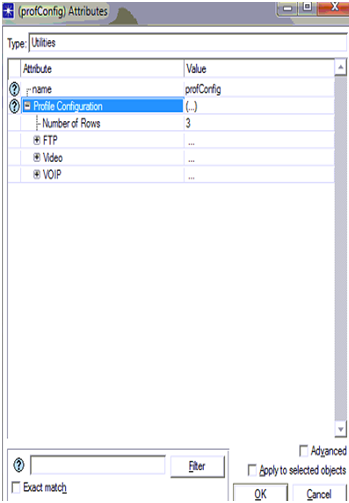
  • Edit attributes option is selected by selecting the profile configuration node placed in the work space and then by giving right click.
  • Once this option of edit attributes is clicked a window gets popped out at the user interface and then the editing of attributes of profile config node is done according to the user requirement. In addition to this the definition of the profile is also appended and this is viewed with the screenshot given below:
This screen shot shows the definition of the profile configuration

This screen shot shows the definition of the profile configuration and the attributes required for the setting of profile configuration node. It is clearly shown in the screen that the number of rows attributes is selected as three. As we used three applications for the simulation of this particular scenario, the number of rows is also taken as three and the profiles must also be selected as three and they are the FTP, Voice and Video profiles. Once these profiles are set the definition of the profile must be added additionally. The profile configuration node has some other settings required to be done and all those are indicated in the screen shot shown already. The additional settings are the parameters required for the simulation of scenario and they are the start time is taken as a constant time values that is 10 seconds and the profile time duration is taken till the profile ends. Similar to the setting of application config, here also the profile configuration is inviked on the entire network when once the setting is completed and this is confirmed just by selecting ok button. Therefore when the settings of application and profile configuration are completed they are allocated to the wireless LAN server and nodes. As a next step to this setting, configuration of mobile nodes and server is done and that is explained in the section below.

Configuration process for mobile nodes and wireless LAN server

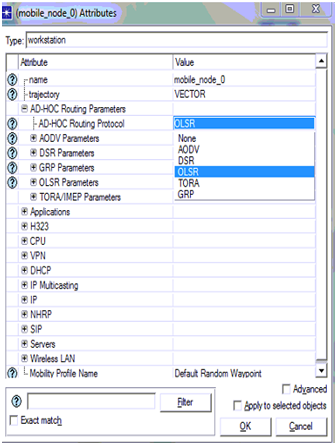
It is already discussed that simulation of this scenario across the MANET is done using 10 mobile nodes and a wireless LAN server, the general configuration of the mobile nodes and the server is explained in this section. This step of the simulation process is considered as the most important step in the project. In order to do the simulation of the scenario, all the 10 mobile nodes and the server must be assigned with a routing protocol, and in this particular project OLSR routing protocol is assigned for generating the traffic across the MANET. The process of applying the OLSR routing protocol for the nodes and server includes the following steps.

  • The work station is opened and then all the 10 mobile nodes and the wireless LAN server are selected.
  • Then by right clicking on any of the node, options are opened and from that the edit attributes option is selected.
  • Then the user should select the set routing protocol option from the window opened specially for that node and then choose the required routing protocol in this particular project the OLSR routing protocol is selected

All this process is represented using a screen shot given below:

All the 10 mobile nodes and the wireless LAN server supports the

All the 10 mobile nodes and the wireless LAN server supports the OLSR routing protocol when it is applied to them and that process is shown in the above screenshot. During the selection of the routing protocol for all the nodes and the server there are various routing protocol available as options but only the OLSR routing protocol is selected in this application and once applying of the protocol is completed when once the apply button is selected. Once this process is completed IP addresses must be assigned for them as the next process and this is described in the following section.

IP address allocation Process 

In This section briefs about the process to apply and to allocate the necessary IPaddress to each and every node and all the proceedings is given in step wise in this scenario is given below 

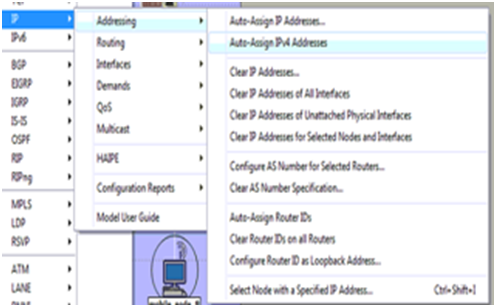
  • We can access OPNET tool and though it we can enter to applications menu and there we can view the IP address option is given.
  • Now from the IP option by using navigation steps where user can easily recognize some of the features before  addresses are allocated to the LAN server and mobile nodes
  • Then we select the option “auto assign IP4” addresses to allocate the concerned IP address to all the nodes existing in this network and the screenshot showing all the above details is specified below
The requirements needed at the work space are selected

The requirements needed at the work space are selected earlier they include mobile nodes and wireless LAN server and this can be observed once the application menu is unleashed .from the above screen we can make certain implementations such as we can open IP protocol menu the next step is to navigate into addressing option and the concerned address is allocated. We may also conclude that from the given screen shot that Auto assign IPv4 addresses option is chosen to allocate the necessary IP’s to all the mobility nodes and LAN server and from here the original settings for application purposes are applied for all the nodes that we come across and the server including the process applied is given in below scenario 

Mobile nodes and wireless LAN server Application Settings

By making sure that entire network is ready for simulation purpose in the 10 mobile nodes and for this a wireless LAN server is required and it is configured for back up in the corresponding application and remaining profile configurations are common as discussed earlier.Here also two methods are there and both of them are given from step to step basis 

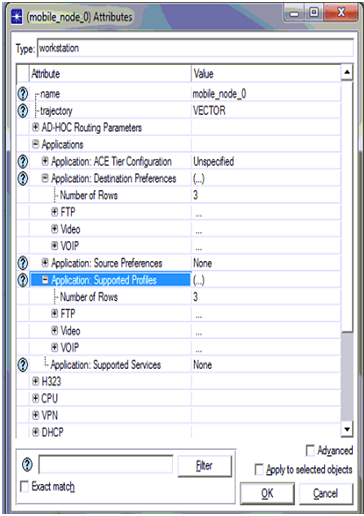
  • In the work space given select any one of the mobile nodes  and  any one of the node is randomly selected and it is modified  by choosing its attributes and this can be inferred by right click on the particular node
  • Once the option  “edit attributes” is opted  a window is pop up on the screen of the users in this windows both the application as well as profile settings can be configured
  • The destination preferences  ,profile tabs  of these applications are navigated to set the necessary configuration and the screen shots resembling these settings are given below
From the above screen shot it is decided that the application destination

From the above screen shot it is decided that the application destination preference tab is opened to fix the necessary application and the number of rows is fixed as 3 since three applications are developed for simulation process. Once the application is choose the required servers opted are FTP server, Video server, Voice sever as mentioned in the above screen shot once these settings are completed the actual application supported profiles choice is used to back up the ftp,voice,video profile is developed in the particular configuration time  .as we decided to take 3 rows and ftp,voice,video is choose based on the profile configurations shown in the previous screen and these settings implicated to the opted objects  and this can be viewed in screen shots given  below once the mobile nodes are confirmed to back up the concerned application and its profile now the wireless LAN server is also fixed accordingly and this clearly described in the form of steps

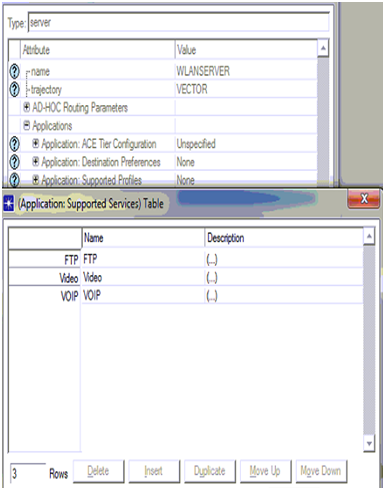
  • Go for the wireless LAN server and the options we automatically suggest is “edit attribute” and modify the desired application and profile characteristic.
  • At present explore the options so that application support services while new window is released to get in to the profile to be supported
  • Append the rows to fix it 3rows simultaneously three profiles are developed in scenario can be viewed.
The assumptions can be made from the above screen

The assumptions can be made from the above screen that three rows can be created and simultaneously three server levels are chosen they are FTP, VOICE, VIDEO servers the necessary profiles to be backed are depends upon its description is fixed as viewed in above screen .Now go for OK button for continuously two times to imply these configurations to the wireless LAN server .As per the studies before  the next process to modify these characteristics to help the deployment to be easy for application and the concern steps e valuate this process

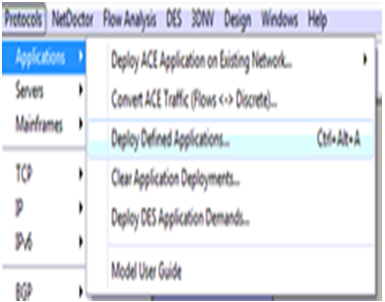
  • Expand the applications menu existing on the high end of the OPNET workspace.
  • It can be noticed that vivid options at this scenario and now select the option  and place it in the concerned choice and for this the screen is given below 
Protocols index is elaborated and from now the application

Protocols index is elaborated and from now the application selection is opened to do deliver the  operations as shown in the up screen .from this image it is guaranteed that the installations applications option is opted for deploy to be done in the network and the next ultimate screen is seen to the users

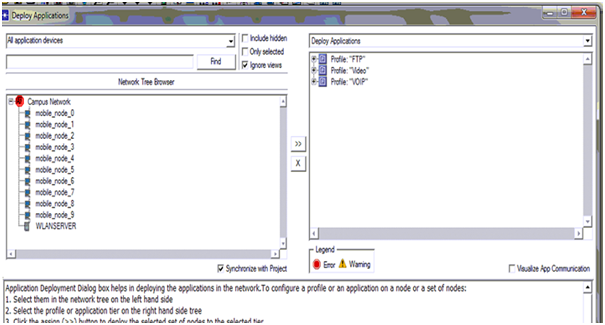
The definite exploitation process is given in the above screen

The definite exploitation process is given in the above screen and from this screen it can be noticed that all the mobility nodes are lagged towards the supply and the wireless LAN server is lagged around the terminal. The reliability of the installation process can also be verified with the button process reliability as given in below and from here the nodes and three servers to back the applications and the  profiles developed across the simulation fixing the mobility to each and every  nodes is the last place of the total settings and the equivalent process is shown 

 Mobility Process definition

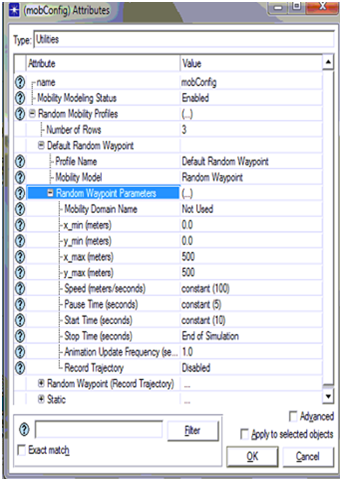
The necessary requirements for developing mobility nodes is all fixed in the mobile nodes  and this can be clearly viewed in the screen shots in the above section this is done by taking the mobile configuration settings. Mobile nodes can be described at this case and this corresponding process applied is also seen below. 

  • Choose the mobile config node and select the edit attributes choice by just click on the node.
  • Ultimately a pop up window opens after this process and the necessary mobility can be fixed as it is fixed in the below screen
As we all can get idea after seeing the screen shot

 As we all can get idea after seeing the screen shot of choosing the mobility node in three different ways one among them is default random waypoint is selected and the required parameters are given in that particular scenario.Random waypoint parameters are fixed into the velocity of the mobile nodes is taken as 100 m/sec. And the pause time is fixed as 0 as shown in the fixed screen and from the screen it can be noticed that start time is defined to be a constant value of steady 10 seconds and the end time is till the conclusion of simulation. Once all these configurations are happened these are simultaneously applicable to all the mobile stuff and the genuine process segt here is given in the scenario below.

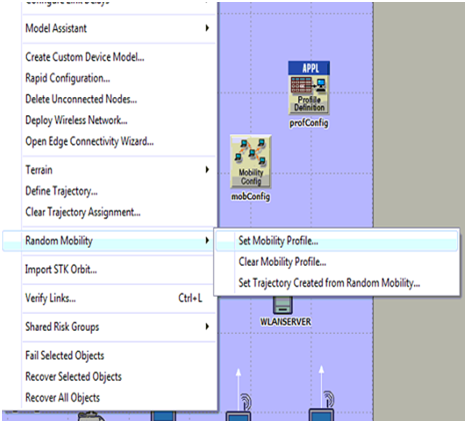
  • Go to menu(TOPOLOGY)and select the choice random mobility
  • As the no of options  grow there is scope of setting the choice like fix random mobility and the next screen shot is given
From the screen we viewed it can be noticed

From the screen we viewed it can be noticed that set mobility profile is utilized to fix the required mobile configurations to all the nodes on the system consisting network and this is surfed by the utilization of random mobility option and the original mobile settings is to fix all th configurations on the same network .Now the final lap in the simulation of this context is to fix the individual DES statistics and this procedure is given below.  

Process to choose performance metrics 

The necessity of performance metrics is required to evaluate the performances of the each independent context and also to distinguish the remaining scenarios developed in the simulation process and the original process given is in these scenarios

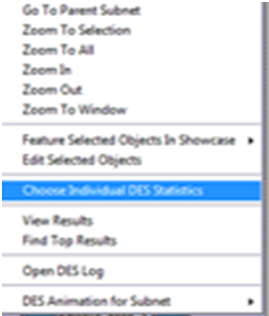
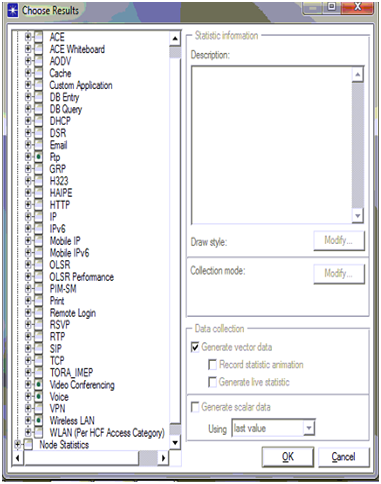
  •  “set the statistics” is the option choose by right clicking it on the wireless network scenarios
  • Select the individual DES statistics is taken to set the abilities of the concerned metrics and the particular screen is given below
Once the choice is taken a pop up window

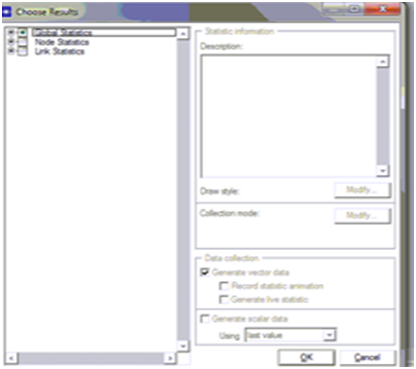
Once the choice is taken a pop up window is opened from there the necessary options are given around the capability analysis and the necessary screen is seen

Hence by seeing the screen we can derive that there

Hence by seeing the screen we can derive that there are three levels of metric performances and among the three global statistics are utilized in simulation process and the equivalent metrics is shown below.

As there are three applications in this project

As there are three applications in this project, following are the performance metrics used to evaluate the performance of the proposed secured wireless LAN configuration 

FTP

Following are the performance metrics used for FTP application

  • Traffic received in bytes per sec
  • Traffic received in packets per sec
  • Traffic sent in bytes per sec
  • Traffic sent in packets per sec 

Voice

Following are the performance metrics for Voice application 

  • Jitter
  • MOS
  • Packet end to end delay
  • Traffic sent in byte per sec 

Video

Following are the performance metrics used for video application 

  • Traffic sent in bytes per sec

WLAN

Following are the WLAN metrics used 

  • Delay
  • Network load
  • Medium Access delay
  • Load 

Simulation process of second scenario

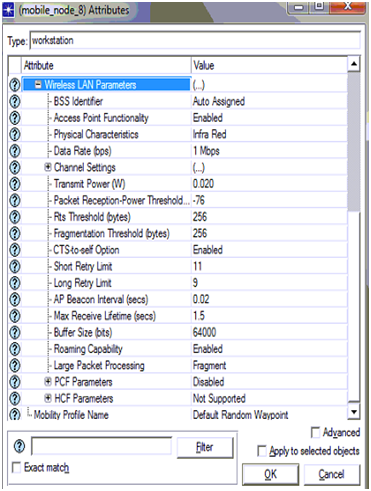
This simulation model is similar to the first one which comes with some necessary changes  and the only change in this process is choosing of LAN parameters in the scenario remaining is the exact replica of the first one   and the screen shots give anew idea of this process. Once the necessary system is replicated the necessary configurations are also varied for all the mobility nodal and the wireless LANS server screen shots are given below.

From the above screen shot we can conclude

From the above screen shot we can conclude that few configuration settings are changed for the usage of wireless LAN characteristics of the above screen and the original settings in this scenario is changed listed below 

  • Transmit power is set to 0.020
  • Packet reception power threshold is set to -76
  • RTS threshold is set to 256
  • Fragmentation threshold is set to 256
  • CTS to self option is set to enabled
  • Short retry limit is set to 11
  • Long retry limit is set to 9
  • AP Becon interval is set to 0.02 seconds
  • Max receive life time is set to 1.2
  • Buffer size is set to 64000
  • Roaming capability is set to enabled

Large packet processing is set to fragment

Once both the scenarios are ready to work then the simulation is processed for 5 minutes to acquire the results and the corresponding results is taken the simulation run is described in brief in the future chapters.

Application Definitions in Default Wireless LAN Configurations

Application definitions:

To develop the necessary traffic around the entire network it is recommended that the mobile nodes and its concerned server should take hold of application the application should be developed through application configuration node. Application config node is modified in this scenario to describe  the necessary applications and in this context three applications are created for the traffic purpose and the three applications here considered are FTP,VOICE, VIDEO applications and these in common creates TCP traffic and this traffic is used to develop the communication modules around the network.

The elaborated descriptions of the all the three FTP,video,Voice applications are fixed at this point mostly in terms of the load scheduled the network and the no of packets created once all the applications created is should be backed by all the profiles around the network  and the entire design process is discussed in the next section.

Profile Definitions in Default Wireless LAN Configurations

Profile definitions

On the whole OPNET every application developed to produce the traffic around the entire network should be backed by a profile description and this is developed by utilizing the profile configuration node as seen before. Every application has an independent profile and we create three applications in this situation three profiles need to be maintaining.FTP, Voice, video profiles are created and in all the scenarios the beginning time and end time are fixed in this level.

In this scenario the beginning time is fixed as ideal value as 10 seconds which is default and the process is again started once it comes to the end time of that particular profile. Once the desired profiles are created now the necessary mobility to the nodes should be appended it is clearly explained in the next section below:

Mobile Definitions in Default Wireless LAN Configurations

Mobile definitions:

In this particular simulation, mobile nodes are selected from the object palette and therefore all these nodes must be added with mobility as a necessary requirement. The mobility model selected in the scenario must be supported by all the 10 mobile nodes selected for simulation and a mobile configuration node is selected for defining the mobility model.

By opening the object palette the mobile configuration node is dragged from it and placed on the work station to establish the mobility model and a random waypoint model which is default is implemented as the mobility model and the selection of this model is done at the “mobile configuration node level”. In addition to the selection of mobility model there few other factors that are required for the simulation and they are mobility speed which is set 100 meters per second and the pause time which is set to 0 seconds.

That means that the movement of the mobile nodes across the network is maintained at a speed of 100 meters per second and the time the nodes get paused will be 0. All the 10 mobile nodes should be added with this mobility which is defined and this can be achieved by using the topology menu. The next chapter explains the detailed process of this mobility configuration.

Node Level Configuration at Default Wireless LAN Configurations

Node level configuration:

Using the simple drag and drop approach provided by the OPNET modeler all the nodes required for the simulation are selected from the object palette and placed in the work station. All the types of nodes dragged are needed to make some changes and this process is generally called as configuration of nodes and this section concentrates on the explanation of the configuration process. Firstly the 10 mobile nodes taken from the object palate are also need to make some changes and in order to make the changes right click should be given on the node and can then select the edit option.

All the nodes must be allocated with a routing protocol in order to establish the routing process needed for the network, several routing protocols are supported by MANETs and some among them are OLSR, AODV, DSR and TORA, these are also supported by the simulation selected in this simulation. OLSR routing protocol is selected for the simulation this particular scenario and therefore all the 10 nodes taken here must be allocated with the OLSR routing protocol.

This routing protocol is also allocated to the wireless LAN server to support the simulation. The other nodes such as the application, profile and mobile nodes also require some changes and are configured by editing the attributes and parameters. The next chapter that is the simulation procedure chapter gives a clear idea of how these configurations are made.

Improving the security level in wireless LAN network is the significant aim of this project and so the configuration of the scenario is done based on this requirement. The settings needed for the configuration of next scenario is done in next level.All the settings done to the nodes will support the simulation process as the default attributes of wireless LAN are made automatically using the OLSR routing protocol. The sections below explain the other configuration like application, profile and mobile nodes.

Default and Secured Wireless LAN Configurations

Introduction Design of Simulation

                       This chapter deals with the explanation of the design that is actually followed in this simulation project. Improving the level of security in wireless LAN networks is taken as the significant aim of the simulation project and to achieve this aim two scenarios are considered. The design that is implemented in simulating these two scenarios is explained in this chapter. The default wireless LAN configuration is used for the creation of the first scenario and secured wireless LAN configurations are used for the creating the second scenario. The further sections of this chapter explain the design of creating the networks:

Design of default wireless LAN configuration scenario:

The simulation procedure of this application is done by creating two scenarios as indicated earlier and the creation of first scenario and the design principles that are implemented in creating and simulation of the scenario are explained in the present section. The main aim of the project is to improve the security levels in wireless LAN, For achieving this aim a Mobile adhoc network is selected as the as the wireless sensor network. The default networking conditions of the first scenario is with the common configuration of the wireless LAN.

The sensor nodes required for the simulation of this particular scenario are considered using 10 mobile nodes and one fixed wireless LAN server is selected to behave as the sink node to handle all the mobile nodes. Then the network required is created in this approach as there is no other specific approach for the creation of wireless sensor network using OPNET modeler. The design implemented for configuring the required network setup is explained in the following sections.The entire design of the scenario is classified in to various factors and they are clearly explained in following sections:

Basic Network Setup

Node Level Configuration

Application definitions

Profile definitions

Mobile definitions

Setting the Performance Metrics

Design of secured wireless LAN configuration scenario:

As discussed initially the second scenario is created to propose the secure wireless LAN configuration and this scenario is the copy of the first scenario and there are few changes done to the wireless LAN configuration and they are as given below 

  • Transmit power is set to 0.020
  • Packet reception power threshold is set to -76
  • RTS threshold is set to 256
  • Fragmentation threshold is set to 256
  • CTS to self option is set to enabled
  • Short retry limit is set to 11
  • Long retry limit is set to 9
  • AP Becon interval is set to 0.02 seconds
  • Max receive life time is set to 1.2
  • Buffer size is set to 64000
  • Roaming capability is set to enabled
  • Large packet processing is set to fragment

Once all these steps are followed the simulation design is completed and the simulation steps followed are explained in the next chapter. 

Simulation tool: OPNET modeler and its importance

Simulation tool:

As discussed in the introduction section of this chapter the simulation procedure of this application considers two scenarios and the simulation tool used for simulating the scenarios is OPNET modeler. In comparison with different simulations tools like OMINET and NS2, OPNET modeler is considered as the best simulation tool as it provides several advantages that they cannot provide.

The significant advantages of OPNET modeler are it supports level of models and provides a user interface to establish several networks. Not only OPNET modeler, NS2 is also considered as a best simulation tool but the single disadvantage in using NS2 is its behavior which is very complex as it includes loads of coding part and this problem is completely avoided using the OPNET modeler.

The significant factor that encourages the usage of OPNET modeler is its drag drop approach, using this approach the simulation procedure is done very simply by selecting the required objects from the object palette that is available by using the OPNET and the configuration of the objects is also provided, the other important feature of OPNET is it supports several model families over the wireless network to enable the communication.

The network setup required for the simulation can be completed by dragging the required objects from the object palette and then by configuring them according to user’s requirement. The model of the simulation includes the operations like establishing the network needed, checking the consistency of the model, simulation running and at last estimating the results.

Irrespective to the type of network to be created these steps are followed in creating the wireless and wired networks. Because of this reason OPNET is regarded as the simple way out to create any network. In addition to the above models of networks, latest network technologies are also provided by OPNET such as the Mobile Adhoc networks, Zigbee networks and wireless mesh networks. Using these available models the estimation of network’s performance can be done easily.