Online Mobile Phone Shop an Asp.Net Project

The cse students who want to do the project on web based application they can choose this project. The project ONLINE MOBILE PHONE SHOP is to develop an Internet based sale and purchase system for mobile.

                This project falls under INTERNET TECHNOLOGIES & RDBMS (Relational Database Management System) category. Since the project is mainly responsible for creation of the portal with the online database .

                  ASP.NET is a programming framework built on the common language runtime that can be used on a server to build powerful Web applications and it can take advantage of early binding, just-in-time compilation, native optimization, and caching services right out of the box. 

Hardware requirements: –

Processor                                            : INTEL PENTIUM-IV 2.1 GHZ 

Memory                                              : 256   M.B., D.D.R. RAM 

Network Adaptor                                : Ethernet Adaptor 

Modem                                               : 56 KBPS VOICE FAX DATA 

Secondary Storage                              : SAMSUNG / SEAGATE HARD DISK (80 GB)  

               Software scope describes the data and control to be processed, function performance, constraints, interfaces and reliability. Function describes in the statement of scope are evaluated and in some case refined to provide more detail prior to the beginning of the estimation.

The benefit of the system is Reducing overheads paper works, zero delays in project completion, etc..and the user information is kept secret from other user as a company policy because the whole business is the game of contact. 

download Online Mobile Phone Shop an Asp.Net Project.

Vehicle Traffic Management & Control System VB CSE Final Year Project With Code

The Vehicle Traffic Management & Control System VB CSE Final Year Project has three basic components, which are

  1. Image Grabbing from the camera
  2. Processing the images
  3. Store and alert mechanisms

1. Image grabbing from the camera:

This particular module involves:

  • A Digital Camera
  • A driver for camera
  • Java Media Framework

The module continuously monitors and grabs the images of a lane and stores them in 8-bit JPEG format. The camera is a Charge Coupled Device Camera (CCDC). The CCDC is a digital camera whose output is a video stream. As the output is digital the stream data can directly be fed into the computer.

        For this module to work the camera driver need to be installed before. The Java Media Framework needs the driver to be installed as the JMF using query mechanism with driver. The JMF creates an object of type player, which is used for grabbing images. After grabbing images, the raw image is stored in buffer. The raw data is converted into image and then converted into 8-bit image. The 8-bit image is encoded into the JPEG format and is stored into the disk.

Processing the images:

        The purpose of this component is to compare the images acquired and say whether, there is significant change. If the change crosses the threshold that has been defined based on the observations made on lane that the camera should monitor then the algorithm generates an alert.

This particular component involves the following operations on the image

  • Image Sensing and Acquisition
  • Image Sampling and Quantization
  • Grey level and color enhancement
  • Convolution and Correlation
  • Image Enhancing in Spatial Domain
  • Neighborhood and Geometric operations
  • Segmentation

This particular module takes the images stored in the database and samples such that the image is suitable for the operations that can be performed on the image.

 After it has been made compatible to the format of the algorithms the image is enhanced using the Grey level operations on the image since there is every possibility that noise can get introduced into the image captured by the camera due various reasons such as thunder bolt, software or hardware problems, by faults in the image setup etc since the image captured should be utilized to the maximum and for the sake of the clarity in the picture we cannot sacrifice the precious time in our hands.

 Convolution helps enhancing the image in the same domain. Once the image meets the standards desired. Correlation algorithms can be applied on the images to see whether there sufficient change in the images captured.

             Here Segmentation comes to our aid in segmenting the images into various regions. The regions are the components that are actually taken into the consideration while comparing the images. Since the whole image, if taken for the comparison then even a small change in the light component any where in the image, then the algorithm used says that there is significant change in the image even though in practice there is no significant change in the images captured according to our requirements.

Store and Alert Mechanisms:

     This module is responsible for two tasks:

  • Store the information into data base
  • If there is a traffic jam then sending info to the control room(not implemented)

 The Data Base Management that we are using in Oracle. In the database the image information is stored.

The information include

  • Timestamp of the image
  • File name
  • Drive where images are stored

                  Using the JDBC the images are retrieved by embedding the SQL statements. The driver that is using is ODBC. Using file name and driver name the images are retrieved. The images are deferred using timestamp that is associated with each image.

                 If there is a traffic jam the second module generates the alert message. The alert message is sent to the control room using TCP/IP networking model. The Java Networking component sends the “Traffic Jam Detected” message to the control room and also sends the URL of the image to the control room. In control room the traffic status can be viewed by using this URL, if necessary

Hardware specifications:

The H/W requirements for the system are:

  • PIII Processor with 256MB RAM
  • 10 GB HDD
  • USB camera to take a pictures with coverage of 100mts
  • LAN card
  • Server with WINDOWS NT 4.0 WORKSTATION
  • Client for Image Processing

Software specifications:

The S/W requirements for the system are:

  • Windows 2000
  • Java2SDK 1.4
  • Java Media Framework (JMF) 1.4
  • ORACLE 8i for database engineering
  • Camera drivers 

Download Vehicle Traffic Management & Control System VB CSE Final Year Project With Code

Online Airline Ticket Reservation System

AIRLINE-TICKET-RESERVATION-SYSTEMThe cse students can select Online Airline Ticket Reservation System project to do the project on data base server. The  aim of the project was to develop a website which would facilitate the reservation of online air tickets through an effective and yet simple GUI for a normal passenger intending to travel in airways.                 

                 The project is basically targeted at those people who would like to travel through air and have an Internet access. Apart from reserving tickets, through this system a passenger can compare online fares ‘from’ various cities ‘to’ various cities.

We use Oracle as the backend and use JDBC connectivity to access the database. The servlets access the database using JDBC and output the results according to the query, which again takes into account the options, selected by the user. 

TECHNOLOGIES USED ARE:

·         Server Technologies

·         Software Technologies 

This system is very much successful in implementing the security features by protecting  against unauthorized database access and use, Oracle provides security features to limit and monitor data access. 

It is in a position to handle requests from users accessing  website from various different types of computers and operating systems by using Oracle software that enables different types of computers and operating systems to share information across networks.

We have around 3 servlets for WML which enables our website to be accessed by hand held devices.                     

                     By implementing  session tracking by  using HTTP sessions API provided by the servlets. New session is created each time a user logs in and all the information required is stored in the session object. The HTTP session keeps track of the user status and whenever he logs out of the system, the entire data in the session object is destroyed so that other users can’t access his information.

download Online Airline Ticket Reservation System project.

Automobile Utilization Visual Basic Project

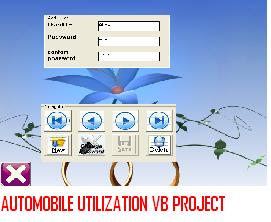
AUTOMOBILE-UTILIZATION-VISUAL-BASIC-PROJECTThe CSE students who are interested in doing the project on visual basics they can select Automobile Utilization visual basic project. Automobile system deals with the purchase and sales of the good and maintains the stock. It contains various forms and reports with different function. It has the menus created for different forms and reports.

The main objectives of Automobile system are:–

  • Easy to generate report for any transaction.
  • It is very much faster and flexible than manual system.
  • Easy and fastest   record finding technique.
  • Man power required is very less.
  • Data can be stored for a longer record.

Visual Basic syntax ideally suited for producing windows application. Ms Word, Ms Access and Ms PowerPoint all share Visual Basic for application, the exact same language syntax in Visual Basic-6.0. It continues the tradition of simple, powerful and easy to learn a language yet adds enough extended capabilities to satisfy the most jaded developer.

A database is coherent collection of data with some inherent meaning, built and populated with data for a specific purpose. Database stores data that is useful to us. This data is only a part of entire data available in the world around us.

HARDWARE REQUIREMENT

  • ·         Processor: Pentium-iii
  • ·         RAM: 256 MB           
  • ·         Hard Disk: 4.3GB
  • ·         Floppy Disk: 1.44 MB
  • ·         CD Drive
  • ·         Monitor-15” Color Monitor

SOFTWARE REQUIREMENT

  • ·         Microsoft Visual Basic 6.0
  • ·         Oracle 8i
download Automobile Utilization Visual Basic Project.

School Health Care System VB Final Year Project With Code

PURPOSE OF THE PROJECT:   

        The  School Health Program System project is  to  provide complete health services on a pilot basis to demonstrate the positive correlation between health and education .

The main aim is to achieve sustainable reduction in vulnerability and poverty of urban poor.

 PROBLEMS IN THE EXISTING SYSTEM:

Redundancy:                                                                               

           As the Administrator views the details of different modules in the records which doesn’t retrieve the data efficiently and it raises the problem of redundancy.

Accuracy:

             Since the same student name , school name etc., will be there so it will be difficult to retrieve the data accurately from the records.

SOLUTION FOR THESE PROBLEMS:

     School Health Program System will

  •     capture and record all biographic data for individuals (e.g.names, addresses)
  •      track tenure, academic titles, and service dates
  •    manage positions
  •       process payroll
  •   track people’s  deductions, direct deposit
  •   digitize paper-based processes such as the personnel action form (PAF)
  •   support a more robust reporting environment
  •  track timekeeping electronically
  • Maintains Accounts Related to Customers and Suppliers
  • Maintains Inventory Details
  • Maintains Warehouse Details
  • Maintains Reports for Material Requirements Planning
  • Maintenance of   details related to Assets and their transfer between different departments.
  • It will also maintains Depreciation details related to different assets   
    Software Requirements:

SOFTWARE SPECIFICATION:

  •  JAVA
  •  JDBC
  •  SERVLETS
  •  JSP
  •  HTML
  •  ORACLE

SCRIPT LANGUAGE:

JAVA SCRIPT

 TOMCAT  (OR)   WEBLOGI

Download School Health Care System VB Final Year Project With Code

Technical Seminar Topic On SWYPE

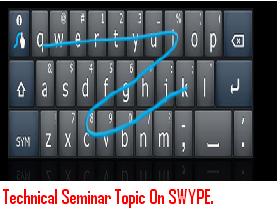
Technical-Seminar-Topic-On-SWYPESwype technical seminar explains about history of keyboard to present usage in mobile devices, details of existing system, Quetry keyboard, proposed system details and specifications.

SWYPE is a new method of keyboard on touch screens, SWYPE keyboard allows users to display words based on sliding from letter to letter, related words are displayed by using error correction algorithms and it uses language model to guess words. Tapping predictive text is also included in this system.

At present four million touch mobile phones all over the world use Swype keyboard which comes with same format as that of regular keyboard.

SWYPE software uses one megabyte memory for windows mobile devices it takes less than one megabyte space.

Swype consists of three major components that contribute to its accuracy and speed: an input path analyzer, word search engine with corresponding database, and a manufacturer customization interface.

SWYPE works in SYMBIAN, android, windows operating systems. In future swype will replace existing systems in the market; it can be used in any computing devices.

download Technical Seminar Topic On SWYPE , paper presentation.

Patient Information System VB.NET Final Year Project With Code

The main objective of this Patient Information System VB.NET Final Year Project With Code is:

If Lab technician:

 (i) Enter login: l0001

      Enter Password: ibmer4

(ii) Then his home page will come with the following privileges:

(a)            My Details

(b)           Tests

(c)      View Medical Tests

(d)           Logout

                (iii) When the lab technician clicks the My Details button then his personal details are displayed so that he can make any modifications (if any) and update his details.

  (iv) When he clicks the Tests button then different buttons like cytology, urine test, xraypns, xraychest, and gynecology are displayed.

                               When he clicks the Cytology button then another form is displayed allowing the lab technician to insert the test reports of a particular patient.

                               When he clicks the Urinetest button then another form is displayed allowing the lab technician to insert the test reports of a particular patient.

                                When he clicks the XRayPNS button then another form is displayed allowing the lab technician to insert the test reports of a particular patient.

                                 When he clicks the Gynecology button then another form is displayed allowing the lab technician to insert the test reports of a particular patient.       

                                 When he clicks the XrayChest button then another form is displayed allowing the lab technician to insert the test reports of a particular patient.

                           (v) When the lab technician clicks the View Medical Tests button then another page is displayed where he has to enter the login id or regd no of a patient ( for ex:1) in order to view the names of the tests that are to performed to that patient.

                           (vi) When he clicks the Logout button then he is directed to “xyz.html” i.e., the home page. If he wants he can login again.

6) .If Administrator

 (i)Enter login: a0001

     Enter password: ibmer1                          

 (ii)After entering into his homepage he will get the following privileges:

                                 (a)Doctor details

                                 (b)Staff details

                                 (c)Infrastructure details

                                 (d)My details

                                 (e)Logout                             

  (iii)When he clicks on My details he can view all his details. He can update them if needed.                

   (iv)After finishing his work the administrator can logout of his account by clicking on Logout.     

   (v) When he clicks on the Infrastructure details he will get two options Add details, Update details.

               If he wants to add new infrastructure details he clicks on Add details, then he enters the infrastructure name, and quantity.

                                     If he wants to update the infrastructure details he clicks on Update details, then he enters the infrastructure name and submits it. When he submits he gets the name of infrastructure and the quantity of it. Then he modifies the quantity.

 (vi) When the administrator wants to add, delete, update the staff details he clicks on Staff details. When he clicks on the Staff details he gets three options Add, Delete, View staff details.

                                      If the wants to add new staff, he enters their details by clicking on Add.

                                      If the wants to delete any staff details he clicks on Delete. When he clicks he enters the LoginID of staff and the corresponding record will be deleted.

                                      If he wants to update the staff details he clicks on View staff details. When he clicks he enters the LoginID of staff and the corresponding staff details will be displayed and he can update them.

 (vii) When the administrator wants to add, delete, update the doctor details he clicks on Doctor Details. When he clicks on the Doctor details he gets three options Add, Delete, View doctor details.

                                       If the wants to add new doctor, he enters their details by clicking on Add.

                                       If the wants to delete any doctor details he clicks on Delete. When he clicks he enters the LoginID of doctor and the corresponding record will be deleted.

                                       If he wants to update the doctor details he clicks on View doctor details. When he clicks he enters the LoginID of doctor and the corresponding doctor details will be displayed and he can update them.

7) If Web Administrator: 

(i)Enter login: w0001

    Enter Password: ibmer3                                      

(ii)Then his home page will come with the following privileges.        

                                             (a)My Details

                                             (b)Prices and Packages

                                             (c)FAQS

                                              (d)Logout

(iii) To view the personal details click on My Details. If you want to change any details, you modify it and click on update.

(iv)To change the costs of Packages click on Prices and Packages. Then you will get the page with the following options

                 (a) To add new package and its cost click on this particular link then you will get a page with 2 fields Package Name and cost. Enter the package name and its cost.

                  (b) If the package cost changes Click on this particular link then you will get a page with a field asking for which package you want to change the cost. Then enter the package name and click on submit then you will get a page with 2 fields Package Name and cost. Enter the package name and its cost.

(v)To add any FAQS click on FAQS. Then you will get a page with two fields Query and solution. Enter the query and solution and click on submit.

(vi) To logout from your account click on Logout.

Download Patient Information System VB.NET Final Year Project With Code

Patient Management System .Net Final Year Project With Code

Specifications

Front End:  HTML, Visual Studio

Back End:  SQL Server

Middle ware:  VB.Net

IIS is used to run the project.

Our project is “Patient Management System”. The databases in our project are

  • patient1
  • patientbox
  • patbox
  • profile
  • doctor
  • mtest
  • staff
  • appoint
  • cost
  • fixappt
  • package
  • freq
  • infra
  • urinetest
  • xraypns
  • gynaec
  • cytol
  • xraych

1. Open xyz.html page.

2. Click on Login

3. If Patient

 (i)Enter login: 1

     Enter Password: ramyab

 (ii)Then his home page will come with the following      privileges

                                             (a)View Profile

                                             (b)Health Details

                                             (c)Fix Appointment       

                                             (d)Pose a Query

                                             (e)Complete your Profile

                                             (f)Inbox

                                             (g)Logout

(iii) To view the personal details click on View Profile. If you want to change any details, you modify it and click on update.

(iv)To View Health details click on Health Details. And you will get the following options.

               (a)Urine test: If you click on urine you will get the urine test results.

      (b)Cytology: If you click on Cytology you will get the Cytology test results.

        (c)Gynecology: If you click on Gynecology you will get the Gynecology results.

               (d)Xraypns: If you click on Xray pns you will get the Xraypns results.

                (e)XrayChest: If you click on XayChest you will get the XrayChest results.

 (v)If you want to fix an appointment with a doctor click on  “fix Appointment “ .Then the page with doctors name, specialization, date and time will come. You choose the desired ones.

(vi) If u have any queries regarding hospital, doctor etc click on Pose a Query and you write your query there and click on submit .These queries will be given solution by Receptionist.  

(vii)To fill your current health details while joining the hospital click on Complete your profile. 

(viii)To view the responses for your queries click on Inbox

(Xi) To logout from your account click on Logout.

2) If Receptionist: 

 (i) Enter login: r0001

      Enter Password: ibmer5

(ii)Then his home page will come with the following privileges.                        

                                             (a) My Details

                                             (b) Inbox

                                             (c) Fix Appointment        

                                             (d) Logout

(iii) To view the personal details click on My Details. If you want to change any details, you modify it and click on update.

(iv)To View the queries the patients posed click on Inbox.

Then all the queries will be shown.

To view the query click on View Message.

To give reply click on Reply.

To delete message click on Delete

(v)To fix an appointment for a doctor click on  Fix Appointment  .Then the page with doctors name, specialization, date , time and specialization will come. You set the values and click on submit.

 (vi)To logout from your account click on Logout.

 3) If Doctor:

 (i) Enter login: 10003

      Enter Password: hansika

 (ii) Then his home page will come with the following privileges:

(a)        My Details

(b)       View Schedule

(c)    View Patient Details

(d)       Medical Tests

(e)        Logout

(iii) When he clicks the My Details button then his details are displayed so that he can make any modifications (if any) and update his details.

 (iv) When he clicks the View Schedule button then his schedule for the whole day will be displayed.              

(v) When he clicks the View Patient Details button then another page will  appear where the doctor should enter the patient’s regd no(for ex:1) in  order to view the health details of the patient.              

(vi) When he clicks the Medical Tests button then a page will be displayed in which different tests are listed in checkboxes and the doctor can click the tests to be taken by the patient.                

(vii) When he clicks the Logout button then he is directed to “xyz.html” i.e., the home page. If he wants he can login again.

4) If Bill Operator:

 (i)Enter login: b0001

     Enter Password: ibmer2                                    

(ii)Then his home page will come with the following privileges.

                                                      (a)My Details

                                             (b)View Tests

                                              (c)Logout

(iii) To view the personal details click on My Details. If you want to change any details, you modify it and click on update.

(iv)To view the tests to be done for a patient and the amount of money to be paid for that tests to be done click on VIEW TESTS . Then it will take you to a page where you have to enter the register number of the patient whose details you have to see. Then it will display you the tests to be performed to a patient along with the individual test cost and overall cost.

 (vi) To logout from your account click on Logout.

Download Patient Management System .Net Final Year Project With Code

Seminar On 4G Wireless Technologies

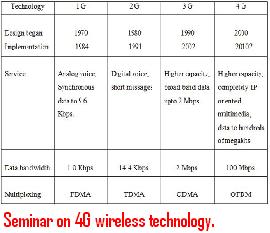
Seminar-on-4G-wireless-technology.4G wireless technology seminar topic explains about history of 4G technology, features of 4G technology, technology used in 4G and its operational features along with hardware requirements.

At present 3G is widely used technology in mobiles phones all over the world.  4G technology is still in developing stage, there is lot of research going on this technology. When comparing with 3G data transmission rates are faster. This seminar topic will outline basic functionality and its applications in real time.

3G and 4G technology differs in speed of data transfer, 4G works as a high speed wireless technology for providing broadband speed to mobile devices. 4G data transfer rate is 100Mbps in roaming and 1Gbps while mobile devices are in stationary position. This technology functions with the help of VOIP, IPV6 and Orthogonal Frequency multiplexing. This technical seminar topic will explain in detail about IPV6 importance and OFDM.

download Seminar on 4G wireless technology, paper presentation.

Secured Data Transmission Through Networks Seminar Topic

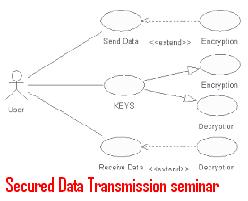
Secured-Data-Transmission-seminar-topicSecured data transmission through network seminar topic explains about how secured data can be encoded in the form of image and advantages in this process along with detailed explanation of the process involved in the encoding secured message.

Data transmission through network involves lot of hacking and illegal data capturing which is main concern for companies and government organizations. This process explains about how data can be securely transmitted.

Before transmitting a secure message data is added in to image by changing least significant bit information to message bits. Then modified message is transmitted through network. This method is called LSB based stenography which is mostly used for securing  data. 

Conclusion.

  • Cryptography is one of the old and widely used technique for securing data compare to many new hiding techniques. Stenography is the supplementary to cryptography which can be used for securing data. This seminar topic will explain a combined procedure for securing the data.

 download Secured Data Transmission Through Networks Seminar Topic, paper presentation.