Store Management System .Net Project

Abstract:

Stores Management System is a project developed to automate the processes to reduce the clerical labor of the staff working in stores both technical and as well as accounts departments.

This system uses the latest technologies and cost-effective tools thereby providing the better control to the management by avoiding manual errors.

Stores management system is a web-based manufacturing system that enables a manufacturing industry to schedule its manufacturing operations based on the daily update of sales from its dealers.

Existing System:

In the existing system, all the details of the records are maintained manually. Details of the items are not maintained properly. Takes a lot of time and less security. Records are not maintained in a proper order. Loss of data may happen sometimes.

Proposed System:

The proposed system maintains the information in the database. It is used as an intranet application. This system provides high-security. This system provides easy business solutions to the users.

Modules:

Admin:

Admin will get login with a valid username and password. Admin can view the customer requests. Admin can add the details of the supply forms. Admin views all the customer information. Admin can add the material forms.

Customer:

Customer needs to fill the registration and get a valid username and password. The customer can make a request for ordering the form. The customer can accept the request and reject the request.

Conclusion:

Our project store management system has succeeded in managing the details and the list of materials in an easy way without taking much time.

Coal Mine Detect and Rescue Robot Embedded Project

AIM:

The main aim the project is to design “Embedded control system design for coal mine detect and rescue robot”.

COMPONENTS:

AT89S52, Gas sensor, Fire Sensor, Driver IC, DC motor, and ZigBee.

EXISTING METHOD:

The present existing method is without monitoring the environmental conditions inside coal mines, persons are sent inside and sensors are connected to their helmets, based on the sensors sensed information if any dangerous gases are detected buzzer present on the helmet turns ON.

The main disadvantage of this method is it gives information to the people present inside the coal mines only and sensed information cannot be sent to control room to take necessary actions.

PROPOSED METHOD:

In the proposed method we overcome the disadvantages present in the existing method by developing a robot to which controller, sensors, buzzer and wireless communication system called ZigBee is attached to it.

Before sending the persons inside the coal mines first the robot is sent and it monitors the environmental conditions inside coal mine using sensors and send the sensed information is sent to the control room using the wireless technology and if detects the dangerous gases inside the coal mines it automatically turns on the buzzer connected to it so as to alert people inside it.

The system uses a compact circuitry built around AT89S52 microcontroller Programs are developed in Embedded C. Flash magic is used for loading programs into Microcontroller.

BLOCK DIAGRAM:

TRANSMITTER:

RECEIVER:

SOFTWARE: Embedded ‘C’
TOOLS: Keil, Flash magic
TARGET DEVICE: AT89S52 Microcontroller.
APPLICATIONS: Used at coal mines.
ADVANTAGES: The distance of controlling can also be improved by connecting ZigBee modules in a network.

REFERENCE:

1. The 8051 micro controller and embedded systems by Mazidi.
2. Datasheets and the user manuals of AT89S52.

Web Based Digital Watermarking .Net Synopsis

Abstract:

Web-based digital watermarking is a project developed to provide copyright protection to images over the web. The original content could easily be copied and displayed so this application provides copyright protection to the data. This application concentrates on the transmission of images safely through watermarking. where the authorized user only can obtain the images without distortion. On the request of user watermarking of the image is done. User watermarking can be retrieved and image can be viewed.

Existing System:

In the existing system, the process of watermarking has no copy rights. Less security. Takes a lot of time and the work done is not effective.

Proposed System:

The proposed system transmits images safely through watermarking. where the authorized user only can obtain the images without distortion. On the request of the user, we take the image and watermark image. Highly secured. Takes less time.

Modules:

Admin:

Admin can enter the application by entering a valid username and password. Admin can view the details of the user. Admin views the requests sent by the users and accepts the requests. Admin views the details of the file on which watermarking has to be done and sends to the users. Admin can send comments to the user.

User:

The user needs to fill the registration form and enter into the application by giving a valid username and password. The user can send the details of the file to the admin. The user can send request and images to admin. The user can view the comments made by admin.

Conclusion:

Our project web-based watermarking is a project which has successfully applied secure watermarking by providing copyrights to the user’s files on the web.

Demonstration of a Lighting System for a Motor Vehicle

This project has the three main modules

Application of Practical Shop Processing – Applicable Products
Lighting System of an Automobile – Demonstration Model
Parallel Clamp – Applicable Equipment

OBJECTIVE:

The main aim of the project is to have set up experience on demonstration of a lighting system for a Motor vehicle by studying the basic components of the lighting system and the operation of the lighting circuit.

USEFULNESS:

Traffic regulations require every Motor vehicle to be fitted with a correct lighting system. The lighting system is also important for an automobile to drive safely at day or night.

Unless lighting system has been used or insufficient components being applied, it will be very dangerous for the vehicle. By demonstration set of a lighting system for an automobile may support much more knowledge of this system to the students who study the concerning engineering subjects.

APPARATUS:

Types of lamps required are;

Main components

  • Headlamps
  • Tail lamps
  • Side or Parking lamps
  • Stop lamp

Accessories

  • Warning lamps
  • Fog lamps
  • Panel lamps and
  • Interior illumination lamps

Types of switch constituted in the lighting system are:

  • Light switch
  • Dip switch
  • Stoplight switch

CONSTRUCTION: (WORKING PROCEDURE)

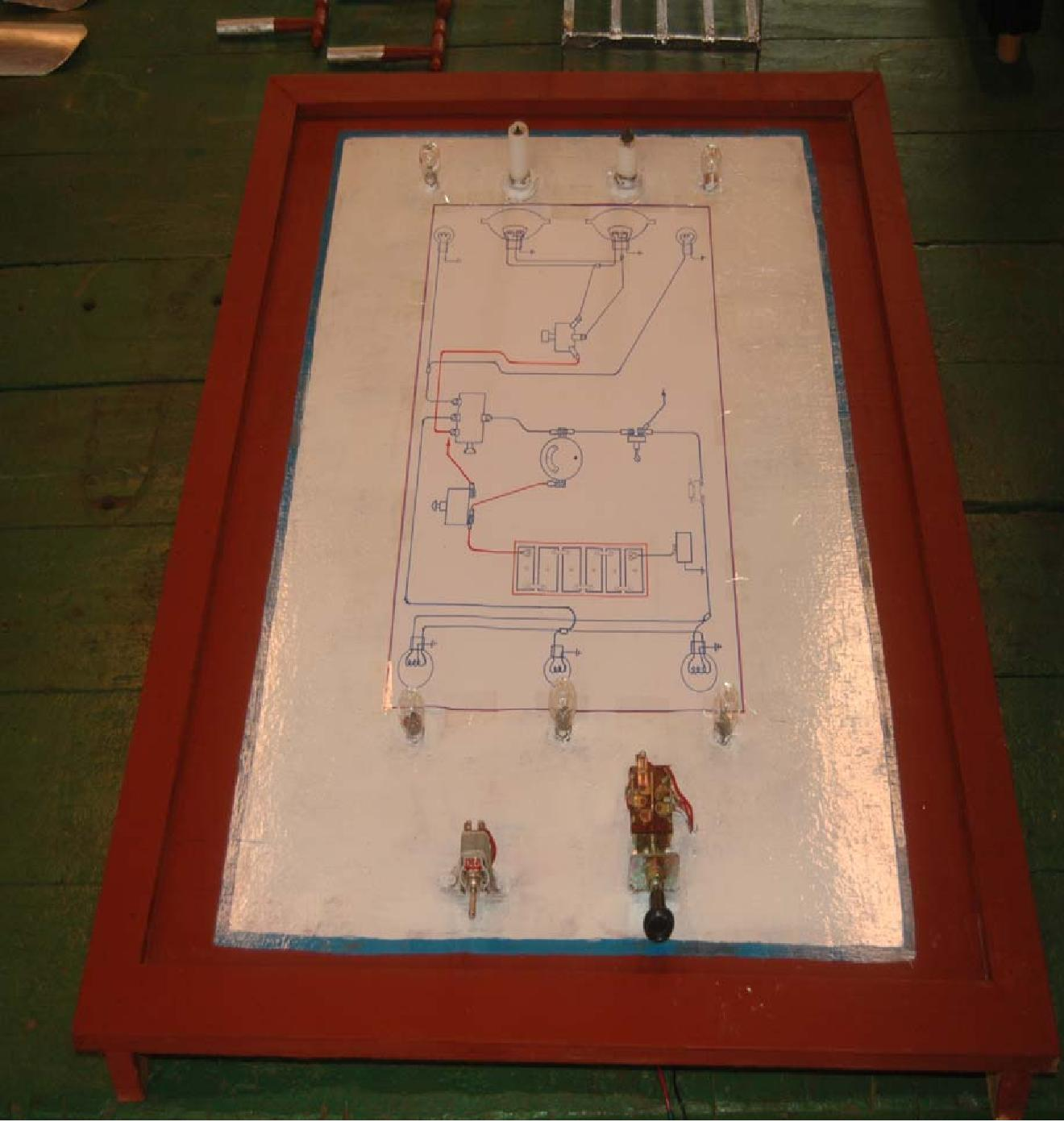
Panelboard is made of wood which has a length (3 ½ ′), wide (2 ½ ′) and thickness (¼″).

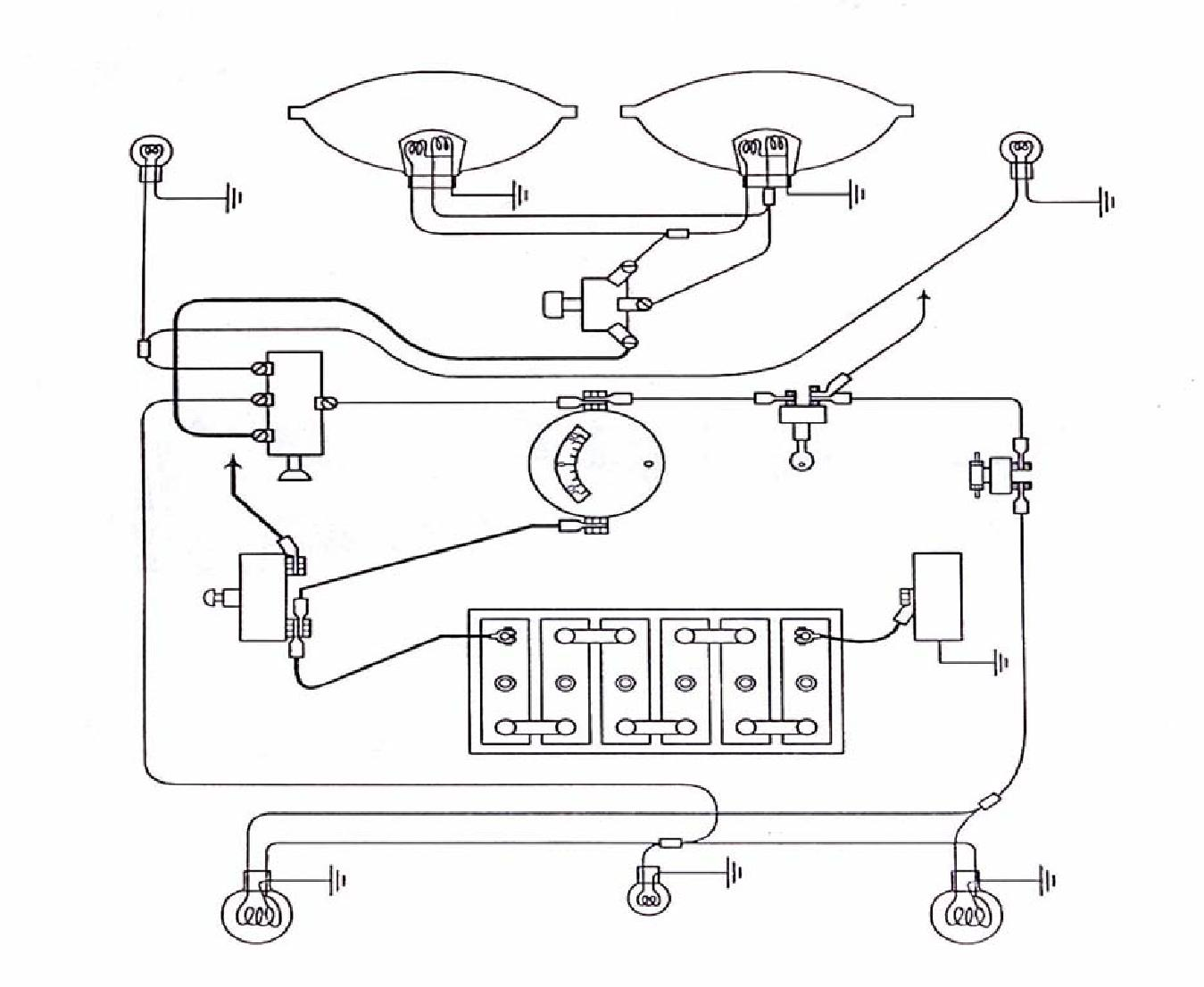
The circuit diagram is drawn on the panel board.

Complete Circuit Diagram

  • The set of apparatus is set up according to circuit on panel board.
  • The apparatus is connected to wire. After the setting has been established, the circuit is connected to the battery.
  • And then, the lighting system for an automobile which display on the panel board can be started for its demonstration.
  • Some of the other components are not display on the demonstration model board due to cost factor.

The following are the components’ specifications:

Sr.No. Components No. Required Specifications
1 Battery 1 12V
2 Head lamps 2 100 watt
3 Tail lamps 2 5 watt
4 Parking lamps 4 5 watt
5 Dip Switch 1

CHOOSING CABLE SIZE

CIRCUIT CABLE SIZE MAXIMUM CURRENT
SWG (size of wire gage) CARRYING CAPACITY
Battery and generator main feeds 44/0.012

28/0.012

14/0.010

27.5 amps
17.5 amps6 amps
Other main feeds

Remaining circuits

Starter circuits

37/0.036

61/0.036

61/0.044

According to circuit length and vehicle operating conditions

Firstly, it is calculated the current of headlamp and tail lamp. And the size of wire is selected from the table by comparing the result of current.

OPERATION:

THE LIGHTING CIRCUIT SYSTEM CONNECTION

  • The battery is connected to the battery terminal of the light switch. The light switch is connected to the dip switch including full terminal and dip terminal connected to the head lamp’s each terminal respectively.
  • Side terminal is connected to the side lamp or parking lamp.
  • The tail terminal is connected to the tail lamp.
  • The light switch control headlights, park sidelight, and tail lights.
  • The dip switch enables the head light to be changed from dip to full beam, and vice versa, without affecting the park-light or the rear light.
  • It should be noted that the stop lights will operate only when the ignition switch is on. Fuse is common practice to insert a fuse in the circuit of interior lights as on driving hazard is caused by the failure of the use in these circuits.

SWITCH OPERATION

  • Naturally, during the right-driver, and in an emergency in the day-time, the full beam of the headlamp must be used and the number two-step of the light switches on. When faced with another vehicle, the dip beam is used so is not to dazzle the driver of that vehicle. Then the dip switch is used.
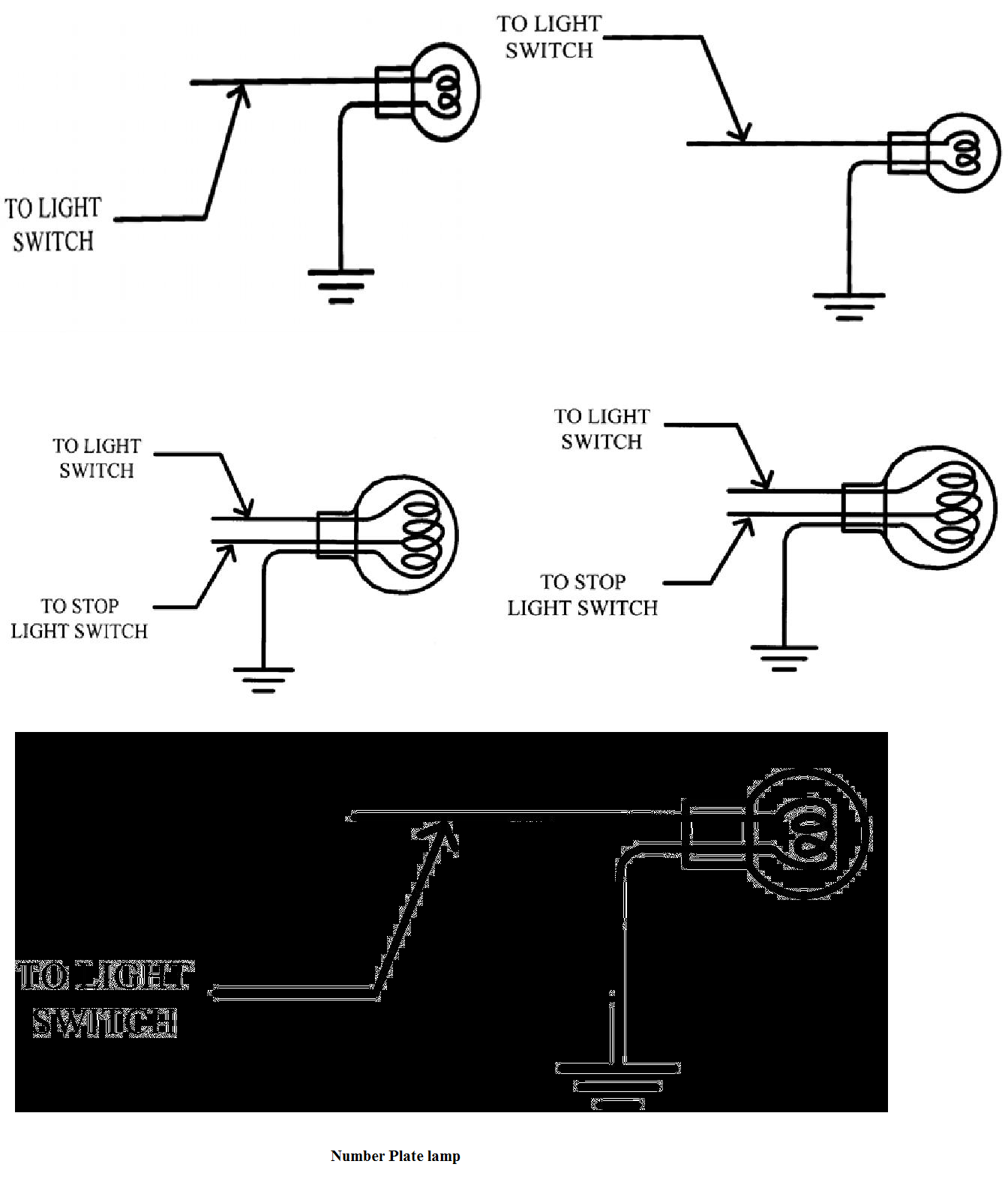
  • When the number one step of the light switch is on, the parking lamps, the tail lamps and the number plate lamps all light up at the same time.
  • As soon as the ignition switch is on, the brake lamps become operational and light up when the break is applied.

HEADLAMP ALIGNING AND FOCUSING

Headlamps must be correctly focused and aligned if the driver is to have good road illumination in the right place without dazzling another road user. They are the following.

  • Front of vehicle to be square with screen.
  • Vehicle to be loaded and standing on level ground.
  • Recommended distance for setting at least 25 ft.
  • For ease of setting one headlamp should be covered.

CIRCUIT CONNECTION DIAGRAM

Parking Lamp & Stop and Tail lamps & Number Plate lamp

PROJECT PHOTOGRAPHS

REFERENCES 

1. J.A Dolan, AMSE, AMJED, 1996, Mortor Vehicle Technology and Practical Work Volume-1, lecture note in Mech. Eng: Dept., Ashton under Lyne College of Further Education Landon
2. R.E Owen, 1965, Electricity for Mortor Mechanics, Government Printer, Wellington, Newzeland.

English to Spanish Translation .Net Project

Abstract

The project titled “English to Spanish Translation” is designed using.NET with Microsoft Visual Studio.Net 2005 as the front end which works in .Net framework version 2.0.The coding language used is C# .Net.

EXISTING SYSTEM

  • In the existing system, the extraction will not be a perfect one. It is a losing one. Because it has a lot of data losses while the text extraction.
  • Also the existing one does not retrieve all the text from an image which has number of text. Also, it does not support the high-resolution images.
  • The existing one does not provide any language conversion options.

PROPOSED SYSTEM

  • The proposed one provides good extraction options. It has a minimized data losing.
  • Also it supports high-resolution images which may have a lot of text.
  • It provides a high level language conversion technique which is used to convert the extracted English text into Spanish.

HARDWARE CONFIGURATION

  • SYSTEM : Pentium IV 2.4 GHz
  •  HARD DISK: 40 GB
  •  FLOPPY DRIVE: 1.44 MB
  • MONITOR : 15 VGA color
  • MOUSE : Logitech.
  • RAM: 256 MB
  • KEYBOARD: 110 keys enhanced.

SOFTWARE CONFIGURATION

  • Operating system:- Windows XP Professional
  • Front End:- Microsoft Visual Studio .Net 2005
  • Coding Language: – C# 2005.
  • Back End:- SQL server 2005

Online Book Store Website Development Project

Index

  • Introduction
  • Proposed System
  • Objectives to be fulfilled
  • System Features
  • Assumptions
  • Entity Relationship Diagram
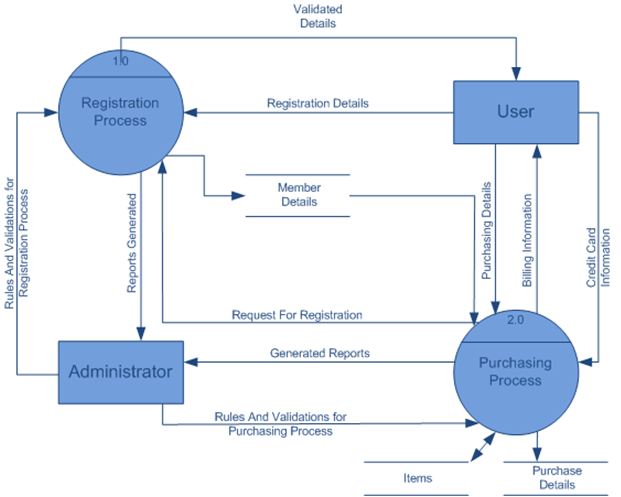
  • Data Flow Diagram
  • Data Dictionary
  • Coding System
  • Screen Layouts
  • Operating Environment
  • Proposed Enhancement
  • Conclusion
  • Bibliography

Introduction

The Project “Online Book Store” is a user interactive and delivery based website where the order can be booked and payments can be done shortly along with getting all the required details regarding each and every mobile.

Business done by e-commerce is far more efficient, faster and reliable than traditional commerce.

This method of adoption of doing business via e-commerce is a user-friendly system which will help the user to access the product easily.

Proposed System

The Online Book Store method of selling products through e-commerce is far more efficient than traditional commerce.

Objectives to be fulfilled

The following are the objectives which are fulfilled by creating an online shop for Selling Books Online.

To provide a wider market to the seller.

To remove monopoly and provide better products to the customers

To make products easily available to the customers.

Assumptions

While developing the E-Commerce website for Book Selling System, following assumptions were kept in mind for the administrator.

The user logged in with ID and Password is a valid user.

The Credit Card Number taken from the user is not received to the database, and is redirected directly to the www.paypal.com via SSL.

All Products are available according to the stock.

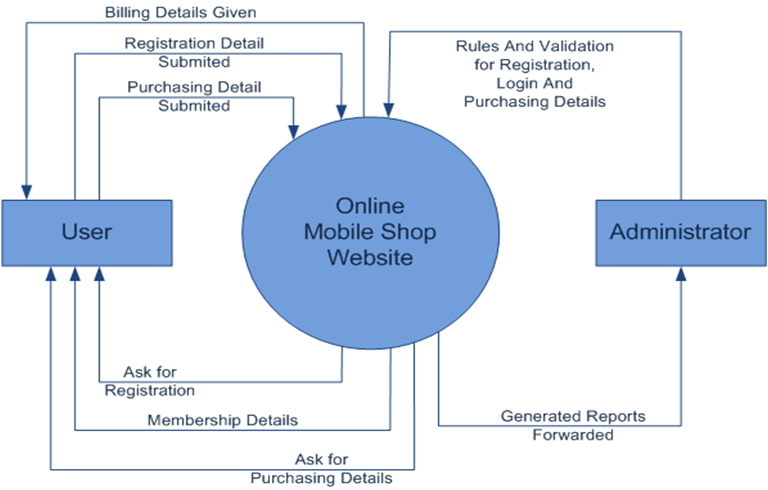
Context Diagram

First Level Diagram

Data Dictionary

Table: Board

This Table Keeps the records of different Discussion boards

Field Name Data Type Size Constraint
BoardID Int 4 Primary Key
B_Name Varchar 40
B_des Varchar 100
B_Order Int 4

Table: Manufacturer

This Table Keeps the records of different Manufacturer Information

Field Name Data Type Size Constraint
Man_id Int 4 Primary Key
Man_name Varchar 30
Man_img Varchar 40

Table : NewestPhone

This Table Keeps the records of Newest Phone

Field Name Data Type Size Constraint
Cheker Varchar 40 Primary Key
Phone_Id Int 4
Man_Id Int 4 Primary Key
Price Float 8
Thumnail Varchar 40

Table : Ordertable

This Table Keeps The Records Of All The Orders

Field Name Data Type Size Constraint
OrderId Varchar 10 Primary Key
UserId Varchar 20 Primary Key
PhoneId Varchar 10 Primary Key
Ord_Quentity Int 4
SubTotal Float 8

Table : Payments

This Table Keeps The Records Of All The Payments

Field Name Data Type Size Constraint
Order_Id Varchar 10 Primary Key
User_Id Varchar 50
Amount Float 8
Exp_Date Date 8
Card_No Varchar 15
IP Varchar 25
Ord_Date Date 8
Status Char 1

Table : PhoneDetails

This Table Keeps The Records Of All The Phones

Field Name Data Type Size Constraint
Phone_Id Varchar 10 Primary Key
Man_id Varchar 20
Date_pub Date 8
Bat_type Varchar 50
Disp_type Varchar 50
Big_img Varchar 50
Small_img Varchar 50
Thumnail Varchar 50
Price Float 8  


Table: Post

This Table Keeps The Records Of All The Posts

Field Name Data Typ Size Constraint
PostId Int 4 Primary Key
PostSubject Varchar 50
PostedBy Varchar 50
Posted Date 8
IP Varchar 25
Massage Varchar 200
ThreadID Int 4

Table : Ratings

This Table Keeps The Records Of All The Ratings For Phones

Field Name Data Type Size Constraint
RatingId Int 4 PrimaryKey
Rating Int 4
IP Varchar 25
PhoneId Varchar 10

Table : Cart

This Table Keeps The Records Of related cart.

Field Name Data Type Size Constraint
TransId Int 4 PrimaryKey
SecCode Int 4
UserId Varchar 50
PhoneId Varchar 10
Man_Id Varchar 20
Price Float 8
Qty Int 4

Table : Thread

This Table Keeps The Records Of All Thread

Field Name Data Type Size Constraint
ThreadId Int 4 PrimaryKey
Tname Varchar 50
StartedBy Varchar 50
BoardId Int 4

Table : User

This Table Keeps The Records Of All The Users

Field Name Data Type Size Constraint
UserId Varchar 50 PrimaryKey
Pass Varchar 50
Name Varchar 50
L_name Varchar 50
B_Date Date 8
Country Varchar 20
Previladge Char 1
JoinDate Date 8
ImgUrl Varchar 200


Screen Layouts

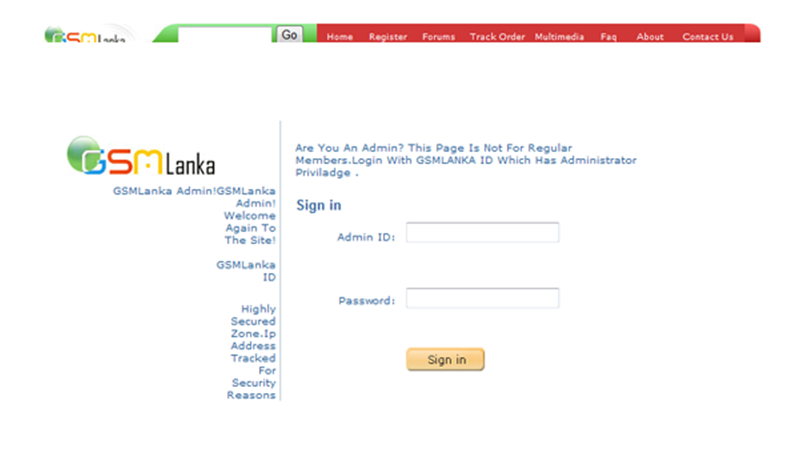
Admin Login

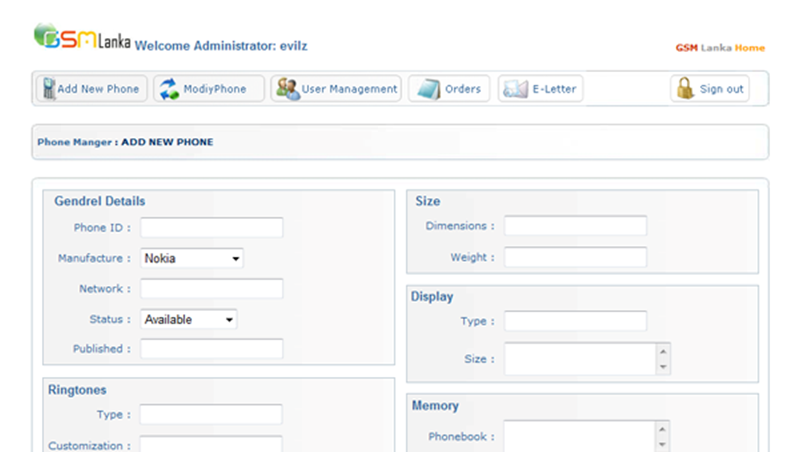
Add New Phone

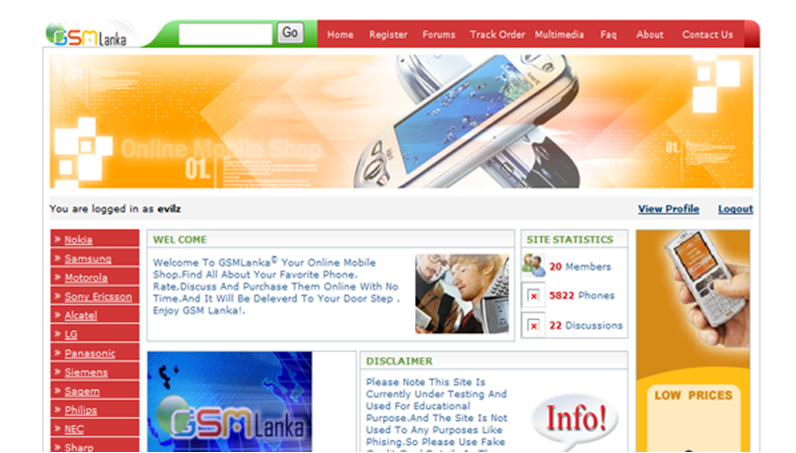
User Home

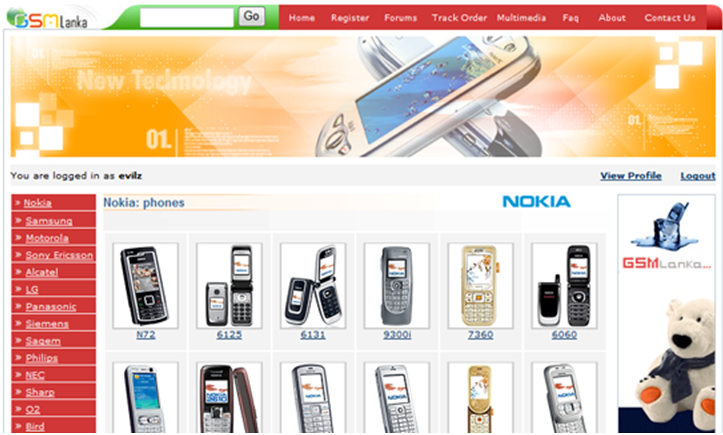
Listing Mobiles

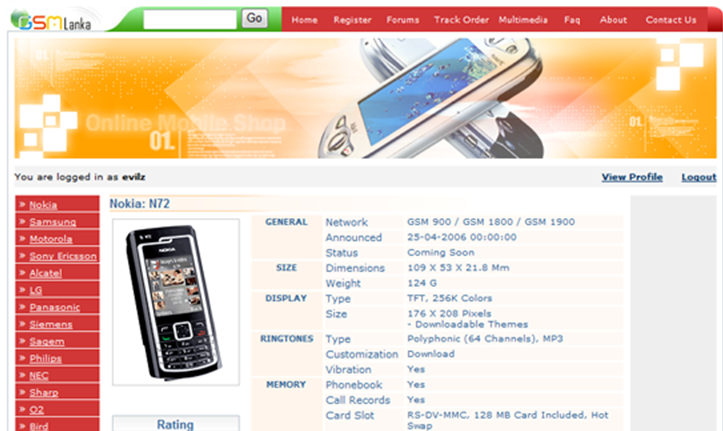
Mobile’s Details

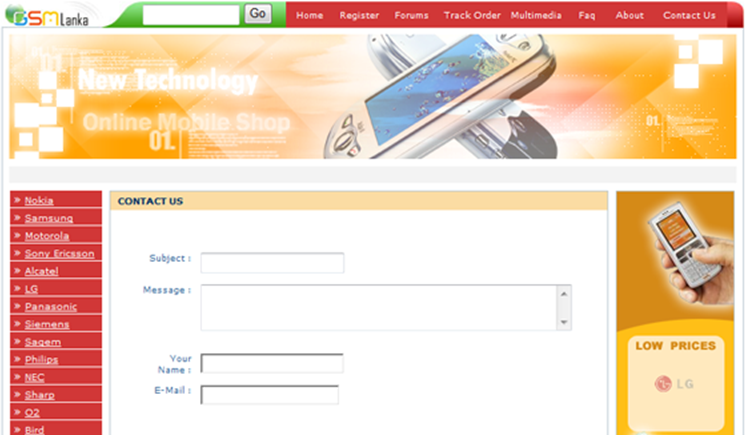
Contact Us

Coding System

In the Coding System, we have provided a unique primary key to all the Books so they can be searched uniquely.

There would be no redundant data in the coding system.

Operational Environment

The Hardware and Software requirements for this particular project is specified below

Hardware Configuration (Minimum Requirement)
Processor Pentium 233 Mhz
RAM 128 MB
HDD 500 MB
Monitor Supporting resolution up to 1024 * 768

Software Requirement (Minimum Requirement)
Internet Explorer 6 or Above—

Proposed Enhancement

The current Online Book Store project can be made more secure by providing cross-checking techniques and algorithms for keeping the user data secure.

This project is expandable if we can include more modules to it, like shipping and door to door delivery.

Conclusion

This is our first live Online Book Store project to handle an e-commerce website. The firm was only using a traditional commerce method for selling machinery.

During analysis, e gathered the information about the companies by taking interviews of organization staff members and even studied the manual system.

This Website Development Project gave us sound knowledge and experience in all major areas of computer application and to get exposure to various technical and management practices of IT industry.

“Data at Rest” Security: Using Sql Server 2005 Encrption Technologies

“DATA AT REST” Security: USING SQL SERVER 2005 ENCRPTION TECHNOLOGIES

ABSTRACT:

This application is a web site, in which provide the services like mailing, chatting services, encryption, decryption, compression and decompression between the members and admin.  This system provides all kinds of services to the clients like file transfer, mail, chat etc.,

This system is cost effective and provides a security like firewall.  Developed in ASP.net platform will be an advantage of to this software.

For every registration of user the members id. Will be generated automatically.  The registered user can encrypt bits data by using the algorithm and send it to the receiver.  The encrypted message will be added to the receivers in box.  Then the receiver uses his private key and decrypts it.

In mailing module all the encrypted mail, compression mail transfer to admin/admin to member and all the decrypted and decompression files are opened by admin/member.   In chatting module the confirmation messages passes from member to admin and admin to member.

If the registered user has forgotten his password or if he wants to change his password, while login on to him area, he can do it by entering his member_id and security answer. That he has given on the registration form while registering.

The user can compress and decompress the file, as per his need by using the folder creation option, then copy all file he want to compress and put them into the folder.  This folder can be made compressed and compressed folder can be decompressed according to the user’s need.  The idle user will be expired automatically.

Modules

Login Module

This module is used for authentication purpose. Any registered User who is trying to enter his work area is checked for his id and password .If he is authorized then he would be allowed to enter into his work area.

File Store Module:

File transfer is handled between User and Admin. To share a file from   Another User  the requestor User sends the request to the Admin. The Admin then gets the file from the User which provides the requested file. Then the Admin sends the file Encryption Key to That User

EMail:

With the advent of the Internet and its commercial availability, the Universal e-mail has become a common feature in today’s High-tech World.

Chat

 In this module the confirmation messages passes from member to admin and admin to member

Compressing Module

In this module the folder can be made compressed and decompressed according to the users need

SOFTWARE REQUIREMENTS

  • Front-End                  :        Asp.Net
  • Coding Language  :            C#
  • Back end                    :         SQL
  • Operating System     :        Windows XP.

Online Voter Database Management System

Project Title: Online Voter Database Management System

Technical Details: JSP, J2SE, JDBC and ORACLE

Description: The main aim of developing this “Online Voter Database Management System” software application is to store the details of voters of our country with all details efficiently. The voter should have completed 18 years of their age to register.

Initially, every eligible voter has to register for the approval. After successful registration, a unique id will be generated automatically and given to the applicant. Through this user can update his details later.

By using unique id one can prove his identity as a citizen of the particular country and to apply for PAN card or driving license. Govt Officials can view the whole database.

This Online Voter Database project has developed using JSP, J2SE, JDBC and ORACLE Technologies.

Modules:

  • User
  • Admin

Online Seminar Hall and Auditorium Booking System

The Online Seminar Hall and Auditorium Booking System is divided into four main modules. Each and every module performs a particular work. Those 4 modules are

  1. Maintenance of user and seminar hall
  2. Booking the seminar hall
  3. Approval and Rejection by In-charge
  4. Role of Principal

Maintenance of user and seminar hall

It consists of Signup, Login and update details of the seminar halls, users. The Administrator creates a separate account for each Department, Seminar hall in-charges, other cells like placement and training, EMDC etc., and Principal.

Booking the seminar hall

Each department has the username and password to book the seminar hall for their requirement. Through this they can view the available dates of particular seminar hall and also the facilities in the hall like capacity, mic’s, projector, marker board etc., This provides user-friendly environment while booking the seminar hall it gives suggestion regarding the selection of seminar hall based on the capacity and availability. The concern department head can view the list of the request. The acceptance and rejection can be viewed by the user through that log in or even by the email id.

Approval and Rejemailon by In-charge

The role of seminar hall in-charge is to check the request came to the seminar hall. When in-charges login into their account the list of new requests are displayed in their page as shown. The request can be either accepted or rejected based on the priority of the request. If more than one request is made for the same seminar hall on the same date after granting approval to a particular request by seminar hall in-charge, the remaining requests are automatically rejected and the email is sent to the bookie and also it is notified on their page.

Module – IV: Role of Principal

The Principal can view the entire process which is happening on the website and can fetch the data from the past to present who all are used the seminar hall. In an emergency case, he can reject the accepted request and the email will be sent to the booker as well as the seminar hall in-charge by suggesting alternate seminar halls.
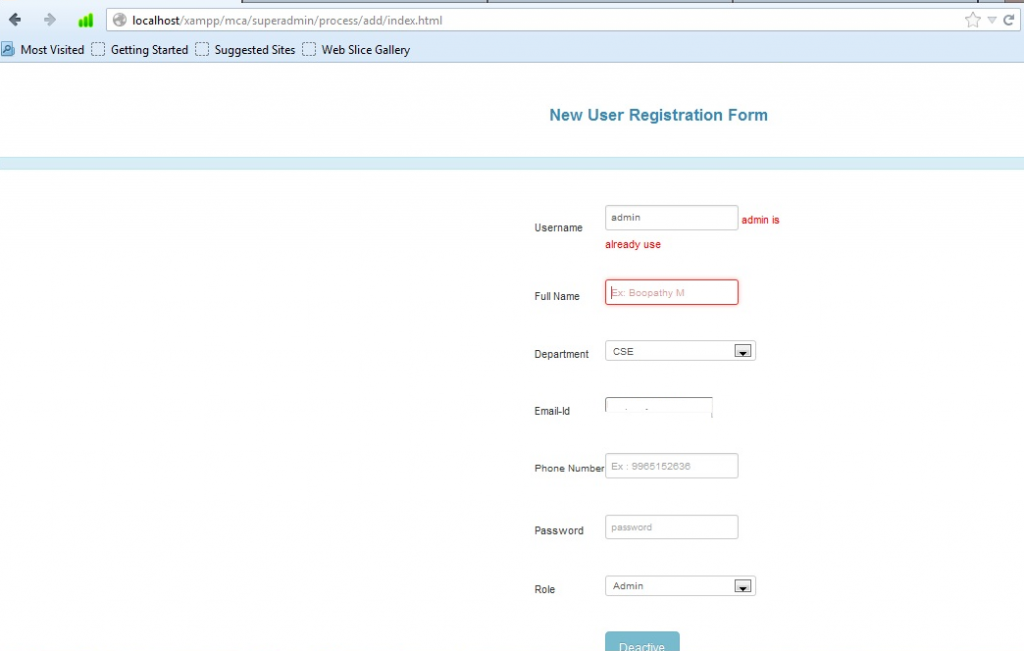
User Registration Form

This form contains new user Registration Fields. Admin will take the role of this process to register user details. Here all the fields are validated using JavaScript Validation.

Signup Form

Login Form
The user can enter username and password. These Fields are mandatory. Both fields are validated using PHP. Login option given separated for four types of users.

Checking Availability

To check the availability of the seminar hall by Booker

Checking the availability
Availability Details
Seminar hall Booking FormIt contains all required fields for booking seminar halls like booking date, session, Booker name, dept, etc., Here all the fields are validated using JavaScript validation. For date picker, we are using ‘jQuery Date Picker’.
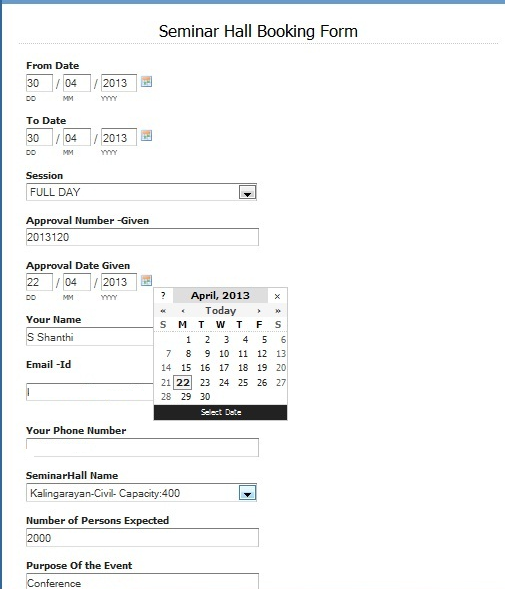
It contains all required fields for booking seminar halls like booking date, session, booker name, dept, etc., Here all the fields are validated using JavaScript validation. For date picker, we are using ‘jQuery Date Picker’.

Booking Form

Booking suggestion form

OUTPUT DESIGN

It contains a list of users on this system.

Administrator portal

Seminar hall Incharge Portal

It lists out the request came for the seminar hall with Booker details.In-charges approve the request based on the priority based on First Come First Serve order based on booking id or booking date and time.

Seminar hall in-charge portal

Usage details
It is Users availability checking page. On this user can check the availability of particular seminar halls.

Usage details

User page-Request details

It contains a list of requests have been sent to the seminar halls, viewed by the Head of the Departments.

Rejection of Acceptance

Notification of Approval Rejection

Usage details –principal portal

From this page, Principal can view the entire process which is happening on the website and can fetch the data from the past to present who all are used the seminar hall.

Acceptance rejection page

It shows the acceptance rejection page details, it can be viewed by principal

Admin portal

Principal portal

SYSTEM IMPLEMENTATION

The project is developed and hosted in our Engineering College web server. It is going to use by our college. Users can access this website by using the intranet. It helps users by reducing manual works. It will be a User-friendly website.

CONCLUSION

The project entitled “Seminar Hall and Auditorium Booking System” was successfully executed.  This system replaces the existing system with more features.  The system provides security to user documents.

However, the possibilities for innovation are infinite and scope for development is innumerable. The future extension can be made to provide more option in this application.

FUTURE ENHANCEMENT

Good amount of user friendliness has been incorporated in this system. It is possible to exploit these features to get the details of not only seminar hall but also the total number of blocks and which contains the total list of the hall in a block wise.  The process is suitable to extend the kind of task and the number of more process.

Download Seminar Hall booking System PHP project.

Easy Resource Utilization System

This Easy Resource Utilization System project aims to development of booking seminar halls and auditoriums in our college through online. It reduces the traditional/manual maintenance system. It creates a user-friendly website for users.

Here, four types of users are available like Principal, Administrator, Seminar hall in-charge and Head of Departments or Booker. Booker can check seminar hall availability, booking and viewing the status through online. Any faculty can reserve the seminar hall and auditorium based on the availability.

In this system, the seminar hall in-charges can view the requests and accept the request(s) according to the priority and also view the usage reports and status for a particular period. Administrator plays a vital role to maintain complete details of all the users, hall details and he/she is the only authorized person to update all details.

The principal can view all user details and usage details of seminar halls. Other users can only view the details of the seminar halls. Each event like seminar hall booking, cancellation of seminar hall will be intimated to the concern seminar hall in-charge, bookie, and Heads of the department through E-mail. Ultimately this project helps to utilize the seminar hall in an easy way.

PROJECT OVERVIEW

The project is developed for the requirement of our Kongu Engineering College. It is used to book the seminar hall through the online. Four roles are available for this project i.e., Principal, Administrator, Seminar hall In-charge and Hod. Booker can reserve the conference/seminar halls and auditorium easily.

Hall in-charges can accept and reject request came for the seminar hall. The principal can view the entire user, in-charge and usage details and he can reject the approval of hall in-charge. The administrator is responsible for users and hall details maintenance.

The project is developed and hosted in our Kongu Engineering College web server and linked to www.kongu.edu.

In the first step, the administrator has to provide the user id, password for the principal, seminar hall in-charges, Hod’s in order to avoid unwanted users to access the file, the second step Booker can book the seminar hall which is required, third step is hall in-charge can approve/reject the request of Booker. The final step is principal can view the usage details of the hall and also he has the rights to cancel the approval of hall in-charge which is accepted.

OBJECTIVES

• It is mainly to implement for departments to book seminar hall through online instead of carrying out documents and maintaining it.
• To reduce the effort of maintaining documents of seminar hall usage.
• It is the effective way of using the college resources properly.

SYSTEM ANALYSIS

EXISTING SYSTEM

This seminar hall booking is done only through the process on paper which means the process done through manual maintenance system.

Drawbacks

• Checking availability of seminar halls.
• Checking the capacity of seminar halls.
• Viewing the detail of the seminar halls.
• Phone conversations with seminar hall in-charges.
• Time wastage for the Booker.
• Mental stress to the booker.
• Non-availability of the technician.
• Booking form maintenance by the in-charge.

PROPOSED SYSTEM

This application entirely based on the online process as we can view the status of all seminar halls. It mainly reduces the effort and time of the Booker and hall in-charge. Based on the priority of request hall in-charges can easily accept or reject the request.

FEASIBILITY STUDY

This application is proposed by our principal as it is a valid one, which is a must for Kongu Engineering College as for the seminar hall booking process. This is efficiently done and helpful for all the faculty and HOD of the entire department. The drawbacks mentioned above in the current/ existing system will not reflect the proposed system.

SYSTEM SPECIFICATIONS

HARDWARE REQUIREMENTS

Processor: Intel Pentium i3 1.3 GHz
RAM: 4 GB
Hard Disk: 320 GB
Monitor: 17inch color display
Key Board: standard 104 Keys
Mouse: 4Button Scroll

SOFTWARE REQUIREMENTS

Operation System: Windows 7
Front End : HTML, PHP
Back End: MySQL
Scripting Languages: JavaScript and jQuery, PHP
Web server: XAMPP server 1.8.1

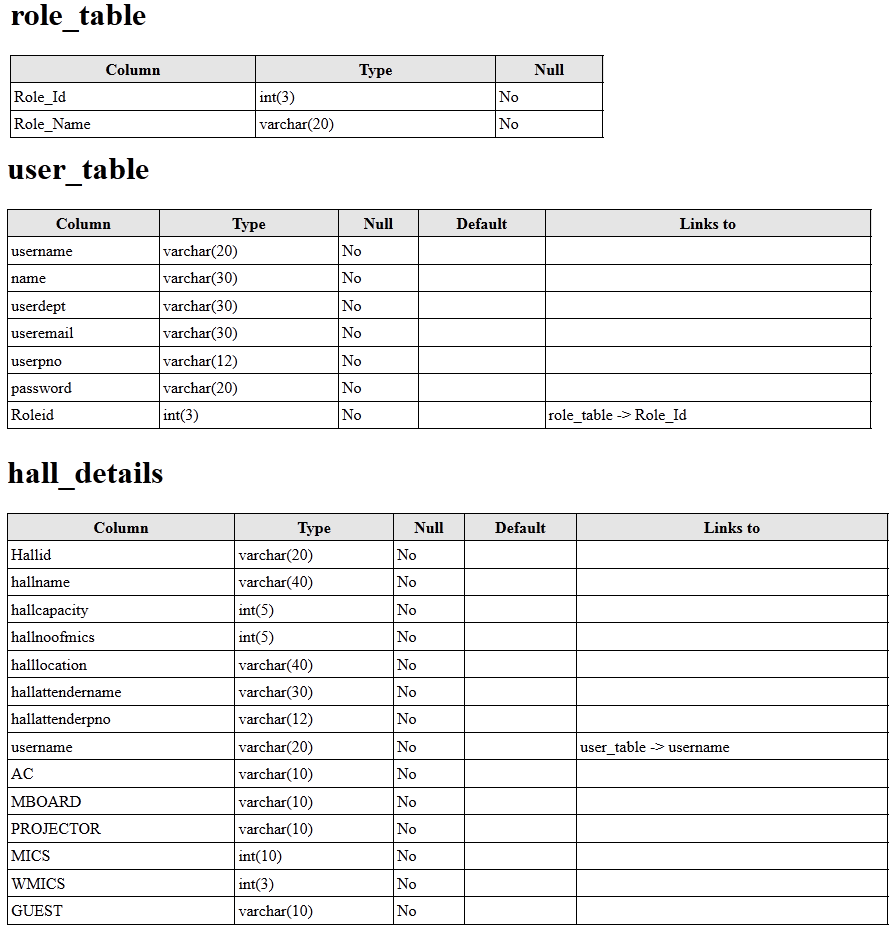
DATABASE DESIGN