Vehicle Management System Java Project

Abstract:

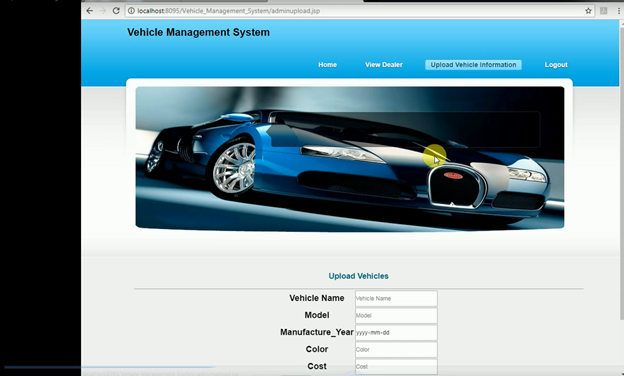
Vehicle Management System is web application developed in Java and it is implemented by using windows appliance. This application provides an easy and simple way to sell or purchase vehicles online. Customers can vie wall the details of the vehicles and can purchase the vehicle. Customers can view all the details of the vehicle and send a request if he wants to purchase the vehicle.
Existing System:

In the existing Vehicle system, all the work is done manually which takes a lot of time and effort. It is very difficult to users to view the details of the vehicle and to purchase the vehicle.

Proposed System:

The proposed Vehicle system provides an easy way to find the information of the vehicle. This is an automated system which enables users to view and purchase a vehicle from anywhere and at any time. All the data will be stored in the database in which there will have not the scope of losing the stored information.

Modules:

Dealer:

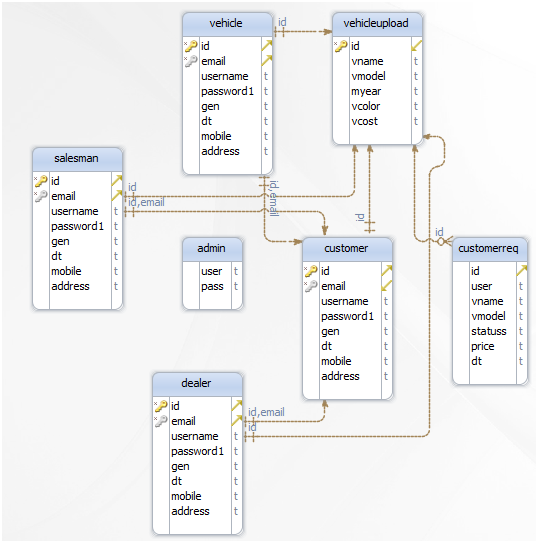
The dealer needs to register with the application to get unique username and password. The dealer can enter into the application with valid username and password. The dealer can upload vehicle information such as vehicle name, manufacture year, model color and cost.

Admin:

Admin can get log in with valid username and password. Admin can view all registered dealer details. Admin can upload vehicle information like Vehicle name, Manufacture Year, Model Color, Cost.

Vehicle:

A vehicle needs to register with the application to get unique username and password. The vehicle can get log in with valid username and password. The vehicle can view vehicle information like Vehicle name, Manufacture Year, Model Color, Cost.

Customer:

Customer needs to register with the application to get unique username and password. The customer can get log in with valid username and password. Customer views Vehicles and sends a request to sales manager for cost and delivery date. The customer can view sales manager response

Sales Manager:

Sales manager need to register with the application to get unique username and password. A sales manager can get log in with valid username and password. Sales Manager can view customer requests and send vehicle cost and delivery date.

Conclusion:

Vehicle Management System Java web application satisfies all the needs of admin, customer, sales manager, and vehicle by providing fast and accurate information about vehicles.
E-Auction Java Project

Secure Web Application for Managing Auction System

Abstract:

E-Auction is a web application developed in java. E-Auction provides a marketplace which facilitates buying products such as electronics, furniture, household goods, bikes, and cars etc. This application enables users to buy the goods by making fast and easy for anyone to post all the details of the product on the application.

Existing System:

In the existing system, the user is not able to get the required information about the products to be purchased. The user should go physically to know the information which is not accurate and takes a lot of it. Selling and purchasing a product takes a lot of time and effort.

Proposed System:

In the proposed system users can find the details of the product at any time and from anywhere. The user can view the details on the application and can apply for the product to purchase the product which takes no time and physical effort.

UML Diagrams:

Use Ca

se Diagram:

Sequence Diagram:

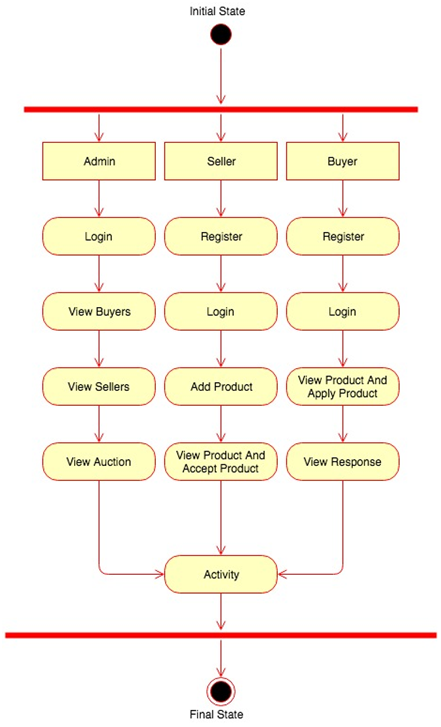
Activity Diagram:

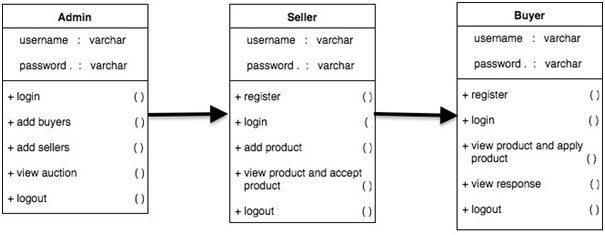
Class Diagram:


Modules:

Admin:

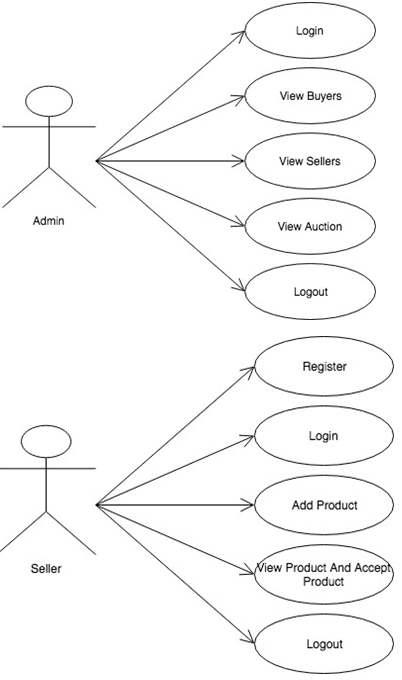
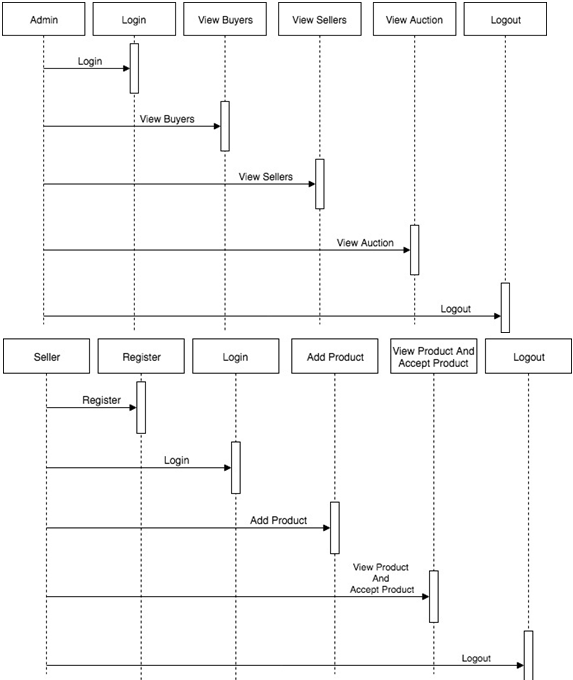
Admin needs to get login by entering valid credentials. Admin can view all the details of the users. Admin can view all the requests of the users who applied for the auction on a product Admin will send a response to users to purchase a product.

User:

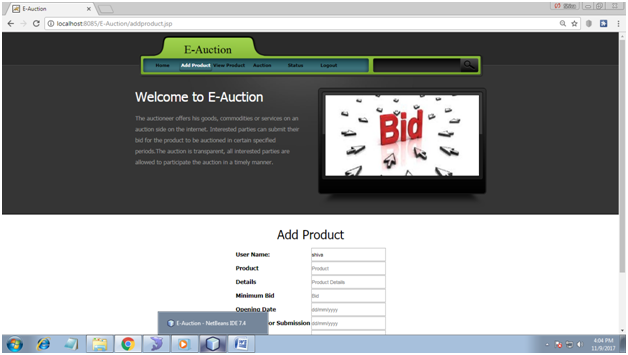
The user needs to enter all the details in the registration form to get a valid username and password. The user needs to enter a one time password which will be sent to his mail id. The user can add all the details of the product. The user can view all the details of the added products. The user needs to enter details of the product need to send for auction and can check the status for their request.

Conclusion:

E-Auction application satisfies the requirement of the users in purchasing the products which selected for auction. This application provides an easy and fast way for the process of the auction on a product.

GSM Based Smart City garbage Bin Monitoring System

This is Smart garbage Bin Monitoring System, In this Project, we are monitoring garbage of the dustbin, Once the garbage bin is filled we can see the status indication of the LED. There is an IR sensor in the garbage bin. In the same way, we also get the alert message is saying that the garbage bin is filled.

Here we are using GSM Modem, which is going to use to send an alert message saying that the particular garbage bin is filled and the indication is indicated there with Green & Red indications. If it is Green- The garbage bin is empty, If it is Red – The garbage bin is full.

Basically here the Arduino board is playing a major role in sending the commands to the GSM Modem saying that when to send the message. This Aurdino board is receiving input from IR sensors saying that what is the garbage whether it is full or empty.

When this gives the digital input to the Arduino, this Arduino will send the output signal to the status indication entities and also it sends the output signal to the GSM modem saying that send the message to the particular number saying that garbage is cleaned.

This is a very advanced project rather than IOT, in IOT there is lack of internet access but here we are using GSM. This GSM one message send to the Municipal Office and another message will send to Cleaning Section.

Density based traffic control system using IR sensors

Aim:

The main aim of developing this Density-based traffic control system project is to provide real-time traffic signaling system in the city to reduce traffic jam.

In this project we are using IR sensors, Sound Sensors, Aurdino Omega to monitor the 4-way traffic density. Each Line has 3 IR sensors, IR sensor is basically a sensor which can detect the obstacle, basically, it works on the proximity principle, It has an IR transmitter and IR Receiver, where IR transmitter sends IR Light where it sees any obstacle the same transmitter light will be reflected back and falls on the Receiver LED. Based on the light reflection,  here we are monitoring the traffic density based on the number IR Sensors Sensed.

Drawbacks in the Present System:

Huge Traffic Jam on the roads with the existing system

Auto & Manual Mode in the present Traffic System

In the Auto Mode, Traffic lights are in the Timer Mode the Time will fix for 1 minute or 2 minutes, Manual Mode takes more human effort.

Proposed Development:

But here we have developed as per traffic density the signal system will work, It mainly works with the help of sensors, If one sensor sensing when the green light signal time is 3 seconds, If 2 sensors are sensing then it will on for 6 seconds, If 3 sensors are sensing then the Green light will on for 9 seconds.

Based on that we just make a priority for all the 4 sides, Moreover, in our project, we have made some complex algorithm that monitoring the traffic density based on the IR sensors, this is just too makes the Things faster in the morning times when we are going to offices.

Moreover, it has a sound detector which can detect the sound which can detect the outer sound, but this is only the program to take the digital input of the vehicle. When the ambulance comes then the sensors will give input to the microcontroller board. This microcontroller board it makes the priority for this line of 9 seconds.

In this Prototype Kit, we have not used DSP Kit in the project. But the sensor if we connected to the DSP Kit if we connect to the microcontroller then We can connect to the ambulance siren also.

This Project can be applied to the real-time city traffic light signaling system.

Carve your Choice Food App

The main aim of developing this Android-based mobile Carve your Choice Food App is to provide easy food application to the users those who want to explore tasty food in their kitchen. This app can be helpful to the newcomers to prepare delicious food.

EXISTING SOLUTION

  • Displays only recipe description by selecting the particular recipe
  • only shows grocery items
  • individual details of each ingredient

PROBLEM

  • Many people want to do a variety of recipes in their homes.
  • Some people may have a habit of preparing a variety of cuisines in their homes and they try to browse and cook.
  • Here there is a problem arises of ingredients Some may be available may not be available and it takes more time to search and can’t find nutrition facts directly.

DISADVANTAGES OF EXISTING SOLUTION

  • Manually typing about the items
  • Doesn’t show each and every detail of vegetables
  • It requires more time to search for recipes.

PROPOSED SYSTEM

we are going to provide a Carve your Choice Food App for different ingredients like organic food and inorganic food materials with their use cases and also we are linking up with videos so that everyone can access easily

ADVANTAGES OF PROPOSED SYSTEM

  • Time-saving, Conduit-free setup, and maintenance
  • Ease of Use and Implementation
  • It is useful for bachelors
  • The people who don’t know cooking
  • It can show the diet details so that we can follow healthy tips

REQUIREMENTS OF OUR PROJECT

  • Android SDK
  • ADT Bundle
  • SQLite

SOFTWARE SPECIFICATIONS

  • Operating system: Windows XP,7,8,10.
  • Coding Language : Java 1.6,1.7,1.8
  • Tool Kit: Android 2.2
  • IDE: Eclipse

MODULES

User (My Recipes):

Users can add and edit the recipes of their choice.

Grocery list:

Users can select any type of ingredients according to the categories existing in the database and can prepare their cuisines.

Cook Recipes:

The user can find many varieties of recipes and can choose their favorite ones to prepare.

Meal Planner:

According to the person, they can plan their diet for the whole day that is breakfast, lunch, and dinner.

Kitchen tips and tricks:

People can follow some of the tips that they need for their kitchens.

Database: In this module, the establishment of a connection between the front end and back end will be done.

CONCLUSION

As our food-related idea is useful for a number of people we are providing features for literate and illiterate people so that the person can easily understand and they can prepare any type of recipe using this app and can learn the easy way of cooking with their available items.

Office Level Student Information System Java Project

Abstract:

Office Level Student Information System is a web application which provides an easy way for students to know about faculty and events information. This application makes the work of faculty and students easy in searching the all the details of the events conducted in the college.

Admin will add all the information of the faculty, students, and events conducted in college. Faculty can view all the details of students and events in college.

Existing System:

In the existing system, all the details of students and faculty are maintained in a record which takes a lot of time to view or modify. Very low communication is maintained between students and faculty. No proper information available to students about events conducted in the college.

This system takes a lot of time and physical effort to students and faculty in searching the information.

Proposed System:

The proposed system all the information is given by admin. All the details of student and faculty are maintained in the database which is easy to retrieve or modify the data.

All the details of the students and the events conducted in the college can be viewed by faculty from anywhere and at any time. Students can vie wall the information of the events online which save a lot of time and physical effort.

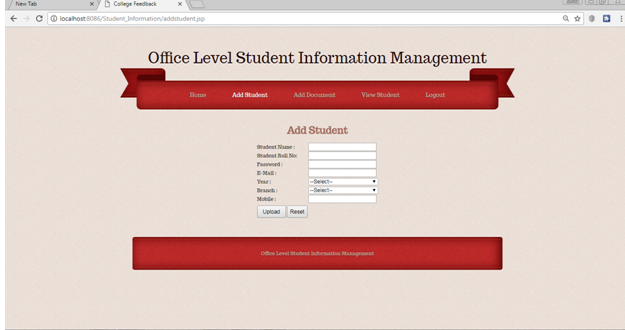
Office Level Student Information System Output Screen

Modules:

Admin:

Admin needs to get login with a valid username and password. Admin can add details of students and view details of the student. Admin can add details of faculty and view details of the faculty. Admin an add details of the event and view all the details of the event.

Faculty:

Faculty can get log in with a valid username and password allocated by admin. Faculty can view student’s details and view event attendance information.

Student:

Students can get log in with a valid username and password allocated by admin. A student can view his profile. Students can view his attendance details. A student can view event attendance details.

College Campus Application for Activities and Notifications

Project Synopsis

Problem Statement:

To develop an android mobile application that allows access to college activities and notifies the students of the upcoming events.

Objective and Scope of the project:

This android based campus application automates the admission of the student including the academic performance, Department notices, Placement updates, Sports, Cultural activities etc. The student will be notified through the mobile application whenever there is a shortage of Attendance/Internal marks and also he/she will be notified of the updates from placement cell.

The hobbies of the student are gathered during the registration of the student and they will be notified about the cultural activities, sports and other events that are held at University/College level. 

Description of modules:

  1. Admission
  • Admission Form
  • Documents Required
  • Fee Payment Mode
  • Fee Structure
  1. Transportation
  • Transportation Form
  • Fee Structure
  • Fee Payment Mode
  • Driver Contact
  1. Academics
  • Department
  • Semester
  • Internal marks
  • External marks
  • Attendance
  1. Placement
  • Placement Coordinator
  • Placement Updates
  • Training Updates
  1. Sports
  • Inter College level
  • State level
  • Indoor
  • Chess
  • Table Tennis
  • Badminton
  • Squash
  • Outdoor
  • Cricket
  • Football
  • VolleyBall
  • Basket Ball
  • Hockey
  1. Cultural
  • Inter College level
  • State level
  • Singing
  • Dance
  • Fashion
  • Paper Presentation
  • Elocution

Requirements(Hardware and Software):

Hardware:

RAM-4GB

Processor-Intel i3 and above

Hard Disk- 40GB

Software:

Operating System: Windows 7 & above

Tools Used: Android SDK

Budget Monitoring System PHP Project Synopsis

ABSTRACT 

Budget Monitoring System is a web-enabled online monitoring information system.  This is mainly for streamlining the flow of annual budgetary allocation on various account heads of an establishment including government departments.

It is very necessary to keep watching the utilization of budget allotment in various heads carefully for tracking the progress of various initiatives taken by the organization.

Typically the budget monitoring system is very useful in other than regular expenses or administrative expenses.

 MODULES: 

  1. Budget Allocation details
  2. Department wise details
  3. Maintaining Regular Expenses
  4. Maintaining Administrative details

SYSTEM REQUIREMENTS 

HARDWARE REQUIREMENTS

System: – Pentium IV 2.4 GHz

Hard disk: – 80 GB

Monitor: 15 Vga Colour

Mouse: – Logitech.

Ram: – 2 GB

Keyboard: – 110 Keys Enhanced.

SOFTWARE REQUIREMENTS 

  • Operating system        : – Windows Family.
  • Coding Language       : -PHP
  • Back end                     :- MY SQL

Bank Information System PHP Project Synopsis

ABSTRACT:

In this Bank Information System project, the bank details are maintained in common. Bank information system manages the account transfer from one bank to another bank.

The details that should be maintained is its bank code, branch code, the amount that should be transferred, the account number from where the amount gets transferred.

The very important thing that should be maintained is the name and along with that unique Id of the person. This could be maintained via a normal view.

According to the detail of the bank account and Id, money that gets transferred is maintained in the database. Whenever the bank manager wishes to retrieve the files by providing the ID and bank code he could receive the data.

MODULES:

1. User Account
2. Unique ID
3. Money Transactions
4. Admin view Details

SOFTWARE REQUIREMENTS

• Operating system : – Windows Family.
• Coding Language: PHP
• Backend :- MY SQL

E Plastic System Java Project

INTRODUCTION

  • E-Plastic recycling includes the user registering for the E-plastic process.
  • Admin getting the user information and returning the date, day, and time for E-plastic collection.
  • Users can then do online shopping for the recycled products.
  • The user can also track the delivery of the ordered product.

OBJECTIVE / PURPOSE

  • The objective of this project is to manage/process recycling process online.
  • The request for recycling placed by the users should be fulfilled by the admin.
  • The user can do online shopping for recycled products
  • The order goes through various payment phases till it finally reaches the customer.
  • At any point of time customer, himself can track the status of the order online with the reference number he got while placing the order.

PROPOSED SYSTEM:

  • Through this E-Plastic we can categorize and display products of plastic.
  • It can give the date, day and time for plastic collection accurately
  • Increase in competition
  • Adopt new methods and approaches
  • Developing an electronic-based platform
  • Recycling ensures sustainable use of resources

Scope of the System

  • We can make the Recycled products to feature on other online shopping portals so that more users can purchase it.
  • This can become a standard mechanism for collection of plastic.
  • We can include the save in cart option for online shopping.

Admin:

Admin can get log in with valid username and password. Admin can view materials details and also can accept materials. Admin can also upload products.

User:

The user needs to register by entering all the fields in the registration form. The user can get log in with valid username and password. The user can upload material and can view material status.

Online Shopping:

Online Shopping can get log in with valid username and password. Online Shopping can view products.

Customer:

Customer needs to register by entering all the fields in the registration form. The customer can get log in with valid username and password. The customer can view the products in the application and can purchase the selected products.

Conclusion:

E-Plastic is a web application which is developed to recycle products collected from users. This application retrieves the user’s information returning the date, day, and time for E-plastic collection. Users can then do online shopping for the recycled products. The user can also track the delivery of the ordered product.