Sequence Diagram of Modeling and Detection of Camouflaging Worm Project

Sequence diagram 

In general the sequence diagram represents the sequence of operations used across the design and the corresponding sequence diagram for this application is as shown below

Sequence diagram

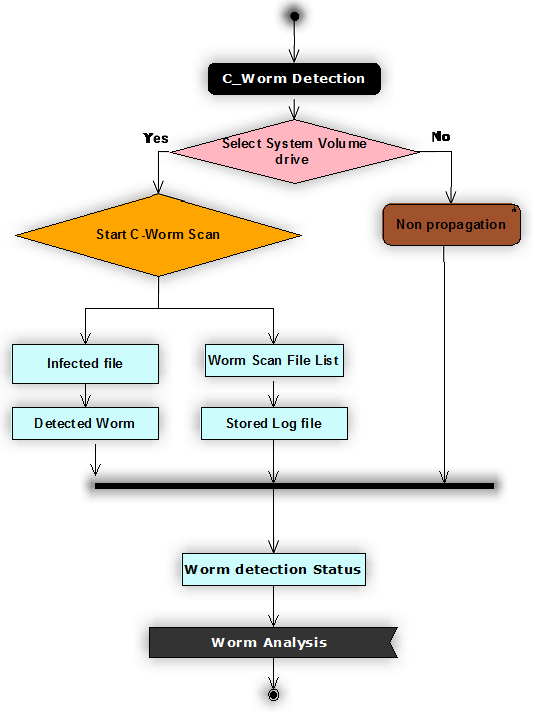
The sequence of operations used across this design are shown in the form of sequence diagram as shown above and from the above diagram it is clear that the actual operations beings with scanning the desired drive for C-worms. As discussed the scanning of the worms can be done in different ways like selecting all the desired drives, selecting the user home drive, selecting the desired file or folder and this option is done based on the user choice.

Once the desired destination of C-worm scan is selected then the very next step is to choose the type of scan to be implemented and for this purpose, if the user select the desired destination for scan, then automatically the C-worm scan is initiated and if not a normal propagation scan to the complete system is initiated. 

C-Worm detection can be categorized in to different aspects and the key operations include detecting the infected file and maintaining the list of worm files. Once the infected files are detected they are maintained in a separate list and the corresponding log files are maintained. The key information provided in the files includes complete folder and drive where the infected file is detected and the level of changes done to the file are also maintained across these log files. Two types of log files are maintained across the C-worm detection process and they are normal log and the stored log.

Normal log holds the high level details of the infected files and the stored log file maintains the exact details of the infected files and more accurate details of the worm detected in the scanning process. Once the log file are created , they can be used for future use to track the similar type of attacks in the system and a detailed analysis on the status of the worms can be tracked at any point of time using this design and this will be the last operation in the sequence of applications.

Complete worm analysis is done to track the status of the scanning operation and the status can be displayed to the user in the form of a graph and this graph is shown with respect to the detection time and detection rate of the scanning process against the number of attacks done by the C-worms on the overall system being scanned. 

Dataflow Application of Modeling and Detection of Camouflaging Worm Project

Data flow application

Dataflow application

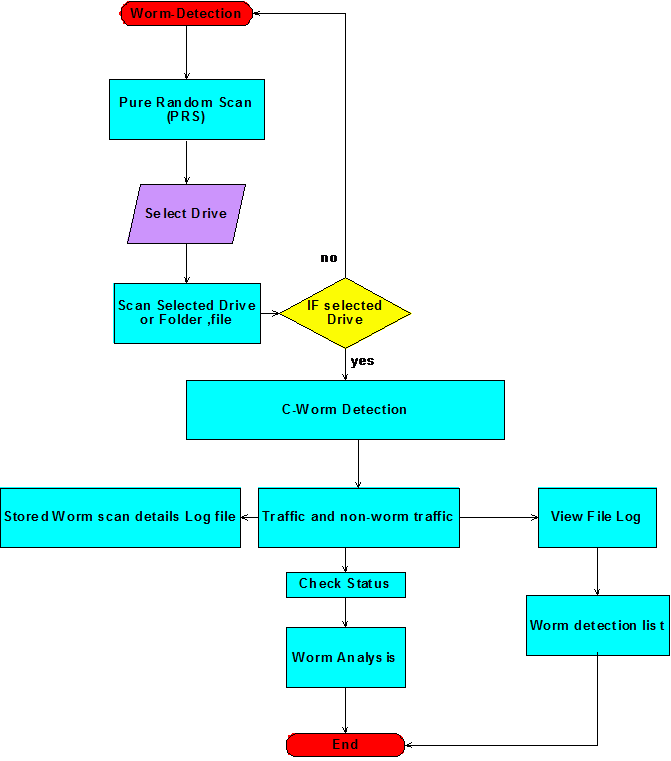
The complete dataflow of the proposed design is as shown in the above figure. From the above figure it is clear that the initial process of the application beings with the step Pure Random Scan (PRS) algorithm and this algorithms scans the desired drives, folder or files as per the user choice as discussed in the previous section.  If the user selects the desired file or folder or drive, the scan proceeds with C-worm detection and if no item is selected the algorithm will detect the normal virus and worms as shown in the dataflow diagram.

C-Worm detection can be categorized in to two important types like normal traffic detection and C-worm traffic detection and these two steps are given in the flow chart as shown above.  Once the non-worm traffic and worm traffic are identified the corresponding details of the scan process are saved against the log file and this log can be viewed by the users to track the details of the worms and the corresponding affects made by the worm on the system drives, folders and files. A separate log file is also created to track the information of all infected files and this log file can be viewed to track the information of the corresponding infected files.

A worm detection list is also maintained once the log files are created and this list provides the complete information of all the files being affected by the C-worms along with their complete path information like parent directory and parent folder as well. Status of the worms and their corresponding affects can also be tracked and a separate option is provided for this as shown in the above dataflow diagram and this status can be tracked with the help of a separate analyzer.

This analyzer scans the complete log files one more time and a graph is generated against the detection rate and detection time and this graph can be used to understand the overall performance of the algorithm developed.  To summarize this dataflow diagram ,t he initial step of the worm detection starts with the algorithm and ends when the analyzer displays the required graph against the detection time and the detection rate as shown in the above flow chart.

Key steps involved in this process are scanning the drives, scanning the user drive, folders and files as per the user choice and maintain the desired log files and maintain the list of C-worm infected files along with few details like the location of the file or folder and the drive and the level of impact and change done with the corresponding file infected are maintained in this log and is shown in the above dataflow diagram.

Detect and Model the Camouflaging Worms A Java Based Application

This chapter deals with the detailed design aspects followed for this application, as the main aim of this project is to detect and model the camouflaging worms a java based application is developed to model this application. Using this application, active worms are detected and blocked and the corresponding design aspects followed are explained in this chapter. Different levels of scanning are provided in this design and the detailed design followed is as explained below 

Front end design 

The required frontend design is created using the java swings concept and all the required components are used to create the frontend design.  An administration window is created initially to start the application and the actual flow of the application is initiated from this window and this window is created using the java swings as discussed. Following are the key components used in this window and all the required components are created using the java swings framework and few buttons are also created against these windows to start the actual operation of the scanning function and they are as explained below 

Pure Random scan (PRS) 

Pure random scan is the basic algorithm used in this application and this algorithm can scan the all the drives and total system against the camouflage worms and the corresponding active worms against the system operation. As discussed this algorithm can scan different layers of the system like all the drives, total system scan and scan to the user drive and the corresponding window can be created using the java swings.  Few buttons are created to start the required operation and the buttons actions are captured to initiate the operation and the key buttons used across this window are listed as below 

  • Scan all drives
  • Scan system
  • Scan user drive
  • Scan folder
  • Scan file
  • Chart

Scan all drives button can be pressed to scan all the drives across the system and the scan process start from the C: drive of the system and proceeds with all the drives created in the hard disk of the system. Scan system will scan the complete system including the system directories and libraries as well. Scan user drive will scan the user drive in the C drive of the system and scans all the user defined directories and folders in the system. Scan folder will scan the desired folder selected by the user and scan file will scan the required file as selected by the user. Chart will give the complete analysis of the scan results and is discussed in details later in this chapter. 

Few settings are also defined in this application and a separate window can be used in this context. The key settings used in this design are as listed below 

  • Task manager: This option is provided in the form of a button and when the user clicks on this button, the CPU performance against the virus scan can be tracked and the corresponding screenshot is shown in the appendix section
  • Empty virus values: This option can be used to detect the empty virus detected across the scan process as discussed in the previous section
  • Settings: This option is provided in the form of a button and when the user clicks on this button, they are redirected to save few settings against the scan process and the corresponding procedure is explained in the next chapter. 

A separate File status area is provided in this design and this text area displays the status of the current file being scanned against the desired option selected across the user choice window and the percentage of scan done can be tracked at this area. Few text areas can be used in this design to track the current status of the scan operation against the worms and the key areas used in this application are as given below 

File scan: This text area is used to display the current file details being scanned and it shows the complete path of the file along with the parent directory and folder respectively

Infection: This area can be used to locate the current and recent infected file and the complete details of this file are tracked in this area 

Virus List: This is the text area and this area can be used to view all the files scanned till the time and the complete list of infected files are displayed in this area along with the key details like pull path of the infected file, type of attack and the type of action performed by the corresponding worms. This list can be used to analyze the number of infected files at any point of time during the scanning process. 

Log file are also created to view the detailed log of the scanned files and the corresponding infected files and three different log options are provided in this design and they are as given below. 

View Log: This log can be used to track the complete details of the file scanned and the time taken to scan them along with the complete path and the information related to the worms are also tracked using this view log file. 

View File Log: This log displays the complete path of the particular drive being scanned and the details of the folders and the file structure used to scan the files are tracked using this view file log.

About worm: This option is provided in the design to track the details of the worm that may infect the system with respect to their technical specifications are also provided in this option. 

As discussed in the previous section, an analysis chart is provided in this design and this chart is used to track the detection rate and detection time of the worms against different attempts done towards detecting the worms across the system as per the user choice. This chart is displayed to the users when the complete scan operations are done with respect to the full drives scan, user drive scan and files and folders scan and the results are shown in the form a graph and is as shown in the appendix section. 

Flow of the application 

This section defines the complete flow of the application with the help of the required user interface diagrams as shown below. Dataflow diagram of the complete application is as given below

Detecting and Preventing the C-worms Project Report

Detecting and preventing the C-worms is the main object of this project and to do the required research a basic problem is identified and is given in this section.  As discussed detecting the worms and virus plays an important role in ensuring the network security and there are many virus and worm detection techniques developed and implemented.

Most of the virus applications are self replicating and they can occupy the complete system space and delete the existing files and the antivirus and worm detection techniques are successful in detecting these affects on the network and the main limitation with these techniques is that, they are complex in nature to understand the key logic used to detect the worms and also the C-worms. 

There are many default packages introduced in this context and there are few limitations within this context and the key among them are that they does not provide the end users to understand the logic being followed to detect the C-worms and even few worm detection systems fails to detect the C-worms at all the drives as they fail at the full system scan level.

There are some differences with the C-worms affects on the system when compared to the traditional worms, as they generate more traffic across the network and thus it is would always become hard to understand the detection rate and detection time and thus always a simple user level application that can detect the worms and virus during the full scan is required. 

To solve this problem, a simple java based application is created and developed that can scan the complete system and also the user defined drives and detect the C-worms. Different level of system scan is provided in this application and the users can scan the complete system and also define the desired drive to scan against the files and folders.

Overall system performance can also be monitored in this context against the CPU performance and also few metrics can be set to define the scan process. A detailed picture of the scan progress and the list of infected files are displayed at the user level as well in this application. Overall traffic generated by the C-worms is also captured at the system level against the CPU performance and thus the key aspects with respect to C-worm detection are achieved in this context.

The overall worm detection rate and worm detection time are also calculated in this application to understand the performance of the algorithm used to and also to compare the impact of the C-worms on the system against the traditional worms. The main advantage with this application is that, the end users can view the complete scan progress with a rich user interface and also understand the implementation logic used to detect the C-worms.

Internet and System Security Project Report

Internet and system security is required at all the levels across the network these days due to the number of attacks introduced across the network security. Virus and worms can be considered as the main threat to the internet security and system security and there are different kinds of worms and virus that propagate in to the network and affect the overall performance of the system at a huge range.

The basic operation of these virus and worms purely depends on the nature of their execution on the system where they are propagated and identifying these attacks at a single glance is not at all possible irrespective of the number of attempts made towards this process. There are many anti viruses and worm identification software’s introduced to detect these attacks and most of them are proved to be successful in detecting the attacks.

Apart from the pros and corns offered by these worms detection software’s the key limitation among all these software’s is that they are not easy to estimate the operations and thus end users who all are affected can’t understand the level of technical specifications and also most of the software’s cant analyze the detection rates and detection time to detect the C-worms and the corresponding anomaly traffic generated.

The main aim of this project is to create a java based application to detect the C-worms and the corresponding traffic generated on the network. Different levels of virus and worm scan is provided at the application and the users can choose the required type of scan like the complete system scan and the individual drive scan.

Overall system performance and the corresponding detection rate and detection time are provided at the application level and thus the overall C-worm traffic analysis is also provided at this application. From the results achieved it is clear that a simple java based application can be used to detect the virus and worms at the user knowledge levels. 

Intrusion Detection for Virus and worms Project Report

Intrusion Detection for Virus and worms:

The programming of intrusion detection is necessary for virus and worms due to the reason that they can spread in a greater speed and attack the systems when compared to the attack done by the intruders directly. The infection due to these worms and viruses spread widely even without the proper notice of the network administrator, that means for the time that a network manager notice the spreading of worm is completed because the network administrator notice the existence of a worm or virus when only if the alarm indicates about the worm and he even takes some time to discover the worm in the meanwhile the worm spreads the infection.

The spreading of worms is done in few minutes of time for example the latest worms like Blaster, Sapphire/Slammer takes few minutes time to spread over millions of systems. Well programmed intrusion detection must be designed and implemented in the systems to identify the latest viruses and worms epidemics as soon as it is possible because of the reason that the latest epidemics of worms and viruses spread with an exponential rate of speed at the starting stage and this shown by the epidemiology. Thus if such new outbreak is identified soon, its effect on the system is decreased up to some extent.

As the designing of antivirus software is done to identify the worms and viruses that occur to the systems, the host-based intrusion detection system is considered as the utmost logical methodology at the initial researches. By running antivirus software of the desktop computers on all the host computers, a “host-based intruder detection system” is assumed easily because whenever a virus is detected in the system an alarm is broadcasted to the neighbours.

But there are some considerable limitations with this approach even if it is attractive. And the significant limitations are at first, expenses of IDS installation in all the hosts is the main drawback. The second one is, because of different reasons it is indicated that the desktop antivirus software is not installed regularly, sometimes it may not be updated and in some cases it is not turned on.

The third limitation is the capability of some worms and viruses as they can damage the antivirus software installed in the systems or can even turn-off the programs of anti-virus. The fourth and the last drawback of this approach is that a virus can be identified by the IDS based on host when only the virus has already to the host and this is too late to avoid certain attacks caused by the virus. Therefore this approach of host based intrusion detection system is not completely believable for detecting the intrusions.

The implementation of network-based intrusion detection system is done often as a firewall which is combined with the antivirus software. Typically as the worms and viruses are located at entry point of the network, the firewalls designed provides a common point for them. Along with these the designing of firewalls is done with special capabilities for inspecting and filtering the traffic that is delivered at a link speed of high level.

The possibility of integrating the antivirus software is not only for firewalls it can even be associated with the routers, gateways and switches. When compared to the host-based intrusion detection system, the network based intrusion system has the capability of identifying the latest worms and viruses at the initial stages of the attack and so it can identify the virus or worm before it spreads to the hosts.

Even the network-based IDS have some drawbacks but these are different from the host-based IDS disadvantages. The first one among the drawbacks of network-based IDS is avoiding of firewalls can be done as there are not faultless filters. The traffic directed towards a particular port which is considered as dangerous can be blocked by the firewalls, for an instance activities can be continued across the ports that are allowed.

The second drawback is,when the particular signature are used for configuring the firewalls then such firewalls are efficient for viewing, but common signatures are not there in viruses and worms. The spreading of these can be done in various approaches by receiving the benefits of infinite number of susceptibilities that known. The third drawback is even if the susceptibilities is known, as soon as it is discovered the worm that exploits that susceptibility can be viewed and thus it gets late for establishing a signature and distributing it for the attack.

The latest worms and viruses can be identified by observing the examples that are established in recent years.

  • Code Red Worm: In “Microsoft’s IIS web servers” , attempts are made by the code red worm at least of three versions for abusing a buffer overflow vulnerability and this is represented as the susceptibility of Index Server ISAPI and announcement of this is done in the year 2001 on 18th of June. A packet that is transferred to the host which is taken as the victim is involved in the buffer overflow attack. The arbitrary code can be run at the host considered as victim by using the buffer overflow in case of the crafting of the packet is done carefully. The worm code red 1 is firstly identified in the year 2001 on 12th of July and this is identified after identifying its susceptibilities by taking one month of time in between. To perform the enquiry the worm creates a list of IP addresses which is pseudorandom to spread the infection, but this generation of list of IP addresses is done in identical manner because of a mistake made during the programming at the host that is infected with the worm.Therefore because of the identical list the spreading of worm is very slow as the enquiry of the worm is done on the similar computers. The second version of code red worm is identified in the year 2001 on 19th of July that is just a week after the identification of the first worm and in this the error caused in the earlier version is fixed that means the list of IP addresses is really maintained in pseudorandom for enquiring and so the spreading of this worm is very fast. It was discovered that more than 359,000 computers get infected by this version worm in just 14 hours. The recent version of code red II is identified in the IIS web servers during the same buffer overflow susceptibility exploitation and this is identified on 4th of august. But the enquiry of machine IP addresses by this version of worm is not based on random list entirely. Here only the randomness can be observed entirely for 1 address among 8 IP addresses, 4 addresses among these are included in the class A level of the address of the host that is infected and other 3 among eight addresses are included in class B level of the address of the host that is infected.
  • Nimda Worm: Nimda worm one of the dangerous worms affected the hosts more than 450,000 hosts by taking of 5 vivid ways into account the time taken to spread this is in first 12hours only. The first way is sending an e-mail attachment from its perspective through system’s web cache as well as MAPI mailbox. The next way is it damages the IIS web servers by picking up randomly using buffer overflow attack known as “Unicode web traversal exploit”. Number three is it made itself as replica around the entire network which it distribute. And the fourth one is it appends unwanted JavaScript’s to web pages to damage other web browsers. And the last one is it keeps an eye on the other worms like code red II as well as sand mind worms. All this is seen on September 2001.
  • SQL Slammer/Sapphire worm: Sapphire worm which took the advantage of buffer overflow weakness said to be identified in Jan 25 2003.this is seen in Microsoft sqlserver it is confirmed 6 months before its evaluation i.e. on July 2002. It is much flexible than other worms as it can be fixed in unique 404-byte UDP packet. But as far as Code Red is concerned it occupies 4000 bytes and Nimda occupies more than that up to 60,000 bytes. Once it started polluting the worm easily develops UDP packets holding the duplicates of sapphire at the maximum rate of the system. The diffusion rate was unanimously high.According to it the damage rate is 90% weak which takes only 10 minute not more than that it damages over 12000 servers.
  • Blaster worm: Blaster worm is a versatile worm which makes DCOM RPC as it target this is due to its weakness it is identified just before a month from the time of its announcement i.e. on July 16, 2003. The worms interact once DCOM interface is done including RPC listening at the time of TCP port 135 is evolving on windows XP as well as on windows 2000 pcs. This occurs when buffer overflow occurs the worm enters into targeted machine to on the wireless shell on the selected port i.e.4444 and sends a circular to the targeted machine through UDP port 69. A tftp (trivial file transfer protocol) “get” control is the next message sent to port 4444 influences the machine to retrieve a replica of the worm ”msblast.exe” is the file we identify.

The examples here mentioned are used as witness to say that worms used many ways to spread and each of them needs to be identified separately in this case we take CODE RED can be identified first   once there is any growth of TCP port 80 automatically detects and it leads to growth of well-shaped HTTP “GET” requests for “.ida” file (a buffer overflow attack).  The Nimda worm is seen when there is a huge growth in attempts of Unicode Web travel Exploit. Sapphire worm is detected when the is unexpected raise on links which leads to an increase in 404-byte UDP packets creates the way to UDP port 1434 in  casuals address.

Simultaneously blaster makes the growth of TCP packets which is processed towards the PORT no135 and also depends upon the no of tftp requests on UDP port 69 .these signs of worms are common  in nature. After a worm has been case studied the problem is that another worm attacks and easily make use of the situation based on its weakness these are many in number every time signature based identification  dost not connects it fails for new ones. Anomaly detection method is “worm like behaviour is more guaranteed” for new type of attacks.

Anyways anomaly detection is more complicated because a worm does not distribute process. Different worms may give different indications   this leads to growth of the volume of network traffic, leads to emptiness a steady increase in scans raise to sudden change of traffic by hosts but still these could not be taken account of indicators as they are not dependable this could be given by anexample port scans are always run on background when internet is working. Despite of this reasons it is complicated to find worm attack at least one worm is caught.

Performance Analysis of AODV under Black Hole Attack through Use of OPNET Simulator Project

Project background 

Ad hoc networks are self organized; self operated and self configured and they can operate without any special infrastructure requirements. In general ad hoc networks can be of different types like mobile ad hoc networks, wireless sensor networks and wireless mesh networks. These entire networks operated under the basic principles of ad hoc networks and operate independently without any special configuration and infrastructure requirements.

There are different types of routing protocols across that the ad hoc networks like MANETs that can be used for the routing process across the network and they can be categorized in to three important aspects like proactive routing protocols, reactive routing protocols and hybrid routing protocols. Proactive routing protocols are table driven routing protocols, which operated under the guidance of the routing tables and in general they are static nature and the routing is fixed across the network and can’t handle the dynamic topology or configuration changes.

Reactive routing protocols are on demand routing protocols and they are dynamic in nature and can handle the topology and configuration changes easily across the network. Hybrid routing protocols holds both the features of proactive and reactive routing protocols and can behave either of the ways based on the conditions of the ad hoc network to accomplish the routing task.  Among these routing protocols, reactive or on demand routing protocols are widely used across the MANETs as they are dynamic in nature and can take the independent routing decisions based on the topology changes and among the on demand routing protocols Ad hoc on demand vector (AODV) is most frequently used routing protocol. 

There are different performance metrics that can be considered with respect to the functionality of the AODV and the most important among them is the working nature of the protocol under various attacks across MANETs. In general there are different types of attacks on MANETs and they can be classified in to two important types like passive attacks and active attacks. Passive attacks target to steal the networking information and active attacks are similar to worm attacks, where they replicate or duplicate the data being exchanged.

Among the most common active network layer attacks black hole attacks are malicious in nature and they can propagate in to the network and damage the MANETs routing information by sending virtual and arbitrary requests to the destinations. Across the black hole attack, the malicious nodes and sends a fresh route requests to the destinations and thus the destinations drops the actual data without forwarding them. Black hole attack across the AODV can be classified in to two important types like black hole attack by RREQ and black hole attack by RREP. The main aim of this project is to evaluate the performance of AODV under the black hole attack and the detailed description of the aims and objective is as given below 

Aim:  To evaluate the performance of AODV under black hole attack using OPNET simulation.

Objectives 

Following are the research objectives 

  • To critically review the ad hoc networks and the corresponding routing protocols
  • To analyze different types of attacks on ad hoc networks like MANETS
  • To design OPNET simulation scenarios to evaluate the performance of AODV under the black hole attacks
  • To develop the designed scenarios using OPNET simulation tool
  • To evaluate the simulation scenarios and compare the scenarios under different attacks of black hole
  • To test the simulation results and evaluate the performance of AODV under different attacks.

Chess Game Design Java

Design of this chess game is divided in to following modules: 

  1. Board representation
  2. Move representation
  3. Piece representation
  4. Analyzer

Move representation: 

Representing the possible moves is really an important aspect in designing the chess game and this section explains the actual procedure followed to handle all the possible moves in this application. A separate module known as chess engine is designed in this program to handle all the possible moves and a separate module of code is required as the possible moves are really high in a chess game. Move against the human move from the computer side need lot of estimations and eliminations and in there, typical tree search algorithm can be used to search for the best move possible. These moves are mainly decided by the position of the piece on the chess board and few predefined moves are assigned to the piece based on the nature of the piece on the board. A typical switch and case condition loop is used to check the type of piece initially and then based on the case identified the moves are defined. The moves are assigned to these pieces based on the square positions, the corresponding characters assigned to the squares and position of the square on the total board. All the possible conditions are checked for all the pieces with respect to the position of the board initially and later the actual moves against the human moves are done in a separate way. The famous tree search algorithm known as alpha beta pruning algorithm is used to decide the best move for the computers from all the possible moves in front of the computer. To proceed with this algorithm, initially alpha and beta variables are considered and an initial depth is assigned as an integer and then these values are incremented or decremented and compared to follow the tree search process. Moves are represented based on the depth value of the alpha and beta and the kind of piece with respect to this depth position on the chess board. Alpha and beta are used to represent the current square position of the piece that need to be moved and the beta represents the target move and thus from the value of the depth calculated as discussed above, the actual move of the desired piece is decided. Once the best move is decided from all the possible moves, the actual move is shown to the users using the same graphic class of the Java Applet package. All the required action listeners are added to the piece movements and the most common among them are the mouse listeners and the computer always recognizes the moves made by the human player using the mouse action listeners and the moves are compared to the predefined moves saved at the memory with the moves made by the human player and as discussed these moves are identified using the mouse action listeners and even the validity of the moves made by the human player is also checked against many conditions. 

Piece representation: 

The very next once the move representation is done is to represent the graphical user interface of the pieces and the corresponding moves of them on the chess board considered. All the images of the required pieces are taken in the same folder where the coding files are maintained and the reference to them are made using the file path in the design process. All these pieces are placed on the squares of the chess board based on the characters assigned to the squares using the character array as discussed in the board representation section of this document. A separate method is used to represent the pieces on the board and is named as drawFigure and the parameters given to this method are like character for the square assigned, x-axis position and y-axis position. Board design takes care of the square positions and the corresponding square positions are designed with respect to the pieces and their respective placement on the squares. Properties for the pieces are assigned at the chess engine level and the corresponding hash codes are assigned as the constant values with respect to these pieces at the backend of the chess engine design. Few methods are defined these pieces in the form of a separate interface and these methods holds the required properties for the corresponding pieces used across the board. Moment of these pieces is defined with respect to the changing positions of the board and the required attributes are set accordingly in these methods. 

Analyzer: 

Design of the analyzer include the time controls used across the chess game and a detailed coding aspects to the alpha beta pruning algorithm based on the time limits imposed across the chess game. Five different time intervals are considered in this design like 50, 100, 300, 600 and 1800 and the corresponding limitations with respect to the time are given based on the human moves. As discussed in the previous section, the human player moves are captured by the mouse action listeners and the corresponding moves are compared against the time limits set across this design.  Time frame allocated in this design is incremented using exponential functions and if the time limit is reached the corresponding action to be taken by the computer program are also defined in this analyzer module. A minimum time limit is given to the human player during the initial moves and gradually the game process, more time limits is allocated to the player in the middle of the game, as the player need more time to analyze the moves and make the right move. A multi threading program is designed in this case to handle the time limits assigned to the human players. 

Chess Board Representation Java

Introduction to Chess Board Representation Java:

Board representation is the key aspect in the chess design and in general 8X8 grid chess board is designed across many computer based chess games. There are different approaches that were followed while designing the chess board and even there are few cases where a chess board of size 10X12 grid is also used and the main reason to use this type of broad representation is to identify the out of bound and the corresponding illegal moves across the board. In this project an 8X8 grid board is used and the Java applet coding is used to design the board window.

A total of 64 squares are used in this case and the board is represented as an array of integers in the memory using the int variables. All the squared in the board are assigned either black or white color based on few conditions and they are as explained. Graphics object of Java applet class is used to draw the basic board and once the empty board is represented, now the colors to the squares are assigned using setColor method of the graphics class from the Applet package.

Few offset values are assigned to the square initially and they are incremented using the while loop and then the corresponding black and white colors are assigned to the corresponding squares by checking these offset values and this procedure is repeated for all the 64 squares and all the squares are assigned either black or white color. Few characters and alphabets are assigned to each and every square of the board and the colors to the board are assigned by checking the position of these characters using the if loop and this loop iterated till every character choosen is assigned a color.

A special character array is used hold all these characters assigned to the squares and these characters are fetched from the array as per the user requirement based on their index in the array considered. Important conditions like rotating the board at any condition of the game is also handled and the colors to the square of the board are assigned considering these entire rotation angles and the corresponding conditions. A string variable is used to handle the complete rotation aspects of the board and few conditions are used to check the board position using this string variable. 

CSE Project Idea on Zed Graph Based Time Tracking Tool

Introduction to Zed Graph Based Time Tracking Tool:

This project includes It is a class library, windows forms user control, ASP Web-accessible control for creating 2Dline, bar and pie graphs of article datasets. Every aspect of the graph can be user modified and at the same time the usage of the classes is kept simple by providing default values for all the graph attributes. The Zed Graph is compatible with .NET 2.0, VS .NET 2005. It is maintained as an open source development project on source Forge.

Zed Graph now supports both .NET 2.0 and .NET 1.1.

For .NET 2.0 we use Zed Graph version 5.0+.

For .NET 1.1 we use Zed Graph version 4.5+.

There are many graphing libraries out there, but no one seems to be fit I found McCarty too quirky and many other options are there but they did not have flexibility most of the commercial packages would do but I need something free so, Zed Graph was born.

Zed Graph Wiki and the online class documentation provide lots of helpful tips and descriptions.

VB users in this article uses C# exclusively, for example all the code samples for the tutorial, plus other examples are available for Visual Basic.

Zed Graph on a Web Control

It includes a class derived from the control class that facilitates access from ASPX web page code. The Zed Graph Wiki includes detailed examples of web control usage for two rendering modes, Raw image and image Tag.

Zed Graph as a User Control:

It is accessible from the control toolbox in visual studio .NET. view the toolbox using the view/toolbox menu command. Right-click inside the “General” sub-pane of the toolbox, and select the “choose items.” option. Click “Browse …”, and navigate the Zed Graph .dll file. Once this is added, you should see the Zed Graph Control option in the toolbox.

 Download CSE Project Idea on Zed Graph Based Time Tracking Tool.