Payroll Management System MS Access Project Database Tables

  • Department Master
  • Leave Register
  • Employee Master
  • Pay Slip
  • Staff Appointment Master
  • Staff Relive Master 

Table Name: Department 

Field Name Data Type Constrains Description
Dcode Text P/K Department Code
Dname Text NOT NULL Department Name

 Table Name: Employee 

Field Name Data Type Constrains Description
Ecode Text P/K Employee Code
Ename Text NOT NULL Employee Name
Dname Text NOT NULL Department Name
Shift Number NOT NULL Shift
Salaryday Number NOT NULL Salaryday
Apno Number NOT NULL Appoinment Number
Esiper Number NOT NULL Esi Percentage
Pfper Number NOT NULL Pf Percentage
Esino Text NOT NULL Esi Number
Pfno Text NOT NULL Pf Number

 Table Name: Leave Register 

Field Name Data Type Constrains Description
Ecode Text NOT NULL Employee Code
Ename Text NOT NULL Employee  Name
Monthyear Text NOT NULL Month Year
Flag Text NOT NULL Flag
Nod Number NOT NULL No Of Days                  
         

 Table Name: Pay slip

Field Name Data Type Constrains Description
Ecode Text R/K Employee Code
Ename Text NOT NULL Employee Name
Sdate Date/Time NOT NULL Salarydate
Myear Number NOT NULL Month Year
Sday Number NOT NULL Salary Day
Noofday Number NOT NULL No Of Day
Pay Number NOT NULL Pay
Esino Text NOT NULL Esi Number
Pfno Text NOT NULL Pf Number
Pfper Number NOT NULL Pf Percentage
Esiper Number NOT NULL Esi Percentage
Pfamt Number NOT NULL Pf Amount
Hramt Number NOT NULL Hra Amount
Daamt Number NOT NULL Da Amount
Taamt Number NOT NULL  Travel Amount
Oaamt1 Number NOT NULL  Other Amount 1
Oaamt2 Number NOT NULL Other Amount 2
Totalsal Number NOT NULL Total Salary
Canteen Number NOT NULL Canteen
Sadvance Number NOT NULL Salary Advance
Netpay Number NOT NULL Net Pay
         

 Table Name: Staff Appointment 

Field Name Data Type Constrains Description
Apno Number P/K Appoinment Number
Apdate Date/Time NOT NULL Appoinment Date
Name Text NOT NULL Name
Sex Text NOT NULL Sex
Dob Date/Time NOT NULL Date Of Birth
Addr Text NOT NULL Address
Quality Text NOT NULL Quality
Salary Text NOT NULL Salary
Fname Text NOT NULL Father Name
Martialst Text NOT NULL Marital Status
Appas Text NOT NULL Appointed As
Std Text NOT NULL Standard
Prevexp Text NOT NULL Previous Experience
         

 Table Name: Relive 

Field Name Data Type Constrains Description
Relno Number P/K Releive Number
Apno Number R/K Appoinment Number
Ename Text NOT NULL Employee Name
Reason Text NOT NULL Reason

Network Monitoring System with Simple IP Subnet Calculator Tool Project Report

Network monitoring system with simple IP subnet calculator tool project is implemented in Asp.Net web technologies and C#.Net programming language. Main aim of this project is to develop a security system or analyzing system inside a locally connected system inside organization and a IP subnet calculator tool is used for only class c IP. 

In every organization systems are connected to a network to make work easier for sharing files and folders. Security is important in locally connected system and there should be a monitory system on client and server side. In this project current sessions monitory method is introduced and using this system we can know folders that are accessed by users by displaying user names. Usernames and IP addresses are stored in server when client login to the system. From server we can select clients IP address and monitory modified files, new folders and deleted files. 

In working environment remote system monitoring is performed regularly for installations, deployment, solving issues and other operations. Remote desktop operations are also performed from homes. 

This project report covers detailed explanation of every topic with ER diagrams, dfd diagrams, user case diagrams. 

Download Network monitoring system with simple IP subnet calculator tool asp.net project report and source code.

Main Objective of Payroll Management System Visual Basic Project

The “Payroll Management System” has been developed with Visual Basic programming in a user friendly manner. The system has been designed so as to get minimum amount of inputs from the user. The system promotes the data entry operator with menus and screens. The form has been designed in such a way that the cursor is placed in the first entry where the data must be entered. Validations are made for each and every data entered. Whenever the user types erroneous data, error messages are displayed and the user is allowed to correct the input data. Dropdown boxes have been provided for the list of valid data for certain fields where the user can make the selection. 

Specific Objective:

                       The system focuses upon imparting better services to the company. It helps the company to maintain its Employee Details, Department Details, Staff Appointment Details , Staff Relive Details, Pay Roll Management etc., 

It is highly user friendly. At the design and development stages it ensures data integrity and security. It requires not much computer knowledge to operate this system. Functions such as data entry, addition, deletion, modification, navigation etc., have been made simpler and interactive and provides a user interface.

Payroll Management System Project abstract provides detailed information on Hardware and software requirements and development details. This project is implemented in java and Asp.net platforms.

Payroll Management System VB and MS Access Project

In this phase the existing system has been studied, the problem is identified, the alternative solutions are analyzed and the best solution has been selected after the feasibility analysis. 

In this step the following steps are carried out: 

                                      1. Existing System

                                      2. Proposed System

                                      3. Comparative System 

              The need for the system stems from the nature of the organization.  In order to justify and appreciate the need for the system, we have to study the existing system.  By conducting the system study, we are able to find out what are the goals specified, whether all the objectives are satisfier, what are the disadvantages of the existing system etc. Here the existing system is maintained manually.  So to computerize this, we must bind the system by identifying the scope of the function and performance that are desired.

                The existing system is maintained manually. In the present system whenever the customer gives an order it is maintained manually in the notebook. Manually they have to update the production order, production plan of items, production monitoring etc.  So the present system is not good enough for the company.

      The disadvantage of the existing system is

  • File maintenance is extremely difficult as every thing is done manually.
  • Information retrieval is difficult and time consuming.
  • Quick analysis of delivery is not possible.
  • Not enough security and privacy.
  • Requires much human effort.
  • Information need not be accurate. 

          The proposed “Payroll Management System” is developed to systematically maintain the employee details and their Appointment Details and their Payroll calculations. This system reduces the Manual File Maintenance and easy to view the details about the particular employee details. This system reduces the manual calculation for employee pay slip. 

Comparative Systems Study

While Comparing the Existing system and proposed system, proposed system is best due to the following reasons 

  • Speed of process increases.
  • After performing a long period human becomes tired, but computer works for a long time continuously (Diligence).
  • Accuracy is more.
  • Deleting, Copying, Updating is possible.
  • Processing Time will be decreased.
  • More Security. 
  • Backup is available.

Salient Features of the system

Hardware Specification

Processor Type          Pentium II

Ram                             128 Megabytes

Clock speed                 866 MHz

Hard disk                    20 Gigabytes

Floppy disk                 1.44 Megabytes

Mouse                         Logitech

Monitor                       Hcl

Keyboard                    Hcl (101 Keys)

Printer                         Epson FX_100 

Software Specification

 Front end                         Visual basic 6.0

Back end                         Ms-Access 7.0 

Operating System            Windows 98

Knowledge Processing out Sourcing Software Life Cycle Diagram

Knowledge processing out sourcing software life cycle diagram helps students for understanding basic work flow inside the project. This project is new business concept which deals with outsourcing employees similar to that of business out sourcing. In this project report we provide screen shots and output of the project.

software lif cycle diagrams hr group managemtn

Download Knowledge processing our sourcing project source code and project report.


Knowledge Processing out Sourcing User Case Diagram

Knowledge processing out sourcing user case diagrams explains about different procedures that are followed to develop this application. This diagram shows identifying exciting user, create new account, contact details, online application, view client details, view carrier details, view feedback. These are the step by step functionalities that are followed in this application.

Computer science students can use this project as mini and major projects. Students can download project report with source code from this site.

user case diagrams hr managemnt

Download Knowledge processing our sourcing project source code and project report.

Knowledge Processing out Sourcing Project

Knowledge processing our sourcing project is implemented in asp.net platform. Main aim of this project is to develop a online web portal for providing services for software companies and employees.

In present trend out sourcing is seen in business filed but here we propose a new business idea in which KPO will act as a mediator between client and employee.


Knowledge Processing out Sourcing Asp.Net Project Report

Knowledge processing out sourcing in short KPO project is implemented in asp.net platform. Main aim of this project is to develop a web portal for developing a bridge between software companies (clients) and employees. Using this application knowledge is shared by taking skilled employees under different platforms and outsources them to companies based on the requirement. In BPO business processing outsourcing is done where clients will send work to BPO and companies will complete work and send back to clients.

Knowledge processing system will provide quality service to clients and make sure that client’s service is full filled in terms of cost and requirements. This business idea is a new trend in present software world which is creating good business scope.

This application is developed in four modules login module, client details, communication, career details.

Project report consists of functional requirements, user case diagrams, software life cycle and screen shots.

Download Knowledge processing out sourcing asp.net project report.

HR Group Management System User Case Diagrams

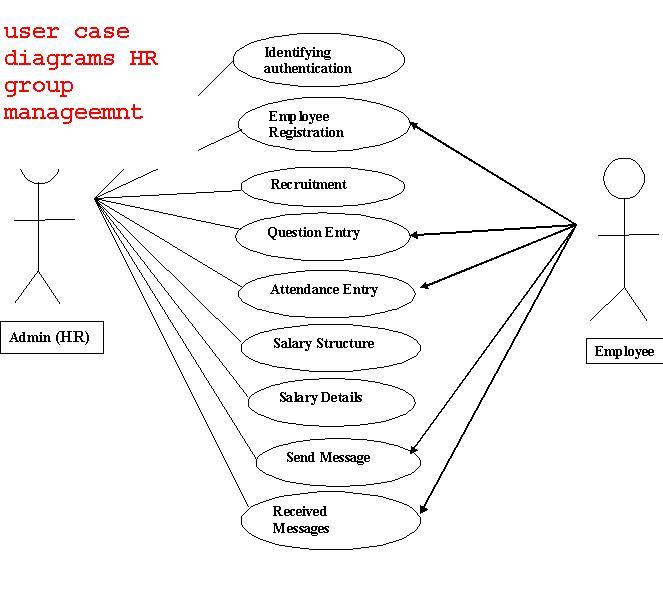
HR group management  system user case diagrams explains about modules and priority of module while developing application. Every application consists of different modules where each module is developed based on priority. This diagram will help students while developing project source code.

HR management project report will provide detailed explanation on every module. ER diagrams, software life cycle diagrams are important for developing this project 

user case diagrams hr managemnt

HR Group Management Software Life Cycle Diagram

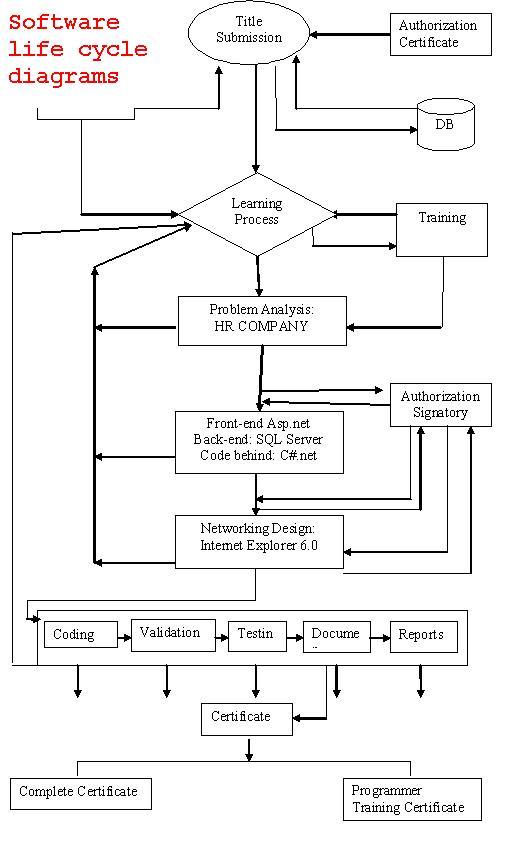
HR Group management software life cycle diagram explains about different steps required to develop application. HR management project is implemented in asp.net platform. Computer science final year students can download project report for detailed explanation about this project. 

Software life cycle diagram , ER diagram, DFD diagrams will help to understand application development process.

software lif cycle diagrams hr group managemtn