File Security Using Elliptic Curve Cryptography (ECC) in Cloud

Abstract:

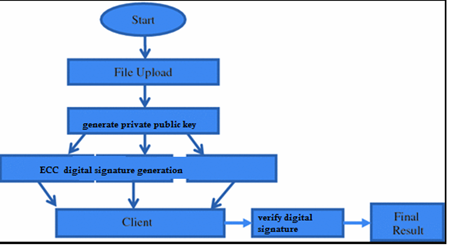
Data security in cloud computing is a mostly researched topic that has various solutions like applying encryption to data and using multi-cloud environments. But still, there are many issues related to data security. In this project, we are using ECC digital signature method to sign the signature of user data while uploading to the cloud and use the same digital signature to download when required.

Elliptic Curve Cryptography (ECC) is a modern family of public-key cryptosystems, you can use an Elliptic Curve algorithm for public/private key cryptography. To be able to use ECC; cryptographic signatures, hash functions and others that help secure the messages or files are to be studied at a deeper level.

It implements all major capabilities of the asymmetric cryptosystems: Encryption, Signatures, and Key Exchange The main advantage is that keys are a lot smaller. With RSA you need key servers to distribute public keys. With Elliptic Curves, you can provide your own public key.

In python, the above-described method can be implemented using the   ECDSA Algorithm. 

Objective:

  • Using public key cryptosystems with both public and private keys can give security for data compared to single key encryption. In this project, the ECC algorithm is used for securing data to the cloud and uploading data to the cloud.

Existing system:

  • AES and DES are mostly used cryptographic algorithms for securing data. These methods are used in most of the applications which use single keys for encryption and decryption.

Disadvantages:

  • These methods are old methods that are used in most applications.
  • They use a single key for encryption and decryption.

Proposed system:

  • In a cloud environment data security is very important as data is stored in third-party servers there is a need for effective multi-key encryption techniques like ECC algorithms. In this project, we are using the ECC algorithm in python language and using the cloud to store encrypted data.

Advantages:

  • The time taken for the encryption process is less
  • Multiple keys are used for the encryption and decryption process.

Architecture:

Software Requirement: 

  • Operating system: Windows XP/7/10
  • Coding Language:  Html, JavaScript,  
  • Development Kit:  Flask Framework
  • Database: SQLite
  • IDE: Anaconda prompt

Crop Yield Prediction using KNN classification

ABSTRACT:

Agriculture is considered as import field all over the world where there are many challenges in solving problems in the process of estimating crops based on the conditions. This has become a challenge for developing countries.  Using latest technologies many companies are using IOT based services and Mechanical technology to reduce manual work. These methods are mostly useful in the case on reducing manual work but not in prediction process. In this project crop yield prediction using Machine learning latest ML technology and KNN classification algorithm is used for prediction crop yield based on soil and temperature factors.  Dataset is prepared with various soil conditions as features and labels for predicting type of each label is related to certain crop. In prediction process user can give input as soil features and result will be type of crop suitable for specific conditions and application also helps in suggesting best crops with yield for hector.

PROBLEM STATEMENT:

  • In our country large amount of population are depending on agriculture though government is taking financial steps to help farmers still they are facing problems due to lack of data analysis and prediction on crops.

OBJECTIVE:

  • Our objective is to develop an application using machine learning for predicting which crop to be used based on soil condition using k nearest neighbor classification.

Existing system:

          Image based analysis was one of the methods which was previously used for detection land type and then analysis was done.

Disadvantages:

         Process is based on image analysis results are not accurate as in this method soil conditions are not considered.

       Image processing is a time taking process.

Proposed system:

        Machine learning is the latest technology which python programming language gives advantage in using various algorithms for crop yield prediction based on the input data set. In this process KNN classification algorithm is used for prediction. In this project testing training is performed on given text dataset which includes soil and temperature conditions as features and type of crop as labels.

Advantages:

        Crop yield prediction is performed based on textual dataset and any user can check type of crop best suits for conditions and get crop suggestions. 


System Requirement:

  • Operating system         :           Windows XP/7/10
  • Coding Language :           Html, JavaScript, 
  • Development Kit :        Flask Framework
  • Programming language: Python
  • IDE :           Anaconda prompt

Deal Tracker System Groovy, XML, CSS, HTML Project Report

The Deal Tracker system automates the creation, monitoring, and management of investment opportunities using common tools for all types of assets. Deal Tracker is an effective tool for tracking activities and tracking key factors that affect activities. This allows managers to record transaction information on a regular basis. Note that managers can revise contracts and change the status of existing contracts. Contacts are sent via email and pop-ups to customers and managers. Debts and expenses can be estimated by clicking the mouse before the transaction is completed. Relationships between different exchanges in the form of evidence disagree on different dates.

Deal Tracker is up and workflow. Workflow is a series of related steps. It emphasizes the concept of flow and looks like a collection of real work. Each step is done quickly and completed before the next step begins. They also work as a real concept for real work. It serves and promotes human-machine relationships. Workflow concepts are closely related to other concepts that are used to define the organizational structure, such as functions, structures, policies, and leadership.

PROJECT DESCRIPTION

With data monitoring, the Request Manager can register new data information directly. Note that managers can revise contracts and change the status of existing contracts. Customers and managers are notified of communications, popups, and email services. It allows you to simplify the effectiveness of business activities ahead of different areas without wasting much time. Workflow is a series of related steps. It emphasizes the concept of flow and looks like a collection of real work. Each step is done quickly and quickly and completed before the next step begins. It also got a real concept for a real job. It works to attract and promote relationships between humans and machines. Workflow concepts are closely related to other concepts that are used to define the organizational structure, such as functions, structures, policies, and leadership.

OBJECTIVE

The main purpose of this tool is to provide an automated way to handle many complex business tasks in a short time. Deal Tracker aims to be a powerful and useful tool that records business activities in seconds. The purpose is also to reuse the system for the same type of data.

SCOPE

Deal Tracker allows us to effectively manage the storage and processing of important information. This business provides the best solution for many activities performed by users every day. This system saves business time and money, facilitates access to data, and provides access to important information in real-time instead of writing and sharing data in an Excel spreadsheet.

PROBLEM STATEMENT

Before there was a Deal Tracker, it was difficult to manage corporate funds from different regions. Managers should keep all contract information in an Excel file and process it. Excel is a spreadsheet program used for calculations, map tools, pivot tables, and more to create new spreadsheets for each activity and save a lot of data for future use. Searching for data becomes a problem. Some operations create difficult situations for data administrators. Some suggestions are missing due to lengthy responses and other comments. As a result of this problem, a new system/device was developed – Deal Tracker.

Download Deal Tracker System Groovy, XML, CSS, HTML Project Report Deal Tracker System Groovy, XML, CSS, HTML Project Report

Phonebook Application C Project Report

ABSTRACT:

The phonebook application works specifically for tracking people. The Phonebook application contains a set of basic functions for adding, searching, updating, and deleting new contacts. This mini-C phonebook design allows you to perform simple tasks in your phonebook, such as mobile phones. You can add text to the phonebook, find, edit, search, and delete. The concept of file management and data structure is often used in almost all functions in this project.  It uses functions, file management, and data structure. This application provides information on adding, viewing, modifying, receiving, and deleting data from/to files. Adding new entries, browsing them, editing and updating, searching for saved contacts, and deleting contacts in the phonebook is one of the most important services that become the main menu in the phonebook application. When you add anything to your phone book, you will be asked for personal information such as name, gender, first name, phone number, nationality, email address, and address. You can then edit, view, search, and delete this text.


SUMMARY

Phonebook project is a very simple tool that helps you understand the basic concepts of creation, file extensions and data structure. This software teaches you how to add, view, edit or modify, receive and delete data from files.
Adding new items, viewing them by logging in, editing and updating, searching for saved contacts and deleting data in the phonebook is one of the main features of the main phonebook application (shown in the main menu below). ).
Personal information, such as name, type, identity, phone number, nationality, email address and address, is required to add a login to the phonebook. You can then edit, view, search and delete this text. It is estimated that there are more than 600 million mobile phone users in the world and the number is also increasing. The success of mobile phones is simply described: they are always there, everywhere. When a trader moves from one place to another, he is doing business without business. If the boy is late returning home, he can tell his parents. If you have a problem with your device, you can seek help along the way. Mobile phones are used for communication and communication between people. Informal meetings (such as going to the bar) are usually arranged on an anonymous and timely map over a mobile phone. In general, there are many ways to use a mobile phone. But there are some problems. Technology decides to reach potential everywhere, anywhere, but its existence does not mean that it can reach all possible respondents! Sharing information about the real world of customers is the way out of this problem. But now mobile user interactions depend on older versions. In particular, the connection between the user and the general user is not sensitive to the context, making it difficult to know when to call and under what circumstances.


The main idea of ​​the program is to increase awareness of computer systems and the use of computer resources. The main purpose of this package is to reduce the pressure on users to learn more about computers and software. This helps maintain a direct connection between the computer and the user. This “My Phonebook” feature allows users with other logs to add and easily search for buttons and search options. There are also other services, for example: – Evaluate data in and out of the database. Our project is as follows: – “ADD” button on the login form, which allows you to add data to the database. Press the “Delete” button to delete transaction data. Press “UPDATE” to update the data. Press the “SEARCH” button to search for information in the database.

CONCLUSION

The application program has been successfully implemented using experimental cases and the language used – C. C. This application works for other functions that make it easy to search, delete, edit, and remember our peer information.

Download Phonebook Application C Project Report

Report Analysis of Inventory Management Using ELK Stack Java Project Report

Support solutions are important now because of the need for improvement and value. Every organization should have a good understanding of the level of inventory, which is the key to continuity and success. If inventory control does not work, it can cause serious problems for all companies. In order to improve operations, we need to achieve a good level of calculation that matches the required constraints at a level that is appropriate and does not add and add value.

To understand the flow of the enterprise, it is important to understand the benefits and efficiency of the product. Understand what is happening and get helpful tips and advice. Obstacles to daily reporting of business evaluation need visual assistance and, if possible, to get a clear picture in real-time and the solution should also be very plastic. To facilitate data management, we decided to use Elastic Stack to manage organizational data. The process of understanding shared data involves three main steps: preparing, promoting, and using it.

To do this and make it real, this project recommends using Elastic Stack solution to handle easily and quickly and move and create panels. Get important information to help you make decisions. In order to achieve this goal and extract the required data from the data, all tools are used to analyze the results to support communication and decision making.


The main purpose of this system is to record inventory data, track inventory, update the inventory based on sales data, create daily or weekly sales and inventory reports, and report and analyze old public databases. Companies not only improve their products and decision-making activities.

The app also provides simple reports to know the details of daily sales and purchases. This application is suitable for small but small organizations, which will help the organization. Search and efficiency reports for small organizations using ELK standards and open source, we use database system databases to indicate the use of ELK files, but the actual use of ELK files will be in big data because without many installation steps and because it is an open-source product.

They have all the basics that are used in small organizations. Our team has successfully created software that allows us to update and remove it as needed. The app also provides simple reports to know the details of daily sales and purchases. This program is suitable for small organizations that are run by a small number of people that will definitely benefit the organization. This system helps the organization to achieve the level of visibility and flow for each company, important to ensure the level of profitability and level of production efficiency. Take helpful tips and tricks to understand what happened and what happened.

Download REPORT ANALYSIS OF INVENTORY MANAGEMENT USING ELK STACK JAVA PROJECT REPORT

Study Point C#.Net Project Report

OBJECTIVE

Study Point is a web project for all programming languages and software, which includes all online web-related activities for learning, as well as answers to questions from students, teachers, and developers.
We use a combination of surveys, focus groups, and personal interviews to reach students, teachers, developers, software developers, human resource managers, development companies, and more. Gather information. After meeting the requirements, we set these goals and objectives for the Port of Study Point website:

  • Get help from NET and JAVA experts and other users
  • To give you the best education, support, and advice.
  • Training schedule for registered users.
  • If you have an internet connection, you can easily find it anywhere in the world.
  • Admin can create an online discussion forum between all registered users and administrators.
  • Provide training materials and course content.

EXISTING SYSTEM

The Current system includes importing data into Microsoft Excel files and printing to storing data. When an administrator needs information about an e-learning student, he or she searches for specific files in the file system. Download the file to learn. Add hints of new technologies and new languages ​​to solve your research questions or applications or problems.

PROPOSED SYSTEM

The recommended system is a browser that is fully integrated into the web system that provides the main database. You can submit survey materials, questions, updates, and more online, and you can request answers from your address or email address. You will find information about training materials and new updates on the web.

The online database is stored, which can be downloaded by the administrator. All student, student, and developer information can be saved by entering the information on the web. Only one administrator can access it, which improves security and no one else can access the data.

SYSTEM MODELS


FUNCTIONAL DESCRIPTION

• Designed in general for user updates, access to training materials, and learning new technologies
• Administrator login
• Detailed information on new technologies and programming languages.
• User questions can also be solved.

MAINTENANCE

The site is easy to maintain and requires minimal operating costs. This site is designed for future reference so that it does not require continuous maintenance. Depending on the terms, the administrator can maintain the site freely as an administrator login.

MODULES:

HOME:

This module contains the name and logo of the baby planet. There is also a simple menu bar. Dynamic windows in the list of new skills, new teaching materials usually have strong updates. There should also be a “new” icon for newly added data.

ABOUT US:

This module provides information about the web pages of the Training Center and the GCRG Institutional Group that run the Learning Center.

OUR SERVICES:

In this module, we have the function to provide users with different technologies, different programming languages ​​, and troubleshooting.

OUR GALLERY:

This module contains pictures of our students, academics, and infrastructure.

OUR DEPARTMENT:

This module contains information about the course, Dean, HOD, and Point Research Trainer who oversees the GCRG Institute Group.

REGISTRATION:

This module is intended for students/developers/visitors who want to join the group and get help through the web port. Student/developer/project developers should register online to improve progress in general.
The main case has the following functions:

Name, type, type, current address, mobile number, email ID, job, profile picture, password, confirmation password, captcha number. A unique user ID is sent to the user’s mobile number.

CONTACT US:

This module is just a username. There are two main things to keep in mind on a contact page: one is static communication information and the other is dynamic form checks.

LOGIN:

This page works for logged in users. When you log in, you are using a web function. Join groups, receive support, help other group members, and so on.

DASHBOARD:

There are options in this module that have user services.

WHAT’S NEW:

This module provides information about new information languages, modern and existing technologies in the community, and the needs of the community where the project can be developed.

USER PROFILE:

This module contains detailed information about the users who visit the web.

DOWNLOAD:

For users who want to download the content of the training material. This is a download link for the content of this copy page that will be downloaded.

SHARE FILE:

On this page, users can add files, content, tutorials, and much more. This page contains services.

DISCUSSION BOARD:

This module can help students or programmers to solve problems in their field.

FEEDBACK:

This module gives users an understanding of the web, its services, and recommendations.

CHANGE PASSWORD:

This module allows the user to change keywords if he forgets or suspects that it has been stolen.

FEEDBACK MANAGEMENT:

Answer the user, student, student, or developer in this module.

ENQUIRY MANAGEMENT:

Answer questions from users, students, academics, or developers in this module.

DOWNLOAD MANAGEMENT:

This module discusses the content or learning material in the database for students and users, as well as those concerned with the content level.

USER MANAGEMENT:

This module handles registered Study point users.

SHARE FILE MANAGEMENT:

In this module, the administrator manages the shared file data in the database, and if necessary or not to ensure that the data is shared by the user, it will be deleted in the database.

WHAT’S NEW MANAGEMENT:

This module includes updates on new languages, technologies in the community, and current community needs.

CONCLUSION

The end result of the project is the creation of a web application that allows students and developers to access the web pages, where they can promote projects and applications in multiple ways and build a developer team. Groups are social units of different sizes that share values, opinions, numbers, and questions. 
This is not just a web portal, it is a direct product of the Vocational Education Council. We will add many more services later.

Download Study Point C# Net Project Report

 

Campus Selection Procedure Android App Project Report

ABSTRACT:

This project is intended to create a web application for university training majors. A system is a web application that, if properly launched, can be accessed throughout the organization and beyond. This system can be used as a university degree application (implementation supervisor) to handle student training information Participants must be able to submit their CV. Visitors/company representatives and students can find/search all information submitted.

MOTIVATION

The main goal is to identify talented and talented students before graduating. Provide employment opportunities for students who are studying or in the final stages of the course. This process reduces network time to select candidates based on their needs.

PROBLEM DEFINITION

This project is specifically designed to facilitate student selection. This allows administrators to see the number of students and companies enrolled. Students can submit company reports and information.

SCOPE OF PROJECT

This system creates activities that are related to the selection process, which must be done by the HR department before and after the election of the appropriate student. This system helps in many ways, for example by sharing time and money to select students and companies. This concept group works to create a communication system between students and companies, and companies can find students who meet their needs

USER CLASSES AND CHARACTERISTICS

Students and companies are listed here. This helps all learn student information and limitations from the company. The process works only after a specific user has registered and logged in.

EXISTING SYSTEM

The Campus Selection Process is now a web application that, when implemented regularly, is available in all organizations and beyond. This system can be used as a program to manage student information in university administration practices. Students who register must be able to submit their CV information. Visitors/company representatives and students can find/search on all information submitted

PROPOSED SYSTEM

In advanced systems, users can see the state of weakness in the company and the state of students. If necessary, you can consult with the manager. That way, people can be useful, especially when they need it.

MODULES

  1. Students
  2. Company information
  3. Find a job
  4. Supervisor
  5. Report

Students

  • This module contains student names, tags, emails, art notes, and more.
  • Students can submit drafts.
  • They can update personal information, knowledge, and activation

Business Information

  • Storage can be saved.
  • Here the company provides basic skills, experience, and experience. Offers, opening days, and closing days.
  • The list will be displayed with information about the company you are looking for, your recent trip, participation opportunities, and how to try it.
  • Location information for all items stored here.

Job Search

  • With the help of this module we can search for limitations based on the data stored in this system.

Management

  • Management module and all project permissions.
  • Students, companies, etc. can delete and edit data.

Reports

  • Prepare reports as needed.

Download Campus Selection Procedure Android App Project Report

College Fest HTML Project Report

Overview

In India, the celebration of culture fest is an annual cultural event organized by a group of students and participants from other universities that accompany the university or university. Professional artists are usually invited and many competitions are held for students. Although some universities claim public acceptance, the celebration is sponsored by sponsors.

Problem Definition

The event is organized by almost all universities, but all work is done by hand. The proper event is then asked whether the student will process or not and then all the information is stored manually in the file. Most colleges have web pages that are specific to the event they are hosting, but this site works to provide information about some of the events that will take place at this university to inform other students.

Students also do not have a good search platform to start again
There is no Android application or event management or corporate web application to set up automatic records and also show participants all events that can be registered and online that can be scheduled

Outcome

The proposed system will produce:
– The communication gap between teachers and student coordinators has been reduced.
-Teachers can see all the events and can participate according to their interests.
– Any changes in the schedule are easily reported to all student coordinators and participants in the event.
-Remember daily to participants about the event.

Download College Fest HTML Project Report

Comparative Study of Barista and Cafe Coffee Day MBA Project

The objective of the thesis is “To compare and study of Barista & Cafe Coffee Day, identify areas of excellence and areas needing improvement; and provide suggestions for such improvement”. The aim of this Thesis is to successfully compare two prominent service sector companies on a common platform, analyze their working and performance, and highlight what they are doing well while providing suggestions and recommendations for improvement.

Barista and Café Coffee Day were chosen because of their identical pattern of functioning and growth. They are one of the two major players in the national coffee café industry, and their customers consider both as interchangeable brands. This is why it is important to study how these brands differentiate themselves from each other and attempt to improve brand loyalty amongst their customers.

For the purpose of this study, I prepared research tools, questionnaires, to find out the relevant primary data pertaining to the functioning and working of both Barista and Café Coffee Day. The data was collected based on information provided by:

  • The management of the organization.
  • Customers visiting Barista and Café Coffee Day outlets.

Besides the primary data collected with the help of the questionnaire, I have also collected the relevant secondary data from various sources like magazines, books, and the Internet and newspapers. Based on the relevant primary and secondary data, a

Comparative analysis has been done so as to find out the areas of excellence and areas of improvement of both organizations.

The areas of excellence and improvement have been identified based on factual information, in light of which recommendations and suggestions have been provided for the overall improvement of the organizations in the future.

This Thesis was conducted in  2018 in Delhi, India; so the information is relative to this city.

Section One: The Coffee Café Industry.

Section one of the Thesis is a peek at the coffee café industry. It takes a look at how the industry has evolved through time, from its early beginnings in Europe, to its current form of a highly organized sector. It also details the structure of the industry, with its various components, in its current form. It finally deals with how this industry has grown in India, and what its current status is.

Section Two: A case study on Barista.

Section Two is a case study on the first organization being compared in this study, Barista. The case study looks at the overall working and performance of Barista, and the various aspects and functioning of its Marketing and Human Resource.

Section Three: A case study on Café Coffee Day.

Section Three is a case study on Café Coffee Day, the other organizations being compared in this study. This section deals with the overall operations of Café Coffee Day, and like the previous section, the functioning and aspects of its Marketing and Human Resource.

Section Four: Market Survey.

Section Four is the main comparative rating of both Barista and Café Coffee Day, based on a survey of customers visiting the outlets. The survey analyses how both are performing in the areas of Taste and Quality of Products, Value for Money, Delivery, People, Décor & Architecture, etc.

Section Five: Conclusion.

The last section of the Thesis identifies areas where both organizations are performing excellently, and areas where they need to improve. It also provides recommendations based on the finding of the market survey, and the case studies of both firms. This section will provide an overall perspective on the comparative study of both the firms.

Stay Safe Women Security Android App Project Report

This system is for women’s safety and overcomes existing systems. This GPS system is the “Women’s Safety App”. It consists of a GPS device, an Android phone. The unit will provide status information such as latitude, the longitude of the user.

The proposed App is based on advanced sensors. Each time a user makes a phone call, an emergency signal will be generated automatically and then an information alert will be sent to the contacts that have been added to the emergency call.

low-battery alarm: when the user’s battery will be less than 10%, a low battery alert message will be sent to the emergency contacts.

In the new application, we provide a user-friendly connection where the user can send notification information in a simpler and more intelligent way. The user did not need to forget all the important contact numbers for their siblings or friends. The new system is also interactive for users and gives them the opportunity to get to know the police, the hospital, and their location.

GENERAL FUNCTIONALITY


• User-friend interface.
• Time construction.
• Easy integration and access.
• Internal communication. SMS communication and information will be sent in case of an emergency.

PRODUCT FUNCTIONS

1. Scream Alarm: It works for both women and other users who need some kind of security alarm if they see if someone is following them or following them. At the same time, it consists of two other types of allergic reactions to radiation. It is the first move that will take some time and allows the user to get rid of the problem.

• Male voice scream
• Police siren.

The user can choose one of their options from the “Settings” program, as two other shooting devices have been added to this application because security and safety are everyone’s concerns today.

2. Fake Call Timer: Allow the fake call timer to allow the user to make false calls when needed. It helps the user to avoid any unwanted situation with an important call reference from anyone who needs it/he/she should hurry up and stop, depending on the user’s creativity. This feature also helps to save the user from social events
In order to make a false call, the user needs to select the icon “Fake Call” and after that, the user can specify from which name he/she wants a false call. Users can also set the timer as needed. Users can also select the default time from the “Settings” application in the application.
In a critical situation, the user is only forced to buy a very long false call button and automatically receive a false call in the settings according to the desired settings.

3. Where Are You: Your friend is at the party for the night. How can you control where that person is? That feature allows the user to find the latest location for friends and family if needed without the attention of the person being tracked.
When the first request is sent by the sender. The candidate is forced to select the “Where You Are” icon and then open a new dialog box with “Choose Friend”. The sender can select any friend and send the request to the recipient. One finally accepts this request and a message is sent to the recipient from the place where the user is currently receiving it.

4. Track Me: Our Track feature allows the user to see the dynamic location of the victim. The first user must send a Track Me application at the end of the receiver. The person agrees to the request and then his or her name is displayed on the friends you are running under the application. The user can select that friend from there and then it will be automatically redirected by Google Maps to the location where the user can see the exact location of the victim and also where he is going.

5. Friends List: This entry shows all contact numbers for family and friends that have been added by the user to the media. This can be done by selecting the contact icon in the lower right corner of the friend’s name.

6. Settings: The “Settings” function consists of the following features -:

• Emergency Services: This allows the Security Security application to send emergency and SMS messages to the right places from emergency contacts.
• Low Battery Alert: The low battery alarm feature allows the Stay Safe application to send emergency equipment and low battery batteries for emergency communication.
• Set Scream Sound: The user can select any beep sound as needed.
• Fake Call Timer(On Long press): The user can set the default time as required for false calls.

7. Emergency Distress Signal (SOS): An emergency signal is generated by the user in an emergency. In order to generate an emergency signal, the user has to shake his phone, then an emergency signal is displayed at the end of the user with a standard clock of 5 seconds. Finally, an emergency signal will be sent to the emergency contacts registered by the user. The application sends SMS and user information as well as the actual location of the user via a push message at the end of the receiver before the user sends the first emergency signal to activate the rescue functions from the application settings.

Data Flow Diagrams:

ata Flow Diagram Level 1
Data Flow Diagram Level 1
Data Flow Diagram Level 2

Output Results of the App:

When the user starts the application on their Android phone the first screen that saves the login desktop. First, it is necessary for the user to record the entry of information such as the name of the line and the contact number of the user.

After you enter the correct information to register, the authentication code (OTP) will be sent to the user in their contact address.

After logging in by the user, a pop-up window will open for the main program, which consists of the following functions:-

• Scream Function: The cookie function allows the user to avoid an unknown situation.
Users can also select the screaming style from the “Settings” icon as needed.

• Fake Call: Timer allows fake calls to be made by the user when they need to make false calls. It allows a quick call to be important to anyone who needs it/him/her quickly, to help the user get out of an uncertain situation. After a long time, the printout on the icon will also trigger a false call for the user.

Where are you? : Where you have the function to look at the static location of the user and the SMS will be sent at the end of the receiver with the actual static locations of the user.
After selecting the Where You icon, users need to select a friend from the friend’s address, and wherever they want you will be sent to the end of the receiver. The person accepts the request and the site will be sent to the end-user.

Track Me: Our Track feature allows the user to see the exact dynamic location of the victims. The first user must send a Track Me application at the end of the receiver. The person agrees to the request and then his or her name is displayed on the friends you are running under the application. The user can select that friend from there and then it will be automatically redirected by Google Maps to the location where the user can see the exact location of the victim and also where he is going.

Friends: The Friends list identifies the friends with whom the user is connected. The user can purchase a friend by selecting the “Add a friend” icon in the lower right corner. The user can add any contact number. directly or indirectly from “Contacts”.

Distress Signal (SOS): The emergency signal is generated by the user in an emergency. To create an emergency signal, the user needs to shake their phone, then there will be an emergency signal at the end of the user. The proper time to send this signal is 5 sec. A custom timeout is set so that the user can remove the signal from his / her end. Eventually, an emergency signal will be sent to the victim’s actual location for emergency contact. At the same time, a push message will be sent to the end of the user with all the details.

Download the attached Stay Safe Women Security Android App Project Report