UML Diagrams of Java and Oracle Mobile Management System

UML Diagrams of Mobile Management System

The unified modeling language is a language for specification, constructing, visualizing and documenting the software and its components.

The UML is a graphical language with set of rules and syntaxes. The goal of UML is to keep the modeling simple.

ACTIVITY DIAGRAM

            Activity diagram is used to model an entire business process. The purpose of the E-R Diagram and activity diagram is below.
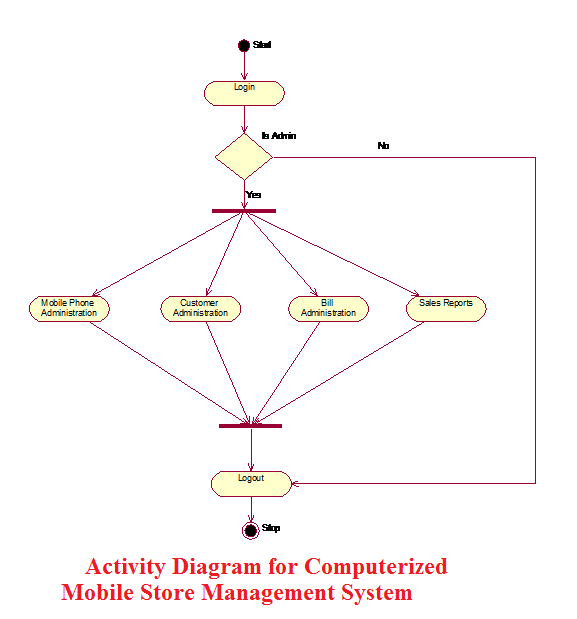

Activity Diagram for Computerized Mobile Store Management System
Activity Diagram for Computerized Mobile Store Management System                                                                                             

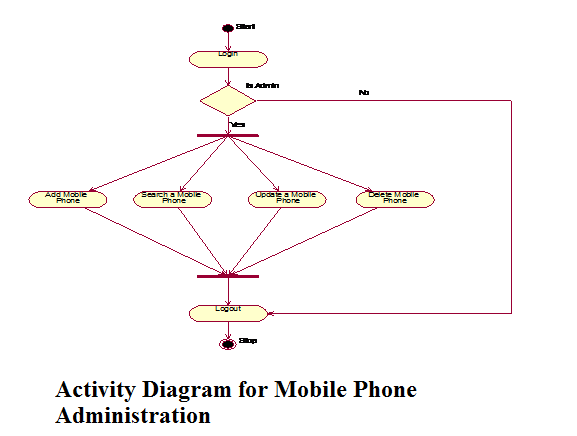
 Activity Diagram for Mobile Phone Administration
Activity Diagram for Mobile Phone Administration

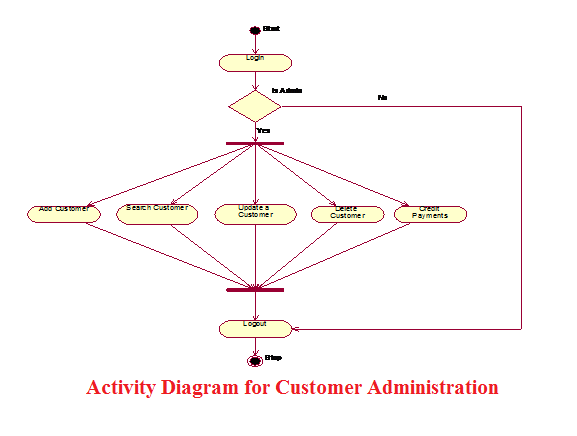
 Activity Diagram for Customer Administration
Activity Diagram for Customer Administration

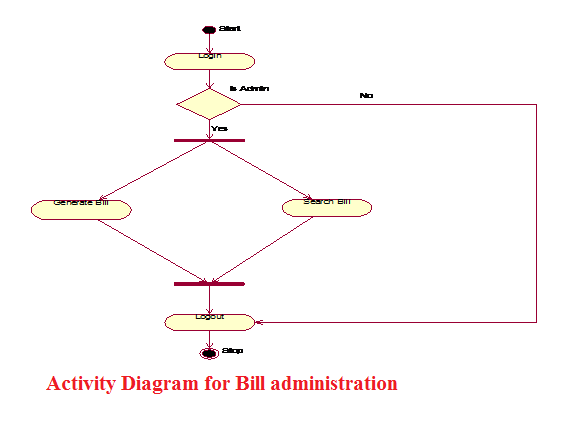
 Activity Diagram for Bill administration
Activity Diagram for Bill administration

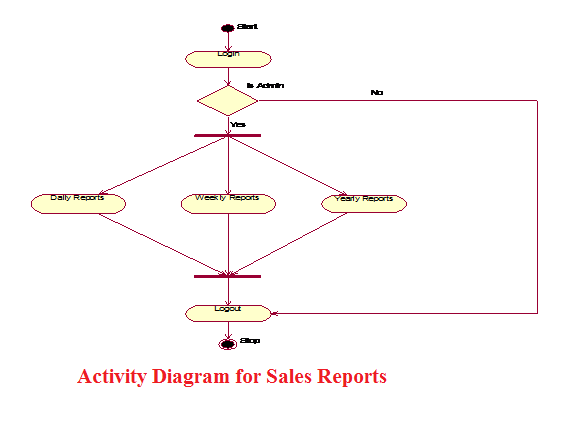
 Activity Diagram for Sales Reports

Activity Diagram for Sales Reports

USE CASE DIAGRAM
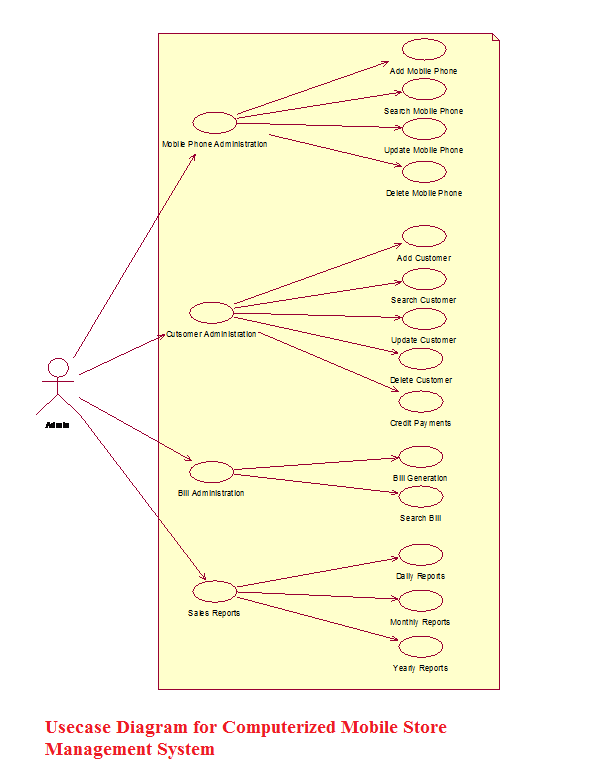
 

Usecase Diagram for Computerized Mobile Store Management System

 Usecase Diagram for Computerized Mobile Store Management System.

Use Case Descriptions

  • Mobile Phone Administration:

In the “Mobile Phone Administration” the Administrator adds, updates, searches, and deletes the Mobile Phones details on his system.

Add a new Mobile Phone:

Here the administrator adds the new Mobile Phones into his system. Here administrator enters the Mobile details like MobileId, MobileModel, Mobile Price, Mobile Phone Color, etc.

Search for a Mobile Phone:

Here the administrator searches a Mobile Phone details by entering the input like Mobileid, Mobile Phone, and Price.

Update a Mobile Phone Details:

Here the Administrator Updates the Mobile Phone details by modifying the Mobile Phone details.

Delete a Mobile Phone:

            Here the Administrator Deletes a Phone details by entering the details like MobileId or IMEI no.

  • Customer Administration:

In the “Customer Administration” the administrator adds, updates, searches, and deletes the customer details on his system.

                   Add a new Customer:

Here the administrator adds the new Customer details into his system. Here administrator enters the Customer Name, Customer Address, Mobile purchased, MobileId etc.

Search for a Customer:

            In the ‘Search for a Phone’ system the administrator searches a Customer details by entering the input like CustomerId, Customer Name.

Update a Customer Details:

            In the ‘Update a Customer Details’ system the administrator Updates the details by modifying the details like Customer Address, Customer credit details.

Delete a Customer:

            In the ‘Delete a Customer’ system the administrator Deletes a Customer Details by entering input like CustomerId. 

  • Bill Administration:

In the “Bill Administration” the administrator generates and searches the bills.

Generate a Bill:

Here the Administrator generates the bill for sold Mobiles. Here he enters the information like Customer Name, Customer Address, Mobile Purchased, MobileId.

Search for a Bill:

Here the Administrator searches the bills by entering the details like Billid. 

  • Sales Reports:

                        In the “Sales Reports” the administrator can generate the Sales Reports for daily, monthly and yearly.

                        Daily Reports:

                        Here the Administrator can generate the Daily Sales Reports by giving the  input information like Date on which the Sales Reports are needed.

                        Monthly Reports:

                        Here the Administrator can generate the Monthly Sales Reports by giving  the input information like Month and Year on which the Sales Reports are                             needed.

                        Yearly Reports:

                        Here the Administrator can generate the Yearly Sales Reports by giving the input information like Year on which the Sales Reports are needed. 

SEQUENCE DIAGRAM
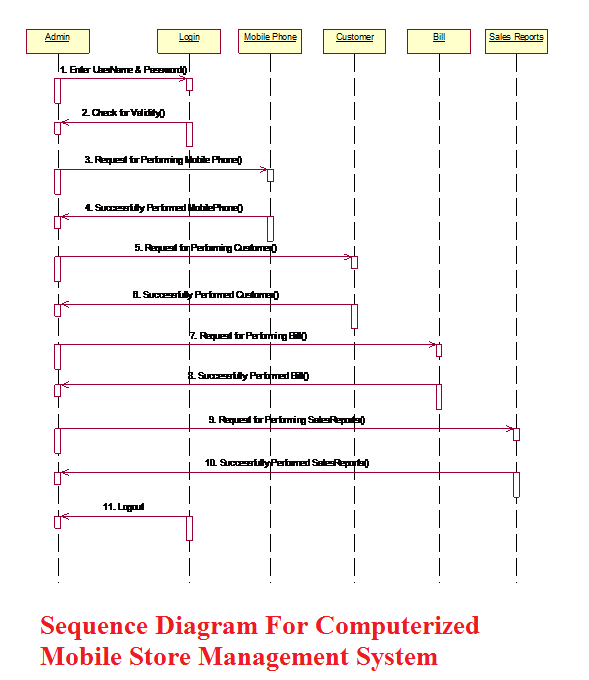
Sequence Diagram For Computerized Mobile Store Management System

Sequence Diagram For Computerized Mobile Store Management System 

CLASS DIAGRAMS
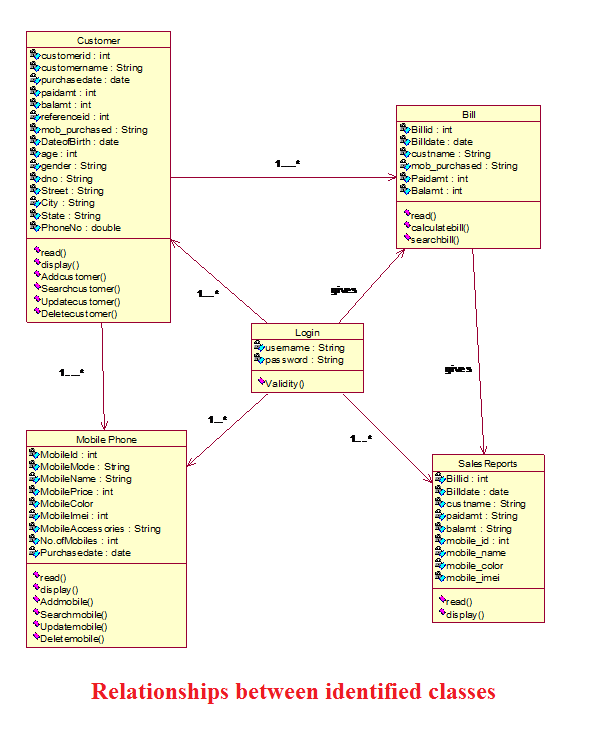
Relationships between identified classes

Relationships between identified classes.
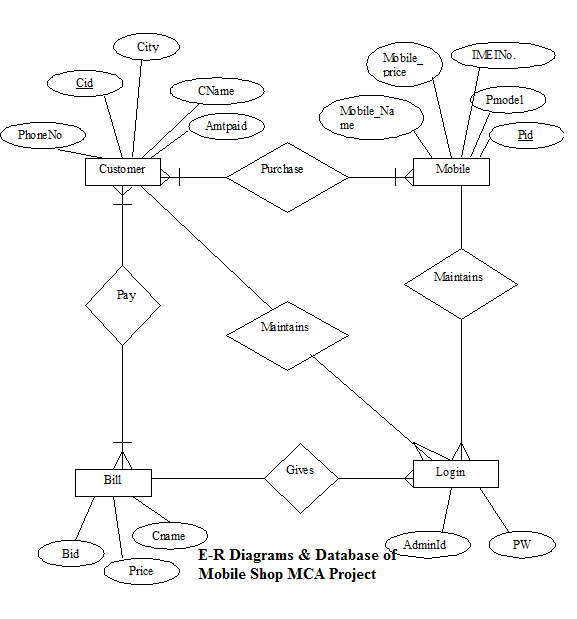
E-R Diagrams & Database of Mobile Shop MCA Project

Oracle Database Table Description for Mobile Store Java Project Report

Tables: Login

Description: Stores the information of User Id and password

  Field    Type    Size    Key Description
Username Varchar 30 Not null Admin Identification
Password Varchar 20   Password

Tables: newcustomer_details

Description: Stores the information of Customer.

  Field    Type    Size    Key Description
Cid  Int 4 Not null Customer Identification
Cname Varchar  20     Customer Name
Pdate Date     Purchase Date
Paidamt Int 7   Paid Amount
Balamt Int 7   Balance Amount
Refid Int 3   Reference Id
Date Of Birth Date     Date of Birth
Age Int 3   Age
Gender Varchar 7   Gender
Dno Varchar 10   Door No
Street Varchar 15   Street
City Varchar 20   City
State Varchar 20   State
Phno Bigint 15   Phone Number
Mob_Purchase Varchar 2000   Mobiles Purchased

Tables: newmobile_details

Description: Stores the information of Mobile Phones.

  Field    Type    Size    Key Description
Phone_Id  Varchar 20 Not null Mobile Phone Id
Mobile_model Varchar 15   Mobile Phone Model
Mobile_name Varchar 20   Mobile Phone Name
Pcolor Varchar 10   Mobile Phone color
Imeino Varchar 20   IMEI No.
Mdate Date     Manufacture Date
Accessories Varchar 55   Accessories

 Tables: newbill

Description: Stores the information of Mobile Related Bill Details.

  Field    Type    Size    Key Description
Bid Int 4 Not null Bill Id
Bill Date Date     Bill Date
Cname Varchar 20   Customer Name
Price Int 7   Total Price
Amtpaid Int 7   Amount Paid
Mob_purchased Varchar 2000   Mobiles Purchased
Mob_Name Varchar 20   Mobile Name
Mob_Price Int 8   Mobile Price
Mob_color Varchar 10   Mobile Color
Mob_imei Varchar 20   Mobile Imei

Entity Relationship diagrams of Mobile Shop MCA Project

E-R Diagrams & Database of Mobile Shop MCA Project

Related Academic Project: Shop Management System

  • In this application, a user (Admin), can log in as an Admin or Staff to perform different activities.
  • By using this application the admin user can maintain the Staff and Customer Bill records and also manipulate it.

Methods of Software Development:

  • Rapid application development for making the user interface screens.
  • Prototyping Model used for development

Operating System and Languages:

  • Shop Management System is designed in .net.
  • Admin Or staff can Manage Products and Bill. The application is connected with Database using JDBC architecture.

Mobile Phone Store Management System Project in Java with Code

There is a full support from the higher authority to implement new system. All the projects can be beneficial if it can be turned to information systems that meet operating requirements. The test of feasibility is made only when the system will work it is developed and installed.

MODULE DESCRIPTION

 The ‘Mobile Phone Store Management System Project’ has four main Modules. 

1. Mobile Phone Administration 

It provides the user to maintain the Mobile Phone Details Like 

  1. Add a new Mobile Phone
  2. Search for a Mobile Phone
  3.  Update a Mobile Phone Details
  4. Delete a Mobile Phone

2.     Customer Administration

It provides the user to maintain the Customer Details Like

  1. Add a New Customer
  2. Search for a Customer
  3. Update a Customer Details
  4. Delete a Customer 

3.  Bill Administration

It provides the user to maintain the Bill Details Like

  1. Generate a Bill
  2. Search for a Bill 

4. Sales Reports

It provides the user to maintain the Sales Report Details Like

  1. Daily Reports
  2. Monthly Reports
  3. Yearly Reports

Also See:Mobile Showroom Management Project in Vb.Net

B Tech Mini Project on Mobile Bill Management System

INTRODUCTION 

STATEMENT OF THE PROBLEM

The objective of the Computerized Mobile Store Management System Final Year Java Windows Application is to develop software for monitoring and controlling the transactions of mobile phones in a Mobile Store. The project “Computerized Mobile Store Management System” is developed in java, and it is window based application.

SCOPE OF THE PROJECT

The Computerized Mobile Store Management System B Tech Mini Project is developed for Suresh Mobile Shoppe, Nalgonda.

In scope:

  • Analyzing the system environment in Mobile Store.
  • Testing the system whether the new mobile details are stored in the database correctly or not.
  • Testing the system whether the searching a Mobile Phone and updating a Mobile is working correctly or not.
  • Testing the system whether the bills are generating properly or not.
  • Testing the system whether the credit customer details are stored properly or not.

Out Scope:

  •  The Administrator can navigate through the software without any training.
  • The Administrator can provide better services to the customer by providing better search results of mobile phones and appropriate bill services.

LIMITATIONS

It is a windows based web application.

ANALYSIS

System analysis is an important activity that takes place when we are building a new system or changing existing one. Analysis helps to understand the existing system and the requirements necessary for building the new system. If there is no existing system then analysis defines only the requirements.

One of the most important factors in system analysis is to understand the system and its problems. A good understanding of the system enables designer to identify and correct problems. Based on the drawbacks of the existing system the system is being planned. So the defining of the given problem has to be analyzed.

 Analysis Objectives:

1        Identification of customer needs

2        Create system definitions

3        Perform technical analysis

REQUIREMENTS SPECIFICATION

Software Requirement Analysis Phases:

 Problem Recognition:

            The problem is recognized by discussing with the employees in the organization and identifying the problems faced by the current system and how the future system should be and its specifications.

 Evaluation and Synthesis:

            After getting the clear problem definition we focused on what to do but not how to do. Ways to solve the problem and the different ways we found and we select the best way to solve the problem.

Modeling:

            We made a rough diagram of the proposed system and showed it to the clients to verify whether their specifications are completely mentioned in that or not.

EXISTING AND PROPOSED SYSTEM

Existing System: 

The Existing system is manual. The Mobile details and bill details will be maintain in the books.

The following are the drawbacks with the manual system.     

  • Delay in Searching a Mobile Phones in Mobile Store.
  • Unable to maintain huge Mobile Phone details in the books.
  • Unable to maintain the perfect Billing Details.
  • Less security for Mobile phone details. 

Proposed System:-

            Proposed system is a computerized Mobile Store. Through our software user can add Mobile Phone details, search for Mobile Phone, Update Mobile Phone details, and Generate credit and normal bills.

Sample Visual Basic Project Free Download

Computer science , MCA, BCA students can use this sample visual basic project as major or mini project for there college course. Students can gain knowledge on visual basic platform and coding used in this project. 

Here we provide large collection of visual basic, java, C++ , asp.net projects reports with source code for free download.

Secured MAODV Project Abstract

The Secured MAODV Ad hoc network communications devices can be Laptops, PDAs, Pocket PCs etc. Ad hoc networks are used for data transfer, sharing of information between students in a classroom, during disaster relief for disasters like earthquake, floods, soldiers in a battlefield and so on. 

                        The passing of information in these networks happens through network packets being routed in the network. This routing in ad hoc networks is trivial, and happens in two ways – proactive, which is a table driven routing and reactive, where routing takes place on-demand. Ad hoc On Demand Distance Vector(AODV)  Routing protocol, one of the reactive routing protocols,and hard state protocol has become popular in the past few years. The multicast version of the AODV or MAODV which is used for routing to a selected group of nodes within the AODV network group is being enhanced in this project to provide more secure routing in this project.

                       There is a lack of centralized network management functionally in ad hoc networks.  These networks tend to be vulnerable to a number of security attacks in the form of data loss, privacy issues, interference eavesdropping, session hijacking and so on. Also countermeasures are not embedded, so external mechanisms are used. Authentication access control, encryption& digital signatures, biometrics verification are some preventive measures. Countermeasures beyond the prevention line are intrusion detection system, cooperation enforcement mechanisms etc. in one network. Here misuse and anomalies are detected and selfish node behavior is reduced.

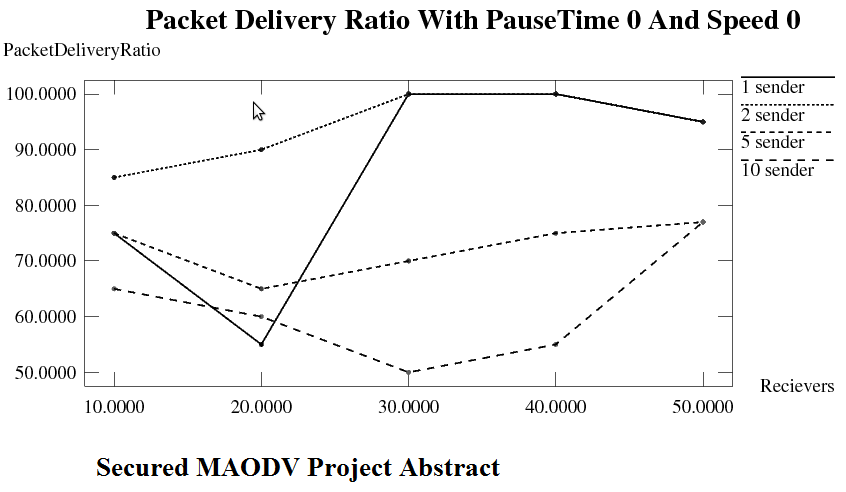
                        This work improvises the security of MAODV. An authentication frame work for MAODV and countermeasures that prevent the impact of the attacks are dealt with. There are four main attacks that are being considered, they are rushing attack, jellyfish attack, neighbour attack and blackhole attack. The nodes that are malicious and found to be involved in these attacks are marked as misbehaving nodes and their role in the network is minimised or removed depending on the location. The implementation is in the form of simulation using NS2. The original MAODV Project Source code and the improvised version are compared based on latency, number of attackers and packet delivery ratio with an emphasis on how security has improved. 

Secured MAODV Project Abstract

CONTENTS

  • List of Figures 
  • INTRODUCTION 
  • MANETs
  • MAODV
  • MOTIVATION
  • LITERATURE SURVEY
  • METHODOLOGY OF SOLUTION
  • Why Simulation
  • Why NS-2
  •  Software and hardware requirements
  • Simulation Environment
  • Simulation Results
  • Statistical Results
  • Graphical Representation of results
  • THE PSEUDO CODE
  • CONCLUSION AND FUTURE WORK
  • REFERENCES

Software Requirements of Secured MAODV

  • GNU/Linux based OS (Debian)
  • Bash shell
  • Ns-allinone-2.34(includes ns, nam and xgraph)
  • Gnome C, C++ compiler and other C++ utilities
  • Various Tcl/Tk libraries
  • Perl and Python builds

Hardware Requirements of Secured MAODV

  • Intel Pentium based Microprocessor with min. speed of 800 MHz
  • RAM – 256 MB or higher
  • 20 GB hard disk space
  • 32 bit graphics supported VGA
Download Secured MAODV CSE Project Abstract with Full Documentation.

Asp.Net Projects For MCA on Text File Hiding In Audio Files Using Low Bit Encoding Steganography

Main aim of this project is to provide security for data using steganography technology where data is encrypted and transmitted in audio file. In this method it is hard to decrypt data without using decryption algorithm. Algorithms used in this application are secure and provide high security. 

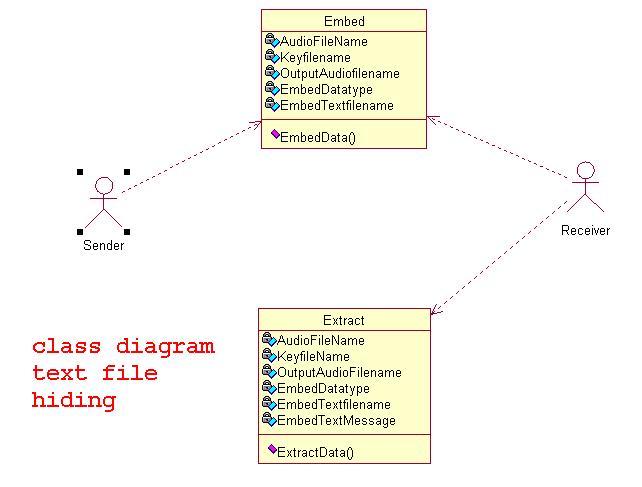
Here we provide class diagram which will be useful for implementing this application. Students can download project report and source code on same topic from this site.

class diagram text file hiding


Text File Hiding In Audio a Asp.net projects in c# DFD Diagram

Text file hiding in audio is a new technique which is alternative to existing cryptography technique which is useful in cases where there is need for high security while transmitting data. 

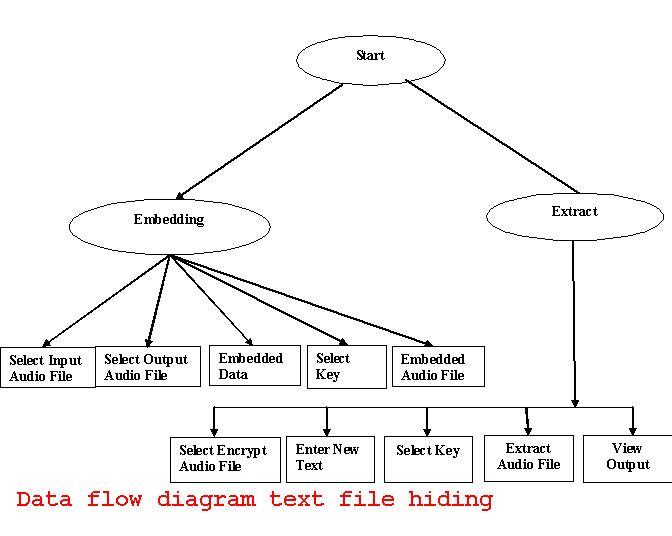
Here we provide Data flow diagram which explains about flow of data in the system. Students can find project report and source code on same topic from this site.

dfd text file hiding


Asp.Net Projects Report on Text File Hiding In Audio (Wav) Files Using Low Bit Encoding Steganography

In order to develop this system we design a architecture which will explain behavior of the system and provide a better experience for client. In order to improve quality of service computerized applications are required in place of manual process.

Modules and their Description

Data hiding and extracting from an audio file is done in two main modules.

• Embed module.

• Extract module.

Embed Module (To embed the text file into the audio file)

In this module, the first step is selecting an input audio file .User is provided with a dialog box where path selection can be made using textbox.The second step is selecting an output audio file in which text data or a text file is embedded.The third step use should follow is to select a file from the list or enter new text for embedding.

In the fifth step what ever the files that we have selected are viewed and verification of the path is done. In the sixth process data is embedded in to the audio file using low bit encoding technique.

After embedding the content both the audio files are played and a listener cannot find any difference between the audios.

Extract Module (To extract the text file from the audio file)

In this module, the first step is the process of selecting the encrypted audio file. This is the file that a user has to extract information from the output audio. 

Download Asp.Net Projects Report on Text File Hiding In Audio (Wav) Files Using Low Bit Encoding Steganography.

Text File Hiding In Audio Files Using Low Bit Encoding Steganography Project Source Code

Introduction to Text File Hiding In Audio Files Using Low Bit Encoding Steganography Project:

Text file hiding in audio files using low bit encoding steganography project is implemented in asp.net Platform using C#.Net coding language. Main aim of this project is to provide security for data by hiding data in audio files without altering data in audio file. With this technique security of the data can be increased to satisfactory level. Even if the hidden data is hacked by any user it will be in encrypted form and it will be tough to decrypt data. It is challenging task to integrate data in to audio file because of human auditory system works on a wide dynamic range. 

This method is alternative to cryptography techniques which provide more security than existing techniques. Audio steganography technique is improving it scope of usage in many applications. In this project we use simple algorithm though which users can securely communicate with other users. This algorithm does not use any keys but it provides better performance by even dealing with high risks. 

Here we provide entire project source code and project report for free download. Project report covers detailed explanation on implementation and design phases involved in developing this application.