Digital Certificates Generation for Authentication and Key Exchange

Certificates Generation

For the process of authentication and key exchange we will be using digital certificates that have been generated by the Certificate Authority (CA). In our application we will be generating certificates using “Windows Server 2003” and the certificates generated by CA will be in a “.pfx” format, which is not supported by our application being generated on a Java platform which can only understands “.jks” format. For this reason after generation of the certificate in “.pfx” format we will be converting it in to “.jks” format using java’s command line tool I; e “key tool”.

In this section we are going to see the certificate generation and the extraction of public and private key pairs using “key tool”.


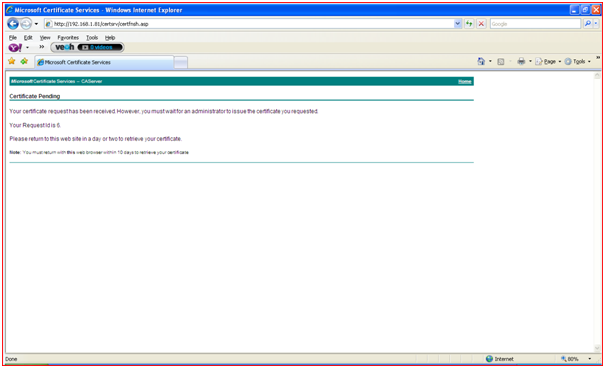
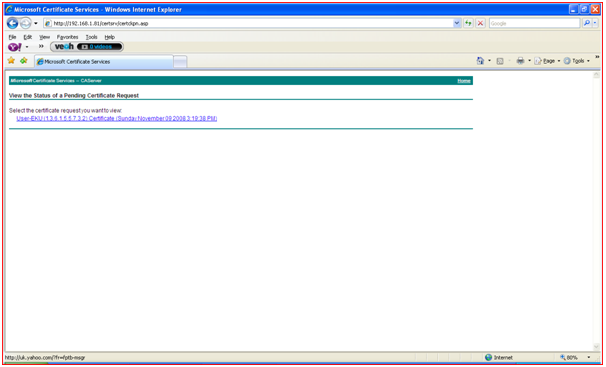
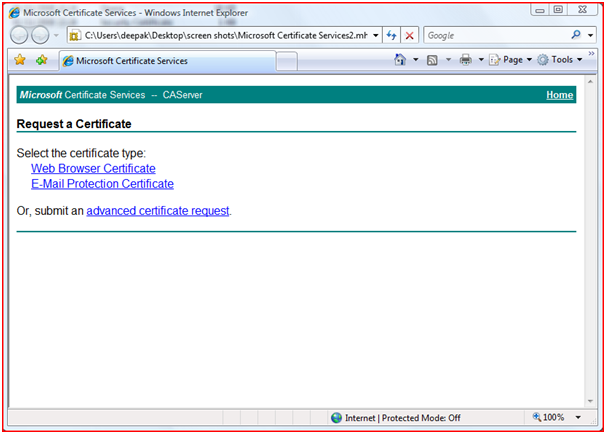
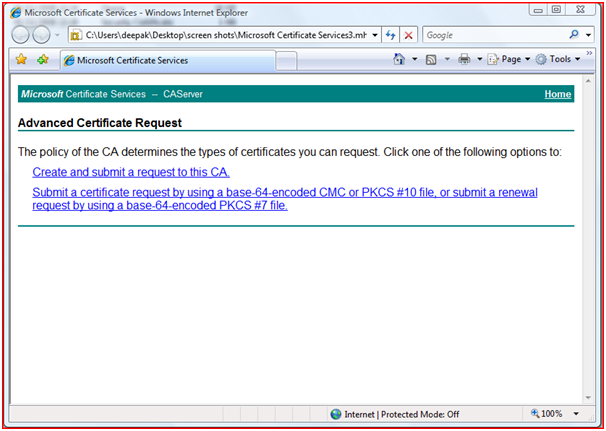
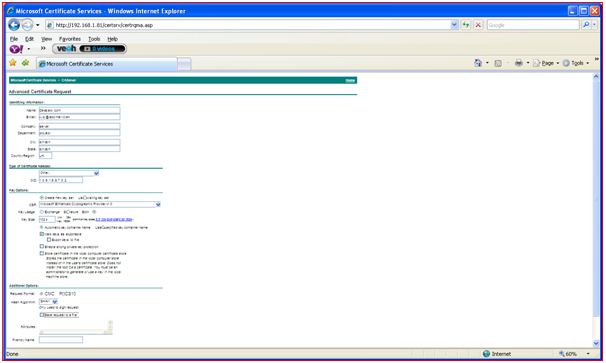
  1. Below screenshots shows the step-by-step request of certificate from the client system.

Requesting Certificate Step 1

Figure 26: Requesting Certificate Step 1

Requesting Certificate Step 1

Figure 27: Requesting Certificate Step 2

Requesting Certificate Step 1

Figure 28: Requesting Certificate Step 3

Requesting Certificate Step 1

Figure 29: Requesting Certificate Step 4

Requesting Certificate Step 1

Figure 30: Requesting Certificate Step 5

Requesting Certificate Step 1

Figure 31: Requesting Certificate Step 6

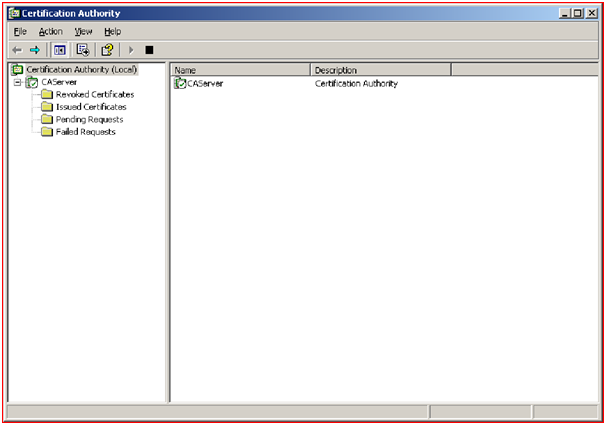
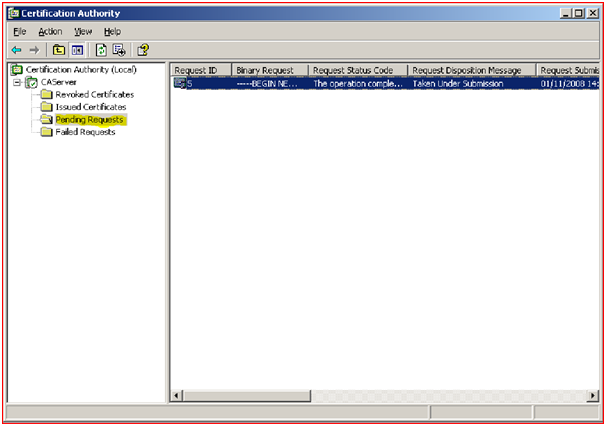
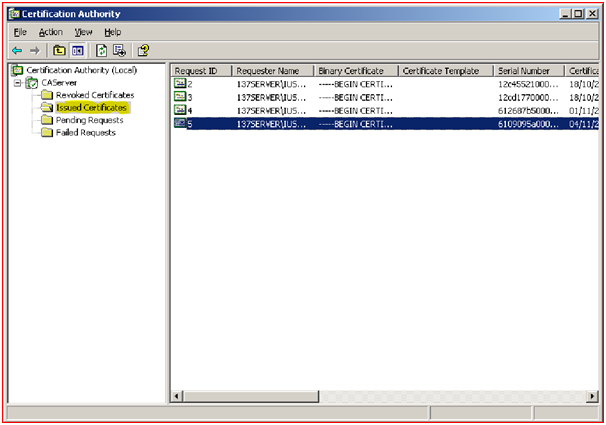
  1. When once the request has been sent to the Server, administrator of the network has to accept the request by observing the details send by the client. In the Server side it will maintain the details of the following certificates.
    1. Revoked Certificates.
    2. Issued Certificates.
    3. Pending Certificates.
    4. Failed Certificates.

Server will maintain the details of the Revoked Certificates and the details for the revocation for the future purpose.

 Issuing Certificate

Figure 32: Issuing Certificate

 Showing Pending Certificates

Figure 33: Showing Pending Certificates

 Showing Issued Certificates

Figure 34: Showing Issued Certificates

Conversion of Certificates:

The certificates that have been downloaded from the certificate authority will be in the “.pfx” format, which our Java application cannot understand and hence we need to convert this into “.JKS” format using command line Java key tool. From these converted JKS file key pair will be generated for both server and client.

This Project Paper is written & submitted by Deepak V.

Java Core Implementation of the Secure Chatting System application

Core Implementation of the application

The following steps takes place at the client side during Connection establishment phase:

1)      Create key store object by reading private key certificate.   

2)      Create key manager object using key store object which is created in the previous step.

3)      Create key store object by reading public key certificate.

4)      Create trust manager object using key store object created in the step3.

5)      Create secure random object and call nextInt().

6)      Create SSLContext object and initialize using key manager object created in step2, trust manager object created in step4 and secure random object created in step5. We are creating this object by specifying TLS protocol for getInstance method of SSlContext.

7)      Create socket object using SSLContext object created in step6, and connect to server using server IP and port

8)      Start TLS handshaking process

9)      With the help of selected cipher suite further messages will be exchanged.

10)     Close the connection. The following steps takes place at the server side during the Connection establishment phase.

Secure Chatting System application

1)      Create key store object by reading private key certificate. Create key manager object using key store object which is created in the previous step.

2)      Create key store object by reading public key certificate.

3)      Create trust manager object using key store object created in the step3.

4)      Create secure random object and call nextInt().

5)      Create SSLContext object and initialize using key manager object created in step2, trust manager object created in step4 and secure random object created in step5. We are creating this object by specifying TLS protocol for getInstance method of SSlContext.

6)      Created server socket object by calling createServerSocket method and server factory object, which is created using SSlContext object.

7)      Call accept method on SSLServer Socket object the accept() system call will return a new socket which is used to communicate with the client and start the hand shaking process, exchange messages in a newly created thread.

8)      Close the sockets. 

This Project Paper is written & submitted by Deepak V.

Final Year Secure Chat System Steps in TLS (SSL v 3.3 is indicated as TLS) Handshake

Steps in TLS (SSL v 3.3 is indicated as TLS) Handshake

Client Hello:  In this step the client initiating the connection would send a hello message to the Server, stating the information about the highest TLS (SSL v 3.3 is indicated as TLS) protocol version it supports, list of cipher suite with the cryptographic algorithms and the key sizes they support and the random sequence number.
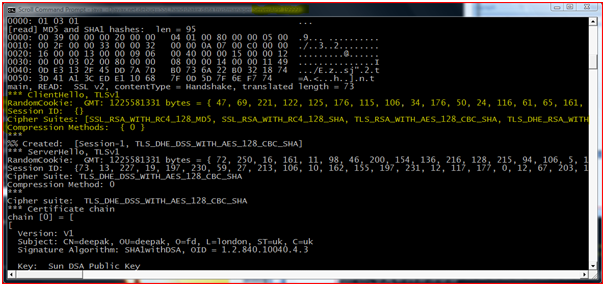
 Debug message showing Server Side “Client Hello Message”
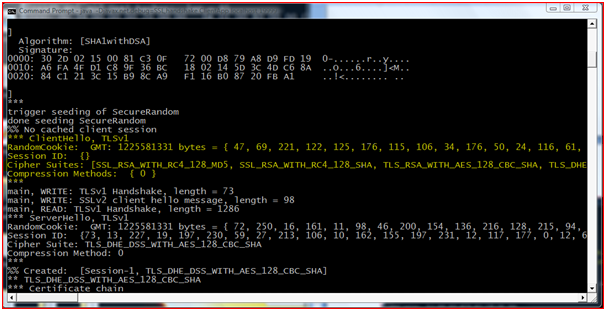
Figure : Debug message showing Server Side “Client Hello Message”

 Debug message showing Client Side “Client Hello Message”

Figure : Debug message showing Client Side “Client Hello Message”

Server Hello: In response the Server will reply with Server Hello message along with the selected highest protocol, cipher suite, random number and compression method. 

“Server Hello “at Client Side and “Server Hello” at Server Side
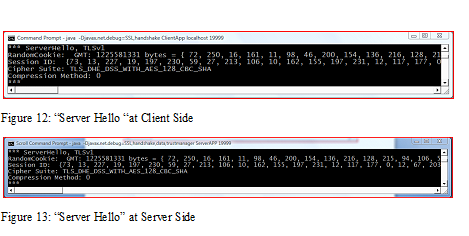
Server Hello “at Client Side

Certificate Exchange: Server will send a Certificate or a certificate chain depending on the cipher suite selected. This certificate chain starts with the server’s public key certificate and ends with the CA’s root certificate (it is an optional step for the server depending on the cipher suite selected).
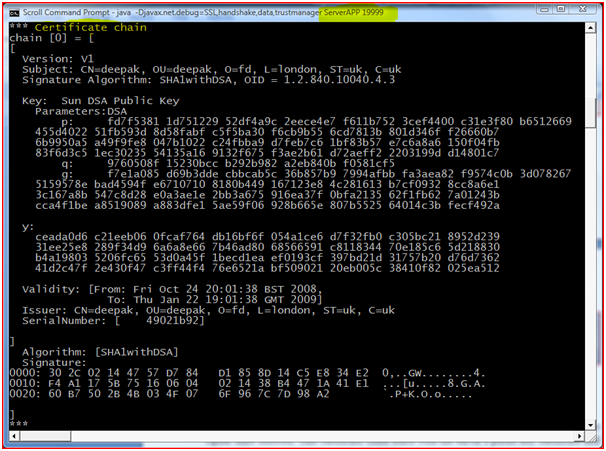
 Certificate Chain” at Server Side

Figure : “Certificate Chain” at Server Side
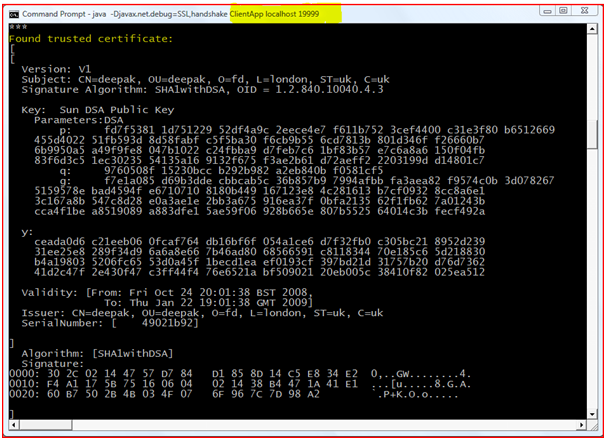
“Certificate Verification” at Client Side


Figure : “Certificate Verification” at Client Side

In the above screen shot it is shown that the certificate that has been send by the Server is validated. If the certificate is found to be invalid handshaking is terminated.

Certificate Request: For mutual authentication server also needs to authenticate the client. Hence server sends the client certificate request.
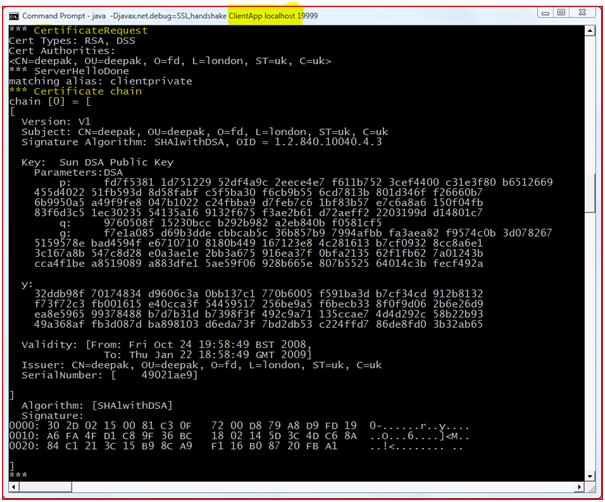
 “Certificate Request” from Server at Client Side
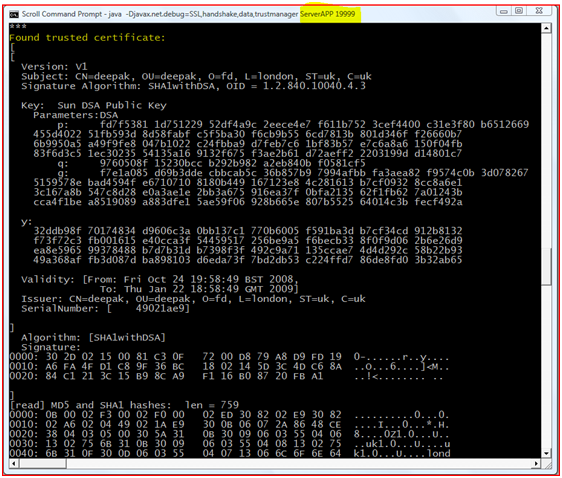
Figure : “Certificate Request” from Server at Client Side                               

 “Certificate Verification” at Server Side

Figure : “Certificate Verification” at Server Side

In the above screenshot it is explained that the certificate send by the client is validated by the Server, hence mutual authentication is done.

Server Key Exchange-Server requests the client key exchange message if the key information exchanged in the previous step is insufficient.
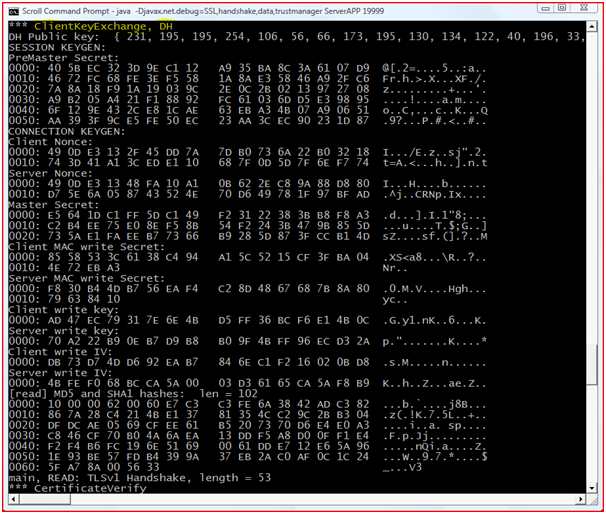
 Server Requesting Client Key Exchange

Figure : Server Requesting Client Key Exchange
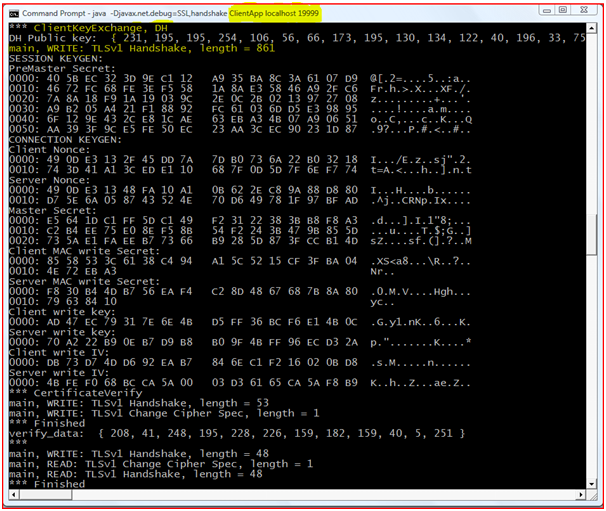
Client Sending the Key Exchange


Figure : Client Sending the Key Exchange

In the above screenshots it is shown that the Server is sending the client Key Exchange message for extra key information, and the client responds to it respectively.

Server Hello Done:When the exchange of all the information for secure communication is done Server sends “Hello Done” message which means that the handshaking is done.

 “Server Hello Done”

Figure : “Server Hello Done”

Client Certificate: In according to obtain mutual authentication, to the response for the server request, Client certificate will be sent to the server. 

Client Key Exchange: Depending on the Servers selected cipher suite Client will send a Client Key Exchange method containing “premaster secret”, public key. “Premaster secret” is encrypted using public key of the server certificate.

Certificate Verify: Client does the signature over the previous handshake message using its certificates private key using the cryptographic hash function. By receiving the reply message server will decrypt the message using the client’s public key. This will make sure that the client has access to the private key of the certificate and it owns the certificate.

Master Secret: To compute this Client and Server uses a random numbers and PreMaster Secret also known as common secret. This is derived by passing it through a “Pseudorandom Function”. To carry on this connection all the data required is derived from this Master secret.

Change Cipher Specification: By passing this command client is initiating Server to change to encrypted mode. This is a record level protocol 20(Change Cipher Spec).

In this screenshot client is initiating server to change the Cipher suite to make the communication encrypted.

In the above screenshot server reads the request send by the client and it response with the finished message.

Finished: It means that the connection is ready for secure data communication, by sending MAC and Hash value over the previous hand shake messages.

Change Cipher Spec: Server sends the message to tell the client to change to encrypted mode.

Finished:  Server decrypts the Client’s “Finished” message and verifies the MAC and HASH values, if this process fails the handshake is failed and the connection is dismantled. It means that this is the end of the TLS (SSL v 3.3 is indicated as TLS) handshake.

Encrypted Data: If the Hand Shaking is successful, then the secure connection is established and Client Server starts communicating using the symmetric encryption algorithm and the Cryptographic Hash functions committed in steps 1 and 2 and the secret key exchanged in the “Client Key Exchange” step.

After successful completion of TLS Handshake client and server will exchange the messages by following the encryption algorithm and key which are obtained using agreed TLS-Handshake process.   Check sum is calculated on the encrypted message and this checksum will be encrypted using private key of the private key certificate and it is appended to the encrypted network message and then the message will be sent to the server.

This Project Paper is written & submitted by Deepak V.

Distributed Networks Project abstract on Mobile Agent Based Fault Tolerance System

Distributed networking is widely used these days and apart from the list of advantages provided with the distributed networks, there are few limitations across these networks and the key among them are faults that occur frequently across the networks.

Among these faults link failures and switching the mode of distributed networking are important to be considered and there are many fault recovery techniques across the literature and most of them are static in nature and can’t detect the dynamic link failures across the network.

The main aim of this project is to evaluate the role of mobile agent based fault tolerance system for the distributed networks and to make this proposed application, a simple java based application is used. Swings framework is used to create the user interface and Oracle SQL is used as the database to handle the tables.

Two servers and a master server are created and each server can handle two clients and the faults like link failures and distributed network off are inserted in this project and from the results it is clear that the mobile agent can handle the dynamic link failures and improve the overall performance of the distributed network.

This paper is written and submitted by sai

Threads Created By Client and Server using Java in Chat Project

Threads Created By Client and Server at Their Ends

First thread will read data from the socket and it will be stored in the queue say q1. Second thread will remove data from q1 and it will display on GUI. The GUI chat window is implemented using JAVA Swing. 

Third thread will take the input messages from the user and it will write in to the queue say q2. Fourth thread will remove data from q2 and it will be written in to socket. Q1 queue is accessed by first and second threads synchronously. Similarly Q2 queue is accessed by third and fourth thread synchronously.

This Project Paper is written & submitted by Deepak V.
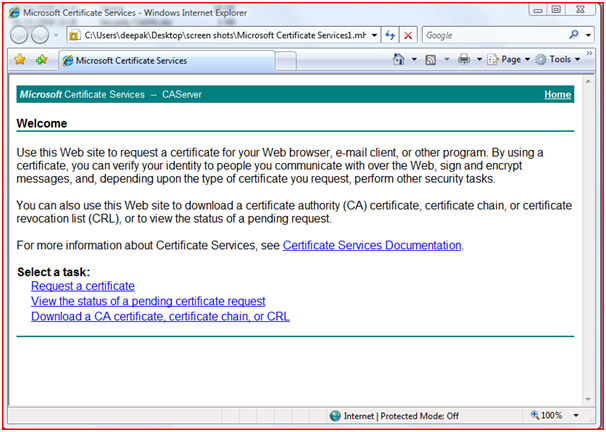
Secure Chat Java and SQL Application Implementation

Implementation

Secure chat application is developed using Java language and we used Eclipse IDE for creating Java Project. The application will be divided in to two basic modules.

Client Module

Client module will initiate a connection with the server. User has to pass Internet Protocol address and port of the server from the command line. Client module will read private key and root certificate information using JAVA API and then will start TLS handshake with the server. In the process of TLS handshaking authentication of the server and client will be done mutually, and there will be an agreement of cipher suite between client and server for secure the connection. The certificates will be generated using Certificate authority and Open SSL tools. These certificates are read from the directory where the class files are located (which is described in Certificate Generation Section). 

Server Module

Server application by default will run on 8003. But if the user specifies any specific port on the command line then server module will run on that port.  This module will also search for private key and root certificate where the server module class files are located then it will read this certificate information using JAVA API. This information will be useful for authenticating the clients and this module will listen for the client requests. When Client sends a request to server, the accept system call will return the new socket descriptor which is used to interact with the client in a secure manner.  The Server module is implemented as concurrent server.   Server module will decrypt information which is sent by client and it will encrypt the information which is sent to client using secret key generated during TLS handshake(which is described in ) and it will also calculates check sum using  Integrity algorithm which is specified  in the agreed cipher suite.

This Project Paper is written & submitted by Deepak V.
Distributed System Research Paper

Aims and Objectives 

Following are the aims and objectives of this research 

Aim:  To develop a hierarchical based dynamic mobile agent to monitor the faults across the dynamic distributed systems 

Objectives 

Following are the research objectives 

  • To review and critically analyze different mobile agent based fault tolerant monitoring systems for dynamic distributed systems and evaluate the gaps in the literature
  • To design a hierarchical wireless sensor network using java swings concept
  • To develop a dynamic mobile agent based fault tolerant monitoring system using java that can collect the statistics from different nodes of the wireless sensor network
  • To develop a SQL database to maintain the routing tables and store the collected monitoring information.
  • To test the application against the aim of the project and evaluate the results 

Project plan

Task Description Start Date End Date Duration
Project Introduction  Following aspects are covered for this task 

  • Problem definition and motivation
  • Aims and Objectives


    1 week 
Literature Review  Following topics are covered under literature review 

  • Introduction to distributed systems
  • What is fault tolerance and mobile agent based monitoring
  • Different types of faults across the wireless sensor networks
  • Existing techniques to handle these faults and their limitations
  • Proposed system


    3 weeks 
Design  Following design aspects covered 

  • Front end design covering the model of wireless sensor network
  • Business logic design that describes the actual coding logic used
  • Database design which deals with all the tables and stored procedure used in this application


    2 weeks 
Coding  Following modules are coded in this project 

  • Front end code using java swings
  • Business logic code
  • Database coding using JDBC connectivity programming


    4 weeks 
Evaluation of results  Following tasks are included in this section 

  • Testing the outputs
  • Bug fixing
  • Evaluation of results against the aims and objective of the project


    1 week 
Final Thesis preparation        1 week 


  This paper is written and submitted by sai

UML Class Diagrams for A Secure Chat Program Java Project

UML Class Diagrams

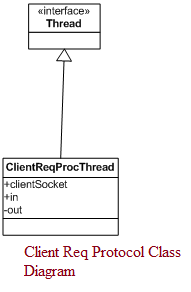
UML Class diagram for A Secure Chat Program is the purpose to depict the classes of the application in the object oriented application, which is considered as the most important part of the system. It mainly consists of three parts name of the class (on the top), attributes and their data types (in the Middle), methods and the operations used (in the bottom).


  1. SecureClientSocket Class Diagram:

SecureClientSocket Class Diagram  

Figure : Secure Client Socket Class Diagram 

 Secure Server Socket Class Diagram

  1. SecureServerSocket Class Diagram: 

Figure : Secure Server Socket Class Diagram 

  1. Client Request Protocol Thread
  2. Client Req Protocol Class Diagram 

Figure : Client Req Protocol Class Diagram 

Client Window Class Diagram

  1. Client Window 

Figure : Client Window Class Diagram

  Chat IO Class Diagram

  1. Chat IO Thread 

Figure : Chat IO Class Diagram

This Project Paper is written & submitted by Deepak V.
MS Project System Design using UML (Unified Modelling Language)

System Design

The system design for our project has been done by using UML (Unified Modelling Language), as it has become the real time standard for developing Object-Oriented software and it has been widely used in the present software industry. In spite of the language used to develop a application UML is the notation for conveying object-oriented analysis and design. In this section I am going to highlight several steps that our application has taken before the initial model was ready for demonstration using UML. 

In this MS Project we have chosen UML for system design and analysis for several reasons.

  • As our application can be developed using any of the languages C, C++, .NET or Java, so the modelling language used to developed should be language independent.
  • To make clear of various responsibilities and to have a clear understanding of how to work, UML notations are made before the coding part starts.
  • UML is used to eradicate various design errors and problems that we face while the coding part starts. Designing of bad notation will cause so many problems when we develop an application in Object Oriented language.

This Project Paper is written & submitted by Deepak V.
Functional Requirements of Network Security MSc Java Chat System Project

Functional Requirements

Encryption/Decryption

The network messages which are exchanged between two end points should be encrypted at the source and messages should be decrypted at destination. 

This secure chat application must use one of the symmetric key algorithms such as AES, DES, RC4, Triple DES, IDEA etc.

Authentication

Chat application should provide authentication for the messages which are exchanged between two end points.  Chat application should achieve this functionality with the help of certificates.  

Integrity

Chat application should verify integrity of the network message which are exchanged between end points using MD5 or SHA algorithms. Md5 or SHA algorithm has to perform on network message at the source to generate check sum and to append this check sum to network message at the source end and it should transmit to the destination.  At destination side chat application should again calculate check sum on network message using MD5 or SHA algorithm and compare with the check sum appended to network message.

Exchange messages using TLSv1 protocol

Chat application should generate network TLSv1 protocol network messages.  This is standard protocol for secure communication. 

Users should communicate messages using user interface.

Chat application should provide GUI chat windows for users in order to communicate securely.

This Project Paper is written & submitted by Deepak V.