Data Aggregation and Optimal Routing in Wireless Sensors

About sensors: 

      Talking about the sensor is device which measures the physical quantity and converts it into signal and sends it from recognition point to control system. Whereas wireless sensor networks are developed from normal sensors that enhance the use too easy for remote monitoring. These sensors are used in many fields like home control, building automation, Industrial plant monitoring, health and fitness. 

Introduction:

    In wireless sensors Data Aggregation and Optimal Routing plays main role in the development process. By improving of these fields will reduce the data traffic and increase the lifespan of wireless sensors. The data which is collected from outside saved in data aggregation. Here some main fields which are used in wireless sensors.

This paper is written and submitted by sandeep k

Data Aggregation and Optimization to improve the Lifetime of Wireless Sensor Networks

Purpose and Justification of the project: 

The development of low-cost, low-power sensor networks has its potential impact in the development of Smart Sensor Networks, Power management, and Data dissemination protocols have been specifically designed for wireless sensor networks. Wireless sensor networks have become an important issue and have gained much attention in many research areas. In this Data Aggregation and Optimization to improve the Lifetime of Wireless Sensor Networks paper we discussed the Zigbee standard (IEEE 802.15.4) of Smart Sensor Networks describing its Architectural Framework, how it deployed power conservation techniques as specified in the IEEE 802.15.4 specification, Protocols, related issues and Applications. We have also discussed some of the wireless technologies like Blue tooth and Wi-Fi since Zigbee is such a wireless standard and compared the different aspects. 

Existing System:

  • The drawback of this approach is that it consumes the more power for the nodes on the minimum energy path, and if the nodes are failed to transmit data due to collision no other nodes take the job of the failed nodes.
  • Some few techniques are proposed to address this problem by studying the maximum lifetime routing problem. The problem focuses on the flow and transmission power to maximize the lifetime of the network, which is the time the first node in the network runs out of energy.

Conclusion:

Presented an optimal routing and data aggregation scheme for maximizing the network Lifetime of sensor networks. By exploiting the special structure of the sensor networks and

Proposed some functions to overcome the non differentiability of optimization problem so that

The distributed solution is possible. The optimality conditions are derived and the distributed

Algorithm is designed accordingly.  This scheme significantly reduces the data traffic and improves the network lifetime. The distributed algorithm can converge to the optimal value efficiently.

Modules:

  1. Convergence of the Distributed Algorithm
  2. Routing Model
  3. Data Aggregation Model 

Module Description: 

Convergence of the Distributed Algorithm

The aggregated data rate is normalized by obtaining the optimal value by the centralized MLR algorithm. The effectiveness of the distributed MLR algorithm can be observed from the normalized aggregated data rate at the sink node for various network sizes. 

Software Requirements

Java 1.4 or More

Swings

Windows 2000, XP

Hardware Requirements

Hard Disk             :           40GB and Above

RAM                                 :           256MB and Above

Processor               :           Pentium III and Above 

Future scope of Wireless sensors:

The overview of wireless sensor networks are describing about existing systems, working procedure and applications. Future scope of its is to determine reducing the cost and power consumption which can be highly useful in the future. 

This paper is written and submitted by sandeep k

Querying For Large Scale Metadata Database Management System Project Abstract

Project background 

Metadata management is always a research process and there are different types of metadata management systems and are proved to be successful in managing large scale metadata database management systems. In general in a corporate organization where large database are maintained, management of metadata plays an important role and queering the metadata is the most tedious task to be executed. There are some techniques and a standard SQL can be used to query the metadata to fetch the desired results about the actual data. This is a well know practice but still querying the metadata simultaneously with the actual data can be considered as the efficient operation to be executed on any metadata management system. In this project metadata is queried along with the actual data and SQL server is used as the database to maintain the metadata and the actual data. 

Aim: To develop a framework to query the metadata along with the actual data at the same time using SQL server and Microsoft dot net technologies.

 Objectives 

Following are the research objectives for Querying For Large Scale Metadata Database Management System

  • To investigate and critically review the metadata database management system for large scale databases
  • To design a framework to query the metadata and actual data at the same time to improve the search performance for a website
  • To develop SQL server metadata management system and evaluate the results

This paper is written and submitted by Arun

MS Dissertation Project Screen Shots for Distributed Networks Project

The project begins with the administration module and as discussed in the previous chapter, administrator are provided with an window and from there they can perform the required operations and the actual window created using the coding is as shown below

From the above screen it can be observed that the administrator is provided with an option to start the master server from where the actual operations begin. Administrators are also provided an option check the status of the network and with respect to this link status and distribution network status can be checked in this module and also the administrator can start the mobile agent by clicking on the mobile agent button as shown in the above screen. 

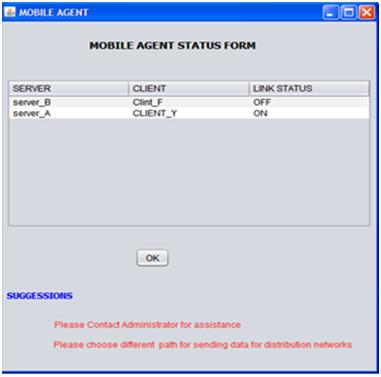
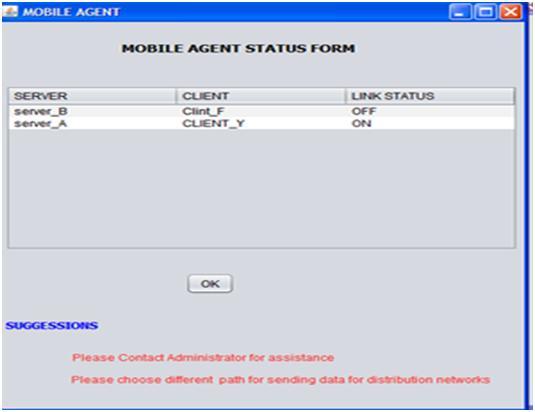
From the above screen it can be observed that the mobile agent module provides the required information related to the link failures and the corresponding information is displayed to the users in the form a table and the corresponding suggestions with respect to these failures are also shown. This module is actually invoked when there are faults across the network and the corresponding faults and network operations are shown below 

When the administrator click on the start master server this particular window is displayed and it can be observed that users are provided with the option to start the Server A and Server B. When the user clicks on the Server A, server A is started and the same with the case with server B and the next steps are as given below 

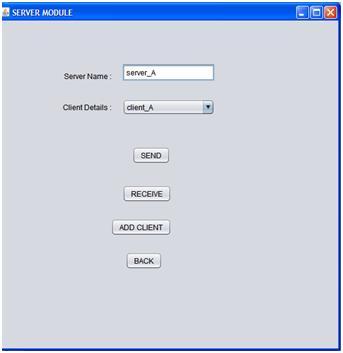
When the user clicks on the server A button, the screen shown above is displayed to the user and from here the actual server operations are initiated. It can be observed from the above screen that users can select the desired client from the list of clients and proceed with the required operations. The users are provided with the options like Send, Receive and Add client and they can click on the desired button to proceed with the required option and the corresponding screens are as given below 

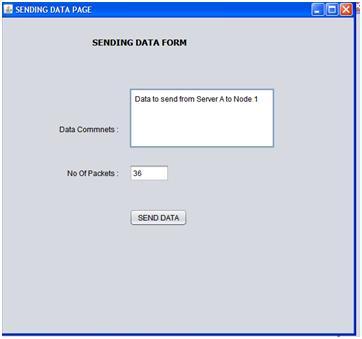
From the above screen it is clear that the users can send the data from the desired server to the desired client and the actual number of packets being sent is also calculated before sending the actual data to the desired client or server. The data sent is saved in the datapackets table as described in the previous chapter. 

Once the data is sent to the desired client or server, users are shown a message with respect to the data insertion and thus one can conclude that the data is sent to the desired client or server successfully.

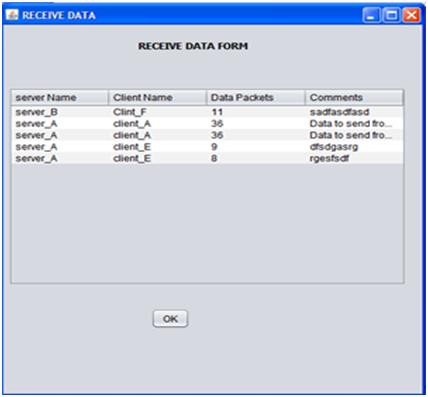
All the data received is displayed in the form a table and is as shown in the above screen. This table contains the key columns like server name, client name, number of data packets sent and the actual message sent. This table can be used to track the log of received data by the administrator and also check the level of communication between the clients and the corresponding servers. 

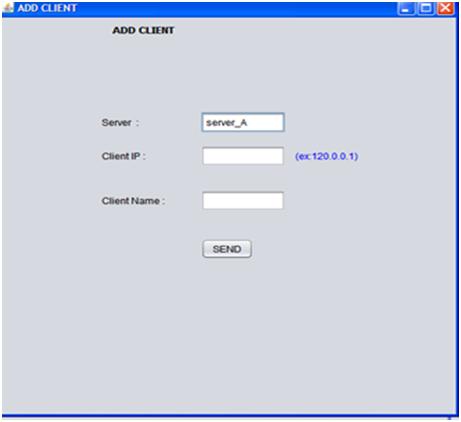
This screen shows the procedure to add a client to a particular server and if the users selects the server A to add the client, then the server A is populated by default on the server field and the users can add the client IP address and the client name. This client is added to the particular server if the server has the limit to handle the required number of clients.

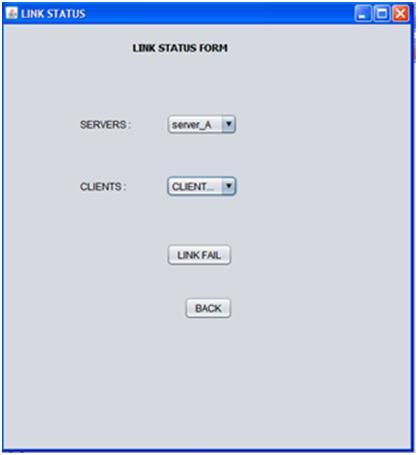
This screen shows the link status form and the users can select the desired server and the corresponding client to fail the link externally. This can be considered as the required fault across the distributed systems and if the server and the client are required and once the link fail button is clicked, then the corresponding link is failed and the communication among these nodes is not possible further and the users should contact the administrator and select an alternative path for the communication as shown in the mobile agent window. 

This screen shows the mobile agent screen where it displays all the nodes that were failed and  now the administrator can select the desired client and server and set back the status as either on or off as shown in the above screen. If any link between the server and client is off, users are provided with an option to contact the administrator for assistance and also they are suggested to choose an alternative path for the communication as shown in the above screen.

This paper is written and submitted by sai

Learning Outcomes of MS Masters Project Dissertation

Learning Outcomes

I am thankful for all the help and guidance I received from my supervisor.

In the initial stage I faced some difficulty in writing the Project Dissertation as I did not outline the exact pros and corns that the existing system has. As the project mainly depends on the network level security, I performed a lot of research work in choosing cryptographic algorithms. The important factor here in choosing the algorithm is the speed at which it could provide the required security level. I am proud for the level of MS Masters standards I have achieved in both developing the application and satisfying the mentioned security concepts.

While developing the application I researched on many underlying network concepts of which I had brief idea from the theoretical concepts of my academics, but now I can confidently say that I have obtained very good real time knowledge in applying and testing them for my application. The latest technology which I have used in my application is “Certificate Authority” for providing authentication which is a very vast concept and where I have gained good amount of knowledge about how the websites are providing secure communication to their users.

I am very happy for exploring and learning new technologies that I have used in my application which will be helpful for me in the future but due to the time constraints I am unable to implement extra services like voice chatting and file transferring, but I am very confident that I can extend my application in the future by adding these services with the knowledge I have gained.

I got a good grip on the Java security extensions like JSSE and JCA. I have used some of the case tools like Microsoft Visio for designing or modelling the design part of the system. Now I am confident in analyzing the problem and finding the effective solution for it. I learnt a lot in terms of managing things and initiation while developing the application from the scratch.

This Project Paper is written & submitted by Deepak V.

Conclusion and Future Scope of Secure Chat Java Application

Conclusion and Future Scope

Conclusion:

The main objective of the project is to develop a Secure Chat Application. I had taken a wide range of literature review in order to achieve all the tasks, where I came to know about some of the products that are existing in the market. I made a detailed research in that path to cover the loop holes that existing systems are facing and to eradicate them in our application. In the process of research I came to know about the latest technologies and different algorithms.

I analyzed various encryption algorithms (DES, AES, IDEA…), Integrity algorithms (MD5, SHA), key-exchange algorithms, authentication and I had implemented those functionalities in my application. I had done a detailed research on Certificate Authority and key tool for the generation of certificates.

The portability of the application has been achieved by using some of the latest JSSE technologies. I implemented these functionalities using JSSE api’s. I had gone through core and security concepts of java (JSSE, JCA) packages and for developing GUI I had implemented java swings.

As a result, the product has been successfully developed in terms of extendability, portability, and maintainability and tested in order to meet all requirements that are

Authentication

Integrity

Confidentiality

Which are specified as the four basic concepts for the secure communication over a network.

Future Scope:

With the knowledge I have gained by developing this application, I am confident that in the future I can make the application more effectively by adding this services.

  • Extending this application by providing Authorisation service.
  • Creating Database and maintaining users.
  • Increasing the effectiveness of the application by providing Voice Chat.
  • Extending it to Web Support.

This Project Paper is written & submitted by Deepak V.

Application Testing in Network Security Chat System

APPLICATION TESTING 

Application testing is done within the same network using two systems, which are connected to the network. This is done by using ethereal tool known as wireshark (http://www.wireshark.org/download.html) which captures the packets over the network.

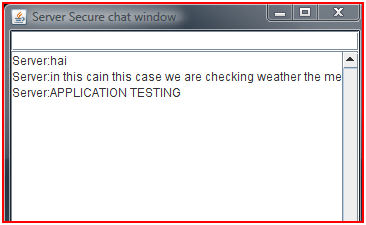
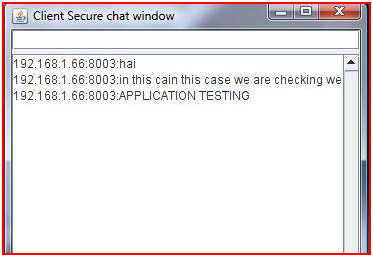
Test Case1:- In this case we are checking weather the messages are transferred from the correct source, completely inspite of the length of the message. This is shown in the screenshots below, where Server (192.168.1.66.8003) and client (192.168.1.69) are executed on two different systems. Which shows the Integrity one of the main aim of our application.

 Integrity at Server Side

Figure : Integrity at Server Side

 Integrity At Client Side 

Figure : Integrity At Client Side

With the following screenshots shown above it is shown that the messages have been transferred completely with out any eavesdropping.

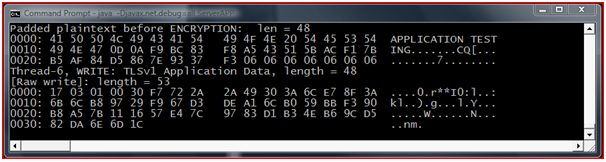
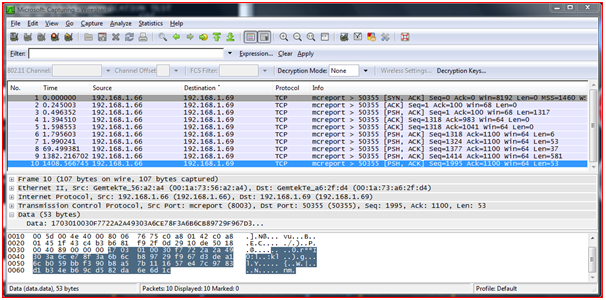
Test Case 2:- In this case we will test the Encryption/Decryption of the application using ethereal tool (wireshark) which captures the network layer packets. We will be testing this case for the message that has been sent in the previous case.

 Test Case 2 Server Side

Figure : Test Case 2 Server Side

In this screenshot it is showing the server side message been encrypted and written on Thread 6 for transferring over a network.

 Ethereal Testing In Wire Shark

Figure : Ethereal Testing In Wire Shark 

In the above screen it is the ethereal tool showing the encrypted data I;e transferring over the network and the source(IP and Port num) and destination (IP and Port num).

 Test Case 2 Client Side

Figure : Test Case 2 Client Side

This is the client side message showing the encrypted message being read from the socket and decrypted message same as the Server side. 

Test Case 3:- Final test case which is the most important part of our application is providing Authentication. In our application we are providing authentication with the help of certificates. These certificates containing the Server/Client key pair are imported and stored in a key store with a password, in case of giving wrong passwords by the intruder the application can not be executed as the authentication fails.

This Project Paper is written & submitted by Deepak V.

Final Output of the prototype System of Secure Chat System

Final Output of the prototype System

When once the key pair is generated from the Certificate then the application will be ready for the communication.

In the following screenshots we will see how the connection is established and the proof of encryption that will be taking place from the command line.

Step 1:- In the first step we need to run the Server by which it generates both the key pair and opens the socket connection on the port number we specified (8003). Start listening for the connections.
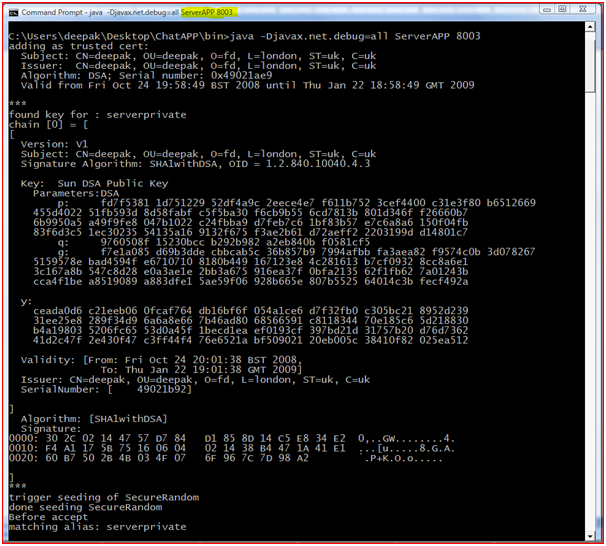
 public and private key pairs at the server side

Figure : public and private key pairs at the server side.

Step 2:- In this step client will be initiating client for the connection by specifying the IPaddress and the port number on which Server is running. Before the establishment of the connection between client and server the key exchange and the TLS handshaking will be taken place which is shown in the previous sections.
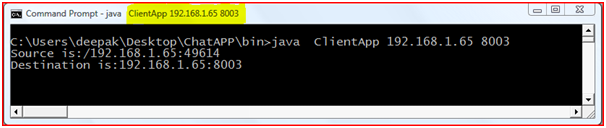
 Connection Establishment

Figure : Connection Establishment

In the above screenshot the connection establishment between Client and Sever (Source and Destination) is shown and the port number on which they are communicating.

Step 3:- when the connection establishment is done successfully at both sides, two little windows pop-up on both server and client side. This will be used for the message exchanging.
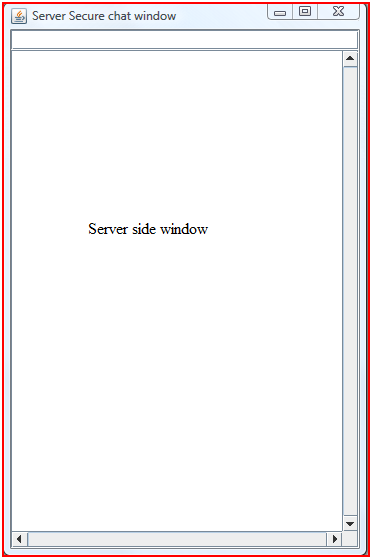
Server side window


Figure : Server side window

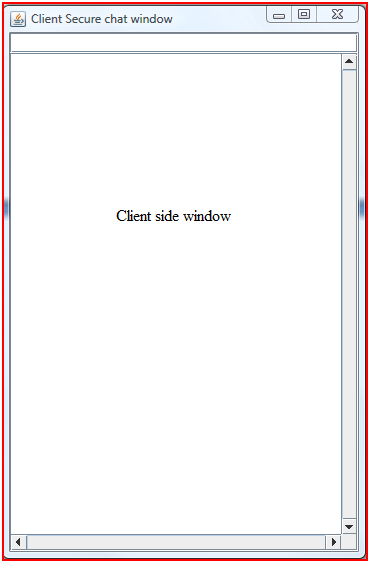
Client side window

Figure : Client side window

As the connection is established and the windows pop-up the messages can be entered in the “Text Box” I.e. the little small box on the top of the window, entered message will be shown on the text area with IPAddress in the “Text Area”. When once the messages are exchanged successfully we can see the encrypted messages in the “command Prompt”, which is mentioned clearly in the Application Testing section.

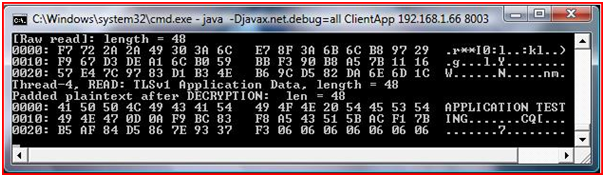
Step 4:- To test weather the main purpose of our application has been achieved or not we need to check the “debug” message at both Client and Server side which shows the messages encryption/decryption at both ends.

Server Side: – When a message is sent by the server to the client initially it reads the message and encrypts the message using AES_128 algorithm which is agreed at the time of connection establishment. The encrypted message along with the MD5 value is sent to client.
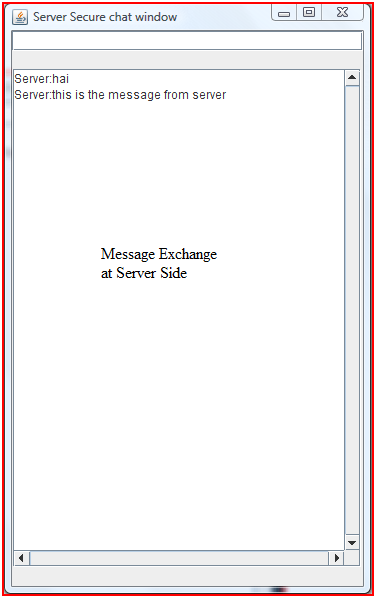
Message Exchange at Server Side


Figure : Message Exchange at Server Side
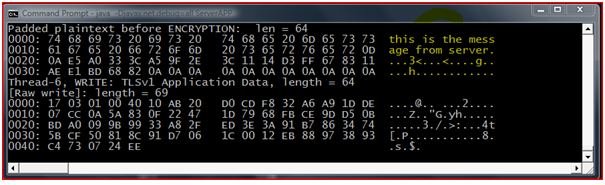
 Server Encryption

Figure : Server Encryption

Client Side: – when the message is received by the client it reds the encrypted message along with the integrity value. It decrypts the message and it checks for the integrity and if it satisfies then the message is displayed. 
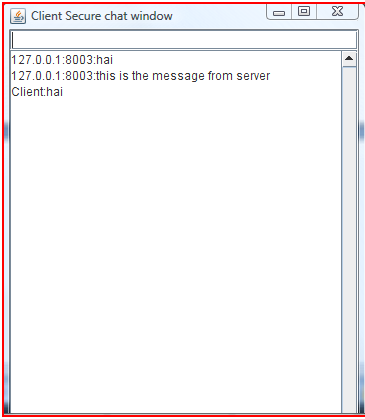
 Message Exchange at Client Side

Figure : Message Exchange at Client Side

 Client Decryption

Figure : Client Decryption

The process of encryption/decryption will goes accordingly whoever sends the message.

This Project Paper is written & submitted by Deepak V.

Distributed Network Computing Model

To make this application a distributed network, a separate distributed network module is created in this application and few assumptions are made in this context. In this module, a predefined metrics are defined in this context like the number of clients to be added and the amount of data to be sent and if these metrics are exceeded then an alternative sever is chosen to add the clients and also process the client request and following are the conditions to be applied in this context

  • A sever can handle only 6 clients and if more clients are added to the server, these clients are automatically added to the next server
  • If both the servers has 6 clients each and more clients need to be added, an extra server is created and the new client is added to that server
  • Each server can process a maximum of 6 client requests to send or receive data and if this limit is exceeded, automatically the next available server is chosen in this context
  • All the servers updates the data to the master server as mentioned above

Client module

A detailed explanation to the server module and the distributed network module is given above and the design aspects of the client module are given in this section. As mentioned above, a single server can handle not more than 6 clients and these clients can communicate with each other or to their server or the other servers when the load on their corresponding server is high. Following are the key functions of the client module

Send data

Clients can send data to the desired server or client as per the requirements. Whenever the client wants to send the data, users are provided with the option to choose the desired destination and this destination can be either another client or server. Initially the users are provided with the list of options and these options only include the peer clients and their corresponding server and if any case the distributed network conditions are violated, users is given a warning message that the server is busy and now the users can choose another server to process their request. While sending the data, users are provided with a browse button and a text area field so that they can choose the desired file or write some request at the sending option and they can click on the send button to send the data. Once the data is send to the server or any other client, the corresponding details are stored across the database.

Receive data

Clients can receive the data either from the server or the client and to achieve this separate functionality is designed in this context. Whenever a client or server sends the data to a particular client, a separate link is provided to the users with respect to check all the data received against that client. Whenever the users click on the link, a table is generated showing all the details of the received data against the sender and the table contains the columns like sender Id, the date or time when the data was send and the description of the data. User can check the desired sender details to download the data and once done the data is saved across the database. 

This paper is written and submitted by sai

Project Design for Computer Engineering On Fault Tolerance System For Highly Dynamic Distributed Systems

As the main aim of this project is to design and implement a fault tolerance system for highly dynamic distributed systems using an agent based approach, the actual design implemented in developing this application is given in this chapter. A mobile agent based approach is followed to identify the failures across the dynamic distributed networks and a fault tolerant environment is provided across this approach. A detailed explanation to the front end and database design is given as below

Front end design

A virtual dynamic distributed network is created using Java in this project and to create a distributed network two servers and four clients modules are created in this project and these nodes are assumed to be in a distributed nature.  A single server module can handle two clients in this design and thus a total of four clients are managed by the two independent and distributed servers. These two servers are controlled by a master server module, where these two servers are the distributed sample of the single master server. The actual programmatic implementation and design aspects to create these modules are given as below

Master server

Master server is the key component in this process and can maintain the two independent and distributed servers. Master server is represented with a server icon and when this master server icon is clicked by the user; the actual functionality of the application is started. On and Off radio buttons are provided against the master server icon and when the user checks the On button two server modules are invoked and when the user clicks on the Off button, users are asked to choose one of the servers to terminate its operations. Once the On button is clicked, the actual process is started and it is explained in detail as below

Server modules

As it is already mentioned two servers are created and considered as the distributed servers and each server can handle two clients and in future more clients can be added as per the user requirements and this provision is also provided at the design level.  A server module is composed of few aspects and the detailed explanation to the server operations is as given below. A distributed server is represented by the server name like Server A and On and Off radio buttons are provided against the server icon. When the user clicks on the On button, the server operations are initiated and the actual operations are listed below.

Send data

Send data is the primary operation available for both the servers and this option is provided to the user across the server in the form a simple button. Whenever the user clicks on the send data button, a browse window is opened and the user can select the desired file to be sent from the servers. Once the file is selected, the very next operation is to choose the client as each server can handle two or more servers. In general the clients are identified with the client name or IP address. To simplify the concept a unique number is assigned to the clients and this number is assumed to be IP address of the client, as this application is a standalone and no network operations are included to simply the demonstration.

Once the client is selected, send button is clicked against the server icon and then the sending process is initiated and this process is represented graphically till the data is send to the client.  The number of packets transmitted to the client is also displayed to user. Users are provided with an option to check the total number of packets being transmitted before sending the data to the client and also can check the actual number of packets transmitted to the client. User can send the data to any of the clients by choosing the client unique ID as mentioned above and once the data is sends to the client, it is stored in the client database against the server name, number of packets send and the client ID.

Receive data

Servers can receive the data from the clients as well and to achieve this, a separate button is provided to the users against the server icon. Once this button is clicked server can select the desired client from where the data should be received and once selected the corresponding data is stored across the server database table.  Total number of packets received can also be calculated across this module.

Link status

Link status from the server to the client and client to server can be checked using module. Status of the link can be checked by clicking on a button before sending or receiving data and if the status is On, then the sending or receiving is done successfully and if the status if Off, the corresponding process are terminated.  Users can check the status of the link at any point of time and if anything goes wrong across the modules, the link status is automatically set to Off and this indicates that there are some failures across the distributed networks and these failures are detected in this project and an alternative fault tolerance system is developed to set the link status again On for a continuous communication mechanism.

Add clients

Users can add more clients with the help of the button available against the server icon and whenever a client is added to the network a unique ID is provided to the client and it can be accessed through the ID.  Once the client is added, a separate row is created in the database table and the client details are maintained in the table and sever can send data or receive data from the client added. When the Add client button is clicked by the user, they are provided with an option to choose the desired server to which the clients should be added. 

This paper is written and submitted by sai