A Local Area Network File Transfer System by using FTP & HTTP File Share Server

  • Name :
  • Student Id: 
  • Type Of Proposal: Formal 
  • Supervisor: 
  • Title: A Local Area Network File Transfer System by using FTP & HTTP File Share Server
  • Keywords: Http Services ,Ftp Services, Java Socket Api,Java 1.4.2,Piv Processor(1.3 GHz) 

Problem Definition: The whole pc-based systems which are available right now are all running through the network type communication .it is more time consuming to transfer files between all the systems connected in a network manually. We have some limitations in this application like users should have knowledge of ftp commands and if we share any file with in the network it can be accessed by anyone with this network becomes insecure. To overcome these limitations we can develop a new type of system called ftp &http file share server. It acts as a network administrator to its client to provide remote service like file transfer. 

Aim: To Develop Http & Ftp File Share Server Environment. Http&Ftp File Share Server Application Provide Remote Services To Its Entire Client Over The Network. 

Objectives:

  1. To Design The Data Flow Diagrams And Testing At Different Levels,
  2. analyzing The System Development Environment. 

Research Method:

1) Expanding My Knowledge By Reading Books Related To File Transfer System, And Ftp, Http Services.

2) Having Discussions With My Supervisor I.E With You.

3) Observing My University Network Operations. 

Delivarables:

1)File Transfer System Coding In The Object Oriented Programming Language.

2)Design Details(Data, Architectural, Procedural Designs)

Conclusion: It Provides Very Fast, Easy And Reliable Access To The File Server Data. Initially The Entire Procedural Flow Of The System Is Represented Diagrammatically In The Form Of Data Flow Diagrams.

A Gantt Chart Is Included Below.

Gantt Chart:

Ic Task Name Start  Finish Duration July                 August
1 Design     10 Days  
2 Testing     1 Week  
3 Analysing Results     10 Days  
4 Documentation     11 Days  


Mobile Applications and Systems MAS Assignment

Mobile Applications and Systems MAS Assignment

You are required to develop a card game application for use on a mobile phone. The application has several components. To achieve the maximum number of marks the application must be well tested. The work you produce MUST be your own work. If two or more students produce similar code they may be reported for suspected plagiarism.

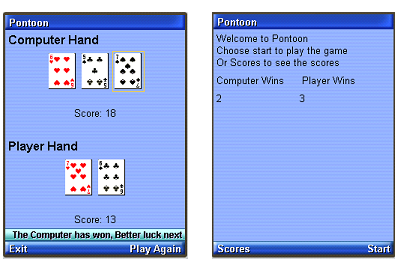
The card game consists an opening screen which invites the player to play the game or view the Scores, you need to add commands “Scores” and “Start” to the opening screen (10 marks)

When the Start button is pressed the following screen is displayed.

 When the Start button is pressedThe cards must be randomly chosen from the deck of 52 cards. The card images are available from Blackboard.  You need to add the commands Stick and Twist to your screen  (30 marks)

You need to display the current score for both the Computer hand and Player hand (in this case 10 and 15.)  The scoring systems works with the cards having their face values apart from Aces which are worth 11 and Jack, Queen and King which are worth 10.     (10 marks)

Once a card is displayed the same card cannot appear again (5 marks) 

If the command Twist is selected:

Another Player Hand card is chosen at random and displayed and the Player’s score is updated. If the computer hand score is less than or equal to the player hand score another Computer Hand card is chosen at random and displayed and the Computer score is updated.

If any of the scores add up to 21 then the game is won either by the Computer or the Player and the game is over. If any of the scores are greater than 21 then the game is lost by either the computer or player (whoever scored more than 21) . If the game is not over the player can select Twist or stick and so on.  (10 marks) 

If the command Stick is selected:

A Computer Hand card is chosen at random and displayed and the Computer score is updated. If the Computer hand is greater than or equal to the player and less or equal to 21 then the computer wins else the player wins.  (5 marks) 

If the game is over and the computer has won a ticker is displayed saying the computer has won else if the player has won a ticker saying the player has won. Also the stick and twist commands  are replaced with a PlayAgain command which returns the player to the opening screen and an exit command which just exits the game (see screen shot below) (10 marks)

As a result of playingAs a result of playing several times the no of wins by the computer and player are stored in the rms database. These score are displayed when the score command is selected from the opening screen (see screen shot above)  (15 marks)

The report must contain print out of the source code                                          

The report must contain screen shots of the application running (5 marks)

The report must contain a CD with all your work on and a project that can be dropped into the WTK20/apps folder (which will run when the Ktoolbar is loaded) OR a project that runs in netbeans. The program must run! or you may not receive any mark.

Improving the Quality of Service for Video and Voice Applications in Mobile Ad Hoc Networks

Following are the key objectives for this Improving the Quality of Service for Video and Voice Applications in Mobile Ad Hoc Networks project 

  • To critically review the QoS requirements for voice and video applications across MANETs and evaluate the key findings and limitations
  • To design four scenarios, where the first two scenarios deals with improving the quality of voice application in terms of audibility and quality of speech and second two scenarios deal with multimedia and voice conferencing applications
  • To create the designed scenarios using OPNET modeler and test the scenarios against the simulation metrics
  • To evaluate the resultant graphs and compare the corresponding scenarios against the QoS requirements for voice and video applications
  • To conclude the work done and suggest few recommendations 

Literature Review 

Quality of service requirements are essential to ensure a reliable communication across any network and in this context, there are many proposal made by different authors in the literature and even there is always an open door towards the quality of service requirements. When it comes to the high end applications like video and voice, the level of quality of service should be more as these applications need more attention towards a low delay and high bandwidth requirements. In general the QoS requirements for voice and video applications are categorized in to different classed which depends on the level of quality of voice and video being transferred across the network and these classes are categorized by different service providers.

Voice applications can be categorized into different types and the key among them are IP voice and these applications are sensitive towards delay, jitter, latency and packet drop and all these aspects should be given the top priority while providing the quality of service requirements to the voice applications and even the same case can be applied to the IP video applications.

Bandwidth also plays an important role across the QoS standards as the voice and video applications required more bandwidth and thus it should also be given top importance in this context and if the network does not has the required bandwidth the voice and video applications are degraded and ultimately the overall quality is affected a lot due to these constraints. Packet loss is the key issue to be considered while talking about the quality of service requirements to the voice and video applications and if there is any packet loss across the network, the quality of the applications are degraded and the output is affected a lot due to these issues and thus to ensure the maximum delivery rate for the voice and video applications all these issues should be considered . 

The level of quality of service requirements also depends on the type of network as well and they will different at the range of operations against the wireless and wired networks. Providing the quality of service standards for wired networks is quite different when compared with wireless networks and in general QoS for wired networks is quite comfortable than providing QoS for wireless networks. In general wireless networks operate under some constraints like infrastructure, deployment and bandwidth and all these aspects play an important role while deciding upon the QoS requirements for the wireless networks.

The critical applications like voice and video which include different ranges like videoconferencing, multimedia and VOIP need more bandwidth requirements across the wireless networks when compared to the wired networks and these applications has a greater tendency to lose the packets and also the quality across the wireless networks and thus considering the optimal quality of service requirements  and there is lot of research done in this context and still there are many issues to be covered in this area while providing the optimal level of quality of service requirements. When the wireless ad hoc networks are considered, there are more critical than the simple wireless networks and this automatically leads to the administrators to provide a high range of quality of service requirements as these ad hoc networks are very peculiar in nature when compared to the normal wireless networks.

In general the mobile ad hoc networks are infrastructure less networks and dynamic in nature and thus providing the quality of service requirements are a tedious job and also the level of QoS requirements across the MANETs depends on the type of traffic being generated on the network and there are different types of traffics like TCP, CBR and VBR. Voice applications in general generate the CBR traffic and the video applications will generate the VBR traffic and based on these traffic requirements the level of QoS requirements will vary and always these issues should be considered against the standard of communication across the networks like MANETs.

The nature of the routing protocol also plays an important role against the quality of service requirements and in general there are three important types of routing protocols like reactive, proactive and hybrid routing protocols and nature of these routing protocols has a significant impact on the type of service provided for the voice and video applications and their quality. 

Research methodology 

As the main aim of this project is to provide quality of service requirements for voice and video applications across MANETs, OPNET modeler is used as the required simulation tool. Four important scenarios are created using this simulation tool, where two scenarios are used to evaluate the QoS requirements for voice applications and two scenarios are used to evaluate the QoS requirements for video applications. When the individual applications like voice and video are considered, initially a blank scenario is created with default attributes and the second scenarios deal with the improved quality of service requirements and these scenarios are compared and the corresponding results are evaluated. 

Project plan 

Task Description Start Date


End Date


Duration
Introduction


Basic introduction to the project along with the problem definition and aims and objectives are defined in this section.


    2 weeks


Literature review


Following topics are covered under the literature review


  • Introduction to MANETS and different routing protocols
  • Critical analysis on voice and video applications in MANETS
  • Detailed study of QoS requirements and corresponding parameters for voice and video applications


    4 weeks


Simulation design


Following design aspects are discussed in this section

  • Introduction to OPNET modeler as the required simulation tool
  • Parameters description of the scenarios
  • Detailed design procedure of the scenarios
  • Explanation to performance evaluation metrics like energy consumption and energy savings


    3 weeks


Simulation procedure


Following aspects are covered under this chapter


  • Detailed explanation to the scenarios considered
  • Steps explaining the simulation procedure to be followed using the OPNET modeler across the scenarios
  • Simulation steps and the corresponding screenshots
  • Procedure to setup the required wireless sensor network
  • Explanation to parameters setup and running the simulation process


    4 weeks


Evaluation of results


Results achieved after running the individual scenarios and after comparing the scenarios are explained in this chapter with reference to the aims and objectives of this project.


    2 weeks


Conclusion and Future work


Conclusion from the total work done and the results evaluation is given and the better ways to improve the project in future are also explained.


    1 week


Simulation Procedure of Energy Efficient Wireless Sensor MAC Protocol

Simulation Procedure 

Introduction 

Design of the scenarios is explained in the previous chapter and the actual simulation process followed is explained in this chapter. Step by step process followed to create the required scenarios is explained in this chapter and simulation steps to create the network, nodes, server, application config, mobile config, profile config and DES metrics used to estimate the performance are also explained in this chapter along with the corresponding screenshots. As explained there are two scenarios used in this application and the detailed simulation process followed to create these two scenarios and also process followed to check the results achieved and simulation setup details are also explained in this chapter. 

Simulation process of first scenario 

As discussed in the previous chapter the basic design followed to create this scenario is MANETs and the mobile nodes are used as the required sensor nodes.  Wireless LAN server is used to act as the sink node and in this process 15 mobile nodes are used as the sensor nodes and the process to set to basic network is explained as below. The complete simulation process involves many steps and the detailed simulation process followed to create this complete setup is explained as below 

Simulation process of basic network 

Mobile ad hoc networks are used as the basic network in this simulation process and the actual process followed to create the basic network is explained in this section. A new project is created and it is renamed as per the user requirements and a blank scenario is created in this process. Following steps and screenshots gives the detailed description of the simulation process followed in this context 

  • OPNET modeler is started and a new project is selected from the file menu
  • Project name is given and also the scenario name is also given as per the user choice
  • Create blank scenarios is used as the option to create the scenario
  • MANET is used as the required network and it is selected at the node family options level
  • Every network should be created at a certain location and in this simulation process campus is chosen as the required network location
  • Size of the network is set to 1000 X 1000 square meters and thus a new network scale is created in this context and thus the required basic network is ready now 

When the basic network is created, an object palette is created and opened at the user interface level and now the simulation can be done by simple drag and drop operations from the object palette. Below screenshot shows the basic MANET object palette used in this simulation process and the also the actual objects used in this scenario creation process

From the above object palette it can be observed that there are different types of nodes available across MANET simulation process and among these nodes, the actual nodes used across this simulation and network creation process are as listed below 

  • One wireless LAN server fixed node is used and this behaves like the sink node and controls the senor nodes
  • 15 wireless LAN mobile nodes are used and they act as the required sensor nodes
  • Required applications are created using the application configuration node
  • Profile definitions are created using the profile configuration node
  • Mobility to all the sensor nodes is given by the mobile configuration node

Above mentioned nodes are created on the empty scenario space using the object palette and a simple drag-drop operation would help in creating the basic network. Below screenshot shows the basic network setup of this scenario and it contains all the all the nodes as mentioned above

From the above screenshot it can be viewed that all the required nodes are created and shown in the workspace and once these nodes are added to the basic network setup they need to be configured to set the simulation process and the actual procedure implemented in this context is explained in the coming sections.

Application definitions process 

The simulation steps followed to create the basic network is explained in the previous section and now this section deals with the configuration process of the application definitions. From the design chapter it is clear that application configuration node is used to define the required applications and in this simulation process a single application is used to generate the required traffic. As discussed file transfer application is used to create and generate the TCP traffic and the actual process followed in this context to create the FTP application for the application configuration is given in the form of the below steps 

  • Application configuration nodes is selected and a simple right click will open the option called edit attributes
  • Now chose this option to edit the required attributes and a separate window is opened in this context
  • Required attributes are edited now to add the application and the actual procedure implemented in this process is given below along with the respective screenshots

Above screenshot demonstrate the actual process followed to edit the attributes of the application configuration node. Application definitions section is elaborated and the number of rows is added against the number of applications and in this simulation process only one application is created and thus only one row is added to the number of rows column.  When the number of rows is added as one a separate section is opened and there the required application name is entered and in this scenario it is FTP.  Once the application name is added, the corresponding description of the application is also added where the FTP is chosen from the list of applications shown to the users and as shown in the above screen. Initially the FTP is set to off and now it should be expanded to activate the application and it can be observed that there are different types of FTP loads and for this simulation process a medium load FTP application is chosen as shown in the above screenshot. A medium load FTP application will generate the required TCP traffic across the network and also initiates the energy consumption aspects and once these settings are done to the application config node, Ok button is used to apply these changes. When the application definition settings are ready they should be applied to the profile definitions as well and the simulation process implemented in this context is as explained below 

Profile definition process 

Profile definitions are important to support the required TCP traffic generate by the FTP application that was created at the application configuration process and as explained in the previous section. Profile configuration node is used to set these profile definitions and the steps followed to create the required profile is given below 

  • Profile configuration node is selected and simple right click on the node will show the edit attributes option
  • Chose the edit attributes option and when done a separate window is opened at the user interface and now the required attributes are edited to support the application and also to create the required profile definition and shown in the below screen 

Profile configuration definition is shown in the above screenshot and from this screen it is clear that one row is created at the number of rows section. The number of rows is set to one as there is only one application available and that was created at the application config level and so a single profile is required to support the application created. Name of the profile is set in this process and it is set to FTP as the application created is FTP and now the description of the profile is also set in this process. FTP is chosen as the application to be supported against this profile and the number of rows used is one even in this process as there is only application to be supported for this single profile. There are few other options available to be set against the profile definitions and they are also done as shown in the above screen and the start time offset is set to a constant value of 10 seconds, where the duration of the profile is set till the end of the profile as shown above. Once all the required settings are done against the profile configuration they are applied across the network by clicking on the OK button as shown in the previous section. When the required application and profile definitions are created using this process they must be applied to the nodes and the wireless LAN server and the actual simulation process implemented at this level is explained in the below sections along with the corresponding screenshots. 

Configuration process for mobile nodes and wireless LAN server 

As mentioned in the previous sections a single wireless LAN server and 15 mobile nodes are used across the basic network setup and the configuration details and the corresponding simulation procedure are explained in this section. Routing protocol is required to support the generate traffic and initiate the routing operations across the network and in this simulation model, AODV is used as the routing protocol as discussed in the design chapter and the actual process followed to set this routing protocol is given in the below steps 

  • All the mobile nodes and the wireless LAN server are selected from the workspace
  • Now any one of the node is selected and right clicked such that to open the edit attributes option
  • When the users click on the edit attributes option a separate window for the selected node is opened and from here the required routing protocol can be chosen and the actual screen used in this process is as given below

AODV is selected as the required routing protocol to be supported by all the 15 mobile nodes and the single wireless LAN server and the corresponding process implemented is as shown in the above screen. From this screen it can be observed that there are different routing protocols available and from them AODV is selected and applied to all the selected objects by clicking on the Apply to selected objects option as shown in the above screen shot. Now the AODV routing protocol is applied to all the mobile nodes and also the wireless LAN server. Once the mobile nodes and the server are set to support the AODV routing protocol, each and every node on the network should be assigned an IP address and the actual process followed in this context is given below 

Process followed to assign IP address 

This section defines the process to be followed to assign the required IP address to all the nodes and the actual steps need to be followed in this context is given below 

  • Applications menu is visited on the OPNET tool and from there it can be observed that IP option is available
  • Now expand the IP option from where the users can identify few aspects while assigning the addresses to the mobile nodes and the wireless LAN server
  • Chose the option auto assign IP4 addresses to assign the corresponding IP addresses to all the nodes on the network and the corresponding screenshot is as given below

All the mobile nodes and the wireless LAN server are selected at the workspace and the applications menu is opened to view the above screenshot. From this screen it can be observed that IP protocol menu is opened and from there the addressing option is opened to assign the required address. From the above screen it is clear that Auto assign IPv4 addresses option is selected to assign the required IP addresses to the nodes and the wireless LAN server  and now the actual application settings need to be applied for all the mobile nodes and the server and the process implemented in this context is shown below 

Application settings for mobile nodes and wireless LAN server 

Once the basic network is ready to be simulated all the 15 mobile nodes and the single wireless LAN server should be set for supporting the corresponding application and profile configurations as set in the previous steps. This process can be done in either two different ways and they are as explained below with the corresponding step by step procedure 

  • All the mobile nodes are selected from the workspace and any one of the node is opened for editing the attributes and this can be done by a right click on the selected node
  • When the edit attributes option is selected a new window is opened to the users from where the application and profile settings can be done for the mobile nodes
  • Application destination preferences and the application supported profiles tabs are expanded to do the required configuration and the corresponding screens are as shown below 

From this screen it is observed that the application destination preferences tab is explored to set the required application and the number of rows is set as one as there is only one application created in this simulation process. The required application is selected and the corresponding symbolic server is also selected as FTP server as shown in the previous screenshot. Once the destination preferences are done now the actual application supported profiles option is used to support the FTP profile as created in the profile configuration time. Number of rows is set to 1 and FTP is selected as the required profile as shown in the previous screen and these settings are applied to all the selected objects by using the option apply to selected objects as shown in the above screen shot. Once the mobile nodes are ready to support the respective application and profile now the wireless LAN server is also set accordingly and the process is explained with the help of below steps 

  • Select the wireless LAN server and chose the option edit attributes to edit the required application and profile attributes
  • Now expand the option application supported services where a new window is opened to enter the profile to be supported
  • Add the number of rows to 1 as there is only one profile created in this scenario and the corresponding screen is shown in the below screen 

It can be observed from the above screen that a single row is created at the application supported services level and FTP is chosen the required profile to be supported and the corresponding description is set to support as shown in the above screen. Now click on the Ok button for two times to apply these settings to the wireless LAN server. As discussed previously there is another process to edit these attributes known as deploying the application and the below steps evaluate this process 

  • Open the applications menu available on the top of the OPNET workspace.
  • It can be observed that are different options at this level and now chose the option deploy the defined option and the respective screen is as shown below

Protocols menu is expanded and from here the application option is explored to do the deployment operation as shown in the above screen. From this screen it is clear that deploy defined applications option is chosen to deploy the network and the very next screen appeared to the users is as shown below 

The actual deployment process is shown in the above screen and from this screen it can be observed that all the mobile nodes are dragged towards the source and the wireless LAN server is dragged towards the destination. The consistency of the deployment process can also be checked with the button check consistency as shown in the above screen and with this all the mobile nodes and the server are ready to support the applications and the profiles created across the simulation process. Setting up the mobility to all the nodes is the last set of the total configuration and the corresponding process is as given below 

Process to define mobility 

As the sensor nodes are mobile in nature the required mobility should be set to the all the mobile nodes and this can be done with the help of the mobile configuration as discussed in the previous section. Mobility of the nodes can be defined at this level and the corresponding process implemented in this context is as given below 

  • Select the mobile config node and chose the edit attributes option by just a right click on the node
  • A new window is opened after this operation and the required mobility can be set and shown in the below screen 

From this screen it is observed there are three different options to choose the mobility to all the nodes and from this default random waypoint is chosen and the corresponding parameters are set in this context. Random waypoint parameters are set and the speed of the mobile nodes is set to 10 meters per sec and the pause time is set to 0 as shown in the above screen and from this screen it can also be observed that the start time is set to a constant value of constant 10 seconds and the stop time is till the end of the simulation. When the mobile config settings are done the same should be applied to all the mobile objects and the actual process followed in this context is as shown below

  • Open the topology menu and chose the option random mobility
  • There are various options available from this chose the option like set random mobility and the corresponding screenshot is as given below 

From the above screen it can be observed that set mobility profile is used to set the required mobility to all the mobile nodes on the network and this is browsed using the random mobility option and the actual mobility is to set all the mobile nodes on the network. Now the last step in the simulation of this scenario is to set the individual DES statistics and this process is as explained below 

Process to choose performance metrics 

 Performance metrics are required to understand the performance of the individual scenarios and also to compare the all the scenarios created in the simulation process and the actual process followed in this context is explained in this section.

  • Right click on the workspace of the network and from there chose the option to set the statistics
  • Choose individual DES statistics is clicked to choose the performance metrics and the corresponding screen is as shown below

Once this option is selected, a new window is opened from there the required options are selected against the performance analysis and the required screen is as shown below

From this screen it can be observed that there are three levels of performance metrics and from them Global statistics are used in this simulation process and the corresponding metrics used are as given below 

From this screen it can be observed that FTP application metrics are used and the actual metrics used to analyze the performance are as listed below 

  • Download response time
  • Traffic received in packets per sec
  • Traffic sent in packets per sec
  • Upload response time 

Now the wireless LAN metrics are used in this process and the corresponding screen is as shown below 

From the above screen it is clear that few wireless LAN parameters are also used and they are as listed below 

  • Data dropped
  • Delay in seconds
  • Load in bits per second
  • Medium access delay in seconds
  • Throughput in bits per sec 

Once all the required performance metrics are selected the simulation process of the first scenario is completed and the actual process to build the second scenario is as given below 

Simulation process of second scenario 

Simulation model of second scenario is almost same as the first one and the only process is at the wireless LAN MAC parameters and this scenario can be generated by just duplicating the first scenario from the scenarios option and the corresponding screen is as given below. Once the required scenario is duplicated now the required settings are changed for all the mobile nodes and the wireless LAN server and the corresponding screen is as shown below 

It can be observed that few settings are changed for the wireless LAN attributes from the above screen and the actual settings changed in this context are as given below 

  • Transmit power is set to 0.020
  • Packet reception power threshold is set to -95
  • RTS threshold is set to 256
  • Fragmentation threshold is set to 256
  • CTS to self option is set to enabled
  • Short retry limit is set to 7
  • Long retry limit is set to 4
  • AP Becon interval is set to 0.02 seconds
  • Max receive life time is set to 0.5
  • Buffer size is set to 256000
  • Roaming capability is set to disabled
  • Large packet processing is set to dropped

Now both the scenarios are ready and then the simulation is run for 5 minutes to achieve the results and the actual results obtained after the simulation run are explained in detailed in the next chapter.


Energy Efficient Wireless Sensor MAC Protocol Project Simulation Design

Design of Simulation

Introduction

Design procedure followed to create this simulation is explained in this chapter. Improving the efficiency of the energy consumption across the wireless sensor networks is the main aim of this Energy Efficient Wireless Sensor MAC Protocol project and to evaluate the research two scenarios are created and the actual design followed to create these scenarios is explained in this chapter. First scenario deals with the normal MAC configurations, where few nodes are added to handle these and the second scenario deals with the Sensor MAC configuration, where the energy efficiency is improved and these two scenario are compared at the results level to understand the importance of S-MAC and the procedure followed to create this S-MAC protocol is given as below

Simulation tool: OPNET modeler and its importance 

As mentioned in the previous section there are two scenarios used across this simulation process and to derive the corresponding scenarios OPNET modeler is used as the simulation tool. OPNET modeler has many advantages when compared to the other simulation tools like NS2 and OMINET in terms of level of models supported and also the user interface provided to create a wide range of networks. NS2 is also much popular as OPNET modeler, but the only disadvantage with NS2 is that, it is complex in nature and involves lot of coding, where these aspects completely eliminated in OPNET modeler. OPNET also provides many model families against the wireless communication and the main importance of this tool lies with the aspect like a simple drag and drop operations can improve the simulation procedure and the object palette available with OPNET provides many objects to be configured. All the required objects can be dragged from this palette and they are configured as per the scenario requirements to create the actual network setup.  The simulation model involves, creating the required network, verifying the model consistency, running the simulation and finally evaluating the results. These steps are followed in creating any type of network and thus OPNET can be considered as the simple solution to create both the wired and wireless networks. Apart from these models, OPNET also provides the latest technologies like MANETs, wireless mesh networks and Zigbee networks also and thus all these models can be created and the performance of the networks can be evaluated easily. 

Design of first scenario 

Two scenarios are created in this simulation process as discussed in the previous section and the actual design principles followed to create the first scenarios are explained in this section. As the main aim of this project is to improve the energy efficiency using the S-MAC protocol, a simple mobile ad hoc network is created in this context to evaluate the wireless sensor networks. The first scenario deals with a normal networking conditions with the ordinary MAC protocol configurations are used in this scenario without changing any settings of the wireless LAN MAC protocol. In this scenario design 15 mobile nodes are used and they are considered as the wireless sensor nodes and a single wireless LAN server is also used and this server acts as the sink node, as there is no separate model in OPNET modeler to create the wireless sensor networks. Detailed network setup aspects followed to design this scenario are given as below 

The complete design of the scenarios can be categorized in to different aspects and they are discussed in detailed bellow. 

Basic network setup 

To evaluate the performance of any network, the basic network should be used and this section explains the basic network setup followed to create the first scenario. As discussed MANET is used the required model family a simple MANET model is created using the OPNET modeler. A network scale of 1000 X 1000 square meters is considered in this context and a simple campus is used to create the MANET and also all the mobile nodes considered operate across this campus and then MANET is chosen as the required model family in creating the simulation model.  Once the blank scenario is created and the required campus network is created with MANET is the model family 15 mobile nodes are created using the object palette.  Simple wireless LAN mobile nodes are considered as the required wireless sensor nodes and they move in the random direction during the routing process. Always a sink node is required to control the mobile sensor nodes and in this context a wireless LAN server fixed is used and this is also dragged from the object palette. This forms the basic network and to support and generate the traffic across the wireless sensor network always an application should be created and in this context, an application configuration node is also used to create the required application. The actual configuration settings done at this scenario are explained in the next section. Always OPNET requires a profile definition to support all the applications created and to achieve this a profile configuration node is create and to support the mobile configuration a mobile configuration node is also create and all these nodes are available at the MANET object palette as discussed. To summarize this section, following are the actual nodes used and they are listed as below

  • One wireless LAN server fixed node is used and this behaves like the sink node and controls the senor nodes
  • 15 wireless LAN mobile nodes are used and they act as the required sensor nodes
  • Required applications are created using the application configuration node
  • Profile definitions are created using the profile configuration node
  • Mobility to all the sensor nodes is given by the mobile configuration node

The actual configuration details done to these nodes are given in the coming sections.

Node level configuration 

As discussed in the above section, 15 mobile nodes are used in this network setup and all these nodes are wireless LAN mobile nodes and they are created by a simple drag operation from the object palette. When these nodes are created some configuration settings need to be done and they are discussed in this section. To create the required routing process across the network always a routing protocol is required and in general the MANETs supports wide range of routing protocols and among them AODV, OLSR, DSR and TORA are supported by OPNET modeler. In the simulation of this particular scenario, AODV is used as the routing protocol and all the mobile nodes are set to support this routing protocol. AODV is proved to be the best among many routing protocols in terms of energy efficiency and thus it chosen in this simulation process and all the nodes across the network are set to support this routing protocol. The application created across the application configuration level is also set to be supported across these mobile nodes across the application definitions section and also the profile created across the profile configuration is also defined at the profile definition section of the mobile nodes. The actual process followed in this context is explained in the next chapter. As the main aim of this project is to understand the energy efficient protocol implementation, the MAC protocol available at the wireless LAN configuration settings are checked once and they are not modified in this scenario and where they are modified in the next scenario and discussed later.  Once all the mobile nodes are set against the configuration now the server or the sink node is edited to support the required application and profile settings. Even in this case AODV is used as the routing protocol and the wireless LAN MAC attributes are set to default in this scenario and they are modified in the next scenario to improve the energy efficiency. 

Application definitions 

To generate the required traffic across the network, always the mobile nodes and the corresponding server should support any of the application and this application is created at the application configuration node. Application config node is edited in this context to define the required number of application and in this scenario only one application is used to create the traffic and it is File transfer application and in general FTP generates the TCP traffic and this traffic is used to create the communication patterns across the network.  Detailed description of the FTP application is set at this stage in terms of the load on the network and the number of packets to be generated and once this application created it should be supported against a profile in the network and the actual design process for this process is given in the next section. 

Profile definitions 

In general across OPNET every application created to generate the traffic across the network should be supported by a profile definition and this is created using the profile configuration node as discussed before. Every application has a separate profile and as a single application is created in this process a single profile is create to support the application. FTP profile is created in this scenario and this profile supports the FTP application and apart from the application support few aspects like the profile start time and end time are also defined in this level. For this scenario the profile start time is set to a constant value of 100 seconds and the repeatability of the profile is set till the end of the profile. Once the required profile is set now the required mobility to the nodes should be added and this is explained in the later section as below 

Mobile definitions

As the nodes used in this simulation are mobile in nature the required mobility should be added to all the nodes. As 15 mobile nodes are added in this network, all these nodes should support any of the mobility models and this model is defined using the mobile configuration node as discussed in the previous section. Mobile configuration node is added from the object palette and edited to create the required mobility model and in this scenario a default random waypoint model is used and this can be chosen at the mobile configuration node level. Apart from the mobility model few aspects like speed of the mobile nodes and pause time are also defined and in this simulation process they are set to 10 meters per sec and 0 seconds respectively. These values indicate that all the mobile nodes move with a speed of 10 meters per second across the network and there is no pause time incurred in this process. Once the mobility is defined, this should be applied to all the mobile nodes and this can be done by using the topology menu and setting the default random waypoint mobility and the actual process followed in this context is explained in the next chapter. 

Setting the performance metrics

All the required configuration steps done across the node level, application config level, profile config and mobile config are explained in the previous sections and once these steps are done the actual performance metrics should be set and the design process is explained in this section. As the aim of this project to improve the energy efficiency at the wireless LAN MAC parameters the corresponding parameters used and also the FTP application parameters are also used in this context. Following are the actual parameters used to analyze the performance of the wireless LAN and FTP and they are listed below

Following are the FTP metrics used to analyze the performance of the overall network

  • Download response time
  • Traffic received in packets per sec
  • Traffic sent in packets per sec
  • Upload response time

Following are the wireless LAN metrics used to analyze the performance of the overall network 

  • Data dropped
  • Delay in seconds
  • Load in bits per second
  • Medium access delay in seconds
  • Throughput in bits per sec 

Once the required performance metrics are set across the simulation process it is run against the simulation time and the corresponding results are analyzed for this scenario and the design of the next scenario is given in the next section  

Design of second scenario 

Design of the second scenario is almost similar to the first scenario and this can be created by a simple duplicate scenario option available across the OPNET modeler.  Wireless LAN MAC parameters are edited in this context to create the second scenario and the actual parameters changed across this scenario are as listed below 

  • Transmit power is set to 0.020
  • Packet reception power threshold is set to -95
  • RTS threshold is set to 256
  • Fragmentation threshold is set to 256
  • CTS to self option is set to enabled
  • Short retry limit is set to 7
  • Long retry limit is set to 4
  • AP Becon interval is set to 0.02 seconds
  • Max receive life time is set to 0.5
  • Buffer size is set to 256000
  • Roaming capability is set to disabled
  • Large packet processing is set to dropped 

Thus the complete design aspects followed to create both the scenarios are explained in this chapter and the actual simulation process followed to achieve this design is given in the next chapter.

Analysis of Results of Energy Efficient Wireless Sensor MAC Protocol

Analysis of Results 

Analysis of the results achieved after running the simulation for 5 minutes is done in this chapter. The detail process followed to create the required scenarios and the step by step process implemented to develop the simulation is explained in the previous Simulation Procedure chapter and the results of the two scenarios after comparing them is given in this chapter. The main aim of this project is to compare the existing MAC protocol with the newly created S-MAC protocol and for this purpose two scenarios are created and compared based on the performance metrics chosen and the actual results obtained are explained as below 

Comparison of FTP metrics

As FTP is used as the application in this simulation process, few FTP metrics are used to evaluate the overall performance of both the scenarios and the actual comparison graphs for the FTP metrics are shown in this section as below 

Download response time

Download response time recorded for both the scenarios in this simulation process is given in this section and the actual graph obtained in this context is as shown below

It is observed from the above graph that there two different colored lines, where the red colored curve indicates the normal scenario where the WSN parameters are default and the blue line indicates the modified S-MAC scenario. From this graph it is clear that the overall download response time is more with the ordinary MAC protocol and it is very less with the modified MAC protocol. A maximum value of 2.4 seconds is obtained for the normal MAC configurations where the maximum value is only 0.8 seconds with the S-MAC configuration. From these observations it can be understood that the overall energy consumption towards the upload of the file across the sensor nodes is optimized in terms of the download response time and thus a lot of energy is saved with the S-MAC routing protocol and even the download response time is constant for the S-MAC when compared to ordinary MAC configuration and thus it can be concluded that S-MAC is better configuration to optimize the performance of the energy efficiency. 

Traffic received in packets per second 

When FTP application used TCP traffic is generated across the network and the corresponding traffic received in packets per second is shown while comparing the scenarios is shown below

More traffic is received with the S-MAC protocol and this can be observed from the above graph when compared to the ordinary MAC configuration. It is observed that almost a maximum value of 0.44 packets per second are received with the modified MAC config where this value is very less with the ordinary and it is recorded as 0.26 packets per seconds in this case and even the overall packet loss is more in this context when compared to the S-MAC protocol. From this analysis it can be understood that if the packet loss is less across the traffic received from the network the overall energy can be optimized and this is proved to be true with the case of S-MAC. 

Traffic sent in packets per seconds

The actual traffic sent against the traffic received as shown in the above screen for both the scenarios considered is shown in the below graph 

From the above graph it can be observed that almost there is no packet loss across the network with the S-MAC protocol where there is some considerable loss with the normal MAC configuration. From this analysis it is shown that the traffic sent with the S-MAC protocol is more across the FTP application when compared to the normal MAC protocol and thus even in this way the overall energy efficiency is improved a lot with the S-MAC protocol.  Thus the overall traffic sent and traffic received for the S-MAC configuration protocol is constant for the complete simulation time and this indicates that the overall packet loss is almost negligible using this energy efficient protocol and again it is proved to energy saving measure. 

Upload response time in seconds 

The upload response time in seconds recorded for both the scenarios and is given in the below graph 

The average upload response time incurred across both the scenarios is shown in the above graph and from this graph it is clear that the upload response time for the S-MAC is more when compared to the normal MAC configuration. From this analysis it can be observed the upload wait time is less with the S-MAC as the response time is more and this indicates that the overall time consumed is less with the S-MAC and this directly implies that energy consumption with this protocol is less when compared to the ordinary MAC configuration.  When this case is considered with MAC protocol it is observed that the upload response time is low and this indicates that the time taken to upload the files across the network is more and thus more energy of the sensor nodes is consumed in this context and again it can be concluded that the overall the energy consumption can be optimized with the proposed S-MAC protocol across the wireless sensor networks. 

Wireless LAN metrics 

The actual FTP metrics used and the corresponding results achieved and the actual wireless LAN metrics used and the respective results achieved in this context are given and explained in this section. The actual parameters used in this simulation process are given in this section and the corresponding results after comparing the two scenarios is given below

Data dropped

Data dropped is analyzed in this section and the actual graphs achieved after the simulation run is given in this section and the below graph is the actual comparison of the two scenarios

From this graph it is clear that the drop across the network is almost equal for both the scenarios and from this it can be derived that if the data drop is consistent it indicates that the average energy consumption is optimized and this is achieved with the S-MAC configuration. The actual data drop with the MAC configuration is not shown in this graph and this indicates that there is no perfect traffic generated with this default configuration and thus there is lot of packet loss with this implementation and thus the energy optimization can be optimized using the S-MAC protocol. From this analysis as well it indicates that S-MAC is always the best option to optimize the energy consumption. 

Delay in seconds 

Delay occurred across the network plays an important role in estimating the performance of the network and the actual delay for both the scenarios are shown in the below screen

Delay occurred with the S-MAC is more when compared to the normal MAC protocol and this comparison is shown in the above screen.  From this graph it is observed that if the delay is more, the nodes across the wireless sensor networks are idle for some time and thus if the nodes are in idle or sleep mode the overall energy consumption is reduced a lot. But when the scenario with the normal MAC protocol is observed the delay is less and this indicates that the sensor nodes are active in nature all the time and thus the overall delay is reduced and also the energy consumption is more when the nodes are active in nature. Thus the average wireless LAN delay plays an important role in estimating the overall energy consumption and from this analysis it is clear that S-MAC reduces the energy consumption in this context where it sets most of the sensor nodes to sleep or idle mode.

Load in bits per second 

The load incurred on the network due to the FTP traffic generated on the application is given in this section and is shown in the below graph 

From the above graph it is clear that the load on the network is more with the S-MAC routing protocol when compared to normal MAC configuration and this indicates that if the load is more on the network, the sensor nodes are set to sleep mode due to the heavy load. As the FTP application is used as the required application and even the medium load is incurred and thus the overall load on the network is more due to the sleep mode of the sensor nodes. From this analysis it is clear that with the implementation of the S-MAC protocol the overall energy can be optimized at a large extend and again from this metric as well it is proved that modification to the normal MAC protocol to improve the overall energy optimization. 

Medium Access delay 

Medium access delay can be considered as the important metrics that can be used to evaluate the performance of the normal MAC configuration and the actual proposed S-MAC configuration and the results achieved after comparing the scenarios is as given below

From the graph the blue curve represents the medium access delay for S-MAC configuration and the red curve represents the normal MAC configuration and from the above two curves it is clear that the delay is more with the S-MAC. From this indication it can be concluded that if the MAC delay is more the sensor nodes are quite idle at this conditions and thus when the sensor nodes are in idle or sleep mode the overall energy consumption is reduced a lot. So from the above graph it is clear that the overall energy consumption by the normal MAC configuration is more when compared to the proposed S-MAC and thus again from this indication it can be concluded that S-MAC is more efficient that the MAC in terms of Medium access delay and thus this value is directly proportional to the energy consumption. Even from this comparison it can be observed that the MAC delay is constant with the S-MAC when compared to the normal MAC protocol. 

Throughput 

Throughput can also be considered as the important metrics to evaluate the performance of the energy consumption of the MAC protocols and the actual comparison of these protocols is shown in the below graph 

Comparison of the throughput of the MAC and S-MAC protocols after running the simulation for 5 minutes is shown in the above graph. From this comparison analysis it can be observed that the throughput of S-MAC is initially more and at the end of the simulation it is less when compared to the normal MAC configuration. This indicates that if the throughput is less at end of the simulation it means that the overall performance of the network is improved in terms of energy consumption at the end of the communication across the network. Initially the energy consumption is not affected with the proposed S-MAC configuration and later at the end of the simulation it has improved a lot in terms of energy efficiency and thus this scenario indicates that at the end of the communication all the nodes implements the S-MAC configuration and tries to conserve low energy and thus the overall energy efficiency is improved a lot as the nodes being to sleep when their task is completed. 

Analysis 

From the overall analysis of the results achieved after comparing the ordinary MAC and S-MAC it is clear that, the proposed S-MAC has optimized the energy consumption of all the sensor nodes and also improved the overall performance of the network in terms of FTP application and also the wireless LAN MAC parameters. There is negligible packet loss across the proposed S-MAC scenario and also equal amount of traffic is sent and received across the proposed S-MAC configuration. S-MAC protocol makes the sensor nodes to be in either idle or sleep mode when there is no communication to be happen across the network and thus the overall performance of network is optimized in terms of energy consumption. Thus from all the results achieved and after the required analysis it can be concluded that S-MAC is always the best way to improve the energy efficiency across the wireless sensor networks.

Routing Protocols in Wireless Mesh Networks Project Documentation

Conclusion and Future work 

Energy consumption is the main task to be considered when dealing the wireless sensor networks, where the general energy consumption is more due to the operations of the sensor nodes. In general the sensor nodes across the wireless sensor networks operated with the battery power and this power is limited and thus the energy consumption should be optimized at the possible levels to improve the battery life and also the performance of the overall network. The sensor nodes across the wireless sensor networks are mobile in nature and they consume the energy due to many reasons like data forwarding, data processing and data storing and all these operations should be optimized against the energy consumption.

In general the overall consumption of energy by the wireless sensor networks depends on MAC protocol configuration as the main medium access patterns consumes more energy when compared to the other operations and the energy optimization should be at this level and there are many proposal towards the MAC energy consumption and most of them are successful with respect to energy consumption. Taking this aspect in to consideration in this project a new sensor MAC protocol is proposed and the energy consumption patterns of the S-MAC configuration are studied across the simulation process. OPNET modeler is used as the required simulation tool as it provides the feasibility to create the wireless networks and for this simulation MANET is considered as the required model to simulate the wireless sensor networks.

Two scenarios are considered in this process, where the first scenario holds 15 mobile nodes and a single wireless LAN server for the communication to happen and the MAC configuration is set to default values and these values are changed and optimized in the second scenario and the simulation is run against the FTP application to generate the TCP traffic. The simulation is run for 5 minutes and the corresponding results are analyzed in this process and based on the results following section gives the required analysis and performance of S-MAC against energy efficiency.

The overall energy consumption towards the upload of the file across the sensor nodes is optimized in terms of the download response time and thus a lot of energy is saved with the S-MAC routing protocol and even the download response time is constant for the S-MAC when compared to ordinary MAC configuration and thus it can be concluded that S-MAC is better configuration to optimize the performance of the energy efficiency and if the packet loss is less across the traffic received from the network the overall energy can be optimized and this is proved to be true with the case of S-MAC.

The overall traffic sent and traffic received for the S-MAC configuration protocol is constant for the complete simulation time and this indicates that the overall packet loss is almost negligible using this energy efficient protocol and again it is proved to energy saving measure and it can be observed the upload wait time is less with the S-MAC as the response time is more and this indicates that the overall time consumed is less with the S-MAC and this directly implies that energy consumption with this protocol is less when compared to the ordinary MAC configuration. 

When this case is considered with MAC protocol it is observed that the upload response time is low and this indicates that the time taken to upload the files across the network is more and thus more energy of the sensor nodes is consumed in this context and again it can be concluded that the overall the energy consumption can be optimized with the proposed S-MAC protocol across the wireless sensor networks. 

The actual data drop with the MAC configuration is not shown in the graph and this indicates that there is no perfect traffic generated with this default configuration and thus there is lot of packet loss with this implementation and thus the energy optimization can be optimized using the S-MAC protocol. From this analysis as well it indicates that S-MAC is always the best option to optimize the energy consumption and if the delay is more, the nodes across the wireless sensor networks are idle for some time and thus if the nodes are in idle or sleep mode the overall energy consumption is reduced a lot.

But when the scenario with the normal MAC protocol is observed the delay is less and this indicates that the sensor nodes are active in nature all the time and thus the overall delay is reduced and also the energy consumption is more when the nodes are active in nature. Thus the average wireless LAN delay plays an important role in estimating the overall energy consumption and from this analysis it is clear that S-MAC reduces the energy consumption in this context where it sets most of the sensor nodes to sleep or idle mode.

As the FTP application is used as the required application and even the medium load is incurred and thus the overall load on the network is more due to the sleep mode of the sensor nodes. From this analysis it is clear that with the implementation of the S-MAC protocol the overall energy can be optimized at a large extend and again from this metric as well it is proved that modification to the normal MAC protocol to improve the overall energy optimization. The overall energy consumption by the normal MAC configuration is more when compared to the proposed S-MAC and thus again from this indication it can be concluded that S-MAC is more efficient that the MAC in terms of Medium access delay and thus this value is directly proportional to the energy consumption.

Even from this comparison it can be observed that the MAC delay is constant with the S-MAC when compared to the normal MAC protocol and if the throughput is less at end of the simulation it means that the overall performance of the network is improved in terms of energy consumption at the end of the communication across the network. Initially the energy consumption is not affected with the proposed S-MAC configuration and later at the end of the simulation it has improved a lot in terms of energy efficiency and thus this scenario indicates that at the end of the communication all the nodes implements the S-MAC configuration and tries to conserve low energy and thus the overall energy efficiency is improved a lot as the nodes being to sleep when their task is completed. 

Future work 

From the above analysis it is clear the performance of S-MAC is better when compared to the normal MAC configuration and apart from this analysis there is some scope to improve the research and simulation in few aspects and is as given below 

  • S-MAC is proposed by changing the default values of MAC configuration and in future more mathematical evaluation can be done in this context
  • Few more scenarios can be improved to understand the exact energy consumption patterns of the wireless sensor networks
  • Even the number of mobile nodes can be increased and the simulation time can be run for 2 hours in future to get the exact energy consumption results. 

Energy Consumption in Wireless Sensor Networks Literature Review

Energy consumption in wireless sensor networks 

In general wireless sensor networks operated with the help of battery power and the life of these batteries are fixed to certain limits and after some time the life can be expired. Optimizing the energy consumption is always required across the wireless sensor networks to save the battery power. There are different scenarios where the energy is consumed across the wireless sensor networks and all these scenarios should be considered to optimize the energy consumption across the wireless sensor networks. In general the sensors operated under the battery power and these sensors consume some energy at the communication level itself to route the packets and also maintain the routing tables.

Frequent updates to the routing tables involves lot of computation across the sink node of the wireless sensor networks and these computation consumes some energy with respect to the overall energy consumption across the wireless sensor networks.  In general the sensor nodes across the wireless sensor networks have some database capabilities and they process the query requests from the neighboring sensor nodes and pass little information across the network and even this process consumes ample energy across the wireless sensor networks.

The type of routing chosen across the wireless sensor networks also plays a vital role in deciding the energy consumption and the routing protocol plays an important role in the energy consumption process. In general there are three different types of routing protocols across the wireless sensor networks like proactive routing protocol, reactive routing protocols and hybrid routing protocols. Proactive routing protocols are table driven routing protocols and they operated under the guidance of the routing table information and the overall energy consumption across these routing protocols is very less as the routing is static in nature and there are no dynamic updates to the routing tables and the routing process is not affected to the dynamic changes in the topology of the wireless sensor networks.

Reactive routing protocols are dynamic in nature and on demand routing protocols. They are dynamic in nature and can change the routing decisions as per the changes in the topology and thus the energy consumption is more across the reactive routing protocols when compared to the proactive routing protocols. Hybrid routing protocols operates under the combined principles of the proactive and reactive routing protocols and thus the energy consumption is less when compared to proactive or reactive routing protocols as they routing decisions are changes as per the current networking conditions. The level of energy consumption also depends on type of routing followed like single path and multipath routing. In general single path routing consumes more energy when compared to the multipath routing.

Wireless Sensor Networks Literature Review

Wireless Sensor Networks: In today’s environment the evolving of technology leads to the growth of different kind of low cost sense technologies that are utilized in various sectors. The technology that supports is wireless sensing technology it is done with the help of wireless sensor networks. These networks are combined of typical nodes which has the capacity to determine both the physical and ecological features.

These sensors distribute the particular data sustaining both physical as well as ecological environments and transfer the information regardless of wires. The main feature of wireless it is very skillful in mechanisms like data transmitting and data forwarding. These sensors independent in nature and they tune to the variables such as vibration, velocity, sound, motion etc. These networks can sense them and as well and also detect them easily.These sensors is composed of four main devices sensor, unit, energy source, transceiver it also consists of other add-on’s like energy producer, position changer, localization unit etc. These wireless nodes resemble the shape of coins since these are smaller in size this can be minimized with the technology of “micro-electro-mechanical systems”.

More nodes to be place as the distance is limited to 30 meters because of low energy levels and low band width therefore the nodes requirement is high. So that data transformation is high and constant. Hence the four components should be used accurately and their supporting team also.Due to this the processing capability is very less since the node is aligned by less bandwidth and less energy transformation. The wireless sensor network varies in a very high degree as the operating system functions are contains millions of code lines unlike wirelesses networks as it can handle limited code lines WSN can handle to only few thousand lines of codes. Here we are mentioning various types of operating systems TINY OS, MANTIS,SOS, NANO-RK,CONTIKI,BTNUT etc. each one is utilized for different purpose regarding to particular field depending upon the commercial needs.

It can track all the possibilities irrespective of physical conditions existing in that area. so it is confirmed that wireless sensor networks are very accurate in nature.The wide range of usage is extended to different fields such as health application, army applications, ecological applications moreover commercial applications for examples the homes which is helpful for smart automation and in multi stored buildings for which environment issues does not raise ultimately warns if there is any problem occurs vehicles can be easily  viewed and proper administration can be processed by innovative control management such as in museums ,railway stations .

In army they  can view the forces ,bunkers, border tacking can also be done  the equipment here used is ammunition. Beneath this they can track the battle fields and also can fix the target and explodes are targeted based on this even in desserts as well as waters it can be tracked through heli copters ,choppers .it can identifies the enemy attacks also    these attacks may include both chemical as well as biological attacks  the war damage is also tracked. In the environmental department it is used to view the land conditions for agriculture purpose and to access the pollution levels and to anticipate which crops are better for the growth type of field, its habitations it also served for commercial purpose like fire alarming and in anticipating the natural calamities like   floods and earthquakes coming to the health region its purposes are drug management and administration and it is also helpful in checking the physical and mental health also.

The routing protocols play vital role in sensor applications it is selected by the application type we use it supports wireless sensor networks. The routing protocol designs causes some internal problems due to this they face same struggles .while implementing the struggles should be carefully read and should be known so that we can take necessary steps the factors which rely when we develop the routing protocols are reporting data methods connectivity, scalability and the important point to remember is deployment of nodes the tolerance level to be maintained and media of transmission.

Sensor nodes can be predictable as small size computers, extremely fundamental in terms of their interfaces and their components. They usually consist of a processor with confined computational power and limited memory, sensors or a communication device and a power source usually in the form of a battery. Other possible inclusions are energy, harvesting modules, secondary ASICs, and possibly secondary communication devicesThe resources are very high with one of the base stations are eminent devices of the WSN which has high energy sources with full of calculated power and limited memory. They act as a gateway between sensor nodes and the end user as they typically forward data from the WSN on to a server. Other special components in routing based networks are routers, designed to compute, calculate and distribute the routing tables. Many techniques are used to connect to the outside world including mobile phone networks, satellite phones, radio modems, high power Wi-Fi links etc.

An Energy-Efficient MAC Protocol for Wireless Sensor Networks Project Abstract

The main aim of this An Energy-Efficient MAC Protocol for Wireless Sensor Networks project is to evaluate the energy consumption across the wireless sensor networks and in this context a S-MAC protocol is proposed across the simulation process. A simple mobile ad hoc network is created and the number of nodes is set to 15 and a single wireless LAN server is created for the simulation purpose using OPNET modeler.

AODV is used the routing protocol and two scenarios are created in this simulation process, where the first scenario is the normal MAC configuration and the actual proposed S-MAC protocol is implemented in the second scenario and the simulation is run for 5 minutes and the results are compared to analyze the performance of S-MAC against the energy efficiency. 

From the overall analysis of the results achieved after comparing the ordinary MAC and S-MAC it is clear that, the proposed S-MAC has optimized the energy consumption of all the sensor nodes and also improved the overall performance of the network in terms of FTP application and also the wireless LAN MAC parameters. There is negligible packet loss across the proposed S-MAC scenario and also equal amount of traffic is sent and received across the proposed S-MAC configuration.

S-MAC protocol makes the sensor nodes to be in either idle or sleep mode when there is no communication to be happen across the network and thus the overall performance of network is optimized in terms of energy consumption. Thus from all the results achieved and after the required analysis it can be concluded that S-MAC is always the best way to improve the energy efficiency across the wireless sensor networks.